
SpringBoot: 8.整合freemarker(转)
1、创建maven项目,添加pom依赖

<!--springboot项目依赖的父项目-->

    <parent>

        <groupId>org.springframework.boot</groupId>

        <artifactId>spring-boot-starter-parent</artifactId>

        <version>2.0.0.RELEASE</version>

    </parent>

    <dependencies>

        <!--注入springboot启动器-->

        <dependency>

            <groupId>org.springframework.boot</groupId>

            <artifactId>spring-boot-starter-web</artifactId>

        </dependency>

        <!--注入springboot对freemarker视图技术的支持-->

        <dependency>

            <groupId>org.springframework.boot</groupId>

            <artifactId>spring-boot-starter-freemarker</artifactId>

        </dependency>

    </dependencies>
2、创建controller
package com.bjsxt.controller;

import com.bjsxt.pojo.User;

import org.springframework.stereotype.Controller;

import org.springframework.ui.Model;

import org.springframework.web.bind.annotation.RequestMapping;

import java.util.ArrayList;

import java.util.List;

/**

 * Created by Administrator on 2019/2/6.

 */

@Controller

public class UserController {

    @RequestMapping("/toUserList")

    public String toUserList(Model model){

        List<User> userList=new ArrayList<User>();

        userList.add(new User(1L,"张三","男"));

        userList.add(new User(2L,"李四","女"));

        userList.add(new User(3L,"王五","男"));

        model.addAttribute("userList",userList);

        return "user_list";

    }

}
3、创建freemarker模版文件user_list.ftl
注意:springboot 要求模板形式的视图层技术的文件必须要放到 src/main/resources 目录下必
须要一个名称为 templates
<html>

<head>

    <title>用户列表</title>

</head>

<body>

<table border="1px solid red">

    <tr>

        <th>id</th>

        <th>姓名</th>

        <th>性别</th>

    </tr>

    <#list userList as user>

        <tr>

            <td>${user.id}</td>

            <td>${user.name}</td>

            <td>${user.sex}</td>

        </tr>

    </#list>

</table>

</body>

</html>
4、创建启动器
package com.bjsxt;

import org.springframework.boot.SpringApplication;

import org.springframework.boot.autoconfigure.SpringBootApplication;

/**

 * Created by Administrator on 2019/2/6.

 */

@SpringBootApplication

public class App {

    public static void main(String[] args){

        SpringApplication.run(App.class,args);

    }

}
目录结构
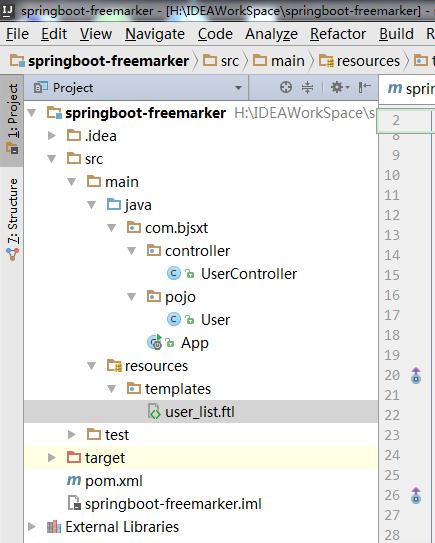
SpringBoot: 8.整合freemarker(转)的更多相关文章
- springboot整合freemarker
前后端分离现在越来越多,如何有效的使用springboot来整合我们的页面是一个很重要的问题. springboot整合freemarker有以下几个步骤,也总结下我所犯的错误: 1.加依赖: 2.配 ...
- springboot 整合 freemarker
springboot 整合 freemarker 依赖 <parent> <groupId>org.springframework.boot</groupId> & ...
- SpringBoot整合freemarker 引用基础
原 ElasticSearch学习笔记Ⅲ - SpringBoot整合ES 新建一个SpringBoot项目.添加es的maven坐标如下: <dependency> <groupI ...
- springboot学习入门简易版四---springboot2.0静态资源访问及整合freemarker视图层
2.4.4 SpringBoot静态资源访问(9) Springboot默认提供静态资源目录位置需放在classpath下,目录名需要符合如下规则 /static /public /resourc ...
- 【SpringBoot】09.SpringBoot整合Freemarker
SpringBoot整合Freemarker 1.修改pom文件,添加坐标freemarker启动器坐标 <project xmlns="http://maven.apache.org ...
- 玩转 SpringBoot 2 快速整合 | FreeMarker篇
FreeMarker 介绍 Apache FreeMarker™是一个模板引擎:一个Java库,用于根据模板和更改数据生成文本输出(HTML网页,电子邮件,配置文件,源代码等).模板是用FreeMar ...
- spring boot 整合freemarker(好用!!!!)
springboot整合freemarker 1.pom依赖 <!-- 引入freeMarker的依赖包. --> <dependency> <groupId>or ...
- SpringBoot基础及FreeMarker模板
案例springboot_freemarker application.properties配置文件 ###FreeMarker配置 spring.freemarker.template-loader ...
- 整合Freemarker视图层和整合jsp视图层和全局捕获异常
SpringBoot静态资源访问 1.静态资源:访问 js / css /图片,传统web工程,webapps springboot 要求:静态资源存放在resource目录下(可以自定义文件存放) ...
- SpringBoot下配置FreeMarker配置远程模版
需求产生原因 要求在同一个接口中,根据不同的参数,返回不同的视图结果 所有的视图中的数据基本一致 要求页面能静态化,优化SEO 例如:A接口返回客户的信息 客户A在调用接口时,返回其个性化定制的页面A ...
随机推荐
- solrcloud2
分片的原因 由于底层Lucene的限制,每个solr索引中包含的文档数不能超过231个,大约是21亿个.但是solr分片一般不是基于这个的原因,因为一般没有到这个峰值的之后,solr的各中性能问题就暴 ...
- BZOJ 3065 带插入区间K小值 (替罪羊树套线段树)
毒瘤题.参考抄自博客:hzwer 第一次写替罪羊树,完全是照着题解写的,发现这玩意儿好强啊,不用旋转每次都重构还能nlognnlognnlogn. 还有外面二分和里面线段树的值域一样,那么r = mi ...
- 2、django后端:课程表、课程详细表
1.课程表录入数据 有些人卖接口,接口就是 数据 1.课程表 2张表+3张表 分布式数据库分表 数据库优化 垂直分表 1000w条数据,999w条数据不常看,经常查的1w条数据放在另一个表 水平分表 ...
- MFC 线程的创建,线程函数在类内、类外
[线程的创建] AfxBeginThread(类外的线程函数,NULL); AfxBeginThread(类内的线程函数,(LPVOID)this); [类外线程函数] UINT 函数名(LPVOID ...
- 【转载】全网最!详!细!tarjan算法讲解。
转自http://www.cnblogs.com/uncle-lu/p/5876729.html [转载]全网最!详!细!tarjan算法讲解.(已改正一些奥妙重重的小错误^_^) 全网最详细tarj ...
- 【转载】Dijkstra算法和Floyd算法的正确性证明
说明: 本文仅提供关于两个算法的正确性的证明,不涉及对算法的过程描述和实现细节 本人算法菜鸟一枚,提供的证明仅是自己的思路,不保证正确,仅供参考,若有错误,欢迎拍砖指正 ----------- ...
- 数据结构实验之链表九:双向链表(SDUT 2054)
#include <bits/stdc++.h> using namespace std; typedef struct node { int data; struct node *nex ...
- luogu4930
P4930 「FJ2014集训」采药人的路径 题目描述 采药人的药田是一个树状结构,每条路径上都种植着同种药材.采药人以自己对药材独到的见解,对每种药材进行了分类.大致分为两类,一种是阴性的,一种是阳 ...
- deepin Linux 日常命令、插件、方法等汇总【更新中】
查看系统编码: dawn@dawn-PC:~$ locale LANG=zh_CN.UTF- LANGUAGE=zh_CN LC_CTYPE="zh_CN.UTF-8" LC_NU ...
- 记一次springboot+mybatis+phoenix在代码集成中的坑
场景: 希望使用phoenix做查询服务,给服务端提供接口 设计: 通过springboot做restful的接口发布,通过mybatis做phoenix的sql处理,因此是springboot+my ...