
SVG动画示例
package com.loaderman.customviewdemo;

import android.graphics.drawable.Animatable;

import android.os.Bundle;

import android.support.graphics.drawable.AnimatedVectorDrawableCompat;

import android.support.v7.app.AppCompatActivity;

import android.support.v7.app.AppCompatDelegate;

import android.view.View;

import android.widget.ImageView;

public class MainActivity extends AppCompatActivity {

    static {

        AppCompatDelegate.setCompatVectorFromResourcesEnabled(true);

    }

    @Override

    protected void onCreate(Bundle savedInstanceState) {

        super.onCreate(savedInstanceState);

        setContentView(R.layout.activity_main);

        findViewById(R.id.btn).setOnClickListener(new View.OnClickListener() {

            @Override

            public void onClick(View v) {

                ImageView imageView = (ImageView) findViewById(R.id.anim_img);

                AnimatedVectorDrawableCompat animatedVectorDrawableCompat = AnimatedVectorDrawableCompat.create(

                        MainActivity.this, R.drawable.line_animated_vector

                );

                imageView.setImageDrawable(animatedVectorDrawableCompat);

                ((Animatable) imageView.getDrawable()).start();

            }

        });

    }

}
<?xml version="1.0" encoding="utf-8"?>

<LinearLayout

    xmlns:android="http://schemas.android.com/apk/res/android"

    xmlns:app="http://schemas.android.com/apk/res-auto"

    xmlns:tools="http://schemas.android.com/tools"

    android:orientation="vertical"

    android:layout_width="match_parent"

    android:layout_height="match_parent"

    >

    <Button

        android:id="@+id/btn"

        android:text="开始动画"

        android:layout_width="match_parent"

        android:layout_height="wrap_content"

        />

    <ImageView

        android:id="@+id/anim_img"

        android:layout_width="wrap_content"

        android:layout_height="wrap_content"

        app:srcCompat="@drawable/svg_line"/>

</LinearLayout>
line_animated_vector.xml
<?xml version="1.0" encoding="utf-8"?>

<animated-vector xmlns:android="http://schemas.android.com/apk/res/android"

        android:drawable="@drawable/svg_line">

    <target

            android:name="bar"

            android:animation="@animator/anim_trim_start"

            />

</animated-vector>
anim_trim_start.xml
<?xml version="1.0" encoding="utf-8"?>

<objectAnimator xmlns:android="http://schemas.android.com/apk/res/android"

        android:propertyName="trimPathStart"

        android:valueFrom="0"

        android:valueTo="1"

        android:duration="2000"/>
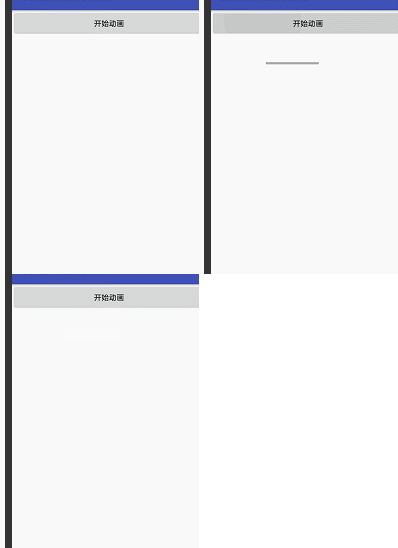
效果:
package com.loaderman.customviewdemo;

import android.graphics.drawable.Animatable;

import android.os.Bundle;

import android.support.graphics.drawable.AnimatedVectorDrawableCompat;

import android.support.v7.app.AppCompatActivity;

import android.support.v7.app.AppCompatDelegate;

import android.view.View;

import android.widget.EditText;

import android.widget.ImageView;

public class MainActivity extends AppCompatActivity {

    static {

        AppCompatDelegate.setCompatVectorFromResourcesEnabled(true);

    }

    @Override

    protected void onCreate(Bundle savedInstanceState) {

        super.onCreate(savedInstanceState);

        setContentView(R.layout.activity_main);

        final ImageView imageView = (ImageView) findViewById(R.id.anim_img);

        //将焦点放在ImageView上

        imageView.setFocusable(true);

        imageView.setFocusableInTouchMode(true);

        imageView.requestFocus();

        imageView.requestFocusFromTouch();

        EditText editText = (EditText)findViewById(R.id.edit);

        //当EditText获得焦点时开始动画

        editText.setOnFocusChangeListener(new View.OnFocusChangeListener() {

            @Override

            public void onFocusChange(View v, boolean hasFocus) {

                if (hasFocus){

                    AnimatedVectorDrawableCompat animatedVectorDrawableCompat = AnimatedVectorDrawableCompat.create(

                            MainActivity.this, R.drawable.animated_vecotr_search

                    );

                    imageView.setImageDrawable(animatedVectorDrawableCompat);

                    ((Animatable) imageView.getDrawable()).start();

                }

            }

        });

    }

}
animated_vecotr_search.xml
<?xml version="1.0" encoding="utf-8"?>

<animated-vector xmlns:android="http://schemas.android.com/apk/res/android"

    android:drawable="@drawable/vector_search_bar" >

    <target

        android:animation="@animator/anim_search_trim_end"

        android:name="search"/>

    <target

        android:animation="@animator/anim_bar_trim_start"

        android:name="bar"/>

</animated-vector>
vector_search_bar.xml
<?xml version="1.0" encoding="utf-8"?>

<vector xmlns:android="http://schemas.android.com/apk/res/android"

    android:width="150dp"

    android:height="24dp"

    android:viewportWidth="150"

    android:viewportHeight="24">

    <!--搜索条-->

    <path

        android:name="search"

        android:pathData="M141,17 A9,9 0 1,1 142,16 L149,23"

        android:strokeWidth="2"

        android:strokeColor="@android:color/darker_gray"/>

    <!--底部横线-->

    <path

        android:name="bar"

        android:trimPathStart="1"

        android:pathData="M0,23 L149,23"

        android:strokeWidth="2"

        android:strokeColor="@android:color/darker_gray"/>

</vector>
anim_search_trim_end.xml
<?xml version="1.0" encoding="utf-8"?>

<objectAnimator xmlns:android="http://schemas.android.com/apk/res/android"

    android:duration="500"

    android:propertyName="trimPathEnd"

    android:valueFrom="0"

    android:valueTo="1"

    android:valueType="floatType" />
<?xml version="1.0" encoding="utf-8"?>

<FrameLayout

    xmlns:android="http://schemas.android.com/apk/res/android"

    android:orientation="vertical"

    android:layout_marginTop="20dp"

    android:layout_marginLeft="20dp"

    android:layout_width="match_parent"

    android:layout_height="match_parent"

    >

    <EditText

        android:id="@+id/edit"

        android:hint="点击输入"

        android:layout_width="150dp"

        android:layout_height="24dp"

        android:background="@null"/>

    <ImageView

        android:id="@+id/anim_img"

        android:layout_width="150dp"

        android:layout_height="24dp"

        />

</FrameLayout>
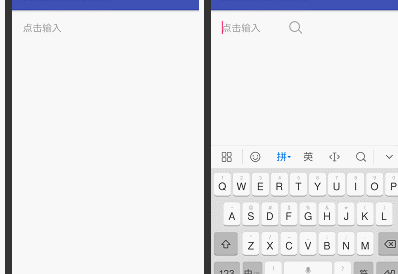
效果:
SVG动画示例的更多相关文章
- Walkway.js – 用线条制作简约的 SVG 动画
Walkway.js 是一个使用线条和路径元素组成 SVG 动画图像的简单方法.只需根据提供的配置对象创建一个新的 Walkway 实例就可以了.这种效果特别适合那些崇尚简约设计风格的网页.目前, W ...
- HTML5的 2D SVG和SVG DOM的学习笔记(2)---SVG动画
SVG支持动画.可以通过以下几种方法获得动画效果: 使用SVG动画元素.SVG可以描述随时间变化的图形对象,使用不同的动画元素可以定义运动路径,淡入淡出效果和对象的膨胀.收缩.旋转和变换颜色. 使用S ...
- SVG动画
动画原理 SVG动画,就是元素的属性值关于时间的变化. 如下图来说,元素的某个属性值的起始值(from)到结束值(to)在一个时间段(duration)根据时间函数(timing-function)计 ...
- 推荐8个实现 SVG 动画的 JavaScript 库
SVG 是一种分辨率无关的图形(矢量图形).这意味着它在任何类型的屏幕都不会遭受任何质量损失.除此之外,你可以让 SVG 灵活现一些动画效果.这篇文章就给大家推荐8个实现 SVG 动画的 JavaSc ...
- 使用 SVG 动画实现弹性的页面元素效果
Codrops 分享了一些给SVG元素加上弹性动画的灵感.实现的思路是把一个SVG元素整合成一个组件,然后从一个路径弹性动画到另一个.这种效果可以应用到像菜单,按钮或其它元素,使得交互更有趣,看起更原 ...
- 带给你灵感:30个超棒的 SVG 动画展示【上篇】
前端开发人员和设计师一般使用 CSS 来创建 HTML 元素动画.然而,由于 HTML 在创建图案,形状,和其他方面的局限性,它们自然的转向了 SVG,它提供了更多更有趣的能力.借助SVG,我们有更多 ...
- 带给你灵感:30个超棒的 SVG 动画展示【下篇】
前端开发人员和设计师一般使用 CSS 来创建 HTML 元素动画.然而,由于 HTML 在创建图案,形状,和其他方面的局限性,它们自然的转向了 SVG,它提供了更多更有趣的能力.借助 SVG,我们有更 ...
- SVG动画实践篇-模拟音量高低效果
git 地址:https://github.com/rainnaZR/svg-animations/tree/master/src/demo/step2/volumn 说明 这个动画的效果就是多个线条 ...
- 借助Bodymovin播放svg动画
svg动画,截取工具有点不忍直视了~~~ 为了实现上面的svg动画,可以使用bodymovin插件,简单配置之后,就可以直接可以实现在 AE(可视化操作,不用码代码)上面导出 svg的json数据,在 ...
随机推荐
- Java学习笔记——第3篇
面向对象 结构化程序的任何一个结构都具有唯一的入口和唯一的出口,并且程序不会出现死循环. 虽然Java是面向对象的,但Java的方法里则是一种结构化的程序流. 面向对象的基本思想:类.对象.继承.封装 ...
- P1736 创意吃鱼法[二维dp]
题目背景 感谢@throusea 贡献的两组数据 题目描述 回到家中的猫猫把三桶鱼全部转移到了她那长方形大池子中,然后开始思考:到底要以何种方法吃鱼呢(猫猫就是这么可爱,吃鱼也要想好吃法 ^_*).她 ...
- 个人项目———Java实现WordCount
2018年系统分析与设计—个人项目作业 题目来自于 :https://edu.cnblogs.com/campus/xnsy/2018Systemanalysisanddesign/homework/ ...
- 跟着园内spring cloud+.net core搭建微服务架构 服务消费出错问题
http://www.cnblogs.com/longxianghui/p/7561259.html spring cloud+.net core搭建微服务架构:服务发现 最近在跟随着园区内的这个博客 ...
- 使用jQuery快速高效制作网页交互特效-----JavaScript操作DOM对象
一.DOM操作分类 使用JavaScript操作DOM时通常分为三类:DOM Core.HTMl--DOM和CSS-DOM 二.访问节点 节点属性 三.节点信息 四.操作节点的属性 语法: ge ...
- SublimeText 括号插件 Bracket Highlighter高亮设置
1. ctrl + shift + p,打开命令面板,输入install,在菜单中选择Package Control:Install Package如图 2. 步骤1后弹出的命令输入框中 输入:Bra ...
- 服务器nginx配置显示文件而不是下载
有时候在服务器上配置某些文件比如TXT文件,在浏览器打开的时候,会弹出下载.如何只让他在浏览器中显示,而不是下载呢.在nginx配置文件中添加一行代码 add_header Content-Type ...
- 005_simulink建立条件子系统
1. 条件执行子系统 a) 使能子系统:是控制信号大于零时执行的子系统.在控制信号穿越零点由负变正的时步点上,使能子系统开始执行.只要子系统的控制信号保持正值,使能子系统就会保持在执行的状态 b) ...
- junit报错
java.lang.RuntimeException: iwap 环境还没有初始化,请先调用IWapContext.init(). at com.nantian.ofpiwap.IWapContext ...
- learning scala pattern matching 03
code: package com.aura.scala.day01 object patternMatching03 { //当不同类型对象需要调用不同方法时,仅匹配类型的模式非常有用. def g ...