
SVG动画
动画原理
SVG动画,就是元素的属性值关于时间的变化。 如下图来说,元素的某个属性值的起始值(from)到结束值(to)在一个时间段(duration)根据时间函数(timing-function)计算出每一帧(frame)的插值(interpolation)作为变换的行为。
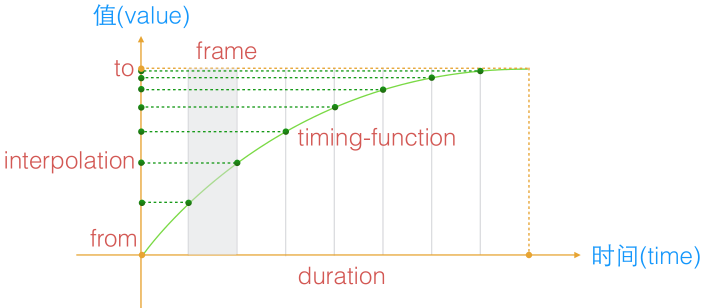
PS:SVG动画是帧动画,在SVG里也就是每秒设置多少个value值。
SVG动画语法
SVG动画是基于SMIL(Synchronized Multimedia Integration Language)语言的,全称是同步多媒体集成语言。
SVG动画使用
SVG元素使用动画有两种方式:
1. 被xlink:href引用
<animate xlink:href="url(#rect1)"></animate>
2. 包含在目标元素里
<rect  x="0"  ...>

     <animate></animate>

</rect>
<animate>标签
该标签用于基本动画。
| 参数 | 描述 |
| attributeName | 要变化属性名称 1.可以是元素直接暴露的属性 2.可以是CSS属性 |
| attributeType | 用来表明attributeName属性值的类型 支持三个固定参数,CSS/XML/auto,默认值auto。 例如:x、 y以及transform就属于XML, opacity就属于CSS。 |
| from | 起始值 起始值与元素的默认值是一样的,该参数可省略。 |
| to | 结束值 |
| by | 相对from的变化值 PS:当有to值时,该值无效。 |
| values | 动画的多个关键值,用分号分隔。 |
| dur | 持续时间 取值:常规时间值 | "indefinite" |
| repeatCount | 动画执行次数 取值:合法数值或者“indefinite” |
| fill | 动画间隙的填充方式 取值:freeze | remove(默认值)。 remove:表示动画结束直接回到开始的地方。 freeze:表示动画结束后保持了动画结束之后的状态。 |
| calcMode | 控制动画的快慢 取值:discrete | linear(默认值) | paced | spline. 中文意思分别是:“离散”|“线性”|“踏步”|“样条”。 另外,该参数要结合keyTimes、keySplines使用,数值的是对应values的, 所以如果没有设置values和keyTime或keySplines,是没有效果的。 |
| begin | 动画开始的时机,取值: time-value | offset-value | syncbase-value | event-value | repeat-value | accessKey-value | media-marker-value | wallclock-sync-value | "indefinite" 1. time-value:动画开始时间,可传多个值,分号分隔。 2. syncbase-value:[元素的id].begin/end +/- 时间值(offset-value) 某个动画效果开始或结束触发此动画的,可加上偏移量。 3. event-value:事件触发 4. repeat-value:指某animation重复多少次开始。 语法为:[元素的id].repeat(整数) +/- 时间值 |
| end | end与begin除了名字和字面含义不一样,其值的种类与表意都是一模一样的。 |
PS:只列出常用参数,其他请查阅参考文献。
例子:
<svg version="1.1" xmlns="http://www.w3.org/2000/svg">

     <rect x="50" y ="50" width="100" height="50" fill="red">

          <animate attributeType="XML"

               attributeName="x"

               from="50"

               to="400"

               dur="5s"

               fill="freeze">

          </animate>

     </rect>

     <rect x="50" y ="150" width="100" height="50" fill="green">

          <animate attributeType="XML"

               attributeName="x"

               from="50"

               by="400"

               dur="5s"

               fill="freeze">

          </animate>

     </rect>

     <rect x="50" y ="250" width="100" height="50" fill="blue">

          <animate attributeType="XML"

               attributeName="x"

               values="50;450;50"

               dur="10s"

               >

          </animate>

     </rect>

     <rect x="50" y ="350" width="100" height="50" fill="orange">

          <animate attributeType="XML"

               attributeName="x"

               dur="10s"

               values="50;450;50"

               calcMode="spline"

               keySplines=".5 0 .5 1; 0 0 1 1"

               fill="freeze"

               >

          </animate>

     </rect>

     <rect x="50" y ="450" width="100" height="50" fill="black">

          <animate attributeType="XML"

               attributeName="x"

               from="50"

               by="400"

               dur="5s"

               calcMode="spline"

               keySplines=".5 0 .5 1; 0 0 1 1"

               fill="freeze"

               >

          </animate>

     </rect>

</svg>
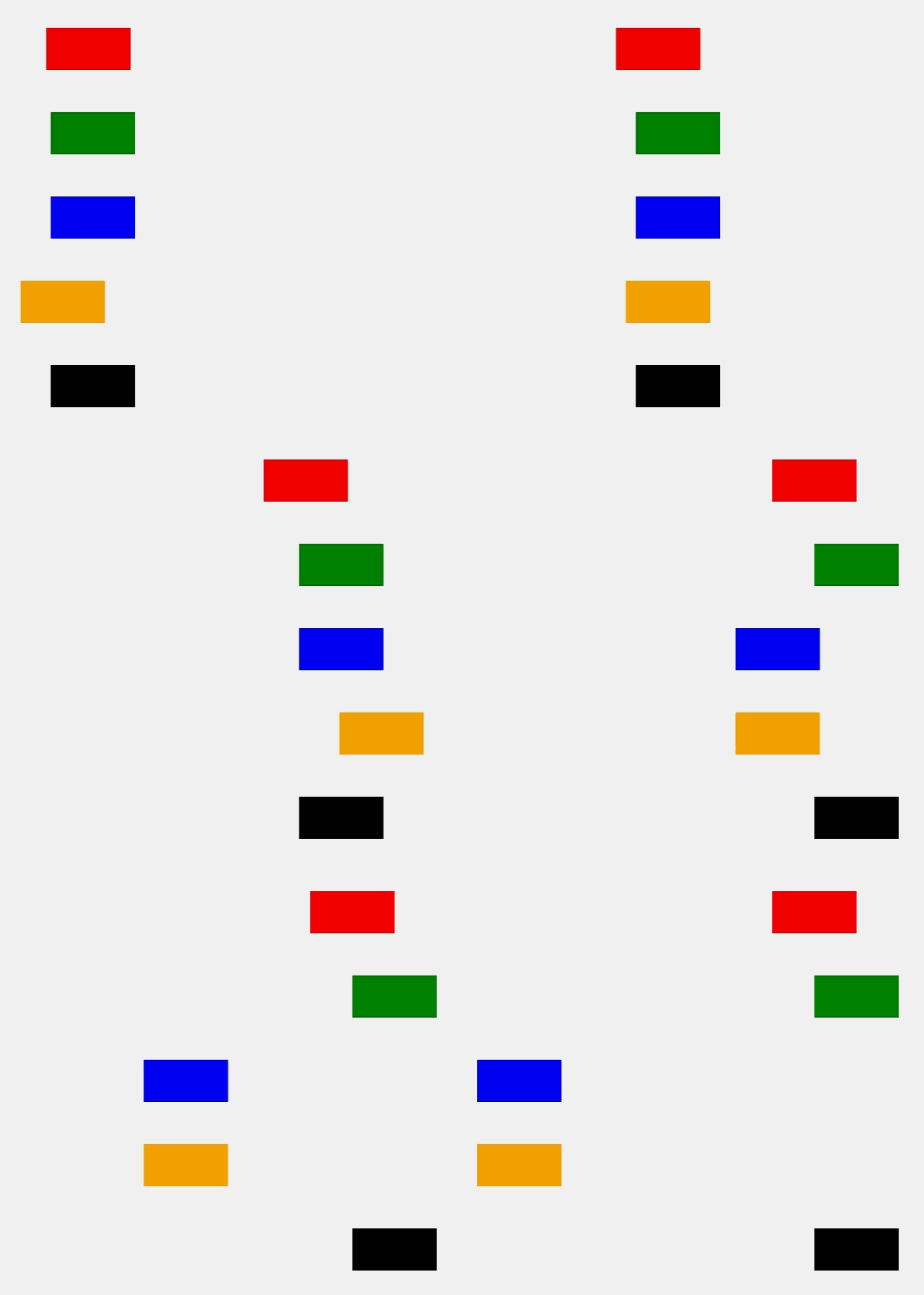
效果:
begin例子:
<svg version="1.1" xmlns="http://www.w3.org/2000/svg">

     <text x="50" y="30" id="t" stroke="red">click red go</text>

     <rect x="50" y ="50" width="100" height="50" fill="red">

          <animate attributeType="XML"

               attributeName="x"

               begin="t.click"

               from="50"

               to="400"

               dur="5s"

               fill="freeze">

          </animate>

     </rect>

     <rect x="50" y ="150" width="100" height="50" fill="green">

          <!--表示的是3s之后动画开始,10s时候动画再开始一次

               (如果之前动画没走完,会立即停止从头开始)-->

          <animate attributeType="XML"

               attributeName="x"

               begin="3s;10s"

               from="50"

               to="400"

               dur="5s"

               fill="freeze">

          </animate>

     </rect>

     <rect x="50" y ="250" width="100" height="50" fill="blue">

          <animate id="goleft" attributeType="XML"

               attributeName="x"

               from="50"

               to="400"

               dur="5s"

               fill="freeze"

               >

          </animate>

          <!--注意begin的id是animate的id,不是元素的-->

          <animate attributeType="XML"

               attributeName="y"

               begin="goleft.end"

               to="350"

               dur="2s"

               fill="freeze"

               >

          </animate>

     </rect>

     <rect x="50" y ="350" width="100" height="50" fill="orange">

          <animate id="goleft" attributeType="XML"

               attributeName="x"

               from="50"

               to="400"

               dur="5s"

               fill="freeze"

               >

          </animate>

          <!--注意begin的id是animate的id,不是元素的-->

          <animate attributeType="XML"

               attributeName="y"

               to="400"

               dur="5s"

               fill="freeze"

               >

          </animate>

     </rect>

     <line stroke='black' x1="50" y1="350" x2="500" y2="350"/>

     <line stroke='black' x1="50" y1="400" x2="500" y2="400"//>

</svg>
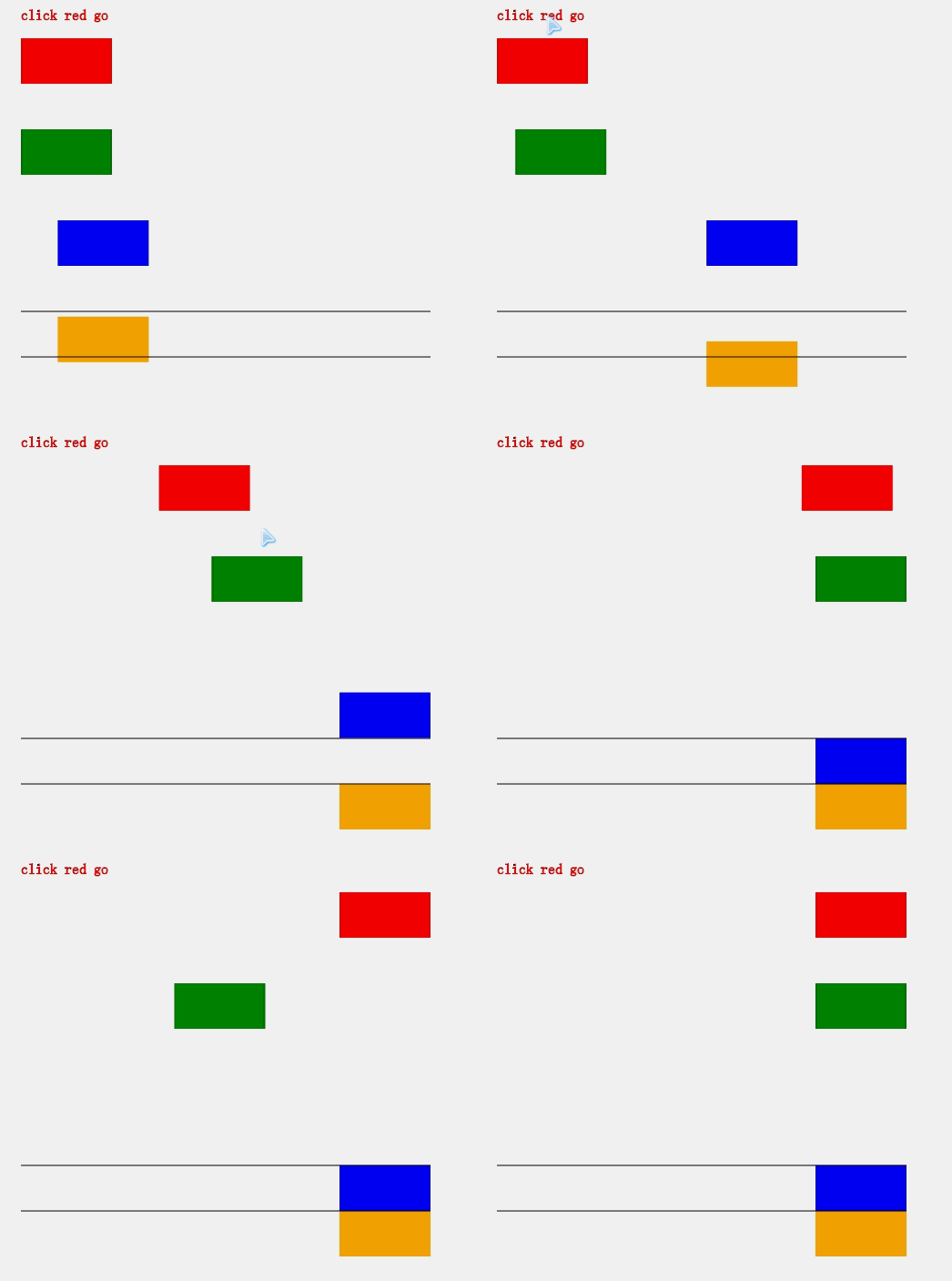
效果:
注意:
1. 多个animate是可以叠加的。
<animateTransform>标签
该标签用于变换动画,animateTransform也有animate的参数,额外的是type。
| 参数 | 描述 |
| type | 变换的类型,取值:translate、scale、rotate、skewX、skewY |
例子:
<svg version="1.1" xmlns="http://www.w3.org/2000/svg" viewBox="-200 -200 800 800">

     <rect x="50" y ="50" width="50" height="50" fill="red">

          <animateTransform attributeName="transform"

               attributeType="XML"

               type="rotate"

               from="0 75 75"

               to="360 75 75"

               dur="2"

               repeatCount="indefinite"/>

     </rect>

     <!--x、y都放大了-->

     <rect x="50" y ="150" width="50" height="50" fill="green">

          <animateTransform attributeName="transform"

               attributeType="XML"

               type="scale"

               from="1"

               to="2"

               dur="2"

               fill="freeze"/>

     </rect>

     <rect x="50" y ="250" width="50" height="50" fill="blue">

          <animateTransform attributeName="transform"

               attributeType="XML"

               type="translate"

               to="250 0"

               dur="2"

               fill="freeze"/>

     </rect>

     <rect x="50" y ="150" width="50" height="50" fill="black">

          <animateTransform attributeName="transform"

               attributeType="XML"

               type="rotate"

               from="0 75 125"

               to="360 75 125"

               dur="2"

               repeatCount="indefinite" additive="sum"/>

          <animateTransform attributeName="transform"

               attributeType="XML"

               type="scale"

               from="1"

               to="2"

               dur="2"

               fill="freeze" additive="sum"/>

     </rect>

</svg>
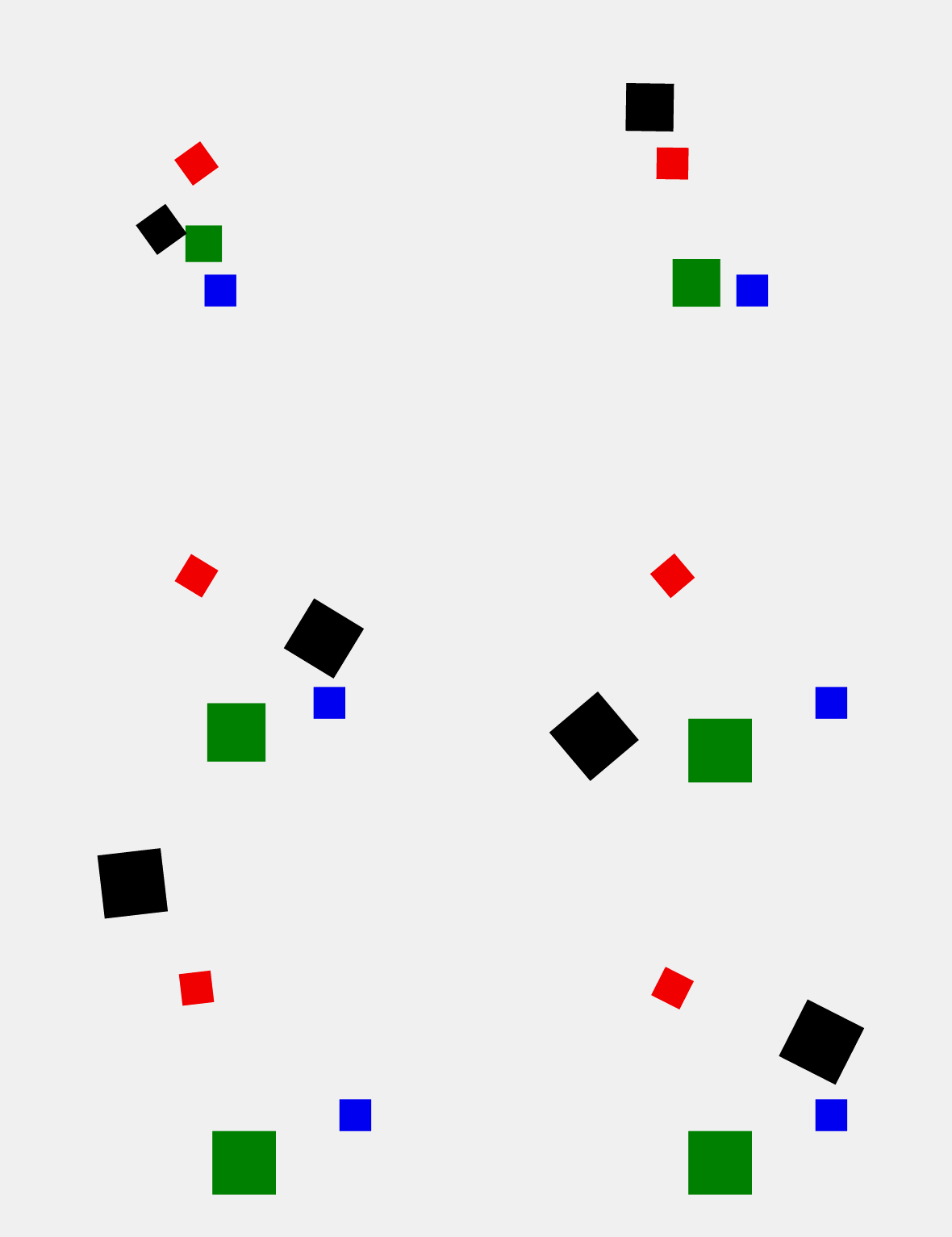
效果:
注意:
1. animateTransform也是可以叠加的,不过要加上additive="sum",否则后面的无效了。
<animateMotion>标签
这个标签让元素在路径(Path)上滑动。
例子:
<svg version="1.1" xmlns="http://www.w3.org/2000/svg">

     <path d="M100,400Q150,300 250,400 T400,400" stroke="red" fill="none"/>

     <rect width="20" height="20" fill="red">

          <animateMotion

               path="M100,400Q150,300 250,400 T400,400"

               rotate="auto"

               dur="3s"

               fill="freeze">

          </animateMotion>

     </rect>

</svg>
效果:
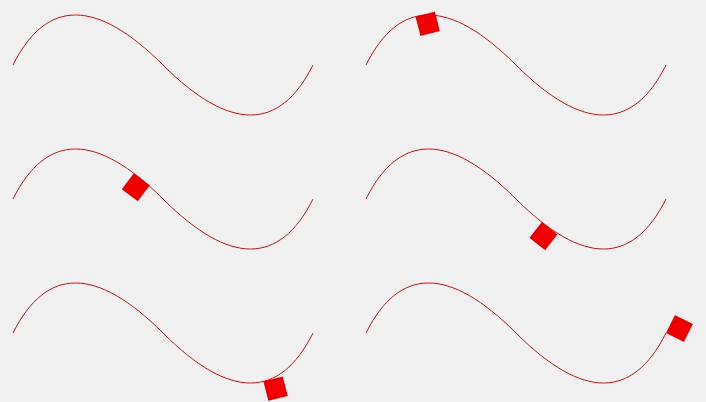
注意:
1. 设置rotate="auto",可以让元素根据路径的切线方向做旋转。
脚本动画
SVG的requestAnimationFrame函数可以让我们用js来做动画,浏览器对requestAnimationFrame调用的频率是每秒60次逐帧动画。
例子:
<svg version="1.1" xmlns="http://www.w3.org/2000/svg">

     <rect id="rect" x="50" y="50" width="100" height="100" fill="green" />

</svg>

<script>

    var cur = 0;

    var rect=document.getElementById("rect");

    var frames = window.requestAnimationFrame(doAnim);

    function doAnim(){

        if(cur>=360){

            //取消帧动画

            window.cancelAnimationFrame(frames);

            return;

        }

        cur++;

        rect.setAttribute("transform", "rotate(" + cur + ",100, 100)");

        frames = window.requestAnimationFrame(doAnim);

    }

</script>
PS:效果就是正方形旋转360°后停止。
参考视频
1. SVG课程(慕课网)
参考文献
本文为原创文章,转载请保留原出处,方便溯源,如有错误地方,谢谢指正。
本文地址 :http://www.cnblogs.com/lovesong/p/6011328.html
SVG动画的更多相关文章
- 推荐8个实现 SVG 动画的 JavaScript 库
SVG 是一种分辨率无关的图形(矢量图形).这意味着它在任何类型的屏幕都不会遭受任何质量损失.除此之外,你可以让 SVG 灵活现一些动画效果.这篇文章就给大家推荐8个实现 SVG 动画的 JavaSc ...
- 使用 SVG 动画实现弹性的页面元素效果
Codrops 分享了一些给SVG元素加上弹性动画的灵感.实现的思路是把一个SVG元素整合成一个组件,然后从一个路径弹性动画到另一个.这种效果可以应用到像菜单,按钮或其它元素,使得交互更有趣,看起更原 ...
- Walkway.js – 用线条制作简约的 SVG 动画
Walkway.js 是一个使用线条和路径元素组成 SVG 动画图像的简单方法.只需根据提供的配置对象创建一个新的 Walkway 实例就可以了.这种效果特别适合那些崇尚简约设计风格的网页.目前, W ...
- 带给你灵感:30个超棒的 SVG 动画展示【上篇】
前端开发人员和设计师一般使用 CSS 来创建 HTML 元素动画.然而,由于 HTML 在创建图案,形状,和其他方面的局限性,它们自然的转向了 SVG,它提供了更多更有趣的能力.借助SVG,我们有更多 ...
- 带给你灵感:30个超棒的 SVG 动画展示【下篇】
前端开发人员和设计师一般使用 CSS 来创建 HTML 元素动画.然而,由于 HTML 在创建图案,形状,和其他方面的局限性,它们自然的转向了 SVG,它提供了更多更有趣的能力.借助 SVG,我们有更 ...
- HTML5的 2D SVG和SVG DOM的学习笔记(2)---SVG动画
SVG支持动画.可以通过以下几种方法获得动画效果: 使用SVG动画元素.SVG可以描述随时间变化的图形对象,使用不同的动画元素可以定义运动路径,淡入淡出效果和对象的膨胀.收缩.旋转和变换颜色. 使用S ...
- SVG动画实践篇-模拟音量高低效果
git 地址:https://github.com/rainnaZR/svg-animations/tree/master/src/demo/step2/volumn 说明 这个动画的效果就是多个线条 ...
- 借助Bodymovin播放svg动画
svg动画,截取工具有点不忍直视了~~~ 为了实现上面的svg动画,可以使用bodymovin插件,简单配置之后,就可以直接可以实现在 AE(可视化操作,不用码代码)上面导出 svg的json数据,在 ...
- svg 动画 透明度 放大缩小 x轴Y轴
参考链接:https://www.cnblogs.com/Chrimisia/p/6670303.html vue 中封装svg:http://www.cnblogs.com/Jiangchuanwe ...
随机推荐
- 转:ORA-15186: ASMLIB error function = [asm_open], error = [1], 2009-05-24 13:57:38
转:ORA-15186: ASMLIB error function = [asm_open], error = [1], 2009-05-24 13:57:38http://space.itpub. ...
- Java模拟Windows的Event
场景 开发中遇到一个场景,业务操作会不定时的产生工作任务,这些工作任务需要放入到一个队列中,而另外会有一个线程一直检测这个队列,队列中有任务就从队列中取出并进行运算. 问题 业务场景倒是简单,只不过这 ...
- ASP.NET 中的 Async/Await 简介
本文转载自MSDN 作者:Stephen Cleary 原文地址:https://msdn.microsoft.com/en-us/magazine/dn802603.aspx 大多数有关 async ...
- Windows10自适应和交互式toast通知[1]
阅读目录: 概述 toast通知的结构 视觉区域(Visual) 行为(Actions) 特定场景下的Toast通知 带多内容的通知 带行为的通知(例子1) 带行为的通知(例子2) 带文本输入框和行为 ...
- PropertyGrid控件由浅入深(二):基础用法
目录 PropertyGrid控件由浅入深(一):文章大纲 PropertyGrid控件由浅入深(二):基础用法 控件的外观构成 控件的外观构成如下图所示: PropertyGrid控件包含以下几个要 ...
- 应用r.js来优化你的前端
r.js是requireJS的优化(Optimizer)工具,可以实现前端文件的压缩与合并,在requireJS异步按需加载的基础上进一步提供前端优化,减小前端文件大小.减少对服务器的文件请求.要使用 ...
- ASP.NET Web API Model-ModelMetadata
ASP.NET Web API Model-ModelMetadata 前言 前面的几个篇幅主要围绕控制器的执行过程,奈何执行过程中包含的知识点太庞大了,只能一部分一部分的去讲解,在上两篇中我们看到在 ...
- ABP源码分析四十四:ZERO的配置
ABP Zero模块中需要配置的地方主要集中在三块:配置静态的role,配置外部认证源,以及配置本地化语言和资源. UserManagementConfig/IUserManagementConfig ...
- Vue2.0用components替换render报错
怀疑是webpack配置的问题,改了一下午也没弄好.去群里问了一轮,也没个解决的. 在研究的过程中,发现了一篇好的讨论帖,看这个帖子能学到不少东西.暂时放弃这个问题的研究了,太费时间,要深入学习编译原 ...
- SqlHelper中IN集合场景下的参数处理
我手头有个古老的项目,持久层用的是古老的ADO.net.前两天去昆明旅游,其中的一个景点是云南民族村,通过导游介绍知道了一个古老的民族——基诺族,“基”在这个族内代表舅舅,“基诺”意为“跟在舅舅后边” ...