
unity3d之如何控制人物移动、旋转和动画播放
代码源自噩梦射手,记录一下方便后续使用,顺便将老师的解释给备注上去_(:з」∠)_
 using UnityEngine;

 using UnitySampleAssets.CrossPlatformInput;

 namespace CompleteProject

 {

     public class PlayerMovement : MonoBehaviour

     {

         public float speed = 6f;            // The speed that the player will move at.

         Vector3 movement;                   // The vector to store the direction of the player's movement.

         Animator anim;                      // Reference to the animator component.

         Rigidbody playerRigidbody;          // Reference to the player's rigidbody.

 #if !MOBILE_INPUT

         int floorMask;                      // A layer mask so that a ray can be cast just at gameobjects on the floor layer.

         float camRayLength = 100f;          // The length of the ray from the camera into the scene.

 #endif

         void Awake ()

         {

 #if !MOBILE_INPUT

             // Create a layer mask for the floor layer.

             floorMask = LayerMask.GetMask ("Floor");

 #endif

             // Set up references.

             anim = GetComponent <Animator> ();

             playerRigidbody = GetComponent <Rigidbody> ();

         }

         void FixedUpdate ()

         {

             // Store the input axes.

             float h = CrossPlatformInputManager.GetAxisRaw("Horizontal");

             float v = CrossPlatformInputManager.GetAxisRaw("Vertical");

             // Move the player around the scene.移动物体

             Move (h, v);

             // Turn the player to face the mouse cursor.转动物体

             Turning ();

             // Animate the player.动画物体

             Animating (h, v);

         }

         void Move (float h, float v)

         {

             // Set the movement vector based on the axis input.

             movement.Set (h, 0f, v);

             // Normalise the movement vector and make it proportional to the speed per second.

             //归一化,为了保持在不同cpu上,每秒走的速度是一样的

             movement = movement.normalized * speed * Time.deltaTime;

             // Move the player to it's current position plus the movement.

             playerRigidbody.MovePosition (transform.position + movement);

         }

         void Turning ()

         {

 #if !MOBILE_INPUT

             // Create a ray from the mouse cursor on screen in the direction of the camera.
             //知道这一帧鼠标点在哪里
                //怎么从鼠标的屏幕空间点直接得到射线

             Ray camRay = Camera.main.ScreenPointToRay (Input.mousePosition);

             // Create a RaycastHit variable to store information about what was hit by the ray.

             RaycastHit floorHit;

             // Perform the raycast and if it hits something on the floor layer...

             if(Physics.Raycast (camRay, out floorHit, camRayLength, floorMask))

             {

                 // Create a vector from the player to the point on the floor the raycast from the mouse hit.
            //得到一条从玩家到鼠标的有方向的射线
                 Vector3 playerToMouse = floorHit.point - transform.position;

                 // Ensure the vector is entirely along the floor plane.

                 playerToMouse.y = 0f;

                 // Create a quaternion (rotation) based on looking down the vector from the player to the mouse.
                    // 得到一个playerToMouse射线的四元数(四元数是啥可以百度一下)
                 Quaternion newRotatation = Quaternion.LookRotation (playerToMouse);

                 // Set the player's rotation to this new rotation.
            //就可以将人物转向新的方向了
                 playerRigidbody.MoveRotation (newRotatation);

             }

 #else

             Vector3 turnDir = new Vector3(CrossPlatformInputManager.GetAxisRaw("Mouse X") , 0f , CrossPlatformInputManager.GetAxisRaw("Mouse Y"));

             if (turnDir != Vector3.zero)

             {

                 // Create a vector from the player to the point on the floor the raycast from the mouse hit.

                 Vector3 playerToMouse = (transform.position + turnDir) - transform.position;

                 // Ensure the vector is entirely along the floor plane.

                 playerToMouse.y = 0f;

                 // Create a quaternion (rotation) based on looking down the vector from the player to the mouse.

                 Quaternion newRotatation = Quaternion.LookRotation(playerToMouse);

                 // Set the player's rotation to this new rotation.

                 playerRigidbody.MoveRotation(newRotatation);

             }

 #endif

         }

         void Animating (float h, float v)

         {

             // Create a boolean that is true if either of the input axes is non-zero.
         // 创建一个布尔值判断键盘是否有输入值

             bool walking = h != 0f || v != 0f;

             // Tell the animator whether or not the player is walking.
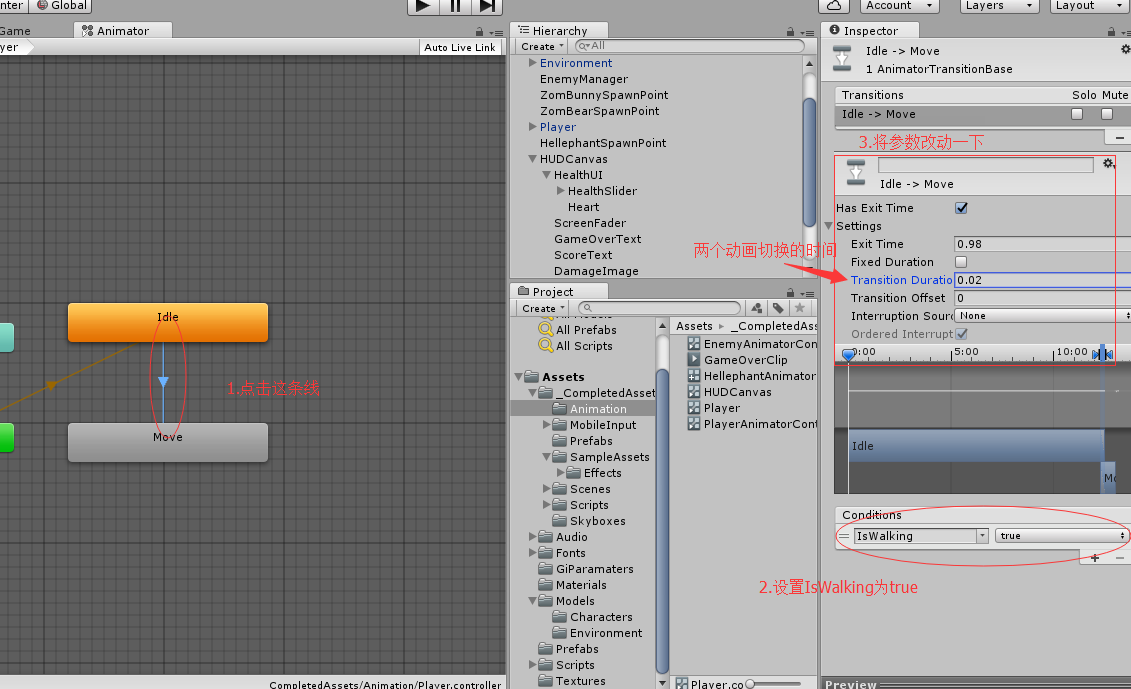
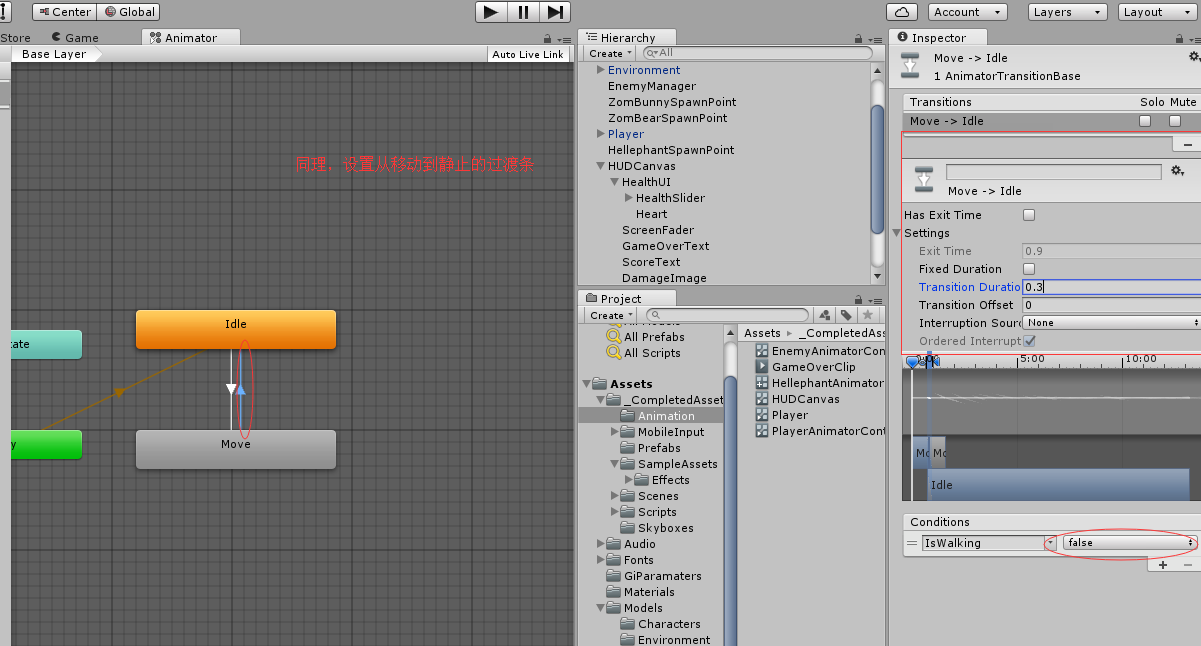
          //告诉animator人物是否在走动,walking为true时,玩家从静止动画到走动动画,为false反之

             anim.SetBool ("IsWalking", walking);

         }

     }

 }
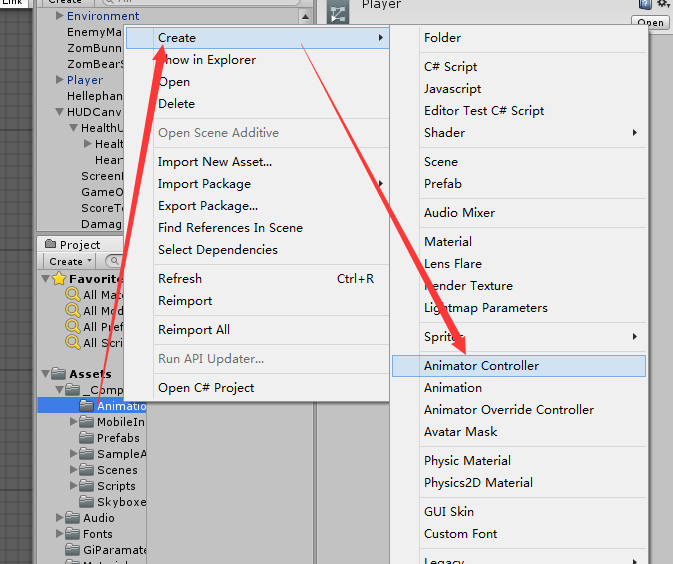
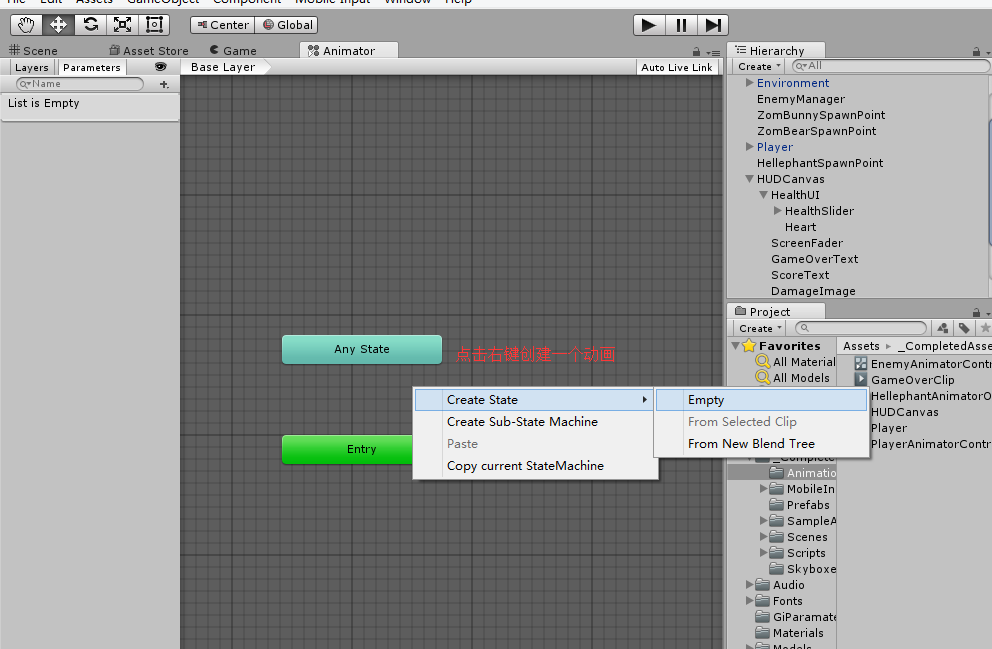
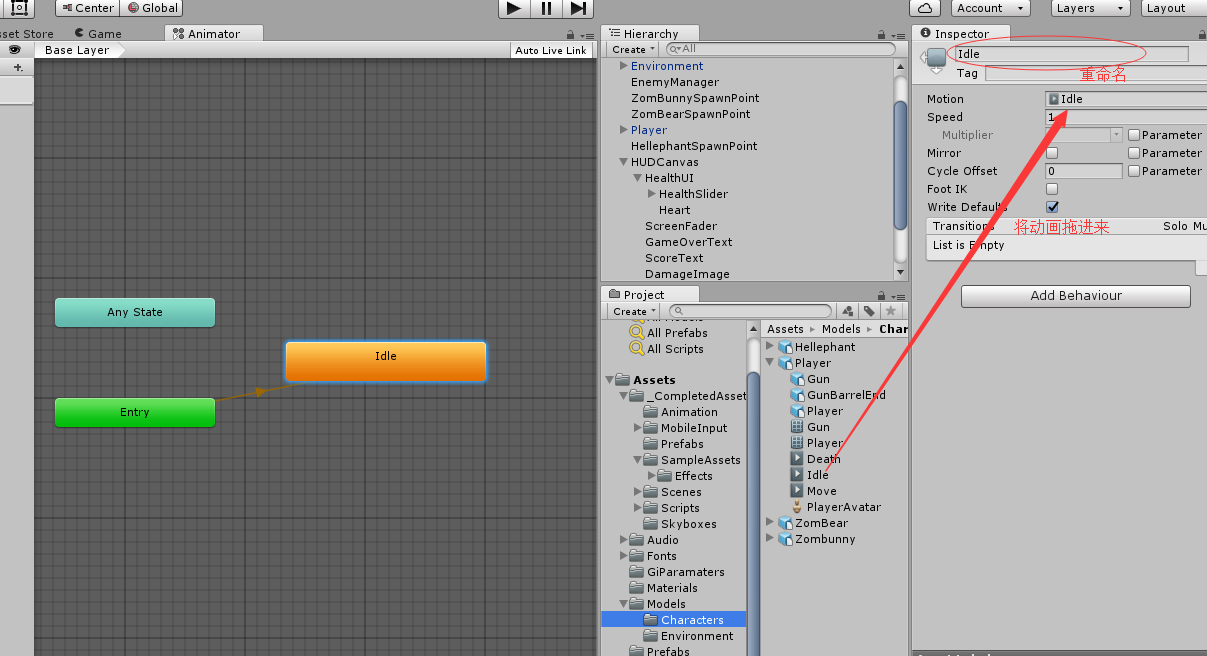
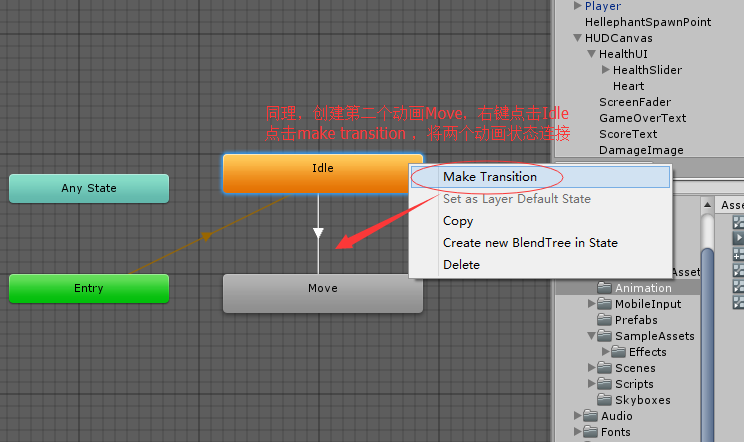
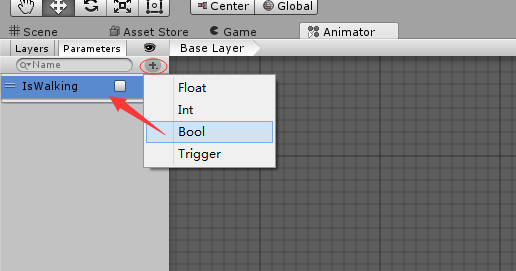
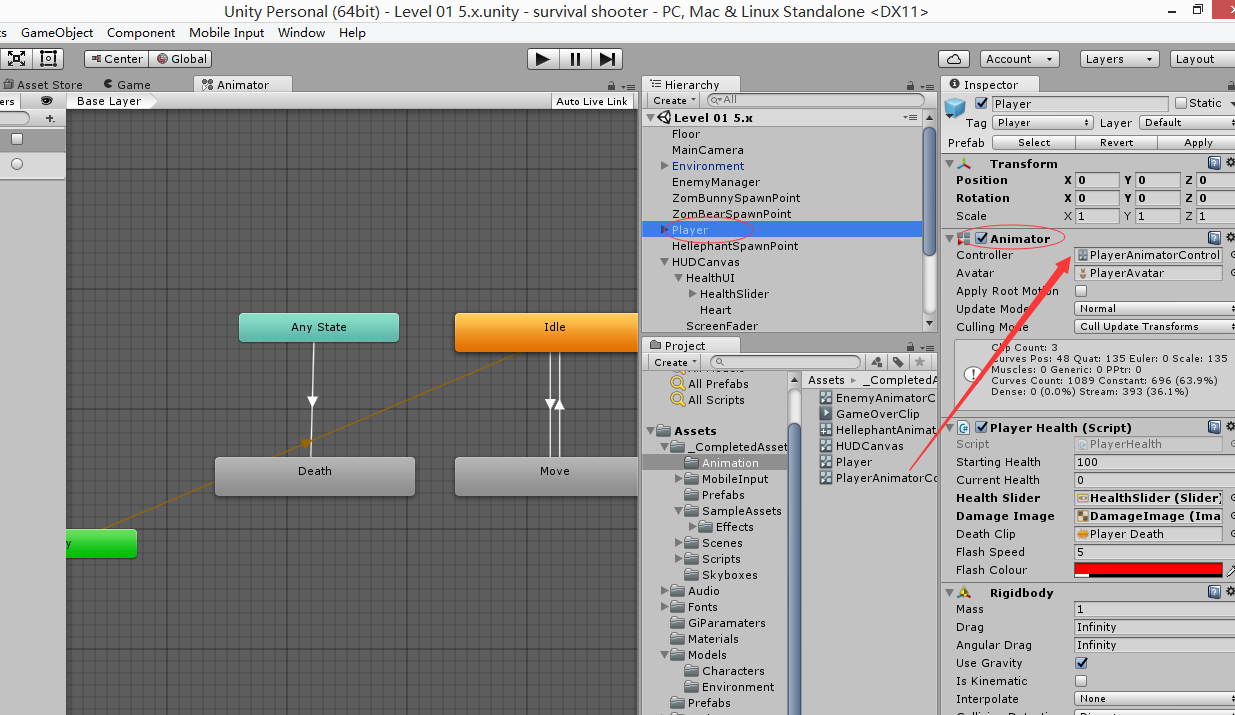
玩家动画状态机设置
创建一个Animator Controller
unity3d之如何控制人物移动、旋转和动画播放的更多相关文章
- [Unity3D]Unity3D游戏开发之使用EasyTouch虚拟摇杆控制人物移动
大家好,欢迎大家关注我的博客,我是秦元培,我的博客地址是blog.csdn.net/qinyuanpei.今天呢,我们来一起学习在Unity3D中使用EasyTouch虚拟摇杆来控制人物移动.虽然Un ...
- (转)在Unity3D中控制动画播放
用Unity3D也算是好久了,但是每次做项目总还是能学到新的东西.这次做一个TPS的项目就遇到了这样一个问题,如何同时在上下半身播放不同的动画?解决方法其实是很简单,但由于对于动画资源的了解不足导致问 ...
- Unity学习笔记_控制人物移动+摄像机跟随
我想做的移动操作方式类似[流星蝴蝶剑].[龙之谷].[我的世界第三人称]的第三人称操作方式. 操作说明:W键会朝当前镜头方向前进,鼠标控制镜头旋转. 做前需知(先去稍微了解一下比较好): ①unity ...
- iOS 控制单个控制器旋转
iOS 控制单个控制器旋转 控制单个ViewController 的旋转 //不旋转,保持竖屏 //iOS 5 - (BOOL) shouldAutorotateToInterfaceOrientat ...
- 可控制转速CSS3旋转风车特效
以前制作网页动画一般使用javascript,现在已经有越来越多动动画使用纯CSS实现,并且动画的控制也可以使用CSS3实现,因为CSS 3来了,CSS 3的动画功能确实强大.以下是一个纯CSS3制作 ...
- Matrix控制平移、旋转和缩放的方法
1.setTranslate(float ds,float dy):控制Matrix进行平移.2.setSkew(float kx,float ky,float px,float py):控制Matr ...
- 使用canvas绘制渐变色矩形和使用按键控制人物移动
使用canvas绘制渐变色矩形和使用按键控制人物移动 1.使用canvas绘制渐变色矩形 效果演示 相关代码: <!DOCTYPE html> <html lang="en ...
- Easy Touch 摇感控制人物移动
Easy Touch 摇感控制人物移动 public class joystick : MonoBehaviour { public float Speed; //定义速度 p ...
- matlab学习笔记9 高级绘图命令_2 图形的高级控制_视点控制和图形旋转_色图和颜色映像_光照和着色
一起来学matlab-matlab学习笔记9 高级绘图命令_2 图形的高级控制_视点控制和图形旋转_色图和颜色映像_光照和着色 觉得有用的话,欢迎一起讨论相互学习~Follow Me 参考书籍 < ...
随机推荐
- dict字典;dict的操作
一.字典: 1. 字典 dict 用{}来表示 键值对数据 {key:value} 唯一性 键 都必须是可哈希的 不可变的数据类型就可以当做字典中的键 值 没有任何限制 1.1 字典的创建: ...
- [ActionScript 3.0] AS利用ByteArray向PHP发送二进制数据生成图片
flash as3向php发送二进制数据,通过php保存成图片. AS端: package { import com.JPEGEncoder.JPGEncoder; import flash.disp ...
- python 绘制抛物线
%matplotlib inlineimport matplotlib.pyplot as plt import numpy as npx = range(100) y = [val**2 for v ...
- [转] iOS中@class #import #include 简介
[转载自:http://blog.csdn.net/chengwuli125/article/details/9705315] 一.解析 很多刚开始学习iOS开发的同学可能在看别人的代码 ...
- webpack2的一些使用入门
首先创建一个webpack文件夹我取名叫webpackVue(为了后续把vue集成进来) 1.首先用npm初始化一下,在这个目录下,执行npm init 2.npm install webpack - ...
- 2019.2.15 t2
考虑倒过来计算最短路径长度,设dis[u]表示在最坏情况下,点u到最近的一 个出口的最短路,则p个出口的dis值都是0,答案即为dis[0]. #include <cstdio> #inc ...
- python 入门级教你如何拿到小姐姐微信
第一题: 首先错误的思路,首先找出 707829217/2+1 里面的所有奇数,然后再利用两个for,来判断 import math def func_get_prime(n): return ...
- esp32 blink实验
#include<stdio.h>#include"freertos/FreeRTOS.h"#include"freertos/task.h"#in ...
- 游戏2:HTML5制作网页游戏看看你有多色--createjs
效果: index.html <!DOCTYPE html> <html lang="en"> <head> <meta charset= ...
- Django---错误
ValueError: Dependency on app with no migrations: users 先 python manage.py makemigration 后 python ma ...