
Multiview
- 新建3个ViewController的类
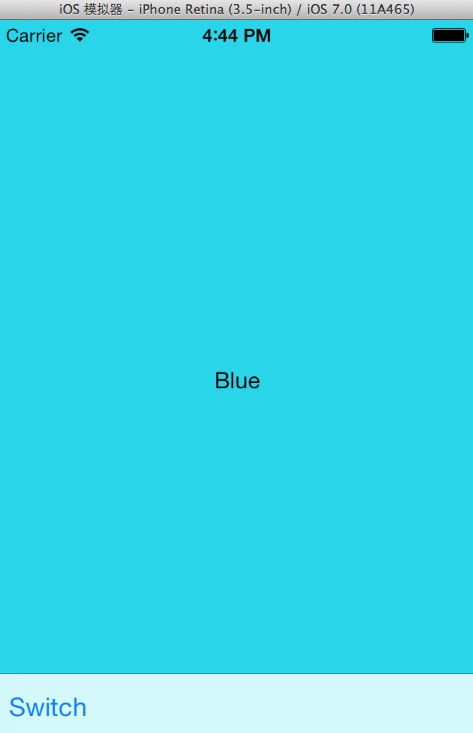
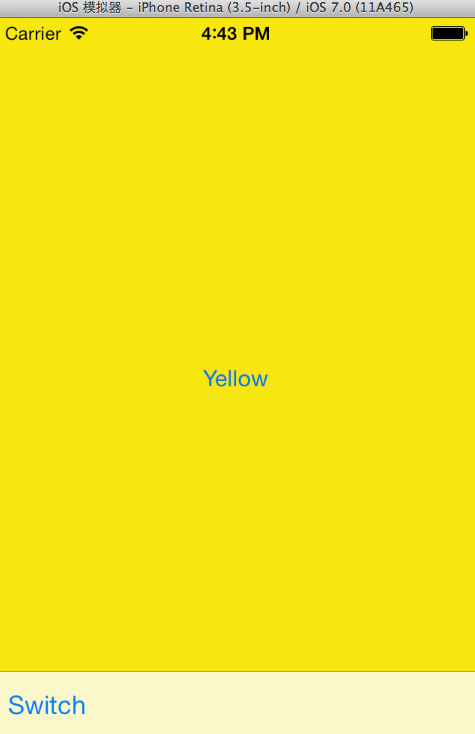
- 新建main.stroyboard,并配置好相应的布局(编辑界面,连接视图与类,ViewController的Storyboard ID,连接3个Button的响应事件)
- 删除app delegate中didFinishLaunchingWithOptions中的代码
- 修改SwitchViewController.m代码(viewDidLoad,didReceiveMemoryWarning,switchButton的响应函数(包括动画))
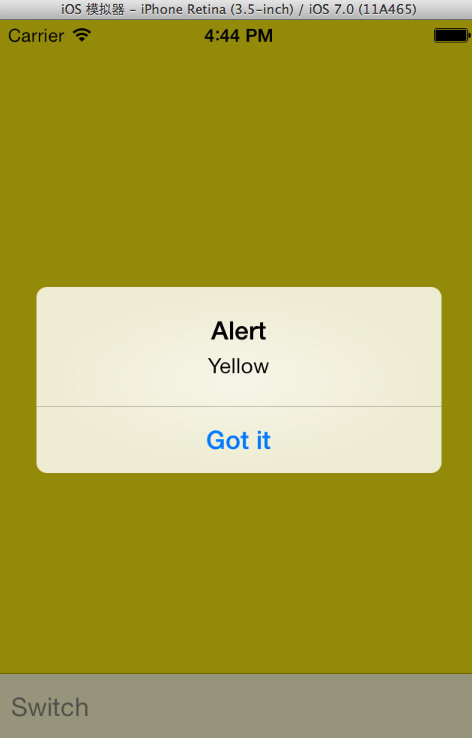
- 修改BlueViewController.m和YellowViewController.m,添加button响应函数
XYZSwitchViewController.m
//

//  XYZSwitchViewController.m

//  MultiView

//

//  Created by Norcy on 14-7-23.

//  Copyright (c) 2014年 QQLive. All rights reserved.

//

#import "XYZSwitchViewController.h"

#import "XYZBlueViewController.h"

#import "XYZYellowViewController.h"

@interface XYZSwitchViewController ()

@property (strong, nonatomic)XYZBlueViewController *blueViewController;

@property (strong, nonatomic)XYZYellowViewController *yellowViewController;

@end

@implementation XYZSwitchViewController

- (void)viewDidLoad

{

    [super viewDidLoad];

    // Do any additional setup after loading the view.

    self.blueViewController = [self.storyboard instantiateViewControllerWithIdentifier:@"Blue"];

    [self.view insertSubview:self.blueViewController.view atIndex:];

}

- (void)didReceiveMemoryWarning

{

    [super didReceiveMemoryWarning];

    // Dispose of any resources that can be recreated.

    if (!self.yellowViewController.view.superview)

        self.yellowViewController = nil;

    else

        self.blueViewController = nil;

}

- (IBAction)switchViews:(id)sender

{

    [UIView beginAnimations:nil context:NULL];

    [UIView setAnimationDuration: 0.5];

    [UIView setAnimationCurve:UIViewAnimationCurveEaseInOut];

    if (!self.yellowViewController.view.superview)

    {

        if (!self.yellowViewController)

            self.yellowViewController = [self.storyboard instantiateViewControllerWithIdentifier:@"Yellow"];

        [self.blueViewController.view removeFromSuperview];

        [self.view insertSubview:self.yellowViewController.view atIndex:];

        [UIView setAnimationTransition:UIViewAnimationTransitionFlipFromLeft forView:self.view cache:YES];

    }

    else

    {

        if (!self.blueViewController)

            self.blueViewController = [self.storyboard instantiateViewControllerWithIdentifier:@"Blue"];

        [self.yellowViewController.view removeFromSuperview];

        [self.view insertSubview:self.blueViewController.view atIndex:];

        [UIView setAnimationTransition:UIViewAnimationTransitionFlipFromRight forView:self.view cache:YES];

    }

    [UIView commitAnimations];

}

@end
XYZBlueViewController.m
//

//  XYZBlueViewController.m

//  MultiView

//

//  Created by Norcy on 14-7-23.

//  Copyright (c) 2014年 QQLive. All rights reserved.

//

#import "XYZBlueViewController.h"

@interface XYZBlueViewController ()

@end

@implementation XYZBlueViewController

- (id)initWithNibName:(NSString *)nibNameOrNil bundle:(NSBundle *)nibBundleOrNil

{

    self = [super initWithNibName:nibNameOrNil bundle:nibBundleOrNil];

    if (self) {

        // Custom initialization

    }

    return self;

}

- (void)viewDidLoad

{

    [super viewDidLoad];

    // Do any additional setup after loading the view.

}

- (void)didReceiveMemoryWarning

{

    [super didReceiveMemoryWarning];

    // Dispose of any resources that can be recreated.

}

- (IBAction)blueBtnPressed:(id)sender

{

    UIAlertView *alert = [[UIAlertView alloc] initWithTitle:@"Alert" message:@"Blue" delegate:self.view cancelButtonTitle:@"Got it" otherButtonTitles:nil];

    [alert show];

}

@end
XYZYellowViewController.m同理,所有头文件保持不变。
Multiview的更多相关文章
- 多视图学习(multiview learning)
多视图学习(multi-view learning) 前期吹牛:今天这一章我们就是来吹牛的,刚开始老板在和我说什么叫多视图学习的时候,我的脑海中是这么理解的:我们在欣赏妹子福利照片的时候,不能只看45 ...
- ASP.NET服务器控件使用之MultiView和View
MultiView 控件是一组 View 控件的容器.使用它可定义一组 View 控件,其中每个 View 控件都包含子控件. 用 ActiveViewIndex 属性或SetActiveView 方 ...
- 【转】ASP.NET服务器控件使用之MultiView和View
MultiView 和 View 控件和制作出选项卡的效果,MultiView 控件是一组 View 控件的容器.使用它可定义一组 View 控件,其中每个 View 控件都包含子控件. 如果要切换视 ...
- 从零开始学ios开发(十):Multiview Applications(多个xib之前的切换)
这篇学习的主要内容是Multiview,在我们学习iphone旋转的时候,介绍过多个view的使用方法,不过这里的view和旋转屏幕中所指的多个view是不同的,旋转屏幕中涉及到的多个view是在一个 ...
- MultiView空间例子
CSS代码: body { font-size:11pt; font-family:宋体; } .mainTitle { font-size:11pt; font-weight:bold; font- ...
- Multi-View 3D Reconstruction with Geometry and Shading——Part-2
From PhDTheses Multi-View 3D Reconstruction with Geometry and Shading 我们的主要目标是只利用图像中的信息而没有额外的限制或假设来得 ...
- Multi-View 3D Reconstruction with Geometry and Shading——Part-1
From PhDTheses Multi-View 3D Reconstruction with Geometry and Shading 计算机视觉的主要任务就是利用图像信息能智能理解周围的世界. ...
- face detection[Multi-view face detection&& MTCNN]
因为这两篇论文感觉内容较短,故而合并到一个博文中. Multi-view face detection 本文来自<Multi-view Face Detection Using Deep Con ...
- Multi-View Region Adaptive Multi-temporal DMM and RGB Action Recognition
论文标题:Multi-View Region Adaptive Multi-temporal DMM and RGB Action Recognition 来源/作者机构情况: 解决问题/主要思想贡献 ...
- Firemonkey MultiView
MultiView 做导航用的. http://docwiki.embarcadero.com/RADStudio/Seattle/en/Mobile_Tutorial:_Using_a_MultiV ...
随机推荐
- struts2+jquery验证注冊用户是否存在
注冊界面 register.jsp <%@ page language="java" contentType="text/html; charset=UTF-8&q ...
- fwrite和fread函数的用法小结(转)
fwrite和fread是以记录为单位的I/O函数,fread和fwrite函数一般用于二进制文件的输入输出. #include <stdio.h> size_t fread(void * ...
- Windows 2008 R2有效激活方法【转】
原文地址:http://jingyan.baidu.com/article/851fbc3707096e3e1f15ab33.html 装了windows server 2008之后才发现,它与win ...
- Drupal的system_list()函数解析
system_list()函数的目的是根据传入的资源类型,返回一个数组列表: function system_list($type) { ... ... } 参数$type支持下面三种类型: boot ...
- LaTeX数学公式输入
[置顶 Tips ] 在 WinEdt 中快速添加公式字符而不必手动打出一个个letters~: 即会出现如下 GUI Page Control : ------------------------- ...
- 体验了把做HR的感觉,上午看了40份简历,说说感受
原文链接:http://huachichi.info/2013/06/26/experience-of-being-a-hr/ 这两天准备从IBM离职,不要问我为什么要在这么bug的时间离职,总之 ...
- unity3d世界坐标系和本地坐标系
transform.Translate(Vector3.forware);//向着自己坐标前方 transform.Translate(Vector3.forware,Space.World);//向 ...
- C#指南,重温基础,展望远方!(6)C#类和对象
类是最基本的 C# 类型. 类是一种数据结构,可在一个单元中就将状态(字段)和操作(方法和其他函数成员)结合起来. 类为动态创建的类实例(亦称为“对象”)提供了定义. 类支持继承和多形性,即派生类可以 ...
- FIFO、LRU、OPT页面调度算法及样例
网上非常多介绍3种页面置换算法的样例和过程是不对的, 本文依据<操作系统概念>第七版对三种算法做介绍,并给出正确的样例以验证算法. 一.FIFO先进先出页面置换算法,创建一个FIFO队列来 ...
- django学习笔记【002】创建第一个django app
2.3.3 1.创建一个名叫polls的app python3. manage.py startapp polls tree mysite/ mysite/ ├── db.sqlite3 ├── ma ...