
selenium+python自动化88-批量操作循环点击报错:Element not found in the cache - perhaps the page has changed since it was looked up
前言
selenium定位一组元素,批量操作循环点击的时候会报错:Element not found in the cache - perhaps the page has changed since it was looked up
实现目标:批量点击标题,获取每个页面的url地址
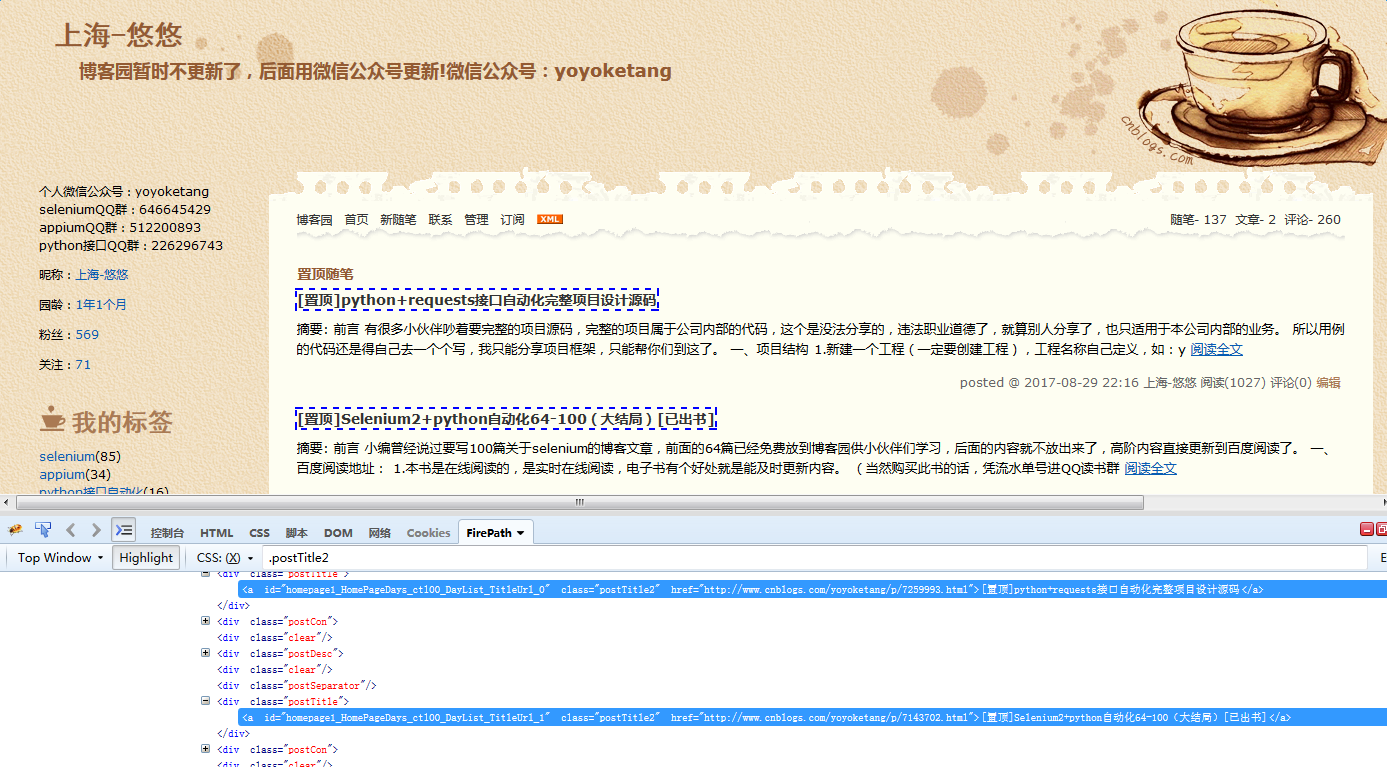
代码如下:
# coding:utf-8

from selenium import webdriver

driver = webdriver.Firefox()

driver.get("https://www.cnblogs.com/yoyoketang/")

all = driver.find_elements_by_css_selector(".postTitle2")

for i in all:

    i.click()

    print(driver.current_url)   # 打印当前页url

    driver.back()
运行结果:
http://www.cnblogs.com/yoyoketang/p/7259993.html
Traceback (most recent call last):
selenium.common.exceptions.StaleElementReferenceException: Message: Element not found in the cache - perhaps the page has changed since it was looked up
这里不少人就会问了:
- “为什么第一次点击可以,for循环第二次点击就不行了呢?”
由于第一次点击后,页面刷新了,我们可以手工点击的时候,注意观察页面,页面是有刷新动作的。
- “为什么明明定位到了,点击会报错呢?”
页面刷新后元素的属性是没变,但是element却变了,所有之前定位的元素element都过期了。
- “那么如何实现呢?”
如何实现,这个才是本篇重点要讲的。
分析问题
1.当页面上有点击行为的时候,页面是会刷新的,为了模拟页面刷新后查看元素是不是会变,我们可以用refresh刷新页面,然后查看刷新前后元素的变化。
# coding:utf-8

from selenium import webdriver

import time

driver = webdriver.Firefox()

driver.get("https://www.cnblogs.com/yoyoketang/")

all = driver.find_elements_by_css_selector(".postTitle2")

print(all)  # 刷新前

driver.refresh()

all_new = driver.find_elements_by_css_selector(".postTitle2")

print(all_new)  # 刷新后
运行结果:
[<selenium.webdriver.remote.webelement.WebElement (session="36801e98-3a57-41b1-a58e-021fe925fd57", element="{88a2f797-3833-4ea4-a734-72c5c59800ff}")>, <selenium.webdriver.remote.webelement.WebElement (session="36801e98-3a57-41b1-a58e-021fe925fd57", element="{529248de-6ca0-43d9-8747-34d7dad28c6c}")>,
...后面太长省略了]
2.很明显element里面的值发生了变化,所以第一次点击是可以点的,点完之后,页面刷新了,然后页面上的元素已经发生变化了,第二次循环的时候还是用刷新前的元素去定位点击的,自然就会报错了。
解决方案
1.针对页面刷新后,之前的元素失效问题,在for循环体里面可以重新定位一次,覆盖掉之前旧的就行了。
2.第一次获取全部元素后,通过len函数获取总个数
3.for循环的时候不要循环定位元素的list对象,换成range函数去循环
4.参考代码如下:
# coding:utf-8

from selenium import webdriver

import time

driver = webdriver.Firefox()

driver.get("https://www.cnblogs.com/yoyoketang/")

all = driver.find_elements_by_css_selector(".postTitle2")

s = len(all)

print(u"获取总个数:%s"%s)

for i in range(s):

    all[i].click()

    time.sleep(2)

    url = driver.current_url

    print(u"获取当前页面url:%s"%url)

    driver.back()  # 点完之后返回

    # 重新获取一次元素

    all = driver.find_elements_by_css_selector(".postTitle2")
运行结果:

selenium+python自动化88-批量操作循环点击报错:Element not found in the cache - perhaps the page has changed since it was looked up的更多相关文章
- Webdriver如何解决页面元素过期:org.openqa.selenium.StaleElementReferenceException: Element not found in the cache - perhaps the page has changed since it was looked up
当运行Webdriver时抛出如下异常:org.openqa.selenium.StaleElementReferenceException: Element not found in the cac ...
- selenium Element not found in the cache - perhaps the page has changed since it was looked up接解决
selenium Element not found in the cache - perhaps the page has changed since it was looked up.这个问题爆出 ...
- python自动化Traceback (most recent call last):报错
今天使用python.然而遇见了Traceback (most recent call last):的报错.抓狂的一笔.有说path写错的,有说是...网上查到的资料也是很少.后来突然发现,页面上我暂 ...
- java selenium后报错Element not found in the cache元素定位要重新赋值之前的定义
习惯上把定位的元素在操作之前就定位好, 例如: WebElement element1=driver.findElement(...); ----------declaration1 Web ...
- selenium+python自动化98--文件下载弹窗处理(PyKeyboard)
前言 在web自动化下载操作时,有时候会弹出下载框,这种下载框不属于web的页面,是没办法去定位的(有些同学一说到点击,脑袋里面就是定位!定位!定位!) 有时候我们并不是非要去定位到这个按钮再去点击, ...
- selenium+python自动化79-文件下载(SendKeys)
前言 文件下载时候会弹出一个下载选项框,这个弹框是定位不到的,有些元素注定定位不到也没关系,就当没有鼠标,我们可以通过键盘的快捷键完成操作. SendKeys库是专业的处理键盘事件的,所以这里需要用S ...
- appium 与 selenium python解决python 'WebElement' object does not support indexing 报错问题问题
再用selenium编写测试脚本时,发现出现python 'WebElement' object does not support indexing 报错问题问题,再找一些解决方法时,发现Appium ...
- python 3.5.2安装mysql驱动报错
python 3.5.2安装mysql驱动报错 python 3.5.2安装mysql驱动时出现如下异常: [root@localhost www]# pip install mysql-connec ...
- selenium+python自动化81-html报告优化(饼图+失败重跑+兼容python2&3)
优化html报告 为了满足小伙伴的各种变态需求,为了装逼提升逼格,为了让报告更加高大上,测试报告做了以下优化: 测试报告中文显示,优化一些断言失败正文乱码问题 新增错误和失败截图,展示到html报告里 ...
随机推荐
- Hierarchical Attention Based Semi-supervised Network Representation Learning
Hierarchical Attention Based Semi-supervised Network Representation Learning 1. 任务 给定:节点信息网络 目标:为每个节 ...
- 虚拟机 VMware Workstation12 安装OS X 系统
Windows下虚拟机安装Mac OS X —– VMware Workstation12安装Mac OS X 10.11 本文即将介绍WIN虚拟MAC的教程.完整详细教程(包含安装中的一些问题) ...
- HDU-2487
Ugly Windows Time Limit: 2000/1000 MS (Java/Others) Memory Limit: 32768/32768 K (Java/Others)Tota ...
- [水煮 ASP.NET Web API2 方法论](1-8)添加 Session 状态
问题 ASP.NET Web API 构建 Web 应用程序时,要求使用 Session 在服务器存储一些用户特定的信息 解决方案 ASP.NET Web API 不支持 Session,因为 API ...
- 服务器迁移到 Windows Servec 2008 R2 64 bit 和IIS 7问题记录
近期公司把网站迁移到了新的环境,windows service 2008 64 bit 和IIS 7,问题有点多,对系统使用影响很多,也困扰了我几个星期,现在记录一些主要的注意点 1.组件权限 系统使 ...
- CentOS7配置sentinel高可用redis
redis哨兵:用于管理和实现多个redis组实现高可用,sentinel哨兵只监控主节点,因为主节点上有所有的从节点信息,当master节点发生故障,sentinel之间会进行投票选举一个slave ...
- phpcms 大杂烩
问题1:栏目页伪静态(不生成HTML)时,URL规则中{$categorydir}{$catdir}仍显示为{$categorydir}{$catdir}解决方法. 第一步:打开phpcms\modu ...
- <<持续交付>>终点的精彩
1,向敏捷转变的过程是一个很容易出乱子的过程, 尤其对项目的领导力来说.在实施敏捷的过程中,会突然释放出一些有用的信息,将原来隐蔽起来的真相推倒聚光灯下. 2,假如执行者忽略了技术实践(比如测试驱动开 ...
- oracle10g中判断字段是否为空的坑
RT,在oracle中,写SQL时,假设这个字段为STA Char(3),判断这个字段是否为空一般都是这两个:STA = '' or STA is null 但是今天这两种方法失效了,无论是STA = ...
- Xamarin.iOS真机测试报错
Xamarin.iOS真机测试报错 错误信息:The MinimumOSVersion inside Info.plist does not include the device version( ...