
elasticsearch基础----->elasticsearch环境的搭建
这里面我们主要是在ubuntu系统上对elasticsearch进行一个环境的搭建,记录一下这个过程中遇到的一些问题以及解决方案。我总是躲在梦与季节的深处,听花与黑夜唱尽梦魇,唱尽繁华,唱断所有记忆的来路。
elasticsearch的下载安装
我们用的测试系统是ubuntu16.0.4,首先是下载最新的elasticsearch。地址:https://artifacts.elastic.co/downloads/elasticsearch/elasticsearch-6.1.0.tar.gz。
一、在/home/huhx/apache/server目录下,用wget下载
wget https://artifacts.elastic.co/downloads/elasticsearch/elasticsearch-6.1.0.tar.gz
使用tar对其进行解压:
tar -xf elasticsearch-6.1..tar.gz
cd到elasticsearch-6.1.0目录下面,可以看到如下的结构:
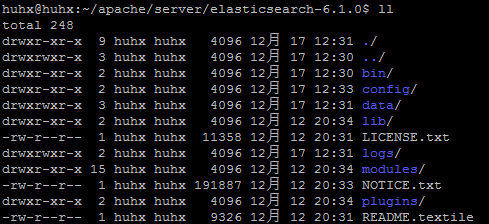
elasticsearch的启动命令:加-d参数可以作为一个后台进程支行。
./bin/elasticsearch -d
我们访问地址: localhost:9200/。可以看到如下的页面信息:
{

  "name" : "1zXRuwV",

  "cluster_name" : "elasticsearch",

  "cluster_uuid" : "2It6zBz5R62uV48XM0UsJw",

  "version" : {

    "number" : "6.1.0",

    "build_hash" : "c0c1ba0",

    "build_date" : "2017-12-12T12:32:54.550Z",

    "build_snapshot" : false,

    "lucene_version" : "7.1.0",

    "minimum_wire_compatibility_version" : "5.6.0",

    "minimum_index_compatibility_version" : "5.0.0"

  },

  "tagline" : "You Know, for Search"

}
但是在本地机器却不能正常的访问服务器192.168.1.112的9200端口的服务,这是因为elasticsearch默认只能本机访问elasticsearch的服务。我们修改config下面的elasticsearch.yml文件:添加内容
network.host: 0.0.0.0
重启elasticsearch服务,就可以要本地机器访问服务器上的elasticsearch服务了。注意:elasticsearch6.1.0好像没有停止elasticsearch的服务了,我们可以kill pid杀掉进程。
二、为了方便查看我们可以安装插件elasticsearch-head
在elasticsearch安装目录之外,我们新建立目录去安装/elasticsearch-head。如果把/elasticsearch-head安装到elasticsearch下面的plugins目录下面,启动会报错。
在~/apache/plugins目录下面,我们下载:elasticsearch-head。
wget https://github.com/mobz/elasticsearch-head/archive/master.zip
解压master.zip文件:
unzip master.zip
elasticsearch-head的运行需要nodejs的支持,所以首先需要安装nodejs,这里就不做介绍。执行npm install,下载必要的依赖。下载完成之后,执行npm run start启动elasticsearch-head,打印的日志如下:
huhx@huhx:~/apache/plugins/elasticsearch-head-master$ npm run start

> elasticsearch-head@0.0. start /home/huhx/apache/plugins/elasticsearch-head-master

> grunt server

(node:) ExperimentalWarning: The http2 module is an experimental API.

Running "connect:server" (connect) task

Waiting forever...

Started connect web server on http://localhost:9100
为了解决访问跨域的问题,我们需要修改elasticsearch的配置文件。地址:/home/huhx/apache/server/elasticsearch-6.1.0/config/elasticsearch.yml。在结尾添加内容:
http.cors.enabled: true

http.cors.allow-origin: "*"
现在我们启动elasticsearch和elasticsearch-head,在本地机器访问:http://192.168.1.112:9100/。截图如下:

三、安装一些问题的整理
- es-head插件的安装:之前好像可以通过进入elasticsearch/bin目录,输入命令./plugin –install mobz/elasticsearch-head 安装head插件。现在bin目录下面有一个elasticsearch-plugin,但是也不能通过这种方式去安装插件。
- elasticsearch的启动不能使用root用法,否则会报can not run elasticsearch as root的异常。
- 运行elasticsearch报错:max virtual memory areas vm.max_map_count [65530] likely too low, increase to at least [262144]。下面是解决方案:
切换到root用户修改配置sysctl.conf: vi /etc/sysctl.conf

添加下面配置:vm.max_map_count=655360

并执行命令:sysctl -p
友情链接
elasticsearch基础----->elasticsearch环境的搭建的更多相关文章
- JAVA 基础开发环境 vscode 搭建 Windows下VSCode编译运行简单java
JAVA 基础开发环境 vscode 搭建 来源 https://www.cnblogs.com/freewsf/p/7744728.html 对于使用 Visual Studio Code 的 Ja ...
- ELK 之一:ElasticSearch 基础和集群搭建
一:需求及基础: 场景: 1.开发人员不能登录线上服务器查看详细日志 2.各个系统都有日志,日志数据分散难以查找 3.日志数据量大,查询速度慢,或者数据不够实时 4.一个调用会涉及到多个系统,难以在这 ...
- (4)ElasticSearch在linux环境中搭建集群
1.概述 一个运行中的Elasticsearch实例称为一个节点(node),而集群是由一个或者多个拥有相同cluster.name配置的节点组成,它们共同承担数据和负载的压力.当有节点加入集群中或者 ...
- Python基础系列----环境的搭建及简单输入、输出
1.Python 以下信 ...
- JAVA 基础--开发环境IDEA 搭建
1.下载IDEA (500M+) 2.激活. 在网站http://idea.lanyus.com/中获取注册码,填入Activation code中: 然后点击Activate即可. 3.创建工程前 ...
- JAVA 基础--开发环境 vscode 搭建
对于使用 Visual Studio Code 的 Java 开发者来说,Language Support for Java(TM) by Red Hat 扩展提供了非常好的语言特性支持,比如智能感知 ...
- (转)搭建Elasticsearch和kibana环境
搭建Elasticsearch和kibana环境 作者:IT云清 原文:https://blog.csdn.net/weixin_39800144/article/details/81162002 1 ...
- ElasticSearch和ElasticSearch Head环境搭建和数据模拟
首先elasticsearch-6.0.0\bin目录下运行elasticsearch服务 修改elasticsearch-6.0.0\elasticsearch.yml文件 在文件最后加入下面代码, ...
- Elasticsearch中文搜索环境搭建
Elasticsearch是一个建立在全文搜索引擎 Apache Lucene™ 基础上的搜索引擎,功能强大,最近刚好要研究搜索这一块,简要记录备日后查阅 安装Java JDK,由于Lucene是用J ...
随机推荐
- Swing文本域的编辑
1..setEditable(false); 设置文本域不可编辑 2..setHorizontalAlignment(JTextField.CENTER); // 设置文本的水平对齐方式 有效值包括: ...
- Windows 2008安装Oracle10g提示操作系统版本检查未通过
原文链接:http://www.cnblogs.com/emanlee/archive/2012/12/18/2824147.html 因开发环境需要,在Windows Server 2008 R2 ...
- springboot+shiro+redis(单机redis版)整合教程
相关教程: 1. springboot+shiro整合教程 2. springboot+shiro+redis(集群redis版)整合教程 3.springboot+shiro+redis(单机red ...
- js 历史
原文http://javascript.ruanyifeng.com/introduction/history.html JavaScript的诞生 JavaScript 因为互联网而生,紧随着浏览器 ...
- 腾讯QQ积分CSRF导致积分任意挥霍(我的积分为什么少了)
触发点:http://jifen.qq.com/html5/index.html?ADTAG=JIFEN.MART.INDEX 随意兑换一个商品: 因为刚才我已经兑换过了,所以积分没有了.. 没关系, ...
- 自动批改android模拟器的imei的小程序 和 下载各个版本SDK Tools及ADT
ADT 22.6.0版本的下载路径是:http://dl.google.com/android/ADT-22.6.0.zip ADT22.6.1版本的下载路径是:http://dl.google.co ...
- JS检查当图片不存在时显示默认图片和键盘大小写键状态
当图片不存在时显示默认图片 <script type="text/javascript"> var imgs = document.images; for(var i ...
- SOCKET,TCP/IP,UDP,HTTP,FTP总结
一.TCP/UDP,SOCKET,HTTP,FTP简析 TCP/IP是个协议组(主要解决数据如何在网络中传输),可分为三个层次:网络层.传输层和应用层: 网络层:IP协议.ICMP协议.ARP协议 ...
- jenkins 神奇变量
Hudson自己设置的一些环境变量可用于通过Hudson来执行shell脚本.Windows批处理文件和Ant文件,他们包括 Hudson设置环境变量 当一个Hudson作业执行时,它会设置一些环境变 ...
- PDF文件转换成Excel表格的操作技巧
我们都知道2007以上版本的Office文档,是可以直接将文档转存为PDF格式文档的.那么反过来,PDF文档可以转换成其他格式的文档吗?这是大家都比较好奇的话题.如果可以以其他格式进行保存,就可以极大 ...