
Selenium2+python自动化42-判断元素(expected_conditions)
前言
经常有小伙伴问,如何判断一个元素是否存在,如何判断alert弹窗出来了,如何判断动态的元素等等一系列的判断,在selenium的expected_conditions模块收集了一系列的场景判断方法,这些方法是逢面试必考的!!!
expected_conditions一般也简称EC,本篇先介绍下有哪些功能,后续更新中会单个去介绍。
selenium+python高级教程》已出书:selenium webdriver基于Python源码案例
(购买此书送对应PDF版本)

一、功能介绍和翻译
title_is: 判断当前页面的title是否完全等于(==)预期字符串,返回布尔值
title_contains : 判断当前页面的title是否包含预期字符串,返回布尔值
presence_of_element_located : 判断某个元素是否被加到了dom树里,并不代表该元素一定可见
visibility_of_element_located : 判断某个元素是否可见. 可见代表元素非隐藏,并且元素的宽和高都不等于0
visibility_of : 跟上面的方法做一样的事情,只是上面的方法要传入locator,这个方法直接传定位到的element就好了
presence_of_all_elements_located : 判断是否至少有1个元素存在于dom树中。举个例子,如果页面上有n个元素的class都是'column-md-3',那么只要有1个元素存在,这个方法就返回True
text_to_be_present_in_element : 判断某个元素中的text是否 包含 了预期的字符串
text_to_be_present_in_element_value : 判断某个元素中的value属性是否 包含 了预期的字符串
frame_to_be_available_and_switch_to_it : 判断该frame是否可以switch进去,如果可以的话,返回True并且switch进去,否则返回False
invisibility_of_element_located : 判断某个元素中是否不存在于dom树或不可见
element_to_be_clickable : 判断某个元素中是否可见并且是enable的,这样的话才叫clickable
staleness_of : 等某个元素从dom树中移除,注意,这个方法也是返回True或False
element_to_be_selected : 判断某个元素是否被选中了,一般用在下拉列表
element_selection_state_to_be : 判断某个元素的选中状态是否符合预期
element_located_selection_state_to_be : 跟上面的方法作用一样,只是上面的方法传入定位到的element,而这个方法传入locator
alert_is_present : 判断页面上是否存在alert
二、查看源码和注释
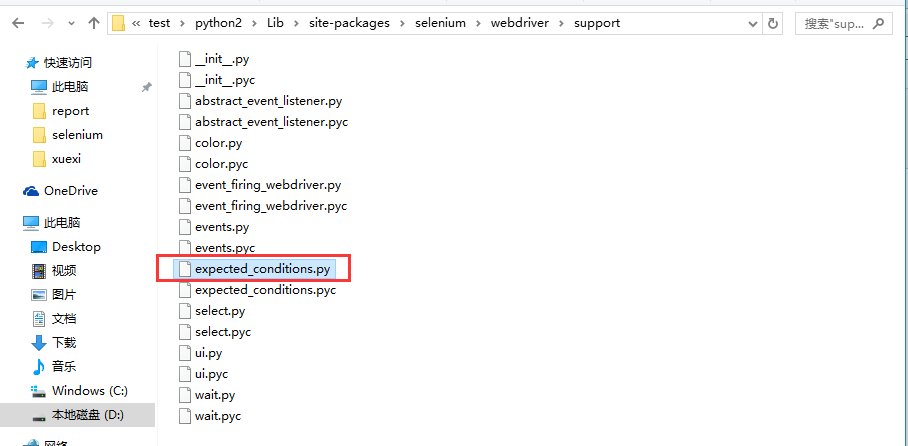
1.打开python里这个目录l可以找到:Lib\site-packages\selenium\webdriver\support\expected_conditions.py
from selenium.common.exceptions import NoSuchElementException
from selenium.common.exceptions import NoSuchFrameException
from selenium.common.exceptions import StaleElementReferenceException
from selenium.common.exceptions import WebDriverException
from selenium.common.exceptions import NoAlertPresentException
"""
* Canned "Expected Conditions" which are generally useful within webdriver
* tests.
"""
class title_is(object):
"""An expectation for checking the title of a page.
title is the expected title, which must be an exact match
returns True if the title matches, false otherwise."""
def __init__(self, title):
self.title = title
def __call__(self, driver):
return self.title == driver.title
class title_contains(object):
""" An expectation for checking that the title contains a case-sensitive
substring. title is the fragment of title expected
returns True when the title matches, False otherwise
"""
def __init__(self, title):
self.title = title
def __call__(self, driver):
return self.title in driver.title
class presence_of_element_located(object):
""" An expectation for checking that an element is present on the DOM
of a page. This does not necessarily mean that the element is visible.
locator - used to find the element
returns the WebElement once it is located
"""
def __init__(self, locator):
self.locator = locator
def __call__(self, driver):
return _find_element(driver, self.locator)
class visibility_of_element_located(object):
""" An expectation for checking that an element is present on the DOM of a
page and visible. Visibility means that the element is not only displayed
but also has a height and width that is greater than 0.
locator - used to find the element
returns the WebElement once it is located and visible
"""
def __init__(self, locator):
self.locator = locator
def __call__(self, driver):
try:
return _element_if_visible(_find_element(driver, self.locator))
except StaleElementReferenceException:
return False
class visibility_of(object):
""" An expectation for checking that an element, known to be present on the
DOM of a page, is visible. Visibility means that the element is not only
displayed but also has a height and width that is greater than 0.
element is the WebElement
returns the (same) WebElement once it is visible
"""
def __init__(self, element):
self.element = element
def __call__(self, ignored):
return _element_if_visible(self.element)
def _element_if_visible(element, visibility=True):
return element if element.is_displayed() == visibility else False
class presence_of_all_elements_located(object):
""" An expectation for checking that there is at least one element present
on a web page.
locator is used to find the element
returns the list of WebElements once they are located
"""
def __init__(self, locator):
self.locator = locator
def __call__(self, driver):
return _find_elements(driver, self.locator)
class visibility_of_any_elements_located(object):
""" An expectation for checking that there is at least one element visible
on a web page.
locator is used to find the element
returns the list of WebElements once they are located
"""
def __init__(self, locator):
self.locator = locator
def __call__(self, driver):
return [element for element in _find_elements(driver, self.locator) if _element_if_visible(element)]
class text_to_be_present_in_element(object):
""" An expectation for checking if the given text is present in the
specified element.
locator, text
"""
def __init__(self, locator, text_):
self.locator = locator
self.text = text_
def __call__(self, driver):
try:
element_text = _find_element(driver, self.locator).text
return self.text in element_text
except StaleElementReferenceException:
return False
class text_to_be_present_in_element_value(object):
"""
An expectation for checking if the given text is present in the element's
locator, text
"""
def __init__(self, locator, text_):
self.locator = locator
self.text = text_
def __call__(self, driver):
try:
element_text = _find_element(driver,
self.locator).get_attribute("value")
if element_text:
return self.text in element_text
else:
return False
except StaleElementReferenceException:
return False
class frame_to_be_available_and_switch_to_it(object):
""" An expectation for checking whether the given frame is available to
switch to. If the frame is available it switches the given driver to the
specified frame.
"""
def __init__(self, locator):
self.frame_locator = locator
def __call__(self, driver):
try:
if isinstance(self.frame_locator, tuple):
driver.switch_to.frame(_find_element(driver,
self.frame_locator))
else:
driver.switch_to.frame(self.frame_locator)
return True
except NoSuchFrameException:
return False
class invisibility_of_element_located(object):
""" An Expectation for checking that an element is either invisible or not
present on the DOM.
locator used to find the element
"""
def __init__(self, locator):
self.locator = locator
def __call__(self, driver):
try:
return _element_if_visible(_find_element(driver, self.locator), False)
except (NoSuchElementException, StaleElementReferenceException):
# In the case of NoSuchElement, returns true because the element is
# not present in DOM. The try block checks if the element is present
# but is invisible.
# In the case of StaleElementReference, returns true because stale
# element reference implies that element is no longer visible.
return True
class element_to_be_clickable(object):
""" An Expectation for checking an element is visible and enabled such that
you can click it."""
def __init__(self, locator):
self.locator = locator
def __call__(self, driver):
element = visibility_of_element_located(self.locator)(driver)
if element and element.is_enabled():
return element
else:
return False
class staleness_of(object):
""" Wait until an element is no longer attached to the DOM.
element is the element to wait for.
returns False if the element is still attached to the DOM, true otherwise.
"""
def __init__(self, element):
self.element = element
def __call__(self, ignored):
try:
# Calling any method forces a staleness check
self.element.is_enabled()
return False
except StaleElementReferenceException:
return True
class element_to_be_selected(object):
""" An expectation for checking the selection is selected.
element is WebElement object
"""
def __init__(self, element):
self.element = element
def __call__(self, ignored):
return self.element.is_selected()
class element_located_to_be_selected(object):
"""An expectation for the element to be located is selected.
locator is a tuple of (by, path)"""
def __init__(self, locator):
self.locator = locator
def __call__(self, driver):
return _find_element(driver, self.locator).is_selected()
class element_selection_state_to_be(object):
""" An expectation for checking if the given element is selected.
element is WebElement object
is_selected is a Boolean."
"""
def __init__(self, element, is_selected):
self.element = element
self.is_selected = is_selected
def __call__(self, ignored):
return self.element.is_selected() == self.is_selected
class element_located_selection_state_to_be(object):
""" An expectation to locate an element and check if the selection state
specified is in that state.
locator is a tuple of (by, path)
is_selected is a boolean
"""
def __init__(self, locator, is_selected):
self.locator = locator
self.is_selected = is_selected
def __call__(self, driver):
try:
element = _find_element(driver, self.locator)
return element.is_selected() == self.is_selected
except StaleElementReferenceException:
return False
class alert_is_present(object):
""" Expect an alert to be present."""
def __init__(self):
pass
def __call__(self, driver):
try:
alert = driver.switch_to.alert
alert.text
return alert
except NoAlertPresentException:
return False
def _find_element(driver, by):
"""Looks up an element. Logs and re-raises ``WebDriverException``
if thrown."""
try:
return driver.find_element(*by)
except NoSuchElementException as e:
raise e
except WebDriverException as e:
raise e
def _find_elements(driver, by):
try:
return driver.find_elements(*by)
except WebDriverException as e:
raise e
本篇的判断方法和场景很多,先贴出来,后面慢慢更新,详细讲解每个的功能的场景和用法。
这些方法是写好自动化脚本,提升性能的必经之路,想做好自动化,就得熟练掌握。
学习过程中有遇到疑问的,可以加selenium(python+java) QQ群交流:646645429
另外成立了python接口自动化QQ群:226296743
Selenium2+python自动化42-判断元素(expected_conditions)的更多相关文章
- Selenium2+python自动化36-判断元素存在
前言 最近有很多小伙伴在问如何判断一个元素是否存在,这个方法在selenium里面是没有的,需要自己写咯. 元素不存在的话,操作元素会报错,或者元素有多个,不唯一的时候也会报错.本篇介绍两种判断元素存 ...
- Selenium2+python自动化36-判断元素存在【转载】
前言 最近有很多小伙伴在问如何判断一个元素是否存在,这个方法在selenium里面是没有的,需要自己写咯. 元素不存在的话,操作元素会报错,或者元素有多个,不唯一的时候也会报错.本篇介绍两种判断元素存 ...
- Selenium2+python自动化42-判断元素(expected_conditions)【转载】
前言 经常有小伙伴问,如何判断一个元素是否存在,如何判断alert弹窗出来了,如何判断动态的元素等等一系列的判断,在selenium的expected_conditions模块收集了一系列的场景判断方 ...
- Selenium2+python自动化6-八种元素元素定位(Firebug和firepath)
前言 自动化只要掌握四步操作:获取元素,操作元素,获取返回结果,断言(返回结果与期望结果是否一致),最后自动出测试报告.本篇主要讲如何用firefox辅助工具进行元素定位. 元素定位在这四个环节中是至 ...
- Selenium2+python自动化12-操作元素(键盘和鼠标事件)
前言 在前面的几篇中重点介绍了一些元素的到位方法,到位到元素后,接下来就是需要操作元素了.本篇总结了web页面常用的一些操作元素方法,可以统称为行为事件 有些web界面的选项菜单需要鼠标悬停在某个元素 ...
- Selenium2+python自动化-八种元素定位(Firebug和Firepath)
前言 自动化只要掌握四步操作:获取元素,操作元素,获取返回结果,断言(返回结果与期望结果是否一致),最后自动出测试报告.本篇主要讲如何用firefox辅助工具进行元素定位.元素定位在这四个环节中 ...
- Selenium2+python自动化35-获取元素属性
前言 通常在做断言之前,都要先获取界面上元素的属性,然后与期望结果对比.本篇介绍几种常见的获取元素属性方法. 一.获取页面title 1.有很多小伙伴都不知道title长在哪里,看下图左上角. 2.获 ...
- Selenium2+python自动化6-八种元素元素定位(Firebug和firepath)【转载】
前言 自动化只要掌握四步操作:获取元素,操作元素,获取返回结果,断言(返回结果与期望结果是否一致),最后自动出测试报告.本篇主要讲如何用firefox辅助工具进行元素定位.元素定位在这四个环节中是至关 ...
- Selenium2+python自动化35-获取元素属性【转载】
前言 通常在做断言之前,都要先获取界面上元素的属性,然后与期望结果对比.本篇介绍几种常见的获取元素属性方法. 一.获取页面title 1.有很多小伙伴都不知道title长在哪里,看下图左上角. 2.获 ...
随机推荐
- 前端:jQuery笔记
前端:jQuery笔记 此系列文章乃是学习jQuery的学习笔记. Asp.net MVC Comet推送 摘要: 一.简介 在Asp.net MVC实现的Comet推送的原理很简单. 服务器端:接收 ...
- bzoj1087
题解: 状压dp 代码: #include<bits/stdc++.h> using namespace std; typedef long long ll; ; int n,m,cnt[ ...
- 设置MyEclipse字体大小
设置MyEclipse字体大小
- C++primer 练习4.31-4.35
Exercise 4.31: 编写程序从标准输入设备读入字符串,并把该串存放在字 符数组中.描述你的程序如何处理可变长的输入.提供比 你分配的数组长度长的字符串数据测试你的程序. string in_ ...
- DevExpress v18.1新版亮点——ASP.NET篇(二)
用户界面套包DevExpress v18.1日前终于正式发布,本站将以连载的形式为大家介绍各版本新增内容.本文将介绍了DevExpress ASP.NET v18.1 的新功能,快来下载试用新版本!点 ...
- 使用MyEclipse开发Java EE应用:企业级应用程序项目(下)
你开学,我放价!MyEclipse线上狂欢继续!火热开启中>> [MyEclipse最新版下载] 二.项目组织.依赖性和类解析 JEE规范为企业应用程序定义了一个分层的Java类解决策略, ...
- DevExpress v17.2新版亮点—WinForms篇(一)
用户界面套包DevExpress v17.2终于正式发布,本站将以连载的形式为大家介绍各版本新增内容.开篇介绍了DevExpress WinForms v17.2 Data Grid Control ...
- SharePoint 2013的100个新功能之内容管理(二)
一:数据视图 SharePoint2013中的数据视图更多的是作为多项目编辑的视图.数据视图在列表项目区域打开项目,选择停止编辑时保存项目的更改.在自定义列表中,你可以选择编辑项目,它会以数据视图编辑 ...
- L232 No methane on Mars
On earth, most of the methane in the atmosphere has been belched by living organisms, so finding the ...
- mysql5.7高可用架构之MHA
一.MHA简介 MHA(Master High Availability)目前在mysql高可用方面比较成熟.是一套优秀的作为 mysql高可用性环境下故障切换和主从提升的高可用软件.在MySQL故障 ...