1. 首先需要一个OSG for android的环境

(1)NDK 现在Eclipse 对NDK已经相当友好了,已经不需要另外cygwin的参与,具体可以参考

Android NDK开发篇(一):新版NDK环境搭建(免Cygwin,超级快)

(2).OSG for android的编译,参考 osg for android学习之一:windows下编译(亲测通过)  建议编译OpenGL ES2版本.


2.然后加载OSG自带的Example:osgAndroidExampleGLES2

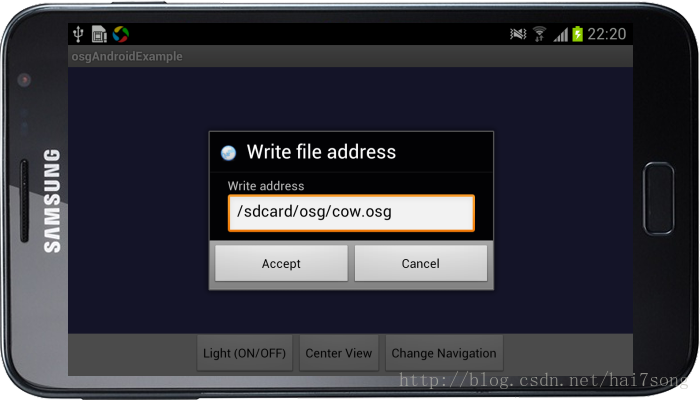
(1)点击菜单键加载文件路径,输入/sdcard/osg/cow.osg(必须先往sdcard创建文件夹osg并把cow.osg放到该文件夹里边)
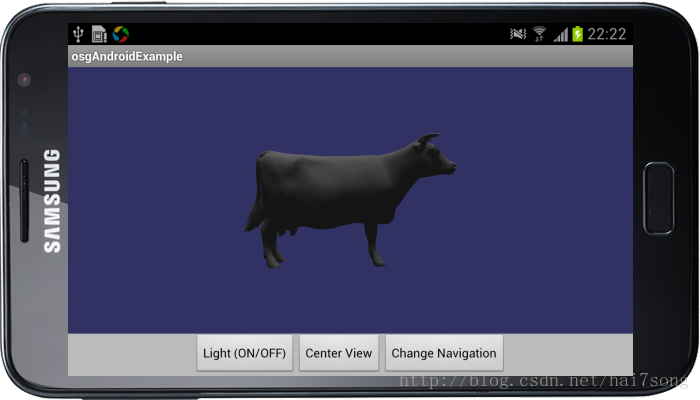
(2)接着经典的牛出现了:)
3.自带的example太多的代码,这样的代码无论对于NDK的初学者或OSG很不直观,所以本人重写了一个HelloWolrd for 

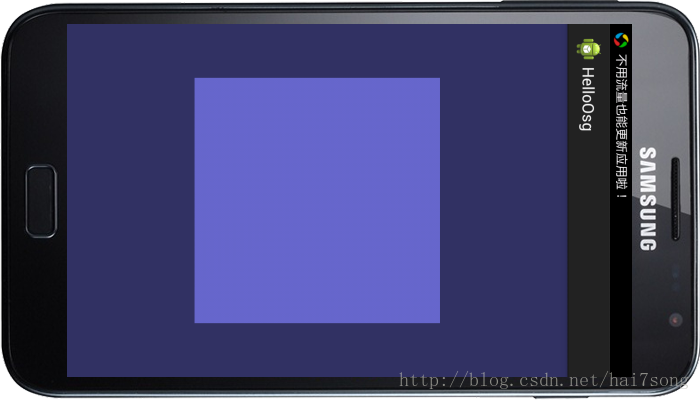
osg的例子。例子很简单,就是简单加载一个四边形并附上颜色。

(1)java代码

 C++ Code 
1
2
3
4
5
6
7
8
9
10
11
12
13
14
15
16
17
18
19
20
21
22
23
24
25
26
27
28
29
 
package com.example.helloosg;
import javax.microedition.khronos.egl.EGLConfig;
import javax.microedition.khronos.opengles.GL10;
import android.opengl.GLSurfaceView.Renderer;

public class NDKRenderer implements Renderer{

NDKRenderer(){
    }
    
    @Override
    public void onSurfaceCreated(GL10 gl, EGLConfig config) {
        // TODO Auto-generated method stub
        gl.glEnable(GL10.GL_DEPTH_TEST);
    }

@Override
    public void onSurfaceChanged(GL10 gl, int width, int height) {
        // TODO Auto-generated method stub
        osgNativeLib.init(width, height);
    }

@Override
    public void onDrawFrame(GL10 gl) {
        // TODO Auto-generated method stub
        osgNativeLib.step();
    }
}

 C++ Code 
1
2
3
4
5
6
7
8
9
10
11
12
13
14
15
 
package com.example.helloosg;
public class osgNativeLib {
    
    static {
        System.loadLibrary("osgNativeLib");
    }

/**
    * @param width the current view width
    * @param height the current view height
    */
    public static native void       init(int width, int height);
    public static native void       step();
}

 C++ Code 
1
2
3
4
5
6
7
8
9
10
11
12
13
14
15
16
17
18
19
20
21
22
23
24
25
26
27
28
29
30
31
32
33
34
35
36
37
38
39
40
41
42
43
44
45
46
47
48
49
50
51
52
53
54
55
56
57
 
package com.example.helloosg;

import android.app.Activity;
import android.opengl.GLSurfaceView;
import android.os.Bundle;
import android.view.Menu;
import android.view.MenuItem;
import android.widget.TextView;

public class MainActivity extends Activity {

private GLSurfaceView mGLSurfaceView;
    
    @Override
    protected void onCreate(Bundle savedInstanceState) {
        super.onCreate(savedInstanceState);
        mGLSurfaceView = new GLSurfaceView(this);
        mGLSurfaceView.setEGLContextClientVersion(2);
        NDKRenderer renderer = new NDKRenderer();
        this.mGLSurfaceView.setRenderer(renderer);
        this.setContentView(mGLSurfaceView);
    }

@Override
    public boolean onCreateOptionsMenu(Menu menu) {
        // Inflate the menu; this adds items to the action bar if it is present.
        getMenuInflater().inflate(R.menu.main, menu);
        return true;
    }

@Override
    protected void onResume() {
        // TODO Auto-generated method stub
        super.onResume();
        mGLSurfaceView.onResume();
    }

@Override
    protected void onPause() {
        // TODO Auto-generated method stub
        super.onPause();
        mGLSurfaceView.onPause();
    }

@Override
    public boolean onOptionsItemSelected(MenuItem item) {
        // Handle action bar item clicks here. The action bar will
        // automatically handle clicks on the Home/Up button, so long
        // as you specify a parent activity in AndroidManifest.xml.
        int id = item.getItemId();
        if (id == R.id.action_settings) {
            return true;
        }
        return super.onOptionsItemSelected(item);
    }
}

(2)JNI代码

 C++ Code 
1
2
3
4
5
6
7
8
9
10
11
12
13
14
15
16
17
18
19
20
21
22
23
24
25
26
27
28
29
30
31
32
33
34
35
36
37
38
39
40
41
42
43
44
45
46
47
48
49
50
51
52
53
54
55
56
57
58
59
60
61
62
63
64
65
66
67
68
69
70
71
72
73
74
75
76
77
78
79
80
81
82
83
84
85
86
87
88
89
90
91
92
93
94
95
96
97
98
99
100
101
102
103
104
105
106
107
108
109
110
111
112
113
114
115
116
117
118
119
120
121
122
123
124
125
126
127
128
129
130
131
132
133
134
135
136
137
138
139
 
/ *  Created on: 2014-10-19
 *      Author: VCC
 */

#include "OsgMainApp.h"

OsgMainApp::OsgMainApp() {
}

void OsgMainApp::initOsgWindow(int x, int y, int width, int height) {
    __android_log_write(ANDROID_LOG_ERROR, "OSGANDROID", "Init geometry");

_viewer = new osgViewer::Viewer();
    _viewer->setUpViewerAsEmbeddedInWindow(x, y, width, height);
    _viewer->setThreadingModel(osgViewer::ViewerBase::SingleThreaded);

_root = new osg::Group();

_viewer->realize();
    _viewer->addEventHandler(new osgViewer::StatsHandler);
    _viewer->addEventHandler(
            new osgGA::StateSetManipulator(
                    _viewer->getCamera()->getOrCreateStateSet()));
    _viewer->addEventHandler(new osgViewer::ThreadingHandler);
    _viewer->addEventHandler(new osgViewer::LODScaleHandler);

_manipulator = new osgGA::KeySwitchMatrixManipulator;
    _manipulator->addMatrixManipulator('1', "Trackball",
            new osgGA::TrackballManipulator());
    _viewer->setCameraManipulator(_manipulator.get());

_viewer->getViewerStats()->collectStats("scene", true);

loadModels();
}

void OsgMainApp::draw() {
    _viewer->frame();
}

void OsgMainApp::loadModels() {
    osg::ref_ptr<osg::Node> loadedModel = osgDB::readNodeFile(
            "/sdcard/osg/cow.osg");
    loadedModel->setName("cow");
    if (loadedModel != NULL) {
        __android_log_print(ANDROID_LOG_ERROR, "OSGANDROID", "Not NULL");
    }
    osg::Shader * vshader = new osg::Shader(osg::Shader::VERTEX, gVertexShader);
    osg::Shader * fshader = new osg::Shader(osg::Shader::FRAGMENT,
            gFragmentShader);

osg::Program * prog = new osg::Program;
    prog->addShader(vshader);
    prog->addShader(fshader);

osg::ref_ptr<osg::Node> node = createNode();
    //loadedModel->getOrCreateStateSet()->setAttribute(prog);
    node->getOrCreateStateSet()->setAttribute(prog);
    //_root->addChild(loadedModel);
    _root->addChild(node);
    osgViewer::Viewer::Windows windows;
    _viewer->getWindows(windows);
    for (osgViewer::Viewer::Windows::iterator itr = windows.begin();
            itr != windows.end(); ++itr) {
        (*itr)->getState()->setUseModelViewAndProjectionUniforms(true);
        (*itr)->getState()->setUseVertexAttributeAliasing(true);
    }

_viewer->setSceneData(NULL);
    _viewer->setSceneData(_root.get());
    _manipulator->getNode();
    _viewer->home();

_viewer->getDatabasePager()->clear();
    _viewer->getDatabasePager()->registerPagedLODs(_root.get());
    _viewer->getDatabasePager()->setUpThreads(3, 1);
    _viewer->getDatabasePager()->setTargetMaximumNumberOfPageLOD(2);
    _viewer->getDatabasePager()->setUnrefImageDataAfterApplyPolicy(true, true);
}

//创建一个四边形节点
osg::ref_ptr<osg::Node> OsgMainApp::createNode() {

//创建一个叶节点对象
    osg::ref_ptr<osg::Geode> geode = new osg::Geode();
    //创建一个几何体对象
    osg::ref_ptr<osg::Geometry> geom = new osg::Geometry();
    //添加顶点数据 注意顶点的添加顺序是逆时针
    osg::ref_ptr<osg::Vec3Array> v = new osg::Vec3Array();
    //添加数据
    v->push_back(osg::Vec3(0, 0, 0));
    v->push_back(osg::Vec3(1, 0, 0));
    v->push_back(osg::Vec3(1, 0, 1));
    v->push_back(osg::Vec3(0, 0, 1));

//设置顶点数据
    geom->setVertexArray(v.get());

//创建纹理订点数据
    osg::ref_ptr<osg::Vec2Array> vt = new osg::Vec2Array();
    //添加纹理坐标
    vt->push_back(osg::Vec2(0, 0));
    vt->push_back(osg::Vec2(1, 0));
    vt->push_back(osg::Vec2(1, 1));
    vt->push_back(osg::Vec2(0, 1));

//设置纹理坐标
    geom->setTexCoordArray(0, vt.get());

//创建颜色数组
    osg::ref_ptr<osg::Vec4Array> vc = new osg::Vec4Array();
    //添加数据
    vc->push_back(osg::Vec4(1, 0, 0, 1));
    vc->push_back(osg::Vec4(0, 1, 0, 1));
    vc->push_back(osg::Vec4(0, 0, 1, 1));
    vc->push_back(osg::Vec4(1, 1, 0, 1));

//设置颜色数组
    geom->setColorArray(vc.get());
    //设置颜色的绑定方式为单个顶点
    geom->setColorBinding(osg::Geometry::BIND_PER_VERTEX);

//创建法线数组
    osg::ref_ptr<osg::Vec3Array> nc = new osg::Vec3Array();
    //添加法线
    nc->push_back(osg::Vec3(0, -1, 0));
    //设置法线
    geom->setNormalArray(nc.get());
    //设置法绑定为全部顶点
    geom->setNormalBinding(osg::Geometry::BIND_OVERALL);
    //添加图元
    geom->addPrimitiveSet(new osg::DrawArrays(osg::PrimitiveSet::QUADS, 0, 4));

//添加到叶子节点
    geode->addDrawable(geom.get());

return geode.get();
}

 C++ Code 
1
2
3
4
5
6
7
8
9
10
11
12
13
14
15
16
17
18
19
20
21
22
23
24
25
26
27
28
29
30
31
32
33
34
35
36
37
38
39
40
41
42
43
44
45
46
47
48
49
50
51
52
53
54
55
56
57
58
59
60
61
62
63
64
65
66
67
68
69
70
71
72
73
74
75
76
77
78
79
80
81
82
83
84
85
86
87
88
89
90
91
92
93
94
95
96
97
98
99
100
101
102
103
104
105
106
107
108
109
110
 
/*
 * OsgMainApp.h
 *
 *  Created on: 2014-10-19
 *      Author: VCC
 */

#ifndef OSGMAINAPP_H_
#define OSGMAINAPP_H_

//android log
#include <android/log.h>
#include <iostream>
#include <cstdlib>
#include <math.h>

#include <string>

//osg
#include <osg/GL>
#include <osg/GLExtensions>
#include <osg/Depth>
#include <osg/Program>
#include <osg/Shader>
#include <osg/Node>
#include <osg/Notify>
#include <osg/ShapeDrawable>

#include <osgText/Text>

//osgDB
#include <osgDB/DatabasePager>
#include <osgDB/Registry>
#include <osgDB/ReadFile>
#include <osgDB/WriteFile>

//osg_viewer
#include <osgViewer/Viewer>
#include <osgViewer/Renderer>
#include <osgViewer/ViewerEventHandlers>
//osgGA

#include <osgGA/GUIEventAdapter>
#include <osgGA/MultiTouchTrackballManipulator>
#include <osgGA/TrackballManipulator>
#include <osgGA/FlightManipulator>
#include <osgGA/DriveManipulator>
#include <osgGA/KeySwitchMatrixManipulator>
#include <osgGA/StateSetManipulator>
#include <osgGA/AnimationPathManipulator>
#include <osgGA/TerrainManipulator>
#include <osgGA/SphericalManipulator>

//Static plugins Macro
USE_OSGPLUGIN(ive)
USE_OSGPLUGIN(osg)
USE_OSGPLUGIN(osg2)
USE_OSGPLUGIN(terrain)
USE_OSGPLUGIN(rgb)
USE_OSGPLUGIN(OpenFlight)
USE_OSGPLUGIN(dds)
//Static DOTOSG
USE_DOTOSGWRAPPER_LIBRARY(osg)
USE_DOTOSGWRAPPER_LIBRARY(osgFX)
USE_DOTOSGWRAPPER_LIBRARY(osgParticle)
USE_DOTOSGWRAPPER_LIBRARY(osgTerrain)
USE_DOTOSGWRAPPER_LIBRARY(osgText)
USE_DOTOSGWRAPPER_LIBRARY(osgViewer)
USE_DOTOSGWRAPPER_LIBRARY(osgVolume)
//Static serializer
USE_SERIALIZER_WRAPPER_LIBRARY(osg)
USE_SERIALIZER_WRAPPER_LIBRARY(osgAnimation)
USE_SERIALIZER_WRAPPER_LIBRARY(osgFX)
USE_SERIALIZER_WRAPPER_LIBRARY(osgManipulator)
USE_SERIALIZER_WRAPPER_LIBRARY(osgParticle)
USE_SERIALIZER_WRAPPER_LIBRARY(osgTerrain)
USE_SERIALIZER_WRAPPER_LIBRARY(osgText)
USE_SERIALIZER_WRAPPER_LIBRARY(osgVolume)

#define LOG_TAG "osgNativeLib"
#define LOGI(...) __android_log_print(ANDROID_LOG_INFO, LOG_TAG, __VA_ARGS__)
#define LOGE(...) __android_log_print(ANDROID_LOG_ERROR, LOG_TAG, __VA_ARGS__)

static const char gVertexShader[] =
    "void main() {                                                          \n"
    "    gl_Position  = gl_ModelViewProjectionMatrix * gl_Vertex;          \n"
    "}                                                                      \n";
static const char gFragmentShader[] =
    "void main() {                             \n"
    "  gl_FragColor =vec4(0.4,0.4,0.8,1.0);    \n"
    "}                                                                      \n";

class OsgMainApp {
private:
    osg::ref_ptr<osgViewer::Viewer>                 _viewer;
    osg::ref_ptr<osg::Group>                        _root;
    osg::ref_ptr<osgGA::KeySwitchMatrixManipulator> _manipulator;
public:
    OsgMainApp();
    void initOsgWindow(int x,int y,int width,int height);
    void draw();
private:
    osg::ref_ptr<osg::Node> createNode();
    void loadModels();

};

#endif /* OSGMAINAPP_H_ */

 C++ Code 
1
2
3
4
5
6
7
8
9
10
11
12
13
14
15
16
17
18
19
20
21
22
 
#include <jni.h>
#include <string.h>
#include <osg/Node>

#include <iostream>

#include "OsgMainApp.h"

OsgMainApp mainApp;

extern "C"{
    JNIEXPORT void JNICALL Java_com_example_helloosg_osgNativeLib_init(JNIEnv* env, jobject obj, jint width, jint height);
    JNIEXPORT void JNICALL Java_com_example_helloosg_osgNativeLib_step(JNIEnv* env, jobject obj);
}
JNIEXPORT void JNICALL Java_com_example_helloosg_osgNativeLib_init(JNIEnv* env, jobject obj, jint width, jint height)
{
    mainApp.initOsgWindow(0, 0, width, height);
}

JNIEXPORT void JNICALL Java_com_example_helloosg_osgNativeLib_step(JNIEnv* env, jobject obj){
    mainApp.draw();
}

(3).mk文件

android.mk

 C++ Code 
1
2
3
4
5
6
7
8
9
10
11
12
13
14
15
16
17
18
19
20
21
22
23
24
25
26
27
28
29
30
31
32
33
34
35
36
37
38
39
40
41
42
43
44
45
46
47
48
49
50
51
52
53
54
55
56
57
58
59
60
61
62
63
64
65
66
67
68
69
70
 
LOCAL_PATH := $(call my-dir)

include $(CLEAR_VARS)

LOCAL_MODULE    := osgNativeLib
### Main Install dir
OSG_ANDROID_DIR := C:/Develop/osggles2
LIBDIR          := $(OSG_ANDROID_DIR)/obj/local/armeabi

ifeq ($(TARGET_ARCH_ABI),armeabi-v7a)
    LOCAL_ARM_NEON  := true
    LIBDIR          := $(OSG_ANDROID_DIR)/obj/local/armeabi-v7a
endif

### Add all source file names to be included in lib separated by a whitespace

LOCAL_C_INCLUDES:= $(OSG_ANDROID_DIR)/include
LOCAL_CFLAGS    := -fno-short-enums
LOCAL_CPPFLAGS  := -DOSG_LIBRARY_STATIC

LOCAL_LDLIBS := -lGLESv2 -lz -llog

LOCAL_SRC_FILES := osgNativeLib.cpp OsgMainApp.cpp

LOCAL_LDFLAGS   := -L $(LIBDIR) \
-losgdb_dds \
-losgdb_openflight \
-losgdb_tga \
-losgdb_rgb \
-losgdb_osgterrain \
-losgdb_osg \
-losgdb_ive \
-losgdb_deprecated_osgviewer \
-losgdb_deprecated_osgvolume \
-losgdb_deprecated_osgtext \
-losgdb_deprecated_osgterrain \
-losgdb_deprecated_osgsim \
-losgdb_deprecated_osgshadow \
-losgdb_deprecated_osgparticle \
-losgdb_deprecated_osgfx \
-losgdb_deprecated_osganimation \
-losgdb_deprecated_osg \
-losgdb_serializers_osgvolume \
-losgdb_serializers_osgtext \
-losgdb_serializers_osgterrain \
-losgdb_serializers_osgsim \
-losgdb_serializers_osgshadow \
-losgdb_serializers_osgparticle \
-losgdb_serializers_osgmanipulator \
-losgdb_serializers_osgfx \
-losgdb_serializers_osganimation \
-losgdb_serializers_osg \
-losgViewer \
-losgVolume \
-losgTerrain \
-losgText \
-losgShadow \
-losgSim \
-losgParticle \
-losgManipulator \
-losgGA \
-losgFX \
-losgDB \
-losgAnimation \
-losgUtil \
-losg \
-lOpenThreads \
-lgnustl_static

include $(BUILD_SHARED_LIBRARY)

application.mk

 C++ Code 
1
2
3
4
5
6
7
8
9
10
11
 
#ANDROID APPLICATION MAKEFILE
APP_BUILD_SCRIPT := $(call my-dir)/Android.mk
#APP_PROJECT_PATH := $(call my-dir)

APP_OPTIM := release

APP_PLATFORM    := android-8
APP_STL         := gnustl_static
APP_CPPFLAGS    := -fexceptions -frtti
APP_ABI         := armeabi armeabi-v7a
APP_MODULES     := osgNativeLib

运行结果

注:由于代码是基于OpenGL ES2,简单加载了一个四边形,并在片元着色器将四边形的颜色赋为浅蓝色,其实也可以通过

OSG将四边形的颜色或者纹理赋到四边形上,具体下篇将说明

https://blog.csdn.net/hai7song/article/details/40515465

参考:

https://blog.csdn.net/edgarliaohs/article/details/37877287

http://www.openscenegraph.com/index.php/documentation/platform-specifics/android/43-building-openscenegraph-for-android-3-0-2

osg for android学习之一:windows下编译(亲测通过)【转】的更多相关文章

  1. Android ijkplayer在windows下编译并导入Android Studio

     我是看着里面的步骤来做的,由于我自己对Linux环境和命令不熟悉,导致我对Cygwin的知识为零,在编译ijkplayer的时候走了一点弯路,需要的同学先去看一下上面的这篇文章,我这边是对上面文章做 ...

  2. Android学习笔记—Windows下NDK开发简单示例

    该示例假设Android开发环境已经搭建完成,NDK也配置成功: 1.在Eclipse上新建Android工程,名称为ndkdemo.修改res\layout\activity_main.xml &l ...

  3. 【Android学习】Windows下Android环境搭建

    一.  JDK下载配置 直接百度,很简单. 二.android JDK下载配置 1.进入下载官网(需要FQ):https://developer.android.com/studio/index.ht ...

  4. Android学习笔记02-Mac下编译java代码

    在Mac OS上配置JDK 1.7. 一 下载 Mac版本的JDK1.7 从以下下载地址,下载Mac版本的JDk1.7 安装文件 jdk-7u79-macosx-x64.dmg. http://www ...

  5. Windows下编译objective-C

    Windows下编译objective-C 2011-08-31 14:32 630人阅读 评论(0) 收藏 举报 windowscocoa工具objective clibraryxcode   目录 ...

  6. 在Windows下编译FFmpeg详细说明

    MinGW:一个可自由使用和自由发布的Windows特定头文件和使用GNC工具集导入库的集合,允许你生成本地的Windows程序而不需要第三方C运行时 MinGW,即 Minimalist GNU F ...

  7. OpenGL学习之windows下安装opengl的glut库

    OpenGL学习之windows下安装opengl的glut库 GLUT不是OpenGL所必须的,但它会给我们的学习带来一定的方便,推荐安装.  Windows环境下的GLUT下载地址:(大小约为15 ...

  8. 在Windows下编译OpenSSL(VS2005和VC6)

    需要说明的是请一定安装openssl-0.9.8a .  openssl-1.0.0我没有编译成功. 如何在Windows下编译OpenSSL (Vs2005使用Vc8的cl编译器)1.安装Activ ...

  9. 一步步实现windows版ijkplayer系列文章之四——windows下编译ijkplyer版ffmpeg

    一步步实现windows版ijkplayer系列文章之一--Windows10平台编译ffmpeg 4.0.2,生成ffplay 一步步实现windows版ijkplayer系列文章之二--Ijkpl ...

随机推荐

  1. ApiPost自动化测试基础之:如何使用测试校验(测试用例)?

    我们在<ApiPost的环境变量的定义和使用>和<ApiPost自动化测试基础之:接口参数依赖的情景处理>分别讲解了ApiPost环境变量的定义.使用以及基于环境变量的接口参数 ...

  2. WICED SDK 3.3.1

    7/20/2015 UPDATE: After installing the IDE you may not see all the APPs.  Press F5 in Eclipse to ref ...

  3. mysql函数的使用

    最近总感觉sql语句不对劲,所以就看了一些官方文档发现了一些以前没有注意的函数:感觉在查询的时候可以用得上,毕竟是内置函数,用起来效率应该会好一些的: FIND_IN_SET(str,strlist) ...

  4. linux socket talkclient talkserver示例

    cleint: #define _GNU_SOURCE 1 #include <sys/types.h> #include <sys/socket.h> #include &l ...

  5. C#访问远程主机资源的方法,多种方式

    最近要实现访问远程主机的共享目录中的一个文件.遇到了权限问题.google了一下,找到了几种解决方法,记录如下: 一.调用Net use命令 // 使用方法:        //if (Connect ...

  6. Snmp学习总结(七)——SNMP4J介绍

    一.SNMP4J介绍 SNMP4J是一个用Java来实现SNMP(简单网络管理协议)协议的开源项目.它支持以命令行的形式进行管理与响应.SNMP4J是纯面向对象设计与SNMP++(用C++实现SNMP ...

  7. 使用Edge模式通知Internet Explorer以最高级别的可用模式显示内容

    一.EasyUI$的window('open')在IE8下兼容性问题 今天在公司使用EasyUI的$('#win').window('open');方法打开一个window窗体时发现EaysUI的脚本 ...

  8. AngularJS的Hello World

    本篇体验AngularJS的Hello World,虽然简单,但体现了AnuglarJS的一些重要概念. 大致思路是这样的: ● 通常通过为hmtl元素添加AngularJS独有的属性来实现一些功能, ...

  9. Client Dataset Basics

    文章出处:  http://www.informit.com/articles/article.aspx?p=24094 In the preceding two chapters, I discus ...

  10. lufylegend:Lbuttion等UI组件

    1,矩形按钮LButtonSample1 首先来看看LButtonSample1按钮的绘制. 在lufylegend.js引擎中可以利用LButton类来添加一个按钮,但是你需要传入按钮弹起和按钮按下 ...