
UI5-文档-4.23-Custom Formatters
如果希望对数据模型的属性进行更复杂的格式化逻辑,还可以编写自定义格式化函数。现在我们将使用自定义格式化程序添加本地化状态,因为数据模型中的状态是一种相当技术性的格式。
Preview
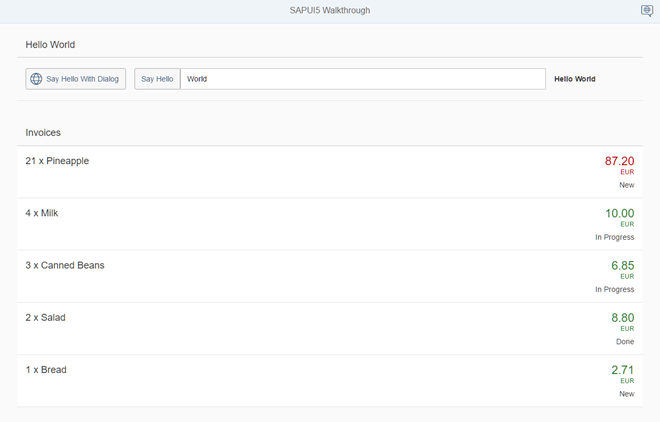
A status is now displayed with a custom formatter
Coding
You can view and download all files at Walkthrough - Step 23.
webapp/model/formatter.js (New)
sap.ui.define([],function(){

        "use strict";

        return{

               statusText:function(sStatus){

                       var resourceBundle =this.getView().getModel("i18n").getResourceBundle();

                       switch(sStatus){

                               case"A":

                                      return resourceBundle.getText("invoiceStatusA");

                               case"B":

                                      return resourceBundle.getText("invoiceStatusB");

                               case"C":

                                      return resourceBundle.getText("invoiceStatusC");

                               default:

                                      return sStatus;

                       }

               }

        };

});
我们的新格式化程序文件位于应用程序的model文件夹中,因为格式化程序正在处理数据属性并格式化它们以便在UI上显示。到目前为止,除了发票之外,我们没有任何与模型相关的 Invoices.json 文件, 现在,我们将把文件夹webapp/model添加到我们的应用程序中。这一次,我们不从任何基本对象进行扩展,只返回一个JavaScript对象,其中包含sap.ui.define调用中的formatter函数。
函数lawstext从数据模型获取技术状态作为输入参数,并返回从resourceBundle文件读取的可读文本。
webapp/controller/InvoiceList.controller.js
sap.ui.define([

        "sap/ui/core/mvc/Controller",

        "sap/ui/model/json/JSONModel",

        "sap/ui/demo/walkthrough/model/formatter"

], function (Controller, JSONModel, formatter) {

        "use strict";

        return Controller.extend("sap.ui.demo.walkthrough.controller.InvoiceList", {

               formatter: formatter,

               onInit : function () {

                       var oViewModel = new JSONModel({

                               currency: "EUR"

                       });

                       this.getView().setModel(oViewModel, "view");

               }

        });

});
要加载格式化程序函数,必须将其添加到invoiclist .controller.js中。在这个控制器中,我们首先向自定义格式化程序模块添加一个依赖项。控制器只是将加载的格式化程序函数存储在本地属性格式化程序中,以便能够在视图中访问它们。
webapp/view/InvoiceList.view.xml
<mvc:View

        controllerName="sap.ui.demo.walkthrough.controller.InvoiceList"

        xmlns="sap.m"

        xmlns:mvc="sap.ui.core.mvc">

        <List

                       headerText="{i18n>invoiceListTitle}"

               class="sapUiResponsiveMargin"

               width="auto"

               items="{invoice>/Invoices}">

               <items>

                       <ObjectListItem

                               title="{invoice>Quantity} x {invoice>ProductName}"

                               number="{

                                      parts: [{path: 'invoice>ExtendedPrice'}, {path: 'view>/currency'}],

                                      type: 'sap.ui.model.type.Currency',

                                      formatOptions: {

                                              showMeasure: false

                                      }

                               }"

                               numberUnit="{view>/currency}"

                               numberState="{=        ${invoice>ExtendedPrice} > 50 ? 'Error' : 'Success' }">

                               <firstStatus>

                                      <ObjectStatustext="{

                                              path: 'invoice>Status',

                                              formatter: '.formatter.statusText'

                                      }"/>

                               </firstStatus>

                       </ObjectListItem>

               </items>

        </List>

</mvc:View>
我们使用firstStatus聚合向ObjectListItem添加一个状态,该状态将显示发票的状态。自定义格式化程序函数是用绑定语法的保留属性格式化程序指定的。formatter名称前面的“.”表示在当前视图的控制器中查找该函数。在那里,我们定义了一个属性formatter,它保存我们的formatter函数,因此我们可以通过.formatter.statusText.访问它。
webapp/i18n/i18.properties
# App Descriptor

appTitle=Hello World

appDescription=A simple walkthrough app that explains the most important concepts of SAPUI5

# Hello Panel

showHelloButtonText=Say Hello

helloMsg=Hello {0}

homePageTitle=Walkthrough

helloPanelTitle=Hello World

openDialogButtonText=Say Hello With Dialog

dialogCloseButtonText=Ok

# Invoice List

invoiceListTitle=Invoices

invoiceStatusA=New

invoiceStatusB=In Progress

invoiceStatusC=Done
我们向资源包中添加了三个新条目,它们反映了翻译后的状态文本。这些文本现在显示在ObjectListItem的number属性下面,该属性取决于发票的状态。
Parent topic: Walkthrough
Previous: Step 22:
Expression Binding
Next: Step 24:
Filtering
Related Information
Formatting,
Parsing, and Validating Data
UI5-文档-4.23-Custom Formatters的更多相关文章
- Apache DolphinScheduler 使用文档(2-3/8):集群规划及环境准备
本文章经授权转载,原文链接: https://blog.csdn.net/MiaoSO/article/details/104770720 目录 2. 集群规划 2.1 集群配置 2.2 软件版本 2 ...
- Spring Boot中使用Swagger2构建API文档
程序员都很希望别人能写技术文档,自己却很不愿意写文档.因为接口数量繁多,并且充满业务细节,写文档需要花大量的时间去处理格式排版,代码修改后还需要同步修改文档,经常因为项目时间紧等原因导致文档滞后于代码 ...
- Apache DolphinScheduler 使用文档(5/8):使用与测试
本文章经授权转载,原文链接: https://blog.csdn.net/MiaoSO/article/details/104770720 目录 5. 使用与测试 5.1 安全中心(Security) ...
- Apache DolphinScheduler 使用文档(4/8):软件部署
本文章经授权转载,原文链接: https://blog.csdn.net/MiaoSO/article/details/104770720 目录 4. 软件部署 4.1 为 dolphinschedu ...
- Apache DolphinScheduler 1.2.0 使用文档(1/8):架构及名词解释
本文章经授权转载,原文链接: https://blog.csdn.net/MiaoSO/article/details/104770720 目录 1. 架构及名词解释 1.1 DolphinSched ...
- Apache DolphinScheduler 使用文档(7/8):系统参数及自定义参数
本文章经授权转载,原文链接: https://blog.csdn.net/MiaoSO/article/details/104770720 目录 7. 参数 7.1 系统参数 7.2 时间自定义参数 ...
- Apache DolphinScheduler 使用文档(8/8):附录
本文章经授权转载,原文链接: https://blog.csdn.net/MiaoSO/article/details/104770720 目录 附录.队列管理 附录.令牌管理 附录.队列管理 Q : ...
- Apache DolphinScheduler 使用文档(6/8):任务节点类型与任务参数设置
本文章经授权转载,原文链接: https://blog.csdn.net/MiaoSO/article/details/104770720 目录 6. 任务节点类型和参数设置 6.1 Shell节点 ...
- JIRA6.36-7.23数据迁移文档
JIRA6.3.6-JIRA7.2.3数据迁移文档 安装JIRA7.2.3 安装包位于服务器/opt/SOFTWARE_PACKAGE目录下 建立JIRA安装的目录数据目录 cd /opt mkdir ...
- [实战]MVC5+EF6+MySql企业网盘实战(23)——文档列表
写在前面 上篇文章实现了图片列表,这篇文章实现文档列表将轻车熟路,因为逻辑基本相似,只是查询条件的不同.这里将txt,doc,docx,ppt,pptx,xls,xlsx的文件都归为文档列表中. 系列 ...
随机推荐
- web开发的一些总结
现在我们是在互联网的时代,到处可以使用internet 这些年的发展,让we 成为了当前开发的主流,包括现在好多的移动端开发, 很多也是使用web 页面进行呈现,因为web 拉近了你我之间的距离.对于 ...
- Eolinker API 接口文档神器
Eolinker API 接口文档神器 群里小伙伴推荐的,还没有去研究,先记下来. API文档管理.自动化测试.开发协作利器 正在为数万企业管理超过100万APIs,提高开发效率以及规范开发流程
- ShareMemory
项目地址 : https://github.com/kelin-xycs/ShareMemory ShareMemory 一个用 C# 实现的 No Sql 数据库 , 也可以说是 分布式 缓存 , ...
- JUC线程池之 线程池架构
线程池的架构图如下: Executor 它是"执行者"接口,它是来执行任务的.准确的说,Executor提供了execute()接口来执行已提交的 Runnable 任务的对象.E ...
- spring答题
ioc 依赖注入:通过注入的方式实例化对象,不再直接new对象了,交给spring容器进行管理和维护 控制反转:实例化对象的控制权交给了spring容器,而不再是某个单独的类,控制权发生了变更 作用: ...
- opencv中的缩放函数
图像处理里面缩放操作是比较常见的: 最近邻插值:类似简单映射的处理方式,目标图像w1,h1,原始图像w0,h0,则在目标图像上的点(x,y)的像素点实际对应原始图上(x*w0/w1,y*h0/h1)的 ...
- ubuntu 16.04 忘记root密码
虚拟机中安装的ubuntu 16.04. 方法一 如果用户具有sudo权限,那么直接可以运行如下命令: sudo su root #输入当前用户的密码 passwd #输入密码 #再次输入密码 方法二 ...
- 编程中检查IIS7组件的安装情况
http://learn.iis.net/page.aspx/135/discover-installed-components/说明:ASP.NET网络应用程序在IIS7上部署的时候,经常会要求预装 ...
- LINUX关机指令
linux下常用的关机命令有:shutdown.halt.poweroff.init:重启命令有:reboot.下面本文就主要介绍一些常用的关机命令以及各种关机命令之间的区别和具体用法. 首先来看一下 ...
- [转] AForge.NET 图像处理类
https://www.nuget.org/packages?q=AForge.NET https://baike.baidu.com/item/AForge.NET/114415?fr=aladdi ...