
[Ng]Angular应用点概览
var app = angular.module('myApp', []);

app.controller('TextController', function($scope) {

     $scope.txt = {'title':'some txt'};

});
[] 表示此模块不依赖其它模块。
<table ng-controller="getList">

    <tr ng-repeat="item in list">

        <td ng-repeat="k in item track by $index">

            {{k}}

        </td>

    </tr>

</table>
<!--遍历对象, 可以取到键-->

<li ng-repeat="(key, value) in obj">{{key}} | {{value}}</li>
ng-options参考:https://docs.angularjs.org/api/ng/directive/select
ng-options分组:http://www.cnblogs.com/xing901022/p/5122702.html
<p>{{data.member}}</p>

<p ng-bind="data.member"></p>
对于index.html中的数据绑定操作,建议使用ng-bind。
function($scope) {

     $scope.funding = {startingEstimate: 0};

     computeNeeded = function() {

          $scope.funding.needed = $scope.funding.startingEstimate * 10;

     }

     $scope.$watch('funding.startingEstimate', computeNeeded);

}
<div ng-click="doSomething();">
$scope.insertTom = function() {

     $scope.students.splice(1, 0, {name:'Tom Thumb', id: '4'});

}
$scope.toggleMenu = function() {

     $scope.menuState.show = !$scope.menuState.show;

}
.error {background-color: red;}

<div ng-controller='headerController'>

     <div ng-class='{error: isError, warning: isWarning}'>{{messageText}}</div>

     <button ng-click='showError();'>错误提示</button>

     <tr ng-repeat='restaurant in directory' ng-click='selectRestaurant($index)' ng-class='{selected: $index==selectedRow}'>

          <td>{{restaurant.name}}</td>

     </tr>

</div>

function HeaderController($scope) {

     $scope.isError = false;

     $scope.isWarning = false;

     $scope.showError = function() {

          $scope.messageText = '这是错误信息';

          $scope.isError = true;

          $scope.isWarning = false;

     }

}

function RestaurantTableController($scope) {

     $scope.directory = [{

          name: 'The handsome heifer', cuisine: 'BBQ',

          name: 'Greens green greens', cuisine: 'salads'

     }];

     $scope.selectRestaurant = function(row) {

          $scope.selectedRow = row;

     }

}

# 使用ng-class,json键为css类名,值为true则应用此类。
<html ng-app='ShoppingModule'>

<body ng-controller='ShoppingController'>

     <table><tr>

          <td>{{item.title}}</td>

     </tr></table>

</body>

 // 创建模型

var shoppingModule = angular.module('ShoppingModule', []);

// Factory服务工厂,创建itemFactory接口,访问服务端

ShoppingModule.factory('itemFactory', function() {

     var items = {};

     items.query = function() {

          // 真实数据从服务端拉取

          return [

               {title: '', description: ''}

          ];

     };

     return items;

});

// Service
ShoppingModule.service('itemService', function() {
  this.title = 'def';
})

// Provider
ShoppingModule.provider('itemProvider', function() {
  this.$get = function() {
    return {title: 'ghi'};
  }
});

// 使用, 注意依赖自定义的service不需要加引号
ShoppingModule.controller('shoppingController', function($scope, itemFactory, itemService, itemProvider) {
  $scope.res = itemFactory.query();
  $scope.res2 = itemService;
  $scope.res3 = itemProvider;
});
// 自己编写首字母大写过滤器:

var homeModule = angular.module('HomeModule', []);

homeModule.filter('titleCase' function() {

     var titleCaseFilter = function(input) {

          var words = input.split(' ');

          for (var i = 0; i < words.length; i++) {

               words[i] = words[i].charAt(0).toUpperCase() + Words[i].slice(1);

          }

          return words.join(' ');

     };

     return titleCaseFilter;

});

<body ng-app='HomeModule', ng-controller='HomeController'>

     <h1>{{ pageHeading | titleCase }}</h1>

</body>

function HomeController($scope) {

     $scope.pageHeading = 'page title';

}
# index.html

     <html ng-app='AMail'>

          <body>

               <h1>A-Mail</h1>

               <div ng-view></div>

          </body>

     </html>

# list.html

     <table><tr ng-repeat='message in messages'>

          <td>{{ message.sender }}</td>

          <td><a href='#/view/{{ message.id }}'>{{ message.subject }}</td>

          <td>{{ message.date }}</td>

     </tr></table>

# detail.html

     <div>

          <strong>To:</strong>

          <span ng-repeat='recipient in message.recipients'>{{ recipient }}</span>

     </div>

     <a href='#/'>返回列表</a>
# controller.js

// 为AMail服务创建模块

var aMailServices = angular.module('AMail', []);

// 在url、模板和控制器之间建立映射关系

function emailRouteConfig($routeProvider) {

    $routeProvider.

          when('/', {controller: ListController, templateUrl: 'list.html'}).

          // 在id前面加一个冒号,指定一个参数化的url

          when('/view/:id', {controller: DetailController, templateUrl: 'detail.html'}).

          otherwise({redirectTo: '/'});

}

// 配置路由

a.MailServices.config(emailRouteConfig);


// 虚拟数据

messages = [{}];


// 给邮件列表数据的控制器

function ListController($scope) {

     $scope.messages = messages;

}

// 从路由信息(url中解析的)中获取邮件id,然后用它找到正确的邮件对象

function DetailController($scope) {

     $scope.message = messages[$routeParams.id];

}
angular-ui-router例子:
http://angular-ui.github.io/ui-router/site/#/api/ui.router.state.directive:ui-sref
http://www.cnblogs.com/koleyang/p/4522543.html
// 查询代码, 模板中使用items,与服务端交互最好写在服务里

function ShoppingController($scope, $http) {

     $http.get('/products').success(function(data, status, headers, config) {

          $scope.items = data;

     });

}
var appModule = angular.module('app', []);

appModule.directive('ngbkFocus', function() {

     return {

          link: function(scope, element, attrs, controller) {

               element[0].focus();

          }

     };

});

// 使用

<button ngbk-focus>被聚焦的按钮</button>

var appModule = angular.module('app', ['directives']);
以Angular的方式切换bootstrap Tab的指令:https://www.grobmeier.de/bootstrap-tabs-with-angular-js-25112012.html
<form name='addUserForm' ng-controller='AddUserController'>

     <input ng-module='user.first' required>

     <input type='email' ng-module='user.email' required>

     <input type='number' ng-module='user.email' required>

     <button ng-disabled='!addUserForm.$valid'>提交</button>

</form>
function AddUserController($scope) {

     $scope.message = '';

     $scope.addUser = function() {

          // 保存到数据库中

     }

}
From:《用angularjs开发下一代web应用》& Internet.
另外这里有一篇关于angular的文章:Angular.js 介绍及实践教程
架构感知:
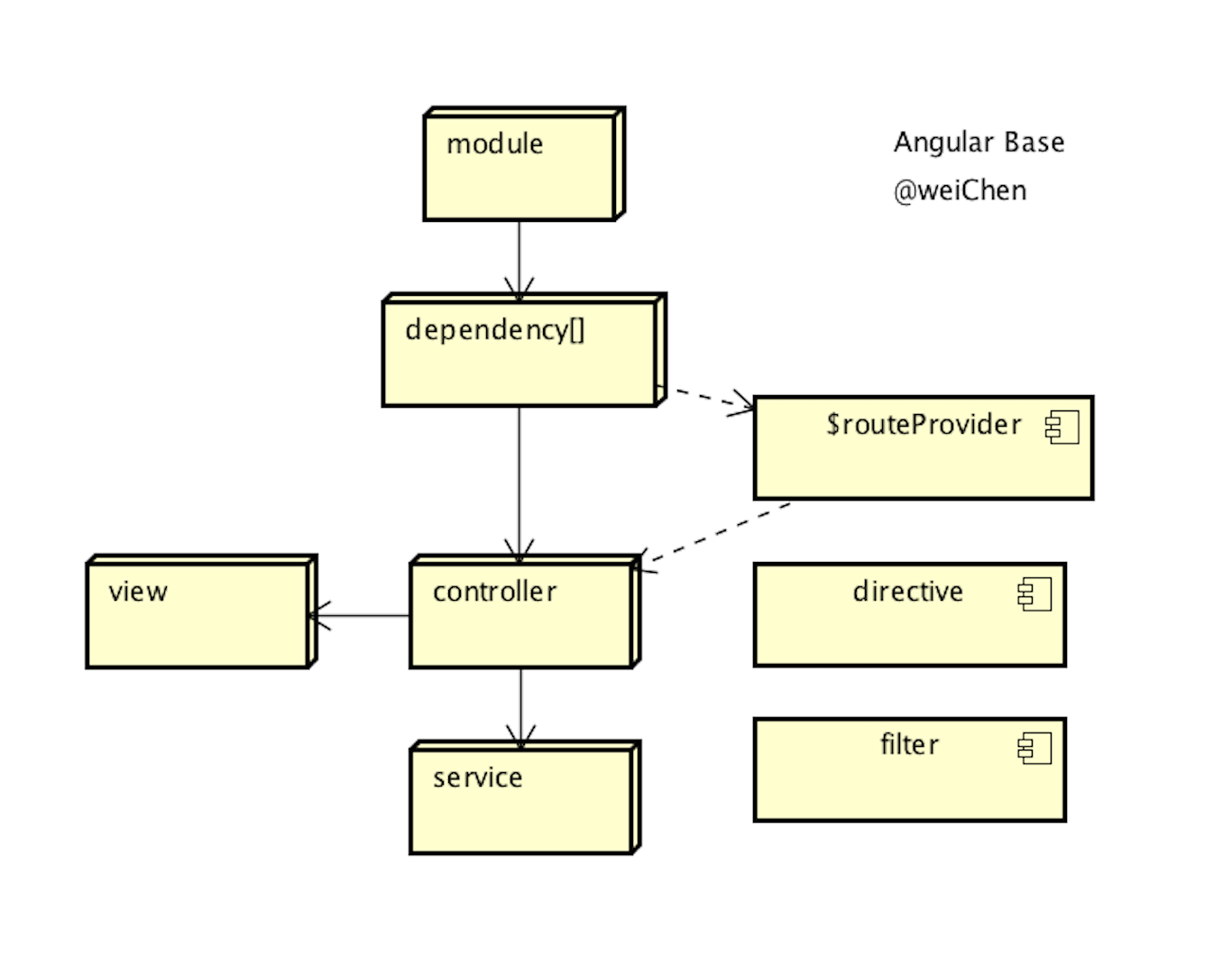
Link: http://www.cnblogs.com/farwish/p/4996253.html
@黑眼诗人 <www.farwish.com>
[Ng]Angular应用点概览的更多相关文章
- Angular(01)-- 架构概览
声明 本系列文章内容梳理自以下来源: Angular 官方中文版教程 官方的教程,其实已经很详细且易懂,这里再次梳理的目的在于复习和巩固相关知识点,刚开始接触学习 Angular 的还是建议以官网为主 ...
- angular源码分析:angular中的依赖注入式如何实现的
一.准备 angular的源码一份,我这里使用的是v1.4.7.源码的获取,请参考我另一篇博文:angular源码分析:angular源代码的获取与编译环境安装 二.什么是依赖注入 据我所知,依赖注入 ...
- angular(常识)
我觉得angularjs是前端框架,而jquery只是前端工具,这两个还是没有可比性的. 看知乎上关于jquery和angular的对比http://www.zhihu.com/question/27 ...
- angular替代Jquery,常用方法支持
1.angular.bind(self,fn.args); 切换作用域执行 2.angular.copy(source,[destination]); 拷贝和深度拷贝 3.angular.eq ...
- 【原创】angularjs1.3.0源码解析之service
Angular服务 在angular中,服务(service)是以提供特定的功能的形式而存在的. angular本身提供了很多内置服务,比如: $q: 提供了对promise的支持. $http: 提 ...
- js 账单打印并分页
<%@ page language="java" contentType="text/html; charset=utf-8" pageEncoding= ...
- js 做账单处理
<%@ page language="java" contentType="text/html; charset=utf-8" pageEncoding= ...
- AngularJS模块具体解释
模块是提供一些特殊服务的功能块.比方本地化模块负责文字本地化,验证模块负责数据验证.一般来说,服务在模块内部,当我们须要某个服务的时候,是先把模块实例化.然后再调用模块的方法. 但Angular模块和 ...
- AngularJS系统学习之Module(模块)
本文源自:http://blog.csdn.net/woxueliuyun/article/details/50962645 学习之后略有所得, 来此分享.建议看原文. 模块是提供一些特殊服务的功能块 ...
随机推荐
- 解决ftp连接出现 无法从控制 Socket 读取。Socket 错误 = #10054。
ftp连接会显示以下错误信息 无法从控制 Socket 读取.Socket 错误 = #10054 或者是这样的信息 Opening data channel for directory list.T ...
- UML精粹2 - 开发过程
迭代和瀑布过程 两者的本质区别是,你如何将一个项目分解为更小块. 瀑布风格基于活动来分解项目.为了构建软件,你不得不做某些活动:需求分析.设计.编码和测试.为期一年的项目可能有2个月的分析阶段,然后是 ...
- nbu恢复 oracle10g rac asm 到单实例asm(恢复某个表空间)
一 检验条件 二 准备工作 1 创建相关目录 mkdir -p /oracle/admin/orcl/adumpmkdir -p /oracle/admin/orcl/bdumpmkdir -p /o ...
- 在sqlserver 中with(nolock)详解
所有Select加 With (NoLock)解决阻塞死锁 在查询语句中使用 NOLOCK 和 READPAST 处理一个数据库死锁的异常时候,其中一个建议就是使用 NOLOCK ...
- Karma: 3 - 测试覆盖率
karma 的插件 karma-coverage 提供了测试代码覆盖率的支持. karma 的页面:http://karma-runner.github.io/0.8/config/coverage. ...
- java 中小数点的处理
第一种 BigDecimal bg = new BigDecimal(f); double f1 = bg.setScale(2, BigDecimal.ROUND_HALF_UP).doubleVa ...
- 用vector容器代替数组 ——使用数组初始化vector对象
在C++中,我们不能用数组直接初始化另一数组,而只能创建新的数组,然后显式的把原数组的元素逐个复制给新的数组. 按照C语言中的做法: const size_t arry_size=6; int int ...
- 深入理解JS异步编程(一)
js事件概念 异步回调 首先了讲讲js中 两个方法 setTimeout()和 setInterval() 定义和用法: setTimeout() 方法用于在指定的毫秒数后调用函数或计算表达式. 语法 ...
- 【译】为什么这样宏定义#define INT_MIN (-2147483647 - 1)?
2的32次方为2147483648*2,0~(2147483648*2-1)这是32位机上无符号整数代表的范围.而32机的int范围为-2147483648~+2147483647 stackover ...
- Scrum 项目——1
广商检索页面 1) N (Need 需求) 这个页面会按一定的规律来集合广商的一些资源,包括微信公众号.教务系统登录处.宿舍报修等,是为了方便我们整个广商的学生和老师来运用.因为现在虽然有很多微信公众 ...