
A trip through the Graphics Pipeline 2011_02
Welcome back. Last part was about vertex shaders, with some coverage of GPU shader units in general. Mostly, they’re just vector processors, but they have access to one resource that doesn’t exist in other vector architectures: Texture samplers. They’re an integral part of the GPU pipeline and are complicated (and interesting!) enough to warrant their own article, so here goes.
Texture state
Before we start with the actual texturing operations, let’s have a look at the API state that drives texturing. In the D3D11 part, this is composed of 3 distinct parts:
1.The sampler state. Filter mode, addressing mode, max anisotropy, stuff like that. This controls how texture sampling is done in a general way.2.The underlying texture resource. This boils down to a pointer to the raw texture bits in memory. The resource also determines whether it’s a single texture or a texture array, what multisample format the texture has (if any), and the physical layout of the texture bits – i.e. at the resource level, it’s not yet decided how the values in memory are to be interpreted exactly, but their memory layout is nailed down.3.The underlying texture resource. This boils down to a pointer to the raw texture bits in memory. The resource also determines whether it’s a single texture or a texture array, what multisample format the texture has (if any), and the physical layout of the texture bits – i.e. at the resource level, it’s not yet decided how the values in memory are to be interpreted exactly, but their memory layout is nailed down.
Creating the extra SRV seems like an annoying extra step at first, but the point is that this allows the API runtime to do all type checking at SRV creation time; if you get a valid SRV back, that means the SRV and resource formats are compatible, and no further type checking needs to be done while that SRV exists. In other words, it’s all about API efficiency here.
Anyway, at the hardware level, what this boils down to is just a bag of state associated with a texture sampling operation – sampler state, texture/format to use, etc. – that needs to get kept somewhere (see part 2 for an explanation of various ways to manage state in a pipelined architecture).
Don’t assume that texture switches are expensive – they might be fully pipelined with stateless texture samplers so they’re basically free. But don’t assume they’re completely free either – maybe they are not fully pipelined or there’s a cap on the maximum number of different sets of texture states in the pipeline at any given time.
Anatomy of a texture request
So, how much information do we need to send along with a texture sample request? It depends on the texture type and which kind of sampling instruction we’re using. For now, let’s assume a 2D texture. What information do we need to send if we want to do a 2D texture sample with, say, up to 4x anisotropic sampling?
- The 2D texture coordinates – 2 floats, and sticking with the D3D terminology in this series, I’m going to call them u/v and not s/t.
- The partial derivatives of u and v along the screen “x” direction:
,
.
- Similarly, we need the partial derivative in the “y” direction too:
,
.
So, that’s 6 floats for a fairly pedestrian 2D sampling request (of the SampleGrad variety) – probably more than you thought. The 4 gradient values are used both for mipmap selection and to choose the size and shape of the anisotropic filtering kernel. You can also use texture sampling instructions that explicitly specify a mipmap level (in HLSL, that would be SampleLevel) – these don’t need the gradients, just a single value containing the LOD parameter, but they also can’t do anisotropic filtering – the best you’ll get is trilinear! Anyway, let’s stay with those 6 floats for a while. That sure seems like a lot. Do we really need to send them along with every texture request?
The answer is: depends. In everything but Pixel Shaders, the answer is yes, we really have to (if we want anisotropic filtering that is). In Pixel Shaders, turns out we don’t; there’s a trick that allows Pixel Shaders to give you gradient instructions (where you can compute some value and then ask the hardware “what is the approximate screen-space gradient of this value?”), and that same trick can be employed by the texture sampler to get all the required partial derivatives just from the coordinates. So for a PS 2D “sample” instruction, you really only need to send the 2 coordinates which imply the rest, provided you’re willing to do some more math in the sampler units.
Just for kicks: What’s the worst-case number of parameters required for a single texture sample? In the current D3D11 pipeline, it’s a SampleGrad on a Cubemap array. Let’s see the tally:
- 3D texture coordinates – u, v, w: 3 floats.
- Cubemap array index: one int (let’s just bill that at the same cost as a float here).
- Gradient of (u,v,w) in the screen x and y directions: 6 floats.
For a total of 10 values per pixel sampled – that’s 40 bytes if you actually store it like that. Now, you might decide that you don’t need full 32 bits for all of this (it’s probably overkill for the array index and gradients), but it’s still a lot of data to be sending around.
In fact, let’s check what kind of bandwidth we’re talking about here. Let’s assume that most of our textures are 2D (with a few cubemaps thrown in), that most of our texture sampling requests come from the Pixel Shader with little to no texture samples in the Vertex Shader, and that the regular Sample-type requests are the most frequent, followed by SampleLevel (all of this is pretty typical for actual rendering you see in games). That means the average number of 32-bit floats values sent per pixel will be somewhere between 2 (u+v) and 3 (u+v+w / u+v+lod), let’s say 2.5, or 10 bytes.
Assume a medium resolution – say, 1280×720, which is about 0.92 million pixels. How many texture samples does your average game pixel shader have? I’d say at least 3. Let’s say we have a modest amount of overdraw, so during the 3D rendering phase, we touch each pixel on the screen roughly twice.
But who asks for a single texture sample?
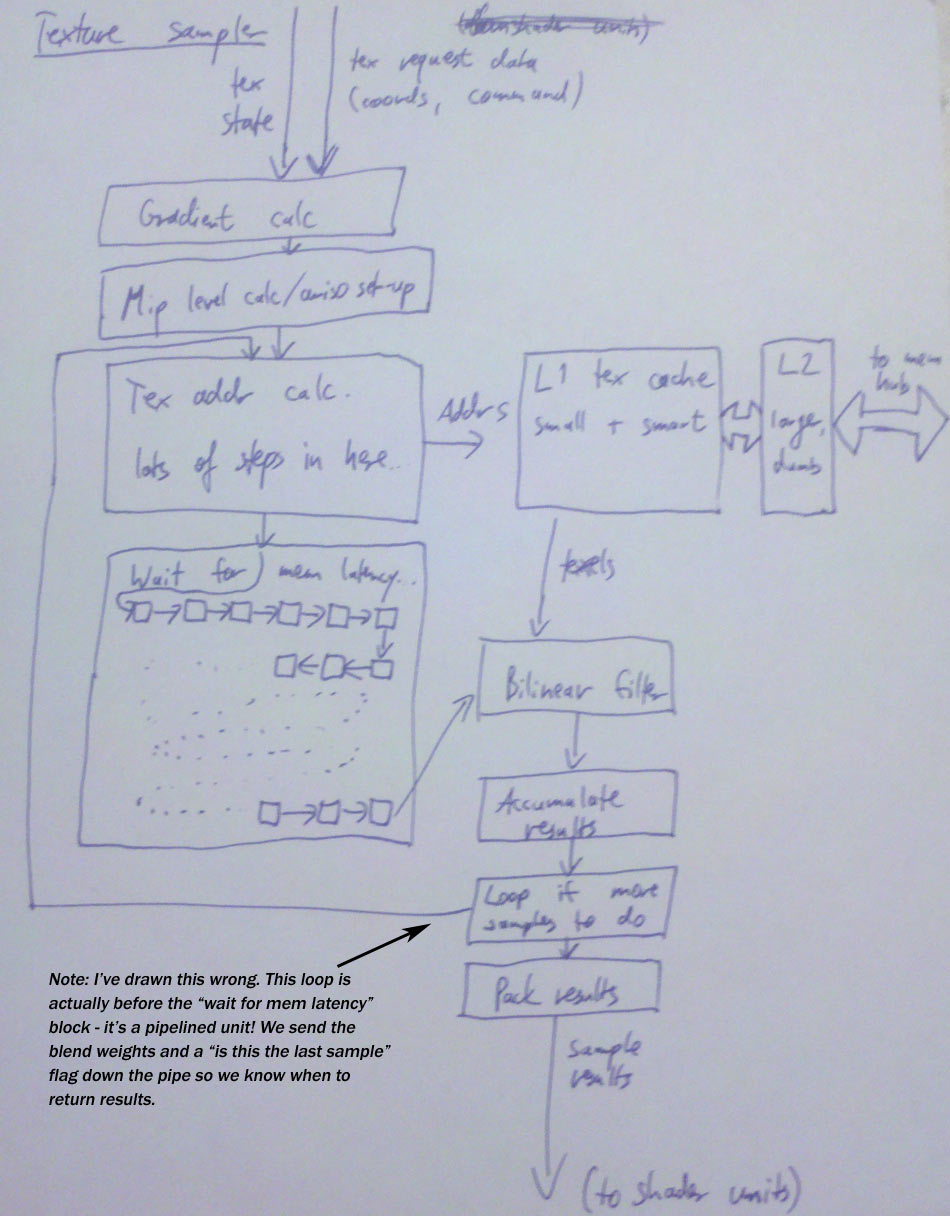
The answer is of course: No one. Our texture requests are coming from shader units, which we know process somewhere between 16 and 64 pixels / vertices / control points / … at once. So our shaders won’t be sending individual texture samples, they’ll dispatch a bunch of them at once.
This will take a while.
No, seriously. Texture samplers have a seriously long pipeline (we’ll soon see why); a texture sampling operation takes waytoo long for a shader unit to just sit idle for all that time. Again, say it with me: throughput. So what happens is that on a texture sample, a shader unit will just quietly switch to another thread/batch and do some other work, then switch back a while later when the results are there. Works just fine as long as there’s enough independent work for the shader units to do!
And once the texture coordinates arrive…
Well, there’s a bunch of computations to be done first: (In here and the following, I’m assuming a simple bilinear sample; trilinear and anisotropic take some more work, see below).
- If this is a Sample or SampleBias-type request, calculate texture coordinate gradients first.
- If no explicit mip level was given, calculate the mip level to be sampled from the gradients and add the LOD bias if specified.
- For each resulting sample position, apply the address modes (wrap / clamp / mirror etc.) to get the right position in the texture to sample from, in normalized [0,1] coordinates.
- If this is a cubemap, we also need to determine which cube face to sample from (based on the absolute values and signs of the u/v/w coordinates), and do a division to project the coordinates onto the unit cube so they are in the [-1,1] interval. We also need to drop one of the 3 coordinates (based on the cube face) and scale/bias the other 2 so they’re in the same [0,1] normalized coordinate space we have for regular texture samples.
- Next, take the [0,1] normalized coordinates and convert them into fixed-point pixel coordinates to sample from – we need some fractional bits for the bilinear interpolation.
- Finally, from the integer x/y/z and texture array index, we can now compute the address to read texels from. Hey, at this point, what’s a few more multiplies and adds among friends?
If you think it sounds bad summed up like that, let me take remind you that this is a simplified view. The above summary doesn’t even cover fun issues such as texture borders or sampling cubemap edges/corners. Trust me, it may sound bad now, but if you were to actually write out the code for everything that needs to happen here, you’d be positively horrified. Good thing we have dedicated hardware to do it for us. :) Anyway, we now have a memory address to get data from. And wherever there’s memory addresses, there’s a cache or two nearby.
Texture cache
Everyone seems to be using a two-level texture cache these days. The second-level cache is a completely bog-standard cache that happens to cache memory containing texture data. The first-level cache is not quite as standard, because it’s got additional smarts. It’s also smaller than you probably expect – on the order of 4-8kb per sampler. Let’s cover the size first, because it tends to come as a surprise to most people.
The thing is this: Most texture sampling is done in Pixel Shaders with mip-mapping enabled, and the mip level for sampling is specifically chosen to make the screen pixel:texel ratio roughly 1:1 – that’s the whole point. But this means that, unless you happen to hit the exact same location in a texture again and again, each texture sampling operation will miss about 1 texel on average – the actual measured value with bilinear filtering is around 1.25 misses/request (if you track pixels individually). This value stays more or less unchanged for a long time even as you change texture cache size, and then drops dramatically as soon as your texture cache is large enough to contain the whole texture (which usually is between a few hundred kilobytes and several megabytes, totally unrealistic sizes for a L1 cache).
Point being, any texture cache whatsoever is a massive win (since it drops you down from about 4 memory accesses per bilinear sample down to 1.25). But unlike with a CPU or shared memory for shader cores, there’s very little gain in going from say 4k of cache to 16k; we’re streaming larger texture data through the cache no matter what.
So, small L1 cache, long pipeline. What about the “additional smarts”? Well, there’s compressed texture formats. The ones you see on PC – S3TC aka DXTC aka BC1-3, then BC4 and 5 which were introduced with D3D10 and are just variations on DXT, and finally BC6H and 7 which were introduced with D3D11 – are all block-based methods that encode blocks of 4×4 pixels individually.
Filtering
And at this point, the actual bilinear filtering process is fairly straightforward. Grab 4 samples from the texture cache, use the fractional positions to blend between them. That’s a few more of our usual standby, the multiply-accumulate unit. (Actually a lot more – we’re doing this for 4 channels at the same time…)
Trilinear filtering? Two bilinear samples and another linear interpolation. Just add some more multiply-accumulates to the pile.Anisotropic filtering? Now that actually takes some extra work earlier in the pipe, roughly at the point where we originally computed the mip-level to sample from. What we do is look at the gradients to determine not just the area but also the shape of a screen pixel in texel space; if it’s roughly as wide as it is high, we just do a regular bilinear/trilinear sample, but if it’s elongated in one direction, we do several samples across that line and blend the results together.
Anyway, aside from the setup and the sequencing logic to loop over the required samples, this does not add a significant amount of computation to the pipe. At this point we have enough multiply-accumulate units to compute the weighted sum involved in anisotropic filtering without a lot of extra hardware in the actual filtering stage. :)
Texture returns
And now we’re almost at the end of the texture sampler pipe. What’s the result of all this? Up to 4 values (r, g, b, a) per texture sample requested. Unlike texture requests where there’s significant variation in the size of requests, here the most common case by far is just the shader consuming all 4 values. Mind you, sending 4 floats back is nothing to sneeze at from a bandwidth point of view, and again you might want to shave bits in some case. If your shader is sampling a 32-bit float/channel texture, you’d better return 32-bit floats, but if it’s reading a 8-bit UNORM SRGB texture, 32 bit returns are just overkill, and you can save bandwidth by using a smaller format on the return path.
The usual post-script
This time, no big disclaimers. The numbers I mentioned in the bandwidth example are honestly just made up on the spot since I couldn’t be arsed to look up some actual figures for current games :), but other than that, what I describe here should be pretty close to what’s on your GPU right now, even though I hand-waved past some of the corner cases in filtering and such (mainly because the details are more nauseating than they are enlightening).
As for texture L1 cache containing decompressed texture data, to the best of my knowledge this is accurate for current hardware. Some older HW would keep some formats compressed even in L1 texture cache, but because of the “1.25 misses/sample for a large range of cache sizes” rule, that’s not a big win and probably not worth the complexity. I think that stuff’s all gone now.
An interesting bit are embedded/power-optimized graphics chips, e.g. PowerVR; I’ll not go into these kinds of chips much in this series since my focus here is on the high-performance parts you see in PCs, but I have some notes about them in the comments for previous parts if you’re interested.
A trip through the Graphics Pipeline 2011_02的更多相关文章
- A trip through the Graphics Pipeline 2011_13 Compute Shaders, UAV, atomic, structured buffer
Welcome back to what’s going to be the last “official” part of this series – I’ll do more GPU-relate ...
- A trip through the Graphics Pipeline 2011_12 Tessellation
Welcome back! This time, we’ll look into what is perhaps the “poster boy” feature introduced with th ...
- A trip through the Graphics Pipeline 2011_10_Geometry Shaders
Welcome back. Last time, we dove into bottom end of the pixel pipeline. This time, we’ll switch ...
- A trip through the Graphics Pipeline 2011_08_Pixel processing – “fork phase”
In this part, I’ll be dealing with the first half of pixel processing: dispatch and actual pixel sha ...
- A trip through the Graphics Pipeline 2011_07_Z/Stencil processing, 3 different ways
In this installment, I’ll be talking about the (early) Z pipeline and how it interacts with rasteriz ...
- A trip through the Graphics Pipeline 2011_05
After the last post about texture samplers, we’re now back in the 3D frontend. We’re done with verte ...
- A trip through the Graphics Pipeline 2011_04
Welcome back. Last part was about vertex shaders, with some coverage of GPU shader units in general. ...
- A trip through the Graphics Pipeline 2011_03
At this point, we’ve sent draw calls down from our app all the way through various driver layers and ...
- A trip through the Graphics Pipeline 2011_01
It’s been awhile since I posted something here, and I figured I might use this spot to explain some ...
随机推荐
- 1.单件模式(Singleton Pattern)
意图:为了保证一个类仅有一个实例,并提供一个访问它的全局访问点. 1.简单实现(多线程有可能产生多个实例) public class CommonSigleton { /// <summary& ...
- TinyHttpd中sockaddr与struct sockaddr_in的区别
上午学习TinyHttpd的源码,sockaddr 结构体以前没接触过, 在网络编程中经常用到struct sockaddr和struct sockaddr_in,这里简单介绍. 在linux环境下, ...
- 用PHP实现定时器功能
1.直接使用PHP来完成定时 <?php ignore_user_abort(false);//当用户关闭页面时服务停止 set_time_limit(0); //设置执行时间,单位是秒.0表示 ...
- hdu 1005:Number Sequence(水题)
Number Sequence Time Limit: 2000/1000 MS (Java/Others) Memory Limit: 65536/32768 K (Java/Others)T ...
- android中ADT和SDK的关系(转)
ADT(Android Development Tools): 目前Android开发所用的开发工具是Eclipse,在Eclipse编译IDE环境中,安装ADT,为Android开发提供开发工具的升 ...
- Android Design
在android的讲解 Android Design
- spark streaming中使用checkpoint
从官方的Programming Guides中看到的 我理解streaming中的checkpoint有两种,一种指的是metadata的checkpoint,用于恢复你的streaming:一种是r ...
- Windows计数器做性能监控(window server 2008服务器)
使用Windows计数器 一.创建数据收集器集 二.创建数据收集器 三.使用数据收集器 1.修改数据收集器的属性 2.手动启用.手动停止数据收集器集 3.计划任务 4.在性能监视器中查看 一.性能监视 ...
- LightOJ1032 Fast Bit Calculations(数位DP)
显然数位DP. dp[i][j]表示所有末尾为j的i位二进制数相邻位的数量和 初始状态dp[2][1]=1 从长度i-1转移到长度i就是在i-1位的末尾添上0或1,转移方程就是: dp[i][0]=d ...
- 阿牛的EOF牛肉串[HDU2047]
阿牛的EOF牛肉串 Time Limit: 2000/1000 MS (Java/Others) Memory Limit: 65536/32768 K (Java/Others)Total S ...