
WPF 实际国际化多语言界面
前段时候写了一个WPF多语言界面处理,个人感觉还行,分享给大家.使用合并字典,静态绑定,动态绑定.样式等东西
效果图
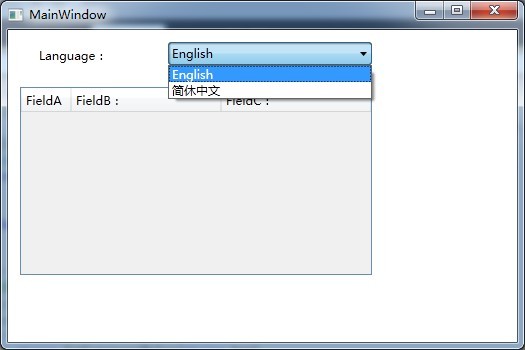

定义一个实体类LanguageModel,实际INotifyPropertyChanged接口
 using System;

 using System.Collections.Generic;

 using System.Linq;

 using System.Text;

 using System.ComponentModel;

 namespace WpfApplication1

 {

     public class LanguageModel : INotifyPropertyChanged

     {

         private string _languageCode;

         private string _languageName;

         private string _languageDisplayName;

         private string _resourcefile;

         private bool _languageenabled;

         /// <summary>

         /// 语言代码  如en,zh

         /// </summary>

         public string LanguageCode

         {

             get { return _languageCode; }

             set { _languageCode = value; OnPropertyChanged("LanguageCode"); }

         }

         /// <summary>

         /// 语言名称  如:中国 ,English

         /// </summary>

         public string LanguageName

         {

             get { return _languageName; }

             set { _languageName = value; OnPropertyChanged("LanguageName"); }

         }

         /// <summary>

         /// 语言名称  如:中国 ,English

         /// </summary>

         public string LanguageDisplayName

         {

             get { return _languageDisplayName; }

             set { _languageDisplayName = value; OnPropertyChanged("LanguageDisplayName"); }

         }

         /// <summary>

         /// 语言资源文件地址

         /// </summary>

         public string Resourcefile

         {

             get { return _resourcefile; }

             set { _resourcefile = value; OnPropertyChanged("Resourcefile"); }

         }

         /// <summary>

         /// 是否启用此语言配置文件

         /// </summary>

         public bool LanguageEnabled

         {

             get { return _languageenabled; }

             set { _languageenabled = value; OnPropertyChanged("LanguageEnabled"); }

         }

         protected void OnPropertyChanged(string name)

         {

             PropertyChangedEventHandler handler = PropertyChanged;

             if (handler != null)

             {

                 handler(this, new PropertyChangedEventArgs(name));

             }

         }

         public event PropertyChangedEventHandler PropertyChanged;

     }

 }
核心类 I18N
 using System;

 using System.Collections.Generic;

 using System.Linq;

 using System.Text;

 using System.Windows;

 using System.IO;

 namespace WpfApplication1

 {

     public class Language : LanguageModel

     {

         private ResourceDictionary _resource;

         public ResourceDictionary Resource

         {

             get { return _resource; }

             set { _resource = value; OnPropertyChanged("Resource"); }

         }

     }

     /// <summary>

     /// 国际化     注:语言资源文件在VS2010的属性设置   复制到输出目录:始终复制     生成操作:内容

     /// 资源文件 LanguageCode ,LanguageName, LanguageDisplayName,LanguageEnabled 字段必填

     /// </summary>

     public class I18N

     {

         private static string _currentLanguage = "zh-cn";

         /// <summary>

         /// 设置或获取语言编码,如果设置失败,则可能语言资源文件错误

         /// </summary>

         public static string CurrentLanguage

         {

             get { return _currentLanguage; }

             set

             {

                 if(UpdateCurrentLanguage(value))

                     _currentLanguage = value;

             }

         }

         private static List<Language> _languageIndex;

         /// <summary>

         /// 所有语言索引

         /// </summary>

         public static List<Language> LanguageIndex

         {

             get { return _languageIndex; }

         }

         /// <summary>

         /// 初始化,加载语言目录下的所有语言文件

         /// </summary>

         public static void Initialize()

         {

             _languageIndex = new List<Language>();

             string dirstring = AppDomain.CurrentDomain.BaseDirectory + "Resource\\Language\\";

             DirectoryInfo directory = new DirectoryInfo(dirstring);

             FileInfo[] files = directory.GetFiles();

             foreach (var item in files)

             {

                 Language language = new Language();

                 ResourceDictionary rd = new ResourceDictionary();

                 rd.Source = new Uri(item.FullName);

                 language.LanguageCode = rd["LanguageCode"] == null ? "未知" : rd["LanguageCode"].ToString();

                 language.LanguageName = rd["LanguageName"] == null ? "未知" : rd["LanguageName"].ToString();

                 language.LanguageDisplayName = rd["LanguageDisplayName"] == null ? "未知" : rd["LanguageDisplayName"].ToString();

                 language.LanguageEnabled = rd["LanguageEnabled"] == null ? false : bool.Parse(rd["LanguageEnabled"].ToString());

                 language.Resourcefile = item.FullName;

                 language.Resource = rd;

                 if(language.LanguageEnabled)

                     _languageIndex.Add(language);

             }

         }

         /// <summary>

         /// 更新语言配置.  同时同步CurrentLanguage字段

         /// </summary>

         private static bool UpdateCurrentLanguage(string LanguageCode)

         {

             if (LanguageIndex.Exists(P => P.LanguageCode == LanguageCode&&P.LanguageEnabled==true))

             {

                 Language language = LanguageIndex.Find(P => P.LanguageCode == LanguageCode&&P.LanguageEnabled==true);

                 if (language != null)

                 {

                     foreach (var item in LanguageIndex)

                     {

                         Application.Current.Resources.MergedDictionaries.Remove(item.Resource);

                     }

                     Application.Current.Resources.MergedDictionaries.Add(language.Resource);

                     return true;

                 }

             }

             return false;

         }

         /// <summary>

         /// 查找语言资源文件具体的某项值,类似索引器

         /// </summary>

         /// <param name="key"></param>

         /// <returns></returns>

         public static string GetLanguageValue(string key)

         {

             ResourceDictionary rd = Application.Current.Resources;

             if (rd == null)

                 return "";

             object obj = rd[key];

             return obj == null ? "" : obj.ToString();

         }

     }

 }
资料文件直接使用 XX.xaml文件 注:语言资源文件在VS2010的属性设置 复制到输出目录:始终复制 生成操作:内容 ,确保xaml文件会复制到项目中,而不是编译到dll中
 <ResourceDictionary xmlns="http://schemas.microsoft.com/winfx/2006/xaml/presentation"

                     xmlns:x="http://schemas.microsoft.com/winfx/2006/xaml"

                     xmlns:sys="clr-namespace:System;assembly=mscorlib">

     <sys:String x:Key="LanguageCode">zh</sys:String>

     <sys:String x:Key="LanguageName">简休中文</sys:String>

     <sys:String x:Key="LanguageDisplayName">简休中文</sys:String>

     <sys:String x:Key="LanguageEnabled">true</sys:String>

     <sys:String x:Key="LanguageLanguage">语言:</sys:String>

     <sys:String x:Key="LanguageA">字段A:</sys:String>

     <sys:String x:Key="LanguageB">字段B:</sys:String>

     <sys:String x:Key="LanguageC">字段C:</sys:String>

 </ResourceDictionary>
默认语言可以在App.xaml里设置
 <Application x:Class="WpfApplication1.App"

              xmlns="http://schemas.microsoft.com/winfx/2006/xaml/presentation"

              xmlns:x="http://schemas.microsoft.com/winfx/2006/xaml"

              Startup="Application_Startup"

              StartupUri="MainWindow.xaml">

     <Application.Resources>

         <ResourceDictionary>

             <ResourceDictionary.MergedDictionaries>

                 <ResourceDictionary Source="Resource/Language/zh.xaml"/>

             </ResourceDictionary.MergedDictionaries>

         </ResourceDictionary>

     </Application.Resources>

 </Application>
界面上使用动态绑定或静态绑定资源 (DynamicResource ,StaticResource) , DataGrid表头使用HeaderSytle
动态绑定:可以实时更新语言种类.
静态绑定,不能实时更新语言种类,如:在登录的时候已经确实语言种类,进入系统后而不能更改.
示例效果界面
 <Window x:Class="WpfApplication1.MainWindow"

         xmlns="http://schemas.microsoft.com/winfx/2006/xaml/presentation"

         xmlns:x="http://schemas.microsoft.com/winfx/2006/xaml"

         Title="MainWindow" Height="" Width="">

     <Window.Resources>

         <Style x:Key="HeaderA" TargetType="{x:Type DataGridColumnHeader}">

             <Setter Property="Content" Value="{DynamicResource LanguageA}" />

         </Style>

         <Style x:Key="HeaderB" TargetType="{x:Type DataGridColumnHeader}">

             <Setter Property="Content" Value="{DynamicResource LanguageB}" />

         </Style>

         <Style x:Key="HeaderC" TargetType="{x:Type DataGridColumnHeader}">

             <Setter Property="Content" Value="{DynamicResource LanguageC}" />

         </Style>

     </Window.Resources>

     <Grid>

         <Grid.RowDefinitions>

             <RowDefinition Height="40*" />

             <RowDefinition Height="271*" />

         </Grid.RowDefinitions>

         <Label Content="{DynamicResource LanguageLanguage}" Height="" HorizontalAlignment="Left" Margin="26,12,0,0" Name="label1" VerticalAlignment="Top" />

         <ComboBox Height="" HorizontalAlignment="Left" DisplayMemberPath="LanguageDisplayName" SelectedIndex="" Margin="160,12,0,0" Name="comboBox1" VerticalAlignment="Top" Width="" SelectionChanged="comboBox1_SelectionChanged" />

         <DataGrid AutoGenerateColumns="False" Grid.Row="" Height="" HorizontalAlignment="Left" Margin="12,17,0,0" Name="dataGrid1" VerticalAlignment="Top" Width="" >

             <DataGrid.Columns>

                 <DataGridTemplateColumn  Width=""  HeaderStyle="{StaticResource HeaderA}"  >

                     <DataGridTemplateColumn.CellTemplate>

                         <DataTemplate>

                             <CheckBox Name="chkStart"  IsChecked="{Binding IsStart,UpdateSourceTrigger=PropertyChanged}" IsEnabled="{Binding Path=DataContext.IsEnabled, Mode=OneWay, RelativeSource={RelativeSource FindAncestor, AncestorType=DataGrid}}"/>

                         </DataTemplate>

                     </DataGridTemplateColumn.CellTemplate>

                 </DataGridTemplateColumn>

                 <DataGridTextColumn Width="3*" HeaderStyle="{StaticResource HeaderB}" Binding="{Binding Path=Name, UpdateSourceTrigger=PropertyChanged}" IsReadOnly="True"  />

                 <DataGridTextColumn Width="3*"  HeaderStyle="{StaticResource HeaderC}" Binding="{Binding Path=Website, UpdateSourceTrigger=PropertyChanged,ValidatesOnDataErrors =True}"  IsReadOnly="True"   />

             </DataGrid.Columns>

         </DataGrid>

     </Grid>

 </Window>
最后附上源代码 ,谢谢
End
技术在于分享,大家共同进步
WPF 实际国际化多语言界面的更多相关文章
- Blazor 国际化多语言界面 (I18nText )
在实际使用中,我们经常会遇到需要把程序界面多种语言切换,适应不同地区使用者的需求,本文介绍一个我初学Blazor接触到的库,边撸边讲解. 包名: Toolbelt.Blazor.I18nText ht ...
- 为程序设置多语言界面——C#
考虑到程序的国际化需求,需要为程序设置多语言界面. 1,新建一个资源文件,名字可以是对应界面+语言代码(MainForm.zh-CN).这样资源文件就会自动添加到对应界面下面. 2,更改界面属性Loc ...
- WPF 获得当前输入法语言区域
原文:WPF 获得当前输入法语言区域 本文告诉大家如何获得 WPF 输入法的语言区域 需要使用 user32 的方法,很简单,请看下面 [DllImport("user32.dll" ...
- iOS 国际化多语言设置 xcode7
iOS 国际化多语言设置 方式一: 1. 在storyboard中创建好UI,然后在 project 里面 Localizables 栏目里面,添加你需要的语言:默认是Englist; 比如这里我添 ...
- WPF如何实现类似iPhone界面切换的效果(转载)
WPF如何实现类似iPhone界面切换的效果 (version .1) 转自:http://blog.csdn.net/fallincloud/article/details/6968764 在论坛上 ...
- WPF换肤之四:界面设计和代码设计分离
原文:WPF换肤之四:界面设计和代码设计分离 说起WPF来,除了总所周知的图形处理核心的变化外,和Winform比起来,还有一个巨大的变革,那就是真正意义上做到了界面设计和代码设计的分离.这样可以让美 ...
- WPF下的视频录制界面设计
原文:WPF下的视频录制界面设计 在去年12月份,我曾经写过三篇文章讨论C#下视频录制.播放界面的设计.这三篇文章是:利用C#画视频录制及播放的界面(一) 利用C#画视频录制及播放的界面(二)利用C# ...
- 更好用的excel国际化多语言导出
不知道大家在开发中有没有遇到过『excel导出』的需求,反正我最近写了不少这种功能,刚开始利用poi,一行行的手动塞数据,生成excel,而且还有国际化需求,比如:标题栏有一列,用户切换成" ...
- [Spring]Spring Mvc实现国际化/多语言
1.添加多语言文件*.properties F64_en_EN.properties详情如下: F60_G00_M100=Please select data. F60_G00_M101=Are yo ...
随机推荐
- ASP.NET MVC 入门8、ModelState与数据验证
原帖地址:http://www.cnblogs.com/QLeelulu/archive/2008/10/08/1305962.html ViewData有一个ModelState的属性,这是一个类型 ...
- Rsync 详细配置说明
rsync是类unix系统下的数据镜像备份工具. 它的特性如下:可以镜像保存整个目录树和文件系统.可以很容易做到保持原来文件的权限.时间.软硬链接等等.无须特殊权限即可安装.快速:第一次同步时 rsy ...
- Tips for thrift
Introduction I have designed and developed game servers successfully with thrift (http://thrift.apac ...
- jQuery的ajax 方法提交多个对象数组问题 C# traditional $.param
当用$.ajax()向后台提交参数时,如果参数中数组的话一般在后台会用List<T>接收;但老是不成功如下面代码 "}]; "}]; function addUser( ...
- S1700
- Alsa驱动snd_soc_read的底层实现
在分析snd_soc_codec_driver的结构体时,发现有些芯片的驱动中定义了字段reg_word_size, reg_cache_size, reg_cache_default,但没有定义re ...
- CLR via C#深解笔记六 - 泛型
面向对象编程一个好处就是“代码重用”,极大提高了开发效率.如是,可以派生出一个类,让它继承基类的所有能力,派生类只需要重写虚方法,或添加一些新的方法,就可以定制派生类的行为,使之满足开发人员的需求. ...
- HMM MEMM & label bias
(http://blog.csdn.net/xum2008/article/details/38147425) 隐马尔科夫模型(HMM): 图1. 隐马尔科夫模型 隐马尔科夫模型的缺点: 1.HMM只 ...
- toad 常用快捷键与配置
F8 调出以前执行的sql命令 F9 执行全部sql Ctrl+. 补全table_name Ctrl+t 补全table_name,或者显示字段 alt+ 箭头上下 看sql history Ctr ...
- [LeetCode] Fraction to Recurring Decimal 哈希表
Given two integers representing the numerator and denominator of a fraction, return the fraction in ...