
Shell-04
- grep程序
Linux下文本处理三剑客-----grep sed awk
sed:文本行编辑器(流编辑器)
awk:报告生成器(文本输出格式化)
grep:文本行过滤工具 每一行进行过滤
pattern一般通过通配符和正则表达式两种方式进行匹配
包含三个命令:grep egrep fgrep,它们是用来进行 行模式(pattern)匹配的
Egrep = grep -E //使用扩展的正则表达式
Fgrep = fast grep //只使用文件通配符进行匹配 快速文件匹配 不调用正则表达式引擎
grep的用法:
grep [option] … PATTERN [filename]
A* 以A开头的任意文件 *---代表任意字符
*grep默认使用正则表达式进行文本匹配*
grep常见选项:
-E 支持使用扩展的正则表达式(ERE)regexp
-P 使用perl语言的正则表达式引擎进行搜索(每一种语言的正则表达式引擎都不相同,甚至sed、grep、awk使用的正则表达式引擎也不相同)
-i 忽略大小写
-v 进行反选
-o 仅仅输出匹配的内容(默认输出的是匹配到的行)
--color=auto 语法着色
-n 显示行号
-w 匹配固定的单词
- 正则表达式----正则表达式PATTERN
作用:通过一些特殊字符,来表示一类字符内容,然后交给前面的命令来执行;如果使用特殊字符本身的含义,就需要进行转义(\)
回顾文件通配符:* ? [] [^ ]
a) 字符匹配
. 代表任意一个字符==?
[] 范围内的任意一个字符
[^ ] 范围外的任意一个字符
字符类:[:digit:] [:alnum:] [:alpha:] [:lower:] [:upper:] [:space:] [:punct:]
b) 次数匹配
* 匹配前面相邻的一个字符0次到n次 n—无数次
\? 匹配前面相邻的一个字符0次到1次
\+ 匹配前面相邻的一个字符1次到n次
\{m\} 匹配前面相邻的一个字符m次
\{m,n\} 匹配前面相邻的一个字符m到n次
\{0,n\} 匹配前面相邻的一个字符0次到n次
\{m,\} 匹配前面相邻的一个字符至少m次
c) 位置锚定
^ 锚定行首
$ 锚定行尾
\b 锚定单词词首和锚定词尾
\> 锚定词尾
\< 锚定词尾
<\root\> --- 匹配root这个单词
d) 分组
abc*----c出现0-n次
abc看作整体,就要分组
\(\) 实例:\(abc\)* abcabcabc…
**分组特性:默认情况下,linux系统会为分组指定变量,变量的表示形式\1 \2 \3…..


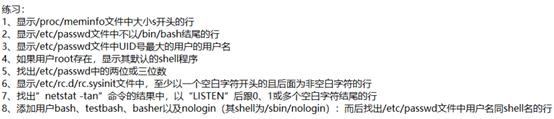
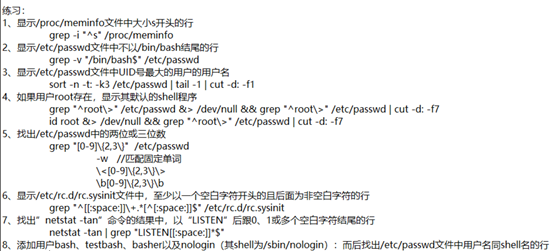
1.grep -i “^s” /pro
2.grep -v “/b$” /e
3.sort -n -t: -k3 /etc/passwd | tail -1 | cut -d: -f1
4.alias grep =”grep “^root\>” --color=auto”
grep “^root\>” /etc/passwd | cut -d: -f7
grep “^root\>” /etc/passwd &> /dev/null && grep “^root\>” /etc/passwd &> /dev/null | cut -d: -f7
id root &> /dev/null && grep “^root\>” /etc/passwd &> /dev/null | cut -d: -f7
5.grep “[0-9]\{2,3\}” /etc/passwd
grep -w “[0-9]\{2,3\}\>” /etc/passwd
grep “\<[0-9]\{2,3\}\>” /etc/passwd

/etc/rc.d/rc.sysinit-------centos7没有文件
6. grep “^[[:space:]]\+ .*[^[:space:]]$” /etc/rc.d/rc.sysinit
7.netstat -tan ----- -t tcp -n
netstat -tan | grep “LISTEN[[:space:]]*$”
8.
-s指定用户使用的
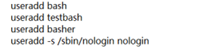
grep “^\(bash\)\b.*\1$” /etc/passwd
grep “^\(bash\)\>.*\1$” /etc/passwd

grep “\(^[[:alnum:]]\+\>\).*\1$” /etc/passwd
9.IP地址:
0-255.0-255.0-255.0-255
0-255
2 0-4 0-9 2[0-4][0-9]
2 5 0-5 25[0-5]
1 0-9 0-9 1[0-9][0-9]
0 0-9 0-9 [0-9][0-9]
0 0 0-9 [0-9]
2[0-4][0-9] | 25[0-5] | 1[0-9][0-9] | [0-9][0-9] | [0-9] \. 2[0-4][0-9] | 25[0-5] | 1[0-9][0-9] | [0-9][0-9] | [0-9] \. 2[0-4][0-9] | 25[0-5] | 1[0-9][0-9] | [0-9][0-9] | [0-9] \. 2[0-4][0-9] | 25[0-5] | 1[0-9][0-9] | [0-9][0-9] | [0-9]

Shell-04的更多相关文章
- shell编程中用户输入处理(shell 04)
shell编程中用户输入处理1.命令行参数2.脚本运行时获取输入 命令行参数 通过空格来进行分割的位置参数 :$+position $0,$1,$2 ....$0 :程序名$1,$2,$3 ... $ ...
- Linux Shell 04 数字/字符串/文件测试
一. 数字测试 格式:n1 -op n2 测试操作op: eq/ne/le/ge/lt/gt --> 等于/不等于/小于等于/大于等于/小于/大于 1. 数字比较可以使用特殊的( ...
- Shell 04 字符串处理、正则表达式
一.字符串的处理 1.字符串截取 1.1 s{}表达式 ${变量名:起始位置:长度} (从0开始) n=number (n="number") echo ${#n} -- ...
- centos6安装部署git服务器(gitlab6.4)
环境准备 python版本2.6git版本 1.8.4.1ruby版本ruby-2.0.0-p353gitlab-shell版本 v1.8.0gitlab版本6.4.3 因centos6系列的pyth ...
- python练习六十二:文件处理,往文件中所有添加指定的前缀
往文件中所有添加指定的前缀 方法一:open方法 f_r = open('text.txt') f_w = open('text_new.txt','w+') i = 0 while True: i ...
- 【Linux】一步一步学Linux——初识Linux命令解析器(10)
目录 00. 目录 01. Shell简介 02. Shell分类 03. 交互式shell和非交互式shell 04. 登录shell和非登录shell 05. Shell类型 06. 参考 00. ...
- ubuntu16.04 安装power shell
ubuntu16.04 安装power shell # Download the Microsoft repository GPG keys wget -q https://packages.micr ...
- Ubuntu 16.04下在Shell终端下使用nautilus快速打开窗口文件夹
Ubunut 16.04默认使用nautilus进行管理资源文件夹,nautilus默认是支持参数传递的. 使用: nautilus /dirurl 打开当前文件夹(可以使用$PWD代替): naut ...
- ubuntu12.04中shell脚本无法使用source的原因及解决方法
现象: shell脚本中source aaa.sh时提示 source: not found 原因: ls -l `which sh` 提示/bin/sh -> dash 这说明是用dash来进 ...
- Ubuntu 14.04 在桌面上双击运行shell 脚本文件
http://askubuntu.com/questions/465531/how-to-make-a-shell-file-execute-by-double-click up vote7down ...
随机推荐
- Android下Native的so编译:使用cmakelists.txt
android studio的CMakeLists.txt写好后,在Studio中编译没问题,在命令编译时则需要配置很多参数才能成功 示例CMakeLists.txt文件: cmake_minimum ...
- 正则表达式断言(Assertions)
一 零宽正向先行断言 x(?=y) 仅匹配被y跟随的x. const regExp = /Jack(?=Sparrow|Dawson)/g; const str = 'JackJones JackSp ...
- python 并发编程 多进程 互斥锁与join区别
互斥锁与join 互斥锁和join都可以把并发变成串行 以下代码是用join实现串行 from multiprocessing import Process import time import js ...
- 关于Logcat
1 android logcat api Log.i(String tag, String msg) info,普通信息 Log.d(String tag, String msg) debug,调试信 ...
- [转帖]100G QSFP28与CFP,CFP2,CFP4光模块的比较
100G QSFP28与CFP,CFP2,CFP4光模块的比较 https://www.eefocus.com/etulink/blog/17-09/423967_5c520.html 数据中心网络发 ...
- python虚拟环境virtualenv创建与迁移
1.安装virtualenv pip install virtualenv #(python2) pip3 install virtualenv #(python3) 2.创建venv virtual ...
- adb 配置连接
一. adb环境安装 1.1. windown 驱动安装 1. 下载驱动(ADB Kits):http://adbshell.com/downloads 2. adb 测试 <1>. 解压 ...
- javascript xml转json
1.代码 //加载xml数据 function loadXml(str) { if (str == null) { return null; } var doc = str; try{ doc = c ...
- 剑指offer-重构二叉树-树-python
题目描述 输入某二叉树的前序遍历和中序遍历的结果,请重建出该二叉树.假设输入的前序遍历和中序遍历的结果中都不含重复的数字.例如输入前序遍历序列{1,2,4,7,3,5,6,8}和中序遍历序列{4,7, ...
- ExtensionlessUrlHandler-Integrated-4.0
window 10 锁定webconfig解决方案 解决办法: 出现这个错误是因为 IIS 7 采用了更安全的 web.config 管理机制,默认情况下会锁住配置项不允许更改.要取消锁定可以以管理 ...