
vue启动问题(You may use special comments to disable some warnings. Use // eslint-disable-next-line to ignore the next line. Use /* eslint-disable */ to ignore all warnings in a file.)
解决vue启动出现:

在build/webpack.base.conf.js文件中,把...(config.dev.useEslint ? [createLintingRule()] : [])注释或者删除掉就可以了
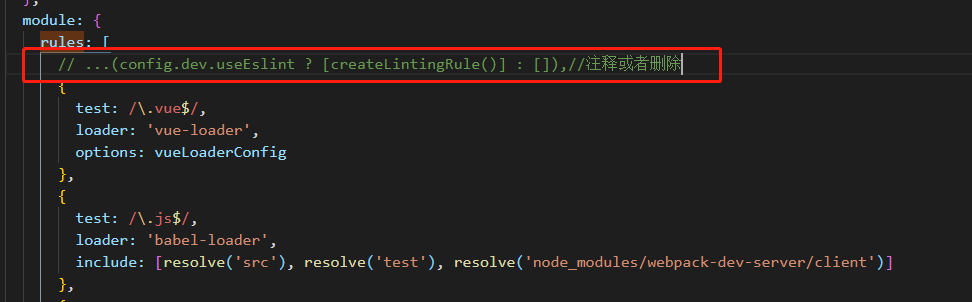
然后在运行npm run dev就可以了
vue启动问题(You may use special comments to disable some warnings. Use // eslint-disable-next-line to ignore the next line. Use /* eslint-disable */ to ignore all warnings in a file.)的更多相关文章
- 解决You may use special comments to disable some warnings.
问题:运行vue项目出现: You may use special comments to disable some warnings.Use // eslint-disable-next-line ...
- Vue笔记:webpack项目vue启动流程
VUE启动流程 1. package.json 在执行npm run dev的时候,会在当前目录中寻找 package.json 文件, 有点类似 Maven 的 pom.xml 文件,包含项目的名称 ...
- vue中利用.env文件存储全局环境变量,以及配置vue启动和打包命令
目录 1,前言 2,.env文件的作用 3,配置.env文件 4,配置启动命令 5,获取.env中的全局变量 5,实际用处 1,前言 分享一下vue项目中利用.env文件存储全局环境变量,以及利于项目 ...
- vue项目启动报错You may use special comments to disable some warnings.
在build/webpack.base.conf.js文件中,注释或者删除掉:...(config.dev.useEslint ? [createLintingRule()] : []),
- vue——解决“You may use special comments to disable some warnings. Use // eslint-disable-next-line to ignore the next line. Use /* eslint-disable */ to ignore all warnings in a file. ”
在build/webpack.base.conf.js文件中,注释或者删除掉:module->rules中有关eslint的规则 module: { rules: [ //...(config. ...
- Vue —— You may use special comments to disable some warnings. Use // eslint-disable-next-line to ignore the next line. Use /* eslint-disable */ to ignore all warnings in a file.问题
方法1: 在build/webpack.base.conf.js文件中,找到module->rules中有关eslint的规则,注释或者删除掉就可以了 module: { rules: [ // ...
- Vue踩坑日记-You may use special comments to disable some warnings. Use // eslint-disable-next-line to ignore the next line. Use /* eslint-disable */ to ignore all warnings in a file.
记录时间:2019年4月24日16:55:54 在build/webpack.base.conf.js文件中,注释或者删除掉:module->rules中有关eslint的规则
- dev: `webpack-dev-server --inline --progress --config build/webpack.dev.conf.js` vue启动报错解决
这是因为webpack-dev-server版本和vue版本不一样,需要将webpack-dev-server卸载了,安装对应版本 查看vue版本是 vue -V 注意:V是大写 卸载npm unin ...
- 设置vue启动项目后默认显示的页面
通过配置路由,可以设置vue项目启动后默认显示的页面.路由的path设置为path:"/",启动项目后就会显示默认的组件页面. import Vue from 'vue' impo ...
随机推荐
- pandas 分组统计
# coding:utf-8 import pandas as pd import numpy as np # path = r'C:\Users\wuzaipei\Desktop\桂林三金项目签到情 ...
- 【Spring 源码】Spring 加载资源并装配对象的过程(XmlBeanDefinitionReader)
Spring 加载资源并装配对象过程 在Spring中对XML配置文件的解析从3.1版本开始不再推荐使用XmlBeanFactory而是使用XmlBeanDefinitionReader. Class ...
- 云风协程库coroutine源码分析
前言 前段时间研读云风的coroutine库,为了加深印象,做个简单的笔记.不愧是大神,云风只用200行的C代码就实现了一个最简单的协程,代码风格精简,非常适合用来理解协程和用来提升编码能力. 协程简 ...
- selenium爬虫后上传数据库。
一.准备工作 1.1安装软件 安装python.安装谷歌浏览器.将chromedriver.exe放到指定位置.放到Scripts文件夹中.我这边的路径为:C:\Users\1\AppData\Loc ...
- 300英雄的危机(heroes)
题面 正解与图书馆馆长的考验一致,都是分层图SPFA: #include <iostream> #include <cstdio> #include <cstring&g ...
- 应对Hadoop集群数据疯长,这里祭出了4个治理对策!
一.背景 在目前规模比较大的互联网公司中,总数据量能达到10PB甚至几十PB数据量的公司,我认为中国已经有超过了20家了.而在这些公司中,也有很多家公司的 日数据增长达到100TB+ 了. 所以我们每 ...
- Vue中自定义指令的使用方法!
除了核心功能默认内置的指令 (v-model 和 v-show),Vue 也允许注册自定义指令.注意,在 Vue2.0 中,代码复用和抽象的主要形式是组件.然而,有的情况下,你仍然需要对普通 DOM ...
- Vue+axios 拦截,超时登录问题
axios.interceptors.request.use(config => config, error => Promise.reject(error)); axios.interc ...
- 第十二篇 JavaScript(简称JS) 实现显示与隐藏
JavaScript JavaScript简称JS.JS是脚本语言,它是一种轻量级的编程语言,是可以插入HTML页面的编程代码,几乎所有现代浏览器都是支持的. 理论老师不行,我就抄袭手册上的一些关 ...
- echo(),print(),print_r()的区别?
echo可以一次输出多个值,多个值之间用逗号分隔.echo是语言结构(language construct),而并不是真正的函数,因此不能作为表达式的一部分使用.echo是php的内部指令,不是函数, ...