
Spring(二)--Spring入门案例
Spring入门案例
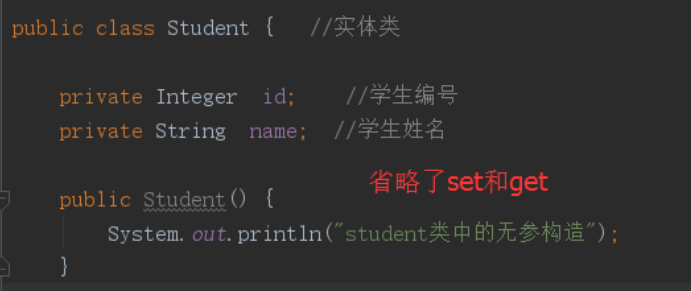
1.需要的实体类
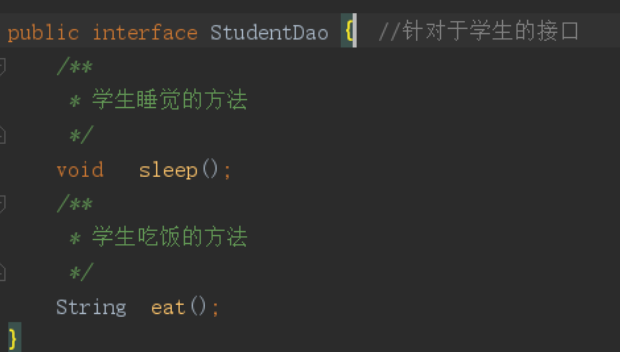
2.需要的接口和实现类
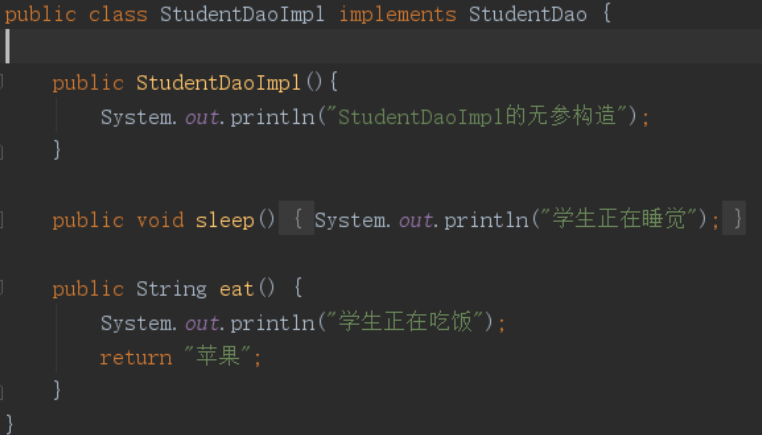
3.需要的service和实现类

/**

 * service层的作用

 *    在不改变dao层代码的前提下,增加业务逻辑操作

 */

public class StudentServiceImpl implements   StudentService {

    public StudentServiceImpl(){

        System.out.println("StudentServiceImpl的无参构造");

    }

    //创建出dao层实例   存在耦合 StudentDao dao=new StudentDaoImpl();

    StudentDao dao;

    public void sleep() {

        System.out.println("开始记录日志");  //系统级业务

             dao.sleep();  //主业务

        System.out.println("结束记录日志"); //系统级业务

    }

    public String eat() {

        System.out.println("开始记录日志"); //系统级业务

         String result=  dao.eat();//主业务

        System.out.println("结束记录日志"); //系统级业务

        return  result;

    }

    public StudentDao getDao() {

        return dao;

    }

    //DI 依赖注入

    public void setDao(StudentDao dao) {

        this.dao = dao;

    }

}
4.需要的核心配置文件
<?xml version="1.0" encoding="UTF-8"?>

<beans xmlns="http://www.springframework.org/schema/beans"

       xmlns:xsi="http://www.w3.org/2001/XMLSchema-instance"

       xmlns:context="http://www.springframework.org/schema/context"

       xmlns:aop="http://www.springframework.org/schema/aop"

       xmlns:tx="http://www.springframework.org/schema/tx"

 xsi:schemaLocation="

        http://www.springframework.org/schema/beans

        http://www.springframework.org/schema/beans/spring-beans.xsd

        http://www.springframework.org/schema/context

        http://www.springframework.org/schema/context/spring-context.xsd

        http://www.springframework.org/schema/tx

        http://www.springframework.org/schema/tx/spring-tx.xsd

        http://www.springframework.org/schema/aop

        http://www.springframework.org/schema/aop/spring-aop.xsd">

<!--管理dao层的对象-->

    <bean id="studentDao" class="com.xdf.dao.StudentDaoImpl"/>

<!--管理service层的对象-->

    <bean id="studentService" class="com.xdf.service.StudentServiceImpl">

        <!--给指定的dao属性赋值-->

        <property name="dao"  ref="studentDao"/>

    </bean>

    <!--创建student类的bean

      xml文件中所有的bean 都是单例的

      默认scope="singleton"

      scope="prototype"  设置原型   默认也是延迟加载

       lazy-init="true" 设置延迟加载

    -->

    <bean id="student" class="com.xdf.bean.Student" lazy-init="true">

         <property name="id" value="20"/>

         <property name="name" value="小黑"/>

    </bean>

</beans>
5.需要的测试类
public class StudentDemo {

    /**

     * 之前的方式

     */

   @Test

   public  void  test01(){

       //实例化service层对象

       StudentService service=new StudentServiceImpl();

       service.sleep();

   }

    /**

     * Spring容器的工作:

     * 01.创建各种bean对象

     * 02.管理bean之间的关系

     *

     *ApplicationContext接口有个实现类

     * ClassPathXmlApplicationContext("spring.xml")

     *   特点:

     *   spring.xml文件中配置的所有bean都实例化了!

     */

   @Test

   public  void  test02(){

       //通过spring容器来 实例化service层对象

       ApplicationContext context=new ClassPathXmlApplicationContext("spring.xml");

       System.out.println("==========================================");

       //spring.xml文件中bean的id

      StudentService service= (StudentService) context.getBean("studentService");

      service.sleep();

   }

    /**

     * 实现按需加载  不是把核心文件中配置的所有bean都实例化!

     */

   @Test

   public  void  test03(){

       //通过spring容器来 实例化service层对象

       XmlBeanFactory context=new XmlBeanFactory(new ClassPathResource("spring.xml"));

       System.out.println("==========================================");

       //spring.xml文件中bean的id

      StudentService service= (StudentService) context.getBean("studentService");

      service.sleep();

   }

   /**

     * 从某个位置获取核心配置文件

     */

   @Test

   public  void  test04(){

       //通过spring容器来 实例化service层对象

       ApplicationContext context=new FileSystemXmlApplicationContext("E:/spring.xml");

       System.out.println("==========================================");

       //spring.xml文件中bean的id

      StudentService service= (StudentService) context.getBean("studentService");

      service.sleep();

   }

    /**

     * 验证单例模式

     * 所有由spring容器创建出来的对象 默认都是单例的

     */

    @Test

    public  void  test05(){

        //通过spring容器来 实例化service层对象

        ApplicationContext context=new ClassPathXmlApplicationContext("spring.xml");

        System.out.println("==========================================");

        //spring.xml文件中bean的id

        Student stu1= (Student) context.getBean("student");

        System.out.println(stu1);

        Student stu2= (Student) context.getBean("student");

        System.out.println(stu1==stu2);

    }

}
还会继续更新的!下次见咯!
Spring(二)--Spring入门案例的更多相关文章
- Spring学习笔记(一)—— Spring介绍及入门案例
一.Spring概述 1.1 Spring是什么 Spring是一个开源框架,是于2003年兴起的一个轻量级的Java开发框架, 由Rod Johnson 在其著作<Expert one on ...
- SSM-Spring-01:Spring的概念+入门案例
------------吾亦无他,唯手熟尔,谦卑若愚,好学若饥------------- Spring 提起Spring,就会想到企业级框架这个词 企业级系统: 1.大规模:用户数量多,数据规模庞大, ...
- Python爬虫Scrapy(二)_入门案例
本章将从案例开始介绍python scrapy框架,更多内容请参考:python学习指南 入门案例 学习目标 创建一个Scrapy项目 定义提取的结构化数据(Item) 编写爬取网站的Spider并提 ...
- Spring(二)之入门示例
任何编程技术,特别是入门示例,通常都是Hello World,在这里我也遵循这个业界公认的原则. 这里我使用的maven项目,大家如果想要演示,建议使用Eclipse(含maven插件)或Idea(含 ...
- Spring(二)Bean入门
一.BeanFactory介绍 1.1.Bean: 在Spring技术中是基于组件的 最基本了是最常用的单元 其实实例保存在Spring的容器当中 Bean通常被定义在配置文件当中,Bean实例化由S ...
- spring的IOC入门案例
步骤: 一,导入jar 二,创建类,在类里创建方法 三,创建Spring配置文件,配置创建类 四,写代码测试对象创建
- quartz(3)--spring整合quartz入门案例
第一步:导入jar <!-- quartz --> <dependency> <groupId>org.quartz-scheduler</groupId&g ...
- spring配置mq入门案例
第一步:添加maven配置 <!-- mq --> <dependency> <groupId>org.springframework</groupId> ...
- Spring boot 官网学习笔记 - Spring Boot CLI 入门案例
安装CLI https://repo.spring.io/release/org/springframework/boot/spring-boot-cli/2.1.1.RELEASE/spring-b ...
- Spring Boot 简单入门案例
第一:打开idea 找到spring Initializr 第二:点击Next 在点击下一步 找到web之后勾选第一个spring web 就完成了 在写一个类 点击运行 结果如下:
随机推荐
- DOM导航与DOM事件
HTML DOM 导航 通过 HTML DOM,能够使用节点关系在节点树中导航. ㈠HTML DOM 节点列表 getElementsByTagName() 方法返回节点列表.节点列表是一个节点数组. ...
- BZOJ 2434: [Noi2011]阿狸的打字机 AC自动机+fail树+线段树
Description 阿狸喜欢收藏各种稀奇古怪的东西,最近他淘到一台老式的打字机.打字机上只有28个按键,分别印有26个小写英文字母和'B'.'P'两个字母. 经阿狸研究发现,这个打字机是这样工作的 ...
- javascript中的原型和原型链(二)
原型(prototype) 函数的 prototype 属性(图) 每个函数都有一个prototype属性,它默认指向一个Object空对象(即称为:原型对象) 原型对象中有一个属性construct ...
- codevs 1077 多源最短路x
题目描述 Description 已知n个点(n<=100),给你n*n的方阵,a[i,j]表示从第i个点到第j个点的直接距离. 现在有Q个询问,每个询 ...
- RedisTemplate集合使用说明-opsForList(二)
1.leftPush(K key, V value) 在变量左边添加元素值. Java代码 redisTemplate.opsForList().leftPush("list" ...
- C++入门经典-例2.10-控制输出精确度
1:代码如下: // 2.10.cpp : 定义控制台应用程序的入口点. // #include "stdafx.h" #include <iostream> usin ...
- vue中bus.$on事件被多次绑定
问题描述:只要页面没有强制刷新,存在组件切换,bus.$on方法会被多次绑定,造成事件多次触发 解决办法一:在每次调用方法前先解绑事件( bus.$off ),然后在重新绑定( bus.$on ) b ...
- ffmpeg静态库Windows版本
GitHub上面有一个项目 提供了编译环境 以及编译好的静态库 https://github.com/ShiftMediaProject/FFmpeg
- RF变量
变量作用域 变量类型 变量作用域 case中的变量 case内部 userkeyword中的变量 userkeyword内部 文件型suite里的变量 文件suite内部,其下case均可使用 目录型 ...
- P1200 [USACO1.1]你的飞碟在这儿Your Ride Is He…
P1200 [USACO1.1]你的飞碟在这儿Your Ride Is He… 大写祖母转数字 -64 发现dalao #include<bits/stdc++.h> usi ...