
TCP Wrapper 特殊使用
更多,更好内容请参见: http://www.ibm.com/developerworks/cn/aix/library/au-tcpwrapper/
一. 用处和用法
没有符合hosts.allow,hosts.deny中的配置的主机,用ssh登陆到我的系统的时候,我希望记录下他的动作,以便用于查询认证只用,这个时候就可以用到TCP Wrappers 的特殊功能。 但是要确定安装tcp_wrappers软件才能使用: " yum install tcp_wrappers"。 这时,就会有更加详细的操作:
spawn : 可以利用后续的shell进行额外的工作,并且可以使用变量:
%h: hostname
%a: address
%d: daemon
twist: 立刻一后续的命令进行,且执行完后终止此次连接
二. 简单范例
1. spawn的使用:
1.1 设置hosts.allow,hosts.deny. 加入相应的spawn配置。
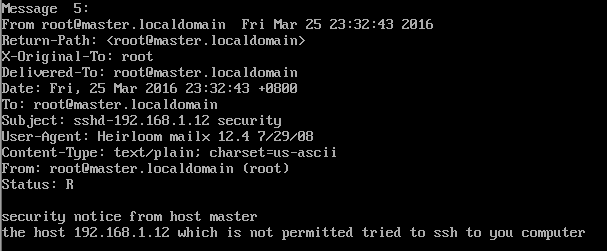
达到的目标: 如果是未经允许的网段登录到我的主机时,就向root账户发送一条mail,mail的内容形式为:
security notice from host ****
the host **** which is not permitted tried to ssh to you computer
hosts.allow
#

# hosts.allow    This file contains access rules which are used to

#        allow or deny connections to network services that

#        either use the tcp_wrappers library or that have been

#        started through a tcp_wrappers-enabled xinetd.

#

#        See 'man 5 hosts_options' and 'man 5 hosts_access'

#        for information on rule syntax.

#        See 'man tcpd' for information on tcp_wrappers

#

sshd:    192.168.1.2,192.168.1.1: allow
hosts.deny
#

# hosts.deny    This file contains access rules which are used to

#        deny connections to network services that either use

#        the tcp_wrappers library or that have been

#        started through a tcp_wrappers-enabled xinetd.

#

#        The rules in this file can also be set up in

#        /etc/hosts.allow with a 'deny' option instead.

#

#        See 'man 5 hosts_options' and 'man 5 hosts_access'

#        for information on rule syntax.

#        See 'man tcpd' for information on tcp_wrappers

#

sshd:    ALL    :spawn ( echo "security notice from host $(/bin/hostname)"; \
          echo "the host %h which is not permitted tried to ssh to you computer"; echo;) | \

             /bin/mail -s "%d-%h security" root
1.2 用不在允许范围的主机192.168.1.12尝试用ssh登陆到这台主机(192.168.1.11)
主机拒绝登陆

1.3 在主机(192.168.1.11)查看收到的新mai,内容如下:
 l
l
2.twist用法
在hosts.deny文件后边加上设置:
#

# hosts.deny    This file contains access rules which are used to

#        deny connections to network services that either use

#        the tcp_wrappers library or that have been

#        started through a tcp_wrappers-enabled xinetd.

#

#        The rules in this file can also be set up in

#        /etc/hosts.allow with a 'deny' option instead.

#

#        See 'man 5 hosts_options' and 'man 5 hosts_access'

#        for information on rule syntax.

#        See 'man tcpd' for information on tcp_wrappers

#

sshd:    ALL    :spawn ( echo "security notice from host $(/bin/hostname)"; \
          echo "the host %h which is not permitted tried to ssh to you computer"; echo;) | \

             /bin/mail -s "%d-%h security" root & \

             :twist (/bin/echo "YOU ARE NOT ALLOWED TO ENTER THE COMPUTER")
在192.168.1.12上用ssh登陆到192.168.1.11上时,并没有出现YOU ARE NOT ALLOWED TO ENTER THE COMPUTER。 查找了很长时间的问题,但是依然没有解决。
这样 sshd: ALL :twist (/bin/echo "YOU ARE NOT ALLOWED TO ENTER THE COMPUTER"),也不行。
求高手解答
TCP Wrapper 特殊使用的更多相关文章
- Linux中TCP wrapper的使用
Linux中TCP wrapper的使用 tcpwrapper的目的是对那些访问控制功能较弱的服务提供访问控制功能要想了解访问控制就必须先知道服务监听的概念: 服务监听的两种方式: listen ...
- linux TCP Wrappers
1. TCP Wrapper简介 (出处:http://www.softpanorama.org/Net/Network_security/TCP_wrappers/) (维基百科)TCP Wrapp ...
- Linux 防火墙之TCP Wrappers
1.TCPWrappers 原理 Telnet.SSH.FTP.POP和SMTP等很多网络服务都会用到TCPWrapper,它被设计为一个介于外来服务请求和系统服务回应的中间处理软件. ...
- Linux服务器安全配置
众所周知,网络安全是一个非常重要的课题,而服务器是网络安全中最关键的环节.Linux被认为是一个比较安全的Internet服务器,作为一种开放源代码操作系统,一旦Linux系统中发现有安全漏洞,Int ...
- VsFtpd服务配置简明笔记
Ftp服务是最常用的文件传输方式,把配置步骤记录下来,以备将来使用. 1.用YUM安装VsFtpd服务:[root@Redis usr]# yum install vsftpd 2.安装完成后启动Vs ...
- VsFtpd配置文件详解
1.默认配置:1>允许匿名用户和本地用户登陆. anonymous_enable=YES local_enable=YES2>匿名用户使用的登陆名为ftp或anonymou ...
- vsftp 搭建及虚拟账号配置
安装vsftpd yum -y install vsftpd chkconfig vsftpd on 修改主配置文件 vi /etc/vsftpd/vsftpd.conf # 允许匿名用户登陆,登陆时 ...
- 详解Linux目录(目录树详细解释)
给大家一篇关于Linux目录 方面的详细说明,好好读一下! Linux目录详解(RHEL5.4) linux有四种基本文件系统类型:--普通文件:如文本文件.c语言源代码.shell脚本等,可以用ca ...
- /etc/xinetd.conf 和 /etc/xinetd.d/*【新网络服务配置】
http://blog.csdn.net/kelven2004/article/details/1701930 xinetd 是 inetd 的安全加强版,它内置了自己的 TCP wrapper, 可 ...
随机推荐
- windows系统查看80端口被占用的程序并结束该程序运行
一.背景 最近系统更新以后,我在Idea中适用80端口启动项目的时候发现80端口被占用了,就查了资料看怎么找到占用80端口的程序并结束其运行,下面把解决方式共享给大家. 二.解决步骤 1.首先打开控制 ...
- 选择题(codevs 2919)
2919 选择题 时间限制: 1 s 空间限制: 16000 KB 题目等级 : 黄金 Gold 题解 查看运行结果 题目描述 Description 某同学考试,在N*M的答题卡上写 ...
- C#冒泡排序
C#最简单的冒泡排序,需要的朋友可作参考: 思路: 使用两个for循环,就可以遍历数组,这样就可以确保每个数组元素都被使用 对比前后两个数,将小的数字和大的交换位置,引入一个临时变量temp来进行交换 ...
- solrconfig.xml和schema.xml说明
1. solrconfig.xml solrconfig.xml配置文件主要定义了SOLR的一些处理规则,包括索引数据的存放位置,更新,删除,查询的一些规则配置. 1.1. datadir节点 ...
- mysql优化学习笔记
优化sql的一般步骤 通过show status了解各种sql的执行频率 定位执行效率低的sql语句 通过explain分析效率低的sql 通过show profile分析sql 通过trace分析优 ...
- 12.享元模式(Flyweight Pattern)
using System; using System.Collections; namespace ConsoleApplication5 { class Program { /// <summ ...
- 苹果开发者账号申请时报错提示错误:Legal Entity Name
he information you entered did not match your profile in the D&B database. Before submitting you ...
- Elasticsearch在Windows下的安装
下载Elasticsearch,地址:elasticsearch.org/download 下载jdk,百度搜索jdk下载即可 配置JAVA_HOME变量,配置方法在此文:http://jingyan ...
- 安装oracle 12c RAC遇到的一些问题
(1) 安装grid软件,停止在38%很长时间不动,日志显示正常 解决方法: 由于是虚拟机安装,设置的内存为600M,关闭虚拟机,把内存调成1GB,问题解决~在38%Linking RMAN Ut ...
- Oracle 10g Block Change Tracking特性
Using Block Change Tracking to Improve Incremental Backup Performance 使用块改变跟踪改善增量备份的性能 The block cha ...