
20.fastDFS集群java代码测试
1.工程结构
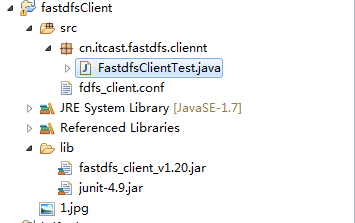
2.代码内容
package cn.itcast.fastdfs.cliennt;import java.io.File;import java.io.FileNotFoundException;import java.io.FileOutputStream;import java.io.IOException;import java.util.UUID;import org.csource.common.NameValuePair;import org.csource.fastdfs.ClientGlobal;import org.csource.fastdfs.FileInfo;import org.csource.fastdfs.StorageClient;import org.csource.fastdfs.StorageClient1;import org.csource.fastdfs.StorageServer;import org.csource.fastdfs.TrackerClient;import org.csource.fastdfs.TrackerServer;import org.junit.Before;import org.junit.Test;/*** 测试FastDFS API使用* @FileName:FastdfsClientTest.java* @Description: TODO()* @Author: tangwan* @Date: 2015年4月23日 下午1:48:45* @since: JDK 1.8*/public class FastdfsClientTest {public String conf_filename = null;public String local_filename = null;@Beforepublic void confInit(){conf_filename = FastdfsClientTest.class.getResource("/fdfs_client.conf").getPath();System.out.println("配置文件夹路径:"+conf_filename);local_filename = "1.jpg";System.out.println("待上传文件路径:"+local_filename);}// 客户端配置文件(绝对路径);使用下面注释的路径,请注释上面confInit方法//public String conf_filename = "D:\\DebugLove\\workspace\\DEV-2\\fastdfsClient\\src\\cn\\itcast\\fastdfs\\cliennt\\fdfs_client.conf";// 本地文件,要上传的文件//public String local_filename = "C:\\Users\\Administrator\\Desktop\\2.jpg";// 将字节流写到磁盘生成文件private void saveFile(byte[] b, String path, String fileName) {File file = new File(path + fileName);FileOutputStream fileOutputStream = null;try {fileOutputStream = new FileOutputStream(file);fileOutputStream.write(b);} catch (FileNotFoundException e) {e.printStackTrace();} catch (IOException e) {e.printStackTrace();} finally {if (fileOutputStream != null) {try {fileOutputStream.close();} catch (IOException e) {e.printStackTrace();}}}}// 上传文件//文件保存在storage设置的baseUrl下 /home/FastDFS/fdfs_storage/data/00/00包括:wKgBFVcMJNyAZtDnAASUcjwYjng393.jpg和wKgBFVcMJNyAZtDnAASUcjwYjng393.jpg-m@Testpublic void testUpload() {//上传5次for (int i = 0; i < 1; i++) {try {ClientGlobal.init(conf_filename);TrackerClient tracker = new TrackerClient();TrackerServer trackerServer = tracker.getConnection();StorageServer storageServer = null;StorageClient storageClient = new StorageClient(trackerServer, storageServer);NameValuePair nvp[] = new NameValuePair[] { new NameValuePair("item_id", "100010"), new NameValuePair("width", "80"),new NameValuePair("height", "90") };String fileIds[] = storageClient.upload_file(local_filename, null, nvp);System.out.println(fileIds.length);System.out.println("组名:" + fileIds[0]);System.out.println("路径: " + fileIds[1]);} catch (FileNotFoundException e) {e.printStackTrace();} catch (IOException e) {e.printStackTrace();} catch (Exception e) {e.printStackTrace();}}}// 下载文件@Testpublic void testDownload() {try {ClientGlobal.init(conf_filename);TrackerClient tracker = new TrackerClient();TrackerServer trackerServer = tracker.getConnection();StorageServer storageServer = null;// StorageClient storageClient = new StorageClient(trackerServer,storageServer);StorageClient1 storageClient = new StorageClient1(trackerServer, storageServer);byte[] b = storageClient.download_file("group1", "M00/00/00/wKgBFVcMJN6AGuYuAASUcjwYjng476.jpg");if (b != null) {System.out.println(b.length);saveFile(b, "d:\\temp\\", UUID.randomUUID().toString() + ".jpg");}} catch (Exception e) {e.printStackTrace();}}// 获取文件信息@Testpublic void testGetFileInfo() {try {ClientGlobal.init(conf_filename);TrackerClient tracker = new TrackerClient();TrackerServer trackerServer = tracker.getConnection();StorageServer storageServer = null;StorageClient storageClient = new StorageClient(trackerServer, storageServer);FileInfo fi = storageClient.get_file_info("group1", "M00/00/00/wKgBFVcMJN6AGuYuAASUcjwYjng476.jpg");System.out.println(fi.getSourceIpAddr());System.out.println(fi.getFileSize());System.out.println(fi.getCreateTimestamp());System.out.println(fi.getCrc32());} catch (Exception e) {e.printStackTrace();}}// 获取文件自定义的mate信息(key、value)@Testpublic void testGetFileMate() {try {ClientGlobal.init(conf_filename);TrackerClient tracker = new TrackerClient();TrackerServer trackerServer = tracker.getConnection();StorageServer storageServer = null;StorageClient storageClient = new StorageClient(trackerServer, storageServer);NameValuePair nvps[] = storageClient.get_metadata("group1", "M00/00/00/wKgBFVcMJN6AGuYuAASUcjwYjng476.jpg");if (nvps != null) {for (NameValuePair nvp : nvps) {System.out.println(nvp.getName() + ":" + nvp.getValue());}}} catch (Exception e) {e.printStackTrace();}}// 删除文件//从操作系统storage节点,物理删除/home/FastDFS/fdfs_storage/data/00/00直接消失@Testpublic void testDelete() {try {ClientGlobal.init(conf_filename);TrackerClient tracker = new TrackerClient();TrackerServer trackerServer = tracker.getConnection();StorageServer storageServer = null;StorageClient storageClient = new StorageClient(trackerServer, storageServer);int i = storageClient.delete_file("group1", "M00/00/00/wKgBFVcMJNyAZtDnAASUcjwYjng393.jpg");System.out.println(i == 0 ? "删除成功" : "删除失败:" + i);} catch (Exception e) {e.printStackTrace();}}}
# connect timeout in seconds# default value is 30sconnect_timeout=30# network timeout in seconds# default value is 30snetwork_timeout=60# the base path to store log filesbase_path=/home/FastDFS# tracker_server can ocur more than once, and tracker_server format is# "host:port", host can be hostname or ip addresstracker_server=192.168.1.20:22122#tracker_server=192.168.101.4:22122#standard log level as syslog, case insensitive, value list:### emerg for emergency### alert### crit for critical### error### warn for warning### notice### info### debuglog_level=info# if use connection pool# default value is false# since V4.05use_connection_pool = false# connections whose the idle time exceeds this time will be closed# unit: second# default value is 3600# since V4.05connection_pool_max_idle_time = 3600# if load FastDFS parameters from tracker server# since V4.05# default value is falseload_fdfs_parameters_from_tracker=false# if use storage ID instead of IP address# same as tracker.conf# valid only when load_fdfs_parameters_from_tracker is false# default value is false# since V4.05use_storage_id = false# specify storage ids filename, can use relative or absolute path# same as tracker.conf# valid only when load_fdfs_parameters_from_tracker is false# since V4.05storage_ids_filename = storage_ids.conf#HTTP settingshttp.tracker_server_port=80#use "#include" directive to include HTTP other settiongs##include http.conf

20.fastDFS集群java代码测试的更多相关文章
- 5 weekend01、02、03、04、05、06、07的分布式集群的HA测试 + hdfs--动态增加节点和副本数量管理 + HA的java api访问要点
weekend01.02.03.04.05.06.07的分布式集群的HA测试 1) weekend01.02的hdfs的HA测试 2) weekend03.04的yarn的HA测试 1) wee ...
- 19.fastDFS集群理解+搭建笔记
软件架构理解 1FastDFS介绍 1.1什么是FastDFS FastDFS是用c语言编写的一款开源的分布式文件系统.FastDFS为互联网量身定制,充分考虑了冗余备份.负载均衡.线性扩容等机制,并 ...
- Redis集群的使用测试(Jedis客户端的使用)
Redis集群的使用测试(Jedis客户端的使用)1.Jedis客户端建议升级到最新版(当前为2.7.3),这样对3.0.x集群有比较好的支持.https://github.com/xetorthio ...
- FastDFS集群部署
之前介绍过关于FastDFS单机部署,详见博文:FastDFS+Nginx(单点部署)事例 下面来玩下FastDFS集群部署,实现高可用(HA) 服务器规划: 跟踪服务器1[主机](Tracker S ...
- 【开源组件】FastDFS集群搭建与实战
FastDFS是一个轻量级的分布式文件系统,在实际生产环境往往以集群的形式部署,保证了服务的高可用.本文重点阐述FastDFS集群的搭建和项目实战. 工作流程 上传流程图 下载流程图 基本概念可参考作 ...
- FastDFS集群部署(转载 写的比较好)
FastDFS集群部署 之前介绍过关于FastDFS单机部署,详见博文:FastDFS+Nginx(单点部署)事例 下面来玩下FastDFS集群部署,实现高可用(HA) 服务器规划: 跟踪服务器1 ...
- Dubbo入门到精通学习笔记(十五):Redis集群的安装(Redis3+CentOS)、Redis集群的高可用测试(含Jedis客户端的使用)、Redis集群的扩展测试
文章目录 Redis集群的安装(Redis3+CentOS) 参考文档 Redis 集群介绍.特性.规范等(可看提供的参考文档+视频解说) Redis 集群的安装(Redis3.0.3 + CentO ...
- 大数据测试之hadoop集群配置和测试
大数据测试之hadoop集群配置和测试 一.准备(所有节点都需要做):系统:Ubuntu12.04java版本:JDK1.7SSH(ubuntu自带)三台在同一ip段的机器,设置为静态IP机器分配 ...
- YARN集群的mapreduce测试(五)
将user表计算后的结果分区存储 测试准备: 首先同步时间,然后master先开启hdfs集群,再开启yarn集群:用jps查看: master上: 先有NameNode.SecondaryNameN ...
随机推荐
- 【iCore3 双核心板_FPGA】例程五:Signal Tapll实验——逻辑分析仪
实验指导书及代码包下载: http://pan.baidu.com/s/1bnNRfaB iCore3 购买链接: https://item.taobao.com/item.htm?id=524229 ...
- GDC2016 执着于光影表现的【全境封锁】的开放世界渲染
执着于光影表现[全境封锁]的开放世界渲染 Snowdrop(雪莲花)引擎的全局照明技术介绍 补上原文链接:http://game.watch.impress.co.jp/docs/news/201 ...
- mysql前缀索引(字符串截取部分作为索引), 以及索引选择指引
- [BS-28] iOS中分页的几种算法
iOS中分页的几种算法 总记录数:totalRecord 每页最大记录数:maxResult 算法一: totalPage = totalRecord % maxResult == 0 ? total ...
- RDIFramework.NET V2.5(.NET快速信息化系统开发框架) Web版界面样例(可参考)
RDIFramework.NET V2.5(.NET快速信息化系统开发框架) Web版介绍 现已升级到V2.8,点击查看 B/S结构(Browser/Server,浏览器/服务器模式),是WEB兴起 ...
- WCF服务接口多,客户端在引用时出错!报WCF The maximum nametable character count quota (16384) has been exceeded while reading XML data错误
WCF服务接口多,客户端在引用时出错!报WCF The maximum nametable character count quota (16384) has been exceeded while ...
- paper 101:图像融合算法及视觉艺术应用
1:基于泊松方程的图像融合方法,利用偏微分方程实现了不同图像上区域的无缝融合.比较经典的文章: P. Pérez, M. Gangnet, A. Blake. Poisson image editin ...
- paper 95:《模式识别和机器学习》资源
Bishop的<模式识别和机器学习>是该领域的经典教材,本文搜罗了有关的教程和读书笔记,供对比学习之用,主要搜索的资源包括CSDN:http://download.csdn.net/sea ...
- HTML报表日期格式不对 导致报错ORA-01861: 文字与格式字符串不匹配
PROCEDURE MAIN(ERRBUF OUT VARCHAR2, RETCODE OUT VARCHAR2, P_CUSTOMER_ID IN VARCHAR2, P_PERSON_ID IN ...
- 17. 星际争霸之php设计模式--职责链模式
题记==============================================================================本php设计模式专辑来源于博客(jymo ...