
[Cocos2D-x For WP8]CocosDenshion音频播放
Cocos2D-x的音频分为长时间的背景音乐和短的音效两种,我们可以通过SimpleAudioEngine::sharedEngine()方法来获取音频播放的引擎,然后调用对音频相关的操作方法就可以了,那么这个是非常简单的。
在Cocos2D-x For WP8里面的要使用音频播放的API,我们需要把CocosDenshion这个项目添加到我们的游戏项目里面去,然后添加引用。如下图所示:
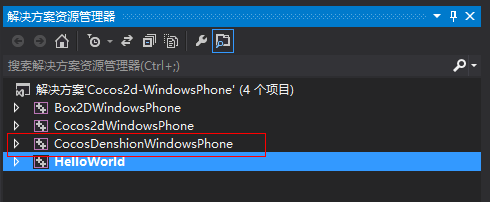
需要注意的是如果发现在编译的时候会出现下面的错误,那么通常是因为没有添加CocosDenshionWindowsPhone.lib链接库。
错误 306 error LNK2019: unresolved external symbol "__declspec(dllimport) public: static class CocosDenshion::SimpleAudioEngine * __cdecl CocosDenshion::SimpleAudioEngine::sharedEngine(void)" (__imp_?sharedEngine@SimpleAudioEngine@CocosDenshion@@SAPAV12@XZ) referenced in function __unwind$26 F:\coco2d\cocos2dx-win8-wp8_v2\cocos2dx-win8-wp8_v2\HelloWorld\HelloWorldScene.obj HelloWorld
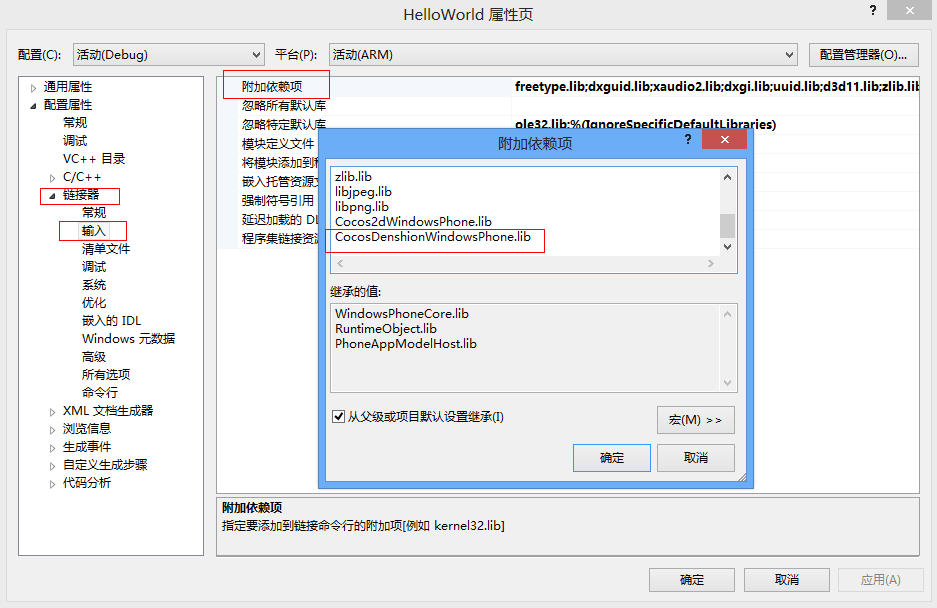
那么我们就需要在VS2012上通过这个路径( Project > Properties > Configuration Properties > Linker > Input > Additional Dependencies)来添加CocosDenshionWindowsPhone.lib链接库, 如下图所示:
示例代码:
class TestLayer : public cocos2d::CCLayer

{

public:

    TestLayer(void);

    ~TestLayer(void);

    void menuCallback(cocos2d::CCObject * pSender);

    virtual void ccTouchesMoved(cocos2d::CCSet *pTouches, cocos2d::CCEvent *pEvent);

    virtual void ccTouchesBegan(cocos2d::CCSet *pTouches, cocos2d::CCEvent *pEvent);

private:

    cocos2d::CCMenu* m_pItmeMenu;

    cocos2d::CCPoint m_tBeginPos;

    int m_nTestCount;

    unsigned int m_nSoundId;

};

TestLayer::TestLayer()

{

        std::string testItems[] = {

        "play background music",

        "stop background music",

        "pause background music",

        "resume background music",

        "rewind background music",

        "is background music playing",

        "play effect",

        "play effect repeatly",

        "stop effect",

        "unload effect",

        "add background music volume",

        "sub background music volume",

        "add effects volume",

        "sub effects volume",

        "pause effect",

        "resume effect",

        "pause all effects",

        "resume all effects",

        "stop all effects"

    };

    //创建菜单栏

    m_pItmeMenu = CCMenu::create();

    CCSize s = CCDirector::sharedDirector()->getWinSize();

    m_nTestCount = sizeof(testItems) / sizeof(testItems[]);

    //添加菜单栏项目和点击的回掉函数

    for (int i = ; i < m_nTestCount; ++i)

    {

        CCLabelTTF* label = CCLabelTTF::create(testItems[i].c_str(), "Arial", );

        CCMenuItemLabel* pMenuItem = CCMenuItemLabel::create(label, this, menu_selector(TestLayer::menuCallback));

        m_pItmeMenu->addChild(pMenuItem, i + );

        pMenuItem->setPosition( CCPointMake( s.width / , (s.height - (i + ) * LINE_SPACE) ));

    }

    //设置菜单栏的位置

    m_pItmeMenu->setContentSize(CCSizeMake(s.width, (m_nTestCount + ) * LINE_SPACE));

    m_pItmeMenu->setPosition(CCPointZero);

    addChild(m_pItmeMenu);

    setTouchEnabled(true);

    //预加载背景音乐和音效

    SimpleAudioEngine::sharedEngine()->preloadBackgroundMusic( CCFileUtils::fullPathFromRelativePath(MUSIC_FILE) );

    SimpleAudioEngine::sharedEngine()->preloadEffect( CCFileUtils::fullPathFromRelativePath(EFFECT_FILE) );

    //设置默认的音量

    SimpleAudioEngine::sharedEngine()->setEffectsVolume(0.5);

    SimpleAudioEngine::sharedEngine()->setBackgroundMusicVolume(0.5);

}

TestLayer::~TestLayer()

{

}

void TestLayer::menuCallback(CCObject * pSender)

{

    //获取调用回掉函数的菜单,获取它的ZOrder,用于判断是那个菜单项触发的

    CCMenuItem* pMenuItem = (CCMenuItem *)(pSender);

    int nIdx = pMenuItem->getZOrder() - ;

    switch(nIdx)

    {

    // 播放背景音乐

    case :

        SimpleAudioEngine::sharedEngine()->playBackgroundMusic(std::string(CCFileUtils::fullPathFromRelativePath(MUSIC_FILE)).c_str(), true);

        break;

    // 停止背景音乐

    case :

        SimpleAudioEngine::sharedEngine()->stopBackgroundMusic();

        break;

    // 暂停背景音乐

    case :

        SimpleAudioEngine::sharedEngine()->pauseBackgroundMusic();

        break;

    // 恢复背景音乐

    case :

        SimpleAudioEngine::sharedEngine()->resumeBackgroundMusic();

        break;

    // 回放背景音乐

    case :

        SimpleAudioEngine::sharedEngine()->rewindBackgroundMusic();

        break;

    // 判断背景音乐是否正在播放

    case :

        if (SimpleAudioEngine::sharedEngine()->isBackgroundMusicPlaying())

        {

            CCLOG("background music is playing");

        }

        else

        {

            CCLOG("background music is not playing");

        }

        break;

    // 播放音效

    case :

        m_nSoundId = SimpleAudioEngine::sharedEngine()->playEffect(std::string(CCFileUtils::fullPathFromRelativePath(EFFECT_FILE)).c_str());

        break;

    // 重复播放音效

    case :

        m_nSoundId = SimpleAudioEngine::sharedEngine()->playEffect(std::string(CCFileUtils::fullPathFromRelativePath(EFFECT_FILE)).c_str(), true);

        break;

    // 停止播放音效

    case :

        SimpleAudioEngine::sharedEngine()->stopEffect(m_nSoundId);

        break;

    // 移除音效

    case :

        SimpleAudioEngine::sharedEngine()->unloadEffect(std::string(CCFileUtils::fullPathFromRelativePath(EFFECT_FILE)).c_str());

        break;

        // 添加背景音乐音量

    case :

        SimpleAudioEngine::sharedEngine()->setBackgroundMusicVolume(SimpleAudioEngine::sharedEngine()->getBackgroundMusicVolume() + 0.1f);

        break;

        // 减少背景音乐音量

    case :

        SimpleAudioEngine::sharedEngine()->setBackgroundMusicVolume(SimpleAudioEngine::sharedEngine()->getBackgroundMusicVolume() - 0.1f);

        break;

        // 添加音效音量

    case :

        SimpleAudioEngine::sharedEngine()->setEffectsVolume(SimpleAudioEngine::sharedEngine()->getEffectsVolume() + 0.1f);

        break;

        // 减少背景音乐音量

    case :

        SimpleAudioEngine::sharedEngine()->setEffectsVolume(SimpleAudioEngine::sharedEngine()->getEffectsVolume() - 0.1f);

        break;

        //暂停音效播放

    case :

        SimpleAudioEngine::sharedEngine()->pauseEffect(m_nSoundId);

        break;

    case :

        //恢复音效播放

        SimpleAudioEngine::sharedEngine()->resumeEffect(m_nSoundId);

        break;

        //暂停所有音效播放

    case :

        SimpleAudioEngine::sharedEngine()->pauseAllEffects();

        break;

    case :

        //恢复所有音效播放

        SimpleAudioEngine::sharedEngine()->resumeAllEffects();

        break;

    case :

        //停止暂停所有音效播放

        SimpleAudioEngine::sharedEngine()->stopAllEffects();

        break;

    }

}

void TestLayer::ccTouchesBegan(CCSet *pTouches, CCEvent *pEvent)

{

    CCSetIterator it = pTouches->begin();

    CCTouch* touch = (CCTouch*)(*it);

    m_tBeginPos = touch->getLocationInView();

    m_tBeginPos = CCDirector::sharedDirector()->convertToGL( m_tBeginPos );

}

//处理菜单栏的滑动

void TestLayer::ccTouchesMoved(CCSet *pTouches, CCEvent *pEvent)

{

    CCSetIterator it = pTouches->begin();

    CCTouch* touch = (CCTouch*)(*it);

    CCPoint touchLocation = touch->getLocationInView();

    touchLocation = CCDirector::sharedDirector()->convertToGL( touchLocation );

    float nMoveY = touchLocation.y - m_tBeginPos.y;

    CCPoint curPos  = m_pItmeMenu->getPosition();

    CCPoint nextPos = ccp(curPos.x, curPos.y + nMoveY);

    CCSize winSize = CCDirector::sharedDirector()->getWinSize();

    if (nextPos.y < 0.0f)

    {

        m_pItmeMenu->setPosition(CCPointZero);

        return;

    }

    if (nextPos.y > ((m_nTestCount + )* LINE_SPACE - winSize.height))

    {

        m_pItmeMenu->setPosition(ccp(, ((m_nTestCount + )* LINE_SPACE - winSize.height)));

        return;

    }

    m_pItmeMenu->setPosition(nextPos);

    m_tBeginPos = touchLocation;

}
运行效果: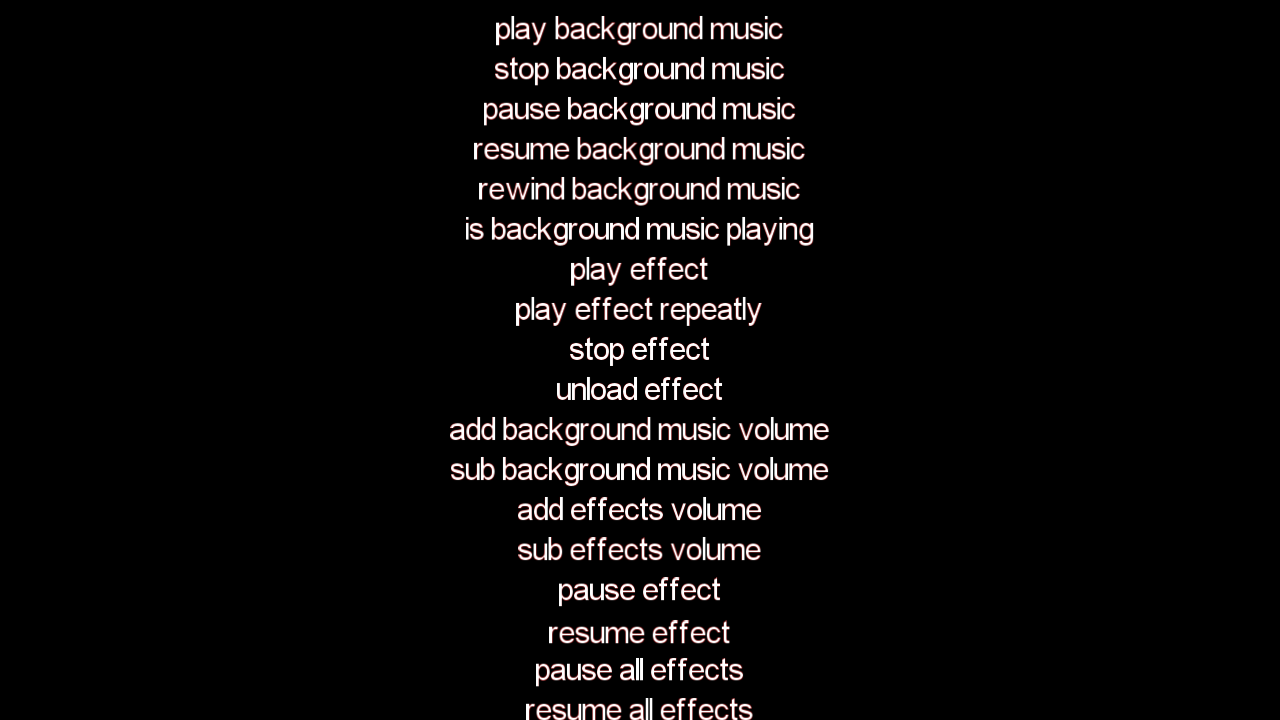
[Cocos2D-x For WP8]CocosDenshion音频播放的更多相关文章
- iOS开发系列--音频播放、录音、视频播放、拍照、视频录制
--iOS多媒体 概览 随着移动互联网的发展,如今的手机早已不是打电话.发短信那么简单了,播放音乐.视频.录音.拍照等都是很常用的功能.在iOS中对于多媒体的支持是非常强大的,无论是音视频播放.录制, ...
- HTML5 音频播放器-Javascript代码(短小精悍)
直接上干货咯! //HTML5 音频播放器 lzpong 2015/01/19 var wavPlayer = function () { if(window.parent.wavPlayer) re ...
- IOS开发之简单音频播放器
今天第一次接触IOS开发的UI部分,之前学OC的时候一直在模拟的使用Target-Action回调模式,今天算是真正的用了一次.为了熟悉一下基本控件的使用方法,和UI部分的回调,下面开发了一个特别简易 ...
- ios原声音频播放AVAudioSession 总结
//音频播放/*英译:record:录音 */ 1 导入头文件#import<AVFoundation/AVFoundation.h>//AVAudioSession是一个单例模式.在IO ...
- 微信小程序-图片、录音、音频播放、音乐播放、视屏、文件
图片: wx.chooseImage(OBJECT) 从本地相册选择图片或使用相机拍照. OBJECT参数说明: 注:文件的临时路径,在小程序本次启动期间可以正常使用,如需持久保存,需在主动调用 wx ...
- Android音频播放之SoundPool
SoundPool 一.基本概念 在Android应用程序的开发过程中,经常需要播放多媒体文件,也许最先想到的会是MediaPlayer类了,该类提供了播放.暂停.停止及重复播放等功能性方法(该类位于 ...
- iOS开发----音频播放、录音、视频播放、拍照、视频录制
随着移动互联网的发展,如今的手机早已不是打电话.发短信那么简单了,播放音乐.视频.录音.拍照等都是很常用的功能.在iOS中对于多媒体的支持是非常强大的,无论是音视频播放.录制,还是对麦克风.摄像头的操 ...
- 【jquery】一款不错的音频播放器——Amazing Audio Player
前段时间分享了一款视频播放器,点击这里.今天介绍一款不错的音频播放器——Amazing Audio Player. 介绍: Amazing Audio Player 是一个使用很方便的 Windows ...
- Android 学习笔记多媒体技术之 AsyncTask+实现音频播放...
PS:今天搞了一下如何实现音频播放...结果被坑了,看书上写的代码是挺简单的,但是有个函数就是死活没看懂,这真是受不了...最后才弄明白,原来是一个实现异步任务的一个类...这个类使用java.uti ...
随机推荐
- securecrt 用心跳保持连接
选项->会话->终端->发送协议NO-OP(P)
- 【SQL】检索满足条件的最大值的数据集合
是不是看题目觉的看不懂?其实我自己也看不懂,但是又找不到更好的词来形容. 为了更好的表达我的意思,请看下. 如果有一张成绩表(Points), 学生(student) 成绩(point) 科目(sub ...
- 【转载】PHP使用1个crontab管理多个crontab任务
转载来自: http://www.cnblogs.com/showker/archive/2013/09/01/3294279.html http://www.binarytides.com/php- ...
- SQL Server排序规则
在使用数据库的过程中,总会碰到一些特别的需求.有时候需要储存中文字符,区分大小写或者按照中文的比划顺序排序.这就涉及到了对数据库排列规则的选择. 我们一般可以选择数据库名称-->右键属性(Pro ...
- git revert 和 git reset的区别
git revert 撤销 某次操作,此次操作之前和之后的commit和history都会保留,并且把这次撤销 作为一次最新的提交 * git revert HEAD ...
- oracle删除用户下所有的表
需要创建这些删除语句,通过oracle的数据字典找到该用户下的所有表.视图等对象,拼接成语句.如下select 'drop table '||table_name|| ' cascade constr ...
- PHPCMS-V9 获取一级栏目、二级栏目、三级栏目
<!-- 获取一级栏目 -->{pc:content action=" siteid="$siteid" order="listorder ASC& ...
- Android的图片缓存ImageCache(转)
为什么要做缓存? 在UI界面加载一张图片时很简单,然而如果需要加载多张较大的图像,事情就会变得更加复杂.在许多情况下(如ListView.GridView或ViewPager等的组件),屏 ...
- 直接拿来用!最火的Android开源项目(完结篇)(转)
摘要:截至目前,在GitHub“最受欢迎的开源项目”系列文章中我们已介绍了40个Android开源项目,对于如此众多的项目,你是Mark.和码友分享经验还是慨叹“活到老要学到老”?今天我们将继续介绍另 ...
- c++ shared_ptr 使用注意事项. 1
条款1:不要把一个原生指针给多个shared_ptr管理 int* ptr = new int; shared_ptr<int> p1(ptr); shared_ptr<int> ...