
selenium web driver 配合使用testng
首先为eclipse添加testng插件
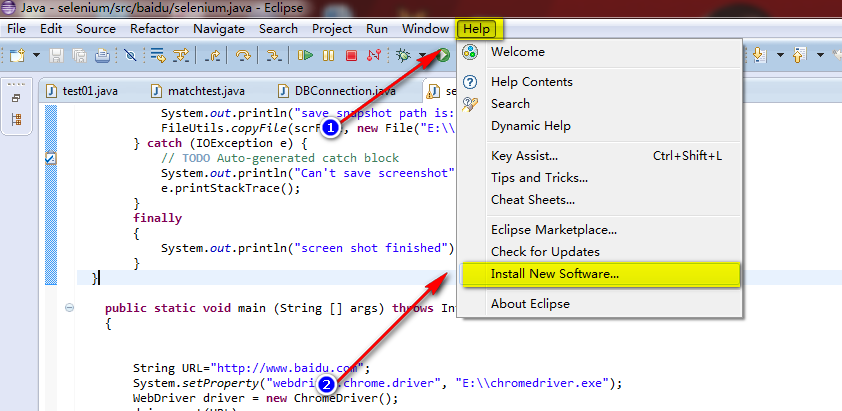
- 步骤如下:help->Install New SoftWare...
2. 添加testng链接,该链接可以在这里找到
For the Eclipse plug-in, we suggest using the update site:
- Select Help / Software updates / Find and Install.
- Search for new features to install.
- New remote site.
- For Eclipse 3.4 and above, enter http://beust.com/eclipse.
- For Eclipse 3.3 and below, enter http://beust.com/eclipse1.
- Make sure the check box next to URL is checked and click Next.
- Eclipse will then guide you through the process.
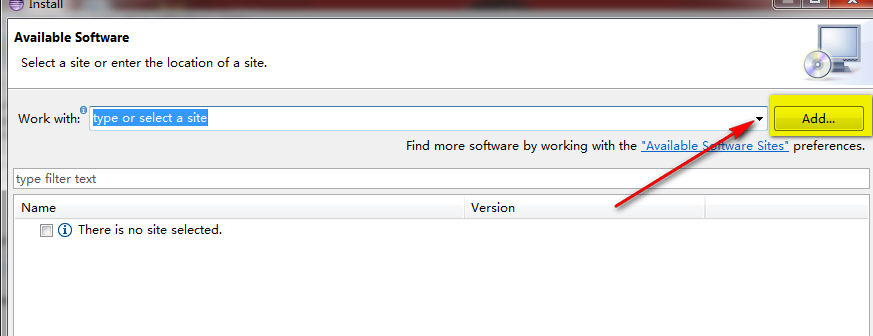
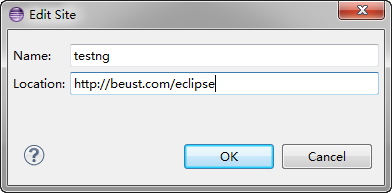
4.下载并安装 testng

testng和junit相比为什么要使用testng
1. testng 和junit功能基本相同testng支持suite,junit执行一大堆case,如果个别fail,只能所有case重跑
而testng可以单独跑
2.testng能生成漂亮的测试报告,比较直观
添加一个testng case,复制一份,保存为
openlinkTest1.java
package baidu;

import java.io.File;

import java.io.IOException;

import java.util.regex.Matcher;

import java.util.regex.Pattern;

import junit.framework.Assert;

import org.apache.commons.io.FileUtils;

import org.openqa.selenium.By;

import org.openqa.selenium.OutputType;

import org.openqa.selenium.TakesScreenshot;

import org.openqa.selenium.WebDriver;

import org.openqa.selenium.WebElement;

import org.openqa.selenium.chrome.ChromeDriver;

import org.testng.annotations.AfterMethod;

import org.testng.annotations.BeforeMethod;

import org.testng.annotations.Test;

public class openlinkTest {

  public static void snapshot(TakesScreenshot drivername, String filename)

  {

      // this method will take screen shot ,require two parameters ,one is driver name, another is file name

    File scrFile = drivername.getScreenshotAs(OutputType.FILE);

        // Now you can do whatever you need to do with it, for example copy somewhere

        try {

            System.out.println("save snapshot path is:E:/"+filename);

            FileUtils.copyFile(scrFile, new File("E:\\"+filename));

        } catch (IOException e) {

            // TODO Auto-generated catch block

            System.out.println("Can't save screenshot");

            e.printStackTrace();

        }

        finally

        {

            System.out.println("screen shot finished");

        }

  }

  @BeforeMethod

  public void tearUp()

  {

    //    WebDriver driver = new ChromeDriver();

  }

  @Test

    public static void runSelenium() throws InterruptedException

    {

         String URL="http://www.baidu.com";

         Pattern p = Pattern.compile("http");

         Matcher m = p.matcher(URL);

        if(m.find())

        {

            System.out.println(URL);

        }

        System.setProperty("webdriver.chrome.driver", "E:\\chromedriver.exe");

        WebDriver driver = new ChromeDriver();

        driver.get(URL);

        //max size the browser

        driver.manage().window().maximize();

 /*

        Navigation navigation = driver.navigate();

         navigation.to(URL);*/

         Thread.sleep(2000);

         snapshot((TakesScreenshot)driver,"open_baidu.png");

         //WebElement reg=driver.findElement(By.name("tj_reg"));

         //reg.click();

         //    WebElement keyWord = driver.findElement(By.id("kw1"));

         //find the element

         WebElement keyWord = driver.findElement(By.xpath("//input[@id='kw1']"));

        keyWord.clear();

        //send key words

         keyWord.sendKeys("Selenium");

         Thread.sleep(3000);

          snapshot((TakesScreenshot)driver,"input_keyWord.png");

          WebElement submit = driver.findElement(By.id("su1"));

          System.out.println(submit.getLocation());

          submit.click();

          //System.out.println(driver.getWindowHandle());

         Thread.sleep(5000);

        // System.out.println(driver.getPageSource());

        String pageSource=driver.getPageSource();

       //  System.out.println(pageSource);

        //WebElement link =driver.findElement(By.xpath(SELENIUM_LINK));

        WebElement link =driver.findElement(By.xpath("//*[@id=\"1\"]/h3/a"));     //*[@id="1"]/h3/a

        link.click();

        Thread.sleep(5000);

        driver.switchTo().window(driver.getWindowHandles().toArray(new String[0])[1]);

        //get page title

        System.out.println(driver.getTitle());

         Thread.sleep(5000);

    //     navigation.back();

          snapshot((TakesScreenshot)driver,"open_bake.png");

         System.out.println(driver.getTitle()+"\n"+driver.getCurrentUrl());

         Assert.assertEquals(driver.getTitle(),"Selenium - Web Browser Automation");

         driver.quit();

    }

     @AfterMethod

     public void tearDown()

     {

         //driver.quit();

         System.out.println("------------END----------------------");

     }

}
添加testng suite
<?xml version="1.0" encoding="UTF-8"?>

<suite name="Suite" parallel="false">

  <test name="Test">

    <classes>

      <class name="baidu.openlinkTest"/>

      <class name="baidu.openlinkTest1"/>

    </classes>

  </test> <!-- Test -->

</suite> <!-- Suite -->
执行case:
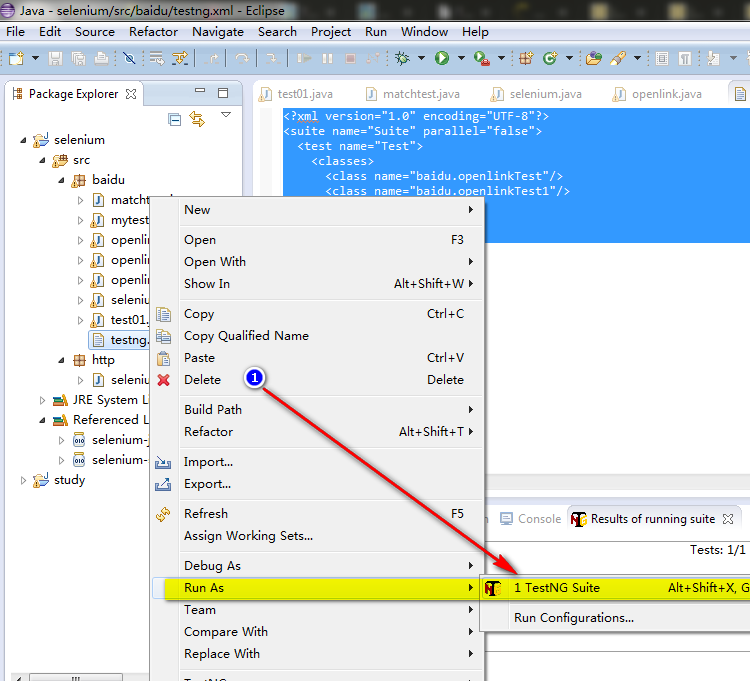
结果如下
[TestNG] Running:
C:\Users\Young\workspace\selenium\src\baidu\testng.xml
http://www.baidu.com
Starting ChromeDriver (v2.9.248315) on port 28218
save snapshot path is:E:/open_baidu.png
screen shot finished
save snapshot path is:E:/input_keyWord.png
screen shot finished
(858, 179)
Selenium - Web Browser Automation
save snapshot path is:E:/open_bake.png
screen shot finished
Selenium - Web Browser Automation
http://docs.seleniumhq.org/
------------END----------------------
http://www.baidu.com
Starting ChromeDriver (v2.9.248315) on port 5568
save snapshot path is:E:/open_baidu.png
screen shot finished
save snapshot path is:E:/input_keyWord.png
screen shot finished
(858, 179)
Selenium_百度百科
save snapshot path is:E:/open_bake.png
screen shot finished
Selenium_百度百科
http://baike.baidu.com/subview/478050/6464537.htm?fr=aladdin
------------END----------------------
===============================================
Suite
Total tests run: 2, Failures: 1, Skips: 0
===============================================
selenium web driver 配合使用testng的更多相关文章
- 25+ Useful Selenium Web driver Code Snippets For GUI Testing Automation
本文总结了使用Selenium Web driver 做页面自动化测试的一些 tips, tricks, snippets. 1. Chrome Driver 如何安装 extensions 两种方式 ...
- selenium web driver 使用JS修改input属性
selenium获取input时候,发现type=”hidden” 的input无法修改value,经牛人指点,可以使用js修改 首先html源文件如下,设置为text .hidden.submit ...
- selenium web driver 实现截图功能
在验证某些关键步骤时,需要截个图来记录一下当时的情况 Webdriver截图时,需要引入 import java.io.File; import java.io.IOException; import ...
- selenium web driver
WebDriver 支持的浏览器 IE6-10 FireFox大部分版本 Chrome Safari Opera Andrioid 系统上的自带浏览器 IOS系统上自带浏览器 HtmlUnit的无界面 ...
- Selenium Web 自动化 - 项目实战(三)
Selenium Web 自动化 - 项目实战(三) 2016-08-10 目录 1 关键字驱动概述2 框架更改总览3 框架更改详解 3.1 解析新增页面目录 3.2 解析新增测试用例目录 3. ...
- Selenium Web 自动化 - Selenium(Java)环境搭建
Selenium Web 自动化 - Selenium(Java)环境搭建 2016-07-29 1 下载JDK JDK下载地址:http://www.oracle.com/technetwork/j ...
- Selenium Web 自动化 - 如何找到元素
Selenium Web 自动化 - 如何找到元素 2016-07-29 1. 什么是元素? 元素:http://www.w3school.com.cn/html/html_elements.asp ...
- Selenium Web 自动化 - 项目实战(一)
Selenium Web 自动化 - 测试框架(一) 2016-08-05 目录 1 框架结构雏形2 把Java项目转变成Maven项目3 加入TestNG配置文件4 Eclipse编码修改5 编写代 ...
- Selenium Web 自动化 - 项目持续集成(进阶)
Selenium Web 自动化 - 项目持续集成(进阶) 2017-03-09 目录 1 背景及目标2 环境配置 2.1 SVN的安装及使用 2.2 新建Jenkins任务3 过程分析 1 背景 ...
随机推荐
- oracle中的sql%rowcount,sql%found、sql%notfound、sql%rowcount和sql%isopen
Oracle 存储过程 删除表记录时删除不存在的记录也是显示删除成功 create or replace procedure delDept(p_deptno in dept.deptno%type ...
- Java 8 Optional类深度解析
身为一名Java程序员,大家可能都有这样的经历:调用一个方法得到了返回值却不能直接将返回值作为参数去调用别的方法.我们首先要判断这个返回值是否为null,只有在非空的前提下才能将其作为其他方法的参数. ...
- android自定义控件(4)-自定义水波纹效果
一.实现单击出现水波纹单圈效果: 照例来说,还是一个自定义控件,观察这个效果,发现应该需要重写onTouchEvent和onDraw方法,通过在onTouchEvent中获取触摸的坐标,然后以这个坐标 ...
- 即将翻译 Building The New Financial Times Web App
<金融时报>这份Web APP 经验的总结,写得非常详细,也提到Web APP制作中常遇到的问题.为么他们就没有点透Bug - -! Building The New Financial ...
- [译]git push
push就是把你本地仓储的commit传到远程仓储中去. 用法 git push <remote> <branch> push指定的分支到<remote>中去. ...
- 使用基于关系的选择器和伪类选择器创建纯CSS无JavaScript的鼠标移动到上面即可显示的下拉菜单
html代码: <div class="menu-bar"> <ul> <li> <h3 class="text-warning ...
- 使用xp光盘修复系统的方法步骤
对于使用Windows XP系统的朋友来说,当系统出现崩溃或者系统使用时出现一些莫名其妙的错误时,你采用什么方法解决呢?一般都是采用重装系统或者使用Ghost恢复等. 但是使用这些方法各有缺陷,比如重 ...
- BZOJ4034——[HAOI2015]T2
1.题目大意:用一个数据结构支持树的点修改和子树修改.树上路径和 2.分析:树链剖分裸题 #include <cstdio> #include <cstdlib> #inclu ...
- Unity 用户手册用户指南二维纹理 (Texture 2D)
http://www.58player.com/blog-2327-953.html 二维纹理 (Texture 2D) 纹理 (Textures) 使您的 网格 (Meshes).粒子 (Parti ...
- python 函数式编程工具
有三个内置函数与列表一起使用时非常有用:filter().map()和reduce(). 1. filter(function, sequence)返回的序列由function(item)结果为真的元 ...