
springboot整合mybatis开发
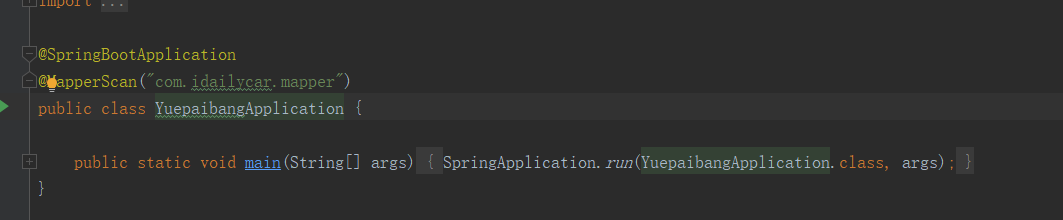
1创建项目,在启动类上添加映射扫描注解
2导入依赖,添加mybatis generator自动生成代码插件
<!-- mybatis generator 自动生成代码插件 -->

			<plugin>

				<groupId>org.mybatis.generator</groupId>

				<artifactId>mybatis-generator-maven-plugin</artifactId>

				<version>1.3.2</version>

				<configuration>

					<configurationFile>${project.basedir}/src/main/resources/generator/generatorConfig.xml</configurationFile>

					<overwrite>true</overwrite>

					<verbose>true</verbose>

				</configuration>

			</plugin>
3创建generatorConfig.xml文件
<?xml version="1.0" encoding="UTF-8"?>

<!DOCTYPE generatorConfiguration

        PUBLIC "-//mybatis.org//DTD MyBatis Generator Configuration 1.0//EN"

        "http://mybatis.org/dtd/mybatis-generator-config_1_0.dtd">

<generatorConfiguration>

    <!-- 数据库驱动:选择你的本地硬盘上面的数据库驱动包-->

    <classPathEntry  location="D:\jar\mysql-connector-java-5.1.0-bin.jar"/>

    <context id="default"  targetRuntime="MyBatis3">

        <commentGenerator>

            <property name="suppressDate" value="true"/>

            <!-- 是否去除自动生成的注释 true:是 : false:否 -->

            <property name="suppressAllComments" value="true"/>

        </commentGenerator>

        <!--数据库链接URL,用户名、密码 -->

        <jdbcConnection driverClass="com.mysql.jdbc.Driver" connectionURL="jdbc:mysql://url:3306/database" userId="username" password="passwrord">

        </jdbcConnection>

        <javaTypeResolver>

            <property name="forceBigDecimals" value="false"/>

        </javaTypeResolver>

        <!-- 生成模型的包名和位置-->

        <javaModelGenerator targetPackage="com.domain" targetProject="src/main/java">

            <property name="enableSubPackages" value="true"/>

            <property name="trimStrings" value="true"/>

        </javaModelGenerator>

        <!-- 生成映射文件的包名和位置-->

        <sqlMapGenerator targetPackage="com.mapper" targetProject="src/main/resources">

            <property name="enableSubPackages" value="true"/>

        </sqlMapGenerator>

        <!-- 生成DAO的包名和位置-->

        <javaClientGenerator type="XMLMAPPER" targetPackage="com.mapper" targetProject="src/main/java">

            <property name="enableSubPackages" value="true"/>

        </javaClientGenerator>

        <!-- 要生成的表 tableName是数据库中的表名或视图名 domainObjectName是实体类名-->

        <!--<table tableName="invitationc" domainObjectName="Invitationc" enableCountByExample="false" enableUpdateByExample="false" enableDeleteByExample="false" enableSelectByExample="false" selectByExampleQueryId="false"></table>-->

        <!--<table tableName="user" domainObjectName="User" enableCountByExample="false" enableUpdateByExample="false" enableDeleteByExample="false" enableSelectByExample="false" selectByExampleQueryId="false"></table>-->

        <!--<table tableName="leaving_a_message" domainObjectName="LeavingAMessage" enableCountByExample="false" enableUpdateByExample="false" enableDeleteByExample="false" enableSelectByExample="false" selectByExampleQueryId="false"></table>-->

        <!--<table tableName="order_payment" domainObjectName="OrderPayment" enableCountByExample="false" enableUpdateByExample="false" enableDeleteByExample="false" enableSelectByExample="false" selectByExampleQueryId="false"></table>-->

        <!--<table tableName="sign_up" domainObjectName="SignUp" enableCountByExample="false" enableUpdateByExample="false" enableDeleteByExample="false" enableSelectByExample="false" selectByExampleQueryId="false"></table>-->

        <!--<table tableName="photo_order" domainObjectName="PhotoOrder" enableCountByExample="false" enableUpdateByExample="false" enableDeleteByExample="false" enableSelectByExample="false" selectByExampleQueryId="false"></table>-->

        <table tableName="commission_order" domainObjectName="CommissionOrder" enableCountByExample="false" enableUpdateByExample="false" enableDeleteByExample="false" enableSelectByExample="false" selectByExampleQueryId="false"></table>

        <!--<table tableName="invitationc" domainObjectName="Invitationc" enableCountByExample="false" enableUpdateByExample="false" enableDeleteByExample="false" enableSelectByExample="false" selectByExampleQueryId="false"></table>-->

        <!--<table tableName="dynamic" domainObjectName="Dynamic" enableCountByExample="false" enableUpdateByExample="false" enableDeleteByExample="false" enableSelectByExample="false" selectByExampleQueryId="false"></table>-->

        <!--<table tableName="sys_dict" domainObjectName="SysDict" enableCountByExample="false" enableUpdateByExample="false" enableDeleteByExample="false" enableSelectByExample="false" selectByExampleQueryId="false"></table>-->

        <!--<table tableName="tag" domainObjectName="Tag" enableCountByExample="false" enableUpdateByExample="false" enableDeleteByExample="false" enableSelectByExample="false" selectByExampleQueryId="false"></table>-->

        <!--<table tableName="attention" domainObjectName="Attention" enableCountByExample="false" enableUpdateByExample="false" enableDeleteByExample="false" enableSelectByExample="false" selectByExampleQueryId="false"></table>-->

        <!--<table tableName="tab_collection" domainObjectName="TabCollection" enableCountByExample="false" enableUpdateByExample="false" enableDeleteByExample="false" enableSelectByExample="false" selectByExampleQueryId="false"></table>-->

        <!--<table tableName="sign_in" domainObjectName="SignIn" enableCountByExample="false" enableUpdateByExample="false" enableDeleteByExample="false" enableSelectByExample="false" selectByExampleQueryId="false"></table>-->

    </context>

</generatorConfiguration>
根据generatorConfig.xml文件生成的
模型:
映射文件: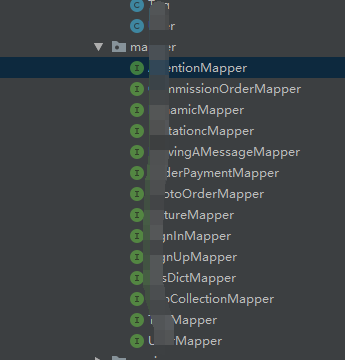
DAO文件: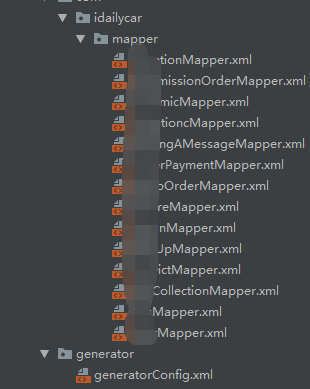
4、自定义查询语句
mapper
dao:
<?xml version="1.0" encoding="UTF-8" ?>

<!DOCTYPE mapper PUBLIC "-//mybatis.org//DTD Mapper 3.0//EN" "http://mybatis.org/dtd/mybatis-3-mapper.dtd" >

<mapper namespace="com.idailycar.mapper.TabCollectionMapper" >

  <resultMap id="BaseResultMap" type="com.idailycar.domain.TabCollection" >

    <id column="id" property="id" jdbcType="BIGINT" />

    <result column="host_id" property="hostId" jdbcType="BIGINT" />

    <result column="collector_id" property="collectorId" jdbcType="BIGINT" />

    <result column="create_time" property="createTime" jdbcType="TIMESTAMP" />

    <result column="update_tine" property="updateTine" jdbcType="TIMESTAMP" />

    <result column="state" property="state" jdbcType="BIGINT" />

  </resultMap>

  <sql id="Base_Column_List" >

    id, host_id, collector_id, create_time, update_tine, state

  </sql>

  <select id="selectByPrimaryKey" resultMap="BaseResultMap" parameterType="java.lang.Long" >

    select

    <include refid="Base_Column_List" />

    from tab_collection

    where id = #{id,jdbcType=BIGINT}

  </select>

    <select id="findByCollectorIdAndHostId" resultType="com.idailycar.domain.TabCollection">

      SELECT * from  tab_collection where collector_id = #{collectorId} and host_id = #{hostId} and state = 16

    </select>

  <select id="findByCollectorIdAndHostIdAndUNCollection" resultType="com.idailycar.domain.TabCollection">

    SELECT * from  tab_collection where collector_id = #{collectorId} and host_id = #{hostId} and state = 17

  </select>

  <select id="findCollectionInfoByOpenId" resultType="com.idailycar.controller.response.DynamicInfo">

    select d.id as dynamicId,u.id as userId,u.nickname as nickname,u.gender as gender,u.avatar_file as avatarFile,u.occupation as occupation,d.location as location,d.content as content,d.create_time as createTime from dynamic d INNER JOIN user u on d.creator_id = u.id where d.id in (select c.host_id from tab_collection c where c.collector_id = #{collectorId} and c.state = 16)

  </select>

  <delete id="deleteByPrimaryKey" parameterType="java.lang.Long" >

    delete from tab_collection

    where id = #{id,jdbcType=BIGINT}

  </delete>

  <insert id="insert" parameterType="com.idailycar.domain.TabCollection" >

    insert into tab_collection (id, host_id, collector_id,

      create_time, update_tine, state

      )

    values (#{id,jdbcType=BIGINT}, #{hostId,jdbcType=BIGINT}, #{collectorId,jdbcType=BIGINT},

      #{createTime,jdbcType=TIMESTAMP}, #{updateTine,jdbcType=TIMESTAMP}, #{state,jdbcType=BIGINT}

      )

  </insert>

  <insert id="insertSelective" parameterType="com.idailycar.domain.TabCollection" >

    insert into tab_collection

    <trim prefix="(" suffix=")" suffixOverrides="," >

      <if test="id != null" >

        id,

      </if>

      <if test="hostId != null" >

        host_id,

      </if>

      <if test="collectorId != null" >

        collector_id,

      </if>

      <if test="createTime != null" >

        create_time,

      </if>

      <if test="updateTine != null" >

        update_tine,

      </if>

      <if test="state != null" >

        state,

      </if>

    </trim>

    <trim prefix="values (" suffix=")" suffixOverrides="," >

      <if test="id != null" >

        #{id,jdbcType=BIGINT},

      </if>

      <if test="hostId != null" >

        #{hostId,jdbcType=BIGINT},

      </if>

      <if test="collectorId != null" >

        #{collectorId,jdbcType=BIGINT},

      </if>

      <if test="createTime != null" >

        #{createTime,jdbcType=TIMESTAMP},

      </if>

      <if test="updateTine != null" >

        #{updateTine,jdbcType=TIMESTAMP},

      </if>

      <if test="state != null" >

        #{state,jdbcType=BIGINT},

      </if>

    </trim>

  </insert>

  <update id="updateByPrimaryKeySelective" parameterType="com.idailycar.domain.TabCollection" >

    update tab_collection

    <set >

      <if test="hostId != null" >

        host_id = #{hostId,jdbcType=BIGINT},

      </if>

      <if test="collectorId != null" >

        collector_id = #{collectorId,jdbcType=BIGINT},

      </if>

      <if test="createTime != null" >

        create_time = #{createTime,jdbcType=TIMESTAMP},

      </if>

      <if test="updateTine != null" >

        update_tine = #{updateTine,jdbcType=TIMESTAMP},

      </if>

      <if test="state != null" >

        state = #{state,jdbcType=BIGINT},

      </if>

    </set>

    where id = #{id,jdbcType=BIGINT}

  </update>

  <update id="updateByPrimaryKey" parameterType="com.idailycar.domain.TabCollection" >

    update tab_collection

    set host_id = #{hostId,jdbcType=BIGINT},

      collector_id = #{collectorId,jdbcType=BIGINT},

      create_time = #{createTime,jdbcType=TIMESTAMP},

      update_tine = #{updateTine,jdbcType=TIMESTAMP},

      state = #{state,jdbcType=BIGINT}

    where id = #{id,jdbcType=BIGINT}

  </update>

</mapper>
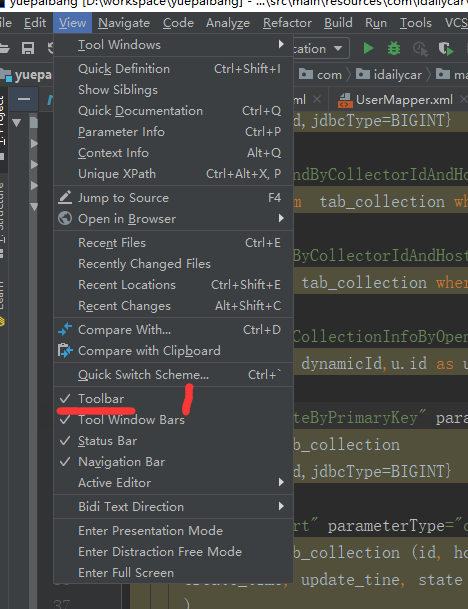
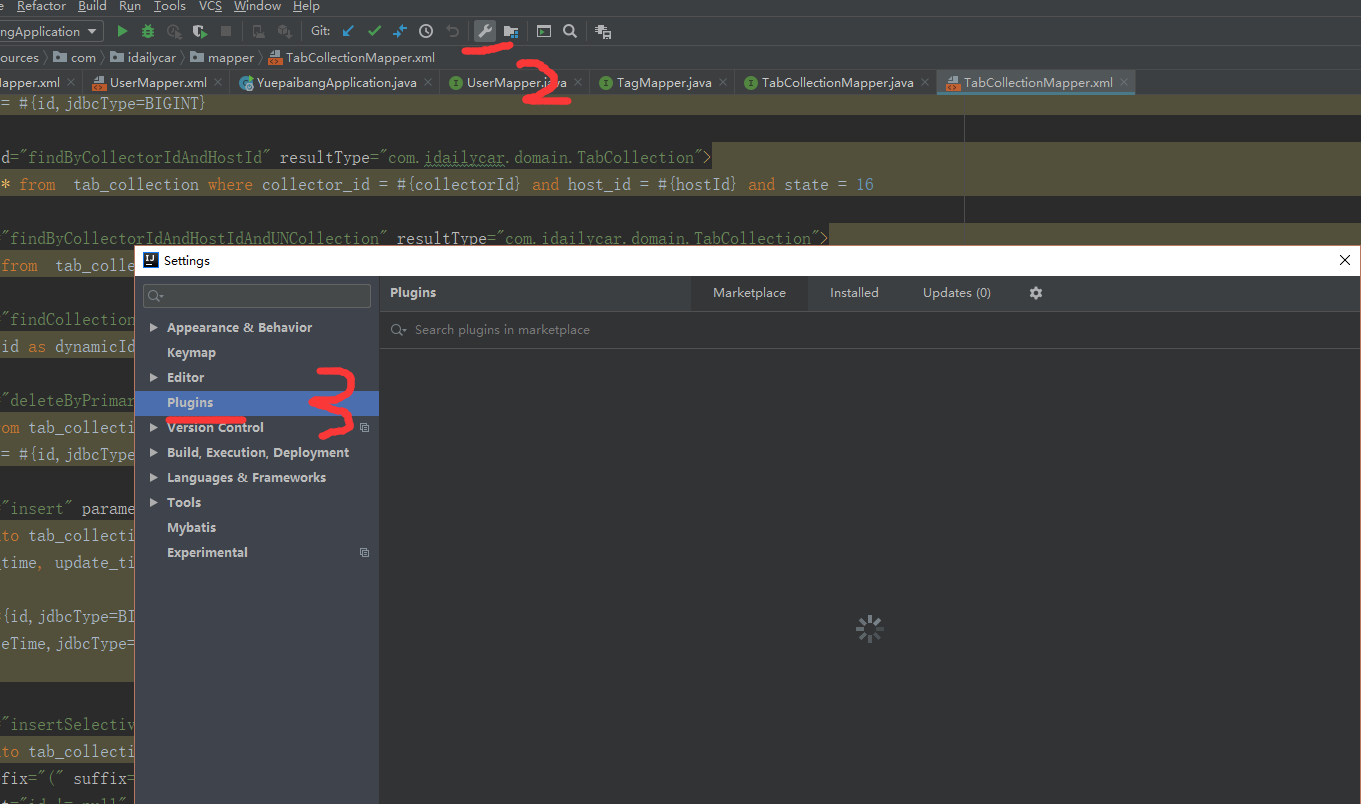
方便在Dao接口和Mappper XML文件之间进行切换,下载free mybatis plugins插件,安装步骤:

springboot整合mybatis开发的更多相关文章
- springboot整合mybatis(SSM开发环境搭建)
0.项目结构: ---------------------方法一:使用mybatis官方提供的Spring Boot整合包实现--------------------- 1.application.p ...
- Java开发学习(三十九)----SpringBoot整合mybatis
一.回顾Spring整合Mybatis Spring 整合 Mybatis 需要定义很多配置类 SpringConfig 配置类 导入 JdbcConfig 配置类 导入 MybatisConfig ...
- SpringBoot整合Mybatis之项目结构、数据源
已经有好些日子没有总结了,不是变懒了,而是我一直在奋力学习springboot的路上,现在也算是完成了第一阶段的学习,今天给各位总结总结. 之前在网上找过不少关于springboot的教程,都是一些比 ...
- SpringBoot整合Mybatis【非注解版】
接上文:SpringBoot整合Mybatis[注解版] 一.项目创建 新建一个工程 选择Spring Initializr,配置JDK版本 输入项目名 选择构建web项目所需的state ...
- springBoot整合mybatis、jsp 或 HTML
springBoot整合mybatis.jsp Spring Boot的主要优点: 1: 为所有Spring开发者更快的入门: 2: 开箱即用,提供各种默认配置来简化项目配置: 3: 内嵌式容器 ...
- SpringBoot系列七:SpringBoot 整合 MyBatis(配置 druid 数据源、配置 MyBatis、事务控制、druid 监控)
1.概念:SpringBoot 整合 MyBatis 2.背景 SpringBoot 得到最终效果是一个简化到极致的 WEB 开发,但是只要牵扯到 WEB 开发,就绝对不可能缺少数据层操作,所有的开发 ...
- SpringBoot整合Mybatis完整详细版
记得刚接触SpringBoot时,大吃一惊,世界上居然还有这么省事的框架,立马感叹:SpringBoot是世界上最好的框架.哈哈! 当初跟着教程练习搭建了一个框架,传送门:spring boot + ...
- 【SpringBoot系列1】SpringBoot整合MyBatis
前言: 一直看网上说SpringBoot是解锁你的配置烦恼,一种超级快速开发的框架.一直挺想学的,正好最近也有时间,就学了下 这个是SpringBoot整合MyBatis的一个教程,用了阿里的drui ...
- SpringBoot整合Mybatis之进门篇
已经有好些日子没有总结了,不是变懒了,而是我一直在奋力学习springboot的路上,现在也算是完成了第一阶段的学习,今天给各位总结总结. 之前在网上找过不少关于springboot的教程,都是一些比 ...
随机推荐
- mysql-SELECT子句的顺序
- 【XSY3344】连续段 DP 牛顿迭代 NTT
题目大意 对于一个长度为 \(n\) 的排列 \(p\),我们称一个区间 \([l,r]\) 是连续的当且仅当 \((\max_{l\leq i\leq r}a_i)-(\min_{l\leq i\l ...
- winform动态生成新窗体并添加控件执行命令
主要代码 Form nf = new Form(); ; ; nf.Width = _w; nf.Height = _h; //添加textbox TextBox tb = new TextBox() ...
- 如何对mRemoteNG在进行Linux终端访问时自定义配色
Its not that easy to config mRemoteNG custom color themes, not like XShell which is really convinent ...
- [SDOI2017]天才黑客
题目大意 给一张有向图,再给一颗字典树,有向图上的每条边有一个非负边权还有一个字典树上的字符串,从一条边到另一条边的代价是那条边的边权和这两个字符串的最长公共前缀,问从1到其他点的最短路. 题解 一看 ...
- 【洛谷P1090 合并果子】
题目描述 在一个果园里,多多已经将所有的果子打了下来,而且按果子的不同种类分成了不同的堆.多多决定把所有的果子合成一堆. 每一次合并,多多可以把两堆果子合并到一起,消耗的体力等于两堆果子的重量之和.可 ...
- zeppelin中连接hive和impala
连接Hive 新建interpreter default.driver = org.apache.hive.jdbc.HiveDriver default.url = jdbc:hive2://hos ...
- 【转】Redis学习笔记(四)如何用Redis实现分布式锁(1)—— 单机版
原文地址:http://bridgeforyou.cn/2018/09/01/Redis-Dsitributed-Lock-1/ 为什么要使用分布式锁 这个问题,可以分为两个问题来回答: 为什么要使用 ...
- H5_0004:JS设置循环debugger的方法
在HTML页面加上如下代码,则PC打开控制台后,就会循环debugger,防止调试代码. <script>eval(function (p, a, c, k, e, r) { e = fu ...
- GCC 警告
-w -W禁止/开启 编译警告的打印.这个警告不建议使用.大约2012年底,公司代码进行一次大重构,另外从Codeblock集成开发环境转向Makefile管理,Makefile里面默认使用了-w,因 ...