
用Excel创建SQL server性能报告
转载自Kun Lee “Creating SQL Server performance based reports using Excel”
性能测试调优中对数据库的监控十分重要,使用Excel方便地生成report对我们的工作效率提高也很重要。本文用到的Excel数据在另一篇博文“怎样获取Windows平台下SQL server的性能计数器值”里有详细描写。或者进到本文中给出的博客链接“Setting up Performance Monitor to always collect performance statistics”(下一段中),按照文中方法得到。
Problem
In a previous tip, "Setting up Performance Monitor to always collect performance statistics" I wrote about how to collect performance monitor data, but once you have the data then what do you do with it. In this tip I will show you how I use Excel to analyze the data to help determine where your bottlenecks may be and also an easy way to create quick reports and charts for your SQL Servers.
Solution
Before we get started here are a couple of things you will need for this tip.
- Microsoft Excel 2007 - you also can use Excel 2003 or earlier version but for this tip, I used the latest version.
- Perfmon trace files at least one day in "csv" format. - if you have a file in "blg" format, you can easily convert it by using the "relog" tool. When I get a chance, I will write another tip about the relog tool and other tools that work well with Perfmon. To collect data using Perfmon you can review this tip Setting up Performance Monitor to always collect performance statistics.
Step 1: Open the csv file
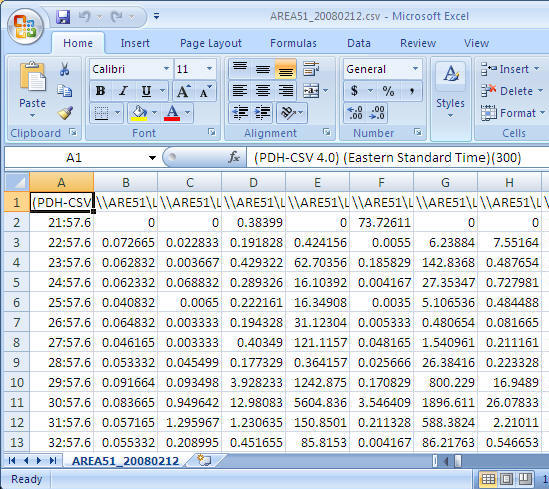
Once you have collected the performance data you can open the csv file using Excel and you should see data similar to the following.
Step 2: Adjust the format
To allow easy reporting of the data there are a few things that I do to adjust the data.
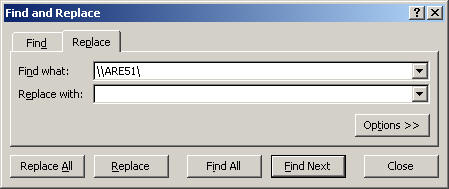
- Replace server name with an empty string - it helps to make reading the counter names easier. In this case I am replacing "\\AREA51\" the name of my server to nothing. (This is optional, but recommended)
- Cell - A1: Replace "(PDH-CSV 4.0) (Eastern Standard Time)(300)" with "Time" (Optional, but recommended)
- Delete the second row - very often, the first data row has bad data
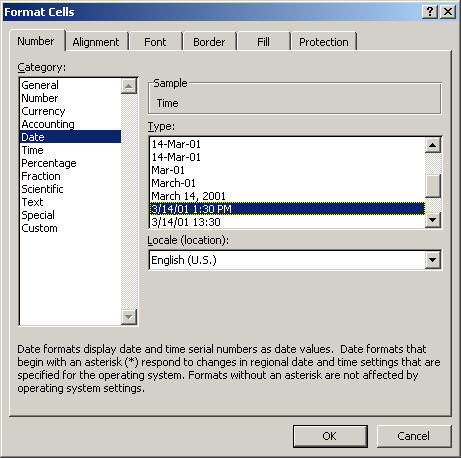
- Change COLUMN A cell format to "date time"
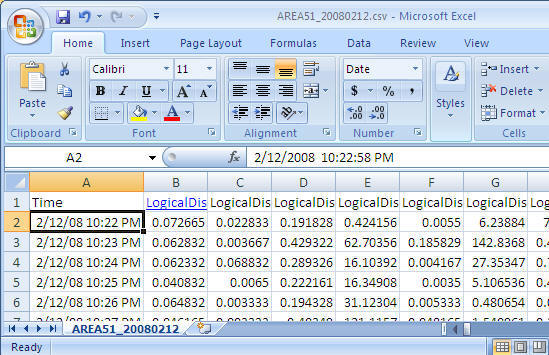
Final look before we start using it the data.
Step 3: Create PivotTable with PivotChart
- From the Insert menu select PivotTable and then select PivotChart as shown below
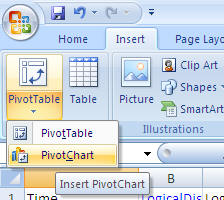
Take the default settings and click "OK"
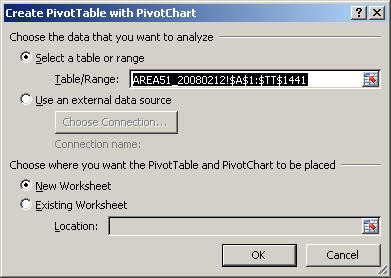
After you select the above you will get a screen similar to the following. (to get a bigger workspace area you can close the "PivotChart Filter Pane")
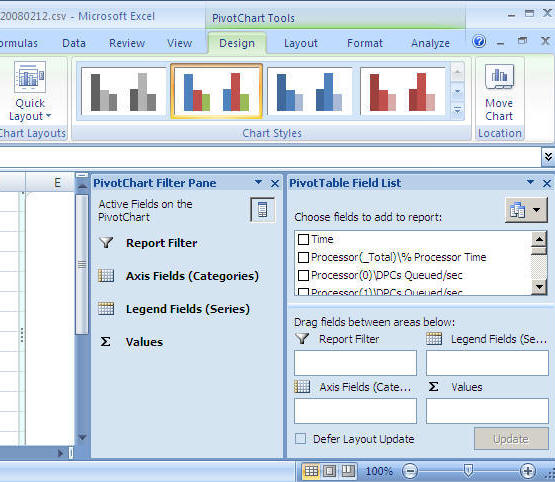
Step 4: Let's generate our first graph
For this example we will look at CPU
- From the "PivotTable Field List" select "Time" and drag it into the "Axis Fields (Categories)" area
- From the "PivotTable Field List" select "Process(_Total)\% Process Time" and drag it into the "Values" area
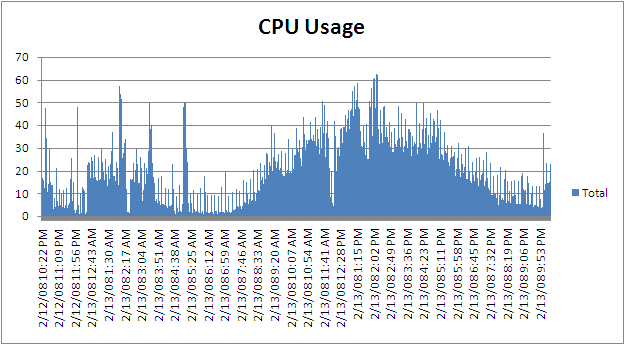
- At this point you will have a graph similar to the one shown below
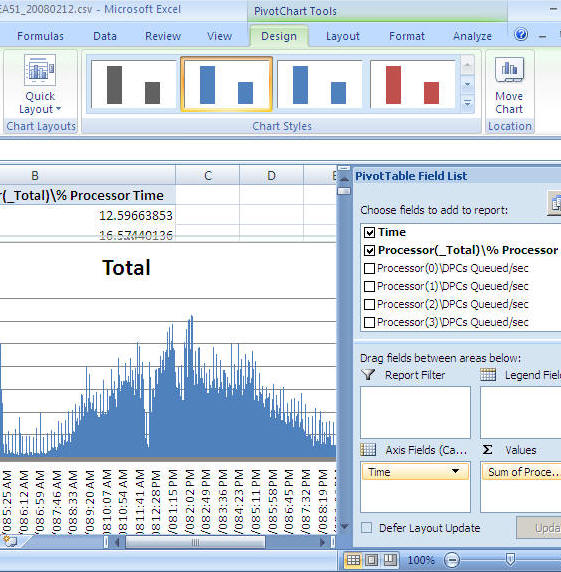
You can now just select the chart and copy and paste it into a report, an email, Word document etc... as shown below
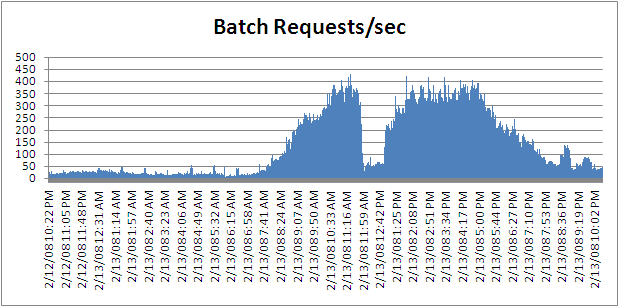
If you want to change it from processor time to batch requests you can remove "Process(_Total)\% Process Time" and select "SQLServer:SQL Statistics\Batch Requests/sec" and you will get a chart like below
Next Steps
- There are many ways to extend this reporting to make it more useful for both short term and long term needs. In order to do that, it is easier to load the Perfmon data into SQL Server and use the power of SQL Server along with Excel to generate the reports.
- By using the "relog" tool, you can load the Perfmon data directly into SQL Server
- By using the "logman" tool, you can setup Perfmon to store the performance data directly to SQL Server
- To get you started you can download a sample CSV file here with a lot of performance counters
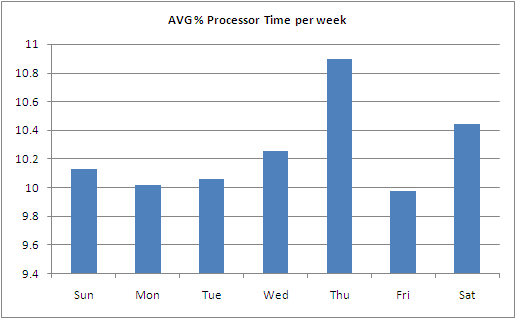
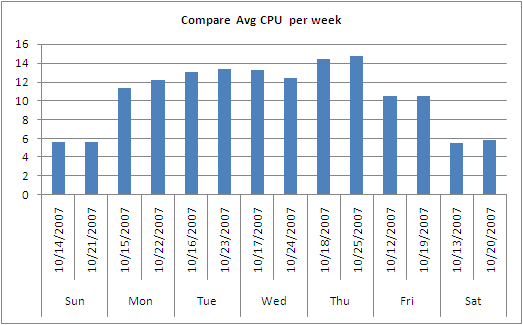
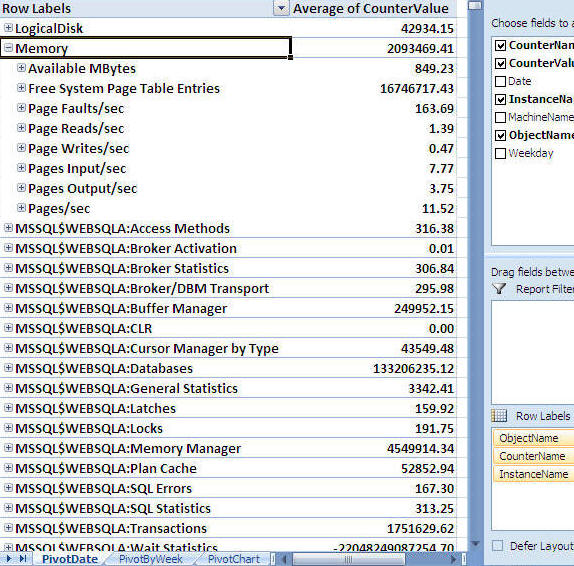
- Here are a few more examples of reports and charts you can create
Sample 1
Sample 2
Sample 3
用Excel创建SQL server性能报告的更多相关文章
- SQL Server Profiler监控SQL Server性能
全面掌握SQL Server Profiler 1. 原理与相关概念介绍 SQL Server Profiler,大家已经非常熟悉.常常在性能优化中使用,本文档详细介绍SQL Server ...
- SQL Server 性能优化详解
故事开篇:你和你的团队经过不懈努力,终于使网站成功上线,刚开始时,注册用户较少,网站性能表现不错,但随着注册用户的增多,访问速度开始变慢,一些用户开始发来邮件表示抗议,事情变得越来越糟,为了留住用户, ...
- SQL Server 性能优化之RML Utilities:快速入门(Quick Start)(1)
SQL Server 性能优化之RML Utilities:快速入门(Quick Start)(1) 安装Quick Start工具 RML(Replay Markup Language)是MS ...
- SQL Server 性能优化之——系统化方法提高性能
SQL Server 性能优化之——系统化方法提高性能 阅读导航 1. 概述 2. 规范逻辑数据库设计 3. 使用高效索引设计 4. 使用高效的查询设计 5. 使用技术分析低性能 6. 总结 1. 概 ...
- 影响Sql server性能的因素
目前本人在看<SQL Server性能调优实战> ,以下内容是本人看书笔记 数据库性能取决于各方面综合因素: 硬件,操作系统,软件 硬件:内存,CPU,磁盘 当服务器的物理内存不足时,会产 ...
- sql server 性能调优之 资源等待PAGELATCH
一.概述 在前几章介绍过 sql server 性能调优资源等待之PAGEIOLATCH,PAGEIOLATCH是出现在sql server要和磁盘作交互的时候,所以加个IO两个字.这次来介绍PAGE ...
- sql server 性能调优之 CPU消耗最大资源分析1 (自sqlserver服务启动以后)
一. 概述 上次在介绍性能调优中讲到了I/O的开销查看及维护,这次介绍CPU的开销及维护, 在调优方面是可以从多个维度去发现问题如I/O,CPU, 内存,锁等,不管从哪个维度去解决,都能达到调优的效 ...
- [转]SQL Server 性能调优(io)
目录 诊断磁盘io问题 常见的磁盘问题 容量替代了性能 负载隔离配置有问题 分区对齐配置有问题 总结 关于io这一块,前面的东西如磁盘大小,磁盘带宽,随机读取写入,顺序读取写入,raid选择,DA ...
- CPU开销sql server 性能调优
sql server 性能调优 CPU开销分析 一. 概述 上次在介绍性能调优中讲到了I/O的开销查看及维护,这次介绍CPU的开销及维护, 在调优方面是可以从多个维度去发现问题如I/O,CPU, 内存 ...
随机推荐
- CentOS 创建SVN 服务器,并且自动同步到WEB 目录
CentOS 创建SVN 服务器,并且自动同步到WEB 目录 标签: centossvnsubversion服务器 2013-12-06 10:09 5492人阅读 评论(0) 收藏 举报 分类: ...
- C++强制类型转换
C语言强制类型转换过于粗暴,任意类型之间都可以进行转换,编译很难判断其正确性; 难于定位,在源码中无法快速定位所有使用强制类型转换的语句. C++将强制类型转换分为4种不同的类型:static_cas ...
- maven 依赖
依赖排除 当一个项目A依赖项目B,而项目B同时依赖项目C,如果项目A中因为各种原因不想引用项目C,在配置项目B的依赖时,可以排除对C的依赖. 示例(假设配置的是A的pom.xml,依赖关系为:A -- ...
- remi
很简单呀,又不用自己编译.用 http://rpms.remirepo.net/ 这个 remi 的包,直接 yum install php-swoole 就完事了 安装remi包也很简单, yum ...
- Java中JDBC连接数据库代码和步骤详解总结
JDBC连接数据库 •创建一个以JDBC连接数据库的程序,包含7个步骤: 1.加载JDBC驱动程序: 在连接数据库之前,首先要加载想要连接的数据库的驱动到JVM(Jav ...
- Android界面组件的四种启动方式
Android界面组件启动有四种方式 standard,singleTop,singleTask,singleInstance. standard:每次调用都会都会产生新的组件. singletop: ...
- virturalbox 本地win8 虚拟机为Linux-- 网络设置
网络地址转换 NAT(适合Linux临时上网,无法连接本地网络) ,Linux需要设置为自动连接 既DHCP,并service network restart 桥接 适合本地和虚拟机对接,虚拟机网络 ...
- eclipse下的emacs风格快捷键
Ieclipse emacs类快捷键 win + shift + b 切换设置断点 win + shift + f 格式化代码 win + shift + l 显示绑定的快捷键 win + shift ...
- [SharePoint 2010] Modify lookup mapping with PowerShell
SharePoint支持将列表保存成列表模板,但当列表包含Lookup字段时,通过模板创建的列表会丢失Lookup字段的信息. 通过PowerShell,可以修改Lookup字段的xml内容. Fun ...
- 新上市Lighthouse专用芯片TS3633规格介绍
背景介绍 Valve 有远大的愿景.它决心要把 SteamVR 追踪系统推向世界,从虚拟现实里的空间定位,到机器人领域,Valve 想为各种环境下的跟踪应用提供支持. 上个月,Valve 方面宣布会把 ...