
ArcEngine中合并断开的线要素(根据几何判断)
在上一篇ArcEngine环境下合并断开的线要素(根据属性)随笔中介绍了如何通过shp文件属性表中相同的属性字段进行线要素的合并。今天刚把通过几何条件判断的方式连接断开的线要素的ArcGIS 插件完成,在这里把思路和代码和大家分享下:
一,程序思路和实现过程
1.首先读取shp线文件,将各条线要素遍历,存储在List<IFeature>,这里之所以不存在List<IPolyline>和List<IGeometry>中的原因是后两者会丢失要素的属性信息;
2.为了简化合并算法的逻辑和复杂性,采用分治思想。将线要素分为需要进行合并和不需要进行合并(独立的线,ToPoint或FromPoint是“节点”的线和ToPoint,FromPoint均是“节点”线)的两大类,分别存储在两个集合中;
3.现在只需对需要进行合并的的线要素集合进行合并操作。首先从集合中选取一条Polyline,然后在集合剩下的元素中寻找与其ToPoint或FromPoint相同的线要素,然后使用ITopologicalOperator2.Union()方法进行合并,然后寻找和合并后新的Polyline的ToPoint或FromPoint相同的线要素继续合并,没合并一次,就将合并入的Polyline从集合中移除,直到剩下的Polyline不可和当前合并的Polyline合并为止,这样就得到了第一条合并好的Polyline。接着从集合剩下的线要素再找一条Polyline开始新一轮合并操作,直到List<IFeature>为空,整个合并操作结束;
4.得到合并好的List<IFeature> mergeResultLineList后,需要为其添加属性(NAME等字段),通过IFeatureBuffer接口写入shape和Fields,然后Flush到文件中,结束。
二,程序实例和结果

图1 程序执行结果
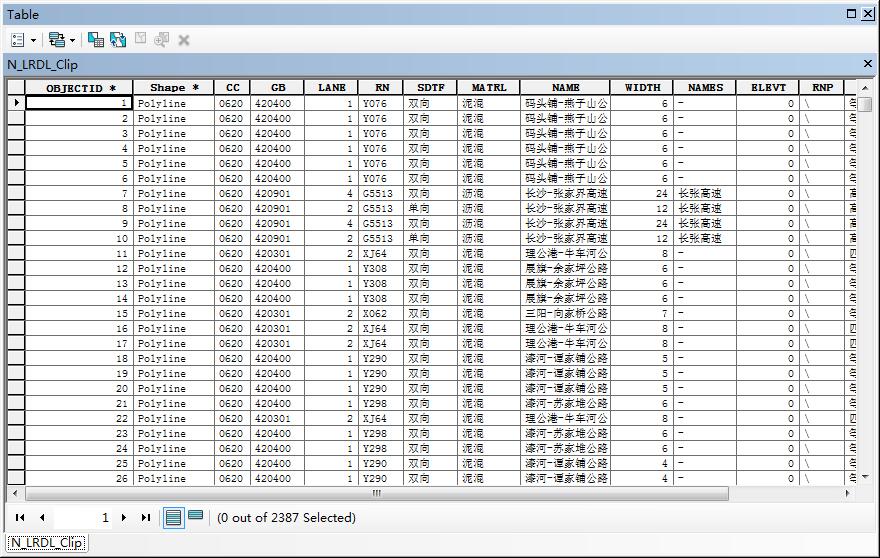
图2 合并前的属性表
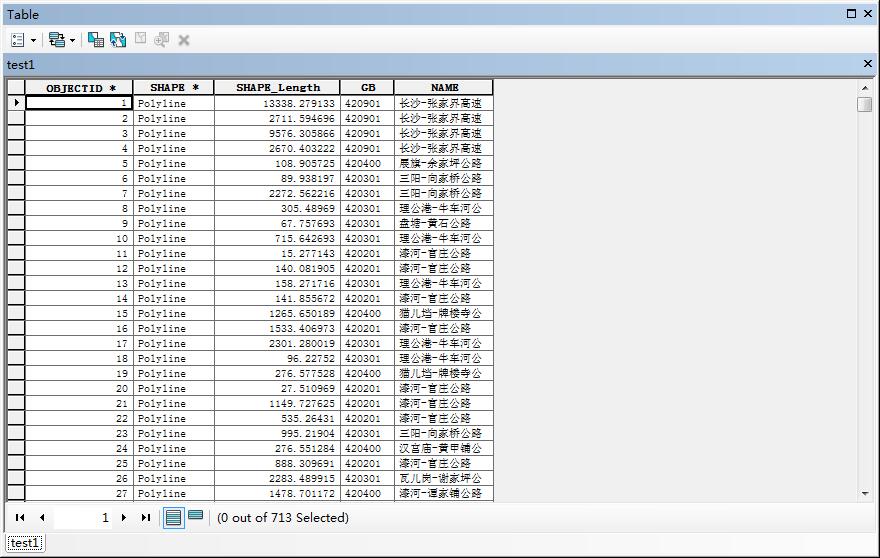
图3 合并后的属性表
三,程序详细代码
public class MergeDisconnectLine : ESRI.ArcGIS.Desktop.AddIns.Button
{ public int CountPercent { get; set; }
IMap map = null;
private List<IFeature> DisconnPolylineList = new List<IFeature>();
private List<IFeature> firstRowFeatureList = new List<IFeature>(); public MergeDisconnectLine()
{
IMxDocument mxDoc = ArcMap.Application.Document as IMxDocument;
map = mxDoc.FocusMap;
}
protected override void OnClick()
{
//
// TODO: Sample code showing how to access button host
//
ArcMap.Application.CurrentTool = null; //计算程序耗时
DateTime beforDT = System.DateTime.Now;
//Application.EnableVisualStyles();
//Application.SetCompatibleTextRenderingDefault(false);
////ProgressBar pBar = new ProgressBar();
//Application.Run(new ProgressBar());
List<IFeature> allPolylineList = getAllPolyline();
List<IFeature> noNeedUnionLineList = getWithoutNeedUnionLineList(allPolylineList);
List<IFeature> toUnionLineList = GetToUnionLineList(allPolylineList, noNeedUnionLineList);
List<IFeature> unionLineList = MergeLineListOperate(toUnionLineList);
AddField();
WriteNoNeedUnionLineToFile(noNeedUnionLineList);
WriteUnionLineToFile(unionLineList, firstRowFeatureList);
DateTime afterDT = System.DateTime.Now;
TimeSpan ts = afterDT.Subtract(beforDT);
int minutes = ts.Minutes;
int seconds = ts.Seconds%;
//pBar.Hide();
MessageBox.Show("线要素合并结束,运行程序共耗时约:" + minutes + "分"+ seconds + "秒");
}
//获取shp文件中所有的Polyline(IFeature)对象
public List<IFeature> getAllPolyline()
{
IFeatureLayer featureLayer = map.get_Layer() as IFeatureLayer;
IFeatureClass featureClass = featureLayer.FeatureClass;
IQueryFilter queryFilter = new QueryFilter();
queryFilter.WhereClause = "";
IFeatureCursor pFeatCursor = featureClass.Search(queryFilter, false);
IFeature pFeature = pFeatCursor.NextFeature(); while (pFeature != null)
{
if (featureClass.ShapeType == esriGeometryType.esriGeometryPolyline)
{
DisconnPolylineList.Add(pFeature);
}
pFeature = pFeatCursor.NextFeature();
}
return DisconnPolylineList;
} //获取需要进行合并的线(是noNeedUnionLineList的补集)
public List<IFeature> GetToUnionLineList(List<IFeature> allPolylineList, List<IFeature> noNeedUnionLineList)
{
List<IFeature> toUnionLineList = allPolylineList;
foreach (IFeature featureLine in noNeedUnionLineList)
{
toUnionLineList.Remove(featureLine);
}
return toUnionLineList;
} //获取不需要进行合并的线(独立线,一端是节点的线,和两端都是节点的线)
public List<IFeature> getWithoutNeedUnionLineList(List<IFeature> allPolylineList)
{
List<IFeature> noNeedUnionLineList = new List<IFeature>();
foreach (IFeature featureLine in allPolylineList)
{
int count = featureLine.Fields.FieldCount;
List<IFeature> allPolylineListCopy = allPolylineList;
IGeometry geoLine = featureLine.Shape;
IPolyline lineFirst = geoLine as IPolyline;
IPoint startPt1 = lineFirst.FromPoint;
IPoint endPt1 = lineFirst.ToPoint;
int fromFlag = ;
int toFlag = ;
for (int i = ; i < allPolylineListCopy.Count; i++)
{
IFeature line2 = allPolylineListCopy[i];
IGeometry geoLine2 = line2.Shape;
IPolyline lineSecond = geoLine2 as IPolyline;
IPoint startPt2 = lineSecond.FromPoint;
IPoint endPt2 = lineSecond.ToPoint;
//FromPoint相同的点
if ((startPt1.X == startPt2.X && startPt1.Y == startPt2.Y) ||
(startPt1.X == endPt2.X && startPt1.Y == endPt2.Y))
{
fromFlag++;
}
//ToPoint相同的点
if ((endPt1.X == endPt2.X && endPt1.Y == endPt2.Y) ||
(endPt1.X == startPt2.X && endPt1.Y == startPt2.Y))
{
toFlag++;
}
}
if (fromFlag > || toFlag > || (fromFlag == && toFlag == ))
{
noNeedUnionLineList.Add(featureLine);
//noNeedUnionLineFileds.Add(featureLine.Fields);
}
}
return noNeedUnionLineList;
} //将需要进行合并的线要素(没有节点)集合进行合并,结果为多条线
public List<IFeature> MergeLineListOperate(List<IFeature> toUnionLineList)
{
List<IFeature> mergeResultLineList = new List<IFeature>();
int CountPercent = ;
while (toUnionLineList.Count > )
{
CountPercent++;
//初始化当前合并的线要素
IFeature unionCurrentLine = toUnionLineList[];
//将第一个要素的属性字段值作为最终合并线要素的值
firstRowFeatureList.Add(unionCurrentLine);
List<IFeature> currentMergeLineList = new List<IFeature>();
int count2 = ;
do
{
count2++;
IFeature featureFirst = unionCurrentLine;
IGeometry geoLineFirst = featureFirst.Shape;
IPolyline lineFirst = geoLineFirst as IPolyline;
IPoint startPt1 = lineFirst.FromPoint;
IPoint endPt1 = lineFirst.ToPoint;
toUnionLineList.Remove(featureFirst);
currentMergeLineList.Clear();
currentMergeLineList.Add(featureFirst); List<IFeature> allPolylineListTemp1 = new List<IFeature>();
List<IFeature> allPolylineListTemp2 = new List<IFeature>();
int bStart1 = ;
int bStart2 = ;
for (int j = ; j < toUnionLineList.Count; j++)
{
IFeature featureSecond = toUnionLineList[j];
IGeometry geoLineSecond = featureSecond.Shape;
IPolyline lineSecond = geoLineSecond as IPolyline;
IPoint startPt2 = lineSecond.FromPoint;
IPoint endPt2 = lineSecond.ToPoint; if ((startPt1.X == startPt2.X && startPt1.Y == startPt2.Y) ||
(startPt1.X == endPt2.X && startPt1.Y == endPt2.Y))
{
bStart1++;
if (bStart1 > )
{
allPolylineListTemp1.Add(featureSecond);
currentMergeLineList.AddRange(allPolylineListTemp1);
toUnionLineList.Remove(featureSecond);
}
}
if ((endPt1.X == endPt2.X && endPt1.Y == endPt2.Y) ||
(endPt1.X == startPt2.X && endPt1.Y == startPt2.Y))
{
bStart2++;
if (bStart2 > )
{
allPolylineListTemp2.Add(featureSecond);
currentMergeLineList.AddRange(allPolylineListTemp2);
toUnionLineList.Remove(featureSecond);
} } }
if (currentMergeLineList.Count > )
{
unionCurrentLine = UnionCurrentLineList(currentMergeLineList);
}
else
{
int ii = ;
}
} while (currentMergeLineList.Count > ); mergeResultLineList.Add(unionCurrentLine);
}
return mergeResultLineList;
} //为待写入图层添加Name和GB字段
public void AddField()
{
IFeatureLayer featureLayer2 = map.get_Layer() as IFeatureLayer;
IFeatureClass featureClass2 = featureLayer2.FeatureClass;
IClass pClass = featureClass2 as IClass;
IField fld1 = new Field();
IField fld2 = new Field();
IFieldEdit2 fld_NAME = fld1 as IFieldEdit2;
IFieldEdit2 fld_GB = fld2 as IFieldEdit2;
fld_NAME.Type_2 = esriFieldType.esriFieldTypeString;
fld_NAME.Name_2 = "NAME";
fld_GB.Type_2 = esriFieldType.esriFieldTypeString;
fld_GB.Name_2 = "GB";
pClass.AddField(fld_GB);
pClass.AddField(fld_NAME); } public void WriteNoNeedUnionLineToFile(List<IFeature> pLineList)
{
foreach (IFeature featureLine in pLineList)
{
IFeatureLayer featureLayer2 = map.get_Layer() as IFeatureLayer;
IFeatureClass featureClass2 = featureLayer2.FeatureClass;
IFeatureBuffer featureBuffer = featureClass2.CreateFeatureBuffer();
IFeatureCursor featureCursor;
featureCursor = featureClass2.Insert(true);
IGeometry pGeometry = featureLine.Shape;
featureBuffer.Shape = pGeometry;
int NAME_Index = featureLine.Fields.FindField("NAME");
int GB_Index = featureLine.Fields.FindField("GB");
string name = featureLine.get_Value(NAME_Index).ToString();
string gb = featureLine.get_Value(GB_Index).ToString();
int fieldindex1 = featureBuffer.Fields.FindField("NAME");
int fieldindex2 = featureBuffer.Fields.FindField("GB");
if (fieldindex1 >= )
{
featureBuffer.set_Value(fieldindex1, name);
}
if (fieldindex2 >= )
{
featureBuffer.set_Value(fieldindex2, gb);
}
featureCursor.InsertFeature(featureBuffer);
featureCursor.Flush();
System.Runtime.InteropServices.Marshal.ReleaseComObject(featureCursor);
}
}
public void WriteUnionLineToFile(List<IFeature> mergeResultLineList, List<IFeature> firstFeatureList)
{
int index = ;
foreach (IFeature featureLine in mergeResultLineList)
{
IFeatureLayer featureLayer2 = map.get_Layer() as IFeatureLayer;
IFeatureClass featureClass2 = featureLayer2.FeatureClass;
IFeatureBuffer featureBuffer = featureClass2.CreateFeatureBuffer();
IFeatureCursor featureCursor;
featureCursor = featureClass2.Insert(true);
IGeometry pGeometry = featureLine.Shape;
featureBuffer.Shape = pGeometry;
int NAME_Index = firstFeatureList[index].Fields.FindField("NAME");
int GB_Index = firstFeatureList[index].Fields.FindField("GB");
string name = firstFeatureList[index].get_Value(NAME_Index).ToString();
string gb = firstFeatureList[index].get_Value(GB_Index).ToString();
int fieldindex1 = featureBuffer.Fields.FindField("NAME");
int fieldindex2 = featureBuffer.Fields.FindField("GB");
if (fieldindex1 >= )
{
featureBuffer.set_Value(fieldindex1, name);
}
if (fieldindex2 >= )
{
featureBuffer.set_Value(fieldindex2, gb);
} featureCursor.InsertFeature(featureBuffer);
featureCursor.Flush();
System.Runtime.InteropServices.Marshal.ReleaseComObject(featureCursor);
index++;
}
} //将传入的List<IPolylne>中的多条线要素进行合并为一条线要素
public IFeature UnionCurrentLineList(List<IFeature> currentMergeLineList)
{
IFeatureLayer featureLayer = map.get_Layer() as IFeatureLayer;
IFeatureClass featureClass = featureLayer.FeatureClass; ITopologicalOperator2 pTopologicalOperator;
IFeature pFeatureTemp = currentMergeLineList[];
IGeometry pGeometry = pFeatureTemp.Shape;
int i = ;
while (i < currentMergeLineList.Count)
{
pTopologicalOperator = pGeometry as ITopologicalOperator2;
//ITopologicalOperator的操作是bug很多的,先强制的检查下面三个步骤,再进行操作
//modifiy in 2016/03/20 12:47
pTopologicalOperator.IsKnownSimple_2 = false;
pTopologicalOperator.Simplify();
pGeometry.SnapToSpatialReference(); pGeometry = currentMergeLineList[i].Shape;
pGeometry = pTopologicalOperator.Union(pGeometry);
i++;
}
IFeature unionLine = featureClass.CreateFeature();
unionLine.Shape = pGeometry;
IDataset pDataset = featureClass as IDataset;
pDataset.Workspace.ExecuteSQL("delete from " + featureClass.AliasName + " where SHAPE_Length = 0" );
return unionLine;
} protected override void OnUpdate()
{
Enabled = ArcMap.Application != null;
}
}
-------------------------------------------------------------------------------------------------------------------------
本文系作者GISQZC原创文章,欢迎转载,但必须注明出处,否则将追究相关法律责任!
ArcEngine中合并断开的线要素(根据几何判断)的更多相关文章
- ArcEngine环境下合并断开的线要素(根据属性)
1.遇到的问题: 最近遇到在线要素(矢量数据)中,一条完整的道路.河流等往往是断开的,如下图1所示: 2.思路: 在ArcGIS Desktop中没有相关的工具可以将这些断开的线要素进行自动合并,今天 ...
- ArcEngine 创建线要素图层
在创建要素图层的时候,默认的几何类型是Polygon: Dim objectClassDescription As IObjectClassDescription = New FeatureClass ...
- ArcEngine中最短路径的实现
原文 ArcEngine中最短路径的实现 最短路径分析属于ArcGIS的网络分析范畴.而ArcGIS的网络分析分为两类,分别是基于几何网络和网络数据集的网络分析.它们都可以实现最短路径功能.下面先介绍 ...
- ArcEngine中打开各种数据源(WorkSpace)的连接
(SDE.personal/File.ShapeFile.CAD数据.影像图.影像数据集) ArcEngine 可以接受多种数据源.在开发过程中我们使用了如下几种数据源 1.企业数据库(SDE) 企业 ...
- ArcEngine中打开各种数据源(WorkSpace)的连接(转)
ArcEngine中打开各种数据源(WorkSpace)的连接 (SDE.personal/File.ShapeFile.CAD数据.影像图.影像数据集) ArcEngine 可以接受多种数据源.在开 ...
- ArcEngine中打开各种数据源(WorkSpace)的连接http://www.cnblogs.com/feilong3540717/archive/2011/08/07/2129906.html
ArcEngine中打开各种数据源(WorkSpace)的连接 ArcEngine中打开各种数据源(WorkSpace)的连接 (SDE.personal/File.ShapeFile.CAD数据.影 ...
- [转] ArcEngine中打开各种数据源(WorkSpace)的连接
原文 ArcEngine中打开各种数据源(WorkSpace)的连接(SDE.personal/File.ShapeFile.CAD数据.影像图.影像数据集) ArcEngine 可以接受多种数据源. ...
- ArcEngine查询、添加、删除要素的方法
原文 ArcEngine查询.添加.删除要素的方法 1.查找数据 1).利用FeaturCursor进行空间查询 //空间查询 ISpatialFilter spatialFilter = new S ...
- ArcMAp对线要素进行平滑处(打断)
一:工具简单介绍 -- ArcMAp10.1的高级编辑工具中提供了对线/面要素进行概括/平滑处理的工具. 概括工具.平滑工具分别例如以下:(首先得开启编辑状态 --- 才干够对要素的属性进行更改).选 ...
随机推荐
- [New Portal]Windows Azure Virtual Machine (23) 使用Storage Space,提高Virtual Machine磁盘的IOPS
<Windows Azure Platform 系列文章目录> 注意:如果使用Azure Virtual Machine,虚拟机所在的存储账号建议使用Local Redundant.不建议 ...
- window、document、html、body、element的事件属性比较
在分析jQuery的事件的时候有提到绑定事件的方式: Dean Edwards的跨浏览器事件绑定使用的方式是 element["on" + type] = handleEvent; ...
- C# Socket系列三 socket通信的封包和拆包
通过系列二 我们已经实现了socket的简单通信 接下来我们测试一下,在时间应用的场景下,我们会快速且大量的传输数据的情况! class Program { static void Main(stri ...
- Asp.Net 高性能ORM框架 SqlSugar.ORM 2.8
3.0最新API: http://www.cnblogs.com/sunkaixuan/p/5911334.html 1.前言/Preface SqlSugar从去年到现在已经一年了,版本从1.0升到 ...
- JS魔法堂:彻底理解0.1 + 0.2 === 0.30000000000000004的背后
Brief 一天有个朋友问我“JS中计算0.7 * 180怎么会等于125.99999999998,坑也太多了吧!”那时我猜测是二进制表示数值时发生round-off error所导致,但并不清楚具体 ...
- PHP循环语句基础介绍
PHP 中的循环语句用于执行相同的代码块指定的次数. 循环 在您编写代码时,您经常需要让相同的代码块运行很多次.您可以在代码中使用循环语句来完成这个任务. 在 PHP 中,我们可以使用下列循环语句: ...
- WinForm对话框
WinForm 对话框控件colorDialog - 颜色选择对话框 使用代码如下: private void 字体颜色ToolStripMenuItem_Click(object sender, E ...
- [函数] Unicode 检查字符串是否含中文字
// 字串含中文 by Aone function IsIncludeChinese(Str: String): Boolean; var i: Integer; UCS4Str: UCS4Strin ...
- C语言的关键字,运算符,标识符
关键字 数据类型修饰相关 auto按照自动的方式进行变量的存储 const定义常量或常参数 extern声明外部变量或函数 register指定变量的存储类型是寄存器变量 static指定变量的存储类 ...
- 【FOL】第一周
本来打算按计划做下去的,发现原来那个sprite虽然功能强大,但是对我想要做的东西来说,冗余似乎有些多,决定自己写一个. 之前做了一段时间的h5游戏,用的是panda.js,发现这个引擎封装的还不错, ...