
SQLServer 版本之八大方法搞清 "我是谁"
你正在使用 SQL Server 的哪个版本?
贴士:作为一个SQL Server数据库管理者或维护、支持人员,应该会经常问自己这样一个问题:我当前SQL Server版本号是?当前版本已经有的累计更新、安全更新包有哪些?这么多包要选哪个?等等,会遇到类似心烦的问题。这里给大家梳理一下关于如何方便的获取SQL Server数据库版本信息,希望在日常运维中有所帮助。
介绍方法前,版本信息中相关名词的概念稍作解释,便于版本信息解读
1. The edition 版本,如:企业版、标准版等
2. The product version 标准产品版本号MM.nn.bbbb.rr
如: 10.0.1600.22-------major.minor.build.revision
- MM - 主版本--major
- nn - 次版本 minor
- bbbb - 内部版本号 build
- rr - 内部修订版本号 revision
3. The ProductMajorVersion产品主版本号 如:
12为 SQL SERVER 2014
11为 SQL SERVER 2012
10.5为SQL SERVER 2008R2
10 为SQL SERVER 2008
9为SQL SERVER 2005
4. The product level 实例版本级别,如:
'RTM' = Original release version 最初发布版本
SPn' = Service pack version 服务包版本
'CTPn', = Community Technology Preview version 社区技术预览版
5. The ProductBuildType 产品当前构建类型,如
OD = OD 为特殊客户发布到web
GDR = GDR 通过windows更新发布
NULL = Not applicable 无
6. The ProductBuild 产品构建,如:4425
7. The ProductUpdateLevel 产品更新级别,如
CUn = Cumulative Update累计更新,如CU1、CU2、CU3
NULL = Not applicable 无
8. The ProductUpdateReference 产品更新参考
如:KB3094221
9. The ProductMinorVersion 次版本号
获取SQL Server 及其组件的版本、版本类别和更新级别的八种方法
方法一:
连接SQL Server Management Studio利用Object Explorer显示的主要版本号信息,如图(一)显示当前实例产品版本号事11.0.6020
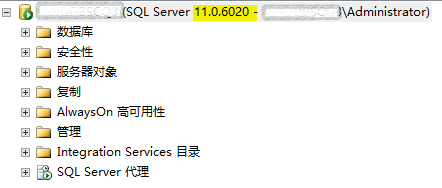
图(一)
方法二:
通过日志获取版本号,打开SQLServer默认安装目录的Log文件下找到ErrorLog文件如图(二),打开后可看到版本信息如(图三),此方法适合SQLServer服务停止情况下查看版本号信息

图(二)

图(三)
或者打开SSMS 在SQLSERVER代理下通过日志查看器查看,如下图(四)所示:

图(四)
方法三:
通过执行select @@version获取版本号信息,如下图(五)所示,

图(五)
方法四:
在 SQL Server Management Studio 中通过执行[sys].[xp_msver]获取版本号信息,如下图(六)所示

图(六)
方法五:
在 SQL Server Management Studio 中通过执行下面脚本获取版本号信息,结果如下图(七)所示
SELECT
SERVERPROPERTY('BuildClrVersion') AS BuildClrVersion --Version of the Microsoft.NET Framework common language runtime (CLR) that was used while building the instance of SQL Server.
,SERVERPROPERTY('Collation') AS Collation --Name of the default collation for the server.
,SERVERPROPERTY('CollationID') AS CollationID --ID of the SQL Server collation.
,SERVERPROPERTY('ComparisonStyle') AS ComparisonStyle --Windows comparison style of the collation.
,SERVERPROPERTY('ComputerNamePhysicalNetBIOS') AS ComputerNamePhysicalNetBIOS --NetBIOS name of the local computer on which the instance of SQL Server is currently running.
,SERVERPROPERTY('Edition') AS Edition --Installed product edition of the instance of SQL Server. Use the value of this property to determine the features and the limits, such as Compute Capacity Limits by Edition of SQL Server. 64-bit versions of the Database Engine append (64-bit) to the version.
,SERVERPROPERTY('EditionID') AS EditionID --EditionID represents the installed product edition of the instance of SQL Server. Use the value of this property to determine features and limits, such as Compute Capacity Limits by Edition of SQL Server.
,SERVERPROPERTY('EngineEdition') AS EngineEdition --Database Engine edition of the instance of SQL Server installed on the server.
,SERVERPROPERTY('HadrManagerStatus') AS HadrManagerStatus --Applies to: SQL Server 2012 through SQL Server 2016. Indicates whether the AlwaysOn Availability Groups manager has started.
,SERVERPROPERTY('InstanceDefaultDataPath') AS InstanceDefaultDataPath --Applies to: SQL Server 2012 through current version in updates beginning in late 2015.Name of the default path to the instance data files.
,SERVERPROPERTY('InstanceDefaultLogPath') AS InstanceDefaultLogPath --Applies to: SQL Server 2012 through current version in updates beginning in late 2015.Name of the default path to the instance data files.
,SERVERPROPERTY('InstanceName') AS InstanceName --Name of the instance to which the user is connected.
,SERVERPROPERTY('IsAdvancedAnalyticsInstalled') AS IsAdvancedAnalyticsInstalled --Returns 1 if the Advanced Analytics feature was installed during setup; 0 if Advanced Analytics was not installed.
,SERVERPROPERTY('IsClustered') AS IsClustered --Server instance is configured in a failover cluster.
,SERVERPROPERTY('IsFullTextInstalled') AS IsFullTextInstalled --The full-text and semantic indexing components are installed on the current instance of SQL Server.
,SERVERPROPERTY('IsHadrEnabled') AS IsHadrEnabled --Applies to: SQL Server 2012 through SQL Server 2016.AlwaysOn Availability Groups is enabled on this server instance.
,SERVERPROPERTY('IsIntegratedSecurityOnly') AS IsIntegratedSecurityOnly --Server is in integrated security mode.
,SERVERPROPERTY('IsLocalDB') AS IsLocalDB --Applies to: SQL Server 2012 through SQL Server 2016.Server is an instance of SQL Server Express LocalDB.
,SERVERPROPERTY('IsPolybaseInstalled') AS IsPolybaseInstalled --Applies to: SQL Server 2016.Returns whether the server instance has the PolyBase feature installed.
,SERVERPROPERTY('IsSingleUser') AS IsSingleUser --Server is in single-user mode.
,SERVERPROPERTY('IsXTPSupported') AS IsXTPSupported --Applies to: SQL Server (SQL Server 2014 through SQL Server 2016), SQL Database.Server supports In-Memory OLTP.
,SERVERPROPERTY('LCID') AS LCID --Windows locale identifier (LCID) of the collation.
,SERVERPROPERTY('LicenseType') AS LicenseType --Unused. License information is not preserved or maintained by the SQL Server product. Always returns DISABLED.
,SERVERPROPERTY('MachineName') AS MachineName --Windows computer name on which the server instance is running.
,SERVERPROPERTY('NumLicenses') AS NumLicenses --Unused. License information is not preserved or maintained by the SQL Server product. Always returns NULL.
,SERVERPROPERTY('ProcessID') AS ProcessID --Process ID of the SQL Server service. ProcessID is useful in identifying which Sqlservr.exe belongs to this instance.
,SERVERPROPERTY('ProductBuild') AS ProductBuild --Applies to: SQL Server 2014 beginning October, 2015. The build number.
,SERVERPROPERTY('ProductBuildType') AS ProductBuildType --Applies to: SQL Server 2012 through current version in updates beginning in late 2015. The build Type.
,SERVERPROPERTY('ProductLevel') AS ProductLevel --Level of the version of the instance of SQL Server.
,SERVERPROPERTY('ProductMajorVersion') AS ProductMajorVersion --Applies to: SQL Server 2012 through current version in updates beginning in late 2015. The major version.
,SERVERPROPERTY('ProductMinorVersion') AS ProductMinorVersion --Applies to: SQL Server 2012 through current version in updates beginning in late 2015. The minor version.
,SERVERPROPERTY('ProductUpdateLevel') AS ProductUpdateLevel --Applies to: SQL Server 2012 through current version in updates beginning in late 2015.
,SERVERPROPERTY('ProductUpdateReference') AS ProductUpdateReference --Applies to: SQL Server 2012 through current version in updates beginning in late 2015.
,SERVERPROPERTY('ProductVersion') AS ProductVersion --Version of the instance of SQL Server, in the form of'major.minor.build.revision'.
,SERVERPROPERTY('ResourceLastUpdateDateTime') AS ResourceLastUpdateDateTime --Returns the date and time that the Resource database was last updated.
,SERVERPROPERTY('ResourceVersion') AS ResourceVersion --Returns the version Resource database.
,SERVERPROPERTY('ServerName') AS ServerName --Both the Windows server and instance information associated with a specified instance of SQL Server.
,SERVERPROPERTY('SqlCharSet') AS SqlCharSet --The SQL character set ID from the collation ID.
,SERVERPROPERTY('SqlCharSetName') AS SqlCharSetName --The SQL character set name from the collation.
,SERVERPROPERTY('SqlSortOrder') AS SqlSortOrder --The SQL sort order ID from the collation
,SERVERPROPERTY('SqlSortOrderName') AS SqlSortOrderName --The SQL sort order name from the collation.
,SERVERPROPERTY('FilestreamShareName') AS FilestreamShareName --The name of the share used by FILESTREAM.
,SERVERPROPERTY('FilestreamConfiguredLevel') AS FilestreamConfiguredLevel --The configured level of FILESTREAM access. For more information, see filestream access level.
,SERVERPROPERTY('FilestreamEffectiveLevel') AS FilestreamEffectiveLevel --The effective level of FILESTREAM access. This value can be different than the FilestreamConfiguredLevel if the level has changed and either an instance restart or a computer restart is pending. For more information, see filestream access level.
GO

图(七)
方法六:
通过“SQL SERVER 安装中心”获取版本号信息
开始菜单,找到  点击后打开如图(八)所示,点击 “已安装的SQLServer功能发现报告”后,显示相关的版本信息,如图(九)。

图(八)

图(九)
方法七:
今年11月18日, Microsoft OneScript 团队发布了最新一版在 SQL Server Management Studio 中运行的脚本,可以帮助我们获取更详细的版本信息
推荐使用此法>>>>>>>>>>>>>>>
该脚本有以下几点:
1. SQL Server 的主要版本、服务级别和版本类别
2. 已安装SP包、累计更新CU,历史更新的QFE\ GDR
3. 推荐当前SP包可以安装最新的CU,并给到相关资源地地址(这个很有帮助)
如Cumulative Update CU6 of SQL Server 2012 SP3.
4. 推荐可升级到其他产品,如:
SQL Server 2014 Enterprise
SQL Server 2014 Business Intelligence
SQL Server 2016 Enterprise
SQL Server 2016 Business Intelligence
5. 服务支持生命周期阶段
有关此脚本的详细信息,请到 TechNet 库中的下载:下载点我
执行后结果显示如图(十):

图(十)
方法八:
Microsoft OneScript 团队页发布了通过Powershell获取版本信息的脚本
Powershell脚本下载地址:点我
部分脚本如图(十一):

图(十一)
执行方法是:
1.确保SQL Server服务正常运行
2.用administrator启动Windows PowerShell
3.执行Execution Set-ExecutionPolicy unrestricted -Force
4: 输入 DetermineVersionOfComponents.ps1 并回车
5: 输入登录数据库的用户名和密码
结果显示如下图(十二)

图(十二)
SQL Server版本更新的维护列表
请点击下面链接下载,包括2005~2016所有版本的构建版本号,KB号、发行日期、SP\CU等信息,如下图(十三)所示:
下载链接:点我

图(十三)
SQL Server相关的所有版本的产品支持周期信息
请点击下面链接查询:点我

小结,SQL Server版本维护是日常运维中重要部分,我们支持的数据库实例可能很多,因业务或历史原因数据库的版本也可能不一样,搞清并建立每个数据库版本档案是件重要的事情,为后期的版本升级、迁移提供正确信息,降低过程中风险。
SQLServer 版本之八大方法搞清 "我是谁"的更多相关文章
- 各版本IIS安装方法
各版本IIS安装方法 Windows 2000 V5.0 将操作系统安装光盘放入光驱,打开“控制面板”→“添加或删除程序”→“添加/删除 Windows 组件”,勾选“Internet信息服务(I ...
- 关于github 0.6.2版本的使用方法
貌似做为一名前端开发人员,没听过使用过github,node,vue就像落伍一样,本人也是在前端自摸自爬的路上越走越远了,经常在群里听大神们讨论vue,github,node,好生羡慕,没人教,没人带 ...
- CentOS系统版本的查看方法
CentOS系统版本的查看方法 查看操作系统版本 1 [root@aliyun ~]# lsb_release -a LSB Version: :core-4.1-amd64:core-4.1-noa ...
- sqlserver 2000数据压缩解决方法
--sqlserver 2000数据压缩解决方法. /************************************************************************* ...
- iOS高版本备份恢复到低版本系统的方法
一般来说,在更新iOS系统的时候我们都会建议大家先用iTunes对系统进行完整备份.但时不时都会有人偷懒,或者使用手机OTA升级而没有对系统备份,最终导致不满意新系统了,想降级却无备份可以恢复的尴尬局 ...
- SQLServer转MYSQL的方法(连数据)[传]
转自 https://blog.csdn.net/AlbenXie/article/details/77449720 SQLServer转MYSQL的方法(连数据) 本次转换需要依赖使用工具Navic ...
- mysql 5.7以上版本安装配置方法图文教程(mysql 5.7.12\mysql 5.7.13\mysql 5.7.14)(转)
http://www.jb51.net/article/90302.htm ******************************* 这篇文章主要为大家分享了MySQL 5.7以上缩版本安装配置 ...
- Data Base Mysql迁移到SqlServer 2008工具使用方法
Data Base Mysql迁移到SqlServer 2008工具使用方法 一.下载及安装: 二.
- Windows下Python2与Python3两个版本共存的方法详解
来源:http://www.jb51.net/article/105311.htm 这篇文章主要介绍了Windows下Python2与Python3两个版本共存的方法,文中介绍的很详细,对大家具有一定 ...
随机推荐
- 百度推出新技术 MIP,网页加载更快,广告呢?
我们在2016年年初推出了MIP,帮助移动页面加速(原理).内测数据表明,MIP页面在1s内加载完成.现在已经有十多家网站加入MIP项目,有更多的网站正在加入中.在我们收到的反馈中,大部分都提到了广告 ...
- CSS float 浮动属性
本篇主要介绍float属性:定义元素朝哪个方向浮动. 目录: 1. 页面布局方式:介绍文档流.浮动层以及float属性. 2. float:left :介绍float为 left 时的布局方式. 3. ...
- var和dynamic的区别
1.var 1.均是声明动态类型的变量. 2.在编译阶段已经确定类型,在初始化的时候必须提供初始化的值. 3.无法作为方法参数类型,也无法作为返回值类型. 2.dynamic 1.均是声明动态类型的变 ...
- 基于Composer Player 模型加载和相关属性设置
主要是基于达索软件Composer Player.的基础上做些二次开发. public class ComposerToolBarSetting { public bool AntiAliasingO ...
- Mysql基础代码(不断完善中)
Mysql基础代码,不断完善中~ /* 启动MySQL */ net start mysql /* 连接与断开服务器 */ mysql -h 地址 -P 端口 -u 用户名 -p 密码 /* 跳过权限 ...
- 【从零开始学BPM,Day5】报表配置及自定义功能页面开发
[课程主题] 主题:5天,一起从零开始学习BPM [课程形式] 1.为期5天的短任务学习 2.每天观看一个视频,视频学习时间自由安排. [第五天课程] 1.课程概要 Step 1 软件下载:H3 BP ...
- Android中Fragment和ViewPager那点事儿(仿微信APP)
在之前的博文<Android中使用ViewPager实现屏幕页面切换和引导页效果实现>和<Android中Fragment的两种创建方式>以及<Android中Fragm ...
- windows下的命令行工具babun
什么是babun babun是windows上的一个第三方shell,在这个shell上面你可以使用几乎所有linux,unix上面的命令,他几乎可以取代windows的shell.用官方的题目说就是 ...
- 希尔排序(java)
时间复杂度为O( n^(3/2) )不是一个稳定的排序算法 如何看一个算法是否稳定:{("scala",12),("python",34),("c++ ...
- Linux+apache+mono+asp.net安装教程
Linux+apache+mono+asp.net安装教程(CentOS上测试的) 一.准备工作: 1.安装linux系统(CentOS,这个就不多讲了) 2.下载所需软件 http-2.4.4.ta ...