
Unity Container 应用示例
一 项目引用Unity
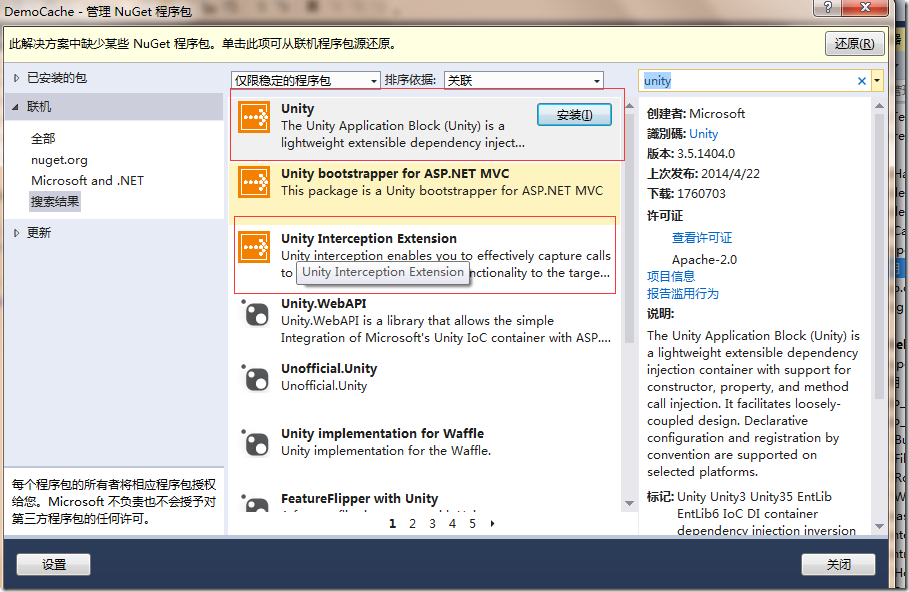
右键项目引用-> 管理Nuget包->搜索unity->安装Unity 和 Unity Interception Extension,如下图所示.
二 创建基础类
我们以商品查询的数据层注入为例.
1.首先创建商品实体Model. 如果商品信息要被序列化,就要为该类添加Serializable特性.
public class Product

    {

        public int Id { get; set; }

        public string Name { get; set; }

        public int Price { get; set; }

        public override string ToString()

        {

            return string.Format(" Product id:{0}\r\n Name:{1}\r\n Price:{2}\r\n",Id,Name,Price);

        }

    }
2.创建数据层接口及其实现类.
public interface IProductDao

    {

        Product Get(int id);

    }
public class ProductDao:IProductDao

    {

        public Product Get(int id)

        {

            #warning product info for test

            return new Product()

            {

                Id = id,

                Name = "Product"+id,

                Price = id*

            };

        }

    }
3.直接创建实例
其实有了以上内容就可以调用查询商品信息了.
static void Main( string[] args)

        {

IProductDao productDao= new ProductDao();

Product product = productDao.Get();

Console.WriteLine(product.ToString());

Console.Read();

        }
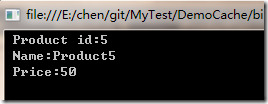
不过在项目中使用这种方式的话,耦合度比较高.一旦想修改IProductDao的实现方式涉及到的地方就太多了. 使用Unity实现依赖注入可以降低耦合.
三.使用Unity实现依赖注入
1.创建Unity配置文件
<? xml version= "1.0 "?>

< configuration>

  < configSections>

    <!-- unity程序集-->

    < section name= "unity " type =" Microsoft.Practices.Unity.Configuration.UnityConfigurationSection, Microsoft.Practices.Unity.Configuration" />

  </ configSections>

  < unity xmlns= "http://schemas.microsoft.com/practices/2010/unity ">

    <!-- 程序集和命名空间 -->

    < assembly name= "DemoCache "/>

    < namespace name= "DemoCache.Dao "/>

    < namespace name= "DemoCache.Dao.Impl "/>

    < container name= "Dao ">

      <!-- 商品 -->

      < register type= "IProductDao " mapTo= "ProductDao "></ register>

    </ container>

  </ unity>

</ configuration>
2.创建UnityContainerManager类
创建UnityContainerManager读取Unity.config配置. 完整代码见附件,重点看一下从Unity.config读取配置信息的方法:
private IUnityContainer LoadUnityConfig()

        {

            ////根据文件名获取指定config文件

            string filePath = AppDomain.CurrentDomain.BaseDirectory + @"Configs\Unity.config";

            var fileMap = new ExeConfigurationFileMap { ExeConfigFilename = filePath };

            //从config文件中读取配置信息

            Configuration configuration = ConfigurationManager.OpenMappedExeConfiguration(fileMap, ConfigurationUserLevel.None);

            var unitySection = (UnityConfigurationSection)configuration.GetSection("unity");

            var container = new UnityContainer();

            foreach (var item in unitySection.Containers)

            {

                container.LoadConfiguration(unitySection, item.Name);

            }

            return container;

        }
3.调用示例
static void Main( string[] args)

        {

IProductDao productDao = UnityContainerManager .Instance.Resolve<IProductDao >();

Product product = productDao.Get();

Console.WriteLine(product.ToString());

Console.Read();

        }
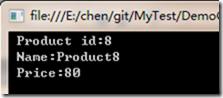
四 使用Unity Interception实现日志
1.创建ICallHandler接口实现类
新建类LogCallHandler类,实现接口ICallHandler. 每次调用相应方法时会自动将执行时间写入日志.
public class LogCallHandler:ICallHandler

    {

        public IMethodReturn Invoke(IMethodInvocation input, GetNextHandlerDelegate getNext)

        {

            //计时开始

            var stopWatch = new Stopwatch();

            stopWatch.Start();

            //执行方法

            IMethodReturn result = getNext()(input, getNext);

            //计时结束

            stopWatch.Stop();

            //记录日志

            var argumentsSb = new StringBuilder(input.MethodBase.Name);

            for (var i = ; i < input.Arguments.Count; i++)

            {

                argumentsSb.AppendFormat("-{0}:{1}", input.Arguments.ParameterName(i), input.Arguments[i]);

            }

            LogHelper.LogInfo(string.Format("{2} 方法 {0},执行时间 {1} ms", argumentsSb, stopWatch.ElapsedMilliseconds,Msg));

            return result;

        }

        public int Order { get; set; }

        public string Msg { get; set; }

    }
2.创建特性
创建特性LogTime,它需要实现HandlerAttribute.
public class LogTimeAttributes:HandlerAttribute

    {

        public int Order { get; set; }

        public string Msg { get; set; }

        public override ICallHandler CreateHandler(IUnityContainer container)

        {

            return new LogCallHandler()

            {

                Order = Order,

                Msg = Msg

            };

        }

    }
3.使用特性
[LogTimeAttributes (Order = ,Msg = "查询单个商品信息" )]
4.配置Unity.config
配置Unity Interception需要在unity节点下添加:
< sectionExtension
type =" Microsoft.Practices.Unity.InterceptionExtension.Configuration.InterceptionConfigurationExtension,Microsoft.Practices.Unity.Interception.Configuration ">
</ sectionExtension >
然后在container节点下添加:
< extension type= "Interception " />
最后调整IProductDao的注册节点:
< register type= "IProductDao " mapTo= "ProductDao ">

        < interceptor type =" InterfaceInterceptor" />

        < policyInjection />

</ register>
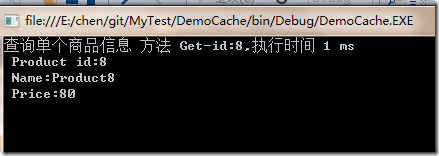
调用处不用做调整,结果如下:
5.不使用Unity.config配置文件
其实如果不走Unity.config配置文件,也可以直接在代码中设置.
static void Main(string[] args)

        {

            var container = new UnityContainer().AddNewExtension<Interception>().RegisterType<IProductDao, ProductDao>();

            container.Configure<Interception>().SetInterceptorFor<IProductDao>(new InterfaceInterceptor());

            IProductDao productDao = container.Resolve<IProductDao>();

            Product product = productDao.Get();

            Console.WriteLine(product);

            Console.Read();

        }
代码: http://files.cnblogs.com/files/janes/DemoCache.zip
Unity Container 应用示例的更多相关文章
- Unity Container
Unity Container中的几种注册方式与示例 2013-12-08 22:43 by 小白哥哥, 22 阅读, 0 评论, 收藏, 编辑 1.实例注册 最简单的注册方式就是实例注册,Unity ...
- 使用Unity Container
Lab1.使用Unity Container Unity Container最主要的两个方法就是RegisterType和Resolve了,RegisterType用于注册类型的映射,而Resolve ...
- Unity Container中的几种注册方式与示例
1.实例注册 最简单的注册方式就是实例注册,Unity 容器负责维护对一个类型的单例引用,比如: 有如下的实际类型: namespace ConsoleSample { public class Sa ...
- 微软IOC容器Unity简单代码示例3-基于约定的自动注册机制
@(编程) [TOC] Unity在3.0之后,支持基于约定的自动注册机制Registration By Convention,本文简单介绍如何配置. 1. 通过Nuget下载Unity 版本号如下: ...
- 微软IOC容器Unity简单代码示例2-配置文件方式
@(编程) 1. 通过Nuget下载Unity 这个就不介绍了 2. 接口代码 namespace UnityDemo { interface ILogIn { void Login(); } } n ...
- 微软IOC容器Unity简单代码示例1
@(编程) 1. 通过Nuget下载Unity 这个就不介绍了 2. 接口代码 namespace UnityDemo { interface ILogIn { void Login(); } } 3 ...
- unity c# 代码示例
1. using UnityEngine; using System.Collections; public class AnimatorMove : MonoBehaviour { public f ...
- Unity文档阅读 第三章 依赖注入与Unity
Introduction 简介In previous chapters, you saw some of the reasons to use dependency injection and lea ...
- Unity容器中AOP应用示例程序
转发请注明出处:https://www.cnblogs.com/zhiyong-ITNote/p/9127001.html 实在没有找到Unity容器的AOP应用程序示例的说明,在微软官网找到了教程( ...
随机推荐
- [转]html5音乐播放器
http://files.cnblogs.com/files/xjyggd/html5music.rar import java.io.File;import java.util.ArrayList; ...
- [Machine-Learning] K临近算法-简单例子
k-临近算法 算法步骤 k 临近算法的伪代码,对位置类别属性的数据集中的每个点依次执行以下操作: 计算已知类别数据集中的每个点与当前点之间的距离: 按照距离递增次序排序: 选取与当前点距离最小的k个点 ...
- msql 实现sequence功能增强
create table sequence ( seq_name VARCHAR(50) NOT NULL COMMENT '序列名称', min_val ...
- 回归分析法&一元线性回归操作和解释
用Excel做回归分析的详细步骤 一.什么是回归分析法 "回归分析"是解析"注目变量"和"因于变量"并明确两者关系的统计方法.此时,我们把因 ...
- CentOS 6.6安装配置LAMP服务器(Apache+PHP5+MySQL)
准备篇: CentOS 6.6系统安装配置图解教程 http://www.osyunwei.com/archives/8398.html 1.配置防火墙,开启80端口.3306端口 vi /etc/s ...
- LINUX安全加固规范
1 概述 近几年来Internet变得更加不安全了.网络的通信量日益加大,越来越多的重要交易正在通过网络完成,与此同时数据被损坏.截取和修改的风险也在增加. 只要有值得偷窃的东西就会有想办法窃取它的人 ...
- 浪潮 NF5240M3 ,NP5540M3 服务器安装2008 R2
1,服务器系统的安装会出现错误的地方一般都是在Raid 卡驱动 略过Raid 卡配置, 具体 http://jingyan.baidu.com/article/ca41422fddfd201eae99 ...
- UVALive 3971 组装电脑
https://icpcarchive.ecs.baylor.edu/index.php?option=com_onlinejudge&Itemid=8&page=show_probl ...
- Nexpose下载安装注册一条龙
附上两个下载链接: Windows版本(64bit) : http://download2.rapid7.com/download/NeXpose-v4/NeXposeSetup-Windows64. ...
- iOS NSURLConnection POST异步请求封装,支持转码GBK,HTTPS等
.h文件 #import <Foundation/Foundation.h> //成功的回调 typedef void(^successBlock)(id responseObj); // ...