
Angular SPA基于Ocelot API网关与IdentityServer4的身份认证与授权(二)
上文已经介绍了Identity Service的实现过程。今天我们继续,实现一个简单的Weather API和一个基于Ocelot的API网关。
回顾
Weather API
Weather API实现非常简单,直接用Visual Studio 2019 Community Edition自带的ASP.NET Core Web Application模板创建就行了,我们的目的不是为了实现Weather API的业务,我们只需要有一个能让IdentityServer4进行保护的API就行,以便能够完成我们的各种实验。
在原有的(也就是Identity Service所在的)解决方案中,新建一个ASP.NET Core Web Application,应用程序模板选择API,并禁用HTTPS和Docker支持,因为目前不需要,也不要启用任何Authentication机制,因为这部分功能会由Ocelot配合IdentityServer4实现。在完成创建之后,我们的Weather API就做好了。
现在,设置启动端口为5000,启动项目,然后通过curl测试API是否工作正常:
curl http://localhost:5000/weatherforecast | json_pp && echo
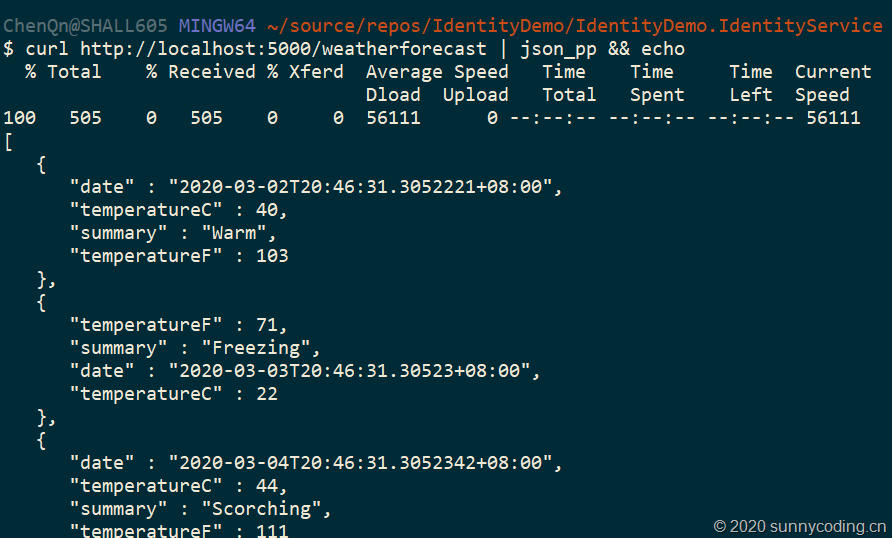
OK,Weather API就成功完成了。
Ocelot API网关
现在我们来创建Ocelot API网关,首先做到能够通过这个网关来访问Weather API,然后再加入认证机制,使得Ocelot API网关能够基于IdentityServer4完成认证。其实这部分实操我已经在《ASP.NET Core中Ocelot的使用:API网关的应用》和《使用Ocelot、IdentityServer4、Spring Cloud Eureka搭建微服务网关:Step by Step(二)》这些文章中介绍过了。为了保证描述的完整性,我还是把这部分工作重新做一次。
搭建网关
新建一个ASP.NET Core Web Application应用程序,模板选择Empty,去掉HTTPS支持。在项目创建后,向项目添加ocelot.config.json文件,内容如下:
{

  "ReRoutes": [

    {

      "DownstreamPathTemplate": "/weatherforecast",

      "DownstreamScheme": "http",

      "DownstreamHostAndPorts": [

        {

          "Host": "localhost",

          "Port": 5000

        }

      ],

      "UpstreamPathTemplate": "/api/weather",

      "UpstreamHttpMethod": [ "Get" ]

    }

  ]

}
然后,向项目添加Ocelot的NuGet包,修改Program.cs文件,将ocelot.config.json文件添加到应用程序配置系统中:
public static IHostBuilder CreateHostBuilder(string[] args) =>

    Host.CreateDefaultBuilder(args)

        .ConfigureWebHostDefaults(webBuilder =>

        {

            webBuilder.UseStartup<Startup>();

        })

        .ConfigureAppConfiguration(configBuilder =>

        {

            configBuilder.AddJsonFile("ocelot.configuration.json");

        });
并且修改Startup.cs文件,加入Ocelot的服务注册以及Middleware:
public void ConfigureServices(IServiceCollection services)

{

    services.AddOcelot();

}

public void Configure(IApplicationBuilder app, IWebHostEnvironment env)

{

    if (env.IsDevelopment())

    {

        app.UseDeveloperExceptionPage();

    }

    app.UseRouting();

    app.UseOcelot();

    app.UseEndpoints(endpoints =>

    {

        endpoints.MapGet("/", async context =>

        {

            await context.Response.WriteAsync("Hello World!");

        });

    });

}
让API网关侦听9000端口,同时启动Weather API和API网关两个项目,于是我们可以直接通过API网关来访问Weather API:
curl http://localhost:9000/api/weather | json_pp && echo
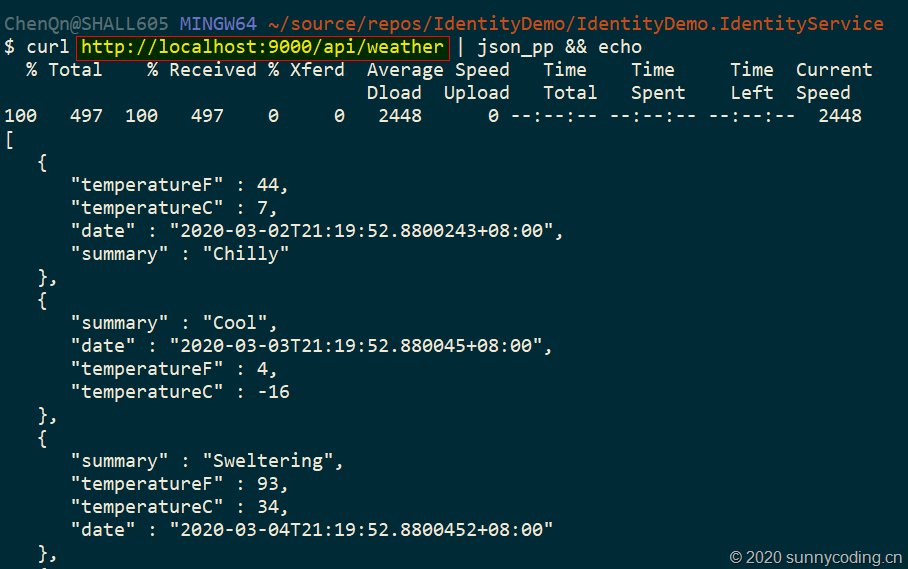
可以看到,我们已经可以直接通过API网关的地址来访问其下游服务了。
在网关上实现身份认证
接下来的这一步,我们会结合前一篇文章中介绍的Identity Service,在API网关上实现身份认证。在Ocelot API网关项目上,添加IdentityServer4.AccessTokenValidation NuGet包的引用,然后在Startup.cs的ConfigureServices中增加对IdentityServer4的认证支持:
public void ConfigureServices(IServiceCollection services)

{

    services.AddOcelot();

    services.AddAuthentication()

        .AddIdentityServerAuthentication("AuthKey", options =>

        {

            options.Authority = "http://localhost:7889";

            options.RequireHttpsMetadata = false;

        });

    services.AddCors(options => options.AddPolicy("AllowAll", p => p.AllowAnyOrigin()

       .AllowAnyMethod()

       .AllowAnyHeader()));

}
当然我们也添加了CORS的Policy,以便能够支持跨域访问,为之后的Angular SPA实现做准备。目前,无需对Configure方法做大的改动,只需要添加app.UseCors("AllowAll");这一调用,以允许跨域访问即可。然后,修改ocelot.config.json文件,在Weather API的ReRoute上增加AuthenticationOptions配置,用以启用基于IdentityServer4的身份认证:
{

  "ReRoutes": [

    {

      "DownstreamPathTemplate": "/weatherforecast",

      "DownstreamScheme": "http",

      "DownstreamHostAndPorts": [

        {

          "Host": "localhost",

          "Port": 5000

        }

      ],

      "UpstreamPathTemplate": "/api/weather",

      "UpstreamHttpMethod": [ "Get" ],

      "AuthenticationOptions": {

        "AuthenticationProviderKey": "AuthKey",

        "AllowedScopes": []

      }

    }

  ]

}
现在,同时启动Identity Service、Weather API和Ocelot网关三个项目,然后再用curl调用上面相同的地址,可以发现,服务端已经返回了401,告诉我们没有认证,无法发起API调用请求:
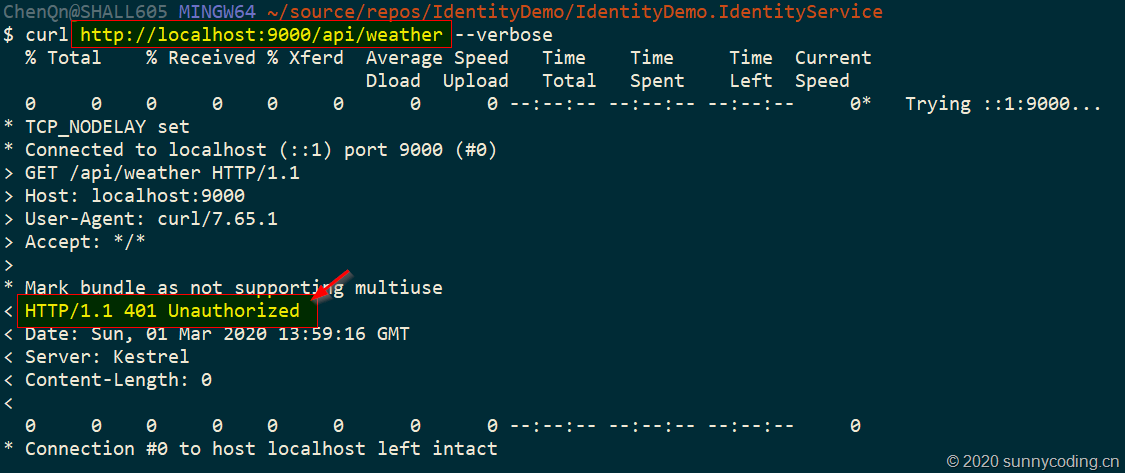
进一步测试
现在,让我们写一个Console App作为客户端,进行进一步测试。新建一个.NET Core Console App的项目,添加IdentityModel NuGet包,Main方法实现如下:
static async Task Main(string[] args)

{

    using var client = new HttpClient();

    var discoResponse = await client.GetDiscoveryDocumentAsync("https://localhost:7890");

    if (discoResponse.IsError)

    {

        Console.WriteLine(discoResponse.Error);

        return;

    }

    var tokenResponse = await client.RequestPasswordTokenAsync(new PasswordTokenRequest

    {

        Address = discoResponse.TokenEndpoint,

        ClientId = "webapi",

        Scope = "api.weather.full_access",

        ClientSecret = "mysecret",

        UserName = "daxnet",

        Password = "P@ssw0rd123"

    });

    if (tokenResponse.IsError)

    {

        Console.WriteLine(tokenResponse.Error);

        return;

    }

    Console.WriteLine(tokenResponse.Json);

    client.SetBearerToken(tokenResponse.AccessToken);

    var response = await client.GetAsync("http://localhost:9000/api/weather");

    Console.WriteLine(response.IsSuccessStatusCode ?

        $"{response.StatusCode} {await response.Content.ReadAsStringAsync()}" :

        response.StatusCode.ToString());

}
仍然同时启动Identity Service、Weather API和Ocelot网关三个项目,然后调试这个Console App,可以看到,API调用成功:

Console App也返回了正确的结果:
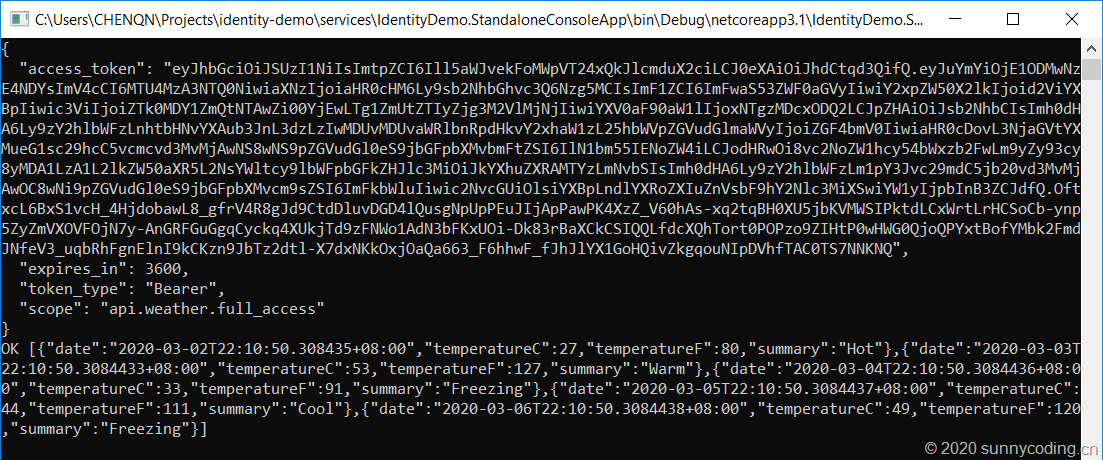
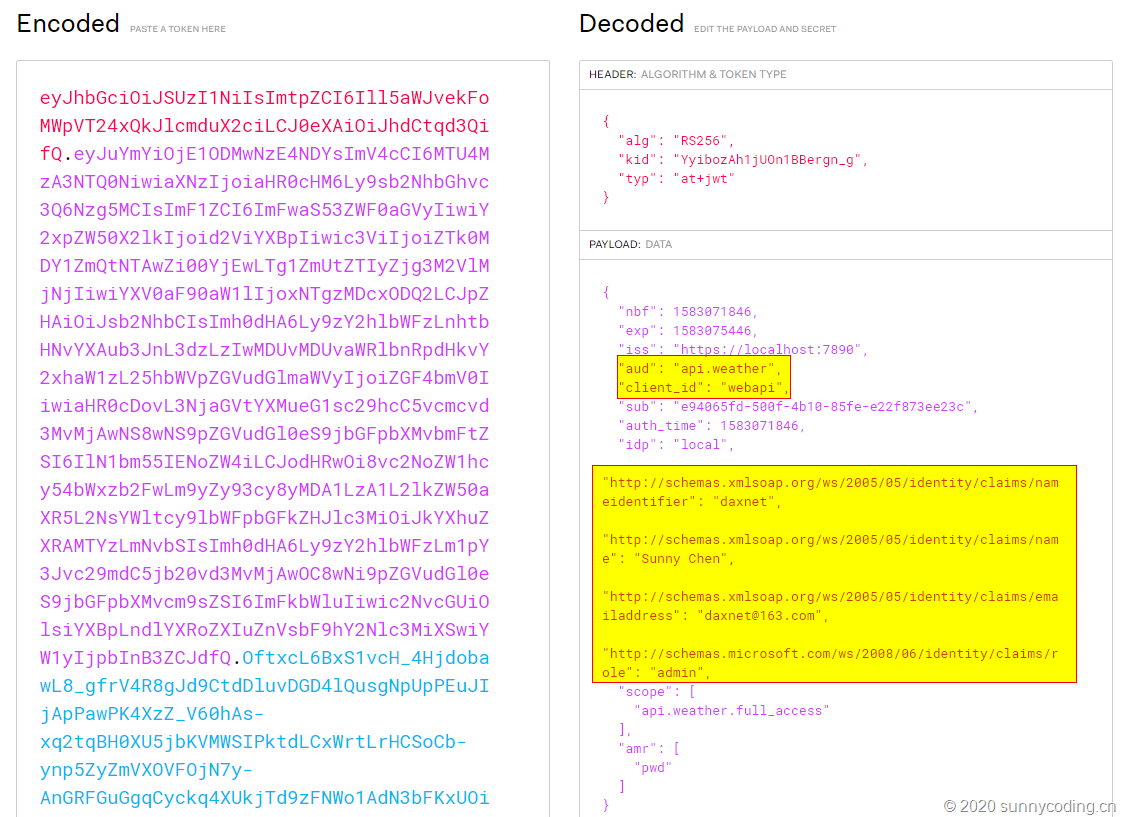
然后,将上面的access_token复制下来,打开https://jwt.io,粘贴到Encoded文本框,在Decoded文本框中可以看到,Identity相关的信息,包括我们在ApiResource上设定的Claims都被包含在了Access Token上:
小结
本文实现了一个实验性质的Weather API,然后搭建了一个Ocelot API网关,并在网关上结合Identity Service完成了身份认证机制,最后通过一个Console App,了解了一下Access Token。下文开始,我会介绍如何在Angular SPA中做身份认证。
源代码
访问以下Github地址以获取源代码:
https://github.com/daxnet/identity-demo
Angular SPA基于Ocelot API网关与IdentityServer4的身份认证与授权(二)的更多相关文章
- Angular SPA基于Ocelot API网关与IdentityServer4的身份认证与授权(四)
在上一讲中,我们已经完成了一个完整的案例,在这个案例中,我们可以通过Angular单页面应用(SPA)进行登录,然后通过后端的Ocelot API网关整合IdentityServer4完成身份认证.在 ...
- Angular SPA基于Ocelot API网关与IdentityServer4的身份认证与授权(三)
在前面两篇文章中,我介绍了基于IdentityServer4的一个Identity Service的实现,并且实现了一个Weather API和基于Ocelot的API网关,然后实现了通过Ocelot ...
- Angular SPA基于Ocelot API网关与IdentityServer4的身份认证与授权(一)
好吧,这个题目我也想了很久,不知道如何用最简单的几个字来概括这篇文章,原本打算取名<Angular单页面应用基于Ocelot API网关与IdentityServer4+ASP.NET Iden ...
- .Netcore 2.0 Ocelot Api网关教程(5)- 认证和授权
本文介绍Ocelot中的认证和授权(通过IdentityServer4),本文只使用最简单的IdentityServer,不会对IdentityServer4进行过多讲解. 1.Identity Se ...
- 微服务(入门三):netcore ocelot api网关结合consul服务发现
简介 api网关是提供给外部调用的统一入口,类似于dns,所有的请求统一先到api网关,由api网关进行指定内网链接. ocelot是基于netcore开发的开源API网关项目,功能强大,使用方便,它 ...
- ASP.NET Core on K8S学习之旅(13)Ocelot API网关接入
本篇已加入<.NET Core on K8S学习实践系列文章索引>,可以点击查看更多容器化技术相关系列文章. 上一篇介绍了Ingress的基本概念和Nginx Ingress的基本配置和使 ...
- .Netcore 2.0 Ocelot Api网关教程(7)- 限流
本文介绍Ocelot中的限流,限流允许Api网关控制一段时间内特定api的总访问次数.限流的使用非常简单,只需要添加配置即可. 1.添加限流 修改 configuration.json 配置文件,对 ...
- .Netcore 2.0 Ocelot Api网关教程(6)- 配置管理
本文介绍Ocelot中的配置管理,配置管理允许在Api网关运行时动态通过Http Api查看/修改当前配置.由于该功能权限很高,所以需要授权才能进行相关操作.有两种方式来认证,外部Identity S ...
- .Netcore 2.0 Ocelot Api网关教程(2)- 路由
.Netcore 2.0 Ocelot Api网关教程(1) 路由介绍 上一篇文章搭建了一个简单的Api网关,可以实现简单的Api路由,本文介绍一下路由,即配置文件中ReRoutes,ReRoutes ...
随机推荐
- MaxCompute Studio提升UDF和MapReduce开发体验
原文链接:http://click.aliyun.com/m/13990/ UDF全称User Defined Function,即用户自定义函数.MaxCompute提供了很多内建函数来满足用户的计 ...
- 13、canvas操纵像素数据ImageData
2019独角兽企业重金招聘Python工程师标准>>> 一.ImageData 对象 含义: 存储canvas对象真实的像素数据(每个像素块的RGBA色值) 属性: 1.width: ...
- 聚集表(clustered table)data page中的数据行可以无序
误区 一直以为只要一个表含有聚集索引,那么在data page中的数据行是排序的.比如原来data page中有1.2.4.5.6这样四条记录,那么我要插入3这条记录,应该是先将456三条记录往后移, ...
- #Week3 Linear Regression with Multiple Variables
一.Multiple Features 这节课主要引入了一些记号,假设现在有n个特征,那么: 为了便于用矩阵处理,令\(x_0=1\): 参数\(\theta\)是一个(n+1)*1维的向量,任一个训 ...
- 图论--差分约束--POJ 3169 Layout(超级源汇建图)
Like everyone else, cows like to stand close to their friends when queuing for feed. FJ has N (2 < ...
- session与cookie的浅谈
cookie的用途: 当你浏览网页时,会有一些推送消息,大多数是你最近留意过的同类东西,比如你想买桌子,上淘宝搜了一下,结果连着几天会有各种各样的桌子的链接.这是因为你浏览某个网页的时候,WEB 服务 ...
- 什么才是Python的高级编程?大牛总结,绝对让你受益匪浅
很多刚入门或者还在了解的小伙伴们都会遇到迷茫期吧,就是学完这些基础,函数,字典啥的,好像也做不了什么东西,其实你基础学的扎实的话,是能做很多的事的,学完基础也不要迷茫,因为每门语言都是博大精深的,不是 ...
- Fibonacci相关问题
公式如下: 递归的解法我就不写了,贴一个递推的. long long Fibonacci(unsigned int n) { ) ; ) ; ; ; long long res; ; i <= ...
- Cordova 浅析架构的原理
因为项目使用了Cordova,也使用了很长时间.至于有很多hybride框架,为什么我们使用Cordova,这里不做过多的叙述,我们也是根据项目需求来选定的,需要及时更新.还要输出别人SDK等.没有最 ...
- 一篇文章解决MongoDB的所有问题
目录 一.MongoDB相关概念 1.1 业务应用场景 1.1.1 而MongoDB可应对"三高"需求· 1.1.2 什么时候选择MongoDB? 1.1.3 如果用mysql? ...