
分布式架构中一致性解决方案——Zookeeper集群搭建
当我们的项目在不知不觉中做大了之后,各种问题就出来了,真jb头疼,比如性能,业务系统的并行计算的一致性协调问题,比如分布式架构的事务问题,
我们需要多台机器共同commit事务,经典的案例当然是银行转账,支付宝转账这种,如果是一台机器的话,这个还是很方便的,windows中自带了一个事务协
调器mstsc,但是呢,你那种很大很牛逼的项目不可能全是windows服务器,对吧,有些人为了解决这个问题,会采用2pc,3pc这种算法,或者是paxos的思
想进行分布式下的一致性处理,当然在这个世界上,真的不需要你自己去开发这种协调性,因为现在已经有了专门解决这种问题的解决方案,比如zookeeper。
一:zookeeper集群搭建
有些人应该明白,zookeeper正是google的chubby的开源实现,使用zookeeper之前,我们先来搭建一个集群。
1. 下载
从官网上,我们可以看到,zookeeper的最新版本是3.4.8,下载地址是:http://apache.fayea.com/zookeeper/zookeeper-3.4.8/,可以下载一下:
2. 文件夹配置
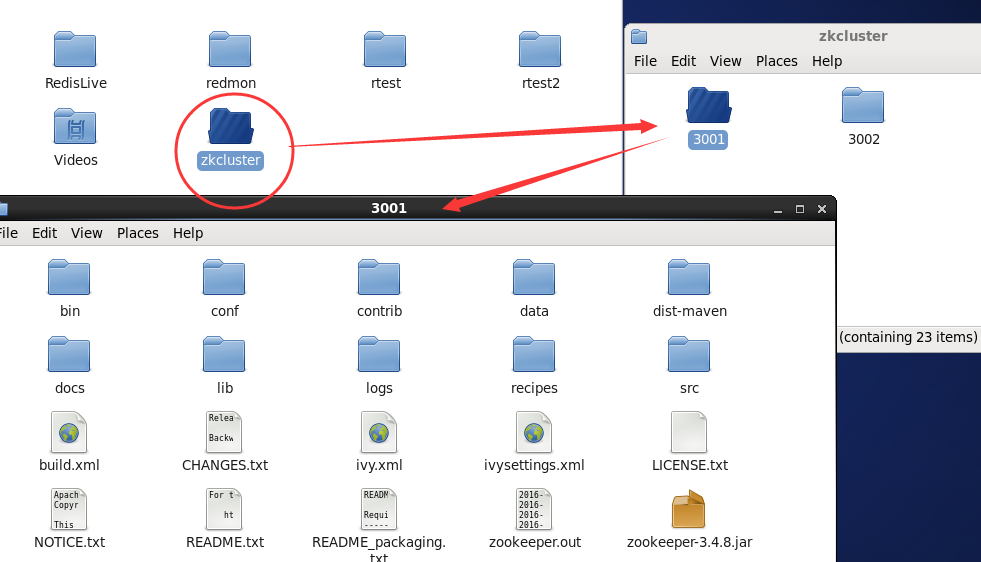
接下来我们解压一下,根目录为zkcluster,下面使用clientport(3000,3001,3002)这样的端口作为文件夹名称,里面就是zookeeper解压包,如下面这样:
3. 配置zoo.cfg
现在我们有三个文件夹,也就是3个zookeeper程序,在3001/conf/下面有一个zoo_sample.cfg文件,现在我们改成zoo.cfg,并且修改如下:
# The number of milliseconds of each tick

tickTime=

# The number of ticks that the initial

# synchronization phase can take

initLimit=

# The number of ticks that can pass between

# sending a request and getting an acknowledgement

syncLimit=

# the directory where the snapshot is stored.

# do not use /tmp for storage, /tmp here is just

# example sakes.

dataDir=/root/zkcluster/3001/data

dataLogDir=/root/zkcluster/3001/logs

# the port at which the clients will connect

clientPort=3001

# the maximum number of client connections.

# increase this if you need to handle more clients

#maxClientCnxns=

#

# Be sure to read the maintenance section of the

# administrator guide before turning on autopurge.

#

# http://zookeeper.apache.org/doc/current/zookeeperAdmin.html#sc_maintenance

#

# The number of snapshots to retain in dataDir

#autopurge.snapRetainCount=

# Purge task interval in hours

# Set to "" to disable auto purge feature

#autopurge.purgeInterval=

server.1=192.168.161.134:2888:3888

server.2=192.168.161.134:2889:3889

server.3=192.168.161.134:2890:3890
这里我们要注意的是,红色的部分分别就是:指定zookeeper的data和log文件夹,指定clientport访问的端口和servers的列表。
4. 生成pid文件
我们在servers列表中,可以看到有server.1 ,server.2, server.3 三个字符串,生成pid文件的内容就取决如此,比如server.1的地址,
我们的pid文件里面就是1,不过要知道的是,pid文件要在data目录下,比如下面这样:
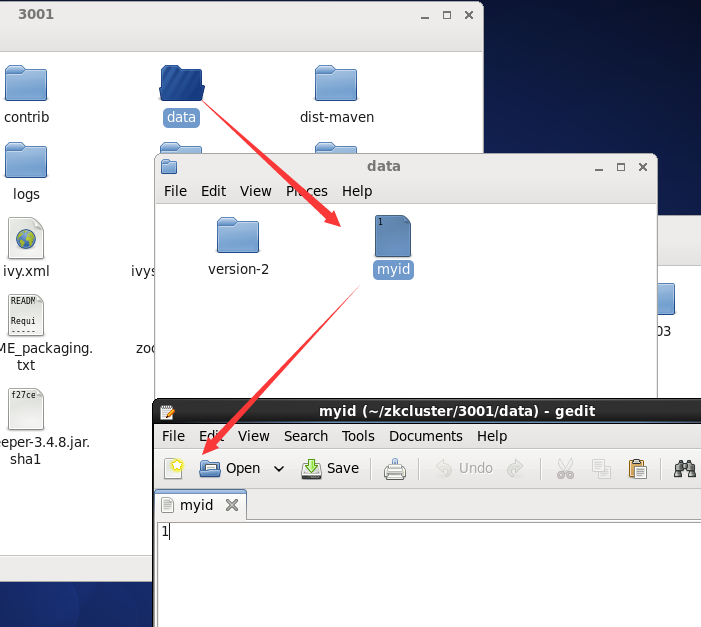
ok,同样的道理,3002和3003的文件夹同3001就可以了,比如他们的zoo.cfg如下:
-------- 3002 --------------
# The number of milliseconds of each tick

tickTime=

# The number of ticks that the initial

# synchronization phase can take

initLimit=

# The number of ticks that can pass between

# sending a request and getting an acknowledgement

syncLimit=

# the directory where the snapshot is stored.

# do not use /tmp for storage, /tmp here is just

# example sakes.

dataDir=/root/zkcluster//data

dataLogDir=/root/zkcluster//logs

# the port at which the clients will connect

clientPort=

# the maximum number of client connections.

# increase this if you need to handle more clients

#maxClientCnxns=

#

# Be sure to read the maintenance section of the

# administrator guide before turning on autopurge.

#

# http://zookeeper.apache.org/doc/current/zookeeperAdmin.html#sc_maintenance

#

# The number of snapshots to retain in dataDir

#autopurge.snapRetainCount=

# Purge task interval in hours

# Set to "" to disable auto purge feature

#autopurge.purgeInterval=

server.=192.168.161.134::

server.=192.168.161.134::

server.=192.168.161.134::
-------- 3003 --------------
# The number of milliseconds of each tick

tickTime=

# The number of ticks that the initial

# synchronization phase can take

initLimit=

# The number of ticks that can pass between

# sending a request and getting an acknowledgement

syncLimit=

# the directory where the snapshot is stored.

# do not use /tmp for storage, /tmp here is just

# example sakes.

dataDir=/root/zkcluster//data

dataLogDir=/root/zkcluster//logs

# the port at which the clients will connect

clientPort=

# the maximum number of client connections.

# increase this if you need to handle more clients

#maxClientCnxns=

#

# Be sure to read the maintenance section of the

# administrator guide before turning on autopurge.

#

# http://zookeeper.apache.org/doc/current/zookeeperAdmin.html#sc_maintenance

#

# The number of snapshots to retain in dataDir

#autopurge.snapRetainCount=

# Purge task interval in hours

# Set to "" to disable auto purge feature

#autopurge.purgeInterval=

server.=192.168.161.134::

server.=192.168.161.134::

server.=192.168.161.134::
5. 启动各自服务器
到现在为止,我们各个zookeeper程序的配置都结束了,接下来我们到各自目录的bin目录下,通过zkServer.sh来进行启动,比如下面这样: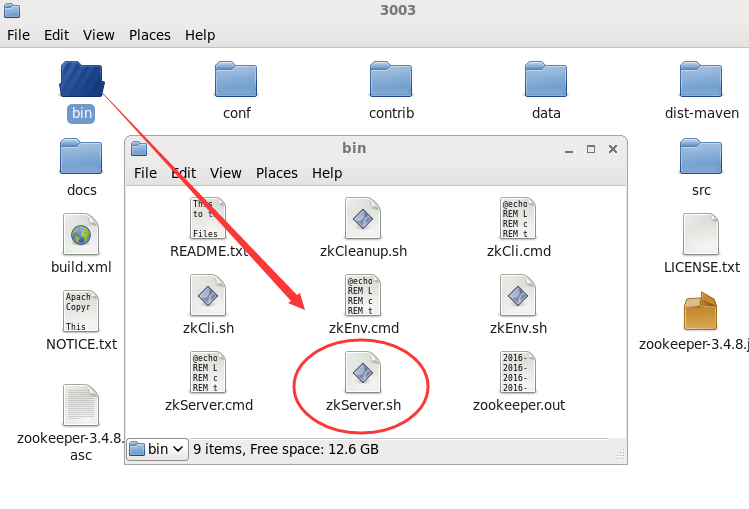
ok,接下来我们来开始启动,通过如下命令即可:
./zkServer.sh start-foreground
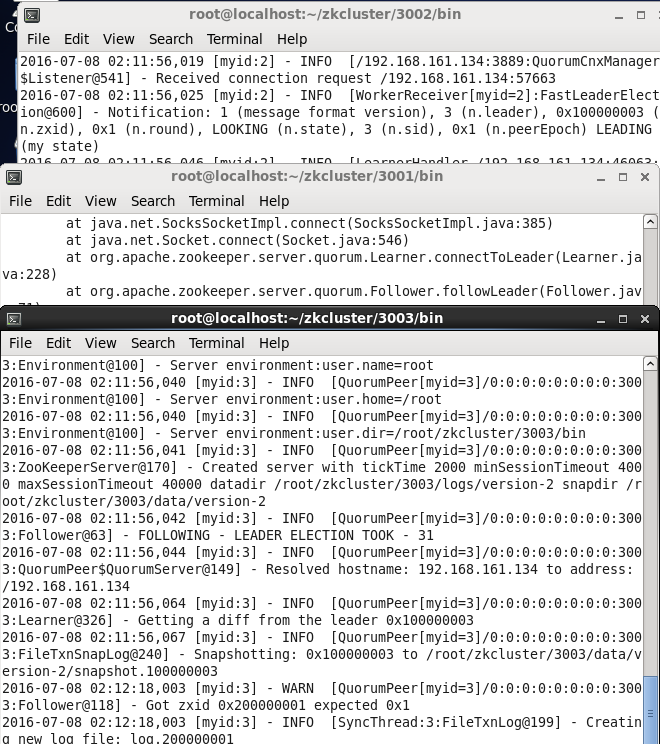
现在我们都启动了,接下来我们可以用命令看下哪个server是leader,哪些是follower。。。
[root@localhost bin]# ./zkServer.sh status

ZooKeeper JMX enabled by default

Using config: /root/zkcluster//bin/../conf/zoo.cfg

Mode: follower

[root@localhost bin]#

[root@localhost bin]# ./zkServer.sh status

ZooKeeper JMX enabled by default

Using config: /root/zkcluster//bin/../conf/zoo.cfg

Mode: leader

[root@localhost bin]#

[root@localhost bin]# ./zkServer.sh status

ZooKeeper JMX enabled by default

Using config: /root/zkcluster//bin/../conf/zoo.cfg

Mode: follower

[root@localhost bin]#
到目前为止,我们的服务端操作都ok啦,,,是不是好吊。。。
二:驱动下载
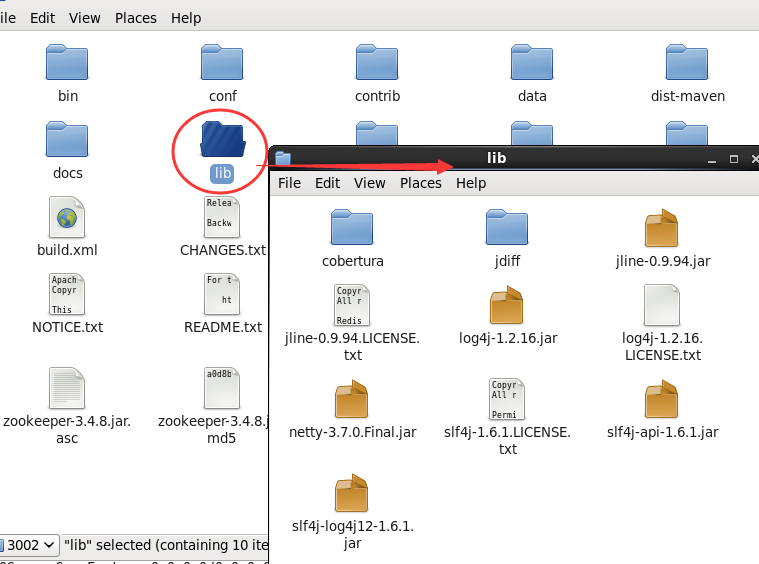
1. java的驱动就方便了,直接在源代码中就提供了,直接copy一下lib文件夹中的jar包就ok了,真是tmd的方便。
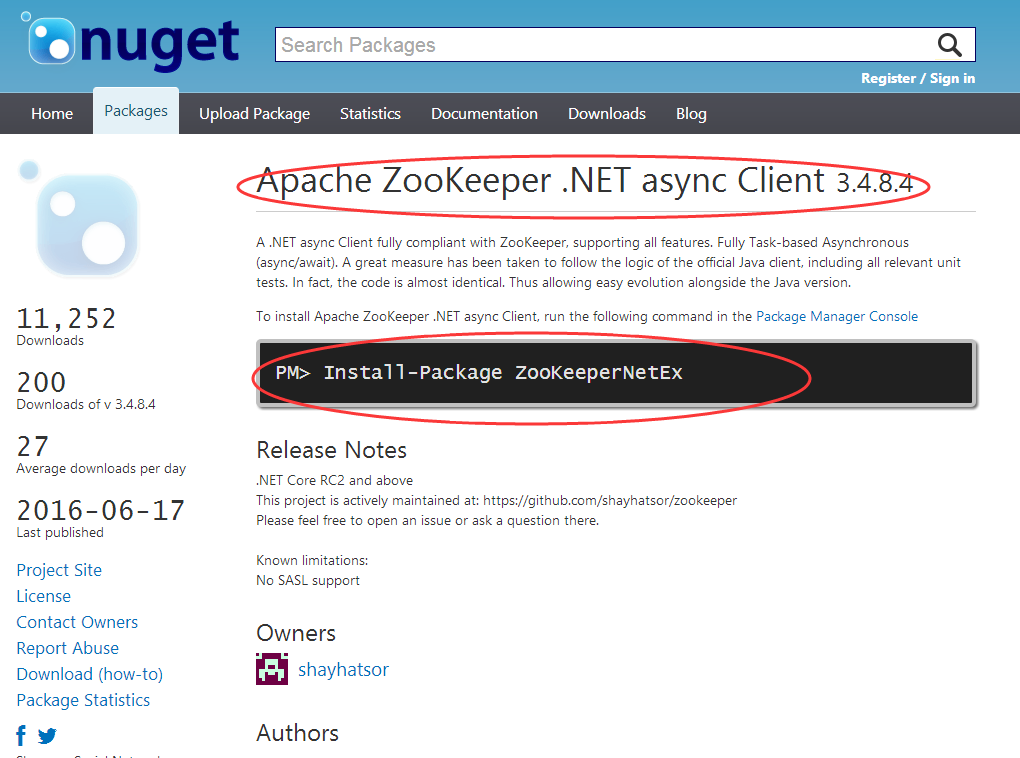
2. 用C#驱动的也不要太烦,要使用也是不难的,我们可以通过nuget下载一下就可以了,转换过来的版本也是3.4.8的最新版本,比如下面这样:
好了,大概就说这么多,希望对你有帮助~~~
分布式架构中一致性解决方案——Zookeeper集群搭建的更多相关文章
- 分布式协调服务Zookeeper集群搭建
分布式协调服务Zookeeper集群搭建 作者:尹正杰 版权声明:原创作品,谢绝转载!否则将追究法律责任. 一.安装jdk环境 1>.操作环境 [root@node101.yinzhengjie ...
- Zookeeper 集群搭建--单机伪分布式集群
一. zk集群,主从节点,心跳机制(选举模式) 二.Zookeeper集群搭建注意点 1.配置数据文件 myid 1/2/3 对应 server.1/2/3 2.通过./zkCli.sh -serve ...
- kafka学习(二)-zookeeper集群搭建
zookeeper概念 ZooKeeper是一个分布式的,开放源码的分布式应用程序协调服务,它包含一个简单的原语集,分布式应用程序可以基于它实现同步服务,配置维护和命名 服务等.Zookeeper是h ...
- Zookeeper集群搭建以及python操作zk
一.Zookeeper原理简介 ZooKeeper是一个开放源码的分布式应用程序协调服务,它包含一个简单的原语集,分布式应用程序可以基于它实现同步服务,配置维护和命名服务等. Zookeeper设计目 ...
- zookeeper集群搭建及Leader选举算法源码解析
第一章.zookeeper概述 一.zookeeper 简介 zookeeper 是一个开源的分布式应用程序协调服务器,是 Hadoop 的重要组件. zooKeeper 是一个分布式的,开放源码的分 ...
- Zookeeper集群搭建及原理
1 概述 1.1 简介 ZooKeeper 是 Apache 的一个顶级项目,为分布式应用提供高效.高可用的分布式协调服务,提供了诸如数据发布/订阅.负载均衡.命名服务.分布式协调/通知和分布式锁等分 ...
- Kafka学习之(五)搭建kafka集群之Zookeeper集群搭建
Zookeeper是一种在分布式系统中被广泛用来作为:分布式状态管理.分布式协调管理.分布式配置管理.和分布式锁服务的集群.kafka增加和减少服务器都会在Zookeeper节点上触发相应的事件kaf ...
- ZooKeeper集群搭建过程
ZooKeeper集群搭建过程 提纲 1.ZooKeeper简介 2.ZooKeeper的下载和安装 3.部署3个节点的ZK伪分布式集群 3.1.解压ZooKeeper安装包 3.2.为每个节点建立d ...
- 【图文详解】Zookeeper集群搭建(CentOs6.3)
Zookeeper简介: Zookeeper是一个分布式协调服务,就是为用户的分布式应用程序提供协调服务的. A.zookeeper是为别的分布式程序服务的 B.Zookeeper本身就是一个分布式程 ...
随机推荐
- 磁盘操作系统(DOS)
一.概要 Disk Operation System(DOS)即磁盘操作系统,与win7一样是一个操作系统,字符界面,单用户,单任务. dos,是磁盘操作系统的缩写,是个人计算机上的一类操作系统.从1 ...
- Kooboo CMS 无聊随笔 (1)
因为公司的框架不开源,但是自己一直都有研究框架的兴趣,所以拿了一个开源的框架过来,而这个开源的框架就是Kooboo CMS.首先我无法用言语来形容我对这个CMS的赞美之词了,总之大家知道一点,这个CM ...
- 关于IIS和.NET 4.0的问题总结
注册asp.net 4.0 到iis 如果没有按照正常的先装iis后装.net的顺序,可以使用此命令重新注册一下 运行->cmd Microsoft Windows [版本 6.1.7601 ...
- roleManager与角色管理授权
总览地址 https://msdn.microsoft.com/zh-cn/library/9ab2fxh0.aspx 其中基本概述是第一篇:了解角色管理 来自 <https://msdn.mi ...
- MSSQL数据库的一些基础知识
转几个关于MSSQL数据库基础的文章: sql server系统表详细说明 SQL Server中系统数据库介绍 SQL Server中的角色(服务器级别和数据库级别角色)
- 【C#】 异常处理
异常是在程序执行期间出现的问题.C# 中的异常是对程序运行时出现的特殊情况的一种响应,比如尝试除以零等异情况. 异常提供了一种把程序控制权从某个部分转移到另一个部分的方式. C# 异常处理时建立在四个 ...
- C标准头文件<string.h>
里面主要包含了一些与字符串关联的函数的声明,这些函数有如下的命名规则: 以"mem"开头的函数操作任意的字符序列 以"strn"开头的函数操作非空字符序列 以& ...
- 三种常用的MySQL建表语句(转)
MySQL建表语句是最基础的SQL语句之一,下面就为您介绍最常用的三种MySQL建表语句,如果您对MySQL建表语句方面感兴趣的话,不妨一看. 1.最简单的: CREATE TABLE t1( ...
- Storm的BaseBasicBolt源码解析ack机制
我们在学习ack机制的时候,我们知道Storm的Bolt有BaseBasicBolt和BaseRichBolt.在BaseBasicBolt中,BasicOutputCollector在emit数据的 ...
- .NET 数据类型转换 方法
using Newtonsoft.Json;using Newtonsoft.Json.Converters;using System.Web.Script.Serialization; /// &l ...