
从微信小程序到鸿蒙js开发【08】——表单组件&注册登录模块
目录:
牛年将至,祝大家行行无bug,页页so easy~
在微信小程序中,提供了form组件,可以将input、picker、slider、button等全部放在form中,并设置name属性实现类似html的表单提交功能。

鸿蒙js目前是没有form组件的,因此我们需要在提交时手动获取输入框、选择框等的值,自行构建数据对象。
1、登录模块
这里接着上一篇,通过dialog组件实现了模态登录和注册的窗口。登录窗口的效果如下:
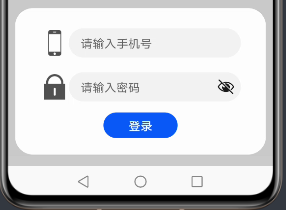
每一行中,放置图标和input输入框。input使用的是默认样式,看起来还是很清爽的。
hml视图层:
                <dialog id="loginDialog">

                    <div class="loginDialog">

                        <div class="formItem">

                            <image src="{{ phone ? (imgUrl + 'phone.png') : (imgUrl + 'phone1.png') }}"></image>

                            <input id="phoneInput" type="number" placeholder="请输入手机号" onchange="inputPhone"></input>

                        </div>

                        <div class="formItem">

                            <image src="{{ pwd ? (imgUrl + 'password.png') : (imgUrl + 'password1.png') }}"></image>

                            <input id="pwdInput" type="password" placeholder="请输入密码" onchange="inputPwd"></input>

                        </div>

                        <button class="inputBtn" onclick="login">登录</button>

                    </div>

                </dialog>
手机号的input设置type="number",在获取焦点后键盘自动弹出为数字键盘。密码框type="password",弹出普通键盘,且输入的字符会变为圆点,也可点击右侧眼睛图标查看密码内容。
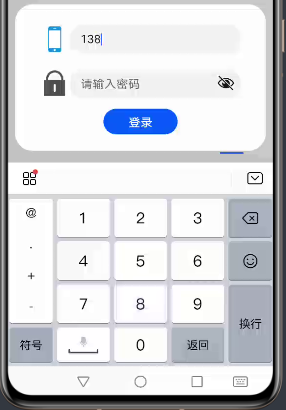
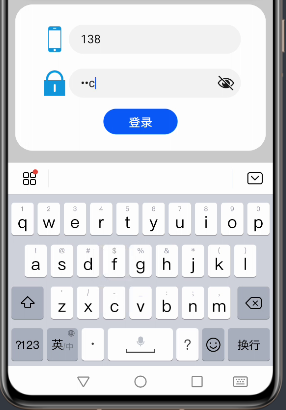
在最开始使用input时,尝试使用this.$element("id").value获取,但这样是获取不到的。
    // 登录

    login() {

        prompt.showToast({

            message: "手机号: " + this.$element("phoneInput").value +

            ", 密码: " + this.$element("pwdInput").value,

            duration: 5000

        })

    }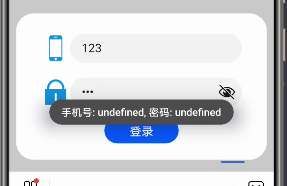
因此需要使用input的onchange属性绑定值改变的事件,通过e.value取到改变后的值,并赋给data中的变量。
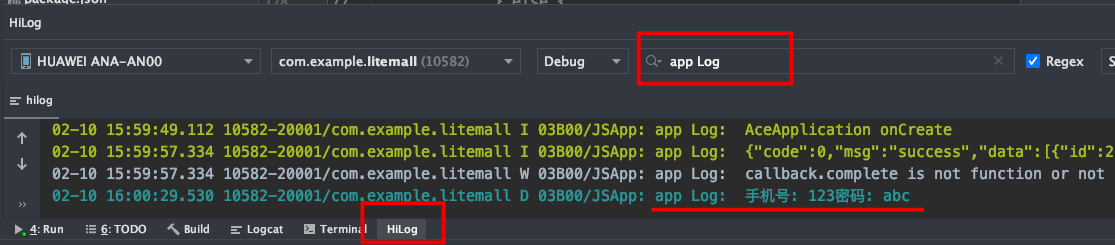
顺便提一下,今天突然找到了console打印日志的查看方式。需在最下方打开"HiLog"视图,搜索"app Log"后即可查看。console.log()的内容需设置日志等级"debug",console.info()则在"info"等级即可查看。
    // 手机号输入框

    inputPhone(e) {

        this.phone = e.value;

    },

    // 密码输入框

    inputPwd(e) {

        this.pwd = e.value;

    },

    // 登录

    login() {

        console.log("手机号: " + this.phone + "密码: " + this.pwd);

    }
这里能够正常获取输入框的值了,就可以在点击按钮后将值传给后台服务器,进行登录的校验。按钮的点击方法通过onclick进行绑定。
    // 登录

    login() {

        fetch.fetch({

            url: this.url + "/litemall/user/login?phone=" + this.phone + "&pwd=" + this.pwd,

            responseType: "json",

            success: res => {

                let data = JSON.parse(res.data);

                console.info(JSON.stringify(data));

                if (0 != data.code) {

                    prompt.showToast({

                        message: data.msg,

                        duration: 3000

                    })

                } else {

                    let userInfo = data.data;

                    userInfo.age = this.getAge(userInfo.birthday);

                    this.userInfo = userInfo;

                    this.$element("loginDialog").close();

                }

            }

        })

    }
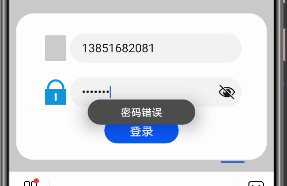
登录失败,用提示框提示用户失败原因:

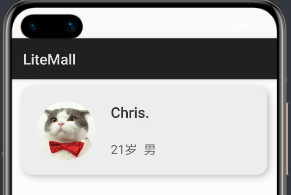
登录成功,用户信息赋值给页面并关闭dialog:
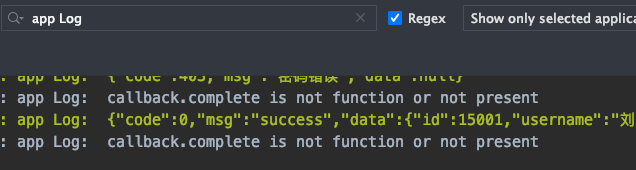
这里日志的打印需要使用JSON.stringify(),否则会打印"object"。
input组件和button组件都提供了丰富的type可供选择,具体可参考官方文档。
https://developer.harmonyos.com/cn/docs/documentation/doc-references/js-components-basic-input-0000000000611673
css渲染层:
.loginDialog {

    width: 80%;

    height: 400px;

    display: flex;

    flex-direction: column;

    align-items: center;

    justify-content: center;

}

.formItem {

    width: 100%;

    height: 100px;

    display: flex;

    align-items: center;

    justify-content: space-between;

    margin-bottom: 20px;

}

.formItem>image {

    width: 70px;

    height: 70px;

    margin: 0 10px 0 10px;

}

input {

    flex: 1;

}

.inputBtn {

    width: 200px;

    height: 70px;

}
2、注册模块
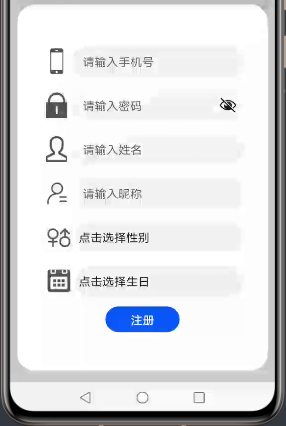
注册模块同样使用dialog弹窗,内容比登录要更丰富一些:
hml视图层:
                <dialog id="registerDialog">

                    <div class="registerDialog">

                        <div class="formItem">

                            <image src="{{ phone ? (imgUrl + 'phone.png') : (imgUrl + 'phone1.png') }}"></image>

                            <input type="number" placeholder="请输入手机号" onchange="inputPhone"></input>

                        </div>

                        <div class="formItem">

                            <image src="{{ pwd ? (imgUrl + 'password.png') : (imgUrl + 'password1.png') }}"></image>

                            <input type="password" placeholder="请输入密码" onchange="inputPwd"></input>

                        </div>

                        <div class="formItem">

                            <image src="{{ username ? (imgUrl + 'username.png') : (imgUrl + 'username1.png') }}"></image>

                            <input type="text" placeholder="请输入姓名" onchange="inputUsername"></input>

                        </div>

                        <div class="formItem">

                            <image src="{{ nickname ? (imgUrl + 'nickname.png') : (imgUrl + 'nickname1.png') }}"></image>

                            <input type="text" placeholder="请输入昵称" onchange="inputNickname"></input>

                        </div>

                        <div class="formItem">

                            <image src="{{ genderVal ? (imgUrl + 'gender.png') : (imgUrl + 'gender1.png') }}"></image>

                            <picker type="text" range="{{ genders }}" onchange="chooseGender">{{ gender }}</picker>

                        </div>

                        <div class="formItem">

                            <image src="{{ birthdayVal ? (imgUrl + 'birthday.png') : (imgUrl + 'birthday1.png') }}"></image>

                            <picker type="date" start="1900-1-1" selected="2000-1-1" onchange="chooseBirthday">{{ birthday }}</picker>

                        </div>

                        <button class="inputBtn" onclick="register">注册</button>

                    </div>

</dialog>上面四个依然是input输入框,随后两个使用了picker选择框组件。需注意,选择框组件标记中需放置文本内容,通过点击这里的文本在页面下方弹出选择框。
type="text"是文本选择框,通过range属性绑定一个字符串数组,效果如下:
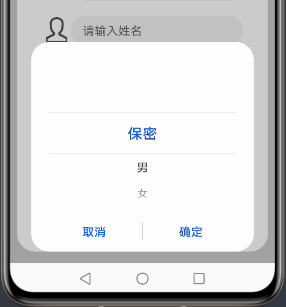
onchange属性绑定选择一项后的处理方法,e.newValue是选项值,e.newSelected是选项下标。
性别选择框js逻辑层代码:
export default {

    data: {

        ...

        gender: "点击选择性别",

        genderVal: "",

        genders: ['保密', '男', '女'],

        ...

    },

    ...

    // 性别选择器

    chooseGender(e) {

        this.gender = e.newValue;

        this.genderVal = e.newSelected;

    },

    ...

}
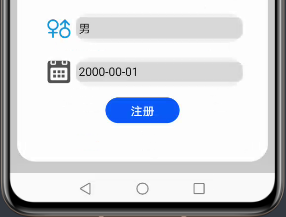
type="date"是日期选择器,可以通过属性指定开始、结束、当前日期,通过onchange绑定选择后的处理方法。效果如下:

e.year/month/day分别为选择的年/月/日,注意month比实际月份小1。
生日选择框js逻辑层:
export default {

    data: {

       ...

        birthday: "点击选择生日",

        birthdayVal: ""

    },

    ...

    // 生日选择器

    chooseBirthday(e) {

        let month = (e.month + 1) + "";

        if (month.length == 1) {

            month = "0" + month;

        }

        let day = e.day + "";

        if (day.length == 1) {

            day = "0" + day;

        }

        let birthday = e.year + "-" + month + "-" + day;

        this.birthday = birthday;

        this.birthdayVal = birthday;

    },

    ...

}
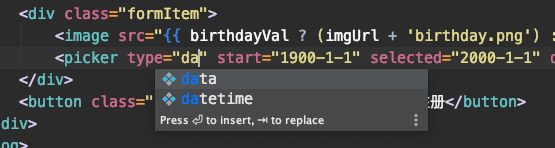
这里开发者工具有一个bug,type="date"在提示时错误拼写成了"data"。
选择器还有time, datetime, multi-text三种,鸿蒙的封装确实很好看好用。
注册的方法:
    // 注册

    register() {

        fetch.fetch({

            url: this.url + "/litemall/user/register",

            method: "POST",

            data: {

                username: this.username,

                password: this.pwd,

                gender: this.genderVal,

                birthday: this.birthdayVal,

                nickname: this.nickname,

                mobile: this.phone

            },

            header: {

                "Content-Type": "application/json;charset=UTF-8"

            },

            responseType: "json",

            success: res => {

                let data = JSON.parse(res.data);

                console.info(JSON.stringify(data));

                if (0 != data.code) {

                    prompt.showToast({

                        message: data.msg,

                        duration: 3000

                    });

                } else {

                    prompt.showToast({

                        message: "注册成功",

                        duration: 3000

                    });

                    this.$element("registerDialog").close();

                }

            }

        })

    }
还需要注意,如果使用fetch发送请求,且data给的是一个对象时,请求头的Content-Type自动设置为application/x-www-form-urlencoded。如果服务器接收json数据,则需要设置请求头,否则会报如下错误。
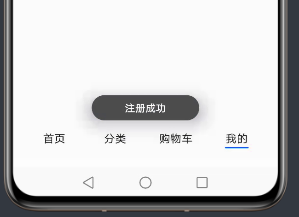
Resolved [org.springframework.web.HttpMediaTypeNotSupportedException: Content type 'application/x-www-form-urlencoded;charset=UTF-8' not supported]注册一下:
作者:Chris.
想了解更多内容,请访问: 51CTO和华为官方战略合作共建的鸿蒙技术社区https://harmonyos.51cto.com
从微信小程序到鸿蒙js开发【08】——表单组件&注册登录模块的更多相关文章
- 从微信小程序到鸿蒙js开发【11】——页面路由
目录: 1.router.push()&wx.navigateTo() 2.router.replace()&wx.redirectTo() 3.router.back()&w ...
- 从微信小程序到鸿蒙js开发【12】——storage缓存&自动登录
鸿蒙入门指南,小白速来!从萌新到高手,怎样快速掌握鸿蒙开发?[课程入口] 正文: 在应用开发时,我们常需要将一些数据缓存到本地,以提升用户体验.比如在一个电商的app中,如果希望用户登录成功后,下次打 ...
- 从微信小程序到鸿蒙js开发【13】——list加载更多&回到顶部
鸿蒙入门指南,小白速来!从萌新到高手,怎样快速掌握鸿蒙开发?[课程入口] 目录: 1.list加载更多 2.list回到顶部 3.<从微信小程序到鸿蒙js开发>系列文章合集 1.list加 ...
- 从微信小程序到鸿蒙js开发【15】——JS调用Java
鸿蒙入门指南,小白速来!0基础学习路线分享,高效学习方法,重点答疑解惑--->[课程入口] 目录:1.新建一个Service Ability2.完善代码逻辑3.JS端远程调用4.<从微信小 ...
- 从微信小程序到鸿蒙js开发【04】——list组件
目录: 1.可滚动区域 2.list + list-item 3.list + list-item-group + list-item 1.可滚动区域 在许多场景中,页面会有一块区域是可滚动的,比如这 ...
- 从微信小程序到鸿蒙js开发【06】——swiper&animator&marquee
目录: 1.swiper轮播图 2.image-animator幻灯片 3.marquee跑马灯 4.nginx动静分离 1.swiper轮播图 微信小程序的swiper组件中只能放置swiper-i ...
- 从微信小程序到鸿蒙js开发【05】——tabs组件&每日新闻
目录: 1.tabs, tab-bar, tab-content 2.tabs的事件处理 3.tabs实现的每日新闻 1.tabs, tab-bar, tab-content 上章说到,鸿蒙的list ...
- 微信小程序购物商城系统开发系列-目录结构
上一篇我们简单介绍了一下微信小程序的IDE(微信小程序购物商城系统开发系列-工具篇),相信大家都已经蠢蠢欲试建立一个自己的小程序,去完成一个独立的商城网站. 先别着急我们一步步来,先尝试下写一个自己的 ...
- 微信小程序购物商城系统开发系列-工具篇
微信小程序开放公测以来,一夜之间在各种技术社区中就火起来啦.对于它 估计大家都不陌生了,对于它未来的价值就不再赘述,简单一句话:可以把小程序简单理解为一个新的操作系统.新的生态,未来大部分应用场景都将 ...
随机推荐
- 内网渗透之信息收集-windows
用户相关 query user #查看当前在线的用户 whoami #查看当前用户 net user #查看当前系统全部用户 net1 user #查看当前系统全部用户(高权限命令) net user ...
- JS从后台获取数据,前台动态添加tr标签中的td标签
功能描述: 要求从后台查询该省份的所有城市,然后动态的再前台固定的tr标签中添加相应的td标签来展示城市基本信息: 文章目录 #一.前台jsp及js源码 jsp:在固定的tr标签中添加一个id,通过j ...
- vmware打开虚拟级断电情况下,无法找到虚拟机文件
1.此时会在建立的虚拟机目录下,有一些 %虚拟机名字%.vmx.lck 或者别的 %虚拟机名字%.***.lck 删除这些文件夹 2.虚拟文件 是一个后缀名为vmx的文件,发现断电后 变成了v ...
- (12)Linux文件系统层次结构
在 Linux 操作系统中,所有的文件和目录都被组织成以一个根节点"/"开始的倒置的树状结构 文件系统的最顶层是由根目录开始的,系统使用"/"来表示根目录,在根 ...
- 小白搭建WAMP详细教程---apache安装与设置
一.apache官网下载Apache HTTP Server服务器 1.打开apache官网http://www.apache.org/,拉到最底下,找到HTTP Server,点击进去下载.也可以直 ...
- vulnhub靶机练习-Os-hackNos-1,超详细使用
第一次写自己总结的文章,之后也会有更新,目前还在初学阶段. 首先介绍一下靶机,靶机是 vulnhub Os-hackNos-1 简介: 难度容易到中, flag 两个 一个是普通用户的user.txt ...
- CF-1354 E. Graph Coloring(二分图,背包,背包方案输出)
E. Graph Coloring 链接 n个点m条边的无向图,不保证联通,给每个点标号1,2,3.1号点个数n1,2号点个数n2,3号点个数n3.且每条边的两点,标号之差绝对值为1.如果有合法方案, ...
- 【uva 12627】Erratic Expansion(算法效率--递推)
题意:初始1个红气球,每小时后,1个红气球会变成3个红气球和1个蓝气球,而1个蓝气球会变成4个蓝气球.问经过N小时后,第L~R行一共有多少个红气球. 解法:问行数就定义f[i][j]表示 i 小时后前 ...
- 牛客编程巅峰赛S1第5场 - 黄金&钻石&王者 B.牛牛的字符串 (DP)
题意:有一个字符串\(s\),我们可以选择\(s_{i}\),如果\(s_{i+k}>s_{i}\),那么就可以交换\(s_{i}\)和\(s_{i+k}\),问最多能够交换多少次. 题解:因为 ...
- codeforce 3C
B. Lorry time limit per test 2 seconds memory limit per test 64 megabytes input standard input outpu ...