
【应用程序见解 Application Insights】Application Insights 使用 Application Maps 构建请求链路视图
Applicaotn Insigths 使用 Application Maps 构建请求链路视图
构建系统时,请求的逻辑操作大多数情况下都需要在不同的服务,或接口中完成整个请求链路。一个请求可以经历多个组件,极有可能出现客户端请求站点1,站点1请求站点2, … 站点N才是最终处理数据然后依次返回。
在这样的情况,如果有一个直观的视图来展示请求在每一个站点上的状态(成功,失败),当问题发生时,非常有帮助定位问题发生的地点。借助Azure 应用程序见解(Application Insights)中的遥测关联建立的Application Maps就能实现
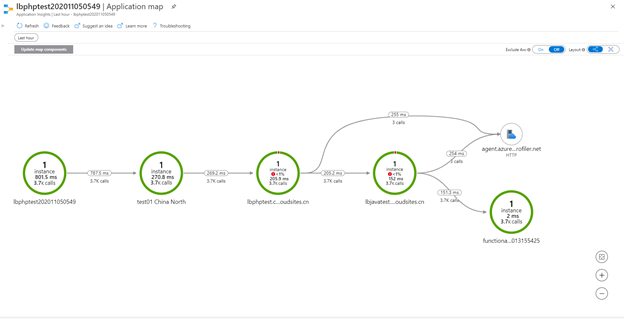
效果展示
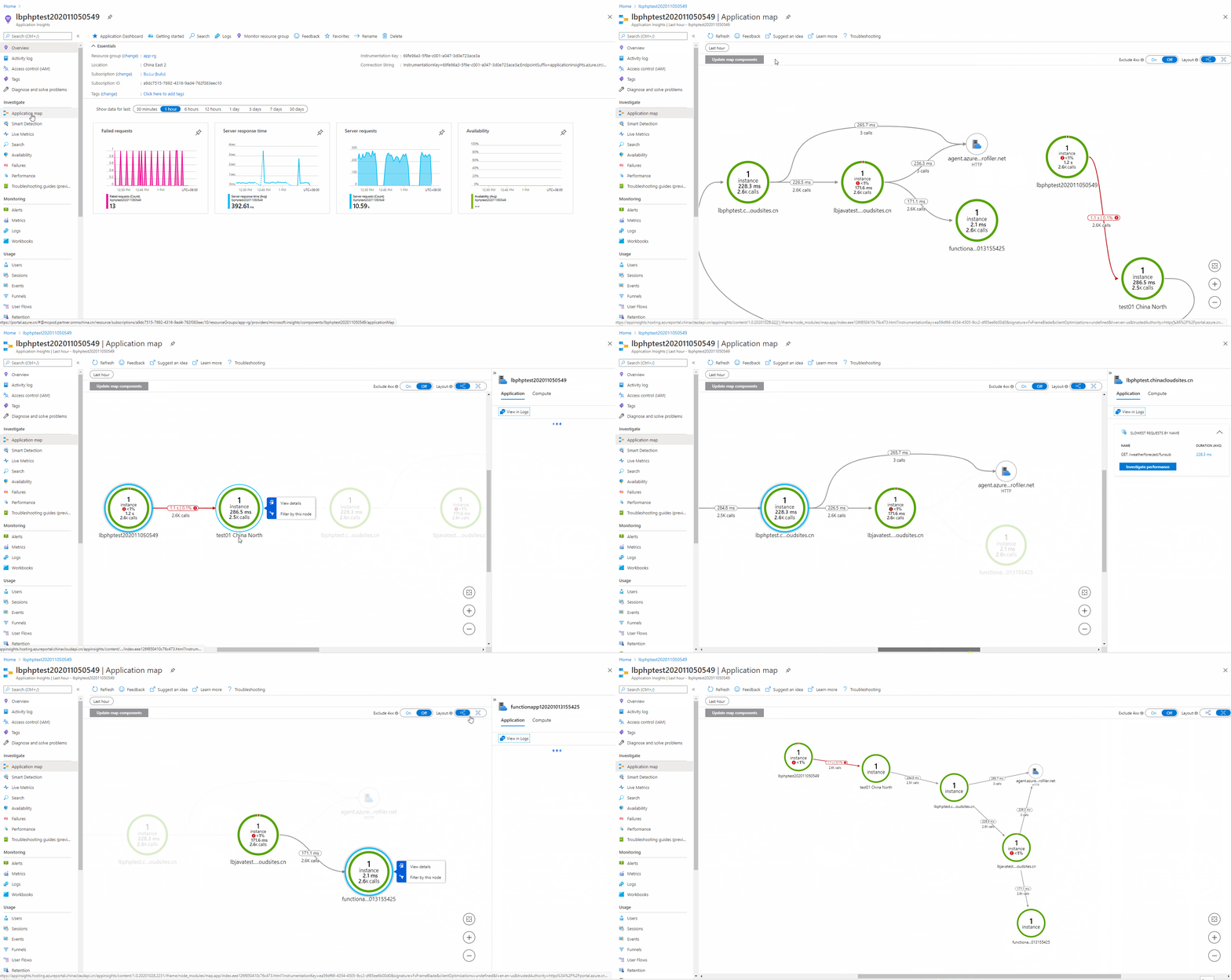
实现原理
Application Insights定义了用于分配遥测关联的数据模型,每个传出操作(例如,对另一个组件的 HTTP 调用)是由依赖项遥测表示的。 依赖项遥测也定义了自身的全局独一无二的 id,此依赖项调用发起的请求遥测将此 id 用作其 operation_parentId。通过operation_Id、operation_parentId 和 request.id,即可以生成分布式逻辑操作的视图 (这些字段也定义了遥测调用的因果关系顺序)。
实例构建Application Maps
在实例中,这一个请求进行了4段转发。
第一段:本地代码访问APIM(test01.azure-api.cn),
第二段:APIM访问站点1(lbphptest.chinacloudsites.cn)
第三段:站点1访问站点2(lbjavatest.chinacloudsites.cn)
第四段:站点2访问最终处理请求的Azure Function(Http Trigger)( functionapp120201013155425.chinacloudsites.cn).
准备条件
- 创建Application Insights (lbphptest202011050549)
- 创建APIM(test01)
- 创建两个App Service (lbphptest 和lbjavatest)
- 创建一个Azure Function(functionapp120201013155425)
注:如不熟悉如何创建以上资源,可以导航到文末的参考资料部分
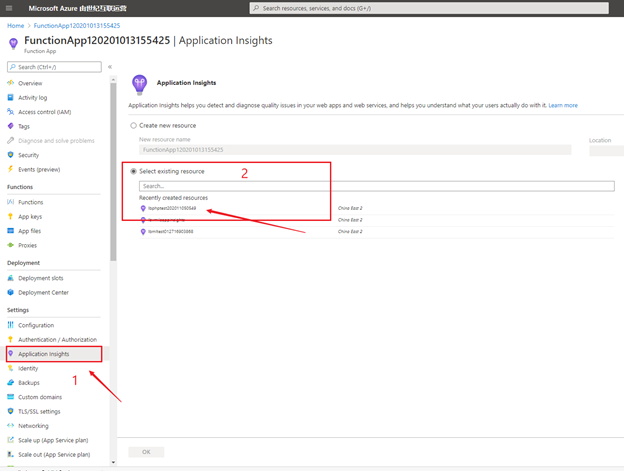
步骤一:在Azure Funciton中启用并关联Application Insights服务
进入Azure Funciton门户,选择Application Insights功能,根据页面提示选择已创建好的Application Insights (lbphptest202011050549).
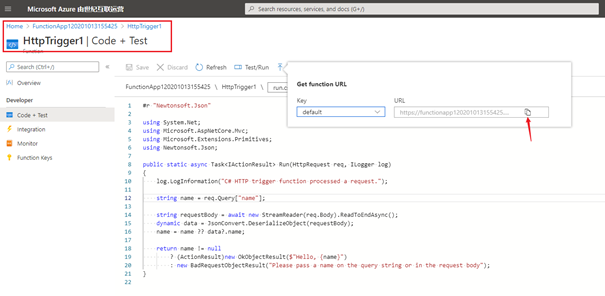
创建的Function为默认的HttpTrigger模式,测试目的,代码可以不需任何修改。参考下图获取到Function的URL,用于下一步在站点2中调用。
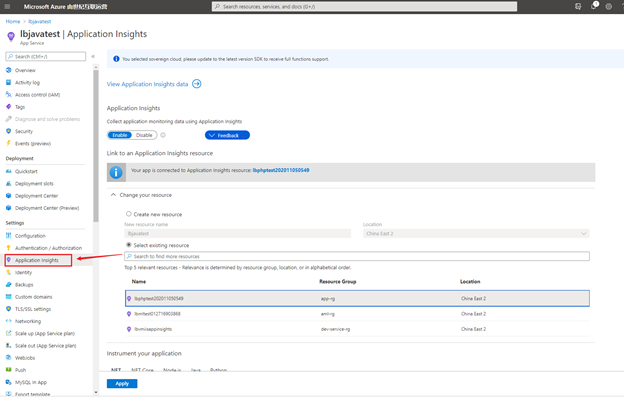
步骤二:在站点2(lbjavatest)中启用并关联Application Insights服务,并部署代码请求Azure Function
进入站点2的门户页面,在Application Insights目录中根据提示Enable Application Insights并选择相同的Application Insights。
部署代码调用步骤一中的Azure Function
        //Level 3

        [HttpGet]

        [Route("[Action]")]

        public string Fun([FromQuery] string name)

        {

            using (HttpClient httpClient = new HttpClient())

            {

                var url = $"https://functionapp120201013155425.chinacloudsites.cn/api/HttpTrigger1?name={name}";

                HttpRequestMessage httpRequest = new HttpRequestMessage(HttpMethod.Get, url);

                httpRequest.Headers.Add("Accept", "application/json, text/plain, */*");

                var response = httpClient.SendAsync(httpRequest).Result;

                string responseContent = response.Content.ReadAsStringAsync().Result;

                return responseContent;

            }

        }
步骤三:在站点1(lbphptest)中启用并关联Application Insights服务,并部署代码请求站点2
进入站点1的门户页面,在Application Insights目录中根据提示Enable Application Insights并选择相同的Application Insights。
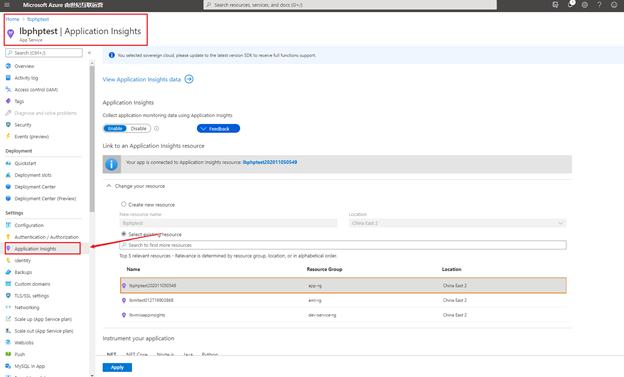
部署代码调用步骤二中的站点2的URL,代码与访问Azure Function相似。
        //Level 2

        [HttpGet]

        [Route("[Action]")]

        public string FunSub([FromQuery] string name)

        {

            using (HttpClient httpClient = new HttpClient())

            {

                var url = $"https://lbjavatest.chinacloudsites.cn/WeatherForecast/fun?name={name}";

                HttpRequestMessage httpRequest = new HttpRequestMessage(HttpMethod.Get, url);

                httpRequest.Headers.Add("Accept", "application/json, text/plain, */*");

                var response = httpClient.SendAsync(httpRequest).Result;

                string responseContent = response.Content.ReadAsStringAsync().Result;

                return responseContent;

            }

        }
步骤四:在APIM中启用并关联Application Insights服务, 并设置API访问站点1
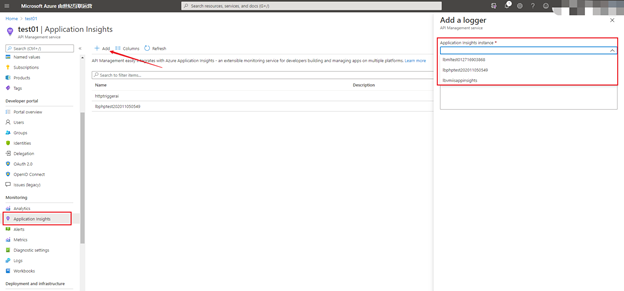
进入APIM的门户页面,在Application Insights目录中添加相同的Application Insights。
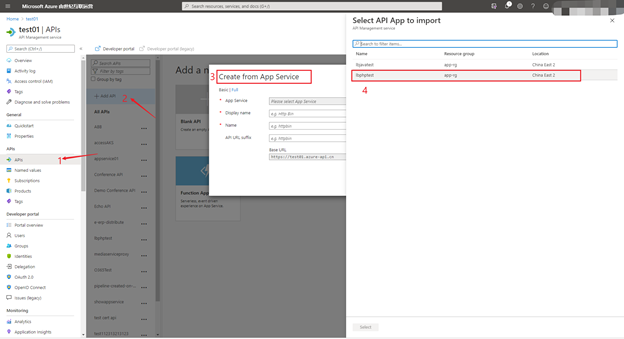
在APIM配置API访问站点1(lbphptest)
- 点击“Add API” 按钮
- 选择从App Service中创建
- 选择站点1(lbphptest)
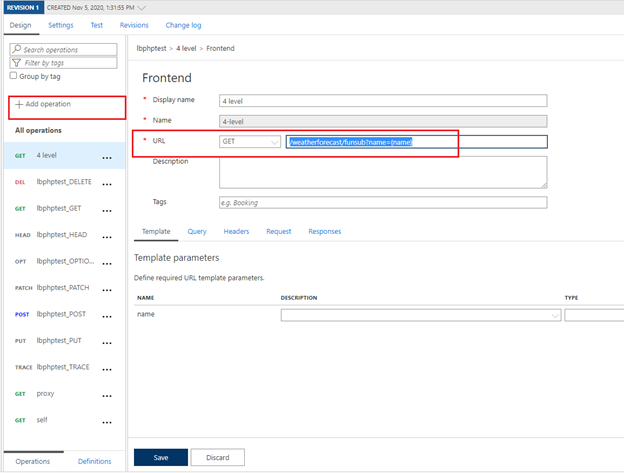
在接口中添加操作一个新操作,访问站点1中的接口/weatherforecast/funsub?name={name}
步骤五:在ASP.NET Core代码中添加Application Insights SDK并配置连接字符串,在接口中访问APIM.
在本地代码中添加Application Insights SDK
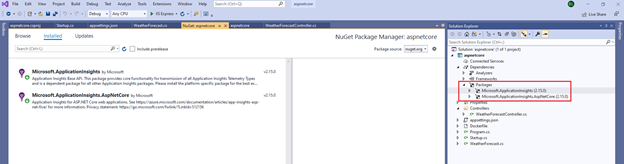
配置连接字符串(字符串中Application Insights的Overview页面复制)
{

  "Logging": {

    "LogLevel": {

      "Default": "Information",

      "Microsoft": "Warning",

      "Microsoft.Hosting.Lifetime": "Information"

    }

  },

  "ApplicationInsights": {

    "ConnectionString": "InstrumentationKey=xxx-xxx-xxx-xxx-xxxxx;EndpointSuffix=applicationinsights.azure.cn;IngestionEndpoint=https://chinaeast2-0.in.applicationinsights.azure.cn/"

  },

  "AllowedHosts": "*"

}
启动本地程序,并通过在浏览器中访问 https://localhost:44323/weatherforecast/Funsubfornt?name=test from local -- apim -- app 1 – app 2 -- function

查看最终效果图:
【END】
参考文档:
在 Azure 门户中创建第一个函数: https://docs.azure.cn/zh-cn/azure-functions/functions-create-first-azure-function
适用于 ASP.NET Core 应用程序的 Application Insights : https://docs.azure.cn/zh-cn/azure-monitor/app/asp-net-core
关于 API 管理: https://docs.azure.cn/zh-cn/api-management/api-management-key-concepts
在 Azure 中创建 ASP.NET Core Web 应用: https://docs.azure.cn/zh-cn/app-service/quickstart-dotnetcore?pivots=platform-linux
【应用程序见解 Application Insights】Application Insights 使用 Application Maps 构建请求链路视图的更多相关文章
- 【Azure 应用程序见解】Application Insights Java Agent 3.1.0的使用实验,通过修改单个URL的采样率来减少请求及依赖项的数据采集
问题描述 近日好消息,如果是一个Java Spring Cloud的项目,想使用Azure Applicaiton Insights来收集日志及一些应用程序见解.但是有不愿意集成SDK来修改代码或者配 ...
- 【应用程序见解 Application Insights】使用Azure Monitor Application Insights Agent获取Azure VM中监控数据及IIS请求指标等信息
问题情形 为了使用Application Insights也可以监控Azure VM中的相关性能数据,如CPU, Memory,IIS Reuqest等信息,可以在VM中开始一个一个扩展插件: Azu ...
- Android程序的入口点和全局变量设置--application
首先看看 application的官方文档 我之前一直以为Android程序的入口点就是带MAIN和LAUNCHER的Activity的onCreate方法,看来我是错了~ 原来真正的入口点是 Ap ...
- 安卓程序代写 网上程序代写[原]Android开发技巧--Application
1. Application用途 创建Application时机 : Application在启动的时候会调用Application无参的构造方法创建实例; Application构造方法 : App ...
- solr File Upload "Unsupported ContentType: application/vnd.ms-excel Not in: [application/xml, application/csv, application/json, text/json, text/csv, text/xml, application/javabin]",
今天在用solr管理界面导入文件时报错:"Unsupported ContentType: application/vnd.ms-excel Not in: [application/xm ...
- 新建Application 报错android.app.Application cannot be cast
我在开发APP的时候重新使用了一个类,继承了android.app.Application.但是在运行的时候提示java.lang.ClassCastException: android.app.Ap ...
- 【应用程序见解 Application Insights】在Application Insights中通过自定义查询结果定义指标并显示在Dashboard中
问题情形 通过Application Insights收集到指标数据后,如Request,Trace,Exception.但是默认的Insights图表不能满足业务的需求,需要自定义相应的类SQL语句 ...
- 【Azure 应用程序见解】 Application Insights 对App Service的支持问题
问题描述 Web App 发布后, Application Insights 收集不到数据了 问题分析 在应用服务(App Service)中收集应用的监控数据(如Request,Exception, ...
- Azure上的时序见解,Time series insights
5G来了,广连接(mmTC)可以实现每平方千米100万的连接数(理论值),是4G的10倍,5G网络出现,配合其他技术,空间将在数据意义上剧烈压缩,车联网.智能家居.智能安防.智慧工厂.智慧能源都可能带 ...
随机推荐
- 08 . Jenkins之SpringCloud微服务+Vue+Docker持续集成
简介 大致流程 /* 1.开发人员每天把代码提交到Gitlab代码仓库 2.jenkins从gitlab中拉取项目源码,编译并打包成war包,然后构建Docker镜像,将镜像上传到Harbor私有仓库 ...
- Mice and Rice(queue的用法)
Mice and Rice(queue的用法) Mice and Rice is the name of a programming contest in which each programmer ...
- http协议和chrome浏览器
http协议和Chrome抓包工具 什么是http和https协议: HTTP协议:全称是HyperText Transfer Protocol,中文意思是超文本传输协议,是一种发布和接收HTML页面 ...
- 【题解】[SDOI2010]捉迷藏
题目链接:https://www.luogu.com.cn/problem/P2479 题目大意:求平面\(n\)个点中,到其它\(n-1\)个点的曼哈顿距离最大和最小距离之差最小的点,求出这个这个距 ...
- Python日志采集(详细)
通常在前期调试代码的时候,我们会使用print在IDE控制台打印一些信息,判断运行情况.但在运行整个自动化测试项目的过程中,通过print打印信息的方式获取运行情况显然行不通. 这时就需要收集日志,每 ...
- Android 10不能使用uiautomatorviewer定位元素的终极解决方法
Android app 元素定位除了使用Appium Inspector 外,还可以使用Android SDK 里tools中的uiautomatorviewer 工具.但今天打算使用 uiautom ...
- centos7 samba安装教程
samba的用途:有的时候,我们需要在centos7 的文件能共享给其他机器. rpm -qa|grep samba yum install -y samba setenforce 0 sed -i ...
- 微信小程序实时将less编译为wxss
1.npm或者yarn全局安装wxss-cli npm install -g wxss-cli 2.运行waxes-cli命令(mp_wx为小程序目录) wxss ./mp_wx 实时监听mp_wx目 ...
- 在Jenkins容器中安装docker-compose
首先使用Docker容器安装Jenkins 链接参考 安装成功后使用管理员权限进入到Jenkins容器 docker exec -it -u root jenkins bash 下载docker-co ...
- golang通过cgo调用lua
目录 1.前期准备 2.测试go代码 3.完成的一个学习项目 4.总结 1.前期准备 1.第三方库:https://github.com/aarzilli/golua 2.下载lua源码:https: ...