
Python3使用钉钉机器人推送消息(签名方式)
import time
import hmac
import hashlib
import base64
import urllib
import json
import requests
import logging try:
JSONDecodeError = json.decoder.JSONDecodeError
except AttributeError:
JSONDecodeError = ValueError def is_not_null_and_blank_str(content):
if content and content.strip():
return True
else:
return False class DingtalkRobot(object):
def __init__(self, webhook, sign=None):
super(DingtalkRobot, self).__init__()
self.webhook = webhook
self.sign = sign
self.headers = {'Content-Type': 'application/json; charset=utf-8'}
self.times = 0
self.start_time = time.time() # 加密签名
def __spliceUrl(self):
timestamp = int(round(time.time() * 1000))
secret = self.sign
secret_enc = secret.encode('utf-8')
string_to_sign = '{}\n{}'.format(timestamp, secret)
string_to_sign_enc = string_to_sign.encode('utf-8')
hmac_code = hmac.new(secret_enc, string_to_sign_enc, digestmod=hashlib.sha256).digest()
sign = urllib.parse.quote_plus(base64.b64encode(hmac_code))
url = f"{self.webhook}×tamp={timestamp}&sign={sign}"
return url def send_text(self, msg, is_at_all=False, at_mobiles=[]):
data = {"msgtype": "text", "at": {}}
if is_not_null_and_blank_str(msg):
data["text"] = {"content": msg}
else:
logging.error("text类型,消息内容不能为空!")
raise ValueError("text类型,消息内容不能为空!") if is_at_all:
data["at"]["isAtAll"] = is_at_all if at_mobiles:
at_mobiles = list(map(str, at_mobiles))
data["at"]["atMobiles"] = at_mobiles logging.debug('text类型:%s' % data)
return self.__post(data) def __post(self, data):
"""
发送消息(内容UTF-8编码)
:param data: 消息数据(字典)
:return: 返回发送结果
"""
self.times += 1
if self.times > 20:
if time.time() - self.start_time < 60:
logging.debug('钉钉官方限制每个机器人每分钟最多发送20条,当前消息发送频率已达到限制条件,休眠一分钟')
time.sleep(60)
self.start_time = time.time() post_data = json.dumps(data)
try:
response = requests.post(self.__spliceUrl(), headers=self.headers, data=post_data)
except requests.exceptions.HTTPError as exc:
logging.error("消息发送失败, HTTP error: %d, reason: %s" % (exc.response.status_code, exc.response.reason))
raise
except requests.exceptions.ConnectionError:
logging.error("消息发送失败,HTTP connection error!")
raise
except requests.exceptions.Timeout:
logging.error("消息发送失败,Timeout error!")
raise
except requests.exceptions.RequestException:
logging.error("消息发送失败, Request Exception!")
raise
else:
try:
result = response.json()
except JSONDecodeError:
logging.error("服务器响应异常,状态码:%s,响应内容:%s" % (response.status_code, response.text))
return {'errcode': 500, 'errmsg': '服务器响应异常'}
else:
logging.debug('发送结果:%s' % result)
if result['errcode']:
error_data = {"msgtype": "text", "text": {"content": "钉钉机器人消息发送失败,原因:%s" % result['errmsg']},
"at": {"isAtAll": True}}
logging.error("消息发送失败,自动通知:%s" % error_data)
requests.post(self.webhook, headers=self.headers, data=json.dumps(error_data))
return result if __name__ == '__main__':
URL = "你的钉钉机器人地址"
SIGN = "签名"
ding = DingtalkRobot(URL, SIGN)
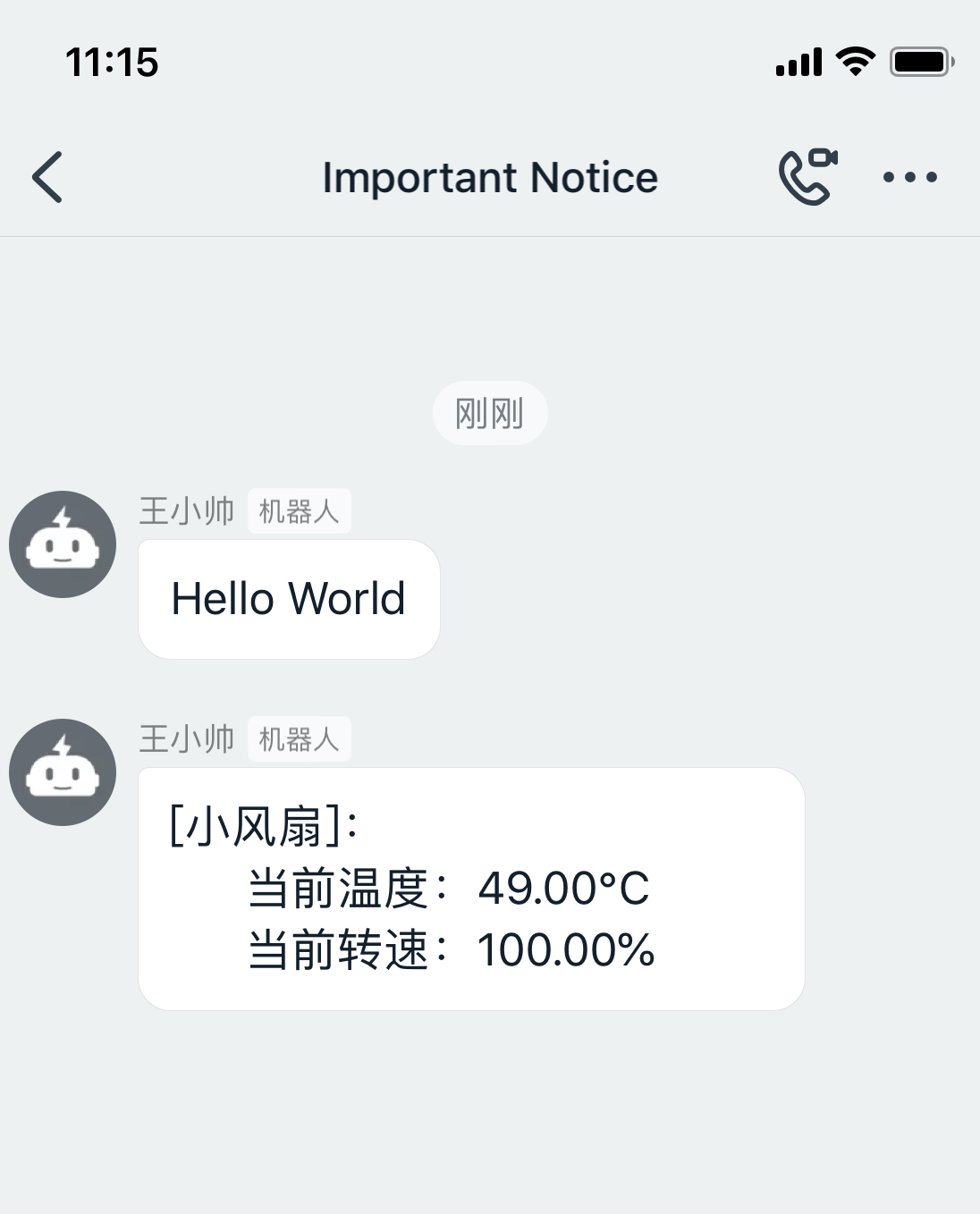
print(ding.send_text("Hello World"))
做通知实例,如图:
Python3使用钉钉机器人推送消息(签名方式)的更多相关文章
- nodejs通过钉钉群机器人推送消息
nodejs 通过钉钉群机器人推送消息 Intro 最近在用 nodejs 写爬虫,之前的 nodejs 爬虫代码用 js 写的,感觉可维护性太差,也没有智能提示,于是把js改用ts(typescri ...
- Java项目中集成钉钉机器人推送消息提醒
前言: 项目中有一个需求,当有新订单产生的时候,希望能够及时通知到业务相关人员进行处理,整体考虑了一下,选用了钉钉机器人提醒功能(公司内部主要也是使用钉钉进行通讯). 操作: 主要分为两部分进行处理: ...
- 极光推送消息——RegistrationID方式
1.工具类 package com.test.util; import cn.jiguang.common.resp.APIConnectionException; import cn.jiguang ...
- 钉钉机器人集成Jenkins推送消息模板自定义发送报告
一.由于公司同样也使用了钉钉.那么在做Jenkins集成自动化部署的时候,也是可以集成钉钉的. 那种Jenkins下载钉钉插件集成,简单设置就可以完成了.我们今天要做的是,定制化的发送消息. 钉钉推送 ...
- 使用PushSharp给iOS应用推送消息
PushSharp是一个C#编写的服务端类库,用于推送消息到各种客户端,支持iOS(iPhone/iPad).Android.Windows Phone.Windows 8.Amazo.Blackbe ...
- android不需要Socket的跨进程推送消息AIDL!
上篇介绍了跨进程实时通讯http://www.cnblogs.com/xiaoxiaing/p/5818161.html 但是他有个缺点就是服务端无法推送消息给客户端,今天这篇文章主要说的就是服务器推 ...
- 使用极光推送(www.jpush.cn)向安卓手机推送消息【服务端向客户端主送推送】C#语言
在VisualStudio2010中新建网站JPushAndroid.添加引用json帮助类库Newtonsoft.Json.dll. 在web.config增加appkey和mastersecret ...
- 用JPUSH极光推送实现服务端向安装了APP应用的手机推送消息(C#服务端接口)
这次公司要我们做一个功能,就是当用户成功注册以后,他登录以后要收到消息,当然这个消息是安装了我们的手机APP应用的手机咯. 极光推送的网站的网址是:https://www.jpush.cn/ 极光推送 ...
- iOS点击推送消息跳到应用指定页面
现在的推送用的越来越频繁,几乎每个应用都开始用到了.其实又有几个用户会去看推送消息呢?没办法,产品经理最大啊,只是苦了我们这一帮程序员啊!闲话少说,进入正题.兄弟我用的是极光推送,自然是以极光推送为例 ...
随机推荐
- 微信小程序setData局部刷新列表
利用setData局部刷新列表 当列表管理加载到第几页时,这个list的数据有十几条的,如果重新setData的话就要重新刷新和渲染列表, 这是个比较麻烦的事,当数据量大时,就会造成白屏, 这时就要局 ...
- ybt1107题解和方法总结
今天花了三个小时的时间刷了些基础题,虽说是简单题,但是有一些还是有点难度的 比如ybt1107,我死嗑了半个小时. [题目描述] 某校大门外长度为L的马路上有一排树,每两棵相邻的树之间的间隔都是1米. ...
- 【算法•日更•第五十期】二分图(km算法)
▎前言 戳开这个链接看看,惊不惊喜,意不意外?传送门. 没想到我的博客竟然被别人据为己有了,还没办法投诉. 这年头写个博客太难了~~~ 之前小编写过了二分图的一些基础知识和匈牙利算法,今天来讲一讲km ...
- Gulp的安装及用法
1.安装淘宝镜像 npm install cnpm -g --registry=https://registry.npm.taobao.org cnpm -v 2.生成项目描述文件 package.j ...
- 解决QT5移植报错:This application failed to start because no Qt platform plugin could be initialized
今天自己基于Pyqt5开发了一个软件,打包成exe后在自己的电脑上运行正常,在其他机器上提示: This application failed to start because no Qt platf ...
- Statistics and Samples in Distributional Reinforcement Learning
郑重声明:原文参见标题,如有侵权,请联系作者,将会撤销发布! arXiv:1902.08102v1 [stat.ML] 21 Feb 2019 Abstract 我们通过递归估计回报分布的统计量,提供 ...
- 01 . etcd简介原理,应用场景及部署,简单使用
etcd简介 Etcd是CoreOS团队于2013年6月发起的开源项目,他的目标是构建一个高可用的分布式键值(key-value)数据库,etcd内部采用raft协议作为一致性算法,etcd基于Go语 ...
- ASP.NET Core3.1使用IdentityServer4中间件系列随笔(三):创建使用[ClientCredentials客户端凭证]授权模式的客户端
配套源码:https://gitee.com/jardeng/IdentitySolution 上一篇<ASP.NET Core3.1使用IdentityServer4中间件系列随笔(二):创建 ...
- Unity报与System.IO相关的错误
比如这个: Type `System.IO.FileInfo' does not contain a definition for `OpenText' and no extension method ...
- tp5下的文件上传与下载类
class FieldInterfun extends Controller { /** * [upload 上传文件] * @param [type] $file [description] * @ ...