
ASP.NET MVC- Model- An Introduction to Entity Framework for Absolute Beginners
Introduction
This article introduces Entity Framework to absolute beginners. The article is meant for developers who are primarily using ADO.NET to write their data access layers. Many experienced developers will find this article very basic but since the article is written from the perspective of beginners, I've tried to keep things simple.
Background
ADO.NET is a very strong framework for data access. ADO.NET has been around since many years and there are a lot of systems running over ADO.NET. Developers who are totally oblivious to the concept of ORMs will probably be asking "What is Entity Framework? What are the benefits of using it and is it an alternative to ADO.NET?"
Well, to answer the first question about what is Entity Framework, Entity Framework is an Object Relational Mapper (ORM). It basically generates business objects and entities according to the database tables and provides the mechanism for:
- Performing basic CRUD (Create, Read, Update, Delete) operations.
- Easily managing "1 to 1", "1 to many", and "many to many" relationships.
- Ability to have inheritance relationships between entities.
and to answer the second question, the benefits are:
- We can have all data access logic written in higher level languages.
- The conceptual model can be represented in a better way by using relationships among entities.
- The underlying data store can be replaced without much overhead since all data access logic is present at a higher level.
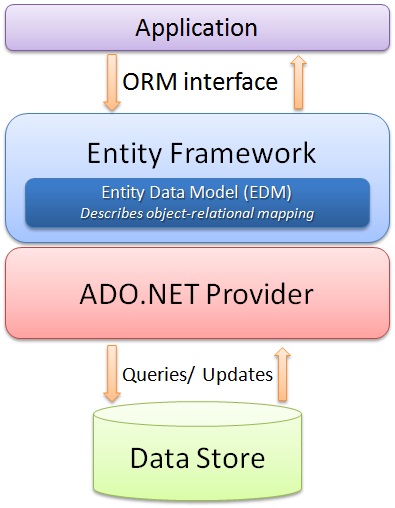
and finally, the last question that whether it is an alternative to ADO.NET, the answer would be "yes and no". Yes because the developer will not be writing ADO.NET methods and classes for performing data operations and no because this model is actually written on top of ADO.NET, meaning under this framework, we are still using ADO.NET. So let us look at the architecture of Entity Framework (diagram taken from MSDN):
Using the code
Let's try to understand the ease of use that Entity Framework provides by performing simple CRUD operations. Once we look at the code and how effortlessly and efficiently we can do these operations, the benefits of Entity Framework will become quite obvious.
Creating the database
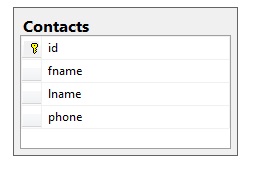
Let's have a simple database with one table. Let's create a simple table for Contacts and we will perform CRUD operations on this table.
Adding the Entity Model to the Website
Once we have the database ready, we can add the entity model to our website. We can do this by adding an ADO.NET Entity Data Model to the website.
Once we select to add this data model to our website, we will have to select the approach we want to take for our Model's contents.
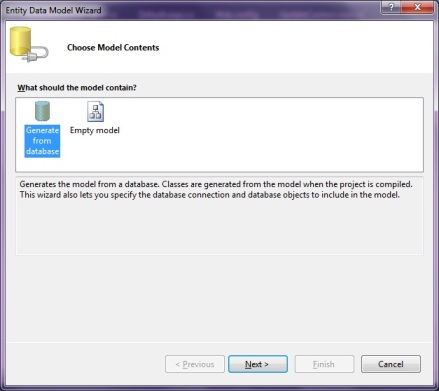
What this selection means is that we can either choose to generate the entity model from an existing database schema or we can design the entity model here and then later hook it up to the database. Since we already have the database ready, we will use the first option. Once the Model is generated, the Entity for each table is generated. The generated entity for our contact table is:
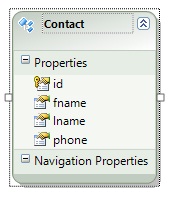
Also, the classes for performing database operations are also created. We just need to know how to use these classes to perform database operations.
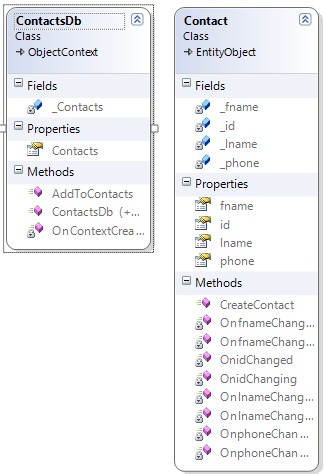
Insert operation
Let us create a simple page to perform an insert operation.
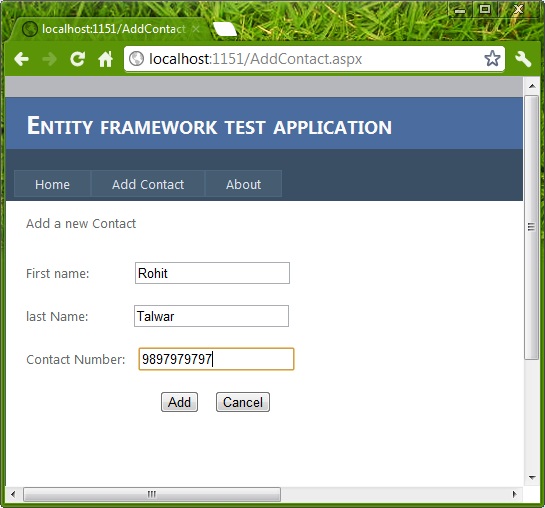
Now once the user chooses to insert the values into the database, the actual data operation can be performed by using the AddObject method of the Model class entity collection. The following code snippet show how to perform the insert.
Contact con = new Contact();

con.fname = TextBox1.Text;

con.lname = TextBox2.Text;

con.phone = TextBox3.Text;

ContactsDb db = new ContactsDb();

db.Contacts.AddObject(con);

db.SaveChanges();
This will insert the record into the table. You can notice the simplicity and efficiency of the code we wrote to perform the insertion.
Reading all the records
There are scenarios when we want to read all records. Let's say we are making a page that will display all the contact information in a single page.

We can retrieve the collection of Entities using the Model object to achieve this. The code snippet below will show how that can be done.
ContactsDb db = new ContactsDb();

Repeater1.DataSource = db.Contacts;

Repeater1.DataBind();
Selecting a specific record
If we want to select a specific record from the table, we can use the SingleOrDefault method on the Model's entities collection. Let's say we want the functionality of updating/deleting a record on a single page then we will first have to select the record based on the ID, then update/delete the selected record.
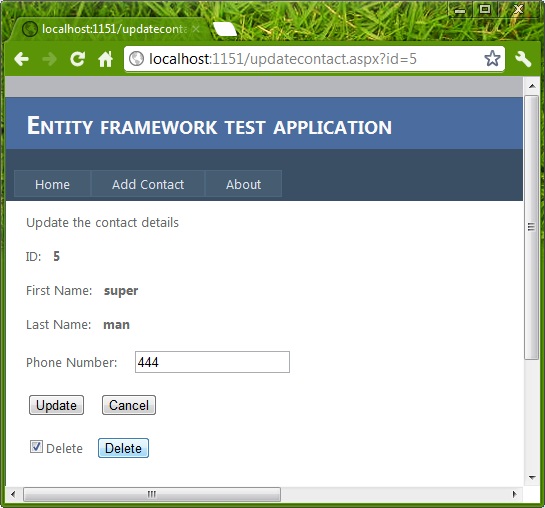
Selection of any particular record (Contact) based on ID can be done as:
int idToupdate = Convert.ToInt32(Request.QueryString["id"].ToString());

ContactsDb db = new ContactsDb();

Contact con = db.Contacts.SingleOrDefault(p => p.id == idToupdate);
Once this code is executed, the Contact object will contain the required values.
Updating the record
If we want to update a record, then a simple update operation can be performed as:
int idToupdate = Convert.ToInt32(Request.QueryString["id"].ToString());

ContactsDb db = new ContactsDb();

Contact con = db.Contacts.SingleOrDefault(p =>  p.id == idToupdate);

con.phone = TextBox1.Text;

db.SaveChanges();
Once this code executes, the value of phone number will be updated by a new value which is retrieved from TextBox1.
Deleting a record
If we want to delete a particular record then we can perform a delete operation by using the DeleteObject function. The following code snippet demonstrates the same:
//delete this contact

int idToupdate = Convert.ToInt32(Request.QueryString["id"].ToString());

ContactsDb db = new ContactsDb();

Contact con = db.Contacts.SingleOrDefault(p => p.id == idToupdate);

db.Contacts.DeleteObject(con);

db.SaveChanges();
Now that we have the basic CRUD operations performed on the database using the Entity Framework.
A note on Relationships and Lazy Loading
To understand the Entity Framework we need to understand some things like naming conventions, relationships between tables, and relationships between entities. Also, the concept of lazy loading once fully understood will give the power to the developer to use the Entity Framework efficiently.
Note: Since this is an introductory article on Entity Framework we have not discussed these things. Perhaps we will discuss them in a separate article.
Points of interest
Entity Framework has been in use for some time now. But there are many developers who are still getting started with Entity Framework. This article was meant as an overview of the Entity Framework. This should not be treated as a complete tutorial. Also, the code written is very simple and there is a lot of scope for optimization but since the idea here is to understand Entity Framework, I tried to keep the code simple and readable rather and optimal.
Note: To run the solution, please change the database path of ConnectionString in the web.config file.
原文:http://www.codeproject.com/Articles/363040/An-Introduction-to-Entity-Framework-for-Absolute-B
ASP.NET MVC- Model- An Introduction to Entity Framework for Absolute Beginners的更多相关文章
- [转帖]2016年时的新闻:ASP.NET Core 1.0、ASP.NET MVC Core 1.0和Entity Framework Core 1.0
ASP.NET Core 1.0.ASP.NET MVC Core 1.0和Entity Framework Core 1.0 http://www.cnblogs.com/webapi/p/5673 ...
- ASP.NET Core 1.0、ASP.NET MVC Core 1.0和Entity Framework Core 1.0
ASP.NET 5.0 将改名为 ASP.NET Core 1.0 ASP.NET MVC 6 将改名为 ASP.NET MVC Core 1.0 Entity Framework 7.0 将 ...
- ASP.NET MVC Model验证(五)
ASP.NET MVC Model验证(五) 前言 上篇主要讲解ModelValidatorProvider 和ModelValidator两种类型的自定义实现, 然而在MVC框架中还给我们提供了其它 ...
- ASP.NET MVC Model验证(四)
ASP.NET MVC Model验证(四) 前言 本篇主要讲解ModelValidatorProvider 和ModelValidator两种类型的自定义实现,前者是Model验证提供程序,而Mod ...
- ASP.NET MVC Model验证(三)
ASP.NET MVC Model验证(三) 前言 上篇中说到在MVC框架中默认的Model验证是在哪里验证的,还讲到DefaultModelBinder类型的内部执行的示意图,让大家可以看到默认的M ...
- ASP.NET MVC Model验证(二)
ASP.NET MVC Model验证(二) 前言 上篇内容演示了一个简单的Model验证示例,然后在文中提及到Model验证在MVC框架中默认所处的位置在哪?本篇就是来解决这个问题的,并且会描述一下 ...
- ASP.NET MVC Model验证(一)
ASP.NET MVC Model验证(一) 前言 前面对于Model绑定部分作了大概的介绍,从这章开始就进入Model验证部分了,这个实际上是一个系列的Model的绑定往往都是伴随着验证的.也会在后 ...
- ASP.NET MVC Model绑定(六)
ASP.NET MVC Model绑定(六) 前言 前面的篇幅对于IValueProvider的使用做个基础的示例讲解,但是没并没有对 IValueProvider类型的实现做详细的介绍,然而MVC框 ...
- ASP.NET MVC Model绑定(五)
ASP.NET MVC Model绑定(五) 前言 前面的篇幅对于IValueProvider的获取位置和所处的生成过程做了讲解,本篇将会对IValueProvider的使用做个基础的示例讲解,读完本 ...
随机推荐
- HDU4530+模拟
/* */ #include<stdio.h> #include<string.h> #include<stdlib.h> #include<algorith ...
- DHTMLX 前端框架 建立你的一个应用程序 教程(九)--绑定表单Form到表格Grrid中
绑定表单Form到表格Grrid中 现在我们需要选中一行表格数据的时候 数据能在表单中显示出来 我们可以使用DHTMLX 丰富的组件功能实现它. 绑定表单到表格 1.调用bind方法将表单绑定到网格, ...
- SPRING IN ACTION 第4版笔记-第六章RENDERING WEB VIEWS-005- 使用ApacheTiles(TilesConfigurer、TilesViewResolver、<put-attribute>、<t:insertAttribute>)
一. 1.定义TilesConfigurer.TilesViewResolver的bean 注意有tiles2和tiles3,这里使用tiles3 (1)java形式 package spittr.w ...
- Android笔记5-与USB HID 设备通信(一)
1.了解 支持USB 主机(host)或者从机(accessary )模式最终是取决于设备的硬件,而与平台版本无关.我们可以通过usesfeature这个方法来查询自己的设备是否支持USB主从. ...
- snapshot
A full backup of a large data set may take a long time to complete. On multi-tasking or multi-user s ...
- 添加service到SystemService硬件服务
添加service到SystemService: 添加硬件服务. 创建时间:2015年3月9日(星期一) 晚上11:07 | 分类:硬件驱动Android | 天气: 修改时间:2015年3月10日( ...
- 【HDOJ】3480 Division
斜率dp+滚动数组. /* 3480 */ #include <iostream> #include <sstream> #include <string> #in ...
- 转载:10个实用的但偏执的Java编程技术
在沉浸于编码一段时间以后(比如说我已经投入近20年左右的时间在程序上了),你会渐渐对这些东西习以为常.因为,你知道的…… 任何事情有可能出错,没错,的确如此. 这就是为什么我们要采用“防御性编程”,即 ...
- Micro 消息
上周,微软与计算机历史博物馆合作,发布了MS-DOS 1.1/2.0和Word for Windows 1.1a版本的源码,这是微软首次将其核心产品开源. MS-DOS MS-DOS是微软于1981年 ...
- c语言实用功能库函数#include<stdlib.h>
实用函数<stdlib.h> 在头文件<stdlib.h>中说明了用于数值转换.内存分配以及具有其他相似任务的函数. 1 atof #include <stdlib.h& ...