
jquery easyui datebox 的使用
看了jquery easyui databox的官方api,还可以加入倒是很简单,但是想要获得他的值和修改值就很费劲,不知道怎么弄,试了n次终于搞定。这里总结一下,供有相同问题的人查询。
1、 官方api介绍
DateBox
Extend from $.fn.combo.defaults. Override defaults with $.fn.datebox.defaults
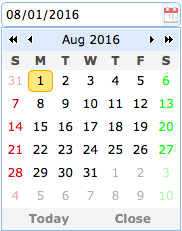
Dependencies
- combo
- calendar
Usage
- <</span>input id="dd" type="text"></</span>input>
- $('#dd').datebox({
- required:true
- });
Properties
The properties extend from combo, below is the added properties for datebox.
| Name | Type | Description | Default |
|---|---|---|---|
| panelWidth | number | The drop down calendar panel width. | 180 |
| panelHeight | number | The drop down calendar panel height. | auto |
| currentText | string | The text to display for the current day button. | Today |
| closeText | string | The text to display for the close button. | Close |
| okText | string | The text to display for the ok button. | Ok |
| disabled | boolean | When true to disable the field. | false |
| formatter | function | A function to format the date, the function take a 'date' parameter and return a string value. | |
| parser | function | A function to parse a date string, the function take a 'date' string and return a date value. |
Events
| Name | Parameters | Description |
|---|---|---|
| onSelect | date | Fires when user select a date. |
Methods
The methods extend from combo, below is the overridden methods for datebox.
| Name | Parameter | Description |
|---|---|---|
| options | none | Return the options object. |
| calendar | none | Get the calendar object. |
| setValue | value | Set the datebox value. |
2、 基本用法:
1) 加入日期选择框
- $("#dd").datebox({"required":true});
- $("#dd").datebox({"required":true});
在id为dd的input type=text的输入框加入iquery easyui的日期选择框,且该日期必须输入时,使用(required: true),否则使用required:false;
2) javascript获取日期选择框的值
使用常用的jquery获取input type=text的值的方式
- $("#dd").val()
- $("#dd").val()
发现没有反应,取不到值。问了度娘只有才发现原来是使用下面的方式取值:
- $("#dd").datebox("getValue");
- $("#dd").datebox("getValue");
当然这种方式不是太符合我们习惯,那么我们可以给它添加一个事件监听,在datebox onSelect 日期选中后,自动为input id="dd" type="text"赋值,然后我们就可以使用
$("#dd").val()获取选中的日期值了。
具体代码如下:
- "text/javascript">
- $(document).ready(function(){
- $("#dd").datebox({
- required:true,
- onSelect: function(date){
- $("#dd").val(date);
- }
- });
- });
- "text/javascript">
- $(document).ready(function(){
- $("#dd").datebox({
- required:true,
- onSelect: function(date){
- $("#dd").val(date);
- }
- });
- });
3) javascript设置datebox的值
- $("#dd").datebox("setValue", "2012-01-01");
- $("#dd").datebox("setValue", "2012-01-01");
补充:
需求场景:当我们需要把datebox中的设置的值,取得后返回一个Date类型的时候,就发现有些不好办了?
错误用法:
- var tempStr = $("#dd").datebox("getValue");
- var tempDate = new Date(tempStr);
- return tempDate;
- var tempStr = $("#dd").datebox("getValue");
- var tempDate = new Date(tempStr);
- return tempDate;
发现在FireFox下,这样做是没有问题的;但是IE下就不起作用了,datebox("getValue")能返回正确的只字符串,例如“2012-01-01",但是new Date(str)的时候返回为NaN;
查了下Date的API发现,new Date(str) 调用了 Date.parse(str) 函数, 但是在IE下该函数默认支持Str格式为:
MM-dd-yyyy HH:mm:ss
所以我们给定的字符串不是这种格式的,那么就解析不了。
找到原因之后,就好解决了,下面提供一个自己是是实现的函数 parseDate(dateStr)
- function parseDate(dateStr){
- var strArray = dateStr.split("-");
- if(strArray.length == 3){
- return new Date(strArray[0], strArray[1], strArray[2]);
- }else{
- return new Date();
- }
- }
- function parseDate(dateStr){
- var strArray = dateStr.split("-");
- if(strArray.length == 3){
- return new Date(strArray[0], strArray[1], strArray[2]);
- }else{
- return new Date();
- }
- }
ok,终于知道怎么用了
jquery easyui datebox 的使用的更多相关文章
- jquery easyui datebox 时间控件默认显示当前日期的实现方法
jquery easyui datebox 时间控件默认显示当前日期的实现方法 直接class easyui-datebox后添加一个value="true"就可以
- jquery easyui datebox单击文本框显示日期选择
jquery easyui的datebox日历控件,实现单击文本框出现日历选择,如下图: 代码: 修改jquery.easyui.min.js第9797行函数(jQuery EasyUI 1.3.2) ...
- 修改easyui datebox默认日期格式
问题描述: 根据jquery easyui datebox demo中给的示例,导入和使用datebox, 发现日期格式为: 6/22/2011, 其他的今天和关闭也是 Today, Close, 对 ...
- jquery easyUI 日期格式化,DateBox只显示年
jquery easyUI 日期格式化,DateBox只显示年 >>>>>>>>>>>>>>>>> ...
- 第二百一十五节,jQuery EasyUI,DateBox(日期输入框)组件
jQuery EasyUI,DateBox(日期输入框)组件 学习要点: 1.加载方式 2.属性列表 3.事件列表 4.方法列表 本节课重点了解 EasyUI 中 DateBox(日期输入框)组件的使 ...
- jQuery EasyUI 使用笔记
大家有四次抢票机会.第一次是放票时间之后的30分钟.第二次机会是开车前的15天.第三个机会是开车前的48小时.第四个机会是开车前的24小时. $("#gys_key").combo ...
- jquery.easyui代码详解,和遇到的问题,提供大家在使用的时候少走弯路(一)
初次使用jquery.easyui这个东东,虽然简单,但还是很费力的去研究了一下使用,在使用过程中遇到的问题,下面代码会详细的注释到 引用的文件jquery.min.js j ...
- HTML5界面开发工具jQuery EasyUI更新至v1.3.5
本文转自:evget.com HTML5界面开发工具 jQuery EasyUI 最新发布v1.3.5,新版修复了多个bug,并改进了menu,tabs和slider等多个控件.jQuery Easy ...
- JavaScript UI选型及Jquery EasyUI使用经验谈
最近由于项目需要,对js UI作了一些简单的了解和使用,有自己的一些想法,在这里留个记录. 当然,我的专注点在管理系统的范围内,所以互联网网站及其他形态的应用这里不提及,所以jQuery UI和Boo ...
随机推荐
- CUDA_矢量相加
#include<iostream> #define N 10 _ _global_ _ void add(*a,*b,*c) { int tid=blockIdx.x; if(tid&l ...
- leetcode Insert Interval 区间插入
作者:jostree 转载请注明出处 http://www.cnblogs.com/jostree/p/4051169.html 题目链接:leetcode Insert Interval 使用模拟 ...
- day20 在php中通过php语句操作数据库
第一步:连接数据库服务器 mysql_connect("数据库服务器地址","用户名","密码") 第二步:设定跟数据库打交道的网页的编码 ...
- [python]使用ElementTree解析XML【译】
19.7 The ElementTree XML API 源码:Lib/xml/etree/ElementTree.py Element类型是一个灵活的容器对象,设计出来是用于存储有层次的数据结构到内 ...
- <a>作Form表单提</a>
1. Form表单<%using (Html.BeginForm("AddRoles", "RoleManage", FormMethod.Post, n ...
- SQLServer数据库通用访问类
private static string connString=ConfigurationManager.ConnStrings["connString"].ToString() ...
- 用android-x86模拟器不能运行程序错误Tag:libc的问题
如果用的是x86的android模拟器,运行软件时一闪就关闭logcat中:类似:Fatal signal 11 (SIGSEGV) at 0x00000078 (code=1), thread 16 ...
- 正则表达式的秘籍-b
一. 正则表达式和其他方法的比较 1.我们一般将谓词和正则表达式配合使用,这是最常用的方法. - (BOOL)validateNumber:(NSString *) textString { ...
- 浅谈HTTP响应拆分攻击
在本文中,我们将探讨何谓HTTP响应拆分以及攻击行为是怎样进行的.一旦彻底理解了其发生原理(该原理往往被人所误解),我们就可以探究如何利用响应拆分执行跨站点脚本(简称XSS).接下来自然就是讨论如果目 ...
- Java集合框架的知识总结(1)
说明:先从整体介绍了Java集合框架包含的接口和类,然后总结了集合框架中的一些基本知识和关键点,并结合实例进行简单分析. 1.综述 所有集合类都位于java.util包下.集合中只能保存对象(保存对象 ...