
IOS 学习笔记 2015-04-08 OC-NSUserDefaults 持久化对象
NSUserDefaults适合存储轻量级的本地数据,比如要保存一个登陆界面的数据,用户名、密码之类的;
NSUserDefaults被设计用来存储设备和应用的配置信息,它通过一个工厂方法返回默认的、也是最常用到的实例对象。这个对象中储存了系统中用户的配置信息,开发者可以通过这个实例对象对这些已有的信息进行修改,也可以按照自己的需求创建新的配置项。
NSUserDefaults把配置信息以字典的形式组织起来,支持字典的项包括:字符串或者是数组,除此之外还支持数字等基本格式。一句话概括就 是:基础类型的小数据的字典。操作方法几乎与NSDictionary的操作方法无异,另外还可以通过指定返回类型的方法获取到指定类型的返回值。
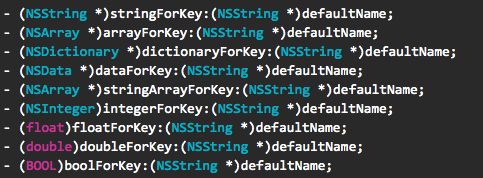
在这需要着重介绍下 保存 自定义对象类型
假如简单的将自定义对象放入NSUserdefaults 中去存储是不会成功,我们需要转换下思路,我们需要将对象转换成NSData,再去存储
简单的说就是自定义对象需要实现NSConding 协议,并且实现两个方法,分别是 encodeWithCoder和 initWithCoder
下面看代码吧
1 文件结构
//

//  WPUser.h

//  OC-NSUserDefaults

//

//  Created by wangtouwang on 15/4/8.

//  Copyright (c) 2015年 wangtouwang. All rights reserved.

//

#import <Foundation/Foundation.h>

@interface WPUser : NSObject<NSCoding>

@property NSString *account;

@property NSString *paw;

@end

//

//  WPUser.m

//  OC-NSUserDefaults

//

//  Created by wangtouwang on 15/4/8.

//  Copyright (c) 2015年 wangtouwang. All rights reserved.

//

#import "WPUser.h"

@implementation WPUser

-(void)encodeWithCoder:(NSCoder *)aCoder{

    [aCoder encodeObject:self.account forKey:@"account"];

    [aCoder encodeObject:self.paw forKey:@"paw"];

}

-(id)initWithCoder:(NSCoder *)aDecoder{

    if (self = [super init]) {

        self.account = [aDecoder decodeObjectForKey:@"account"];

        self.paw =  [aDecoder decodeObjectForKey:@"paw"];

    }

    return self;

}

@end
//

//  TurnViewController.h

//  OC-NSUserDefaults

//

//  Created by wangtouwang on 15/4/8.

//  Copyright (c) 2015年 wangtouwang. All rights reserved.

//

#import <UIKit/UIKit.h>

@interface TurnViewController : UIViewController

-(void)saveData:(UIButton *)btn;

@end

//

//  TurnViewController.m

//  OC-NSUserDefaults

//

//  Created by wangtouwang on 15/4/8.

//  Copyright (c) 2015年 wangtouwang. All rights reserved.

//

#import "TurnViewController.h"

#import "WPUser.h"

@interface TurnViewController ()

//保存字符串数据

@property(nonatomic,strong) UILabel *stringLable;

@property(nonatomic,strong) UITextField *stringTextFile;

//保存NSNumber类型

@property(nonatomic,strong) UILabel *numberLable;

@property(nonatomic,strong) UITextField *numberField;

//保存日期类型

@property(nonatomic,strong) UILabel *dateLable;

@property(nonatomic,strong) UITextField *dateField;

//保存数组类型

@property(nonatomic,strong) UILabel *arrayLable;

@property(nonatomic,strong) UITextField *array_ALable;

@property(nonatomic,strong) UITextField *array_BLable;

//保存集合类型

@property(nonatomic,strong) UILabel *dicLable;

@property(nonatomic,strong) UITextField *dic_ALable;

@property(nonatomic,strong) UITextField *dic_BLable;

//保存BOOL类型

@property(nonatomic,strong) UILabel *boolLable;

@property(nonatomic,strong) UITextField *boolField;

//保存对象类型

//保存按钮 然后跳转

@property(nonatomic,strong) UIButton *viewButton;

@end

@implementation TurnViewController

- (void)viewDidLoad {

    [super viewDidLoad];

    [self.view setBackgroundColor:[UIColor grayColor]];

    self.stringLable = [[UILabel alloc] initWithFrame:CGRectMake(, , , )];

    self.stringLable.text=@"保持字符串数据";

    self.stringLable.font = [UIFont fontWithName:@"Helvetica" size:];

    self.stringTextFile=[[UITextField alloc] initWithFrame:CGRectMake(, , , )];

    self.stringTextFile.borderStyle=UITextBorderStyleRoundedRect;

    self.stringTextFile.font= [UIFont fontWithName:@"Helvetica" size:];

    [self.view addSubview:self.stringLable];

    [self.view addSubview:self.stringTextFile];

    self.numberLable = [[UILabel alloc] initWithFrame:CGRectMake(, , , )];

    self.numberLable.text=@"保持数值类型";

    self.numberLable.font = [UIFont fontWithName:@"Helvetica" size:];

    self.numberField=[[UITextField alloc] initWithFrame:CGRectMake(, , , )];

    self.numberField.borderStyle=UITextBorderStyleRoundedRect;

    self.numberField.font= [UIFont fontWithName:@"Helvetica" size:];

    [self.view addSubview:self.numberLable];

    [self.view addSubview:self.numberField];

    self.dateLable = [[UILabel alloc] initWithFrame:CGRectMake(, , , )];

    self.dateLable.text=@"保持日期类型";

    self.dateLable.font = [UIFont fontWithName:@"Helvetica" size:];

    self.dateField=[[UITextField alloc] initWithFrame:CGRectMake(, , , )];

    self.dateField.borderStyle=UITextBorderStyleRoundedRect;

    self.dateField.font= [UIFont fontWithName:@"Helvetica" size:];

    [self.view addSubview:self.dateLable];

    [self.view addSubview:self.dateField];

    self.arrayLable = [[UILabel alloc] initWithFrame:CGRectMake(, , , )];

    self.arrayLable.text=@"保持数组类型";

    self.arrayLable.font = [UIFont fontWithName:@"Helvetica" size:];

    self.array_ALable=[[UITextField alloc] initWithFrame:CGRectMake(, , , )];

    self.array_ALable.borderStyle=UITextBorderStyleRoundedRect;

    self.array_ALable.font= [UIFont fontWithName:@"Helvetica" size:];

    self.array_BLable=[[UITextField alloc] initWithFrame:CGRectMake(, , , )];

    self.array_BLable.borderStyle=UITextBorderStyleRoundedRect;

    self.array_BLable.font= [UIFont fontWithName:@"Helvetica" size:];

    [self.view addSubview:self.arrayLable];

    [self.view addSubview:self.array_ALable];

    [self.view addSubview:self.array_BLable];

    self.dicLable = [[UILabel alloc] initWithFrame:CGRectMake(, , , )];

    self.dicLable.text=@"保持集合类型";

    self.dicLable.font = [UIFont fontWithName:@"Helvetica" size:];

    self.dic_ALable=[[UITextField alloc] initWithFrame:CGRectMake(, , , )];

    self.dic_ALable.borderStyle=UITextBorderStyleRoundedRect;

    self.dic_ALable.font= [UIFont fontWithName:@"Helvetica" size:];

    self.dic_BLable=[[UITextField alloc] initWithFrame:CGRectMake(, , , )];

    self.dic_BLable.borderStyle=UITextBorderStyleRoundedRect;

    self.dic_BLable.font= [UIFont fontWithName:@"Helvetica" size:];

    [self.view addSubview:self.dicLable];

    [self.view addSubview:self.dic_ALable];

    [self.view addSubview:self.dic_BLable];

    self.boolLable = [[UILabel alloc] initWithFrame:CGRectMake(, , , )];

    self.boolLable.text=@"保持布尔类型";

    self.boolLable.font = [UIFont fontWithName:@"Helvetica" size:];

    self.boolField=[[UITextField alloc] initWithFrame:CGRectMake(, , , )];

    self.boolField.borderStyle=UITextBorderStyleRoundedRect;

    self.boolField.font= [UIFont fontWithName:@"Helvetica" size:];

    [self.view addSubview:self.boolLable];

    [self.view addSubview:self.boolField];

    self.viewButton = [[UIButton alloc] initWithFrame:CGRectMake(, , , )];

    self.viewButton.backgroundColor=[UIColor redColor];

    [self.viewButton setTitle:@"保存" forState:UIControlStateNormal];

    [self.viewButton.layer setCornerRadius:10.0]; //设置矩形四个圆角半径

    [self.view addSubview:self.viewButton];

    [self.viewButton addTarget:self action:@selector(saveData:) forControlEvents:UIControlEventTouchUpInside];

}

-(void)saveData:(UIButton *)btn{

    NSLog(@"准备保存数据");

    //通过NSUserDefaults保存数据

    NSUserDefaults *ud = [NSUserDefaults standardUserDefaults];

    //保存字符串类型

    [ud setObject:self.stringTextFile.text forKey:@"string"];

    //保存数值类型

    [ud setInteger:self.numberField.text.intValue forKey:@"number"];

    //保存日期类型

    NSDateFormatter *format = [[NSDateFormatter alloc] init];

    format.dateFormat=@"yy-MM-dd HH:mm";

    [ud setObject:[NSDate date] forKey:@"date"];

    //保存数组类型

    NSArray *array = [[NSArray alloc] initWithObjects:self.array_ALable.text,self.array_BLable.text, nil];

    [ud setObject:array forKey:@"array"];

    //保存集合类型

    NSMutableDictionary *md  = [[NSMutableDictionary alloc] initWithObjectsAndKeys:nil];

    [md setObject:self.dic_ALable.text forKey:@"dicA"];

    [md setObject:self.dic_BLable.text forKey:@"dicB"];

    [ud setObject:md forKey:@"dictionary"];

   [ud setBool:YES forKey:@"BOOL"];

    //保存对象类型

    WPUser *user = [[WPUser alloc] init];

    user.account = @"zhangjie";

    user.paw=@"";

    NSData *udObject = [NSKeyedArchiver archivedDataWithRootObject:user];

    [ud setObject:udObject forKey:@"user"];

    udObject = nil;

    [self.navigationController popViewControllerAnimated:YES];

}

@end
//

//  WPViewController.h

//  OC-NSUserDefaults

//

//  Created by wangtouwang on 15/4/8.

//  Copyright (c) 2015年 wangtouwang. All rights reserved.

//

#import <UIKit/UIKit.h>

@interface WPViewController : UIViewController

@end

//

//  WPViewController.m

//  OC-NSUserDefaults

//

//  Created by wangtouwang on 15/4/8.

//  Copyright (c) 2015年 wangtouwang. All rights reserved.

//

#import "WPViewController.h"

#import "TurnViewController.h"

#import "WPUser.h"

@interface WPViewController ()

//保存字符串数据

@property(nonatomic,strong) UILabel *stringLable;

@property(nonatomic,strong) UITextField *stringTextFile;

//保存NSNumber类型

@property(nonatomic,strong) UILabel *numberLable;

@property(nonatomic,strong) UITextField *numberField;

//保存日期类型

@property(nonatomic,strong) UILabel *dateLable;

@property(nonatomic,strong) UITextField *dateField;

//保存数组类型

@property(nonatomic,strong) UILabel *arrayLable;

@property(nonatomic,strong) UITextField *array_ALable;

@property(nonatomic,strong) UITextField *array_BLable;

//保存集合类型

@property(nonatomic,strong) UILabel *dicLable;

@property(nonatomic,strong) UITextField *dic_ALable;

@property(nonatomic,strong) UITextField *dic_BLable;

//保存BOOL类型

@property(nonatomic,strong) UILabel *boolLable;

@property(nonatomic,strong) UITextField *boolField;

//保存对象类型

//显示按钮

@property(nonatomic,strong) UIButton *viewButton;

//转向填写数据页面

@property(nonatomic,strong) UIButton *turnButton;

//转向保存数据页面

-(void)turnPage;

//显示保存数据

-(void)viewData;

@end

@implementation WPViewController

- (void)viewDidLoad {

    [super viewDidLoad];

    [self.view setBackgroundColor:[UIColor grayColor]];

    self.stringLable = [[UILabel alloc] initWithFrame:CGRectMake(, , , )];

    self.stringLable.text=@"保持字符串数据";

    self.stringLable.font = [UIFont fontWithName:@"Helvetica" size:];

    self.stringTextFile=[[UITextField alloc] initWithFrame:CGRectMake(, , , )];

    self.stringTextFile.borderStyle=UITextBorderStyleRoundedRect;

    self.stringTextFile.font= [UIFont fontWithName:@"Helvetica" size:];

    [self.view addSubview:self.stringLable];

    [self.view addSubview:self.stringTextFile];

    self.numberLable = [[UILabel alloc] initWithFrame:CGRectMake(, , , )];

    self.numberLable.text=@"保持数值类型";

    self.numberLable.font = [UIFont fontWithName:@"Helvetica" size:];

    self.numberField=[[UITextField alloc] initWithFrame:CGRectMake(, , , )];

    self.numberField.borderStyle=UITextBorderStyleRoundedRect;

    self.numberField.font= [UIFont fontWithName:@"Helvetica" size:];

    [self.view addSubview:self.numberLable];

    [self.view addSubview:self.numberField];

    self.dateLable = [[UILabel alloc] initWithFrame:CGRectMake(, , , )];

    self.dateLable.text=@"保持日期类型";

    self.dateLable.font = [UIFont fontWithName:@"Helvetica" size:];

    self.dateField=[[UITextField alloc] initWithFrame:CGRectMake(, , , )];

    self.dateField.borderStyle=UITextBorderStyleRoundedRect;

    self.dateField.font= [UIFont fontWithName:@"Helvetica" size:];

    [self.view addSubview:self.dateLable];

    [self.view addSubview:self.dateField];

    self.arrayLable = [[UILabel alloc] initWithFrame:CGRectMake(, , , )];

    self.arrayLable.text=@"保持数组类型";

    self.arrayLable.font = [UIFont fontWithName:@"Helvetica" size:];

    self.array_ALable=[[UITextField alloc] initWithFrame:CGRectMake(, , , )];

    self.array_ALable.borderStyle=UITextBorderStyleRoundedRect;

    self.array_ALable.font= [UIFont fontWithName:@"Helvetica" size:];

    self.array_BLable=[[UITextField alloc] initWithFrame:CGRectMake(, , , )];

    self.array_BLable.borderStyle=UITextBorderStyleRoundedRect;

    self.array_BLable.font= [UIFont fontWithName:@"Helvetica" size:];

    [self.view addSubview:self.arrayLable];

    [self.view addSubview:self.array_ALable];

    [self.view addSubview:self.array_BLable];

    self.dicLable = [[UILabel alloc] initWithFrame:CGRectMake(, , , )];

    self.dicLable.text=@"保持集合类型";

    self.dicLable.font = [UIFont fontWithName:@"Helvetica" size:];

    self.dic_ALable=[[UITextField alloc] initWithFrame:CGRectMake(, , , )];

    self.dic_ALable.borderStyle=UITextBorderStyleRoundedRect;

    self.dic_ALable.font= [UIFont fontWithName:@"Helvetica" size:];

    self.dic_BLable=[[UITextField alloc] initWithFrame:CGRectMake(, , , )];

    self.dic_BLable.borderStyle=UITextBorderStyleRoundedRect;

    self.dic_BLable.font= [UIFont fontWithName:@"Helvetica" size:];

    [self.view addSubview:self.dicLable];

    [self.view addSubview:self.dic_ALable];

    [self.view addSubview:self.dic_BLable];

    self.boolLable = [[UILabel alloc] initWithFrame:CGRectMake(, , , )];

    self.boolLable.text=@"保持布尔类型";

    self.boolLable.font = [UIFont fontWithName:@"Helvetica" size:];

    self.boolField=[[UITextField alloc] initWithFrame:CGRectMake(, , , )];

    self.boolField.borderStyle=UITextBorderStyleRoundedRect;

    self.boolField.font= [UIFont fontWithName:@"Helvetica" size:];

    [self.view addSubview:self.boolLable];

    [self.view addSubview:self.boolField];

    self.viewButton = [[UIButton alloc] initWithFrame:CGRectMake(, , , )];

    self.viewButton.backgroundColor=[UIColor redColor];

    [self.viewButton setTitle:@"显示" forState:UIControlStateNormal];

    [self.viewButton.layer setCornerRadius:10.0]; //设置矩形四个圆角半径

    [self.view addSubview:self.viewButton];

    [self.viewButton addTarget:self action:@selector(viewData) forControlEvents:UIControlEventTouchUpInside];

    self.turnButton = [[UIButton alloc] initWithFrame:CGRectMake(, , , )];

    [self.turnButton setTitle:@"转向" forState:UIControlStateNormal];

     self.turnButton.backgroundColor=[UIColor redColor];

    [self.turnButton.layer setCornerRadius:10.0]; //设置矩形四个圆角半径

    [self.view addSubview:self.turnButton];

    [self.turnButton addTarget:self action:@selector(turnPage) forControlEvents:UIControlEventTouchUpInside];

}

-(void)turnPage{

    NSLog(@"Ready TURN SAVE DATA PAGE");

    [self.navigationController pushViewController:[TurnViewController new] animated:YES];

}

-(void)viewData{

    NSLog(@"READY VIEW SAVE DATA");

    //通过NSUserDefaults读取数据

    NSUserDefaults *ud = [NSUserDefaults standardUserDefaults];

    self.stringTextFile.text=[ud objectForKey:@"string"];

    self.numberField.text= [NSString stringWithFormat: @"%lu", [ud integerForKey:@"number"]];

    NSDateFormatter *format = [[NSDateFormatter alloc] init];

    format.dateFormat=@"yy-MM-dd HH:mm";

    NSLog(@"%@",[ud objectForKey:@"date"]);

    self.dateField.text=[format stringFromDate:[ud objectForKey:@"date"]];;

    NSArray *array = [ud objectForKey:@"array"];

    self.array_ALable.text=(NSString *)array[];

    self.array_BLable.text=(NSString *)array[];

    NSDictionary *dic = [ud dictionaryForKey:@"dictionary"];

    self.dic_ALable.text=[dic objectForKey:@"dicA"];

    self.dic_BLable.text=[dic objectForKey:@"dicB"];

    self.boolField.text=[NSString stringWithFormat: @"%i", [ud boolForKey:@"BOOL"]];

    NSData *udObject =  [ud objectForKey:@"user"];

    WPUser *wpuser = [NSKeyedUnarchiver unarchiveObjectWithData:udObject] ;

    if (wpuser!=nil) {

        NSLog(@"account = %@",wpuser.account);

         NSLog(@"paw = %@",wpuser.paw);

    }

}

@end
IOS 学习笔记 2015-04-08 OC-NSUserDefaults 持久化对象的更多相关文章
- IOS学习笔记25—HTTP操作之ASIHTTPRequest
IOS学习笔记25—HTTP操作之ASIHTTPRequest 分类: iOS2012-08-12 10:04 7734人阅读 评论(3) 收藏 举报 iosios5网络wrapper框架新浪微博 A ...
- Java学习笔记(04)
Java学习笔记(04) 如有不对或不足的地方,请给出建议,谢谢! 一.对象 面向对象的核心:找合适的对象做合适的事情 面向对象的编程思想:尽可能的用计算机语言来描述现实生活中的事物 面向对象:侧重于 ...
- iOS学习笔记之ARC内存管理
iOS学习笔记之ARC内存管理 写在前面 ARC(Automatic Reference Counting),自动引用计数,是iOS中采用的一种内存管理方式. 指针变量与对象所有权 指针变量暗含了对其 ...
- iOS学习笔记之UITableViewController&UITableView
iOS学习笔记之UITableViewController&UITableView 写在前面 上个月末到现在一直都在忙实验室的事情,与导师讨论之后,发现目前在实验室完成的工作还不足以写成毕业论 ...
- iOS学习笔记22-推送通知
一.推送通知 推送通知就是向用户推送一条信息来通知用户某件事件,可以在应用退到后台后,或者关闭后,能够通过推送一条消息通知用户某件事情,比如版本更新等等. 推送通知的常用应用场景: 一些任务管理APP ...
- iOS学习笔记17-FMDB
上一节我已经介绍了SQLite的简单使用,不了解的可以提前去看一下iOS学习笔记16-数据库SQLite,这节我们来讲下FMDB. 一.FMDB介绍 FMDB是一种第三方的开源库,FMDB就是对SQL ...
- iOS学习笔记16-数据库SQLite
一.数据库 在项目开发中,通常都需要对数据进行离线缓存的处理,如新闻数据的离线缓存等.离线缓存一般都是把数据保存到项目的沙盒中.有以下几种方式: 归档:NSKeyedArchiver 偏好设置:NSU ...
- iOS学习笔记17-FMDB你好!
上一节我已经介绍了SQLite的简单使用,不了解的可以提前去看一下iOS学习笔记16-数据库SQLite,这节我们来讲下FMDB. 一.FMDB介绍 FMDB是一种第三方的开源库,FMDB就是对SQL ...
- iOS学习笔记——AutoLayout的约束
iOS学习笔记——AutoLayout约束 之前在开发iOS app时一直以为苹果的布局是绝对布局,在IB中拖拉控件运行或者直接使用代码去调整控件都会发上一些不尽人意的结果,后来发现iOS在引入了Au ...
- IOS学习笔记之关键词@dynamic
IOS学习笔记之关键词@dynamic @dynamic这个关键词,通常是用不到的. 它与@synthesize的区别在于: 使用@synthesize编译器会确实的产生getter和setter方法 ...
随机推荐
- 《征服c指针》学习笔记-----统计文本单词数目的程序word_count
1.程序的要求:对用户指定的英文文本文件(包括标准输入),将英文单词按照字母顺序输出到用户指定的文本文件中(包括标准输出),并且在各单词后面显示单词的出现次数. 2.模块设计: 主要分为:1.从输入流 ...
- ffmpeg关于aac解码
ffmpeg从0.11.3版本开始,默认解码aac为AV_SAMPLE_FMT_FLT (float) 0.11.2以前版本解码aac为AV_SAMPLE_FMT_S16 (16位short型)
- epoll原理解释(转)
转自:http://yaocoder.blog.51cto.com/2668309/888374 首先我们来定义流的概念,一个流可以是文件,socket,pipe等等可以进行I/O操作的内核对象. ...
- What does enumerable mean?
I was directed to MDN's for..in page when it said, "for..in Iterates over the enumerable proper ...
- UIImage的使用
UIImage是IOS中层级比较高的一个用来加载和绘制图像的一个类,更底层的类还有CGImage,以及IOS5.0以后新增加的CIImage.今天我们主要聊一聊UIImage的三个属性: imageO ...
- 判断文件是否存在(exist)
set datedir=%date:~0,4%%date:~5,2%%date:~8,2%if exist d:\rollback\%datedir%\Server\ (rename d:\rollb ...
- 在Apache Tomcat 7设置redis作为session store
在Apache Tomcat 7设置redis作为session store //输出tomcat控制台日志 root@ubuntu:~# cd /usr/tomcat/apache-tomcat- ...
- Spring mvc Data Redis—Pub/Sub(附Web项目源码)
一.发布和订阅机制 当一个客户端通过 PUBLISH 命令向订阅者发送信息的时候,我们称这个客户端为发布者(publisher). 而当一个客户端使用 SUBSCRIBE 或者 PSUBSCRIBE ...
- Network Load Balancing Technical Overview--reference
http://technet.microsoft.com/en-us/library/bb742455.aspx Abstract Network Load Balancing, a clusteri ...
- Servlet中的转发
public class OneServlet extends HttpServlet { public void doGet(HttpServletRequest request, HttpServ ...