
chapter3——逻辑回归手动+sklean版本
1 导入numpy包
import numpy as np
2 sigmoid函数
def sigmoid(x):

    return 1/(1+np.exp(-x))

demox = np.array([1,2,3])

print(sigmoid(demox))

#报错

#demox = [1,2,3]

# print(sigmoid(demox))
结果:
[0.73105858 0.88079708 0.95257413]
3 定义逻辑回归模型主体
### 定义逻辑回归模型主体

def logistic(x, y, w, b):

    # 训练样本量

    num_train = x.shape[0]

    # 逻辑回归模型输出

    y_hat = sigmoid(np.dot(x,w)+b)

    # 交叉熵损失

    cost = -1/(num_train)*(np.sum(y*np.log(y_hat)+(1-y)*np.log(1-y_hat)))

    # 权值梯度

    dW = np.dot(x.T,(y_hat-y))/num_train

    # 偏置梯度

    db = np.sum(y_hat- y)/num_train

    # 压缩损失数组维度

    cost = np.squeeze(cost)

    return y_hat, cost, dW, db
4 初始化函数
def init_parm(dims):

    w = np.zeros((dims,1))

    b = 0

    return w ,b
5 定义逻辑回归模型训练过程
### 定义逻辑回归模型训练过程

def logistic_train(X, y, learning_rate, epochs):

    # 初始化模型参数

    W, b = init_parm(X.shape[1])

    cost_list = []

    for i in range(epochs):

        # 计算当前次的模型计算结果、损失和参数梯度

        a, cost, dW, db = logistic(X, y, W, b)

        # 参数更新

        W = W -learning_rate * dW

        b = b -learning_rate * db

        if i % 100 == 0:

            cost_list.append(cost)

        if i % 100 == 0:

            print('epoch %d cost %f' % (i, cost))

    params = {

        'W': W,

        'b': b

    }

    grads = {

        'dW': dW,

        'db': db

    }

    return cost_list, params, grads
6 定义预测函数
def predict(X,params):

    y_pred = sigmoid(np.dot(X,params['W'])+params['b'])

    y_preds = [1 if y_pred[i]>0.5 else 0 for i in range(len(y_pred))]

    return y_preds
7 生成数据
# 导入matplotlib绘图库

import matplotlib.pyplot as plt

# 导入生成分类数据函数

from sklearn.datasets import make_classification

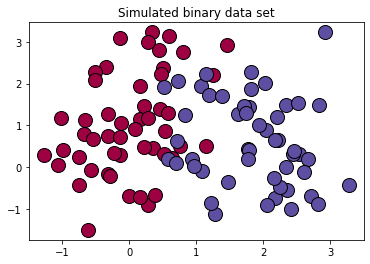
# 生成100*2的模拟二分类数据集

x ,label  = make_classification(

    n_samples=100,# 样本个数

    n_classes=2,# 样本类别

    n_features=2,#特征个数

    n_redundant=0,#冗余特征个数(有效特征的随机组合)

    n_informative=2,#有效特征,有价值特征

    n_repeated=0, # 重复特征个数(有效特征和冗余特征的随机组合)

    n_clusters_per_class=2 ,# 簇的个数

    random_state=1,

)

print("x.shape =",x.shape)

print("label.shape = ",label.shape)

print("np.unique(label) =",np.unique(label))

print(set(label))

# 设置随机数种子

rng = np.random.RandomState(2)

# 对生成的特征数据添加一组均匀分布噪声https://blog.csdn.net/vicdd/article/details/52667709

x += 2*rng.uniform(size=x.shape)

# 标签类别数

unique_label  = set(label)

# 根据标签类别数设置颜色

print(np.linspace(0,1,len(unique_label)))

colors = plt.cm.Spectral(np.linspace(0,1,len(unique_label)))

print(colors)

# 绘制模拟数据的散点图

for k,col in zip(unique_label , colors):

    x_k=x[label==k]

    plt.plot(x_k[:,0],x_k[:,1],'o',markerfacecolor=col,markeredgecolor="k",

             markersize=14)

plt.title('Simulated binary data set')

plt.show();
结果:
x.shape = (100, 2)

label.shape =  (100,)

np.unique(label) = [0 1]

{0, 1}

[0. 1.]

[[0.61960784 0.00392157 0.25882353 1.        ]

 [0.36862745 0.30980392 0.63529412 1.        ]]
复习
# 复习

mylabel = label.reshape((-1,1))

data = np.concatenate((x,mylabel),axis=1)

print(data.shape)
结果:
(100, 3)
8 划分数据集
offset = int(x.shape[0]*0.7)

x_train, y_train = x[:offset],label[:offset].reshape((-1,1))

x_test, y_test = x[offset:],label[offset:].reshape((-1,1))

print(x_train.shape)

print(y_train.shape)

print(x_test.shape)

print(y_test.shape)
结果:
(70, 2)

(70, 1)

(30, 2)

(30, 1)
9 训练
cost_list, params, grads = logistic_train(x_train, y_train, 0.01, 1000)

print(params['b'])
结果:
epoch 0 cost 0.693147

epoch 100 cost 0.568743

epoch 200 cost 0.496925

epoch 300 cost 0.449932

epoch 400 cost 0.416618

epoch 500 cost 0.391660

epoch 600 cost 0.372186

epoch 700 cost 0.356509

epoch 800 cost 0.343574

epoch 900 cost 0.332689

-0.6646648941379839
10 准确率计算
from sklearn.metrics import accuracy_score,classification_report

y_pred = predict(x_test,params)

print("y_pred = ",y_pred)

print(y_pred)

print(y_test.shape)

print(accuracy_score(y_pred,y_test)) #不需要都是1维的,貌似会自动squeeze()

print(classification_report(y_test,y_pred))
结果:
y_pred =  [0, 0, 1, 1, 1, 1, 0, 0, 0, 1, 1, 1, 0, 1, 1, 1, 1, 1, 1, 0, 0, 1, 1, 0, 1, 1, 0, 0, 1, 0]

[0, 0, 1, 1, 1, 1, 0, 0, 0, 1, 1, 1, 0, 1, 1, 1, 1, 1, 1, 0, 0, 1, 1, 0, 1, 1, 0, 0, 1, 0]

(30, 1)

0.9333333333333333

              precision    recall  f1-score   support

           0       0.92      0.92      0.92        12

           1       0.94      0.94      0.94        18

    accuracy                           0.93        30

   macro avg       0.93      0.93      0.93        30

weighted avg       0.93      0.93      0.93        30
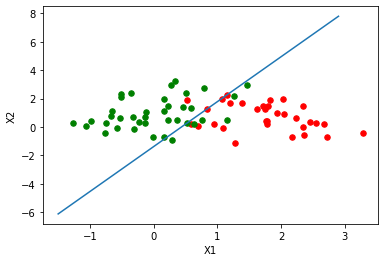
11 绘制逻辑回归决策边界
### 绘制逻辑回归决策边界

def plot_logistic(X_train, y_train, params):

    # 训练样本量

    n = X_train.shape[0]

    xcord1,ycord1,xcord2,ycord2 = [],[],[],[]

    # 获取两类坐标点并存入列表

    for i in range(n):

        if y_train[i] == 1:

            xcord1.append(X_train[i][0])

            ycord1.append(X_train[i][1])

        else:

            xcord2.append(X_train[i][0])

            ycord2.append(X_train[i][1])

    fig = plt.figure()

    ax = fig.add_subplot(111)

    ax.scatter(xcord1,ycord1,s = 30,c = 'red')

    ax.scatter(xcord2,ycord2,s = 30,c = 'green')

    # 取值范围

    x =np.arange(-1.5,3,0.1)

    # 决策边界公式

    y = (-params['b'] - params['W'][0] * x) / params['W'][1]

    # 绘图

    ax.plot(x, y)

    plt.xlabel('X1')

    plt.ylabel('X2')

    plt.show()

plot_logistic(x_train, y_train, params)
结果:
11 sklearn实现
from sklearn.linear_model import LogisticRegression

clf = LogisticRegression(random_state=0).fit(x_train,y_train)

y_pred = clf.predict(x_test)

print(y_pred)

accuracy_score(y_test,y_pred)
结果:
[0 0 1 1 1 1 0 0 0 1 1 1 0 1 1 0 0 1 1 0 0 1 1 0 1 1 0 0 1 0]

0.9333333333333333
chapter3——逻辑回归手动+sklean版本的更多相关文章
- numpy+sklearn 手动实现逻辑回归【Python】
逻辑回归损失函数: from sklearn.datasets import load_iris,make_classification from sklearn.model_selection im ...
- 逻辑回归原理_挑战者飞船事故和乳腺癌案例_Python和R_信用评分卡(AAA推荐)
sklearn实战-乳腺癌细胞数据挖掘(博客主亲自录制视频教程) https://study.163.com/course/introduction.htm?courseId=1005269003&a ...
- 逻辑回归算法的原理及实现(LR)
Logistic回归虽然名字叫"回归" ,但却是一种分类学习方法.使用场景大概有两个:第一用来预测,第二寻找因变量的影响因素.逻辑回归(Logistic Regression, L ...
- Theano3.3-练习之逻辑回归
是官网上theano的逻辑回归的练习(http://deeplearning.net/tutorial/logreg.html#logreg)的讲解. Classifying MNIST digits ...
- PRML读书会第四章 Linear Models for Classification(贝叶斯marginalization、Fisher线性判别、感知机、概率生成和判别模型、逻辑回归)
主讲人 planktonli planktonli(1027753147) 19:52:28 现在我们就开始讲第四章,第四章的内容是关于 线性分类模型,主要内容有四点:1) Fisher准则的分类,以 ...
- Spark Mllib逻辑回归算法分析
原创文章,转载请注明: 转载自http://www.cnblogs.com/tovin/p/3816289.html 本文以spark 1.0.0版本MLlib算法为准进行分析 一.代码结构 逻辑回归 ...
- Python实践之(七)逻辑回归(Logistic Regression)
机器学习算法与Python实践之(七)逻辑回归(Logistic Regression) zouxy09@qq.com http://blog.csdn.net/zouxy09 机器学习算法与Pyth ...
- 学习Machine Leaning In Action(四):逻辑回归
第一眼看到逻辑回归(Logistic Regression)这个词时,脑海中没有任何概念,读了几页后,发现这非常类似于神经网络中单个神经元的分类方法. 书中逻辑回归的思想是用一个超平面将数据集分为两部 ...
- Andrew Ng机器学习课程笔记--week3(逻辑回归&正则化参数)
Logistic Regression 一.内容概要 Classification and Representation Classification Hypothesis Representatio ...
随机推荐
- Java 将Excel转为OFD
OFD是一种开放版式文档(Open Fixed-layout Document )的英文缩写,是我国国家版式文档格式标准.本文,通过Java后端程序代码展示如何将Excel转为OFD格式.方法步骤如下 ...
- 【HTML响应式项目】成人教育官网前端页面(HTML+CSS+JS实现三端适应)
这个页面是在校参赛的小组项目,除首页和所有课程页面以外由组内成员编写,发博客纯属记录. 项目源码已上传至码云仓库:https://gitee.com/ynavc/sss 项目演示地址:http://y ...
- Hive on Spark和Spark sql on Hive,你能分的清楚么
摘要:结构上Hive On Spark和SparkSQL都是一个翻译层,把一个SQL翻译成分布式可执行的Spark程序. 本文分享自华为云社区<Hive on Spark和Spark sql o ...
- XML解析和创建的JAXB方式
1.说明 JAXB是Java Architecture for XML Binding, 即用于XML绑定的Java体系结构, JAXB作为JDK的一部分, 能便捷地将Java对象与XML进行相互转换 ...
- Springboot+Javamail实现邮件发送
Springboot+Javamail实现邮件发送 使用的是spring-context-support-5.2.6.RELEASE.jar里的javamail javamail 官方文档:javam ...
- vue再页面渲染json数据时没有显示
对象点属性不能获取数据. 原因: 在创建数据对象时我使用了k,v方式:tempMap['category '] = this.category[i].label 如果在创建数据时使用的k,v方式,那么 ...
- 实验 2 :Mininet 实验 —— 拓扑的命令脚本
实验2: Mininet 实验--拓扑的命令脚本 一.实验目的 掌握 Mininet 的自定义拓扑生成方法:命令行创建.Python 脚本编写 二 .实验任务 通过使用命令行创建.Python 脚本编 ...
- Autofac实现有条件的DI
Autofac.Annotation框架是我用.netcore写的一个DI框架,基于Autofac参考 Spring注解方式所有容器的注册和装配,切面,拦截器等都是依赖标签来完成. 开源地址:http ...
- vue js 格式化时间
常用于iview日期组件时间处理 /** * @param {Number} num 数值 * @returns {String} 处理后的字符串 * @description 如果传入的数值小于10 ...
- CSS-选择器的使用
* 默认选择器,这个符号能匹配所有样式,所以如果没有额外定义就默认为这个样式,一般用于消除页面与浏览器的内外边距 <style> *{ padding:0; // 所有标签默认消除内边距 ...