
Tornado WEB服务器框架 Epoll-- 【模板】
4.2 使用模板
1. 路径与渲染
使用模板,需要仿照静态文件路径设置一样,向web.Application类的构造函数传递一个名为template_path的参数来告诉Tornado从文件系统的一个特定位置提供模板文件,如:
app = tornado.web.Application(

    [(r'/', IndexHandler)],

    static_path=os.path.join(os.path.dirname(__file__), "statics"),

    template_path=os.path.join(os.path.dirname(__file__), "templates"),

)
在这里,我们设置了一个当前应用目录下名为templates的子目录作为template_path的参数。在handler中使用的模板将在此目录中寻找。
现在我们将静态文件目录statics/html中的index.html复制一份到templates目录中,此时文件目录结构为:
.
├── statics
│ ├── css
│ │ ├── index.css
│ │ ├── main.css
│ │ └── reset.css
│ ├── html
│ │ └── index.html
│ ├── images
│ │ ├── home01.jpg
│ │ ├── home02.jpg
│ │ ├── home03.jpg
│ │ └── landlord01.jpg
│ ├── js
│ │ ├── index.js
│ │ └── jquery.min.js
│ └── plugins
│ ├── bootstrap
│ │ └─...
│ └── font-awesome
│ └─...
├── templates
│├--templateStudyIndex.html
| |--templateControlStudyIndex.html
|
└── static_server.py
在handler中使用render()方法来渲染模板并返回给客户端。
class TemplateStudyIndexHandler(web.RequestHandler):

    '''

    定义请求处理类

    '''

    def get(self, *args, **kwargs):

        '''测试模板用方法

        '''

        '''给模板传递变量'''

        house_info = {

            "price": 398,

            "title": "宽窄巷子+160平大空间+文化保护区双地铁",

            "score": 5,

            "comments": 6,

            "position": "北京市丰台区六里桥地铁"

        }

        self.render('templateStudyIndex.html',**house_info)  #渲染类render('模板名',变量字典)


if __name__ == '__main__':

    options.parse_command_line()

    options.define('port', type=int, default=80, help='服务器端口')

    BASE_DIR = os.path.dirname(__file__)

    static_path = os.path.join(BASE_DIR,'statics')

    print(static_path)

    urls = [

        (r'/',IndexHandler,),

        (r'/templateTest',TemplateStudyIndexHandler,),

    ]

    app = web.Application(urls,

                          static_path=static_path,#给html中css js文件指定的获取路径=html中/static/ 这个url

                          template_path=os.path.join(BASE_DIR,'templates'), #模板的目录配置

                          login_url='/login',

                          debug=True)

    server = httpserver.HTTPServer(app)

    server.listen(options.port)

    ioloop.IOLoop.current().start()
2. 模板语法
2-1 变量与表达式
在tornado的模板中使用{{}}作为变量或表达式的占位符,使用render渲染后占位符{{XXX}}会被替换为相应的结果值。
我们将templateStudyIndex.html中的一条房源信息记录
<li class="house-item">

    <a href=""><img src="/static/images/home01.jpg"></a>

    <div class="house-desc">

        <div class="landlord-pic"><img src="/static/images/landlord01.jpg"></div>

        <div class="house-price">¥<span>398</span>/晚</div>

        <div class="house-intro">

            <span class="house-title">宽窄巷子+160平大空间+文化保护区双地铁</span>

            <em>整套出租 - 5分/6点评 - 北京市丰台区六里桥地铁</em>

        </div>

    </div>

</li>
改为模板:
<li class="house-item">

    <a href=""><img src="/static/images/home01.jpg"></a>

    <div class="house-desc">

        <div class="landlord-pic"><img src="/static/images/landlord01.jpg"></div>

        <div class="house-price">¥<span>{{price}}</span>/晚</div>

        <div class="house-intro">

            <span class="house-title">{{title}}</span>

            <em>整套出租 - {{score}}分/{{comments}}点评 - {{position}}</em>

        </div>

    </div>

</li>
渲染方式如下:
    def get(self, *args, **kwargs):

        '''测试模板用方法

        '''

        '''给模板传递变量'''

        house_info = {

            "price": 398,

            "title": "宽窄巷子+160平大空间+文化保护区双地铁",

            "score": 5,

            "comments": 6,

            "position": "北京市丰台区六里桥地铁"

        }

        self.render('templateStudyIndex.html',**house_info)  #渲染类render('模板名',变量字典)
{{}}不仅可以包含变量,还可以是表达式,如html语法中: {{p1 + p2}} 这种写法
<div class="house-price">¥<span>{{p1 + p2}}</span>/晚</div>
class IndexHandler(RequestHandler):

    def get(self):

        house_info = {

            "p1": 198,

            "p2": 200,

            "titles": ["宽窄巷子", "160平大空间", "文化保护区双地铁"],

            "score": 5,

            "comments": 6,

            "position": "北京市丰台区六里桥地铁"

        }

        self.render("index.html", **house_info)
--------------------------------展示模板渲染访问效果-------------------------------------------------------------
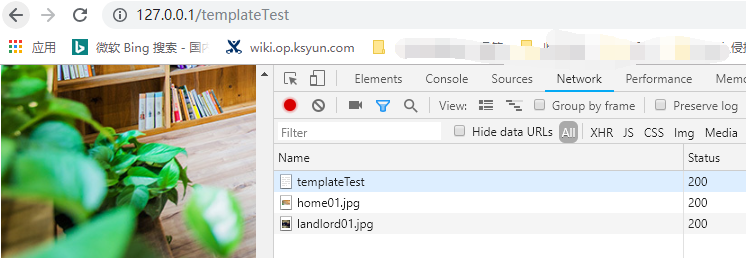
-------------------------------------------------The End-----------------------------------------------------------------------------------
2-2 控制语句
可以在Tornado模板中使用Python条件和循环语句。控制语句以{\%和\%}包围,并以类似下面的形式被使用:
{% if page is None %}
或
{% if len(entries) == 3 %}
控制语句的大部分就像对应的Python语句一样工作,支持if、for、while,注意end:
{% if ... %} ... {% elif ... %} ... {% else ... %} ... {% end %}

{% for ... in ... %} ... {% end %}

{% while ... %} ... {% end %}
示例html
<!DOCTYPE html>

<html lang="en">

<head>

    <meta charset="UTF-8">

    <title>模板控制语句测试页面</title>

</head>

<body>

    <ur class="house-list">

        {% if len(houses) > 0 %}

            {% for house in houses %}

                <li class="house-item">

                    <a href=""><img src="/static/images/{{ house['image'] }}"></a>

                    <div class="house-desc">

                        <div class="landlord-pic"><img src="/static/images/landlord01.jpg"></div>

                        <div class="house-price">¥<span>{{ house["price"] }}</span>/晚</div>

                        <div class="house-intro">

                            <span class="house-title">{{ house["title"] }}</span>

                            <em>整套出租 - {{ house["score"] }}分/{{ house["comments"] }}点评 - {{ house["position"] }}</em>

                        </div>

                    </div>

                </li>

            {% end %}

        {% else %}

            对不起,暂时没有房源!!!

        {% end %}

    </ur>

</body>

</html>
python中渲染语句为:
class TemplateControlStudyIndexHandler(RequestHandler):

    def get(self):

        houses = [

            {

                "image": "home01.jpg",

                "price": 298,

                "title": "宽窄巷子+160平大空间+文化保护区双地铁",

                "score": 5,

                "comments": 6,

                "position": "北京市丰台区六里桥地铁"

            },

            {

                "image": "home02.jpg",

                "price": 198,

                "title": "宽窄巷子+160平大空间+文化保护区双地铁",

                "score": 5,

                "comments": 6,

                "position": "北京市丰台区六里桥地铁"

            },

            {

                "image": "home03.jpg",

                "price": 98,

                "title": "宽窄巷子+160平大空间+文化保护区双地铁",

                "score": 5,

                "comments": 6,

                "position": "北京市丰台区六里桥地铁"

            }

        ]

        houses = [] #此时无房源,注释后有房源

        self.render("templateControlStudyIndex.html", houses=houses)
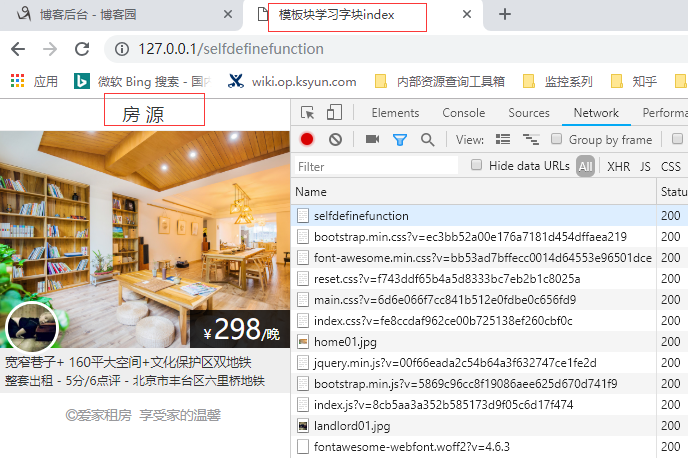
----------------------------------------------------------------------------------展示访问效果------------------------------------------------------------------------------------------------------------
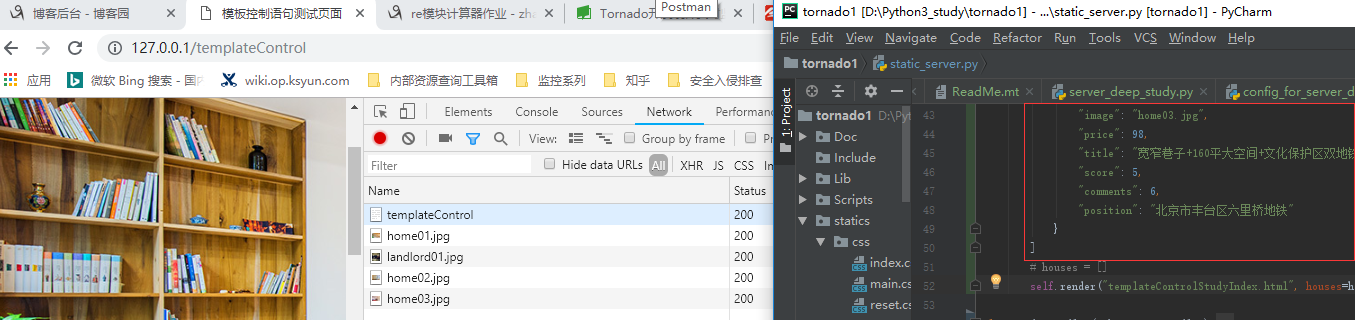
---------------------------------------------------无房源展示-------------------------------------------------------------------
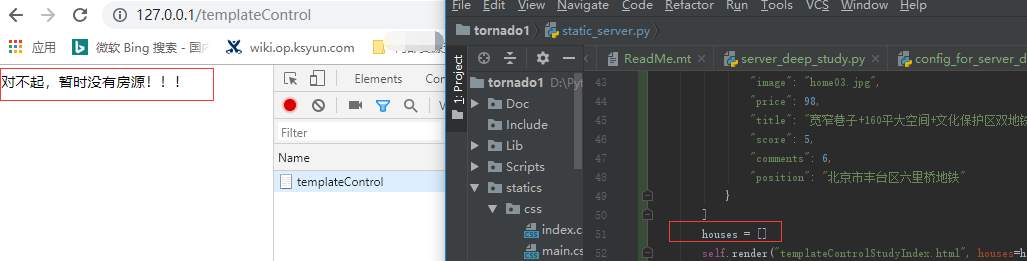
-----------------------------------------------------------------展示end-------------------------------------------------------------------------------------
2-3 函数
static_url()
Tornado模板模块提供了一个叫作static_url的函数来生成静态文件目录下文件的URL。如下面的示例代码:
<link rel="stylesheet" href="{{ static_url("style.css") }}">
这个对static_url的调用生成了URL的值,并渲染输出类似下面的代码:
<link rel="stylesheet" href="/static/style.css?v=fe8ccdaf962ce00b725138ef260cbf0c">
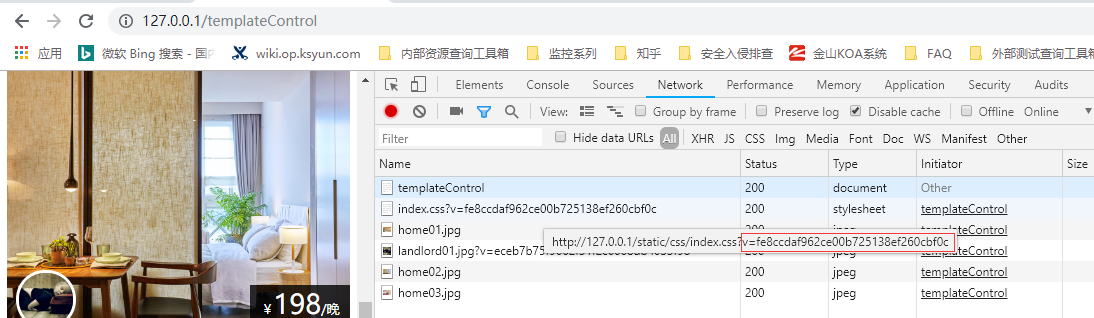
优点:
- static_url函数创建了一个基于文件内容的hash值,并将其添加到URL末尾(查询字符串的参数v)。这个hash值确保浏览器总是加载一个文件的最新版而不是之前的缓存版本。无论是在你应用的开发阶段,还是在部署到生产环境使用时,都非常有用,因为你的用户不必再为了看到你的静态内容而清除浏览器缓存了。
- 另一个好处是你可以改变你应用URL的结构,而不需要改变模板中的代码。例如,可以通过设置static_url_prefix来更改Tornado的默认静态路径前缀/static。如果使用static_url而不是硬编码的话,代码不需要改变。
转义--------------------------------------------------------------------------------------------------------------
我们新建一个表单页面transferred.html
<!DOCTYPE html>

<html lang="en">

<head>

    <meta charset="UTF-8">

    <title>Title</title>

</head>

<body>

    <form method="post" href="/transferred">

        <textarea name="text"></textarea>

        <input type="submit" value="提交数据">

    </form>

    {{ text }}

</body>

</html>
对应的handler为:
class TransferredHandler(RequestHandler):

    def get(self, *args, **kwargs):

        '''测试tornado对网页文字的自动转义功能'''

        self.render('transferred.html',text='')

    def post(self, *args, **kwargs):

        '''测试tornado对网页文字的自动转义功能'''

        text = self.get_argument('text','')

        print('获取到参数text:',text)

        self.render('transferred.html',text=text)
当我们在表单中填入如下内容时:
<script>alert("hello!");</script> :写入的js程序并没有运行,而是显示出来了,如下截图展示
--------------------------截图展示自动转义------------------------------------访问效果-------------------------------------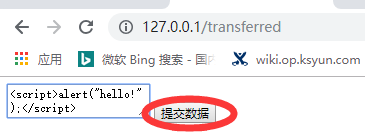

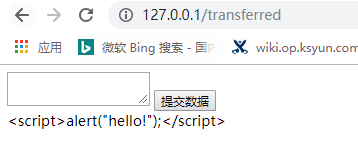
---------------------------------------------------------------------------------------------------------------------------------------------------------------------
我们查看页面源代码,发现<、>、"等被转换为对应的html字符:<script>alert("hello!");</script>
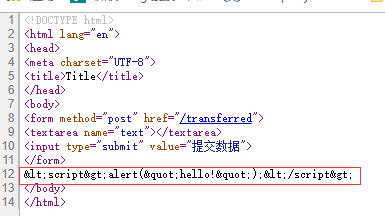

------------------------------------------------------------------------------------------------------------------------------------------------------------------------------------------------
这是因为tornado中默认开启了模板自动转义功能,防止网站受到恶意攻击。
我们可以通过raw语句来输出不被转义的原始格式,如:
<!DOCTYPE html>

<html lang="en">

<head>

    <meta charset="UTF-8">

    <title>Title</title>

</head>

<body>

    <form method="post" action="/transferred">

        <textarea name="text"></textarea>

        <input type="submit" value="提交数据">

    </form>

    {{ text }}

    {% raw text %}    <!-- 这里设置浏览器执行网页输入的脚本-->


</body>

</html>
注意:在Firefox浏览器中会直接弹出alert窗口,而在Chrome浏览器中,需要set_header("X-XSS-Protection", 0)
    def post(self, *args, **kwargs):

        '''测试tornado对网页文字的自动转义功能'''

        self.set_header("X-XSS-Protection", 0)

        text = self.get_argument('text','')

        print('获取到参数text:',text)

        self.render('transferred.html',text=text)

-------------------------------------------------------------------------------------------------------------------------------------------------------------------------------------------------------------------
关闭自动转义:,
方法一: 在Application构造函数中配置参数: autoescape=None,
app = web.Application(urls,

                          static_path=static_path,#给html中css js文件指定的获取路径=html中/static/ 这个url

                          template_path=os.path.join(BASE_DIR,'templates'),

                          autoescape=None,

                          login_url='/login',

                          debug=True)
方法二:每页模板中修改自动转义行为,添加如下语句: {% autoescape None %} : 被注释的情况下仍然生效
<!DOCTYPE html> <html lang="en">
<head>
<meta charset="UTF-8">
<title>测试自动转义</title>
</head>
<body>
<form method="post" action="/transferred">
<textarea name="text"></textarea>
<input type="submit" value="提交数据">
</form>
{{ text }}
{% autoescape None %}
<!--{% raw text %} <!– 这里设置浏览器执行网页输入的脚本–>--> </body>
</html>
{% autoescape None %}
escape():
关闭自动转义后,可以使用escape()函数来对特定变量进行转义,如:{{ escape(text) }}
注意:模板中{{ escape(text) }} 并不会覆盖{% autoescape None %} 两者同时存在时先按照不转义处理,转义后的仍会被显示
自定义函数-----------------------------------------------------------------------------------------------------------------------
在模板中还可以使用一个自己编写的函数,只需要将函数名作为模板的参数传递即可,就像其他变量一样。
我们修改后端如下:
class SelfDefiningfunction(RequestHandler):

    def get(self):

        houses = [

            {

                "image": "home01.jpg",

                "price": 298,

                "title": ["宽窄巷子"," 160平大空间","文化保护区双地铁"],

                "score": 5,

                "comments": 6,

                "position": "北京市丰台区六里桥地铁"

            }

        ]

        self.render("templateControlStudyIndex.html", houses=houses,title_join=house_title_join)
前端Html文件修改如下
<body>

    <ur class="house-list">

        {% if len(houses) > 0 %}

            {% for house in houses %}

                <li class="house-item">

                    <!--<a href=""><img src="/static/images/{{ house['image'] }}"></a>-->

                    <a href=""><img src="/static/images/{{house['image']}}"></a>

                    <div class="house-desc">

                        <div class="landlord-pic"><img src="{{static_url('images/landlord01.jpg')}}"></div>

                        <div class="house-price">¥<span>{{ house["price"] }}</span>/晚</div>

                        <div class="house-intro">

                            <span class="house-title">{{ title_join(house["title"]) }}</span>

                            <em>整套出租 - {{ house["score"] }}分/{{ house["comments"] }}点评 - {{ house["position"] }}</em>

                        </div>

                    </div>

                </li>

            {% end %}

        {% else %}

            对不起,暂时没有房源!!!

        {% end %}

    </ur>

</body>
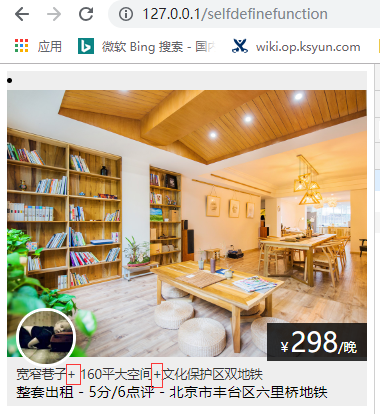
=================================================================================================
2-4 块
我们可以使用块来复用模板,块语法如下:
{% block block_name %} {% end %}
现在,我们对模板index.html进行抽象,抽离出父模板base.html如下:
<!DOCTYPE html>

<html>

<head>

    <meta charset="utf-8">

    <meta http-equiv="X-UA-Compatible" content="IE=edge">

    <meta name="viewport" content="width=device-width, initial-scale=1, maximum-scale=1, user-scalable=no">

    {% block page_title %}{% end %}

    <link href="{{static_url('plugins/bootstrap/css/bootstrap.min.css')}}" rel="stylesheet">

    <link href="{{static_url('plugins/font-awesome/css/font-awesome.min.css')}}" rel="stylesheet">

    <link href="{{static_url('css/reset.css')}}" rel="stylesheet">

    <link href="{{static_url('css/main.css')}}" rel="stylesheet">

    {% block css_files %}{% end %}

</head>

<body>

    <div class="container">

        <div class="top-bar">

            {% block header %}{% end %}

        </div>

        {% block body %}{% end %}

        <div class="footer">

            {% block footer %}{% end %}

        </div>

    </div>

    <script src="{{static_url('js/jquery.min.js')}}"></script>

    <script src="{{static_url('plugins/bootstrap/js/bootstrap.min.js')}}"></script>

    {% block js_files %}{% end %}

</body>

</html>
而子模板subblock_index.html使用extends来使用父模板base.html,如下:
{% extends "base.html" %}
{% block page_title %}
<title>爱家-房源</title>
{% end %}
{% block css_files %}
<link href="{{static_url('css/index.css')}}" rel="stylesheet">
{% end %}
{% block js_files %}
<script src="{{static_url('js/index.js')}}"></script>
{% end %}
{% block header %}
<div class="nav-bar">
<h3 class="page-title">房 源</h3>
</div>
{% end %}
{% block body %}
<ul class="house-list">
{% if len(houses) > 0 %}
{% for house in houses %}
<li class="house-item">
<a href=""><img src="/static/images/home01.jpg"></a>
<div class="house-desc">
<div class="landlord-pic"><img src="/static/images/landlord01.jpg"></div>
<div class="house-price">¥<span>{{house["price"]}}</span>/晚</div>
<div class="house-intro">
<span class="house-title">{{title_join(house["title"])}}</span>
<em>整套出租 - {{house["score"]}}分/{{house["comments"]}}点评 - {{house["position"]}}</em>
</div>
</div>
</li>
{% end %}
{% else %}
对不起,暂时没有房源。
{% end %}
</ul>
{% end %}
{% block footer %}
<p><span><i class="fa fa-copyright"></i></span>爱家租房 享受家的温馨</p>
{% end %}
#渲染直接使用子页面

self.render("subblock_index.html", houses=houses,title_join=house_title_join)
Tornado WEB服务器框架 Epoll-- 【模板】的更多相关文章
- Tornado WEB服务器框架 Epoll
引言: 回想Django的部署方式 以Django为代表的python web应用部署时采用wsgi协议与服务器对接(被服务器托管),而这类服务器通常都是基于多线程的,也就是说每一个网络请求服务器都会 ...
- Tornado WEB服务器框架 Epoll-- 【Mysql数据库】
5.1 数据库 与Django框架相比,Tornado没有自带ORM,对于数据库需要自己去适配.我们使用MySQL数据库. 在Tornado3.0版本以前提供tornado.database模块用来操 ...
- 20-2 树莓派搭建服务器 Tornado Web服务器
Drive.google.com/drive/folders/1ahbeoEHkjxoo4NV1wReOmpoRWbl448z- 1.Tornado简介 Tornado一款使用 Python 编写的, ...
- Python(九)Tornado web 框架
一.简介 Tornado 是 FriendFeed 使用的可扩展的非阻塞式 web 服务器及其相关工具的开源版本.这个 Web 框架看起来有些像web.py 或者 Google 的 webapp,不过 ...
- tornado web 框架的认识
tornado 简介 1,概述 Tornado就是我们在 FriendFeed 的 Web 服务器及其常用工具的开源版本.Tornado 和现在的主流 Web 服务器框架(包括大多数 Python 的 ...
- tornado 学习笔记2 Python web主流框架
2.1 Django 官方网址:https://www.djangoproject.com/ 简介:Django is a high-level Python Web framework that e ...
- 浅析tornado web框架
tornado简介 1.tornado概述 Tornado就是我们在 FriendFeed 的 Web 服务器及其常用工具的开源版本.Tornado 和现在的主流 Web 服务器框架(包括大多数 Py ...
- Tornado web 框架
Tornado web 框架 其实很简单.深度应用 一.简介 Tornado 是 FriendFeed 使用的可扩展的非阻塞式 web 服务器及其相关工具的开源版本.这个 Web 框架看起来有些像we ...
- tornado web框架
tornado web框架 tornado简介 1.tornado概述 Tornado就是我们在 FriendFeed 的 Web 服务器及其常用工具的开源版本.Tornado 和现在的主流 Web ...
随机推荐
- pycahrm下载
下载地址: https://www.jetbrains.com/pycharm/download/#section=windows 下载社区版本,不用破解,可以直接使用
- CF1601E Phys Ed Online
考虑一个贪心. 我们一定采取的方案是 \(b_i = \min_{j = i - k}^i a_j\) \(\sum a_l + b_{l + k} + \min_{i = 1}^2{b_{l + i ...
- 洛谷 P2481 [SDOI2010]代码拍卖会(背包+隔板法)
题面传送门 题意: 给出 \(n,p\),求有多少 \(n\) 位数 \(X=a_1a_2a_3\dots a_n\) 满足: 该 \(n\) 位数不含前导零 \(a_i \leq a_{i+1}\) ...
- DirectX12 3D 游戏开发与实战第七章内容(上)
利用Direct3D绘制几何体(续) 学习目标 学会一种无须每帧都要刷新命令队列的渲染流程,以此来优化性能 了解另外两种根签名参数类型:根常量和根描述符 探索如何在程序中生成和绘制常见的几何体:如栅格 ...
- 使用mamba加快conda安装软件速度?
conda是个安装软件的神器,但镜像不稳定,下载安装软件的速度有时很慢.对于几十Mb甚至上百Mb的软件往往下不动,下了半天可能失败. 找了一个叫mamba的加速神器,可以用来并行下载和安装,大大加快速 ...
- 使用BRAKER2进行基因组注释
来自:https://www.jianshu.com/p/e6a5e1f85dda 使用BRAKER2进行基因组注释 BRAKER2是一个基因组注释流程,能够组合GeneMark,AUGUSTUS和转 ...
- R语言与医学统计图形-【23】ggplot2坐标系转换函数
ggplot2绘图系统--坐标系转换函数 包括饼图.环状条图.玫瑰图.戒指图.坐标翻转. 笛卡尔坐标系(最常见). ArcGIS地理坐标系(地图). Cartesian坐标系. polar极坐标系. ...
- 31-Longest Common Prefix
Longest Common Prefix My Submissions Difficulty: Easy Write a function to find the longest common pr ...
- Identity Server 4 从入门到落地(五)—— 使用Ajax访问Web Api
前面的部分: Identity Server 4 从入门到落地(一)-- 从IdentityServer4.Admin开始 Identity Server 4 从入门到落地(二)-- 理解授权码模式 ...
- A Child's History of England.50
'Knave [man without honor]!' said King Richard. 'What have I done to thee [you] that thou [you] shou ...