
Tornado WEB服务器框架 Epoll-- 【Mysql数据库】
5.1 数据库
与Django框架相比,Tornado没有自带ORM,对于数据库需要自己去适配。我们使用MySQL数据库。
在Tornado3.0版本以前提供tornado.database模块用来操作MySQL数据库,而从3.0版本开始,此模块就被独立出来,作为torndb包单独提供。torndb只是对MySQLdb的简单封装,不支持Python 3。
torndb安装
python2 : pip install torndb python3:pip install torndb_for_python3连接初始化
我们需要在应用启动时创建一个数据库连接实例,供各个RequestHandler使用。我们可以在构造Application的时候创建一个数据库实例并作为其属性,而RequestHandler可以通过self.application获取其属性,进而操作数据库实例。
import torndb_for_python3 as  torndb

from tornado.web import RequestHandler,Application

class Application(Application):

    '''重写应用,增加数据库连接功能'''

    def __init__(self,handlers,**kwargs):

        super(Application,self).__init__(handlers=handlers,**kwargs)

        print(kwargs)

        self.db = torndb.Connection(

            host='192.168.135.29',

            database='test',

            user='admin',

            password='Wyf@1314'

        )
使用数据库
新建数据库与表:
create database `test` default character set utf8;

use test;

create table houses (

    id bigint(20) unsigned not null auto_increment comment '房屋编号',

    title varchar(64) not null default '' comment '标题',

    position varchar(32) not null default '' comment '位置',

    price int not null default 0,

    score int not null default 5,

    comments int not null default 0,

    primary key(id)

)ENGINE=InnoDB default charset=utf8 comment='房屋信息表';
1. 执行语句
- execute(query, parameters, *kwparameters) 返回影响的最后一条自增字段值
- execute_rowcount(query, parameters, *kwparameters) 返回影响的行数
query为要执行的sql语句,parameters与kwparameters为要绑定的参数,如:
db.execute("insert into houses(title, position, price, score, comments) values(%s, %s, %s, %s, %s)", "独立装修小别墅", "紧邻文津街", 280, 5, 128)

或

db.execute("insert into houses(title, position, price, score, comments) values(%(title)s, %(position)s, %(price)s, %(score)s, %(comments)s)", title="独立装修小别墅", position="紧邻文津街", price=280, score=5, comments=128)
执行语句主要用来执行非查询语句。
insert 语句一般如果表结构有id字段会返回这个自增的唯一ID字段
class UseTorndbHandler(RequestHandler):def post(self, *args, **kwargs):

        '''测试上传数据报保存到数据库'''

        title = self.get_argument("title")

        position = self.get_argument("position")

        price = self.get_argument("price")

        score = self.get_argument("score")

        comments = self.get_argument("comments")

        try:

            ret = self.application.db.execute( "insert into houses(title, position, price, score, comments) values(%s, %s, %s, %s, %s)", title, position, price, score, comments)

        except Exception as e:

            self.write("DB error:%s" % e)

        else:

            self.write("OK %d" % ret)
2. 查询语句
- get(query, parameters, *kwparameters) 返回单行结果或None,若出现多行则报错。返回值为torndb.Row类型,是一个类字典的对象,即同时支持字典的关键字索引和对象的属相访问。
- query(query, parameters, *kwparameters) 返回多行结果,torndb.Row的列表。
以上一章节模板中的案例来演示,先修改一下 subblock_for_usedb_index.html 模板,将
<span class="house-title">{{title_join(house["titles"])}}</span>
改为
<span class="house-title">{{house["title"]}}</span>
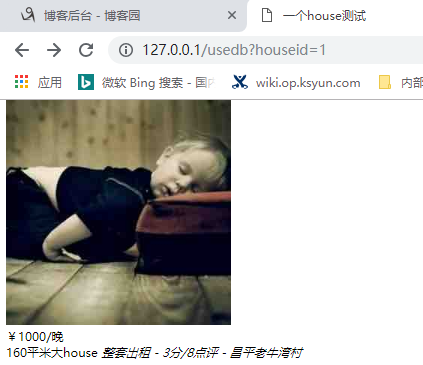
Handler 测试: get、query查询测试代码Handler如下GET get()方法处理, 写入在POSTpost()方法处理
class UseTorndbHandler(RequestHandler):

    def get(self, *args, **kwargs):

        '''测试从数据库获取数据做数量展示'''

        limit = self.get_query_argument('query_limit',default='10')

        house_id = self.get_query_argument('houseid',default=None)

        if house_id:

            try:

                ret = self.application.db.get("select title,position,price,score,comments from houses where id=%s", house_id)

            except Exception as e:

                self.write("DB Error : %s" % e)

            else:

                print('ret type: ', type(ret))

                print(ret)

                print(ret.title)

                print(ret['title'])

                self.render('subblock_for_usedb_index_one_house.html', **ret,title_join=house_title_join)

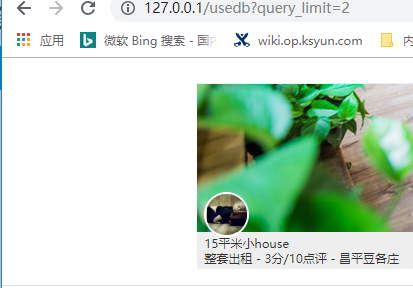
        else:

            try:

                sql = "select title,position,price,score,comments from houses limit %s" % limit

                ret = self.application.db.query(  sql)

            except Exception as e:

                self.write("DB Error : %s" % e)

            else:

                print('ret type: ',type(ret) )

                print(ret)

                # print(ret.title)

                # print(ret['title'])

                self.render('subblock_for_usedb_index.html', houses=ret,title_join=house_title_join)

    def post(self, *args, **kwargs):

        '''测试上传数据报保存到数据库'''

        title = self.get_argument("title")

        position = self.get_argument("position")

        price = self.get_argument("price")

        score = self.get_argument("score")

        comments = self.get_argument("comments")

        try:

            ret = self.application.db.execute( "insert into houses(title, position, price, score, comments) values(%s, %s, %s, %s, %s)", title, position, price, score, comments)

        except Exception as e:

            self.write("DB error:%s" % e)

        else:

            self.write("OK %d" % ret)
<!DOCTYPE html>

<html lang="en">

<head>

    <meta charset="UTF-8">

    <title>一个house测试</title>

</head>

<body>

    <li class="house-item">

    <a href=""><img src="/static/images/home01.jpg"></a>

    <div class="house-desc">

        <div class="landlord-pic"><img src="/static/images/landlord01.jpg"></div>

        <div class="house-price">¥<span>{{price}}</span>/晚</div>

        <div class="house-intro">

            <span class="house-title">{{title}}</span>

            <em>整套出租 - {{score}}分/{{comments}}点评 - {{position}}</em>

        </div>

    </div>

</li>

</body>

</html>
subblock_for_usedb_index_one_house.html
{% extends "base.html" %}
{% block page_title %}
<title>数据库,多个house模板index</title>
{% end %}
{% block css_files %}
<link href="{{static_url('css/index.css')}}" rel="stylesheet">
{% end %}
{% block js_files %}
<script src="{{static_url('js/index.js')}}"></script>
{% end %}
{% block header %}
<div class="nav-bar">
<h3 class="page-title">房 源</h3>
</div>
{% end %}
{% block body %}
<ul class="house-list">
{% if len(houses) > 0 %}
{% for house in houses %}
<li class="house-item">
<a href=""><img src="/static/images/home01.jpg"></a>
<div class="house-desc">
<div class="landlord-pic"><img src="/static/images/landlord01.jpg"></div>
<div class="house-price">¥<span>{{house["price"]}}</span>/晚</div>
<div class="house-intro">
<span class="house-title">{{ house["title"]}}</span>
<em>整套出租 - {{house["score"]}}分/{{house["comments"]}}点评 - {{house["position"]}}</em>
</div>
</div>
</li>
{% end %}
{% else %}
对不起,暂时没有房源。
{% end %}
</ul>
{% end %}
{% block footer %}
<p><span><i class="fa fa-copyright"></i></span>爱家租房 享受家的温馨</p>
{% end %}
subblock_for_usedb_index.html
<!DOCTYPE html>

<html>

<head>

    <meta charset="utf-8">

    <meta http-equiv="X-UA-Compatible" content="IE=edge">

    <meta name="viewport" content="width=device-width, initial-scale=1, maximum-scale=1, user-scalable=no">

    {% block page_title %}{% end %}

    <link href="{{static_url('plugins/bootstrap/css/bootstrap.min.css')}}" rel="stylesheet">

    <link href="{{static_url('plugins/font-awesome/css/font-awesome.min.css')}}" rel="stylesheet">

    <link href="{{static_url('css/reset.css')}}" rel="stylesheet">

    <link href="{{static_url('css/main.css')}}" rel="stylesheet">

    {% block css_files %}{% end %}

</head>

<body>

    <div class="container">

        <div class="top-bar">

            {% block header %}{% end %}

        </div>

        {% block body %}{% end %}

        <div class="footer">

            {% block footer %}{% end %}

        </div>

    </div>

    <script src="{{static_url('js/jquery.min.js')}}"></script>

    <script src="{{static_url('plugins/bootstrap/js/bootstrap.min.js')}}"></script>

    {% block js_files %}{% end %}

</body>

</html>
base.html

Tornado WEB服务器框架 Epoll-- 【Mysql数据库】的更多相关文章
- Tornado WEB服务器框架 Epoll
引言: 回想Django的部署方式 以Django为代表的python web应用部署时采用wsgi协议与服务器对接(被服务器托管),而这类服务器通常都是基于多线程的,也就是说每一个网络请求服务器都会 ...
- Tornado WEB服务器框架 Epoll-- 【模板】
4.2 使用模板 1. 路径与渲染 使用模板,需要仿照静态文件路径设置一样,向web.Application类的构造函数传递一个名为template_path的参数来告诉Tornado从文件系统的一个 ...
- jdbc连接阿里云服务器上的MySQL数据库 及 数据库IP限制
问题1:Jdbc 如何连接阿里云服务器上的MySQL数据库? 解决: 上截图: 其中IP是阿里云服务器的公网IP地址. 问题2: 刚开始接手开发的时候,使用Navicat连接阿里云服务器上的数据后 ...
- 服务器怎么安装mysql数据库
有些小伙伴们想自己玩玩服务器.可以买了服务以后,发现服务器就是一个大框子,没有数据存储.啥都没有,这时候就需要各种软件操作来逐步安装这些东西, 一.使用的工具:xshell(从官网上下载),目的是得使 ...
- 使用Navicat连接阿里云服务器上的MySQL数据库=======Linux 开放 /etc/hosts.allow
使用Navicat连接阿里云服务器上的MySQL数据库 1.首先打开Navicat,文件>新建连接> 2,两张连接方法 1>常规中输入数据库的主机名,端口,用户名,密码 这种直接 ...
- Windows(Server)环境安装Web服务器(Apache,PHP,Mysql)图文教程
Windows下Apache+PHP+MySQL搭建web服务器的方法,windows Server Install Apache PHP MySQL(图文详解) 环境准备: Windows Serv ...
- 使用Navicat连接阿里云服务器中的Mysql数据库
1.首先将阿里云服务器中的安全组添加上Mysql的端口3306,如下图所示: 步骤就是进入到阿里云的官网,点击右上角控制台,在左边选择云服务器ECS--->实例 点击图中的管理按钮,然后选择本实 ...
- 使用Navicat远程连接阿里云ECS服务器上的MySQL数据库
一.必须给服务器的安全组规则设置端口放行规则,在管理控制台中设置: 之后填写配置,授权对象是授权的IP,其中0.0.0.0/0为所有IP授权,之后保存; 二.Navicat使用的配置 在编辑连接处,要 ...
- 基于gin的golang web开发:访问mysql数据库
web开发基本都离不开访问数据库,在Gin中使用mysql数据库需要依赖mysql的驱动.直接使用驱动提供的API就要写很多样板代码.你可以找到很多扩展包这里介绍的是jmoiron/sqlx.另外还有 ...
随机推荐
- CF1175G
叉姐牛逼. \(f_{k,i} = \min_{0\leq j <i}{f_{k - 1,j} + RMQ(j + 1,i) * (i - j)}\) 我们考虑在序列上分治一波. 按照\(m\) ...
- [CCC2019] Tourism题解
我们先考虑一下拿部分分: subtask1 考虑因为 \(n < 2k\) ,那么我们的划分一定是从中间某个地方裁开,且满足 \(k\) 的条件的,我们发现当划分点在 \([n\ mod\ k, ...
- Codeforces 1483F - Exam(AC 自动机)
Codeforces 题目传送门 & 洛谷题目传送门 一道 ACAM 的 hot tea 首先建出 ACAM.考虑枚举长串,以及短串在长串中出现的最后位置 \(j\),这个复杂度显然是 \(\ ...
- 配置GitHub和 Gitee共存环境
配置GitHub 和Gitee共存环境 前言 Git共有三个级别的config文件,分别是system.global和local 在当前环境中,分别对应 %GitPath%\mingw64\etc\g ...
- 【Workflows】 WGS/WES Mapping to Variant Calls
WGS/WES Mapping to Variant Calls - Version 1.0 htslib官网上给的一个WGS/WES的流程.关于htslib.samtools和bcftools之间的 ...
- web性能测试工具——http_load
http_load是一款基于Linux平台的web服务器性能测试工具,用于测试web服务器的吞吐量与负载,web页面的性能. http_load是基于linux.unix平台的一种性能测工具 它以并行 ...
- PL\SQL和PL/SQL Developer 12安装与配置
安装: (1)在已有安装包的情况下,直接将安装包解压到文件夹下,注意不要解压缩到c:\programs Files(x86)的文件夹下,不能解压缩到有中文文件夹命名的文件夹下面 (2)没有安装包的情况 ...
- javaWeb - 3 — JSP (技术已淘汰)— 更新完毕
1.jsp 在servlet中说过java中前端到后台有两条路线嘛 后台 <------ ajax.json <--------- 前端 后台 <------ jsp( EL.JST ...
- 商业爬虫学习笔记day2
1. get传参 (1)url中包含中文报错解决方法 urllib.request.quote("包含中文的url", safe = "string.printtable ...
- An internal error occurred during: “Updating Maven Project”. Unsupported IClasspathEntry kind=4解决办法
An internal error occurred during: "Updating Maven Project". Unsupported IClasspathEntry k ...