
kubernetes/k8s CRI分析-kubelet创建pod分析
先来简单回顾上一篇博客《kubernetes/k8s CRI 分析-容器运行时接口分析》的内容。
上篇博文先对 CRI 做了介绍,然后对 kubelet CRI 相关源码包括 kubelet 组件 CRI 相关启动参数分析、CRI 相关 interface/struct 分析、CRI 相关初始化分析 3 个部分进行了分析,没有看的小伙伴,可以点击上面的链接去看一下。
把上一篇博客分析到的CRI架构图再贴出来一遍。
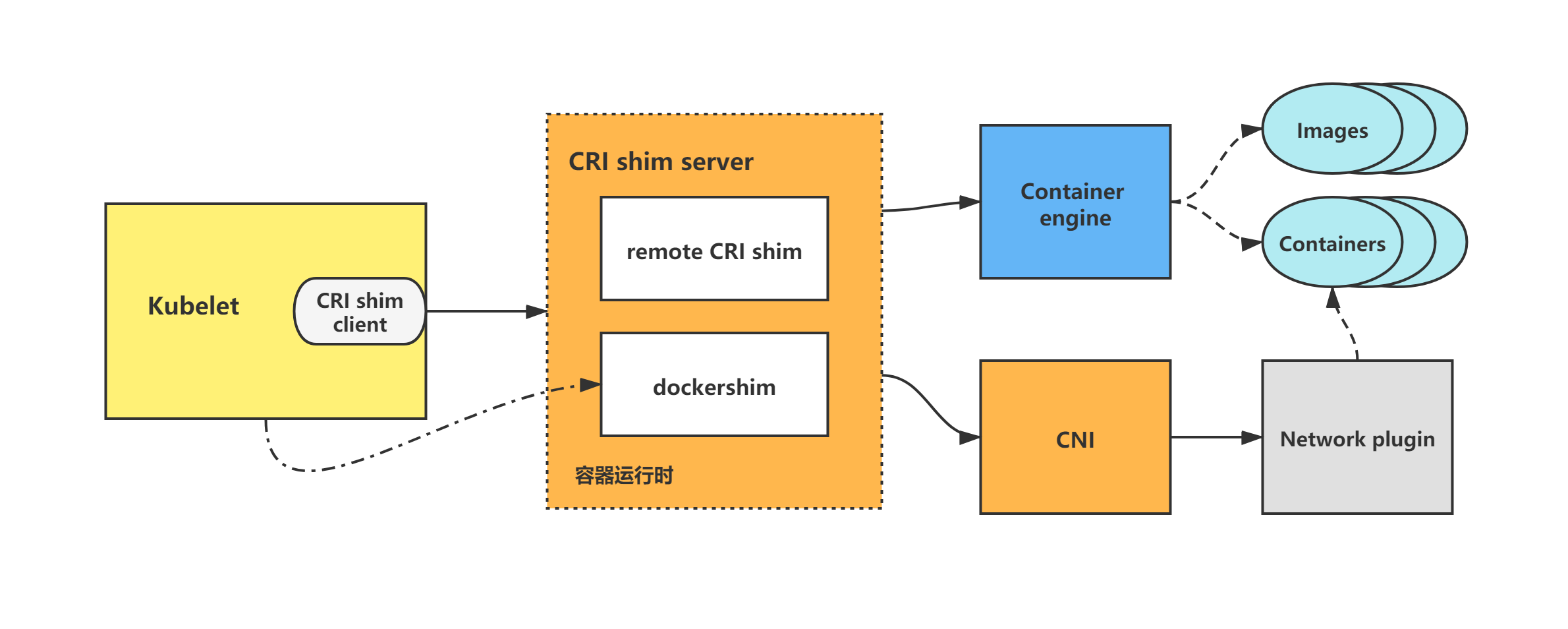
本篇博文将对kubelet调用CRI创建pod做分析。
kubelet中CRI相关的源码分析
kubelet的CRI源码分析包括如下几部分:
(1)kubelet CRI相关启动参数分析;
(2)kubelet CRI相关interface/struct分析;
(3)kubelet CRI初始化分析;
(4)kubelet调用CRI创建pod分析;
(5)kubelet调用CRI删除pod分析。
上篇博文先对前三部分做了分析,本篇博文将对kubelet调用CRI创建pod做分析。
基于tag v1.17.4
https://github.com/kubernetes/kubernetes/releases/tag/v1.17.4
4.kubelet调用CRI创建pod分析
kubelet CRI创建pod调用流程
下面以kubelet dockershim创建pod调用流程为例做一下分析。
kubelet通过调用dockershim来创建并启动容器,而dockershim则调用docker来创建并启动容器,并调用CNI来构建pod网络。
图1:kubelet dockershim创建pod调用流程图示
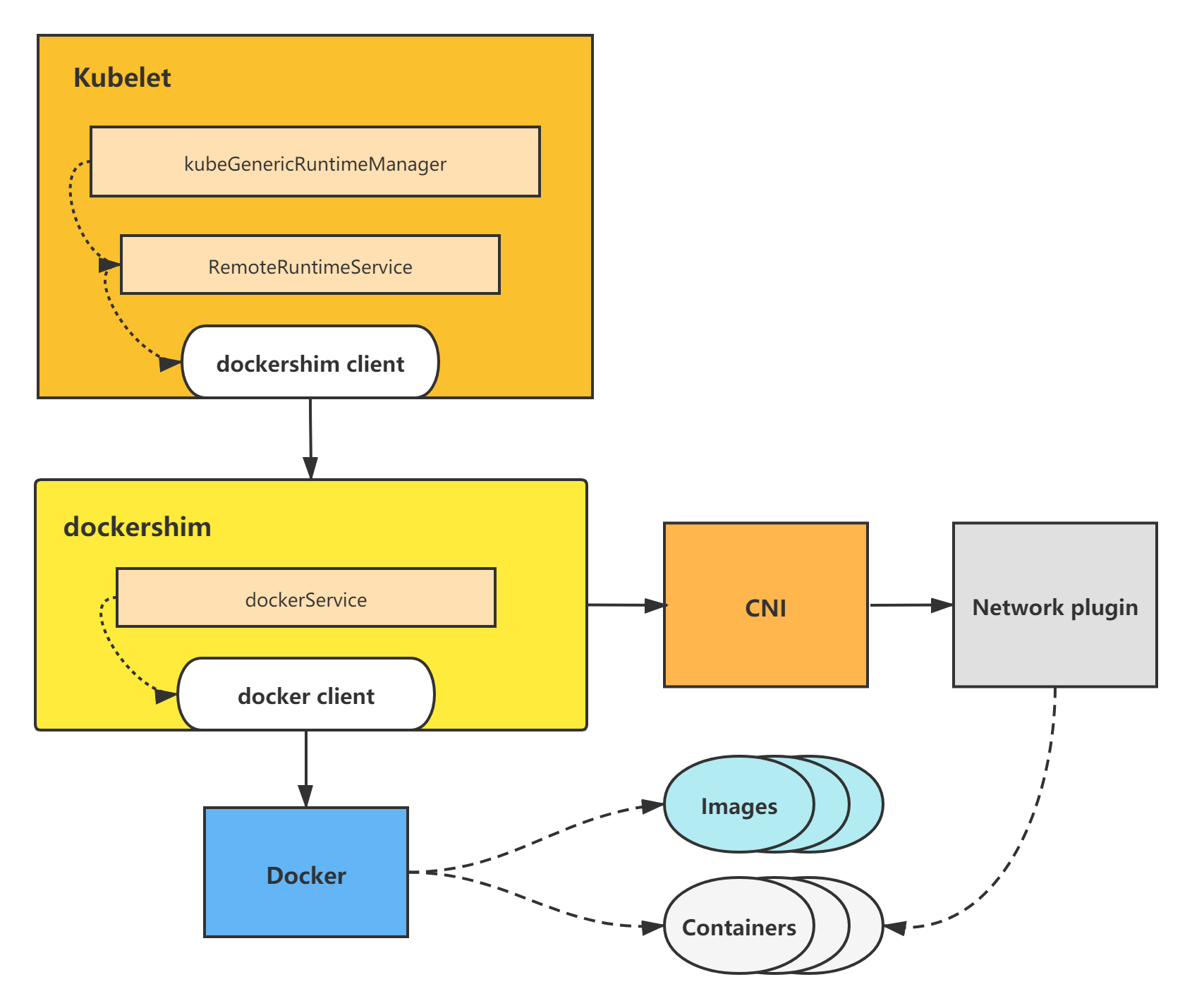
dockershim属于kubelet内置CRI shim,其余remote CRI shim的创建pod调用流程其实与dockershim调用基本一致,只不过是调用了不同的容器引擎来操作容器,但一样由CRI shim调用CNI来构建pod网络。
下面开始详细的源码分析。
直接看到kubeGenericRuntimeManager的SyncPod方法,调用CRI创建pod的逻辑将在该方法里触发发起。
从该方法代码也可以看出,kubelet创建一个pod的逻辑为:
(1)先创建并启动pod sandbox容器,并构建好pod网络;
(2)创建并启动ephemeral containers;
(3)创建并启动init containers;
(4)最后创建并启动normal containers(即普通业务容器)。
这里对调用m.createPodSandbox来创建pod sandbox进行分析,m.startContainer等调用分析可以参照该分析自行进行分析,调用流程几乎一致。
// pkg/kubelet/kuberuntime/kuberuntime_manager.go

// SyncPod syncs the running pod into the desired pod by executing following steps:

//

//  1. Compute sandbox and container changes.

//  2. Kill pod sandbox if necessary.

//  3. Kill any containers that should not be running.

//  4. Create sandbox if necessary.

//  5. Create ephemeral containers.

//  6. Create init containers.

//  7. Create normal containers.

func (m *kubeGenericRuntimeManager) SyncPod(pod *v1.Pod, podStatus *kubecontainer.PodStatus, pullSecrets []v1.Secret, backOff *flowcontrol.Backoff) (result kubecontainer.PodSyncResult) {

	...

	// Step 4: Create a sandbox for the pod if necessary.

	podSandboxID := podContainerChanges.SandboxID

	if podContainerChanges.CreateSandbox {

		var msg string

		var err error

		klog.V(4).Infof("Creating sandbox for pod %q", format.Pod(pod))

		createSandboxResult := kubecontainer.NewSyncResult(kubecontainer.CreatePodSandbox, format.Pod(pod))

		result.AddSyncResult(createSandboxResult)

		podSandboxID, msg, err = m.createPodSandbox(pod, podContainerChanges.Attempt)

		...

}
4.1 m.createPodSandbox
m.createPodSandbox方法主要是调用m.runtimeService.RunPodSandbox。
runtimeService即RemoteRuntimeService,实现了CRI shim客户端-容器运行时接口RuntimeService interface,持有与CRI shim容器运行时服务端通信的客户端。所以调用m.runtimeService.RunPodSandbox,实际上等于调用了CRI shim服务端的RunPodSandbox方法,来进行pod sandbox的创建。
// pkg/kubelet/kuberuntime/kuberuntime_sandbox.go

// createPodSandbox creates a pod sandbox and returns (podSandBoxID, message, error).

func (m *kubeGenericRuntimeManager) createPodSandbox(pod *v1.Pod, attempt uint32) (string, string, error) {

	podSandboxConfig, err := m.generatePodSandboxConfig(pod, attempt)

	if err != nil {

		message := fmt.Sprintf("GeneratePodSandboxConfig for pod %q failed: %v", format.Pod(pod), err)

		klog.Error(message)

		return "", message, err

	}

	// Create pod logs directory

	err = m.osInterface.MkdirAll(podSandboxConfig.LogDirectory, 0755)

	if err != nil {

		message := fmt.Sprintf("Create pod log directory for pod %q failed: %v", format.Pod(pod), err)

		klog.Errorf(message)

		return "", message, err

	}

	runtimeHandler := ""

	if utilfeature.DefaultFeatureGate.Enabled(features.RuntimeClass) && m.runtimeClassManager != nil {

		runtimeHandler, err = m.runtimeClassManager.LookupRuntimeHandler(pod.Spec.RuntimeClassName)

		if err != nil {

			message := fmt.Sprintf("CreatePodSandbox for pod %q failed: %v", format.Pod(pod), err)

			return "", message, err

		}

		if runtimeHandler != "" {

			klog.V(2).Infof("Running pod %s with RuntimeHandler %q", format.Pod(pod), runtimeHandler)

		}

	}

	podSandBoxID, err := m.runtimeService.RunPodSandbox(podSandboxConfig, runtimeHandler)

	if err != nil {

		message := fmt.Sprintf("CreatePodSandbox for pod %q failed: %v", format.Pod(pod), err)

		klog.Error(message)

		return "", message, err

	}

	return podSandBoxID, "", nil

}
m.runtimeService.RunPodSandbox
m.runtimeService.RunPodSandbox方法,会调用r.runtimeClient.RunPodSandbox,即利用CRI shim客户端,调用CRI shim服务端来进行pod sandbox的创建。
分析到这里,kubelet中的CRI相关调用就分析完毕了,接下来将会进入到CRI shim(以kubelet内置CRI shim-dockershim为例)里进行创建pod sandbox的分析。
// pkg/kubelet/remote/remote_runtime.go

// RunPodSandbox creates and starts a pod-level sandbox. Runtimes should ensure

// the sandbox is in ready state.

func (r *RemoteRuntimeService) RunPodSandbox(config *runtimeapi.PodSandboxConfig, runtimeHandler string) (string, error) {

	// Use 2 times longer timeout for sandbox operation (4 mins by default)

	// TODO: Make the pod sandbox timeout configurable.

	ctx, cancel := getContextWithTimeout(r.timeout * 2)

	defer cancel()

	resp, err := r.runtimeClient.RunPodSandbox(ctx, &runtimeapi.RunPodSandboxRequest{

		Config:         config,

		RuntimeHandler: runtimeHandler,

	})

	if err != nil {

		klog.Errorf("RunPodSandbox from runtime service failed: %v", err)

		return "", err

	}

	if resp.PodSandboxId == "" {

		errorMessage := fmt.Sprintf("PodSandboxId is not set for sandbox %q", config.GetMetadata())

		klog.Errorf("RunPodSandbox failed: %s", errorMessage)

		return "", errors.New(errorMessage)

	}

	return resp.PodSandboxId, nil

}
4.2 r.runtimeClient.RunPodSandbox
接下来将会以dockershim为例,进入到CRI shim来进行创建pod sandbox的分析。
前面kubelet调用r.runtimeClient.RunPodSandbox,会进入到dockershim下面的RunPodSandbox方法。
创建pod sandbox主要有5个步骤:
(1)调用docker,拉取pod sandbox的镜像;
(2)调用docker,创建pod sandbox容器;
(3)创建pod sandbox的Checkpoint;
(4)调用docker,启动pod sandbox容器;
(5)调用CNI,给pod sandbox构建网络。
// pkg/kubelet/dockershim/docker_sandbox.go

// RunPodSandbox creates and starts a pod-level sandbox. Runtimes should ensure

// the sandbox is in ready state.

// For docker, PodSandbox is implemented by a container holding the network

// namespace for the pod.

// Note: docker doesn't use LogDirectory (yet).

func (ds *dockerService) RunPodSandbox(ctx context.Context, r *runtimeapi.RunPodSandboxRequest) (*runtimeapi.RunPodSandboxResponse, error) {

	config := r.GetConfig()

	// Step 1: Pull the image for the sandbox.

	image := defaultSandboxImage

	podSandboxImage := ds.podSandboxImage

	if len(podSandboxImage) != 0 {

		image = podSandboxImage

	}

	// NOTE: To use a custom sandbox image in a private repository, users need to configure the nodes with credentials properly.

	// see: http://kubernetes.io/docs/user-guide/images/#configuring-nodes-to-authenticate-to-a-private-repository

	// Only pull sandbox image when it's not present - v1.PullIfNotPresent.

	if err := ensureSandboxImageExists(ds.client, image); err != nil {

		return nil, err

	}

	// Step 2: Create the sandbox container.

	if r.GetRuntimeHandler() != "" && r.GetRuntimeHandler() != runtimeName {

		return nil, fmt.Errorf("RuntimeHandler %q not supported", r.GetRuntimeHandler())

	}

	createConfig, err := ds.makeSandboxDockerConfig(config, image)

	if err != nil {

		return nil, fmt.Errorf("failed to make sandbox docker config for pod %q: %v", config.Metadata.Name, err)

	}

	createResp, err := ds.client.CreateContainer(*createConfig)

	if err != nil {

		createResp, err = recoverFromCreationConflictIfNeeded(ds.client, *createConfig, err)

	}

	if err != nil || createResp == nil {

		return nil, fmt.Errorf("failed to create a sandbox for pod %q: %v", config.Metadata.Name, err)

	}

	resp := &runtimeapi.RunPodSandboxResponse{PodSandboxId: createResp.ID}

	ds.setNetworkReady(createResp.ID, false)

	defer func(e *error) {

		// Set networking ready depending on the error return of

		// the parent function

		if *e == nil {

			ds.setNetworkReady(createResp.ID, true)

		}

	}(&err)

	// Step 3: Create Sandbox Checkpoint.

	if err = ds.checkpointManager.CreateCheckpoint(createResp.ID, constructPodSandboxCheckpoint(config)); err != nil {

		return nil, err

	}

	// Step 4: Start the sandbox container.

	// Assume kubelet's garbage collector would remove the sandbox later, if

	// startContainer failed.

	err = ds.client.StartContainer(createResp.ID)

	if err != nil {

		return nil, fmt.Errorf("failed to start sandbox container for pod %q: %v", config.Metadata.Name, err)

	}

	// Rewrite resolv.conf file generated by docker.

	// NOTE: cluster dns settings aren't passed anymore to docker api in all cases,

	// not only for pods with host network: the resolver conf will be overwritten

	// after sandbox creation to override docker's behaviour. This resolv.conf

	// file is shared by all containers of the same pod, and needs to be modified

	// only once per pod.

	if dnsConfig := config.GetDnsConfig(); dnsConfig != nil {

		containerInfo, err := ds.client.InspectContainer(createResp.ID)

		if err != nil {

			return nil, fmt.Errorf("failed to inspect sandbox container for pod %q: %v", config.Metadata.Name, err)

		}

		if err := rewriteResolvFile(containerInfo.ResolvConfPath, dnsConfig.Servers, dnsConfig.Searches, dnsConfig.Options); err != nil {

			return nil, fmt.Errorf("rewrite resolv.conf failed for pod %q: %v", config.Metadata.Name, err)

		}

	}

	// Do not invoke network plugins if in hostNetwork mode.

	if config.GetLinux().GetSecurityContext().GetNamespaceOptions().GetNetwork() == runtimeapi.NamespaceMode_NODE {

		return resp, nil

	}

	// Step 5: Setup networking for the sandbox.

	// All pod networking is setup by a CNI plugin discovered at startup time.

	// This plugin assigns the pod ip, sets up routes inside the sandbox,

	// creates interfaces etc. In theory, its jurisdiction ends with pod

	// sandbox networking, but it might insert iptables rules or open ports

	// on the host as well, to satisfy parts of the pod spec that aren't

	// recognized by the CNI standard yet.

	cID := kubecontainer.BuildContainerID(runtimeName, createResp.ID)

	networkOptions := make(map[string]string)

	if dnsConfig := config.GetDnsConfig(); dnsConfig != nil {

		// Build DNS options.

		dnsOption, err := json.Marshal(dnsConfig)

		if err != nil {

			return nil, fmt.Errorf("failed to marshal dns config for pod %q: %v", config.Metadata.Name, err)

		}

		networkOptions["dns"] = string(dnsOption)

	}

	err = ds.network.SetUpPod(config.GetMetadata().Namespace, config.GetMetadata().Name, cID, config.Annotations, networkOptions)

	if err != nil {

		errList := []error{fmt.Errorf("failed to set up sandbox container %q network for pod %q: %v", createResp.ID, config.Metadata.Name, err)}

		// Ensure network resources are cleaned up even if the plugin

		// succeeded but an error happened between that success and here.

		err = ds.network.TearDownPod(config.GetMetadata().Namespace, config.GetMetadata().Name, cID)

		if err != nil {

			errList = append(errList, fmt.Errorf("failed to clean up sandbox container %q network for pod %q: %v", createResp.ID, config.Metadata.Name, err))

		}

		err = ds.client.StopContainer(createResp.ID, defaultSandboxGracePeriod)

		if err != nil {

			errList = append(errList, fmt.Errorf("failed to stop sandbox container %q for pod %q: %v", createResp.ID, config.Metadata.Name, err))

		}

		return resp, utilerrors.NewAggregate(errList)

	}

	return resp, nil

}
接下来以ds.client.CreateContainer调用为例,分析下dockershim是如何调用docker的。
ds.client.CreateContainer
主要是调用d.client.ContainerCreate。
// pkg/kubelet/dockershim/libdocker/kube_docker_client.go

func (d *kubeDockerClient) CreateContainer(opts dockertypes.ContainerCreateConfig) (*dockercontainer.ContainerCreateCreatedBody, error) {

	ctx, cancel := d.getTimeoutContext()

	defer cancel()

	// we provide an explicit default shm size as to not depend on docker daemon.

	// TODO: evaluate exposing this as a knob in the API

	if opts.HostConfig != nil && opts.HostConfig.ShmSize <= 0 {

		opts.HostConfig.ShmSize = defaultShmSize

	}

	createResp, err := d.client.ContainerCreate(ctx, opts.Config, opts.HostConfig, opts.NetworkingConfig, opts.Name)

	if ctxErr := contextError(ctx); ctxErr != nil {

		return nil, ctxErr

	}

	if err != nil {

		return nil, err

	}

	return &createResp, nil

}
d.client.ContainerCreate
构建请求参数,向docker指定的url发送http请求,创建pod sandbox容器。
// vendor/github.com/docker/docker/client/container_create.go

// ContainerCreate creates a new container based in the given configuration.

// It can be associated with a name, but it's not mandatory.

func (cli *Client) ContainerCreate(ctx context.Context, config *container.Config, hostConfig *container.HostConfig, networkingConfig *network.NetworkingConfig, containerName string) (container.ContainerCreateCreatedBody, error) {

	var response container.ContainerCreateCreatedBody

	if err := cli.NewVersionError("1.25", "stop timeout"); config != nil && config.StopTimeout != nil && err != nil {

		return response, err

	}

	// When using API 1.24 and under, the client is responsible for removing the container

	if hostConfig != nil && versions.LessThan(cli.ClientVersion(), "1.25") {

		hostConfig.AutoRemove = false

	}

	query := url.Values{}

	if containerName != "" {

		query.Set("name", containerName)

	}

	body := configWrapper{

		Config:           config,

		HostConfig:       hostConfig,

		NetworkingConfig: networkingConfig,

	}

	serverResp, err := cli.post(ctx, "/containers/create", query, body, nil)

	defer ensureReaderClosed(serverResp)

	if err != nil {

		return response, err

	}

	err = json.NewDecoder(serverResp.body).Decode(&response)

	return response, err

}
// vendor/github.com/docker/docker/client/request.go

// post sends an http request to the docker API using the method POST with a specific Go context.

func (cli *Client) post(ctx context.Context, path string, query url.Values, obj interface{}, headers map[string][]string) (serverResponse, error) {

	body, headers, err := encodeBody(obj, headers)

	if err != nil {

		return serverResponse{}, err

	}

	return cli.sendRequest(ctx, "POST", path, query, body, headers)

}
总结
CRI架构图
在 CRI 之下,包括两种类型的容器运行时的实现:
(1)kubelet内置的 dockershim,实现了 Docker 容器引擎的支持以及 CNI 网络插件(包括 kubenet)的支持。dockershim代码内置于kubelet,被kubelet调用,让dockershim起独立的server来建立CRI shim,向kubelet暴露grpc server;
(2)外部的容器运行时,用来支持 rkt、containerd 等容器引擎的外部容器运行时。
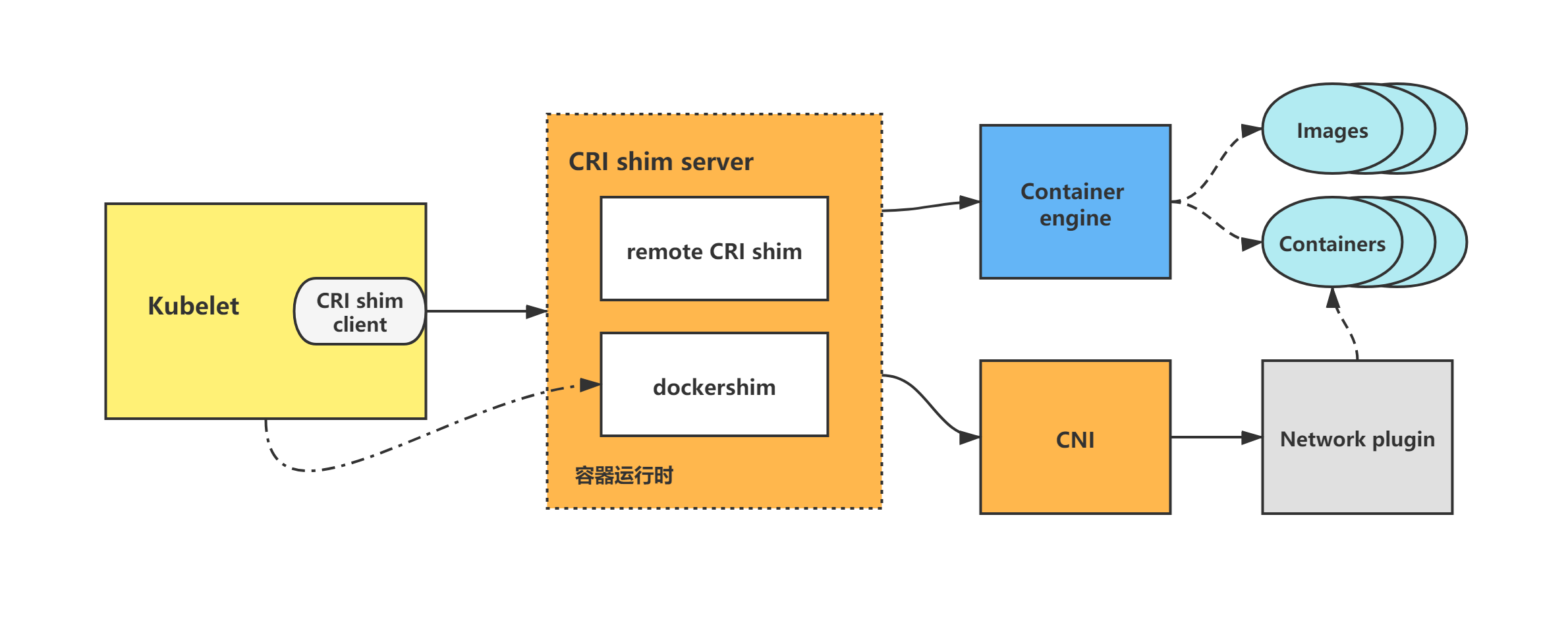
kubelet调用CRI创建pod流程分析
kubelet创建一个pod的逻辑为:
(1)先创建并启动pod sandbox容器,并构建好pod网络;
(2)创建并启动ephemeral containers;
(3)创建并启动init containers;
(4)最后创建并启动normal containers(即普通业务容器)。
kubelet CRI创建pod调用流程
下面以kubelet dockershim创建pod调用流程为例做一下分析。
kubelet通过调用dockershim来创建并启动容器,而dockershim则调用docker来创建并启动容器,并调用CNI来构建pod网络。
图1:kubelet dockershim创建pod调用流程图示
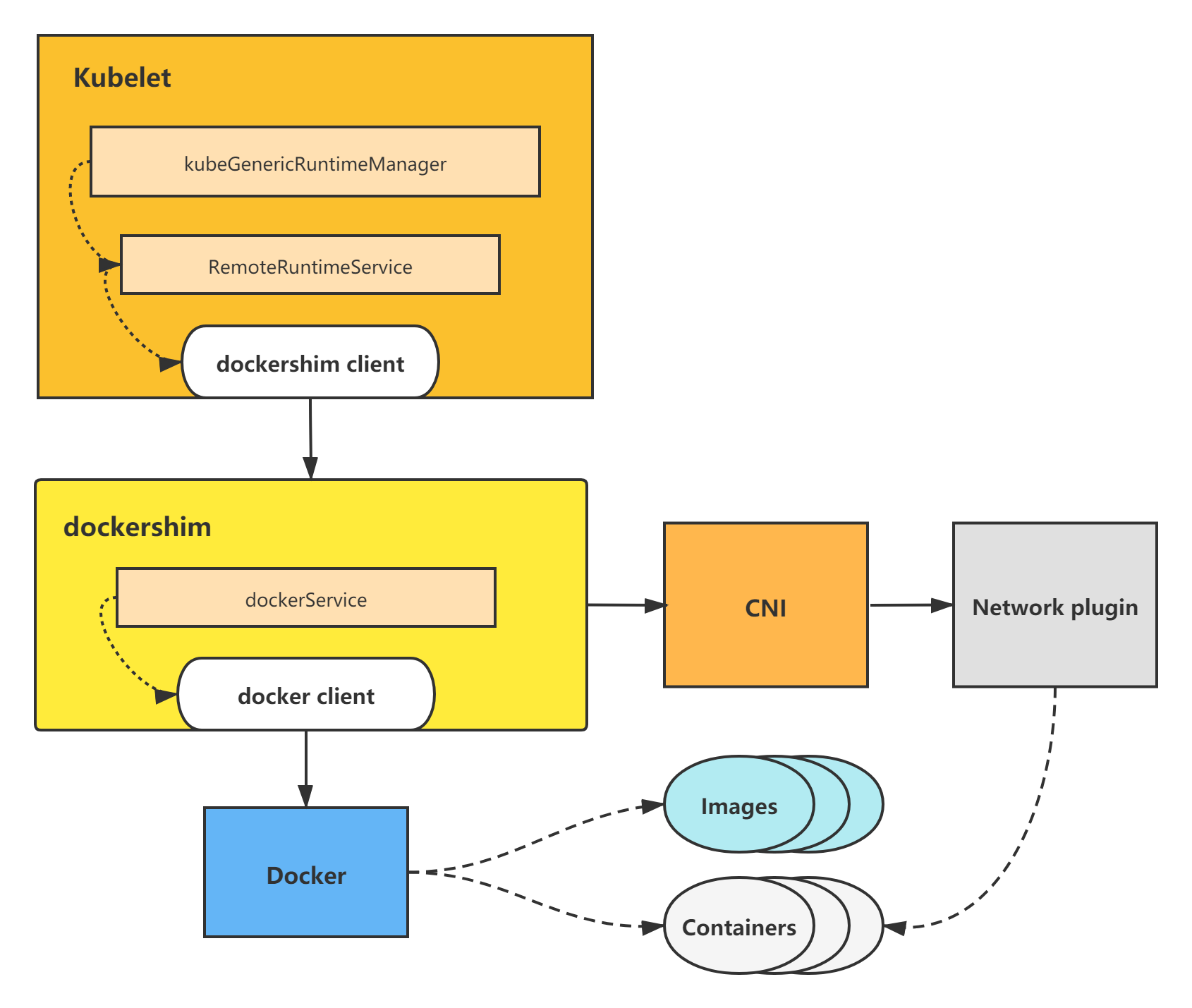
dockershim属于kubelet内置CRI shim,其余remote CRI shim的创建pod调用流程其实与dockershim调用基本一致,只不过是调用了不同的容器引擎来操作容器,但一样由CRI shim调用CNI来构建pod网络。
本篇博文将对kubelet调用CRI创建pod做了分析,下一篇博客将对kubelet中CRI相关的源码分析最后一个部分进行分析,也就是kubelet调用CRI删除pod分析,敬请期待。
关联博客:《kubernetes/k8s CSI分析-容器存储接口分析》
《kubernetes/k8s CRI 分析-容器运行时接口分析》
kubernetes/k8s CRI分析-kubelet创建pod分析的更多相关文章
- kubernetes/k8s CRI分析-kubelet删除pod分析
关联博客<kubernetes/k8s CRI 分析-容器运行时接口分析> <kubernetes/k8s CRI分析-kubelet创建pod分析> 之前的博文先对 CRI ...
- 12.深入k8s:kubelet创建pod流程源码分析
转载请声明出处哦~,本篇文章发布于luozhiyun的博客:https://www.luozhiyun.com 源码版本是1.19 在上一篇中,我们知道在kubelet中,工作核心就是围绕着整个syn ...
- kubernetes/k8s CRI分析-容器运行时接口分析
关联博客:kubernetes/k8s CSI分析-容器存储接口分析 概述 kubernetes的设计初衷是支持可插拔架构,从而利于扩展kubernetes的功能.在此架构思想下,kubernetes ...
- Kubernetes K8S之通过yaml文件创建Pod与Pod常用字段详解
YAML语法规范:在kubernetes k8s中如何通过yaml文件创建pod,以及pod常用字段详解 YAML 语法规范 K8S 里所有的资源或者配置都可以用 yaml 或 Json 定义.YAM ...
- k8s组件通信或者创建pod生命周期
Kubernetes 多组件之间的通信原理: apiserver 负责 etcd 存储的所有操作,且只有 apiserver 才直接操作 etcd 集群 apiserver 对内(集群中的其他组件)和 ...
- kubelet源码分析——启动Pod
前文说到Kubelet启动时,调用到kubelet.Run方法,里面最核心的就是调用到kubelet.syncLoop.它是一个循环,这个循环里面有若干个检查和同步操作,其中一个是地在监听Pod的增删 ...
- kubelet源码分析——关闭Pod
上一篇说到kublet如何启动一个pod,本篇讲述如何关闭一个Pod,引用一段来自官方文档介绍pod的生命周期的话 你使用 kubectl 工具手动删除某个特定的 Pod,而该 Pod 的体面终止限期 ...
- Kubernetes K8S之资源控制器Daemonset详解
Kubernetes的资源控制器Daemonset详解与示例 主机配置规划 服务器名称(hostname) 系统版本 配置 内网IP 外网IP(模拟) k8s-master CentOS7.7 2C/ ...
- Kubernetes K8S之存储ConfigMap详解
K8S之存储ConfigMap概述与说明,并详解常用ConfigMap示例 主机配置规划 服务器名称(hostname) 系统版本 配置 内网IP 外网IP(模拟) k8s-master CentOS ...
随机推荐
- 《MySQL面试小抄》索引考点二面总结
<MySQL面试小抄>索引考点二面总结 我是肥哥,一名不专业的面试官! 我是囧囧,一名积极找工作的小菜鸟! 囧囧表示:小白面试最怕的就是面试官问的知识点太笼统,自己无法快速定位到关键问题点 ...
- Hadoop - 彻底解决警告:WARN util.NativeCodeLoader: Unable to load native-hadoop library for your platform...
目录 1 - 在日志配置文件中忽略警告 - 有效 2 - 指定本地库的路径 - 无效 3 - 不使用 Hadoop 本地库 - 无效 4 - 替换 Hadoop 本地库 - 有效 5 - 根据源码,编 ...
- App免责声明
一切移动客户端用户在下载并浏览xxxAPP软件时均被视为已经仔细阅读本条款并完全同意.凡以任何方式使用本APP,或直接.间接使用本APP资料者,均被视为自愿接受本网页相关声明和用户服务协议的约束. x ...
- 敢为人先,从阿里巴巴云原生团队实践Dapr案例,看分布式应用运行时前景
背景 Dapr是一个由微软主导的云原生开源项目,国内云计算巨头阿里云也积极参与其中,2019年10月首次发布,到今年2月正式发布V1.0版本.在不到一年半的时间内,github star数达到了1.2 ...
- 0shell变量
1.定义变量 2.使用变量 3.修改变量的值 4.将命令的结果赋值给变量 5.只读变量 6.删除变量 一.变量 1.定义变量 在 Bash shell 中,每一个变量的值都是字符串,无论你给变量赋值时 ...
- DNS部署与安全
1.DNS Domain Name Service 域名服务 作用: 为客户机提供域名解析服务器 2.域名组成 2.1 域名组成概述 如"www.baidu.com"是一个域名,从 ...
- ArrayList 从源码角度剖析底层原理
本篇文章已放到 Github github.com/sh-blog 仓库中,里面对我写的所有文章都做了分类,更加方便阅读.同时也会发布一些职位信息,持续更新中,欢迎 Star 对于 ArrayList ...
- navicat for sqlserver 注册过程
1.安装原软件,不要打开软件2.将Navicat_Keygen_Patch_v3.4_By_DFoX_URET复制到软件安装位置,运行3.选择navicat v12 products:SQL Serv ...
- Java之注解与反射
Java之注解与反射 注解(Annotation)简介 注解(Annotation)是从JDK5.0引入的新技术 Annotation作用:注解(Annotation)可以被其他程序如编译器等读取 A ...
- dart pub上传失败如何解决
问题: Flutter Exception: Pub will wait for a while before trying to connect again. 解决 1.设置终端代理 export ...