
kubelet分析-pvc扩容源码分析
存储的扩容分为controller端操作与node端操作两大步骤,controller端操作由external-resizer来调用ceph完成,而node端操作由kubelet来完成,下面来分析下kubelet中有关存储扩容的相关代码。
基于tag v1.17.4
https://github.com/kubernetes/kubernetes/releases/tag/v1.17.4
controller端存储扩容作用
将底层存储扩容,如ceph rbd扩容,则会让ceph集群中的rbd image扩容。
node端存储扩容作用
在pod所在的node上做相应的操作,让node感知该存储已经扩容,如ceph rbd filesystem扩容,则会调用node上的文件系统扩容命令让文件系统扩容。
某些存储无需进行node端扩容操作如cephfs。
存储扩容大致过程
(1)更改pvc.Spec.Resources.Requests.storgage,触发扩容
(2)controller端存储扩容:external-resizer watch pvc对象,当发现pvc.Spec.Resources.Requests.storgage比pvc.Status.Capacity.storgage大,于是调csi plugin的ControllerExpandVolume方法进行 controller端扩容,进行底层存储扩容,并更新pv.Spec.Capacity.storgage。
(3)node端存储扩容:kubelet发现pv.Spec.Capacity.storage大于pvc.Status.Capacity.storage,于是调csi node端扩容,对dnode上文件系统扩容,成功后kubelet更新pvc.Status.Capacity.storage。
存储扩容详细流程
下面以ceph rbd存储扩容为例,对详细的存储扩容过程进行分析。
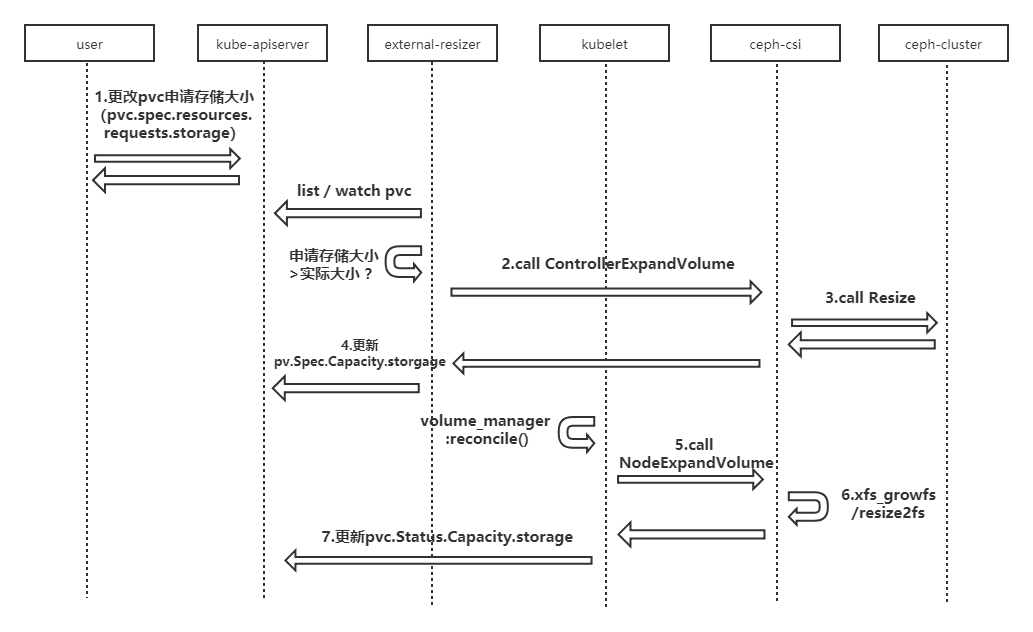
(1)修改pvc对象,修改申请存储大小(pvc.spec.resources.requests.storage);
(2)修改成功后,external-resizer监听到该pvc的update事件,发现pvc.Spec.Resources.Requests.storgage比pvc.Status.Capacity.storgage大,于是调ceph-csi组件进行 controller端扩容;
(3)ceph-csi组件调用ceph存储,进行底层存储扩容;
(4)底层存储扩容完成后,ceph-csi组件更新pv对象的.Spec.Capacity.storgage的值为扩容后的存储大小;
(5)kubelet的volume manager在reconcile()调谐过程中发现pv.Spec.Capacity.storage大于pvc.Status.Capacity.storage,于是调ceph-csi组件进行 node端扩容;
(6)ceph-csi组件对node上存储对应的文件系统扩容;
(7)扩容完成后,kubelet更新pvc.Status.Capacity.storage的值为扩容后的存储大小。
下面主要对kubelet中的存储扩容相关的代码进行分析,controller端存储扩容分析将在后续分析external-resizer时进行分析。
volumeManager.Run
关于存储扩容,主要看到两个主要方法:
(1)vm.desiredStateOfWorldPopulator.Run:主要负责找到并标记需要扩容的存储;
(2)vm.reconciler.Run:主要负责对需要扩容的存储触发进行扩容操作。
func (vm *volumeManager) Run(sourcesReady config.SourcesReady, stopCh <-chan struct{}) {

	defer runtime.HandleCrash()

	go vm.desiredStateOfWorldPopulator.Run(sourcesReady, stopCh)

	klog.V(2).Infof("The desired_state_of_world populator starts")

	klog.Infof("Starting Kubelet Volume Manager")

	go vm.reconciler.Run(stopCh)

	metrics.Register(vm.actualStateOfWorld, vm.desiredStateOfWorld, vm.volumePluginMgr)

	if vm.kubeClient != nil {

		// start informer for CSIDriver

		vm.volumePluginMgr.Run(stopCh)

	}

	<-stopCh

	klog.Infof("Shutting down Kubelet Volume Manager")

}
1.vm.desiredStateOfWorldPopulator.Run
主要是对dswp.populatorLoop的调用
func (dswp *desiredStateOfWorldPopulator) Run(sourcesReady config.SourcesReady, stopCh <-chan struct{}) {

	// Wait for the completion of a loop that started after sources are all ready, then set hasAddedPods accordingly

	klog.Infof("Desired state populator starts to run")

	wait.PollUntil(dswp.loopSleepDuration, func() (bool, error) {

		done := sourcesReady.AllReady()

		dswp.populatorLoop()

		return done, nil

	}, stopCh)

	dswp.hasAddedPodsLock.Lock()

	dswp.hasAddedPods = true

	dswp.hasAddedPodsLock.Unlock()

	wait.Until(dswp.populatorLoop, dswp.loopSleepDuration, stopCh)

}
populatorLoop中调用dswp.findAndAddNewPods
func (dswp *desiredStateOfWorldPopulator) populatorLoop() {

	dswp.findAndAddNewPods()

	// findAndRemoveDeletedPods() calls out to the container runtime to

	// determine if the containers for a given pod are terminated. This is

	// an expensive operation, therefore we limit the rate that

	// findAndRemoveDeletedPods() is called independently of the main

	// populator loop.

	if time.Since(dswp.timeOfLastGetPodStatus) < dswp.getPodStatusRetryDuration {

		klog.V(5).Infof(

			"Skipping findAndRemoveDeletedPods(). Not permitted until %v (getPodStatusRetryDuration %v).",

			dswp.timeOfLastGetPodStatus.Add(dswp.getPodStatusRetryDuration),

			dswp.getPodStatusRetryDuration)

		return

	}

	dswp.findAndRemoveDeletedPods()

}
findAndAddNewPods中主要看到dswp.processPodVolumes
// Iterate through all pods and add to desired state of world if they don't

// exist but should

func (dswp *desiredStateOfWorldPopulator) findAndAddNewPods() {

	// Map unique pod name to outer volume name to MountedVolume.

	mountedVolumesForPod := make(map[volumetypes.UniquePodName]map[string]cache.MountedVolume)

	if utilfeature.DefaultFeatureGate.Enabled(features.ExpandInUsePersistentVolumes) {

		for _, mountedVolume := range dswp.actualStateOfWorld.GetMountedVolumes() {

			mountedVolumes, exist := mountedVolumesForPod[mountedVolume.PodName]

			if !exist {

				mountedVolumes = make(map[string]cache.MountedVolume)

				mountedVolumesForPod[mountedVolume.PodName] = mountedVolumes

			}

			mountedVolumes[mountedVolume.OuterVolumeSpecName] = mountedVolume

		}

	}

	processedVolumesForFSResize := sets.NewString()

	for _, pod := range dswp.podManager.GetPods() {

		if dswp.isPodTerminated(pod) {

			// Do not (re)add volumes for terminated pods

			continue

		}

		dswp.processPodVolumes(pod, mountedVolumesForPod, processedVolumesForFSResize)

	}

}
processPodVolumes主要是调用dswp.checkVolumeFSResize对需要扩容的存储进行标记
// processPodVolumes processes the volumes in the given pod and adds them to the

// desired state of the world.

func (dswp *desiredStateOfWorldPopulator) processPodVolumes(

	pod *v1.Pod,

	mountedVolumesForPod map[volumetypes.UniquePodName]map[string]cache.MountedVolume,

	processedVolumesForFSResize sets.String) {

	......

	expandInUsePV := utilfeature.DefaultFeatureGate.Enabled(features.ExpandInUsePersistentVolumes)

	// Process volume spec for each volume defined in pod

	for _, podVolume := range pod.Spec.Volumes {

		......

		if expandInUsePV {

			dswp.checkVolumeFSResize(pod, podVolume, pvc, volumeSpec,

				uniquePodName, mountedVolumesForPod, processedVolumesForFSResize)

		}

	}

	......

}
1.1 checkVolumeFSResize
主要逻辑:
(1)调用volumeRequiresFSResize判断是否需要扩容;
(2)调用dswp.actualStateOfWorld.MarkFSResizeRequired做进标记处理。
// checkVolumeFSResize checks whether a PVC mounted by the pod requires file

// system resize or not. If so, marks this volume as fsResizeRequired in ASW.

// - mountedVolumesForPod stores all mounted volumes in ASW, because online

//   volume resize only considers mounted volumes.

// - processedVolumesForFSResize stores all volumes we have checked in current loop,

//   because file system resize operation is a global operation for volume, so

//   we only need to check it once if more than one pod use it.

func (dswp *desiredStateOfWorldPopulator) checkVolumeFSResize(

	pod *v1.Pod,

	podVolume v1.Volume,

	pvc *v1.PersistentVolumeClaim,

	volumeSpec *volume.Spec,

	uniquePodName volumetypes.UniquePodName,

	mountedVolumesForPod map[volumetypes.UniquePodName]map[string]cache.MountedVolume,

	processedVolumesForFSResize sets.String) {

	if podVolume.PersistentVolumeClaim == nil {

		// Only PVC supports resize operation.

		return

	}

	uniqueVolumeName, exist := getUniqueVolumeName(uniquePodName, podVolume.Name, mountedVolumesForPod)

	if !exist {

		// Volume not exist in ASW, we assume it hasn't been mounted yet. If it needs resize,

		// it will be handled as offline resize(if it indeed hasn't been mounted yet),

		// or online resize in subsequent loop(after we confirm it has been mounted).

		return

	}

	if processedVolumesForFSResize.Has(string(uniqueVolumeName)) {

		// File system resize operation is a global operation for volume,

		// so we only need to check it once if more than one pod use it.

		return

	}

	// volumeSpec.ReadOnly is the value that determines if volume could be formatted when being mounted.

	// This is the same flag that determines filesystem resizing behaviour for offline resizing and hence

	// we should use it here. This value comes from Pod.spec.volumes.persistentVolumeClaim.readOnly.

	if volumeSpec.ReadOnly {

		// This volume is used as read only by this pod, we don't perform resize for read only volumes.

		klog.V(5).Infof("Skip file system resize check for volume %s in pod %s/%s "+

			"as the volume is mounted as readonly", podVolume.Name, pod.Namespace, pod.Name)

		return

	}

	if volumeRequiresFSResize(pvc, volumeSpec.PersistentVolume) {

		dswp.actualStateOfWorld.MarkFSResizeRequired(uniqueVolumeName, uniquePodName)

	}

	processedVolumesForFSResize.Insert(string(uniqueVolumeName))

}
1.1.1 volumeRequiresFSResize
pv.Spec.Capacity.storage大小比pvc.Status.Capacity.storage大小要大时返回true
func volumeRequiresFSResize(pvc *v1.PersistentVolumeClaim, pv *v1.PersistentVolume) bool {

	capacity := pvc.Status.Capacity[v1.ResourceStorage]

	requested := pv.Spec.Capacity[v1.ResourceStorage]

	return requested.Cmp(capacity) > 0

}
1.1.2 MarkFSResizeRequired
主要逻辑:
(1)获取volume对应的volumePlugin;
(2)调用volumePlugin.RequiresFSResize()判断plugin是否支持resize;
(3)plugin支持则设置podObj的fsResizeRequired属性为true。(reconcile中会根据podObj的fsResizeRequired属性为true来触发node端resize操作)
func (asw *actualStateOfWorld) MarkFSResizeRequired(

	volumeName v1.UniqueVolumeName,

	podName volumetypes.UniquePodName) {

	asw.Lock()

	defer asw.Unlock()

	volumeObj, volumeExists := asw.attachedVolumes[volumeName]

	if !volumeExists {

		klog.Warningf("MarkFSResizeRequired for volume %s failed as volume not exist", volumeName)

		return

	}

	podObj, podExists := volumeObj.mountedPods[podName]

	if !podExists {

		klog.Warningf("MarkFSResizeRequired for volume %s failed "+

			"as pod(%s) not exist", volumeName, podName)

		return

	}

	volumePlugin, err :=

		asw.volumePluginMgr.FindNodeExpandablePluginBySpec(podObj.volumeSpec)

	if err != nil || volumePlugin == nil {

		// Log and continue processing

		klog.Errorf(

			"MarkFSResizeRequired failed to find expandable plugin for pod %q volume: %q (volSpecName: %q)",

			podObj.podName,

			volumeObj.volumeName,

			podObj.volumeSpec.Name())

		return

	}

	if volumePlugin.RequiresFSResize() {

		if !podObj.fsResizeRequired {

			klog.V(3).Infof("PVC volume %s(OuterVolumeSpecName %s) of pod %s requires file system resize",

				volumeName, podObj.outerVolumeSpecName, podName)

			podObj.fsResizeRequired = true

		}

		asw.attachedVolumes[volumeName].mountedPods[podName] = podObj

	}

}
2.vm.reconciler.Run
func (rc *reconciler) Run(stopCh <-chan struct{}) {

	wait.Until(rc.reconciliationLoopFunc(), rc.loopSleepDuration, stopCh)

}

func (rc *reconciler) reconciliationLoopFunc() func() {

	return func() {

		rc.reconcile()

		// Sync the state with the reality once after all existing pods are added to the desired state from all sources.

		// Otherwise, the reconstruct process may clean up pods' volumes that are still in use because

		// desired state of world does not contain a complete list of pods.

		if rc.populatorHasAddedPods() && !rc.StatesHasBeenSynced() {

			klog.Infof("Reconciler: start to sync state")

			rc.sync()

		}

	}

}
省略了部分代码,下面列出的是扩容相关代码。
扩容相关主要逻辑:
(1)调用rc.actualStateOfWorld.PodExistsInVolume;
(2)判断上一步骤的返回是否是IsFSResizeRequiredError,true时调用rc.operationExecutor.ExpandInUseVolume触发扩容操作。
func (rc *reconciler) reconcile() {

	......

	// Ensure volumes that should be attached/mounted are attached/mounted.

	for _, volumeToMount := range rc.desiredStateOfWorld.GetVolumesToMount() {

		volMounted, devicePath, err := rc.actualStateOfWorld.PodExistsInVolume(volumeToMount.PodName, volumeToMount.VolumeName)

		volumeToMount.DevicePath = devicePath

		if cache.IsVolumeNotAttachedError(err) {

			......

		} else if !volMounted || cache.IsRemountRequiredError(err) {

			......

		} else if cache.IsFSResizeRequiredError(err) &&

			utilfeature.DefaultFeatureGate.Enabled(features.ExpandInUsePersistentVolumes) {

			klog.V(4).Infof(volumeToMount.GenerateMsgDetailed("Starting operationExecutor.ExpandInUseVolume", ""))

			err := rc.operationExecutor.ExpandInUseVolume(

				volumeToMount.VolumeToMount,

				rc.actualStateOfWorld)

			if err != nil &&

				!nestedpendingoperations.IsAlreadyExists(err) &&

				!exponentialbackoff.IsExponentialBackoff(err) {

				// Ignore nestedpendingoperations.IsAlreadyExists and exponentialbackoff.IsExponentialBackoff errors, they are expected.

				// Log all other errors.

				klog.Errorf(volumeToMount.GenerateErrorDetailed("operationExecutor.ExpandInUseVolume failed", err).Error())

			}

			if err == nil {

				klog.V(4).Infof(volumeToMount.GenerateMsgDetailed("operationExecutor.ExpandInUseVolume started", ""))

			}

		}

	}

	......

}
2.1 rc.actualStateOfWorld.PodExistsInVolume
扩容相关主要逻辑:
(1)从actualStateOfWorld中获取获取volumeObj;
(2)从volumeObj中获取podObj;
(3)判断podObj的fsResizeRequired属性,true时返回newFsResizeRequiredError。
func (asw *actualStateOfWorld) PodExistsInVolume(

	podName volumetypes.UniquePodName,

	volumeName v1.UniqueVolumeName) (bool, string, error) {

	asw.RLock()

	defer asw.RUnlock()

	volumeObj, volumeExists := asw.attachedVolumes[volumeName]

	if !volumeExists {

		return false, "", newVolumeNotAttachedError(volumeName)

	}

	podObj, podExists := volumeObj.mountedPods[podName]

	if podExists {

		if podObj.remountRequired {

			return true, volumeObj.devicePath, newRemountRequiredError(volumeObj.volumeName, podObj.podName)

		}

		if podObj.fsResizeRequired &&

			utilfeature.DefaultFeatureGate.Enabled(features.ExpandInUsePersistentVolumes) {

			return true, volumeObj.devicePath, newFsResizeRequiredError(volumeObj.volumeName, podObj.podName)

		}

	}

	return podExists, volumeObj.devicePath, nil

}
2.2 rc.operationExecutor.ExpandInUseVolume
调用oe.operationGenerator.GenerateExpandInUseVolumeFunc做进一步处理
func (oe *operationExecutor) ExpandInUseVolume(volumeToMount VolumeToMount, actualStateOfWorld ActualStateOfWorldMounterUpdater) error {

	generatedOperations, err := oe.operationGenerator.GenerateExpandInUseVolumeFunc(volumeToMount, actualStateOfWorld)

	if err != nil {

		return err

	}

	return oe.pendingOperations.Run(volumeToMount.VolumeName, "", generatedOperations)

}
GenerateExpandInUseVolumeFunc中主要看到og.doOnlineExpansion
func (og *operationGenerator) GenerateExpandInUseVolumeFunc(

	volumeToMount VolumeToMount,

	actualStateOfWorld ActualStateOfWorldMounterUpdater) (volumetypes.GeneratedOperations, error) {

	volumePlugin, err :=

		og.volumePluginMgr.FindPluginBySpec(volumeToMount.VolumeSpec)

	if err != nil || volumePlugin == nil {

		return volumetypes.GeneratedOperations{}, volumeToMount.GenerateErrorDetailed("NodeExpandVolume.FindPluginBySpec failed", err)

	}

	fsResizeFunc := func() (error, error) {

		var resizeDone bool

		var simpleErr, detailedErr error

		resizeOptions := volume.NodeResizeOptions{

			VolumeSpec: volumeToMount.VolumeSpec,

		}

		attachableVolumePlugin, _ :=

			og.volumePluginMgr.FindAttachablePluginBySpec(volumeToMount.VolumeSpec)

		if attachableVolumePlugin != nil {

			volumeAttacher, _ := attachableVolumePlugin.NewAttacher()

			if volumeAttacher != nil {

				resizeOptions.CSIVolumePhase = volume.CSIVolumeStaged

				resizeOptions.DevicePath = volumeToMount.DevicePath

				dmp, err := volumeAttacher.GetDeviceMountPath(volumeToMount.VolumeSpec)

				if err != nil {

					return volumeToMount.GenerateError("NodeExpandVolume.GetDeviceMountPath failed", err)

				}

				resizeOptions.DeviceMountPath = dmp

				resizeDone, simpleErr, detailedErr = og.doOnlineExpansion(volumeToMount, actualStateOfWorld, resizeOptions)

				if simpleErr != nil || detailedErr != nil {

					return simpleErr, detailedErr

				}

				if resizeDone {

					return nil, nil

				}

			}

		}

		// if we are here that means volume plugin does not support attach interface

		volumeMounter, newMounterErr := volumePlugin.NewMounter(

			volumeToMount.VolumeSpec,

			volumeToMount.Pod,

			volume.VolumeOptions{})

		if newMounterErr != nil {

			return volumeToMount.GenerateError("NodeExpandVolume.NewMounter initialization failed", newMounterErr)

		}

		resizeOptions.DeviceMountPath = volumeMounter.GetPath()

		resizeOptions.CSIVolumePhase = volume.CSIVolumePublished

		resizeDone, simpleErr, detailedErr = og.doOnlineExpansion(volumeToMount, actualStateOfWorld, resizeOptions)

		if simpleErr != nil || detailedErr != nil {

			return simpleErr, detailedErr

		}

		if resizeDone {

			return nil, nil

		}

		// This is a placeholder error - we should NEVER reach here.

		err = fmt.Errorf("volume resizing failed for unknown reason")

		return volumeToMount.GenerateError("NodeExpandVolume.NodeExpandVolume failed to resize volume", err)

	}

	eventRecorderFunc := func(err *error) {

		if *err != nil {

			og.recorder.Eventf(volumeToMount.Pod, v1.EventTypeWarning, kevents.VolumeResizeFailed, (*err).Error())

		}

	}

	return volumetypes.GeneratedOperations{

		OperationName:     "volume_fs_resize",

		OperationFunc:     fsResizeFunc,

		EventRecorderFunc: eventRecorderFunc,

		CompleteFunc:      util.OperationCompleteHook(util.GetFullQualifiedPluginNameForVolume(volumePlugin.GetPluginName(), volumeToMount.VolumeSpec), "volume_fs_resize"),

	}, nil

}
og.doOnlineExpansion
doOnlineExpansion主要是调用og.nodeExpandVolume
func (og *operationGenerator) doOnlineExpansion(volumeToMount VolumeToMount,

	actualStateOfWorld ActualStateOfWorldMounterUpdater,

	resizeOptions volume.NodeResizeOptions) (bool, error, error) {

	resizeDone, err := og.nodeExpandVolume(volumeToMount, resizeOptions)

	if err != nil {

		klog.Errorf("NodeExpandVolume.NodeExpandVolume failed : %v", err)

		e1, e2 := volumeToMount.GenerateError("NodeExpandVolume.NodeExpandVolume failed", err)

		return false, e1, e2

	}

	if resizeDone {

		markFSResizedErr := actualStateOfWorld.MarkVolumeAsResized(volumeToMount.PodName, volumeToMount.VolumeName)

		if markFSResizedErr != nil {

			// On failure, return error. Caller will log and retry.

			e1, e2 := volumeToMount.GenerateError("NodeExpandVolume.MarkVolumeAsResized failed", markFSResizedErr)

			return false, e1, e2

		}

		return true, nil, nil

	}

	return false, nil, nil

}
og.nodeExpandVolume
og.nodeExpandVolume主要逻辑:
(1)获取扩容plugin;
(2)获取pv与pvc对象;
(3)当pv.Spec.Capacity比pvc.Status.Capacity大时,调用expandableVolumePlugin.NodeExpand进行扩容;
(4)扩容完成,调用util.MarkFSResizeFinished,更新PVC.Status.Capacity.storage的值为扩容后的存储大小值。
func (og *operationGenerator) nodeExpandVolume(volumeToMount VolumeToMount, rsOpts volume.NodeResizeOptions) (bool, error) {

	if !utilfeature.DefaultFeatureGate.Enabled(features.ExpandPersistentVolumes) {

		klog.V(4).Infof("Resizing is not enabled for this volume %s", volumeToMount.VolumeName)

		return true, nil

	}

	if volumeToMount.VolumeSpec != nil &&

		volumeToMount.VolumeSpec.InlineVolumeSpecForCSIMigration {

		klog.V(4).Infof("This volume %s is a migrated inline volume and is not resizable", volumeToMount.VolumeName)

		return true, nil

	}

	// Get expander, if possible

	expandableVolumePlugin, _ :=

		og.volumePluginMgr.FindNodeExpandablePluginBySpec(volumeToMount.VolumeSpec)

	if expandableVolumePlugin != nil &&

		expandableVolumePlugin.RequiresFSResize() &&

		volumeToMount.VolumeSpec.PersistentVolume != nil {

		pv := volumeToMount.VolumeSpec.PersistentVolume

		pvc, err := og.kubeClient.CoreV1().PersistentVolumeClaims(pv.Spec.ClaimRef.Namespace).Get(pv.Spec.ClaimRef.Name, metav1.GetOptions{})

		if err != nil {

			// Return error rather than leave the file system un-resized, caller will log and retry

			return false, fmt.Errorf("MountVolume.NodeExpandVolume get PVC failed : %v", err)

		}

		pvcStatusCap := pvc.Status.Capacity[v1.ResourceStorage]

		pvSpecCap := pv.Spec.Capacity[v1.ResourceStorage]

		if pvcStatusCap.Cmp(pvSpecCap) < 0 {

			// File system resize was requested, proceed

			klog.V(4).Infof(volumeToMount.GenerateMsgDetailed("MountVolume.NodeExpandVolume entering", fmt.Sprintf("DevicePath %q", volumeToMount.DevicePath)))

			if volumeToMount.VolumeSpec.ReadOnly {

				simpleMsg, detailedMsg := volumeToMount.GenerateMsg("MountVolume.NodeExpandVolume failed", "requested read-only file system")

				klog.Warningf(detailedMsg)

				og.recorder.Eventf(volumeToMount.Pod, v1.EventTypeWarning, kevents.FileSystemResizeFailed, simpleMsg)

				og.recorder.Eventf(pvc, v1.EventTypeWarning, kevents.FileSystemResizeFailed, simpleMsg)

				return true, nil

			}

			rsOpts.VolumeSpec = volumeToMount.VolumeSpec

			rsOpts.NewSize = pvSpecCap

			rsOpts.OldSize = pvcStatusCap

			resizeDone, resizeErr := expandableVolumePlugin.NodeExpand(rsOpts)

			if resizeErr != nil {

				return false, fmt.Errorf("MountVolume.NodeExpandVolume failed : %v", resizeErr)

			}

			// Volume resizing is not done but it did not error out. This could happen if a CSI volume

			// does not have node stage_unstage capability but was asked to resize the volume before

			// node publish. In which case - we must retry resizing after node publish.

			if !resizeDone {

				return false, nil

			}

			simpleMsg, detailedMsg := volumeToMount.GenerateMsg("MountVolume.NodeExpandVolume succeeded", "")

			og.recorder.Eventf(volumeToMount.Pod, v1.EventTypeNormal, kevents.FileSystemResizeSuccess, simpleMsg)

			og.recorder.Eventf(pvc, v1.EventTypeNormal, kevents.FileSystemResizeSuccess, simpleMsg)

			klog.Infof(detailedMsg)

			// File system resize succeeded, now update the PVC's Capacity to match the PV's

			err = util.MarkFSResizeFinished(pvc, pvSpecCap, og.kubeClient)

			if err != nil {

				// On retry, NodeExpandVolume will be called again but do nothing

				return false, fmt.Errorf("MountVolume.NodeExpandVolume update PVC status failed : %v", err)

			}

			return true, nil

		}

	}

	return true, nil

}
expandableVolumePlugin.NodeExpand
NodeExpand中会调用util.CheckVolumeModeFilesystem来检查volumemode是否是block,如果是block,则不用进行node端扩容操作。
func (c *csiPlugin) NodeExpand(resizeOptions volume.NodeResizeOptions) (bool, error) {

	klog.V(4).Infof(log("Expander.NodeExpand(%s)", resizeOptions.DeviceMountPath))

	csiSource, err := getCSISourceFromSpec(resizeOptions.VolumeSpec)

	if err != nil {

		return false, errors.New(log("Expander.NodeExpand failed to get CSI persistent source: %v", err))

	}

	csClient, err := newCsiDriverClient(csiDriverName(csiSource.Driver))

	if err != nil {

		return false, err

	}

	fsVolume, err := util.CheckVolumeModeFilesystem(resizeOptions.VolumeSpec)

	if err != nil {

		return false, errors.New(log("Expander.NodeExpand failed to check VolumeMode of source: %v", err))

	}

	return c.nodeExpandWithClient(resizeOptions, csiSource, csClient, fsVolume)

}
MarkFSResizeFinished
更新PVC对象,将.Status.Capacity.storage的值为扩容后的存储大小值
// MarkFSResizeFinished marks file system resizing as done

func MarkFSResizeFinished(

	pvc *v1.PersistentVolumeClaim,

	newSize resource.Quantity,

	kubeClient clientset.Interface) error {

	newPVC := pvc.DeepCopy()

	newPVC.Status.Capacity[v1.ResourceStorage] = newSize

	newPVC = MergeResizeConditionOnPVC(newPVC, []v1.PersistentVolumeClaimCondition{})

	_, err := PatchPVCStatus(pvc /*oldPVC*/, newPVC, kubeClient)

	return err

}

// PatchPVCStatus updates PVC status using PATCH verb

// Don't use Update because this can be called from kubelet and if kubelet has an older client its

// Updates will overwrite new fields. And to avoid writing to a stale object, add ResourceVersion

// to the patch so that Patch will fail if the patch's RV != actual up-to-date RV like Update would

func PatchPVCStatus(

	oldPVC *v1.PersistentVolumeClaim,

	newPVC *v1.PersistentVolumeClaim,

	kubeClient clientset.Interface) (*v1.PersistentVolumeClaim, error) {

	patchBytes, err := createPVCPatch(oldPVC, newPVC)

	if err != nil {

		return nil, fmt.Errorf("patchPVCStatus failed to patch PVC %q: %v", oldPVC.Name, err)

	}

	updatedClaim, updateErr := kubeClient.CoreV1().PersistentVolumeClaims(oldPVC.Namespace).

		Patch(oldPVC.Name, types.StrategicMergePatchType, patchBytes, "status")

	if updateErr != nil {

		return nil, fmt.Errorf("patchPVCStatus failed to patch PVC %q: %v", oldPVC.Name, updateErr)

	}

	return updatedClaim, nil

}
总结
存储的扩容分为controller端操作与node端操作两大步骤,controller端操作由external-resizer来调用ceph完成,而node端操作由kubelet来完成。
controller端存储扩容作用
将底层存储扩容,如ceph rbd扩容,则会让ceph集群中的rbd image扩容。
node端存储扩容作用
在pod所在的node上做相应的操作,让node感知该存储已经扩容,如ceph rbd filesystem扩容,则会调用node上的文件系统扩容命令让文件系统扩容。
某些存储无需进行node端扩容操作如cephfs。
存储扩容大致过程
(1)更改pvc.Spec.Resources.Requests.storgage,触发扩容
(2)controller端存储扩容:external-resizer watch pvc对象,当发现pvc.Spec.Resources.Requests.storgage比pvc.Status.Capacity.storgage大,于是调csi plugin的ControllerExpandVolume方法进行 controller端扩容,进行底层存储扩容,并更新pv.Spec.Capacity.storgage。
(3)node端存储扩容:kubelet发现pv.Spec.Capacity.storage大于pvc.Status.Capacity.storage,于是调csi node端扩容,对dnode上文件系统扩容,成功后kubelet更新pvc.Status.Capacity.storage。
存储扩容整体流程
如图,整体的存储扩容步骤如下:
(1)修改pvc对象,修改申请存储大小(pvc.spec.resources.requests.storage);
(2)修改成功后,external-resizer监听到该pvc的update事件,发现pvc.Spec.Resources.Requests.storgage比pvc.Status.Capacity.storgage大,于是调ceph-csi组件进行 controller端扩容;
(3)ceph-csi组件调用ceph存储,进行底层存储扩容;
(4)底层存储扩容完成后,ceph-csi组件更新pv对象的.Spec.Capacity.storgage的值为扩容后的存储大小;
(5)kubelet的volume manager在reconcile()调谐过程中发现pv.Spec.Capacity.storage大于pvc.Status.Capacity.storage,于是调ceph-csi组件进行 node端扩容;
(6)ceph-csi组件对node上存储对应的文件系统扩容;
(7)扩容完成后,kubelet更新pvc.Status.Capacity.storage的值为扩容后的存储大小。
node端(kubelet)存储扩容调用链
vm.reconciler.Run --> rc.operationExecutor.ExpandInUseVolume --> oe.operationGenerator.GenerateExpandInUseVolumeFunc --> og.doOnlineExpansion --> og.nodeExpandVolume --> expander.NodeExpand (pkg/volume/csi/expander.go) --> csClient.NodeExpandVolume
kubelet分析-pvc扩容源码分析的更多相关文章
- k8s驱逐篇(3)-kubelet节点压力驱逐-源码分析篇
kubelet节点压力驱逐-概述 kubelet监控集群节点的 CPU.内存.磁盘空间和文件系统的inode 等资源,根据kubelet启动参数中的驱逐策略配置,当这些资源中的一个或者多个达到特定的消 ...
- NIO 源码分析(05) Channel 源码分析
目录 一.Channel 类图 二.begin 和 close 是什么 2.1 AbstractInterruptibleChannel 中的 begin 和 close 2.2 Selector 中 ...
- NIO 源码分析(02-2) BIO 源码分析 Socket
目录 一.BIO 最简使用姿势 二.connect 方法 2.1 Socket.connect 方法 2.2 AbstractPlainSocketImpl.connect 方法 2.3 DualSt ...
- NIO 源码分析(02-1) BIO 源码分析
目录 一.BIO 最简使用姿势 二.ServerSocket 源码分析 2.1 相关类图 2.2 主要属性 2.3 构造函数 2.4 bind 方法 2.5 accept 方法 2.6 总结 NIO ...
- k8s client-go源码分析 informer源码分析(3)-Reflector源码分析
k8s client-go源码分析 informer源码分析(3)-Reflector源码分析 1.Reflector概述 Reflector从kube-apiserver中list&watc ...
- 11.深入k8s:kubelet工作原理及源码分析
转载请声明出处哦~,本篇文章发布于luozhiyun的博客:https://www.luozhiyun.com 源码版本是1.19 kubelet信息量是很大的,通过我这一篇文章肯定是讲不全的,大家可 ...
- 集合源码分析[3]-ArrayList 源码分析
历史文章: Collection 源码分析 AbstractList 源码分析 介绍 ArrayList是一个数组队列,相当于动态数组,与Java的数组对比,他的容量可以动态改变. 继承关系 Arra ...
- HashMap源码分析(一):JDK源码分析系列
正文开始 注:JDK版本为1.8 HashMap1.8和1.8之前的源码差别很大 目录 简介 数据结构 类结构 属性 构造方法 增加 删除 修改 总结 1.HashMap简介 HashMap基于哈希表 ...
- 【MyBatis源码分析】select源码分析及小结
示例代码 之前的文章说过,对于MyBatis来说insert.update.delete是一组的,因为对于MyBatis来说它们都是update:select是一组的,因为对于MyBatis来说它就是 ...
随机推荐
- .Net Core·寄托于IIS的REST服务405的问题
阅文时长 | 0.48分钟 字数统计 | 828.8字符 主要内容 | 1.引言&背景 2.声明与参考资料 『.Net Core·寄托于IIS的REST服务405的问题』 编写人 | SCsc ...
- SpringCloud-OAuth2(一):基础篇
关于Oauth2 的详细介绍官网地址:https://developer.okta.com/blog/2017/06/21/what-the-heck-is-oauth 1:什么是OAuth2 首先, ...
- WPF 使用附加属性声明 ICommand
一.ListBox中为什么选择同一项不能每次都触发SelectionChanged事件呢? 当我需要每次点击ListBox的选中项,都触发事件.找到最符合的事件为SelectionChanged事 ...
- java基础——循环结构
循环结构 while 循环 只要表达式成立,循环就一直持续 我们大多数情况会让循环停下来,我们需要一个让表达式失效的方式,来结束循环 public static void main(String ...
- CSS3文本样式
目录 文本阴影 text-shadow 文本轮廓 text-outline 文本换行 word-break normal break-all keep-all word-wrap 新文本属性 text ...
- linux操作系统优化系列-RAID不同阵列模式的选择
背景 笔者所在的某通信运营商某大数据项目由于应用面临瓶颈需要扩充服务器设备,当初上这个项目的时候,服务器上线前的工作(配置raid,安装操作系统,Infiniband网络调试,系统漏洞安全加固)都是我 ...
- Windows 10 创建虚拟网卡
想把虚拟机桥接到我的电脑,但我连的是无线网电脑没查网线,所以就创建个虚拟网卡吧. 1.win + x 打开设备管理器 2.网络适配器 + 操作 + 添加过时硬件 3.下一步 4.选-->安 ...
- Linux 核心系统命令目录
S5 Linux信息显示与搜索文件命令 S6 文件备份与压缩命令 S7 Linux用户管理及用户信息查询命令 S8 Linux磁盘与文件系统管理命令 S9 Linux 进程管理命令 S10 Linux ...
- MVC RadioButton控件
@Html.RadioButtonFor(m => m.IfValid, 1, new { @id = "radio1", @name = "rdolstState ...
- Linux系统编程【5】——stty的学习
从文件的角度看设备 之前几篇文章介绍的编程是基于文件的.数据可以保存在文件中,也可以从文件中取出来做处理,再存回去.不仅如此,Linux操作系统还专门为这个东西建立了一套规则,就是前期介绍的" ...