
Vivado Design Suite用户指南之约束的使用第一部分(介绍部分)
首先来看目录部分:
首先是介绍部分:这部分讲述的是Migrating From UCF Constraints to XDC Constraints(从UCF约束迁移到XDC约束)和About XDC Constraints(讲述的是特点,属性,还有如何输入XDC文件)
这里有一些我需要的部分,就是如何输入XDC文件
下面是英文文档:
You can enter XDC constraints in several ways, at different points in the flow.
• Store the constraints in one or more XDC files.
To load the XDC file in memory, do one of the following:
° Use the read_xdc command.
° Add it to one of your project constraints sets.
XDC files only accept the set, list,and expr built-in Tcl commands. See Appendix A, Supported XDC and SDC Commands for a complete list of supported commands.
• Generate the constraints with an unmanaged Tcl script.
To execute the Tcl script, do one of the following:
° Run the source command.
° Use the read_xdc -unmanaged command.
° Add the Tcl script to one of your project constraints sets.
什么,英文看不懂,别灰心,我也不是那么明白(英语还要练啊),但只要有心,就有办法(只要思想不滑坡,办法总比困难多)
您可以在流程的不同阶段以多种方式输入XDC约束:
(1)将约束保存在一个或多个XDC文件中。
要在内存中加载XDC文件,请执行以下操作之一:
1.使用read_xdc命令。
2.将其添加到您的一个项目约束集中。XDC文件只接受set,list和expr内置Tcl命令。 有关支持的命令的完整列表,请参阅附录A,支持的XDC和SDC命令。
(2)使用非托管Tcl脚本生成约束。
要执行Tcl脚本,请执行以下操作之一:
1.运行source命令。
2.使用read_xdc -unmanaged命令。
3.将Tcl脚本添加到您的一个项目约束集中。
这部分还有一个提示和两条重要信息:
TIP: Unlike XDC files, unmanaged Tcl scripts can include any common Tcl command for selecting
design objects and defining design constraints, including conditional and looping control structures.
IMPORTANT: The Vivado Design Suite allows you to mix XDC files and Tcl scripts in the same
constraints set. Modified constraints are saved back to their original location only if they originally
came from an XDC file, and not from an unmanaged Tcl script. A constraint generated by a Tcl script is
not managed by the Vivado Design Suite and cannot be interactively modified. For more information,
see Chapter 2, Constraints Methodology.
IMPORTANT: For XDC constraints, there is a difference in behavior between the commands source
and read_xdc. The constraints imported with the source command are not saved in the checkpoint
in the same order as they are imported. The constraints imported with read_xdc are saved first and
then those imported with source. To save all the constraints in the same order as they are applied to
the design, use read_xdc -unmanaged instead of source.
与XDC文件不同,非托管Tcl脚本可以包括用于选择设计对象和定义设计约束的任何常见Tcl命令,包括条件和循环控制结构。
Vivado Design Suite允许您在相同的约束集中混合XDC文件和Tcl脚本。 仅当修改的约束最初来自XDC文件而不是来自非托管Tcl脚本时,它们才会保存回原始位置。 由Tcl脚本生成的约束不由Vivado Design Suite管理,无法进行交互式修改。 有关更多信息,请参阅第2章,约束方法。
对于XDC约束,命令source和read_xdc之间的行为存在差异。 使用source命令导入的约束不会以与导入时相同的顺序保存在检查点中。 首先保存使用read_xdc导入的约束,然后保存使用source导入的约束。 要以与应用于设计相同的顺序保存所有约束,请使用read_xdc -unmanaged而不是source。
要在将设计加载到内存后验证特定约束的语法或影响,请使用Tcl控制台和Vivado Design Suite报告功能。 这对于分析和调试时序约束和物理约束特别有用
这部分是不是感觉有些乱,这跟中国与外国的阅读习惯是有一定关系的,还有一些概念比较晦涩难懂,这又给理解增加了一些困难,不过没关系,如果第一遍不懂,就看第二遍,第二遍不懂,就看第三遍,谁说未必能解决根本问题,但无法否认的是,你对它加深了认识。

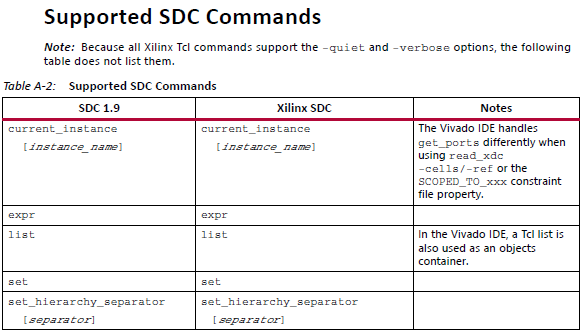
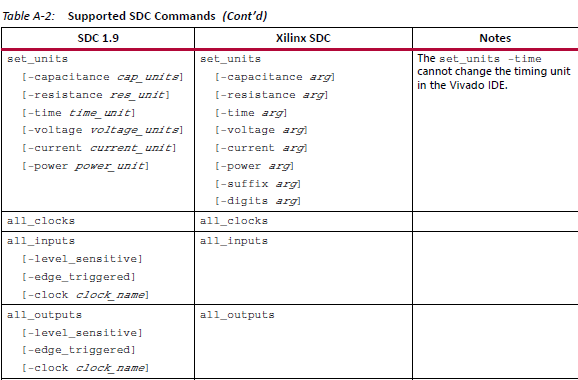
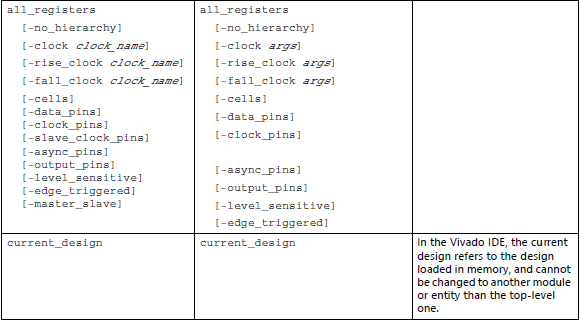
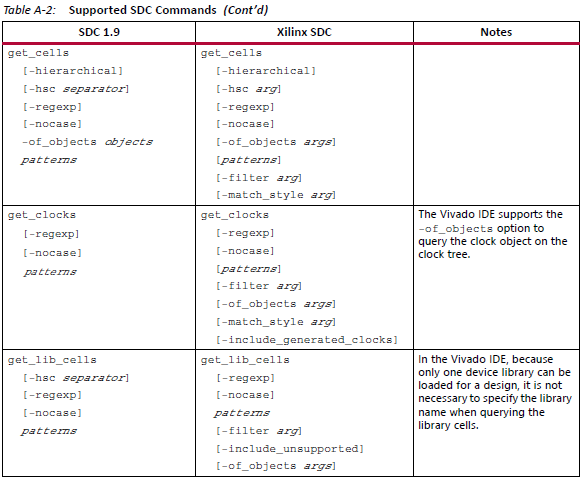
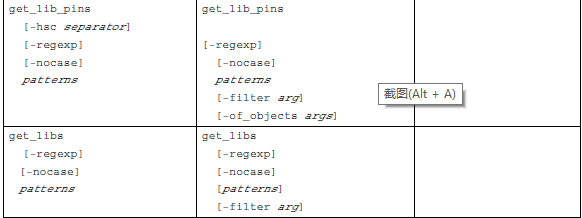
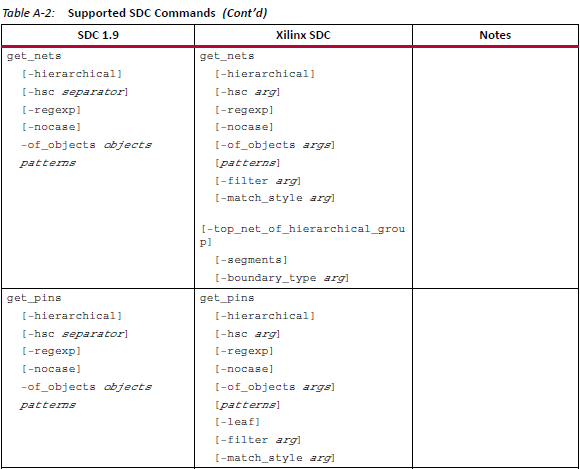
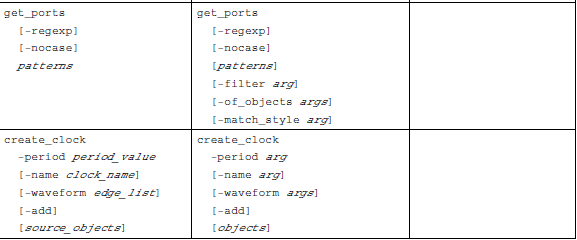

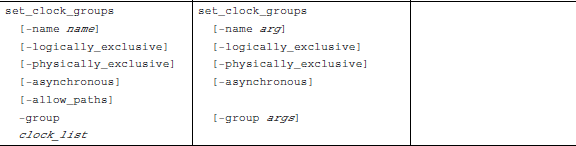
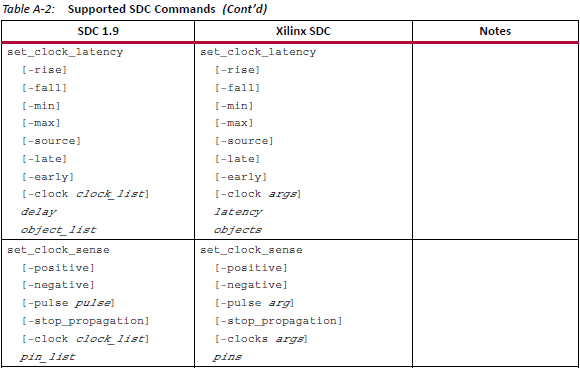
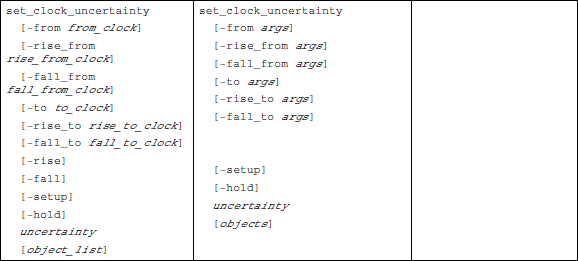
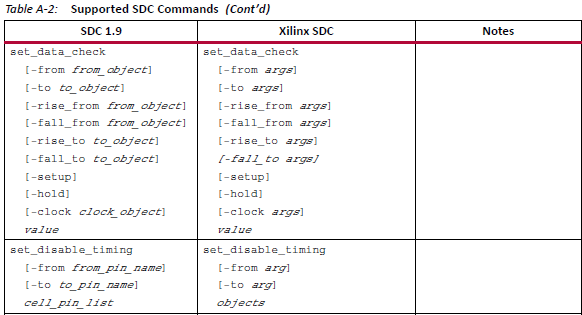
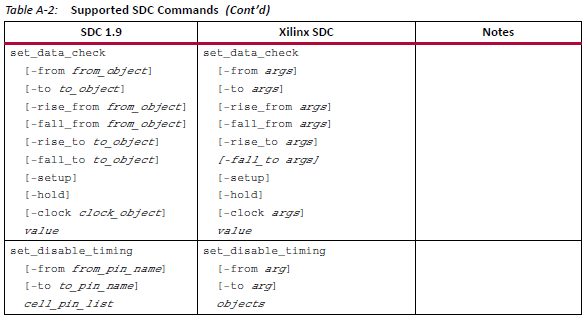
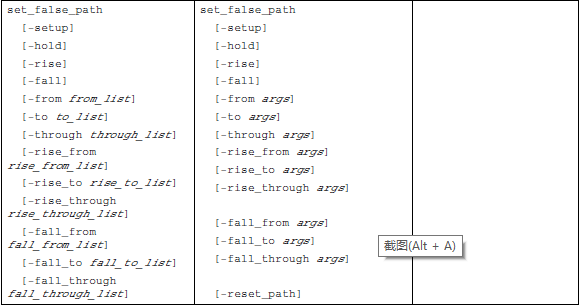

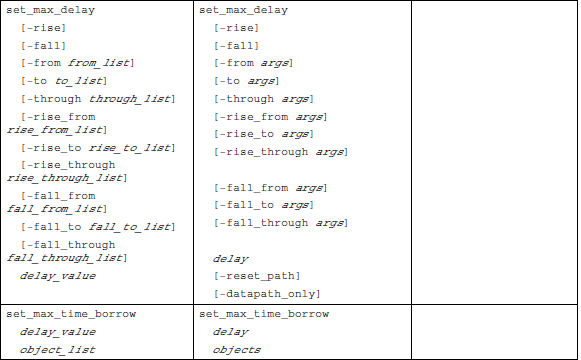
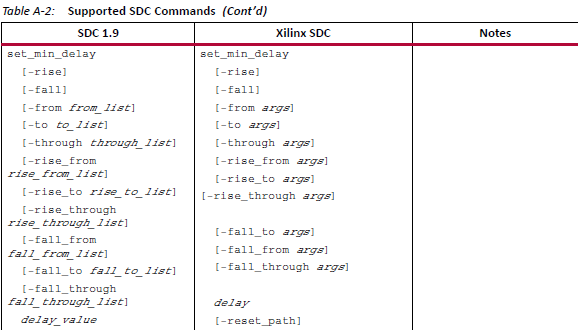
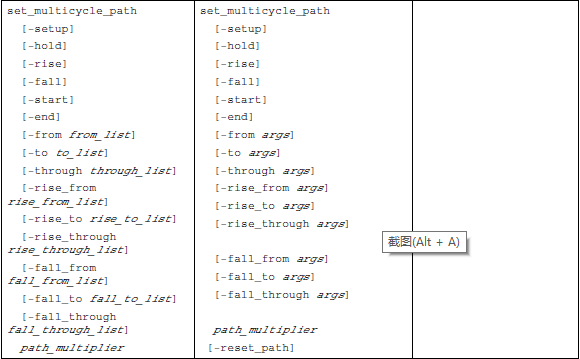
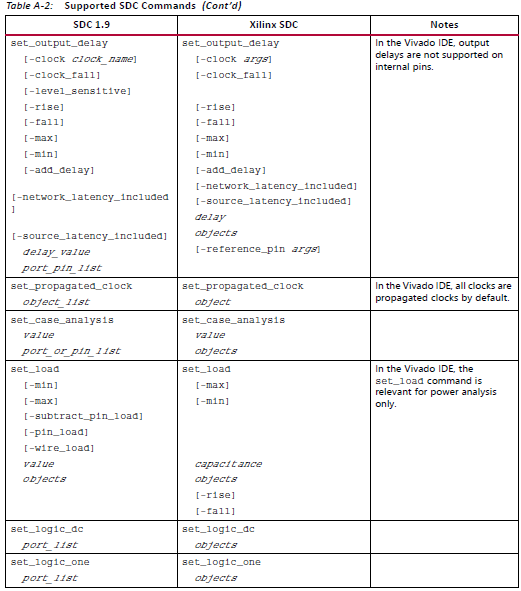
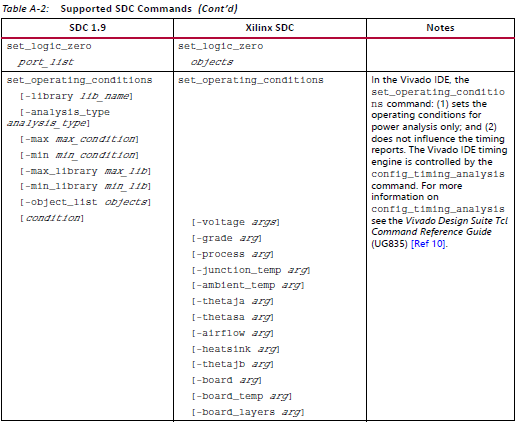
在文档里还有一些不支持的SDC命令,那就可以不用管了,反正我暂时也用不上。
Vivado Design Suite用户指南之约束的使用第一部分(介绍部分)的更多相关文章
- Vivado Design Suite用户指南之约束的使用第二部分(约束方法论)
Constraints Methodology(约束方法论) 关于约束方法论 设计约束定义了编译流程必须满足的要求,以使设计在板上起作用. 并非所有步骤都使用所有约束在编译流程中. 例如,物理约束仅在 ...
- 阅读<Vivado Design Suite Tutorial---Logic Simulation>笔记
阅读<Vivado Design Suite Tutorial---Logic Simulation>笔记 1.建工程,添加仿真文件 2.在IP Catalog里面添加IP核 Sine_h ...
- Vivado HLS初识---阅读《vivado design suite tutorial-high-level synthesis》(6)
Vivado HLS初识---阅读<vivado design suite tutorial-high-level synthesis>(6) 1.创建工程与开启GUI 2.调试 查看关于 ...
- Vivado HLS初识---阅读《vivado design suite tutorial-high-level synthesis》(5)
Vivado HLS初识---阅读<vivado design suite tutorial-high-level synthesis>(5) 1.创建工程 启动vidado HLS co ...
- Vivado HLS初识---阅读《vivado design suite tutorial-high-level synthesis》(4)
Vivado HLS初识---阅读<vivado design suite tutorial-high-level synthesis>(4) 1.老样子,首先运行tcl脚本建工程: Vi ...
- Vivado HLS初识---阅读《vivado design suite tutorial-high-level synthesis》(3)
Vivado HLS初识---阅读<vivado design suite tutorial-high-level synthesis>(3) 优化lab1 1.创建工程,开启HLS 运行 ...
- Vivado HLS初识---阅读《vivado design suite tutorial-high-level synthesis》(2)
Vivado HLS初识---阅读<vivado design suite tutorial-high-level synthesis>(2) 1.实验目的 2.启动命令行 将命令行切换 ...
- Vivado HLS初识---阅读《vivado design suite tutorial-high-level synthesis》
Vivado HLS初识---阅读<vivado design suite tutorial-high-level synthesis> 1.启动 2.创建工程 3.添加源文件 4.添加测 ...
- Ubuntu16.4安装Vivado Design Suite sdx2019.1
1:下载安装包.到Xilinx官网下载下面为网址: https://www.xilinx.com/support/download.html 2:进入安装包路径,打开终端 Ctrl+alt +t sh ...
随机推荐
- MySQL解压版的安装与配置
1.解压mysql-5.7.15-winx64.zip到D:\MySQL Server 5.7(你想安装的位置) 2.如果机器上安装过其他版本的mysql先删除环境变量PATH中的mysql路径,然后 ...
- react-native 报错 RawText "" must be wrapped in an explicit <Text> component
刚才又遇到了一个坑,找了好久,问题如下: 开始以为是Text标签怎么有问题了,结果是下面的原因影响的: 上图第二行,标签和注释中间多了一个空格,就会报这个错误. 解决办法 1.将空格删掉 <Re ...
- Prior Posterior和Likelihood的理解与几种表达方式
- ios开发中字符串的常用功能总结
1.分割字符串 NSString * str1 = @"123/456"; NSArray * arr1 = [str1 componentsSeparatedByString:@ ...
- GMA Round 1 年货
传送门 年货 三角形的年货有没有见过啊?(如下图所示,图中共有12层小三角形,共计144个) 啊,不,这不是真正的年货,真正的年货是正六边形的!(这是什么设定?) 总之,麻烦你在图中找出顶点在三角形格 ...
- MySQL 数据库-索引注意事项
索引注意事项 (1)最左前缀原则 如果查询的时候,查询条件精确匹配索引的左边连续一列或几列,则可以命中索引. (2)避免where 子句中对字段施加函数,如to_date(create_tim ...
- [MySQL]查看用户权限与GRANT用法
摘自:http://apps.hi.baidu.com/share/detail/15071849 查看用户权限 show grants for 你的用户 比如:show grants for roo ...
- Docker容器内部端口映射到外部宿主机端口的方法小结
转自:https://www.cnblogs.com/kevingrace/p/9453987.html Docker允许通过外部访问容器或者容器之间互联的方式来提供网络服务.容器启动之后,容器中可以 ...
- CSS魔法堂:改变单选框颜色就这么吹毛求疵!
前言 是否曾经被业务提出"能改改这个单选框的颜色吧!让它和主题颜色搭配一下吧!",然后苦于原生不支持换颜色,最后被迫自己手撸一个凑合使用.若抛开input[type=radio] ...
- Jetpack 迁移到 androidX support MD
Markdown版本笔记 我的GitHub首页 我的博客 我的微信 我的邮箱 MyAndroidBlogs baiqiantao baiqiantao bqt20094 baiqiantao@sina ...