
任务调度及远端管理(基于Quartz.net)
这篇文章我们来了解一些项目中的一个很重要的功能:任务调度
可能有些同学还不了解这个,其实简单点说任务调度与数据库中的Job是很相似的东西
只不过是运行的物理位置与管理方式有点不一样,从功能上来说我觉得还是差不多的,
存储过程有很大的局限性,耦合性也太高,所以最好把系统的一些Job放在代码层,
于是就有了Quartz.net,我们本篇就是针对Quartz.net的二次开发
一、新建HelloJob
HelloJob.cs,示例Job,每次执行都输出msg变量中的信息
 using Common.Logging;

 using Quartz;

 namespace Job.Items

 {

     public class HelloJob : IJob

     {

         public const string Message = "msg";

         private static readonly ILog log = LogManager.GetLogger(typeof(HelloJob));

         public virtual void Execute(IJobExecutionContext context)

         {

             var jobKey = context.JobDetail.Key;

             var message = context.JobDetail.JobDataMap.GetString(Message);

             log.InfoFormat("HelloJob: msg: {0}", message);

         }

     }

 }
HelloJobExample.cs,每5秒执行一次
         public class HelloJobExample

         {

             public virtual void Run()

             {

                 ISchedulerFactory sf = new StdSchedulerFactory();

                 IScheduler sched = sf.GetScheduler();

                 IJobDetail job = JobBuilder.Create<HelloJob>()

                     .WithIdentity("job1", "group1")

                     .Build();

                 JobDataMap map = job.JobDataMap;

                 map.Put("msg", "Your remotely added job has executed!");

                 ITrigger trigger = TriggerBuilder.Create()

                     .WithIdentity("trigger1", "group1")

                     .ForJob(job.Key)

                     .WithCronSchedule("/5 * * ? * *")

                     .Build();

                 sched.ScheduleJob(job, trigger);

                 sched.Start();

             }

         }
好了,有效代码就那么多,我们来试试
     class Program

     {

         static void Main(string[] args)

         {

             var example = new HelloJobExample();

             example.Run();

             Console.ReadKey();

         }

     }
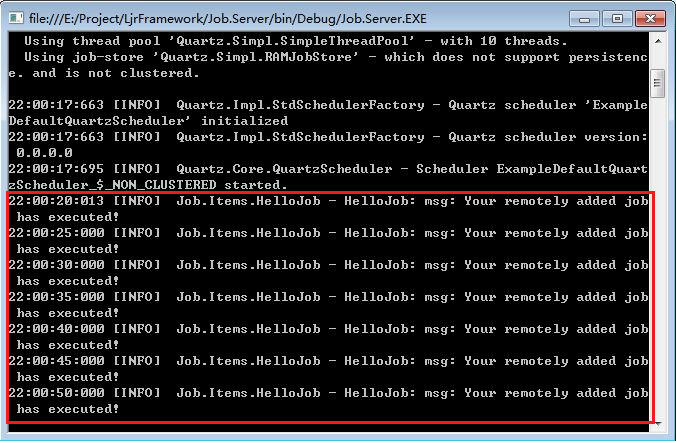
貌似没什么问题,如愿地执行了。
但是我们想想,实际运行中执行任务的服务器一般都是独立出来的,那怎么去管理这些任务的开启、关闭及暂停呢?
肯定不能每次手动去操作,那太麻烦了。我们的希望是在应用中(系统管理后台)去管理这些任务。万幸Quartz.net足够强大,
他是支持远程操作的,没有太深入了解,不过看调用参数应该是通过TCP请求进行操作的,我们试试看
二、Job远程管理
2.1、新建Job.Items项目,把之前新建的HelloJob.cs放在其中
2.2、新建Job.Server项目
新建RemoteServer.cs
     public class RemoteServer : ILjrJob

     {

         public string Name

         {

             get { return GetType().Name; }

         }

         public virtual void Run()

         {

             ILog log = LogManager.GetLogger(typeof(RemoteServer));

             NameValueCollection properties = new NameValueCollection();

             properties["quartz.scheduler.instanceName"] = "RemoteServer";

             properties["quartz.threadPool.type"] = "Quartz.Simpl.SimpleThreadPool, Quartz";

             properties["quartz.threadPool.threadCount"] = "";

             properties["quartz.threadPool.threadPriority"] = "Normal";

             properties["quartz.scheduler.exporter.type"] = "Quartz.Simpl.RemotingSchedulerExporter, Quartz";

             properties["quartz.scheduler.exporter.port"] = "";

             properties["quartz.scheduler.exporter.bindName"] = "QuartzScheduler";

             properties["quartz.scheduler.exporter.channelType"] = "tcp";

             properties["quartz.scheduler.exporter.channelName"] = "httpQuartz";

             properties["quartz.scheduler.exporter.rejectRemoteRequests"] = "true";

          }

     }
2.3、新建控制器HelloJobController
     public class HelloJobController : Controller

     {

         public ActionResult Index()

         {

             try

             {

                 if (HelloJobHelper.Trigger != null)

                 {

                     ViewBag.JobKey = "remotelyAddedJob";

                     ViewBag.State = HelloJobHelper.Scheduler.GetTriggerState(HelloJobHelper.Trigger.Key);

                     ViewBag.StartTime = HelloJobHelper.Trigger.StartTimeUtc.ToString();

                 }

                 else

                 {

                     ViewBag.State = "获取Job执行状态失败";

                 }

             }

             catch (Exception ex)

             {

                 ViewBag.State = "Job服务器连接失败";

             }

             return View();

         }

         public ActionResult Run()

         {

             HelloJobHelper.RunJob();

             return RedirectToAction("Index", "HelloJob");

         }

         public ActionResult Pause()

         {

             HelloJobHelper.PauseJob();

             return RedirectToAction("Index", "HelloJob");

         }

         public ActionResult Resume()

         {

             HelloJobHelper.ResumeJob();

             return RedirectToAction("Index", "HelloJob");

         }

     }
2.4、新建HelloJobHelper
先配置连接远端任务服务器的参数,这个要和上面的RemoteServer.cs对应
1             properties["quartz.scheduler.proxy"] = "true";

2             properties["quartz.scheduler.proxy.address"] = "tcp://127.0.0.1:555/QuartzScheduler";
我们来看看开始操作,运行这个方法,任务服务器将自动开启这个Job
         public static void RunJob()

         {

             if (!scheduler.CheckExists(jobKey))

             {

                 IJobDetail job = JobBuilder.Create<HelloJob>()

                     .WithIdentity(jobKey)

                     .Build();

                 JobDataMap map = job.JobDataMap;

                 map.Put("msg", "Your remotely added job has executed!");

                 ITrigger trigger = TriggerBuilder.Create()

                     .WithIdentity(triggerKey)

                     .ForJob(job.Key)

                     .WithCronSchedule("/5 * * ? * *")

                     .Build();

                 scheduler.ScheduleJob(job, trigger);

                 JobDetail = job;

                 Trigger = trigger;

             }

         }
暂停比较简单
         public static void PauseJob()

         {

             scheduler.PauseJob(jobKey);

         }
2.5、View
 @{

     ViewBag.Title = "Index";

     Layout = "~/Views/Shared/_Bootstrap.cshtml";

 }

 <!DOCTYPE html>

 <html>

 <head>

     <meta name="viewport" content="width=device-width" />

     <title>Index</title>

     <style>

         .col-sm-offset-2 {

         margin-left:20px;

         }

     </style>

 </head>

 <body>

     <br />

     @using (Html.BeginForm("Run", "HelloJob", null, FormMethod.Post, new { @id = "form1", @class = "form-horizontal", role = "form" }))

     {

         @Html.AntiForgeryToken()

         <div class="form-group">

             <div class="col-sm-offset-2 col-sm-10">

                 <input type="hidden" name="Id" id="Id" />

                 <button type="submit" class="btn btn-default">Run</button>

             </div>

         </div>

     }

     @using (Html.BeginForm("Pause", "HelloJob", null, FormMethod.Post, new { @id = "form2", @class = "form-horizontal", role = "form" }))

     {

         @Html.AntiForgeryToken()

         <div class="form-group">

             <div class="col-sm-offset-2 col-sm-10">

                 <input type="hidden" name="Id" id="Id" />

                 <button type="submit" class="btn btn-default">Pause</button>

             </div>

         </div>

     }

     @using (Html.BeginForm("Resume", "HelloJob", null, FormMethod.Post, new { @id = "form3", @class = "form-horizontal", role = "form" }))

     {

         @Html.AntiForgeryToken()

         <div class="form-group">

             <div class="col-sm-offset-2 col-sm-10">

                 <input type="hidden" name="Id" id="Id" />

                 <button type="submit" class="btn btn-default">Resume</button>

             </div>

         </div>

     }

     <br />

     <div>

         <ul>

             <li>ViewBag.JobKey: @ViewBag.JobKey</li>

             <li>ViewBag.State: @ViewBag.State</li>

             <li>ViewBag.StartTime: @ViewBag.StartTime</li>

             <li>ViewBag.ExecuteTimes: @ViewBag.ExecuteTimes</li>

         </ul>

     </div>

 </body>

 </html>
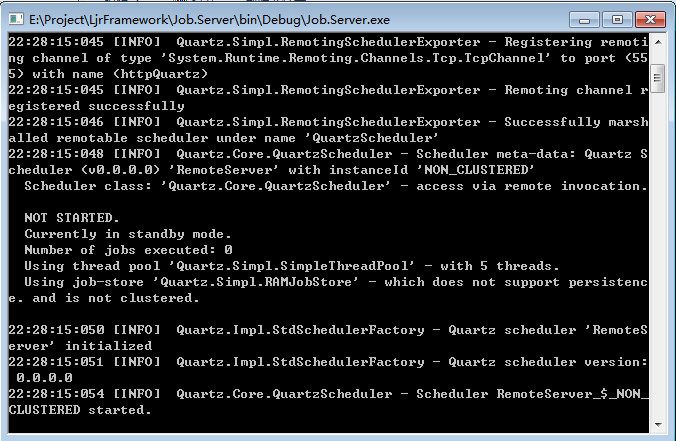
2.6 好了,我们先运行服务端,开起来就好了
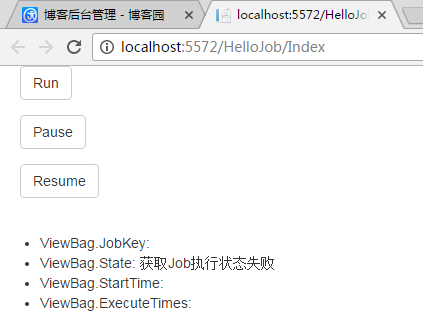
2.7、运行Web
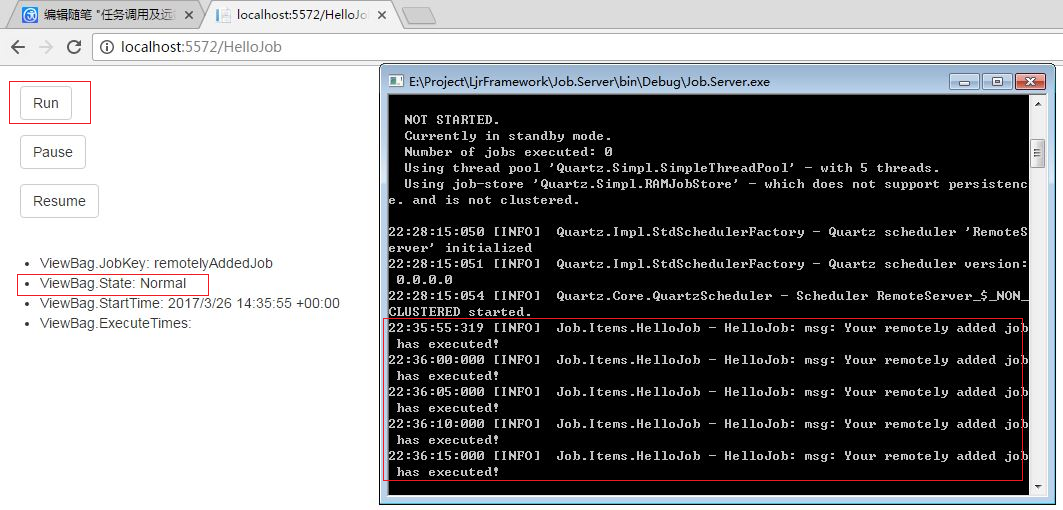
2.7.1 点击Run
2.7.2、点击Pause(暂停)

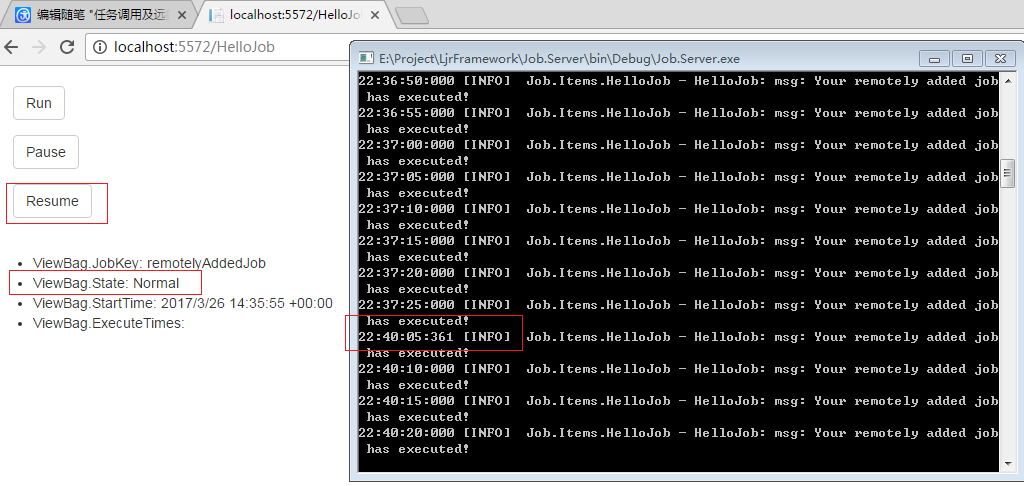
2.7.3、点击Resume(恢复)
2.8、最后看看项目代码层次,涉及3个:MVC、Job.Items、Job.Server

好了,基本的功能有了。这篇就到这里
任务调度及远端管理(基于Quartz.net)的更多相关文章
- 任务调度之持久化(基于Quartz.net)
上一篇我们了解了任务调度及他的远端管理方式,传送门:任务调度及远端管理(基于Quartz.net) 这篇我们要完成任务调度的持久化功能,即新增修改删除之类的功能,这必须得要有的,不然都不知道后台都有什 ...
- 任务调度之集群(基于Quartz.net)
上一篇我们完成了任务调度的持久化,传送门:任务调度之持久化(基于Quartz.net) 这篇我们来完成Quartz.net的一个比较优秀的功能,即集群:集群可以提高任务调度服务的容灾性, 当一个节点宕 ...
- RDIFramework.NET框架基于Quartz.Net实现任务调度详解及效果展示
在上一篇Quartz.Net实现作业定时调度详解,我们通过实例代码详细讲解与演示了基于Quartz.NET开发的详细方法.本篇我们主要讲述基于RDIFramework.NET框架整合Quartz.NE ...
- Window服务基于Quartz.Net组件实现定时任务调度(二)
前言: 在上一章中,我们通过利用控制台实现定时任务调度,已经大致了解了如何基于Quartz.Net组件实现任务,至少包括三部分:job(作业),trigger(触发器),scheduler(调度器). ...
- 一行代码完成定时任务调度,基于Quartz的UI可视化操作组件 GZY.Quartz.MUI
前言 之前发布过第一个版本,有兴趣的可以去看看: NET Core 基于Quartz的UI可视化操作组件 GZY.Quartz.MUI 简介 GitHub开源地址:l2999019/GZY.Quart ...
- Quartz.NET总结(五)基于Quartz.net 的开源任务管理平台
前面总结了很多,关于Quartz.net 的文章,介绍了如何使用Quartz.net.不清楚的朋友,可以看我之前的系列文章,http://www.cnblogs.com/zhangweizhong/c ...
- 基于Quartz.NET构建自己的动态作业调度器
在日常的开发中,运行定时任务基本上已经是很普遍的需求了,可以通过windows服务+timer组件来实现,也可以使用第三方框架来集成,Quartz.NET就是一款从JAVA的Quartz移植过来的一个 ...
- 基于Quartz实现简单的定时发送邮件
一.什么是Quartz Quartz 是一个轻量级任务调度框架,只需要做些简单的配置就可以使用:它可以支持持久化的任务存储,即使是任务中断或服务重启后,仍可以继续运行.Quartz既可以做为独立的应用 ...
- Java 基于quartz实现定时 之二(XML方式配置)
<!-- 在spring核心配置文件中进行如下配置 --> <!-- Spring基于quartz定时任务 --> <bean id="triggerByBea ...
随机推荐
- python3 发送邮件
import smtplibfrom email.mime.text import MIMETextdef SendEmail(fromAdd,toAdd,subject,text): _pwd = ...
- SpringData中使用@Modifying注解实现修改操作
通过@Modifying可以实现修改和删除操作 @Modifying @Query("update Person set email = :email where lastName =:la ...
- 编程最好用的字体consolas
python 自带idle最好用的字体consolas https://www.icourse163.org/learn/BIT-268001?tid=1002788003#/learn/forumd ...
- oracle instantclient + plsql 远程连接数据库
PLSQL Developer连接数据库: 1.不连接数据库登陆PLSQL Developer(登陆界面按“取消”即可).在Tools->Perferences->Connection ...
- 用ActiveX 创建自己的comboBox 控件(二)
3.0 添加事件 3.1 添加OnSelChange 事件 当用户选中列表项的时候触发该事件.(不只是选择改变时触发,本次选择和上次相同时也触发): 添加完成后,在ActivexcomboBox.id ...
- Communication Model
[Communication Model] EOSIO actions operate primarily in a message-based communication architecture. ...
- DJango 基础 (3)
模板路径 在配置文件setting.py中找到TEMPLATES设置来配置. 这是一个设置选项的列表,模板大都包含两项通用设置:两种方式配置模板: 第一种: DIRS 定义一个目录列表,模板引擎按列表 ...
- Python人工智能之路 - 第三篇 : PyAudio 实现录音 自动化交互实现问答
Python 很强大其原因就是因为它庞大的三方库 , 资源是非常的丰富 , 当然也不会缺少关于音频的库 关于音频, PyAudio 这个库, 可以实现开启麦克风录音, 可以播放音频文件等等,此刻我们不 ...
- redis5 集群迁移方案
Redis5 集群迁移方案 一.KEY优化 1.按原来要求进行优化与大KEY分拆. 二.现Redis 集群缩容(对业务无影响) 主节点按要求合并至3个主节点. 业务配置为3主4从 删除没有槽的主节点与 ...
- ucore-lab1-练习5report
实验5--实现函数调用堆栈跟踪函数 需要完成kdebug.c中函数print_stackframe的实现,可以通过函数print_stackframe来跟踪函数调用堆栈中记录的返回地址. 一.函数堆栈 ...