
swagger-codegen自动生成代码工具的介绍与使用
一、Swagger Codegen简介
Swagger Codegen是一个开源的代码生成器,根据Swagger定义的RESTful API可以自动建立服务端和客户端的连接。Swagger Codegen的源码可以在Github上找到。
GitHub: https://github.com/swagger-api/swagger-codegen
二、Swagger Codegen安装
首先机器上需要安装jdk,具体Java, version 7 or higher,然后在这里(https://oss.sonatype.org/content/repositories/releases/io/swagger/)找到需要的Swagger Codegen版本来安装,不过官方是推荐最新版本。
只要下载一个cli的jar文件就可以了,例如, swagger-codegen-cli-2.2.1.jar(已共享到QQ群文件:301343109)。也可以直接在命令行里下载,例如
Wget https://oss.sonatype.org/content/repositories/releases/io/swagger/swagger-codegen-cli/2.2.1/swagger-codegen-cli-2.2.1.jar
下载好了,运行
java -jar swagger-codegen-cli-2.2.1.jar
根据返回结果可以看到Swagger Codegen支持的语言有很多: [android, aspnet5, async-scala, cwiki, csharp, cpprest, dart, flash, python-flask, go, groovy, java, jaxrs, jaxrs-cxf, jaxrs-resteasy, jaxrs-spec, inflector, javascript, javascript-closure-angular, jmeter, nancyfx, nodejs-server, objc, perl, php, python, qt5cpp, ruby, scala, scalatra, silex-PHP, sinatra, rails5, slim, spring, dynamic-html, html, html2, swagger, swagger-yaml, swift, tizen, typescript-angular2, typescript-angular, typescript-node, typescript-fetch, akka-scala, CsharpDotNet2, clojure, haskell, lumen, go-server]
三、Swagger Codegen的使用
查看Swagger Codegen的帮助信息
java -jar swagger-codegen-cli-2.2.1.jar help generate
查看Swagger Codegen支持的具体某个语言的使用帮助,拿java举例
java -jar swagger-codegen-cli-2.2.1.jar config-help -l java
C:\Users\Administrator\Documents\swagger-coden>java -jar swagger-codegen-cli-2.3..jar help generate

NAME

        swagger-codegen-cli generate - Generate code with chosen lang

SYNOPSIS

        swagger-codegen-cli generate

                [(-a <authorization> | --auth <authorization>)]

                [--additional-properties <additional properties>...]

                [--api-package <api package>] [--artifact-id <artifact id>]

                [--artifact-version <artifact version>]

                [(-c <configuration file> | --config <configuration file>)]

                [-D <system properties>...] [--git-repo-id <git repo id>]

                [--git-user-id <git user id>] [--group-id <group id>]

                [--http-user-agent <http user agent>]

                (-i <spec file> | --input-spec <spec file>)

                [--ignore-file-override <ignore file override location>]

                [--import-mappings <import mappings>...]

                [--instantiation-types <instantiation types>...]

                [--invoker-package <invoker package>]

                (-l <language> | --lang <language>)

                [--language-specific-primitives <language specific primitives>...]

                [--library <library>] [--model-name-prefix <model name prefix>]

                [--model-name-suffix <model name suffix>]

                [--model-package <model package>]

                [(-o <output directory> | --output <output directory>)]

                [--release-note <release note>] [--remove-operation-id-prefix]

                [--reserved-words-mappings <reserved word mappings>...]

                [(-s | --skip-overwrite)]

                [(-t <template directory> | --template-dir <template directory>)]

                [--type-mappings <type mappings>...] [(-v | --verbose)]

OPTIONS

        -a <authorization>, --auth <authorization>

            adds authorization headers when fetching the swagger definitions

            remotely. Pass in a URL-encoded string of name:header with a comma

            separating multiple values

        --additional-properties <additional properties>

            sets additional properties that can be referenced by the mustache

            templates in the format of name=value,name=value. You can also have

            multiple occurrences of this option.

        --api-package <api package>

            package for generated api classes

        --artifact-id <artifact id>

            artifactId in generated pom.xml

        --artifact-version <artifact version>

            artifact version in generated pom.xml

        -c <configuration file>, --config <configuration file>

            Path to json configuration file. File content should be in a json

            format {"optionKey":"optionValue", "optionKey1":"optionValue1"...}

            Supported options can be different for each language. Run

            config-help -l {lang} command for language specific config options.

        -D <system properties>

            sets specified system properties in the format of

            name=value,name=value (or multiple options, each with name=value)

        --git-repo-id <git repo id>

            Git repo ID, e.g. swagger-codegen.

        --git-user-id <git user id>

            Git user ID, e.g. swagger-api.

        --group-id <group id>

            groupId in generated pom.xml

        --http-user-agent <http user agent>

            HTTP user agent, e.g. codegen_csharp_api_client, default to

            'Swagger-Codegen/{packageVersion}}/{language}'

        -i <spec file>, --input-spec <spec file>

            location of the swagger spec, as URL or file (required)

        --ignore-file-override <ignore file override location>

            Specifies an override location for the .swagger-codegen-ignore file.

            Most useful on initial generation.

        --import-mappings <import mappings>

            specifies mappings between a given class and the import that should

            be used for that class in the format of type=import,type=import. You

            can also have multiple occurrences of this option.

        --instantiation-types <instantiation types>

            sets instantiation type mappings in the format of

            type=instantiatedType,type=instantiatedType.For example (in Java):

            array=ArrayList,map=HashMap. In other words array types will get

            instantiated as ArrayList in generated code. You can also have

            multiple occurrences of this option.

        --invoker-package <invoker package>

            root package for generated code

        -l <language>, --lang <language>

            client language to generate (maybe class name in classpath,

            required)

        --language-specific-primitives <language specific primitives>

            specifies additional language specific primitive types in the format

            of type1,type2,type3,type3. For example:

            String,boolean,Boolean,Double. You can also have multiple

            occurrences of this option.

        --library <library>

            library template (sub-template)

        --model-name-prefix <model name prefix>

            Prefix that will be prepended to all model names. Default is the

            empty string.

        --model-name-suffix <model name suffix>

            Suffix that will be appended to all model names. Default is the

            empty string.

        --model-package <model package>

            package for generated models

        -o <output directory>, --output <output directory>

            where to write the generated files (current dir by default)

        --release-note <release note>

            Release note, default to 'Minor update'.

        --remove-operation-id-prefix

            Remove prefix of operationId, e.g. config_getId => getId

        --reserved-words-mappings <reserved word mappings>

            specifies how a reserved name should be escaped to. Otherwise, the

            default _<name> is used. For example id=identifier. You can also

            have multiple occurrences of this option.

        -s, --skip-overwrite

            specifies if the existing files should be overwritten during the

            generation.

        -t <template directory>, --template-dir <template directory>

            folder containing the template files

        --type-mappings <type mappings>

            sets mappings between swagger spec types and generated code types in

            the format of swaggerType=generatedType,swaggerType=generatedType.

            For example: array=List,map=Map,string=String. You can also have

            multiple occurrences of this option.

        -v, --verbose

            verbose mode
利用Swagger Codegen根据服务生成客户端代码
java -jar swagger-codegen-cli-2.2.1.jar generate -i http://petstore.swagger.io/v2/swagger.json -l java -o samples/client/pestore/java
在上面这段代码里,使用了三个参数,分别是-i和-l和-o。
-i指定swagger描述文件的路径,url地址或路径文件;该参数为必须(http://petstore.swagger.io/v2/swagger.json是官方的一个例子,我们可以改成自己的服务)
-l指定生成客户端代码的语言,该参数为必须
-o指定生成文件的位置(默认当前目录)
除了可以指定上面三个参数,还有一些常用的:
-c json格式的配置文件的路径;文件为json格式,支持的配置项因语言的不同而不同
-a 当获取远程swagger定义时,添加授权头信息;URL-encoded格式化的name,逗号隔开的多个值
--api-package 指定生成的api类的包名
--artifact-id 指定pom.xml的artifactId的值
--artifact-version 指定pom.xml的artifact的版本
--group-id 指定pom.xml的groupId的值
--model-package 指定生成的model类的包名
-s 指定该参数表示不覆盖已经存在的文件
-t 指定模版文件所在目录
生成好的客户端代码
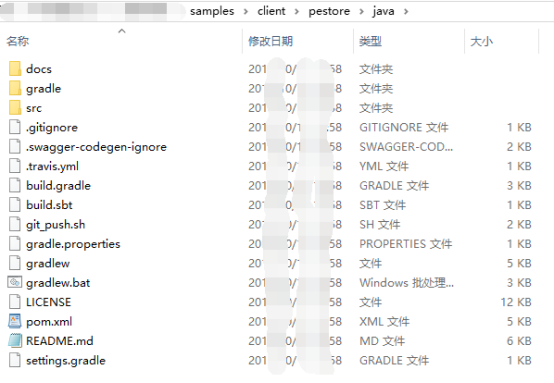
生成的这些文件里,src文件下的文件和pom.xml文件是对我们最有用的。把它们导入到我们习惯用的java编辑器里,这里以eclipse为例,下面是导入好的客户端的maven工程,和我们平常新建的maven工程一模一样(已共享到QQ群文件:301343109)。
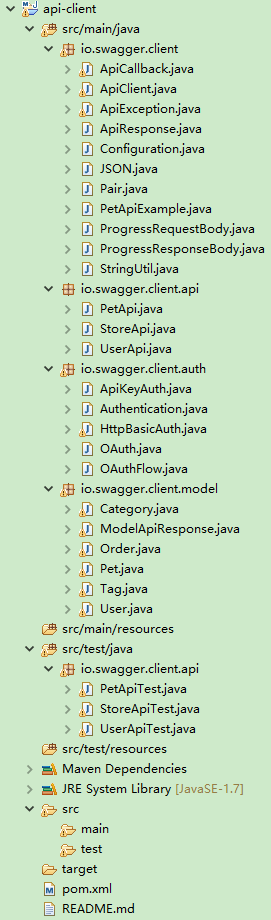
但是自动生成的客户端代码并不能直接使用,需要我们做一些修改,特别是io.swagger.client.api包下的class类,我们需要把void替换成各自的model。
改好后,我们就可以运行客户端test下的测试代码,进行单元测试了。拿PetApiTest类来举例,运行它的addPetTest()方法。
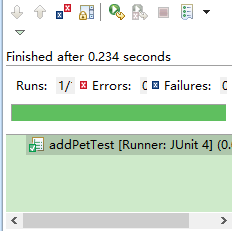
可以看到测试成功。
2019.6.23 更新
我们会发现生成的默认包是io.swagger.client.api/module,而我们可能想要自己的包,怎么办呢?我看网上居然有人说要改源码,以下是那篇文章的内容。
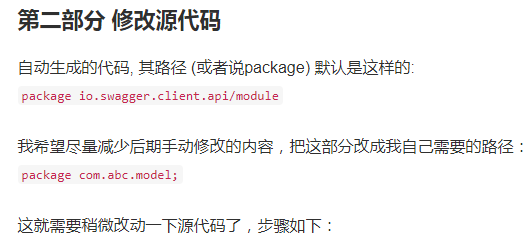
这边我想说swagger也是一个比较成熟的产品了,也这么多人在用了,怎么可能连修改默认的包这个基础的需求都不提供呢,说明这篇文章的作者,根本就没看Swagger Codegen的帮助信息,上面明明已经列出来了,只需要生成代码的时候指定--api-package这个选项就好了。
命令我贴出来
java -jar swagger-codegen-cli-2.3..jar generate -i http://xxxx:8807/static/swagger.json -l java -o C:\Users\Administrator\Documents\xx-java-gen --api-package com.xxxx.client --invoker-package com.xxxx.client.invoker --model-package com.xxxx.client.model
所以我们在学习和工作的时候,一定要灵活,多动脑。
swagger-codegen自动生成代码工具的介绍与使用的更多相关文章
- Swagger Edit自动生成代码工具
一.swagger简介 swagger是一套开源的API设计工具,包括Swagger UI和Swagger Editor等.其中swagger edit是用来编辑接口文档的小程序,非常简单易用.在官网 ...
- Python自动生成代码工具
项目中有一个需求,对一个基类而言,拥有一个比较方法和拷贝方法,某些地方需要频繁地对这两个方法进行调用.对于所有子类而言,需要重写这两个方法,并在其中维护类内一些成员变量.例如有一个变量m_iMyVal ...
- mybatis自动生成代码工具(逆向工程)
MyBatis自动生成实体类(逆向工程) MyBatis属于一种半自动的ORM框架,它需要我们自己编写sql语句和映射文件,但是编写映射文件和sql语句很容易出错,所以mybatis官方提供了Gene ...
- SpringBoot与Mybatis整合(包含generate自动生成代码工具,数据库表一对一,一对多,关联关系中间表的查询)
链接:https://blog.csdn.net/YonJarLuo/article/details/81187239 自动生成工具只是生成很单纯的表,复杂的一对多,多对多的情况则是在建表的时候就建立 ...
- mybatis-generator自动生成代码工具
1.在项目的配置文件中放入配置文件mybatis-generator-config.xml 根据情况修改下配置 <?xml version="1.0" encoding= ...
- Mybatis自动生成代码工具
项目结构如下 一:在POM中添加mybatis-generator-maven-plugin 插件 <plugins> <plugin> <groupId>org. ...
- 自动生成代码工具【JAVA版】
发现任何项目无非五类操作:新增.修改.删除.查询详细.查询列表 大多数的服务端基础代码都是相同的,但是每次开发一个新项目都会做很多重复工作,从controller,bean,service,到数据库访 ...
- mybatis 自动生成代码工具
配置官网: http://www.mybatis.org/generator/configreference/xmlconfig.html 源码:https://github.com/mybatis/ ...
- 一分钟带你学会利用mybatis-generator自动生成代码!
目录 一.MyBatis Generator简介 二.使用方式 三.实战 之前的文章<SpringBoot系列-整合Mybatis(XML配置方式)>介绍了XML配置方式整合的过程,本文介 ...
随机推荐
- JSP判断移动设备
日期: 2014年3月6日 人员::铁锚 看到了一篇很好的文章, <在天猫,前端做什么?>,里面有天猫php判断移动设备的正则(个人猜测),觉得很好用,于是就决定移植到JSP里面. jsp ...
- Android性能优化之界面UI篇
1.使用style.color.string.dimen样式来分离xml布局文件,减少代码的重复使用,增加代码复用率,防止hardcode,下面是一个例子: 在定义layout时候,因为每个View或 ...
- Android特效专辑(九)——仿微信雷达搜索好友特效,逻辑清晰实现简单
Android特效专辑(九)--仿微信雷达搜索好友特效,逻辑清晰实现简单 不知不觉这个春节也已经过完了,遗憾家里没网,没能及时给大家送上祝福,今天回到深圳,明天就要上班了,小伙伴们是不是和我一样呢?今 ...
- Android Data Binding高级用法-Observable、动态生成Binding Class(三)
设置View的id 虽然说Data Binding这种分层模式使得我们对数据的传递简单明了,一般情况下我们可以不设置View的id,不使用findViewById即可对View进行数据上一系列的操作, ...
- shell脚本里面相互调用时路径不要用pwd获取
shellA调用shellB,如果shellB 里面需要使用路径作为变量,去寻找其它文件.那么要注意,不用pwd,其返回的是系统中用户当前所在位置的路径,也就是shellA的路径,这样就错了.应该用d ...
- 让opencv程序在没有安装opencv的电脑上运行
经常需要把用opencv写的程序拿到没有装opencv的电脑上去运行和演示,要让opencv程序脱离opencv环境,一般有两种方法: 一种是动态链接opencv,即把相应的dll拷贝到exe所在目录 ...
- Android开发 PopupWindow弹窗调用第三方地图(百度,高德)实现导航功能
博客描述:后台返回地点的经纬度在地图上进行描点,点击导航弹出PopupWindow进行选择地图操作,如果手机中没有安装地图,提示没有,否则传值调起地图进行导航操作 看一下实现的效果,没图说再多都白搭 ...
- java设计原则---开闭原则
开闭原则:指的是一个软件实体应对对扩展开发,对修改关闭(Software entities should be open for extension, but closed for modificat ...
- 单链表反转(Singly Linked Lists in Java)
单链表反转(Singly Linked Lists in Java) 博客分类: 数据结构及算法 package dsa.linkedlist; public class Node<E> ...
- subclipse下svn: E200015: authentication cancelled问题的解决
今天要把新建的一个项目要share到一个Ubuntu下SVN服务上,总是让我不断的重复输入密码,实在是太要命了,点取消就报错如标题,Google了一下,最后在后面参考那篇帖子的启发下,到SVN配置里面 ...