
Designing IP-Based Video Conferencing Systems: Dealing with Lip Synchronization(唇音同步)
转自:http://www.ciscopress.com/articles/article.asp?p=705533&seqNum=6
Correlating Timebases Using RTCP
The RTCP protocol specifies the use of RTCP packets to provide information that allows the sender to map the RTP domain of each stream into a common reference timebase on the sender, called the Network Time Protocol (NTP) time. NTP time is also referred to aswall clock time because it is the common timebase used for all media transmitted by a sending endpoint. NTP is just a clock measured in seconds.
RTCP uses a separate wall clock because the sender may synchronize any combination of media streams, and therefore it might be inconvenient to favor any one stream as the reference timebase. For instance, a sender might transmit three video streams, all of which must be synchronized, but with no accompanying audio stream. In practice, most video conferencing endpoints send a single audio and video stream and often reuse the audio sample clock to derive the NTP wall clock. However, this generalized discussion assumes that the wall clock is separate from the capture clocks.
NTP
The wall clock, which provides the master reference for the streams on the sender endpoint, is in units of NTP time. However, it is important to bear in mind what NTP time isand what NTP time is not:
- NTP time as defined in the RTP specification is nothing more than a data format consisting of a 64-bit double word: The top 32 bits represent seconds, and the bottom 32 bits represent fractions of a second. The NTP time stamp can therefore represent time values to an accuracy of ± 0.1 nanoseconds (ns).
- The most widespread misconception related to the RTCP protocol is that it requires the use of an NTP time server to generate the NTP clock of the sender. An NTP time server provides a service over the network that allows clients to synchronize their clocks to the time server. The time server specifies that NTP time should measure the number of seconds that have elapsed since January 1, 1970. However, NTP time as defined in the RTP spec does not require the use of an NTP time server. It is possible for RTP implementations to use an NTP time server to provide a reference timebase, but this usage is not necessary and is out of scope of the RTP specification. Indeed, most video conferencing implementations do not use an NTP time server as the source of the NTP wall clock.
NOTE
In the RTP/RTCP protocol, the "NTP time" does not need to come from an NTP time server; the sender can generate it directly from any reference clock. Often, the sender reuses the audio capture clock as the basis for the NTP time.
Forming RTCP Packets
Each RTP stream has an associated RTCP packet stream, and the sender transmits an RTCP packet once every few seconds, according to a formula given in RFC 3550. As a result, RTCP packets consume a small amount of bandwidth compared to the RTP media stream.
For each RTP stream, the sender issues RTCP packets at regular intervals, and those packets contain a pair of time stamps: an NTP time stamp, and the corresponding RTP time stamp associated with that RTP stream. This pair of time stamps communicates the relationship between the NTP time and RTP time for each media stream. The sender calculates the relationship between its NTP timebase and the RTP media stream by observing the value of the RTP media capture clock and the NTP wall clock in real time. The clocks have both an offset and a scale relationship, according to the following equation:
RTP/(RTP sample rate) = (NTP + offset) x scale
After determining this relationship by calculating the offset and scale values, the sender creates the RTCP packet in two steps:
- The sender first selects an NTP time stamp for the RTCP packet. The sender must calculate this time stamp carefully, because the time stamp must correspond to the real-time value of the NTP clock when the RTCP packet appears on the network. In other words, the sender must predict the precise time at which the RTCP packet will appear on the network and then use the corresponding NTP clock time as the value that will appear inside the RTCP packet. To perform this calculation, the sender must anticipate the network interface delay.
After the sender determines the NTP time stamp for the RTCP packet, the sender calculates the corresponding RTP time stamp from the preceding relationship as follows:
RTP = ((NTP + offset) x scale) x sample_rate
The sender can now transmit the RTCP packet with the proper NTP and RTP time stamps.
Determining the values of offset and scale is nontrivial because the sender must figure out the NTP and RTP time stamps at the moment the capture sensor (microphone or camera) captures the data. For instance, to determine the exact point in time when the capture device samples the audio, the sender might need to take into account delays in the capture hardware. Typically, the audio capture device makes a new packet of audio data available to the main processor and then triggers an interrupt to allow the processor to retrieve the packet. When the sender processes an interrupt, the sender must calculate the NTP time of the first sample in each audio packet, corresponding to the moment in time when the sample entered the microphone. One method of calculating this time is by observing the time of the NTP wall clock and then subtracting the predicted latency through the audio capture hardware. However, a better way to map the captured samples to NTP time is for the capture device to provide two features:
- A way for the sender to read the device clock of the capture device in real time, and therefore correlate the capture device clock to NTP wall clock time.
- A way for the sender to correlate samples in the captured data to the capture device clock. The capture device can provide this functionality by adding its own capture device time stamp to each chunk of audio data.
From these two features, the sender can correlate audio samples to NTP wall clock time. The sender can then establish the relationship between NTP time and RTP time stamps by assigning RTP time stamps to the data.
The same principles apply to the video capture device. The sender must correlate a frame of video to the NTP time at which the camera CCD imager captures each field. The sender establishes the RTP/NTP mapping for the video stream by assigning RTP values to the video frames.
NOTE
The Microsoft DirectX streaming technology used for capture devices defines source filters, which are capture drivers that generate packets of captured data, along with time stamps. Hardware vendors write source filters for their capture hardware. Applications that use these source filters rely entirely on the source filters to provide data with accurate time stamps. If a source filter provides output streams for audio and video, it is critical that the source filter use kernel-level routines to ensure that the time stamps on the packets accurately reflect the time at which the hardware samples the media.
Using RTCP for Media Synchronization
The method of synchronizing audio and video is to consider the audio stream the master and to delay the video as necessary to achieve lip sync. However, this scheme has one wrinkle: If video arrives later than audio, the audio stream, not the video stream, must be delayed. In this case, audio is still considered the master; however, the receiver must first add latency to the audio jitter buffer to make the audio "the most delayed stream" and to ensure that synchronization can be achieved by delaying video, not audio.
In addition, the receiver must determine a relationship between the local audio device timebase ATB and the local video device timebase VTB on the receiver by calculating an offset AtoV:
VTB = ATB/(audio sample rate) + AtoV
This equation converts the local audio device timebase ATB into units of seconds by dividing the audio device time stamp by the audio sample rate. The receiver determines the offset AtoV by simultaneously observing Vtime, the value of the real-time video device clock, and Atime, the value of the real-time audio device clock. Then
AtoV = Vtime – ATime/(audio sample rate)
Now that the receiver knows AtoV, it can establish the final mapping for synchronization.
NOTE
The Microsoft DirectX streaming technology used for playout devices defines render filters, which are essentially playback drivers that accept packets of data with time stamps that are relative to a global system time. The render filters play the media at the time indicated on the time stamp. Hardware vendors write filters for their playout hardware. Applications that use these render filters rely entirely on the render filters to play data accurately, based on the time stamps. A DirectX streaming render filter provides input connections in the form of input pins. If a render filter provides input pins for audio and video, it is critical that the render filter use kernel-level procedures to ensure that the time at which the hardware displays the media is accurately reflected by the time stamp on the packet.
To establish this mapping, two criteria must be met:
- At least one RTP packet must arrive from each stream.
- The receiver must receive at least one RTCP packet for each stream, to associate each RTP timebase with the common NTP timebase of the sender.
For this method, the audio is the master stream, and the video is the slave stream. The general approach is for the receiver to maintain buffer-level management for the audio stream and to adapt the playout of the video stream by transforming the video RTP time stamp to a video device time stamp that properly slaves to the audio stream.
When a video frame arrives at the receiver with an RTP time stamp RTPv, the receiver maps the RTP time stamp RTPv to the video device time stamp VTB using four steps, as illustrated in Figure 7-14.
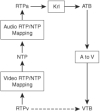
Figure 7-14 Audio and Video Synchronization
This sequence of steps maps the RTP video time stamp into the audio RTP timebase and then back into the video device timebase. The receiver follows these steps in order:
- Map the video RTP time stamp RTPv into the sender NTP time domain, using the mapping established by the RTP/NTP time stamp pairs in the video RTCP packets.
- From this NTP time stamp, calculate the corresponding audio RTP time stamp from the sender using the mapping established by the RTP/NTP time stamp pairs in the audio RTCP packets. At this point, the video RTP time stamp is mapped into the audio RTP timebase.
- From this audio RTP time stamp, calculate the corresponding time stamp in the audio device timebase by using the Krl offset. The result is a time stamp in the audio device timebase ATB.
- From ATB, calculate the corresponding time stamp in the video device timebase VTB using the offset AtoV.
The receiver now ensures that the video frame with RTP time stamp RTPv will play on the video presentation device at the calculated local video device timebase VTB.
Lip Sync Policy
The receiver may decide not to attempt to achieve lip sync for synchronized audio and video streams in certain circumstances, even if lip sync is possible. There are two scenarios in which this situation might occur:
- Excessive audio delay—If the receiver must delay audio to establish lip sync, the receiver might instead choose to achieve the lower audio latency of unsynchronized streams. The reason is because lower end-to-end audio latency achieves the best real-time interaction. The receiver can make this determination after it achieves buffer management for both audio and video streams. If the audio stream is the most-delayed stream, the receiver can opt to delay the video stream to achieve lip sync; if the video stream is the most-delayed stream, however, the receiver might opt to avoid delaying audio to achieve lip sync.
- Excessive video delay—If the receiver must delay video by a significant duration to achieve lip sync, on the order of a second or more, the receiver might need to store a large amount of video bitstream in a delay buffer. For high bit rate video streams, the amount of memory required to store this video data might exceed the available memory in the receiver. In this case, the receiver may opt to set an upper limit on the maximum delay of the video stream to accommodate the limited memory or forego video delay altogether.
Designing IP-Based Video Conferencing Systems: Dealing with Lip Synchronization(唇音同步)的更多相关文章
- Video processing systems and methods
BACKGROUND The present invention relates to video processing systems. Advances in imaging technology ...
- Video tagging systems based on DNNs
Need: With the ever-growth large-scale video in the mobile phone, so what will everyone get from the ...
- 可以创建专业的客户端/服务器视频会议应用程序的音频和视频控件LEADTOOLS Video Conferencing SDK
LEADTOOLS Video Streaming Module控件为您创建一个自定义的视频会议应用程序和工具提供所有需要的功能.软件开发人员可以使用Video Streaming Module SD ...
- DeepCoder: A Deep Neural Network Based Video Compression
郑重声明:原文参见标题,如有侵权,请联系作者,将会撤销发布! Abstract: 在深度学习的最新进展的启发下,我们提出了一种基于卷积神经网络(CNN)的视频压缩框架DeepCoder.我们分别对预测 ...
- 真实场景中WebRTC 用到的服务 STUN, TURN 和 signaling
FQ收录转自:WebRTC in the real world: STUN, TURN and signaling WebRTC enables peer to peer communication. ...
- Blackhat EU 2013 黑客大会(Full Schedule for Black Hat USA 2013)
大会文档下载:https://www.blackhat.com/eu-13/archives.html 此次BH EU 议题整体较水,涉及系统安全.移动安全.网络传输安全.WEB安全.游戏安全等.下面 ...
- Flexible implementation of a system management mode (SMM) in a processor
A system management mode (SMM) of operating a processor includes only a basic set of hardwired hooks ...
- Video for Linux Two API Specification Revision 2.6.32【转】
转自:https://www.linuxtv.org/downloads/legacy/video4linux/API/V4L2_API/spec-single/v4l2.html Video for ...
- Information Centric Networking Based Service Centric Networking
A method implemented by a network device residing in a service domain, wherein the network device co ...
随机推荐
- 软件卸载工具 Uninstall Tool 3.5.1 中文破解版
Uninstall Tool 是一个小巧.安全.快速.强大的软件卸载删除工具,它支持在使用软件本身的卸载程序卸载完毕后,再扫描软件残留的注册及其它残余文件,将其彻底在系统删除!安装监视器可以监视每个应 ...
- angular指令深度学习篇
angular指令深度学习-过滤器 limitTo ... <body ng-app="app" > <div ng-controller="myCtr ...
- 错误信息:内存位置访问无效。 (Exception from HRESULT: 0x800703E6)
错误提示: 错误信息:内存位置访问无效. (Exception from HRESULT: 0x800703E6) 异常类型:System.BadImageFormatException 堆栈跟踪: ...
- BZOJ2815: [ZJOI2012]灾难
传送门 学LCA的时候根本没意识到LCA可以有这么多玩法. 这玩意据说是个高级数据结构(支配树)的弱化版,蒟蒻没学过呀.所以出题人提出一个概念叫灾难树. 我理解的灾难树的意思实际上是属于DAG的一个子 ...
- [Nhibernate]二级缓存(二)
目录 写在前面 文档与系列文章 更新数据 二级缓存管理 总结 写在前面 本篇文章也算nhibernate入门系列的结尾了,在总结nhibernate系列的过程中,遇到了很多问题,学习的过程也是解决bu ...
- 如何在ASP.NET MVC和EF中使用AngularJS
(此文章同时发表在本人微信公众号"dotNET每日精华文章",欢迎右边二维码来关注.) AngularJS作为一个越来越流行的前端框架,在使用ASP.NET MVC和实体框架开发W ...
- 利用pg_stat_activity进行问题排查
pg_stat_activity是一个非常有用的视图,可以帮助排查pg的一些问题(如连接数目过多问题).pg_stat_activity每行展示的是一个“process”的相关信息,这里的“proce ...
- Java---类加载机制,构造方法,静态变量,(静态)代码块,父类,变量加载顺序
直接上代码: 代码1: public class ConstroctTest { private static ConstroctTest test = new ConstroctTest(); // ...
- (四)SQL Server分区管理
一.拆分分区(SPLIT) 在已有分区上添加一个新分区. 如下图所示,将分区03拆分成03和04分区,拆分方式先锁定旧03分区的所有数据,后将旧03分区相关数据迁移到分区04,最后删除旧03上的对应分 ...
- Node.js与Express4安装与配置
Nodejs简介 Node.js 基于 Chrome JavaScript 运行环境,用于便捷地搭建快速.可扩展的网络应用. 它使用了一个事件驱动.非阻塞式 I/O 的模型,使其轻量又高效, 非常适合 ...