
【MongoDB】5.MongoDB与java的简单结合
1.首先 你的清楚你的MongoDB的版本是多少 就下载对应的架包
下载地址如下:
http://mongodb.github.io/mongo-java-driver/
2.新建一个项目 把架包扔进去,并Build path到你的项目下【如果用于测试,请如下 多用一个架包】
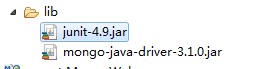
3.新建一个MongoConnection类 用来获取MongoDB的连接对象:
 package com.mongo.util;

 import java.util.ArrayList;

 import java.util.List;

 import com.mongodb.MongoClient;

 import com.mongodb.MongoCredential;

 import com.mongodb.ServerAddress;

 import com.mongodb.client.MongoDatabase;

 public class MongoConnection {

     /**

      * 需要验证用户名  密码的 MongoDB的连接方式   com.mongodb.MongoClient.getDatabase("数据库名")

      * @return

      */

     public MongoDatabase getConnection() {

          try {

                 //连接到MongoDB服务 如果是远程连接可以替换“localhost”为服务器所在IP地址

                 //ServerAddress()两个参数分别为 服务器地址 和 端口

                 ServerAddress serverAddress = new ServerAddress("localhost",27017);

                 List<ServerAddress> addrs = new ArrayList<ServerAddress>();

                 addrs.add(serverAddress);

                 //MongoCredential.createScramSha1Credential()三个参数分别为 用户名 数据库名称 密码

                 MongoCredential credential = MongoCredential.createScramSha1Credential("username", "databaseName", "password".toCharArray());

                 List<MongoCredential> credentials = new ArrayList<MongoCredential>();

                 credentials.add(credential);

                 //通过连接认证获取MongoDB连接

                 MongoClient mongoClient = new MongoClient(addrs,credentials);

                 //连接到数据库

                 MongoDatabase mongoDatabase = mongoClient.getDatabase("databaseName");

                 System.out.println("连接成功");

                 return mongoDatabase;

             } catch (Exception e) {

                 System.err.println( e.getClass().getName() + ": " + e.getMessage() );

             }

          return null;

     }

     /**

      * 不需要验证  用户名+密码  的获取连接的方式 com.mongodb.MongoClient.getDatabase("数据库名")

      * @return

      */

     public MongoDatabase getConnectionBasis(){

         try {

             //连接到mongodb服务

             MongoClient mongoClient = new MongoClient("localhost",27017);

             MongoDatabase mongoDatabase = mongoClient.getDatabase("databaseName");

             System.out.println("连接成功");

             return mongoDatabase;

         } catch (Exception e) {

             System.out.println(e.getClass().getName()+":"+e.getMessage());

         }

         return null;

     }

 }
4.再建一个类 用来测试 你的增删改查
 package com.mongo.test;

 import java.text.SimpleDateFormat;

 import java.util.ArrayList;

 import java.util.List;

 import org.bson.Document;

 import org.junit.Test;

 import com.mongo.util.MongoConnection;

 import com.mongodb.client.FindIterable;

 import com.mongodb.client.MongoCollection;

 import com.mongodb.client.MongoCursor;

 import com.mongodb.client.MongoDatabase;

 import com.mongodb.client.model.Filters;

 public class MongoTest {

     MongoConnection connection = new MongoConnection();

     //连接到数据库

     MongoDatabase mongoDatabase = connection.getConnectionBasis();

     @Test

     public void test(){

         //createCollection();//创建   集合 一次就好

         MongoCollection<Document> collection = getCollection();

         insertDomcument(collection);

         findAll(collection);

         //delete(collection);

     }

     /**

      * 创建  集合【对应RDBMS 中的数据表】 com.mongodb.client.MongoDatabase.createCollection("集合名")

      */

     public void createCollection(){

         mongoDatabase.createCollection("testConllection");

         System.out.println("创建集合成功");

     }

     /**

      * 获取  集合【对应RDBMS 中的数据表】com.mongodb.client.MongoDatabase.getCollection("集合名")

      */

     public MongoCollection<Document> getCollection(){

         MongoCollection<Document>  collection = mongoDatabase.getCollection("testConllection");

         System.out.println("转换到指定集合");

         return collection;

     }

     /**

      * 插入  文档【对应RDBMS 中的一条数据】com.mongodb.client.MongoCollection<Document>.insertOne()/insertMany()

      */

     public void insertDomcument(MongoCollection<Document> collection){

         /**

         * 1. 创建文档 org.bson.Document 参数为key-value的格式

         * 2. 创建文档集合List<Document>

         * 3. 将文档集合插入数据库集合中 mongoCollection.insertMany(List<Document>) 插入单个文档可以用 mongoCollection.insertOne(Document)

         * */

         Document document = new Document();

         document.append("name", "走四方");

         document.append("age", 23);

         document.append("url", "www.baidu.com");

         List<Document> list = new ArrayList<Document>();

         list.add(document);

         collection.insertMany(list);

         System.out.println("插入文档成功");

         //插入 单条数据

         Document  t = new Document();

         t.append("name", "走什么");

         t.append("age", 26);

         t.append("url", "www.agen.cn");

         collection.insertOne(t);

         System.out.println("插入单条数据成功");

     }

     /**

      * 查询  所有文档【表内 数据】com.mongodb.client.MongoCollection<Document>.find()

      * 查询  本条数据的时间节点   _id采用ObjectId格式

      *

      * ObjectId 是一个12字节 BSON 类型数据,有以下格式:

             前4个字节表示时间戳

             接下来的3个字节是机器标识码

             紧接的两个字节由进程id组成(PID)

             最后三个字节是随机数。

      */

     public void findAll(MongoCollection<Document> collection){

         /**

         * 1. 获取迭代器FindIterable<Document>

         * 2. 获取游标MongoCursor<Document>

         * 3. 通过游标遍历检索出的文档集合

         * */

          FindIterable<Document> findIterable = collection.find();

          MongoCursor<Document> mongoCursor = findIterable.iterator();

          while(mongoCursor.hasNext()){

              Document document = mongoCursor.next();

              System.out.println("MongoDB数据:"+document);

              System.out.println("本地时间:"+new SimpleDateFormat().format(document.getObjectId("_id").getDate()));

          }

     }

     /**

      * 更新   所有文档【表内  数据】com.mongodb.client.MongoCollection<Document>.updateMany()

      */

     public void update(MongoCollection<Document> collection){

         collection.updateMany(Filters.eq("age", 26), new Document("$set",new Document("age",100)));

         FindIterable<Document> findIterable = collection.find();

         MongoCursor<Document> cursor = findIterable.iterator();

         while (cursor.hasNext()) {

             System.out.println("更新后的MongoDB数据:"+cursor.next());

         }

     }

     /**

      * 删除  文档 com.mongodb.client.MongoCollection<Document>.deleteMany()/deleteOne()

      */

     public void delete(MongoCollection<Document> collection){

         // 删除符合条件的 第一个文档

         collection.findOneAndDelete(Filters.eq("age", 26));

         //删除符合条件的  所有文档

         collection.deleteMany(Filters.gte("age", 20));

         FindIterable<Document> findIterable = collection.find();

         MongoCursor<Document> cursor = findIterable.iterator();

         while(cursor.hasNext()){

             System.out.println("删除后的MongoDB数据:"+cursor.next());

         }

     }

 }
5.完成 自行研究
【MongoDB】5.MongoDB与java的简单结合的更多相关文章
- Mongodb系列- java客户端简单使用(CRUD)
Mongodb提供了很多的客户端: shell,python, java, node.js...等等. 以 java 为例实现简单的增删改查 pom文件: <dependencies> & ...
- Mongodb入门并使用java操作Mongodb
转载请注意出处:http://blog.csdn.net/zcm101 最近在学习NoSql,先从Mongodb入手,把最近学习的总结下. Mongodb下载安装 Mongodb的下载安装就不详细说了 ...
- mongodb 按照时间聚类 java
当存储到mongodb中的是string类型的时间,小tips: 1. 那么在对此域按照时间聚类(每周,每月)时就不能直接使用mongodb的time关键字了,因为mongodb有自己的时间类型,且目 ...
- MongoDB 副本集和C#交互,简单测试
MongoDB 副本集和C#交互,简单测试 primary节点宕机: 模拟primary节点宕机的情况,这时查看监控: 可以看到37018已经成了primary节点.主界面宕机导致了整个集群发生一次e ...
- MongoDB学习-在.NET中的简单操作
1.新建MVC项目, 管理NuGet包,进入下载MongDB.net库文件 2.新增项目DAL数据访问层,引用以下库文件: 3.C# 访问MongoDB通用方法类: using MongoDB.Dri ...
- mongodb数据库连接池(java版)
mongodb数据库接口的设计 package storm.db; import java.util.ArrayList; import com.mongodb.DB; import com.mong ...
- mongoDB介绍、安装、搭建简单的mongoDB服务器(一)
相关网站 1. http://www.mongodb.org/ 官网,可以下载安装程序,和doc,和驱动等. 2. http://www.mongoing.com/ 国内官方网站,博客,问题谈论等 ...
- C# 对MongoDB 进行增删改查的简单操作
C# 对MongoDB 进行增删改查的简单操作 下面演示下C#操作MongoDB驱动的简单的增删改查代码 运用到的MongoDB支持的C#驱动,当前版本为1.6.0 1,连接数据库 /// & ...
- python操作三大主流数据库(7)python操作mongodb数据库①mongodb的安装和简单使用
python操作mongodb数据库①mongodb的安装和简单使用 参考文档:中文版:http://www.mongoing.com/docs/crud.html英文版:https://docs.m ...
- 【MongoDB学习-在.NET中的简单操作】
1.新建MVC项目, 管理NuGet包,进入下载MongDB.net库文件 2.新增项目DAL数据访问层,引用以下库文件: 3.C# 访问MongoDB通用方法类: using MongoDB.Dri ...
随机推荐
- Map工具系列-01-Map代码生成工具说明
所有cs端工具集成了一个工具面板 -打开(IE) Map工具系列-01-Map代码生成工具说明 Map工具系列-02-数据迁移工具使用说明 Map工具系列-03-代码生成BySQl工具使用说明 Map ...
- python作用域和多继承
python作用域 python无块级作用域 看c语言代码: #include<stdio.h> int main() { > ) { ; } printf("i = %d ...
- Beta版本——用户试用与调研报告
1 引言 1.1 系统概述 毕设导师智能分配系统是一个用来简化传统手工匹配繁琐操作的系统.本系统将学生报志愿.系负责人收集整理数据.相关人员进行手工分配.反馈选择结果等繁琐的操作转移到线上.把毕设 ...
- Java中vector的使用详解
Vector 可实现自动增长的对象数组. java.util.vector提供了向量类(vector)以实现类似动态数组的功能.在Java语言中没有指针的概念,但如果正确灵活地使用指针又确实可以大大提 ...
- .Net 中的反射(反射特性) - Part.3
反射特性(Attribute) 可能很多人还不了解特性,所以我们先了解一下什么是特性.想想看如果有一个消息系统,它存在这样一个方法,用来将一则短消息发送给某人: // title: 标题:author ...
- 图解c/c++多级指针与“多维”数组
声明:本文为原创博文,如有转载,请注明出处.若本文有编辑错误.概念错误或者逻辑错误,请予以指正,谢谢. 指针与数组是C/C++编程中非常重要的元素,同时也是较难以理解的.其中,多级指针与“多维”数组更 ...
- Rabbitmq Exchange Type 说明
Exchange在定义的时候是有类型的,以决定到底是哪些Queue符合条件,可以接收消息 fanout 所有bind到此exchange的queue都可以接收消息 direct 通过routingKe ...
- Asp.net实现直接在浏览器预览Word、Excel、PDF、Txt文件(附源码)
功能说明 输入文件路径,在浏览器输出文件预览信息,经测试极速(Chrome).IE9.Firefox通过 分类文件及代码说明 DemoFiles 存放可测试文件 Default.aspx 启动页 ...
- VS2008 Debug与Release的本质区别(转)
如何设置:工具栏“生成”→“配置管理器”→“活动解决方案配置” 对于VS2008的初次使用者来说,常会遇到的编译问题时,Debug版本运行正常,但在Release版本则不稳定或无法运行.以下是对Deb ...
- 使用OLEQAxObject导出Log日志文件
头文件<QAxObject> Qt project settings需要支持QtActivex container 具体导出如下:(单列这里) QString filepath=QFile ...