
Vmware Vsphere WebService之vijava 开发(二)一性能信息的采集(实时监控)
最近一直没有更新这部分的内容,会利用五一时间完成vcenter这一个系列。
这里先给大家一本关于vijava开发的书,比较实用。
地址:http://pan.baidu.com/s/1gfkl9mj。密码:t1y3
有网友评论要数据存储读写速度及延迟之后时间的实现。今天就先介绍关于java实现实时监控vcenter状态的内容,包括CPU、内存、网络、存储等。
在看这篇前如果还是新手,建议先看下我的第一篇 http://www.cnblogs.com/xiaodige/p/6721517.html(vijava基本连接和数据中心信息获取)
先说一下我之前是怎么发现,CPU、内存、网络、存储等可以监控的内容。我用vsphere client连接vcenter查看客户端所能监控的属性.
建议大家在实现功能前,先看下官方文档关于性能监控的知识。贴上连接vcenter6.0的官方文档连接。http://pubs.vmware.com/vsphere-60/index.jsp
比如要监控虚拟机的性能信息:首先得保证虚拟机开机,选择“性能选项”,点击“图标选项”,这样就能看到它所支持的性能监控信息。下面贴图:
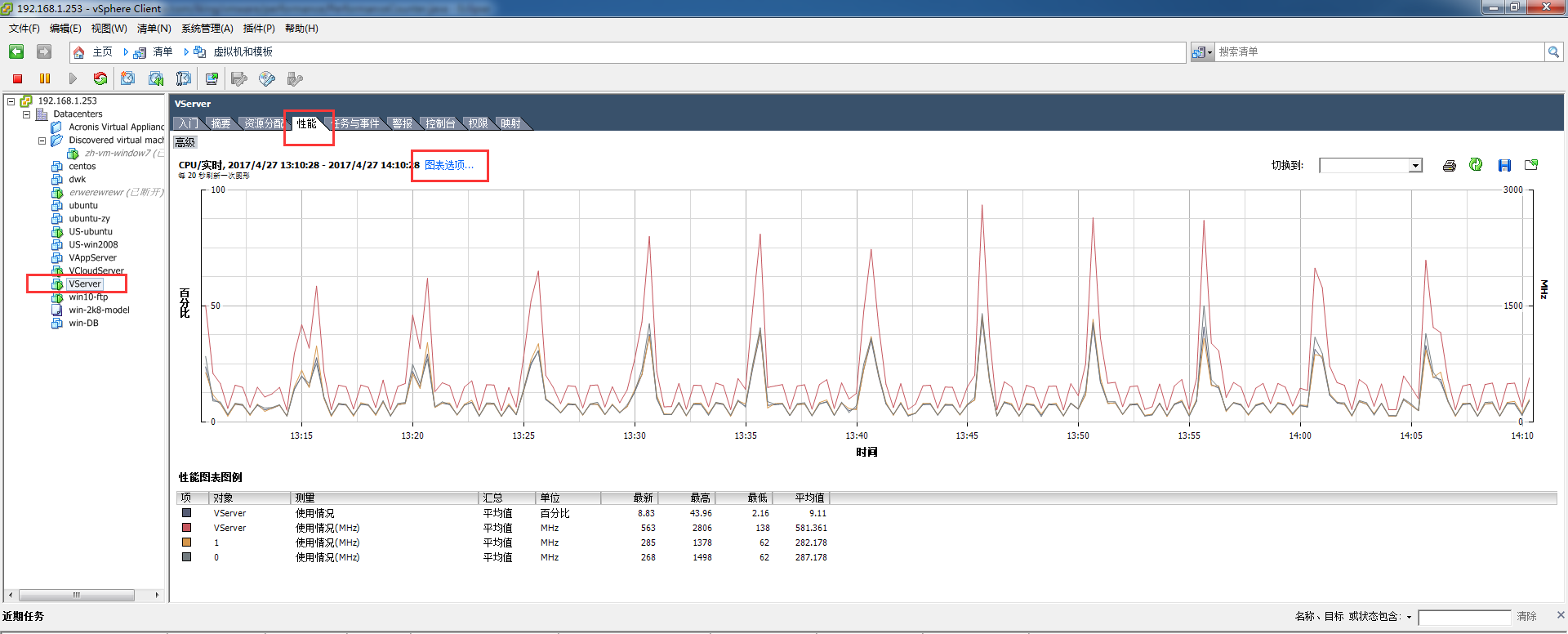
下图左边就是该对象具体能监控的信息,右边就是具体性能,使用率啊等等。
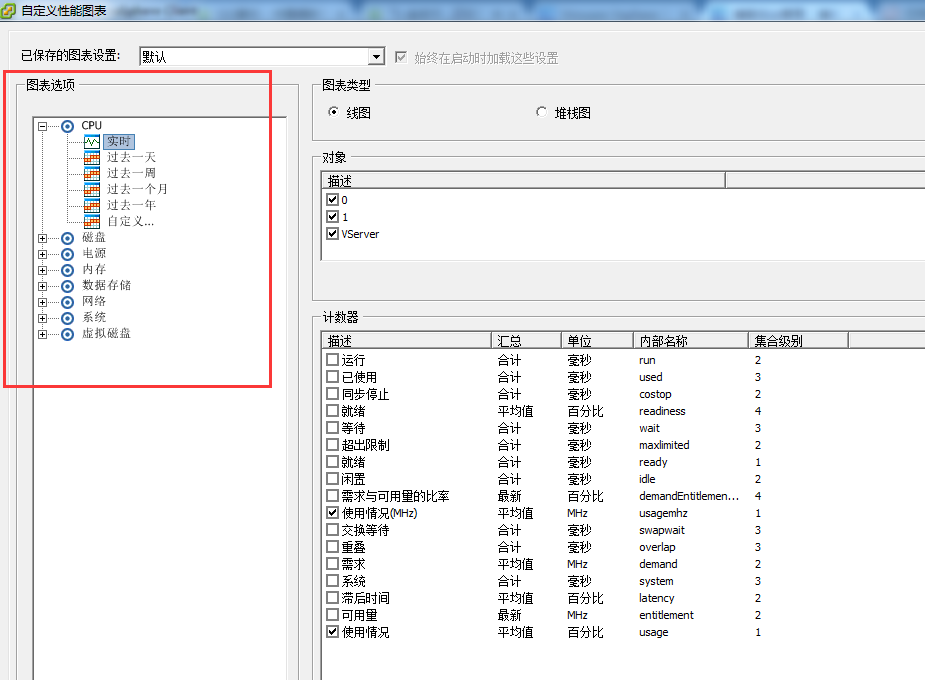
做性能监控这块,如果不知道具体能监控对象的哪些属性就打开客户端看看。下面就贴上具体的java实现代码。
package com.iking.vmware.performance;

import java.util.ArrayList;

import java.util.Calendar;

import java.util.Date;

import java.util.HashMap;

import java.util.List;

import java.util.Map;

import com.iking.vmware.bean.PerformanceManage;

import com.iking.vmware.bean.VsphereConst;

import com.iking.vmware.connection.ConnectedVimServiceBase;

import com.iking.vmware.vim25.PerfCounterInfo;

import com.iking.vmware.vim25.PerfEntityMetric;

import com.iking.vmware.vim25.PerfEntityMetricBase;

import com.iking.vmware.vim25.PerfMetricId;

import com.iking.vmware.vim25.PerfMetricIntSeries;

import com.iking.vmware.vim25.PerfMetricSeries;

import com.iking.vmware.vim25.PerfQuerySpec;

import com.iking.vmware.vim25.PerfSampleInfo;

import com.iking.vmware.vim25.mo.Folder;

import com.iking.vmware.vim25.mo.HostSystem;

import com.iking.vmware.vim25.mo.InventoryNavigator;

import com.iking.vmware.vim25.mo.ManagedEntity;

import com.iking.vmware.vim25.mo.PerformanceManager;

/**

 * @description 监控统计vcenter所有对象性能数据

 * @date 2017年2月9日11:46:35

 * @version 1.1

 * @author DiWk

 */

public class PerformanceCounter {

    private ConnectedVimServiceBase cs = null;

    public ConnectedVimServiceBase getCs() {

        return cs;

    }

    public void setCs(ConnectedVimServiceBase cs) {

        this.cs = cs;

    }

    /**

     * @description 根据属性名称、类型、对象、采集间隔获取所有的性能数据

     * @date 2017年2月8日14:37:58

     * @return PerformanceMap 性能数据map对象

     * @version 1.1

     * @author DiWk

     */

    public Map<String, PerformanceManage> getPerfData(String nameInfo, List<String> groupInfo, ManagedEntity mo,

            Integer interval) {

        Map<String, PerformanceManage> PerformanceMap = null;

        Date date = new Date();

        Date sTime = new Date(date.getTime() - 24 * 60 * 60 * 1000);

        Calendar calBegin = Calendar.getInstance();

        calBegin.setTime(sTime);

        Calendar calEnd = Calendar.getInstance();

        calEnd.setTime(date);

        try {

            PerformanceMap = new HashMap<String, PerformanceManage>();

            if (mo != null) {

                PerformanceManager performanceManager = cs.si.getPerformanceManager();

                PerfCounterInfo[] cInfo = performanceManager.getPerfCounter();

                Map<Integer, PerfCounterInfo> counters = new HashMap<Integer, PerfCounterInfo>();

                for (PerfCounterInfo pcInfo : cInfo) {

                    counters.put(new Integer(pcInfo.getKey()), pcInfo);

                }

                PerfMetricId[] listpermeid = performanceManager.queryAvailablePerfMetric(mo, null, null, interval);

                ArrayList<PerfMetricId> mMetrics = new ArrayList<PerfMetricId>();

                if (listpermeid != null) {

                    for (int index = 0; index < listpermeid.length; ++index) {

                        if (counters.containsKey(new Integer(listpermeid[index].getCounterId()))) {

                            mMetrics.add(listpermeid[index]);

                        }

                    }

                }

                PerfQuerySpec qSpec = new PerfQuerySpec();

                qSpec.setEntity(mo.getMOR());

                qSpec.setMetricId(listpermeid);

                qSpec.setStartTime(calBegin);

                qSpec.setEndTime(calEnd);

                qSpec.setIntervalId(interval);

                qSpec.setFormat("normal");

                PerfQuerySpec[] arryQuery = { qSpec };

                PerfEntityMetricBase[] pValues = performanceManager.queryPerf(arryQuery);

                if (pValues == null || pValues.length <= 0) {

                    return null;

                }

                PerfSampleInfo[] listperfsinfo = ((PerfEntityMetric) pValues[0]).getSampleInfo();

                for (int i = 0; i < pValues.length; i++) {

                    PerfMetricSeries[] listpems = ((PerfEntityMetric) pValues[i]).getValue();

                    for (int vi = 0; vi < listpems.length; ++vi) {

                        PerfCounterInfo pci = (PerfCounterInfo) counters

                                .get(new Integer(listpems[vi].getId().getCounterId()));

                        if (pci != null) {

                            for (String Info : groupInfo) {

                                PerformanceManage performanceManage = new PerformanceManage();

                                performanceManage.setStartTime(listperfsinfo[0].getTimestamp().getTime());

                                performanceManage

                                        .setEndTime((listperfsinfo[listperfsinfo.length - 1]).getTimestamp().getTime());

                                if (pci.getNameInfo().getKey().equalsIgnoreCase(nameInfo)

                                        && pci.getGroupInfo().getKey().equalsIgnoreCase(Info)) {

                                    if (listpems[vi] instanceof PerfMetricIntSeries) {

                                        PerfMetricIntSeries val = (PerfMetricIntSeries) listpems[vi];

                                        long[] lislon = val.getValue();

                                        List<Long> asList = new ArrayList<Long>();

                                        for (Long k : lislon) {

                                            asList.add(k);

                                        }

                                        performanceManage.setPerformanceValues(asList);

                                        PerformanceMap.put(Info, performanceManage);

                                    }

                                }

                            }

                        }

                    }

                }

            }

        } catch (Exception e) {

            e.printStackTrace();

        }

        return PerformanceMap;

    }

    /** main测试方法 */

    public static void main(String[] args) throws Exception {

        PerformanceCounter performanceCounter2 = new PerformanceCounter();

        ConnectedVimServiceBase cs = new ConnectedVimServiceBase();

        cs.connect("192.168.1.253", "administrator@vsphere.local", "Iking!@#456");

        performanceCounter2.setCs(cs);

        Folder rootFolder = cs.si.getRootFolder();

        HostSystem dataCenter = (HostSystem) new InventoryNavigator(rootFolder)

                .searchManagedEntity(VsphereConst.HOSTSYSTEM, "192.168.1.254");

        List<String> listNm = new ArrayList<String>();

        listNm.add("datastore");

        Map<String, PerformanceManage> perfData = performanceCounter2.getPerfData("write", listNm, dataCenter, 20);

        PerformanceManage performanceManage = perfData.get("datastore");

        List<Long> performanceValues = performanceManage.getPerformanceValues();

        System.out.println(performanceValues.toString());

    }

}
上面就是通过Java代码实现对vcenter性能的实时监控,相信大家结合官方文档和我分享的电子书一定能实现自己想要的效果。
关于数据存储并没有历史信息的监控,只有实时信息的监控。所以当我统计数据存储的历史信息时,我是累加了所有的虚拟机、主机关于数据存储的数据。我知道这不是一个很好的方法,但是目前没想到更好的。希望和网友分享学习。
Vmware Vsphere WebService之vijava 开发(二)一性能信息的采集(实时监控)的更多相关文章
- Vmware Vsphere WebService之vijava 开发一-vcenter连接、及集群信息获取
开始是通过java代码调用vsphere提供的原始接口,从而控制vcenter的操作.当第一个版本做完之后发现代码执行的速度特别慢,后来在网上看到有人用vijava(对vsphere原始接口封装)编程 ...
- Vmware Vsphere WebService SDK开发(第一讲)-基本知识学习
刚开始这方面开发的时候,不知道如何下手,能够查到的资料特别少,而且看到很多网友和我一样也在找这方面的资料.接下来的一段时间我就结合自己所参与的项目,完成关于Vmware Vsphere WebServ ...
- Vmware vsphere webservice sdk 连接打开慢的问题
还在为VimService实例化速度慢的问题烦恼吗?这有一篇文章可以帮你解决问题,英文水平所限,就不翻译了,原文地址http://kb.vmware.com/selfservice/microsite ...
- 二十九、rsync+inotity实时监控同步工具
一.场景应用: 客户通过url访问资源(查询,下载等),并发量是非常高的,所以运用负载均衡分担web服务器的压力,在后端连接不同的 ...
- VMware vSphere 服务器虚拟化之二十五 桌面虚拟化之终端服务池
VMware vSphere 服务器虚拟化之二十五 桌面虚拟化之终端服务池 终端服务池是指由一台或多台微软终端服务器提供服务的桌面源组成的池.终端服务器桌面源可交付多个桌面.它具有以下特征: 1.终端 ...
- VMware vSphere 服务器虚拟化之二十二桌面虚拟化之创建View Composer链接克隆的虚拟桌面池
VMware vSphere 服务器虚拟化之二十二桌面虚拟化之创建View Composer链接克隆的虚拟桌面池 在上一节我们创建了完整克隆的自动专有桌面池,在创建过程比较缓慢,这次我们将学习创建Vi ...
- VMware vSphere 服务器虚拟化之二十八 桌面虚拟化之安装View传输服务器
VMware vSphere 服务器虚拟化之二十八 桌面虚拟化之安装View传输服务器 View 传输服务器用于管理和简化数据中心与在最终用户本地系统上检出使用的 View 桌面之间的数据传输.必须安 ...
- VMware vSphere 服务器虚拟化之二十七桌面虚拟化之View中使用Thinapp软件虚拟化
VMware vSphere 服务器虚拟化之二十七桌面虚拟化之View中使用Thinapp软件虚拟化 VMware ThinApp 应用程序虚拟化软件是无代理解决方案,通过将应用程序隔离并封装为EXE ...
- VMware vSphere 服务器虚拟化之二十六 桌面虚拟化之View Persona Management
VMware vSphere 服务器虚拟化之二十六 桌面虚拟化之View Persona Management 实验失败告终,启动VMware View Persona Management服务报10 ...
随机推荐
- 1574: [Usaco2009 Jan]地震损坏Damage
1574: [Usaco2009 Jan]地震损坏Damage Time Limit: 10 Sec Memory Limit: 64 MBSubmit: 425 Solved: 232[Subm ...
- 2060: [Usaco2010 Nov]Visiting Cows 拜访奶牛
2060: [Usaco2010 Nov]Visiting Cows 拜访奶牛 Time Limit: 3 Sec Memory Limit: 64 MBSubmit: 252 Solved: 1 ...
- 算法模板——sap网络最大流 2(非递归+邻接表)
实现功能:同最大流 1 这里面主要是把前面的邻接矩阵改成了邻接表,相比之下速度大大提高——本人实测,当M=1000000 N=10000 时,暂且不考虑邻接矩阵会不会MLE,新的程序速度快了很多倍(我 ...
- 1620: [Usaco2008 Nov]Time Management 时间管理
1620: [Usaco2008 Nov]Time Management 时间管理 Time Limit: 5 Sec Memory Limit: 64 MBSubmit: 506 Solved: ...
- final 、finally 和 finalize()的区别
1. final 是一个关键字.可以修饰数据.方法.类. 1)final 数据:final 用来修饰一个永不改变的编译时常量,或者运行时初始化但是不希望被改变的常量.一个既是 static又是 fin ...
- SignalR指定用户推送消息
一.首先,在MVC项目中安装SingalR包(SingalR2.0需要.net4.5以上,VS2010可以安装1.1.3版本,本例为VS2010+SignalR1.1.3). 打开工具-NuGet程序 ...
- Exchange Server 2007的即将生命周期,您的计划是?
多数人做微软技术,Exchange Server 几乎所有 Microsoft 产品,都具有产品支持生命周期,原厂提供的新增功能. 错误修复.安全修补程序等.产品生命周期通常持续时间 10 年,超过期 ...
- Spring中一个类的注入和引用是不一样的
1.在Spring管理下的bean需要以下面这种方式引入(一种注入方式): private MgrService mgrService; public MgrService getMgrService ...
- mysq常用l性能分析方法
orzdba查看读写./orzdba.pl --mysql -S /data/mysql30001/mysql.sock 语句查看读写命令数量,以及数据库TPS,传输的大小 查看processlist ...
- 疑问:Spring中构造器、init-method、@PostConstruct、afterPropertiesSet孰先孰后,自动注入发生时间
问题:今天想写一个通用点的方法,根据传入的参数的类型(clazz对象),判断使用哪个mapper来插入mysql数据库. 下面是我的写法: public interface BizNeeqCommon ...