
Vmware Vsphere WebService之vijava 开发(二)一性能信息的采集(实时监控)
最近一直没有更新这部分的内容,会利用五一时间完成vcenter这一个系列。
这里先给大家一本关于vijava开发的书,比较实用。
地址:http://pan.baidu.com/s/1gfkl9mj。密码:t1y3
有网友评论要数据存储读写速度及延迟之后时间的实现。今天就先介绍关于java实现实时监控vcenter状态的内容,包括CPU、内存、网络、存储等。
在看这篇前如果还是新手,建议先看下我的第一篇 http://www.cnblogs.com/xiaodige/p/6721517.html(vijava基本连接和数据中心信息获取)
先说一下我之前是怎么发现,CPU、内存、网络、存储等可以监控的内容。我用vsphere client连接vcenter查看客户端所能监控的属性.
建议大家在实现功能前,先看下官方文档关于性能监控的知识。贴上连接vcenter6.0的官方文档连接。http://pubs.vmware.com/vsphere-60/index.jsp
比如要监控虚拟机的性能信息:首先得保证虚拟机开机,选择“性能选项”,点击“图标选项”,这样就能看到它所支持的性能监控信息。下面贴图:
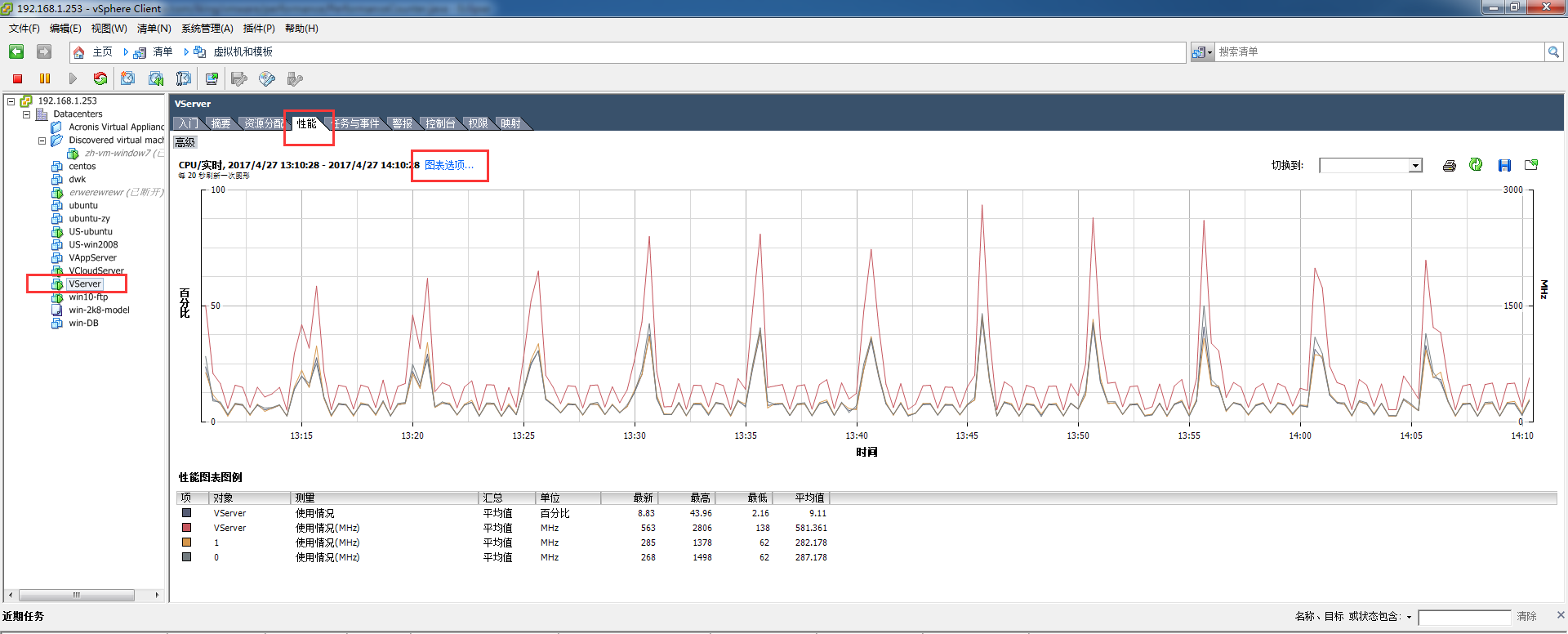
下图左边就是该对象具体能监控的信息,右边就是具体性能,使用率啊等等。
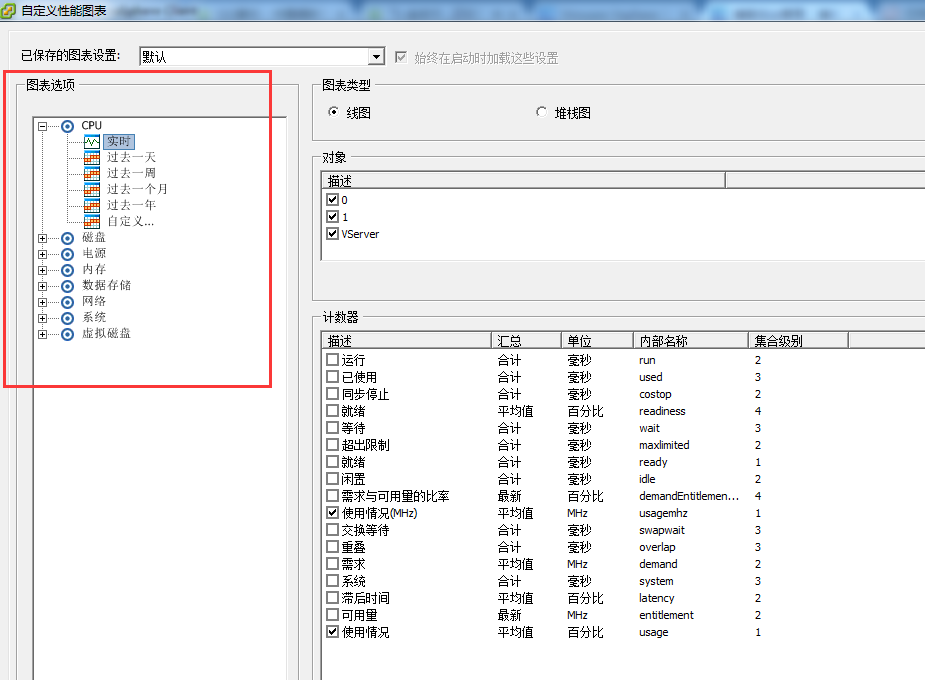
做性能监控这块,如果不知道具体能监控对象的哪些属性就打开客户端看看。下面就贴上具体的java实现代码。
package com.iking.vmware.performance;

import java.util.ArrayList;

import java.util.Calendar;

import java.util.Date;

import java.util.HashMap;

import java.util.List;

import java.util.Map;

import com.iking.vmware.bean.PerformanceManage;

import com.iking.vmware.bean.VsphereConst;

import com.iking.vmware.connection.ConnectedVimServiceBase;

import com.iking.vmware.vim25.PerfCounterInfo;

import com.iking.vmware.vim25.PerfEntityMetric;

import com.iking.vmware.vim25.PerfEntityMetricBase;

import com.iking.vmware.vim25.PerfMetricId;

import com.iking.vmware.vim25.PerfMetricIntSeries;

import com.iking.vmware.vim25.PerfMetricSeries;

import com.iking.vmware.vim25.PerfQuerySpec;

import com.iking.vmware.vim25.PerfSampleInfo;

import com.iking.vmware.vim25.mo.Folder;

import com.iking.vmware.vim25.mo.HostSystem;

import com.iking.vmware.vim25.mo.InventoryNavigator;

import com.iking.vmware.vim25.mo.ManagedEntity;

import com.iking.vmware.vim25.mo.PerformanceManager;

/**

 * @description 监控统计vcenter所有对象性能数据

 * @date 2017年2月9日11:46:35

 * @version 1.1

 * @author DiWk

 */

public class PerformanceCounter {

    private ConnectedVimServiceBase cs = null;

    public ConnectedVimServiceBase getCs() {

        return cs;

    }

    public void setCs(ConnectedVimServiceBase cs) {

        this.cs = cs;

    }

    /**

     * @description 根据属性名称、类型、对象、采集间隔获取所有的性能数据

     * @date 2017年2月8日14:37:58

     * @return PerformanceMap 性能数据map对象

     * @version 1.1

     * @author DiWk

     */

    public Map<String, PerformanceManage> getPerfData(String nameInfo, List<String> groupInfo, ManagedEntity mo,

            Integer interval) {

        Map<String, PerformanceManage> PerformanceMap = null;

        Date date = new Date();

        Date sTime = new Date(date.getTime() - 24 * 60 * 60 * 1000);

        Calendar calBegin = Calendar.getInstance();

        calBegin.setTime(sTime);

        Calendar calEnd = Calendar.getInstance();

        calEnd.setTime(date);

        try {

            PerformanceMap = new HashMap<String, PerformanceManage>();

            if (mo != null) {

                PerformanceManager performanceManager = cs.si.getPerformanceManager();

                PerfCounterInfo[] cInfo = performanceManager.getPerfCounter();

                Map<Integer, PerfCounterInfo> counters = new HashMap<Integer, PerfCounterInfo>();

                for (PerfCounterInfo pcInfo : cInfo) {

                    counters.put(new Integer(pcInfo.getKey()), pcInfo);

                }

                PerfMetricId[] listpermeid = performanceManager.queryAvailablePerfMetric(mo, null, null, interval);

                ArrayList<PerfMetricId> mMetrics = new ArrayList<PerfMetricId>();

                if (listpermeid != null) {

                    for (int index = 0; index < listpermeid.length; ++index) {

                        if (counters.containsKey(new Integer(listpermeid[index].getCounterId()))) {

                            mMetrics.add(listpermeid[index]);

                        }

                    }

                }

                PerfQuerySpec qSpec = new PerfQuerySpec();

                qSpec.setEntity(mo.getMOR());

                qSpec.setMetricId(listpermeid);

                qSpec.setStartTime(calBegin);

                qSpec.setEndTime(calEnd);

                qSpec.setIntervalId(interval);

                qSpec.setFormat("normal");

                PerfQuerySpec[] arryQuery = { qSpec };

                PerfEntityMetricBase[] pValues = performanceManager.queryPerf(arryQuery);

                if (pValues == null || pValues.length <= 0) {

                    return null;

                }

                PerfSampleInfo[] listperfsinfo = ((PerfEntityMetric) pValues[0]).getSampleInfo();

                for (int i = 0; i < pValues.length; i++) {

                    PerfMetricSeries[] listpems = ((PerfEntityMetric) pValues[i]).getValue();

                    for (int vi = 0; vi < listpems.length; ++vi) {

                        PerfCounterInfo pci = (PerfCounterInfo) counters

                                .get(new Integer(listpems[vi].getId().getCounterId()));

                        if (pci != null) {

                            for (String Info : groupInfo) {

                                PerformanceManage performanceManage = new PerformanceManage();

                                performanceManage.setStartTime(listperfsinfo[0].getTimestamp().getTime());

                                performanceManage

                                        .setEndTime((listperfsinfo[listperfsinfo.length - 1]).getTimestamp().getTime());

                                if (pci.getNameInfo().getKey().equalsIgnoreCase(nameInfo)

                                        && pci.getGroupInfo().getKey().equalsIgnoreCase(Info)) {

                                    if (listpems[vi] instanceof PerfMetricIntSeries) {

                                        PerfMetricIntSeries val = (PerfMetricIntSeries) listpems[vi];

                                        long[] lislon = val.getValue();

                                        List<Long> asList = new ArrayList<Long>();

                                        for (Long k : lislon) {

                                            asList.add(k);

                                        }

                                        performanceManage.setPerformanceValues(asList);

                                        PerformanceMap.put(Info, performanceManage);

                                    }

                                }

                            }

                        }

                    }

                }

            }

        } catch (Exception e) {

            e.printStackTrace();

        }

        return PerformanceMap;

    }

    /** main测试方法 */

    public static void main(String[] args) throws Exception {

        PerformanceCounter performanceCounter2 = new PerformanceCounter();

        ConnectedVimServiceBase cs = new ConnectedVimServiceBase();

        cs.connect("192.168.1.253", "administrator@vsphere.local", "Iking!@#456");

        performanceCounter2.setCs(cs);

        Folder rootFolder = cs.si.getRootFolder();

        HostSystem dataCenter = (HostSystem) new InventoryNavigator(rootFolder)

                .searchManagedEntity(VsphereConst.HOSTSYSTEM, "192.168.1.254");

        List<String> listNm = new ArrayList<String>();

        listNm.add("datastore");

        Map<String, PerformanceManage> perfData = performanceCounter2.getPerfData("write", listNm, dataCenter, 20);

        PerformanceManage performanceManage = perfData.get("datastore");

        List<Long> performanceValues = performanceManage.getPerformanceValues();

        System.out.println(performanceValues.toString());

    }

}
上面就是通过Java代码实现对vcenter性能的实时监控,相信大家结合官方文档和我分享的电子书一定能实现自己想要的效果。
关于数据存储并没有历史信息的监控,只有实时信息的监控。所以当我统计数据存储的历史信息时,我是累加了所有的虚拟机、主机关于数据存储的数据。我知道这不是一个很好的方法,但是目前没想到更好的。希望和网友分享学习。
Vmware Vsphere WebService之vijava 开发(二)一性能信息的采集(实时监控)的更多相关文章
- Vmware Vsphere WebService之vijava 开发一-vcenter连接、及集群信息获取
开始是通过java代码调用vsphere提供的原始接口,从而控制vcenter的操作.当第一个版本做完之后发现代码执行的速度特别慢,后来在网上看到有人用vijava(对vsphere原始接口封装)编程 ...
- Vmware Vsphere WebService SDK开发(第一讲)-基本知识学习
刚开始这方面开发的时候,不知道如何下手,能够查到的资料特别少,而且看到很多网友和我一样也在找这方面的资料.接下来的一段时间我就结合自己所参与的项目,完成关于Vmware Vsphere WebServ ...
- Vmware vsphere webservice sdk 连接打开慢的问题
还在为VimService实例化速度慢的问题烦恼吗?这有一篇文章可以帮你解决问题,英文水平所限,就不翻译了,原文地址http://kb.vmware.com/selfservice/microsite ...
- 二十九、rsync+inotity实时监控同步工具
一.场景应用: 客户通过url访问资源(查询,下载等),并发量是非常高的,所以运用负载均衡分担web服务器的压力,在后端连接不同的 ...
- VMware vSphere 服务器虚拟化之二十五 桌面虚拟化之终端服务池
VMware vSphere 服务器虚拟化之二十五 桌面虚拟化之终端服务池 终端服务池是指由一台或多台微软终端服务器提供服务的桌面源组成的池.终端服务器桌面源可交付多个桌面.它具有以下特征: 1.终端 ...
- VMware vSphere 服务器虚拟化之二十二桌面虚拟化之创建View Composer链接克隆的虚拟桌面池
VMware vSphere 服务器虚拟化之二十二桌面虚拟化之创建View Composer链接克隆的虚拟桌面池 在上一节我们创建了完整克隆的自动专有桌面池,在创建过程比较缓慢,这次我们将学习创建Vi ...
- VMware vSphere 服务器虚拟化之二十八 桌面虚拟化之安装View传输服务器
VMware vSphere 服务器虚拟化之二十八 桌面虚拟化之安装View传输服务器 View 传输服务器用于管理和简化数据中心与在最终用户本地系统上检出使用的 View 桌面之间的数据传输.必须安 ...
- VMware vSphere 服务器虚拟化之二十七桌面虚拟化之View中使用Thinapp软件虚拟化
VMware vSphere 服务器虚拟化之二十七桌面虚拟化之View中使用Thinapp软件虚拟化 VMware ThinApp 应用程序虚拟化软件是无代理解决方案,通过将应用程序隔离并封装为EXE ...
- VMware vSphere 服务器虚拟化之二十六 桌面虚拟化之View Persona Management
VMware vSphere 服务器虚拟化之二十六 桌面虚拟化之View Persona Management 实验失败告终,启动VMware View Persona Management服务报10 ...
随机推荐
- 学学简单的-------------javaScript基础
首先知道什么是JavaScript? JavaScript是一种描述性语言,也是一种基于对象和事件驱动的.并具有安全性的脚本语言. 2.JavaScript由三部分组成:①ecmascript ②Bo ...
- springmvc.xml或spring.xml 能运行配置文件总是出现错误
1:在java开发时总遇到配置文件配置正确,可以运行但有时显示错误.例如下图 上面配置文件正确但有时显错就不能运行.原因是配置文件的约束项错了. 原因是自己的jar包和配置文件版本不同.如果电脑联网它 ...
- Angular2发布思路(整理官网Deployment页面)
本文是按着ng2官网的高级内容“Deployment”的思路整理得出的,原文虽然在angular2的中文站下挂着,截止目前却还是英文版未翻译,笔者就在这里结合自己的理解给出原文的一点点整理.这是原文地 ...
- (14)jdk1.5开始的一些新特性:静态导入,增强for循环,可变参数,自动装箱/拆箱,枚举类型
Jdk1.5新特性之静态导入 jdk1.5新特性值静态导入 静态导入的作用:简化缩写 静态导入的作用:可以作用一个类的所有静态成员. 静态导入的格式:import static 包名.类名.静态的成员 ...
- oracle 实例启动报错(ORA-01078: failure in processing system parameters )
在启动Oracle数据库时报错,如下: [oracle@localhost ~]$ sqlplus / as sysdba SQL*Plus: Release 11.2.0.1.0 Productio ...
- iOS开发之UIApplication和delegate
1.概述 所有的移动操作系统都有个致命的缺点:app很容易受到打扰.比如一个来电或者锁屏会导致app进入后台甚至被终止. 还有很多其它类似的情况会导致app受到干扰,在app受到干扰时,会产生一些系统 ...
- shell中的readonly
readonly用来定义只读变量,一旦使用readonly定义的变量在脚本中就不能更改 测试脚本 #!/bin/sh readonly a='haha' echo a a='xixi' //更改变量的 ...
- 《连载 | 物联网框架ServerSuperIO教程》- 17.支持实时数据库,高并发保存测点数据。附:3.4 发布与版本更新说明。
1.C#跨平台物联网通讯框架ServerSuperIO(SSIO)介绍 <连载 | 物联网框架ServerSuperIO教程>1.4种通讯模式机制. <连载 | 物联网框架Serve ...
- 在Activiti中如何使用自定义的组织架构
1.概述 我们知道,activiti是一个不错的流程引擎,它有自身的人员组织架构,但仅限于用户.用户组的管理,流程产生的任务(UserTask),就涉及到任务的所属人(Owner),任务的执行人(as ...
- 新人小达之wpf
Wpf学习之路-- 第一次写微博,可能内容不够精细,但目的就是把问题讲明白,让看到文章的小伙伴们少走弯路. 由于公司的需要,需要学习.net的一门新技术-wpf. 要说wpf是什么框架?模式?架构? ...