
Best packages for data manipulation in R
dplyr and data.table are amazing packages that make data manipulation in R fun. Both packages have their strengths. While dplyr is more elegant and resembles natural language, data.table is succinct and we can do a lot withdata.table in just a single line. Further, data.table is, in some cases, faster (see benchmark here) and it may be a go-to package when performance and memory are constraints. You can read comparison of dplyr and data.tablefrom Stack Overflow and Quora.
You can get reference manual and vignettes for data.table here and for dplyrhere. You can read other tutorial about dplyr published at DataScience+
Background
I am a long time dplyr and data.table user for my data manipulation tasks. For someone who knows one of these packages, I thought it could help to show codes that perform the same tasks in both packages to help them quickly study the other. If you know either package and have interest to study the other, this post is for you.
dplyr
dplyr has 5 verbs which make up the majority of the data manipulation tasks we perform. Select: used to select one or more columns; Filter: used to select some rows based on specific criteria; Arrange: used to sort data based on one or more columns in ascending or descending order; Mutate: used to add new columns to our data; Summarise: used to create chunks from our data.
data.table
data.table has a very succinct general format: DT[i, j, by], which is interpreted as: Take DT, subset rows using i, then calculate j grouped by by.
Data manipulation
First we will install some packages for our project.
library(dplyr)

library(data.table)

library(lubridate)

library(jsonlite)

library(tidyr)

library(ggplot2)

library(compare)
The data we will use here is from DATA.GOV. It is Medicare Hospital Spending by Claim and it can be downloaded from here. Let’s download the data in JSONformat using the fromJSON function from the jsonlite package. Since JSON is a very common data format used for asynchronous browser/server communication, it is good if you understand the lines of code below used to get the data. You can get an introductory tutorial on how to use the jsonlite package to work with JSON data here and here. However, if you want to focus only on the data.table and dplyr commands, you can safely just run the codes in the two cells below and ignore the details.
spending=fromJSON("https://data.medicare.gov/api/views/nrth-mfg3/rows.json?accessType=DOWNLOAD")

names(spending)

"meta" "data"

meta=spending$meta

hospital_spending=data.frame(spending$data)

colnames(hospital_spending)=make.names(meta$view$columns$name)

hospital_spending=select(hospital_spending,-c(sid:meta))

glimpse(hospital_spending)

Observations: 70598

Variables:

$ Hospital.Name                       (fctr) SOUTHEAST ALABAMA MEDICAL CENT...

$ Provider.Number.                    (fctr) 010001, 010001, 010001, 010001...

$ State                               (fctr) AL, AL, AL, AL, AL, AL, AL, AL...

$ Period                              (fctr) 1 to 3 days Prior to Index Hos...

$ Claim.Type                          (fctr) Home Health Agency, Hospice, I...

$ Avg.Spending.Per.Episode..Hospital. (fctr) 12, 1, 6, 160, 1, 6, 462, 0, 0...

$ Avg.Spending.Per.Episode..State.    (fctr) 14, 1, 6, 85, 2, 9, 492, 0, 0,...

$ Avg.Spending.Per.Episode..Nation.   (fctr) 13, 1, 5, 117, 2, 9, 532, 0, 0...

$ Percent.of.Spending..Hospital.      (fctr) 0.06, 0.01, 0.03, 0.84, 0.01, ...

$ Percent.of.Spending..State.         (fctr) 0.07, 0.01, 0.03, 0.46, 0.01, ...

$ Percent.of.Spending..Nation.        (fctr) 0.07, 0.00, 0.03, 0.58, 0.01, ...

$ Measure.Start.Date                  (fctr) 2014-01-01T00:00:00, 2014-01-0...

$ Measure.End.Date                    (fctr) 2014-12-31T00:00:00, 2014-12-3...
As shown above, all columns are imported as factors and let’s change the columns that contain numeric values to numeric.
cols = 6:11; # These are the columns to be changed to numeric.

hospital_spending[,cols] <- lapply(hospital_spending[,cols], as.numeric)
The last two columns are measure start date and measure end date. So, let’s use the lubridate package to correct the classes of these columns.
cols = 12:13; # These are the columns to be changed to dates.

hospital_spending[,cols] <- lapply(hospital_spending[,cols], ymd_hms)
Now, let’s check if the columns have the classes we want.
sapply(hospital_spending, class)

$Hospital.Name

    "factor"

$Provider.Number.

    "factor"

$State

    "factor"

$Period

    "factor"

$Claim.Type

    "factor"

$Avg.Spending.Per.Episode..Hospital.

    "numeric"

$Avg.Spending.Per.Episode..State.

    "numeric"

$Avg.Spending.Per.Episode..Nation.

    "numeric"

$Percent.of.Spending..Hospital.

    "numeric"

$Percent.of.Spending..State.

    "numeric"

$Percent.of.Spending..Nation.

    "numeric"

$Measure.Start.Date

        "POSIXct" "POSIXt"

$Measure.End.Date

        "POSIXct" "POSIXt"
Create data table
We can create a data.table using the data.table() function.
hospital_spending_DT = data.table(hospital_spending)

class(hospital_spending_DT)

"data.table" "data.frame"
Select certain columns of data
To select columns, we use the verb select in dplyr. In data.table, on the other hand, we can specify the column names.
Selecting one variable
Let’s selet the “Hospital Name” variable
from_dplyr = select(hospital_spending, Hospital.Name)

from_data_table = hospital_spending_DT[,.(Hospital.Name)]
Now, let’s compare if the results from dplyr and data.table are the same.
compare(from_dplyr,from_data_table, allowAll=TRUE)

TRUE

dropped attributes
Removing one variable
from_dplyr = select(hospital_spending, -Hospital.Name)

from_data_table = hospital_spending_DT[,!c("Hospital.Name"),with=FALSE]

compare(from_dplyr,from_data_table, allowAll=TRUE)

TRUE

dropped attributes
we can also use := function which modifies the input data.table by reference.
We will use the copy() function, which deep copies the input object and therefore any subsequent update by reference operations performed on the copied object will not affect the original object.
DT=copy(hospital_spending_DT)

DT=DT[,Hospital.Name:=NULL]

"Hospital.Name"%in%names(DT)FALSE
We can also remove many variables at once similarly:
DT=copy(hospital_spending_DT)

DT=DT[,c("Hospital.Name","State","Measure.Start.Date","Measure.End.Date"):=NULL]

c("Hospital.Name","State","Measure.Start.Date","Measure.End.Date")%in%names(DT)

FALSE FALSE FALSE FALSE
Selecting multiple variables
Let’s select the variables:
Hospital.Name,State,Measure.Start.Date,and Measure.End.Date.
from_dplyr = select(hospital_spending, Hospital.Name,State,Measure.Start.Date,Measure.End.Date)

from_data_table = hospital_spending_DT[,.(Hospital.Name,State,Measure.Start.Date,Measure.End.Date)]

compare(from_dplyr,from_data_table, allowAll=TRUE)

TRUE

dropped attributes
Dropping multiple variables
Now, let’s remove the variables Hospital.Name,State,Measure.Start.Date,and Measure.End.Date from the original data frame hospital_spending and the data.table hospital_spending_DT.
from_dplyr = select(hospital_spending, -c(Hospital.Name,State,Measure.Start.Date,Measure.End.Date))

from_data_table = hospital_spending_DT[,!c("Hospital.Name","State","Measure.Start.Date","Measure.End.Date"),with=FALSE]

compare(from_dplyr,from_data_table, allowAll=TRUE)

TRUE

dropped attributes
dplyr has functions contains(), starts_with() and, ends_with() which we can use with the verb select. In data.table, we can use regular expressions. Let’s select columns that contain the word Date to demonstrate by example.
from_dplyr = select(hospital_spending,contains("Date"))

from_data_table = subset(hospital_spending_DT,select=grep("Date",names(hospital_spending_DT)))

compare(from_dplyr,from_data_table, allowAll=TRUE)

TRUE

dropped attributes

names(from_dplyr)

"Measure.Start.Date" "Measure.End.Date"
Rename columns
setnames(hospital_spending_DT,c("Hospital.Name", "Measure.Start.Date","Measure.End.Date"), c("Hospital","Start_Date","End_Date"))

names(hospital_spending_DT)

"Hospital" "Provider.Number." "State" "Period" "Claim.Type" "Avg.Spending.Per.Episode..Hospital." "Avg.Spending.Per.Episode..State." "Avg.Spending.Per.Episode..Nation." "Percent.of.Spending..Hospital." "Percent.of.Spending..State." "Percent.of.Spending..Nation." "Start_Date" "End_Date"

hospital_spending = rename(hospital_spending,Hospital= Hospital.Name, Start_Date=Measure.Start.Date,End_Date=Measure.End.Date)

compare(hospital_spending,hospital_spending_DT, allowAll=TRUE)

TRUE

  dropped attributes
Filtering data to select certain rows
To filter data to select specific rows, we use the verb filter from dplyr with logical statements that could include regular expressions. In data.table, we need the logical statements only.
Filter based on one variable
from_dplyr = filter(hospital_spending,State=='CA') # selecting rows for California

from_data_table = hospital_spending_DT[State=='CA']

compare(from_dplyr,from_data_table, allowAll=TRUE)

TRUE

  dropped attributes
Filter based on multiple variables
from_dplyr = filter(hospital_spending,State=='CA' & Claim.Type!="Hospice")

from_data_table = hospital_spending_DT[State=='CA' & Claim.Type!="Hospice"]

compare(from_dplyr,from_data_table, allowAll=TRUE)

TRUE

  dropped attributes
from_dplyr = filter(hospital_spending,State %in% c('CA','MA',"TX"))

from_data_table = hospital_spending_DT[State %in% c('CA','MA',"TX")]

unique(from_dplyr$State)

CA MA TX

compare(from_dplyr,from_data_table, allowAll=TRUE)

TRUE

dropped attributes
Order data
We use the verb arrange in dplyr to order the rows of data. We can order the rows by one or more variables. If we want descending, we have to use desc()as shown in the examples.The examples are self-explanatory on how to sort in ascending and descending order. Let’s sort using one variable.
Ascending
from_dplyr = arrange(hospital_spending, State)

from_data_table = setorder(hospital_spending_DT, State)

compare(from_dplyr,from_data_table, allowAll=TRUE)

TRUE

dropped attributes
Descending
from_dplyr = arrange(hospital_spending, desc(State))

from_data_table = setorder(hospital_spending_DT, -State)

compare(from_dplyr,from_data_table, allowAll=TRUE)

TRUE

dropped attributes
Sorting with multiple variables
Let’s sort with State in ascending order and End_Date in descending order.
from_dplyr = arrange(hospital_spending, State,desc(End_Date))

from_data_table = setorder(hospital_spending_DT, State,-End_Date)

compare(from_dplyr,from_data_table, allowAll=TRUE)

TRUE

dropped attributes
Adding/updating column(s)
In dplyr we use the function mutate() to add columns. In data.table, we can Add/update a column by reference using := in one line.
from_dplyr = mutate(hospital_spending, diff=Avg.Spending.Per.Episode..State. - Avg.Spending.Per.Episode..Nation.)

from_data_table = copy(hospital_spending_DT)

from_data_table = from_data_table[,diff := Avg.Spending.Per.Episode..State. - Avg.Spending.Per.Episode..Nation.]

compare(from_dplyr,from_data_table, allowAll=TRUE)

TRUE

sorted

renamed rows

dropped row names

dropped attributes
from_dplyr = mutate(hospital_spending, diff1=Avg.Spending.Per.Episode..State. - Avg.Spending.Per.Episode..Nation.,diff2=End_Date-Start_Date)

from_data_table = copy(hospital_spending_DT)

from_data_table = from_data_table[,c("diff1","diff2") := list(Avg.Spending.Per.Episode..State. - Avg.Spending.Per.Episode..Nation.,diff2=End_Date-Start_Date)]

compare(from_dplyr,from_data_table, allowAll=TRUE)

TRUE

dropped attributes
Summarizing columns
We can use the summarize() function from dplyr to create summary statistics.
summarize(hospital_spending,mean=mean(Avg.Spending.Per.Episode..Nation.))

mean 8.772727

hospital_spending_DT[,.(mean=mean(Avg.Spending.Per.Episode..Nation.))]

mean 8.772727

summarize(hospital_spending,mean=mean(Avg.Spending.Per.Episode..Nation.),

                            maximum=max(Avg.Spending.Per.Episode..Nation.),

                            minimum=min(Avg.Spending.Per.Episode..Nation.),

                            median=median(Avg.Spending.Per.Episode..Nation.))

mean  maximum  minimum  median

8.77  19       1        8.5

hospital_spending_DT[,.(mean=mean(Avg.Spending.Per.Episode..Nation.),

                        maximum=max(Avg.Spending.Per.Episode..Nation.),

                        minimum=min(Avg.Spending.Per.Episode..Nation.),

                        median=median(Avg.Spending.Per.Episode..Nation.))]

mean  maximum  minimum  median

8.77  19       1        8.5
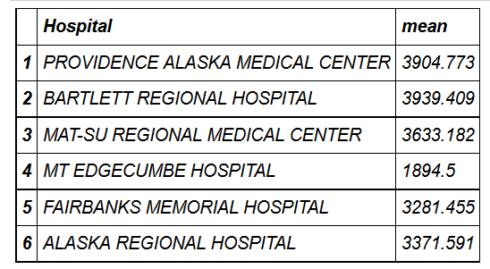
We can calculate our summary statistics for some chunks separately. We use the function group_by() in dplyr and in data.table, we simply provide by.
head(hospital_spending_DT[,.(mean=mean(Avg.Spending.Per.Episode..Hospital.)),by=.(Hospital)])
mygroup= group_by(hospital_spending,Hospital)

from_dplyr = summarize(mygroup,mean=mean(Avg.Spending.Per.Episode..Hospital.))

from_data_table=hospital_spending_DT[,.(mean=mean(Avg.Spending.Per.Episode..Hospital.)), by=.(Hospital)]

compare(from_dplyr,from_data_table, allowAll=TRUE)

TRUE

  sorted

  renamed rows

  dropped row names

  dropped attributes
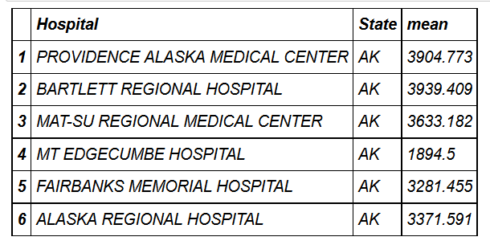
We can also provide more than one grouping condition.
head(hospital_spending_DT[,.(mean=mean(Avg.Spending.Per.Episode..Hospital.)),

                          by=.(Hospital,State)])
mygroup= group_by(hospital_spending,Hospital,State)

from_dplyr = summarize(mygroup,mean=mean(Avg.Spending.Per.Episode..Hospital.))

from_data_table=hospital_spending_DT[,.(mean=mean(Avg.Spending.Per.Episode..Hospital.)), by=.(Hospital,State)]

compare(from_dplyr,from_data_table, allowAll=TRUE)

TRUE

  sorted

  renamed rows

  dropped row names

  dropped attributes
Chaining
With both dplyr and data.table, we can chain functions in succession. In dplyr, we use pipes from the magrittr package with %>% which is really cool. %>% takes the output from one function and feeds it to the first argument of the next function. In data.table, we can use %>% or [ for chaining.
from_dplyr=hospital_spending%>%group_by(Hospital,State)%>%summarize(mean=mean(Avg.Spending.Per.Episode..Hospital.))

from_data_table=hospital_spending_DT[,.(mean=mean(Avg.Spending.Per.Episode..Hospital.)), by=.(Hospital,State)]

compare(from_dplyr,from_data_table, allowAll=TRUE)

TRUE

  sorted

  renamed rows

  dropped row names

  dropped attributes
hospital_spending%>%group_by(State)%>%summarize(mean=mean(Avg.Spending.Per.Episode..Hospital.))%>%

arrange(desc(mean))%>%head(10)%>%

        mutate(State = factor(State,levels = State[order(mean,decreasing =TRUE)]))%>%

          ggplot(aes(x=State,y=mean))+geom_bar(stat='identity',color='darkred',fill='skyblue')+

          xlab("")+ggtitle('Average Spending Per Episode by State')+

          ylab('Average')+ coord_cartesian(ylim = c(3800, 4000))
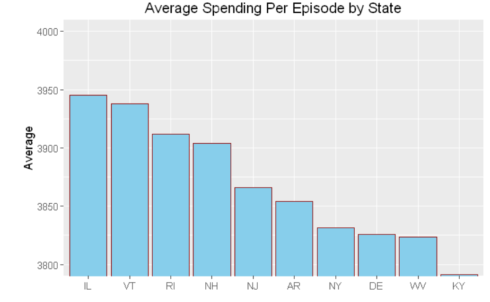
hospital_spending_DT[,.(mean=mean(Avg.Spending.Per.Episode..Hospital.)),

                                     by=.(State)][order(-mean)][1:10]%>%

            mutate(State = factor(State,levels = State[order(mean,decreasing =TRUE)]))%>%

           ggplot(aes(x=State,y=mean))+geom_bar(stat='identity',color='darkred',fill='skyblue')+

          xlab("")+ggtitle('Average Spending Per Episode by State')+

          ylab('Average')+ coord_cartesian(ylim = c(3800, 4000))
Summary
In this blog post, we saw how we can perform the same tasks using data.tableand dplyr packages. Both packages have their strengths. While dplyr is more elegant and resembles natural language, data.table is succinct and we can do a lot with data.table in just a single line. Further, data.table is, in some cases, faster and it may be a go-to package when performance and memory are the constraints.
You can get the code for this blog post at my GitHub account.
This is enough for this post. If you have any questions or feedback, feel free to leave a comment.
转自:http://datascienceplus.com/best-packages-for-data-manipulation-in-r/
Best packages for data manipulation in R的更多相关文章
- Data manipulation primitives in R and Python
Data manipulation primitives in R and Python Both R and Python are incredibly good tools to manipula ...
- Data Manipulation with dplyr in R
目录 select The filter and arrange verbs arrange filter Filtering and arranging Mutate The count verb ...
- The dplyr package has been updated with new data manipulation commands for filters, joins and set operations.(转)
dplyr 0.4.0 January 9, 2015 in Uncategorized I’m very pleased to announce that dplyr 0.4.0 is now av ...
- An Introduction to Stock Market Data Analysis with R (Part 1)
Around September of 2016 I wrote two articles on using Python for accessing, visualizing, and evalua ...
- 7 Tools for Data Visualization in R, Python, and Julia
7 Tools for Data Visualization in R, Python, and Julia Last week, some examples of creating visualiz ...
- java.sql.SQLException: Can not issue data manipulation statements with executeQuery().
1.错误描写叙述 java.sql.SQLException: Can not issue data manipulation statements with executeQuery(). at c ...
- Can not issue data manipulation statements with executeQuery()错误解决
转: Can not issue data manipulation statements with executeQuery()错误解决 2012年03月27日 15:47:52 katalya 阅 ...
- 数据库原理及应用-SQL数据操纵语言(Data Manipulation Language)和嵌入式SQL&存储过程
2018-02-19 18:03:54 一.数据操纵语言(Data Manipulation Language) 数据操纵语言是指插入,删除和更新语言. 二.视图(View) 数据库三级模式,两级映射 ...
- Can not issue data manipulation statements with executeQuery().解决方案
这个错误提示是说无法发行sql语句到指定的位置 错误写法: 正确写法: excuteQuery是查询语句,而我要调用的是更新的语句,所以这样数据库很为难到底要干嘛,实际我想用的是更新,但是我写成了查询 ...
随机推荐
- 雷达的L、S、C、X波段是什么
L.S.C.X都是电磁波波段的划分代号. 最早用于搜索雷达的电磁波波长度为23cm,这一波段被定义为L波段(英语Long的字头),后来这一波段的中心波长度变为22cm. 当波长为10cm的电磁波被使用 ...
- 发散问题——Spring容器及加载
一.前言 发散问题系列,是围绕日常工作,发散思考,提取问题,并寻求答案的一个系列.总的来说,就是将遇到的问题发散来提出更多的问题,并通过解决发散问题,从而对问题有更深入的了解,对知识有更深刻的记忆,帮 ...
- VS2017 Cordova Ionic2 移动开发-环境搭建
1. 文档概述 本文档用于说明Visual Studio 2017下使用 Ionic 2进行跨平台开发的运行环境配置. 2. 安装环境 Windows10 3. 安装 Visual Studio 20 ...
- 微信和支付宝支付模式详解及实现(.Net标准库)- OSS开源系列
支付基本上是很多产品都必须的一个模块,大家最熟悉的应该就是微信和支付宝支付了,不过更多的可能还是停留在直接sdk的调用上,甚至和业务系统高度耦合,网上也存在各种解决方案,但大多形式各异,东拼西凑而成. ...
- 时间同步方法及几个可用的NTP服务器地址
大家都知道计算机电脑的时间是由一块电池供电保持的,而且准确度比较差经常出现走时不准的时候.通过互联网络上发布的一些公用网络时间服务器NTP server,就可以实现自动.定期的同步本机标准时间. 依靠 ...
- 第十章 MyBatis入门
第十章 MyBatis入门10.1 MyBatis入门 优点:简单且功能强大.能够完全控制SQL语句.容易维护和修改 缺点:移植性不好 使用步骤: 1.下载 ...
- select效果联动
<!DOCTYPE HTML PUBLIC "-//W3C//DTD HTML 4.01 Transitional//EN"> <html> <hea ...
- [codevs]1087麦森数
题目 这个题在noiOJ上是分治专题,这个题包括了很多,求位数,高精度乘,快速幂. 那么单独把这个高精度拿出来做一个自定义函数即可 一.求位数 显而易见,既然是2进制的就是log2X,是10进制就是l ...
- IO调度器原理介绍
IO调度器(IO Scheduler)是操作系统用来决定块设备上IO操作提交顺序的方法.存在的目的有两个,一是提高IO吞吐量,二是降低IO响应时间.然而IO吞吐量和IO响应时间往往是矛盾的,为了尽量平 ...
- webpack学习(三)之web-dev-server不能自动刷新问题
使用webpack-dev-server中遇到不能浏览器无法自动刷新的问题:寻找多方答案后明白了一些: 下面有一些需要注意的点: 1.webpack-dev-server并不能读取你的webpack. ...