
Sentinel——pull模式规则持久化
pull模式规则持久化
pull 模式的数据源(如本地文件、RDBMS 等)一般是可写入的。使用时需要在客户端注册数据源:将对应的读数据源注册至对应的
RuleManager,将写数据源注册至 transport 的WritableDataSourceRegistry中。[1]
本地文件数据源会定时轮询文件的变更,读取规则。这样我们既可以在应用本地直接修改文件来更新规则,也可以通过 Sentinel 控制台推送规则。以本地文件数据源为例,推送过程如下图所示:
首先 Sentinel 控制台通过 API 将规则推送至客户端并更新到内存中,接着注册的写数据源会将新的规则保存到本地的文件中。使用 pull 模式的数据源时一般不需要对 Sentinel 控制台进行改造。
这种实现方法好处是简单,不引入新的依赖,坏处是无法保证监控数据的一致性。
定义数据源
这里将数据源定义在了classes目录下了。
package com.zjw.sentinel;

import com.alibaba.csp.sentinel.command.handler.ModifyParamFlowRulesCommandHandler;

import com.alibaba.csp.sentinel.datasource.FileRefreshableDataSource;

import com.alibaba.csp.sentinel.datasource.FileWritableDataSource;

import com.alibaba.csp.sentinel.datasource.ReadableDataSource;

import com.alibaba.csp.sentinel.datasource.WritableDataSource;

import com.alibaba.csp.sentinel.init.InitFunc;

import com.alibaba.csp.sentinel.slots.block.authority.AuthorityRule;

import com.alibaba.csp.sentinel.slots.block.authority.AuthorityRuleManager;

import com.alibaba.csp.sentinel.slots.block.degrade.DegradeRule;

import com.alibaba.csp.sentinel.slots.block.degrade.DegradeRuleManager;

import com.alibaba.csp.sentinel.slots.block.flow.FlowRule;

import com.alibaba.csp.sentinel.slots.block.flow.FlowRuleManager;

import com.alibaba.csp.sentinel.slots.block.flow.param.ParamFlowRule;

import com.alibaba.csp.sentinel.slots.block.flow.param.ParamFlowRuleManager;

import com.alibaba.csp.sentinel.slots.system.SystemRule;

import com.alibaba.csp.sentinel.slots.system.SystemRuleManager;

import com.alibaba.csp.sentinel.transport.util.WritableDataSourceRegistry;

import com.alibaba.fastjson.JSON;

import com.alibaba.fastjson.TypeReference;

import java.io.File;

import java.io.IOException;

import java.util.List;

/**

 * @since 2023/12/07 22:10

 */

public class FileDataSourceInit implements InitFunc {

    @Override

    public void init() throws Exception {

        // 获取当前类的ClassLoader

        ClassLoader classLoader = FileDataSourceInit.class.getClassLoader();

//        File ruleDir = new File(System.getProperty("user.dir") + "/rules");

        File ruleDir = new File(classLoader.getResource("").getPath() + File.separator+"rules");

        if (!ruleDir.exists()) {

            ruleDir.mkdirs();

        }

        // 规则文件路径

        String ruleDirPath = ruleDir.getPath();

        readWriteRuleFileFlow(ruleDirPath,"flow-rule.json");

        readWriteRuleFileDegrade(ruleDirPath,"degrade-rule.json");

        readWriteRuleFileParamFlow(ruleDirPath,"param-rule.json");

        readWriteRuleFileAuthority(ruleDirPath,"authority-rule.json");

        readWriteRuleFileSystem(ruleDirPath,"system-rule.json");

    }

    /**

     * 流控规则

     */

    private void readWriteRuleFileFlow(String rulePath, String ruleFile) throws IOException {

        //创建规则文件

        String ruleFilePath = rulePath + File.separator + ruleFile;

        createRuleFile(ruleFilePath);

        ReadableDataSource<String, List<FlowRule>> ds = new FileRefreshableDataSource<>(

                ruleFilePath, source -> JSON.parseObject(source, new TypeReference<List<FlowRule>>() {})

        );

        // 将可读数据源注册至 FlowRuleManager.

        FlowRuleManager.register2Property(ds.getProperty());

        WritableDataSource<List<FlowRule>> wds = new FileWritableDataSource<>(ruleFilePath, this::encodeJson);

        // 将可写数据源注册至 transport 模块的 WritableDataSourceRegistry 中.

        // 这样收到控制台推送的规则时,Sentinel 会先更新到内存,然后将规则写入到文件中.

        WritableDataSourceRegistry.registerFlowDataSource(wds);

    }

    /**

     * 熔断规则

     */

    private void readWriteRuleFileDegrade(String rulePath, String ruleFile) throws IOException {

        //创建规则文件

        String ruleFilePath = rulePath + File.separator + ruleFile;

        createRuleFile(ruleFilePath);

        ReadableDataSource<String, List<DegradeRule>> ds = new FileRefreshableDataSource<>(

                ruleFilePath, source -> JSON.parseObject(source, new TypeReference<List<DegradeRule>>() {})

        );

        // 将可读数据源注册至 FlowRuleManager.

        DegradeRuleManager.register2Property(ds.getProperty());

        WritableDataSource<List<DegradeRule>> wds = new FileWritableDataSource<>(ruleFilePath, this::encodeJson);

        // 将可写数据源注册至 transport 模块的 WritableDataSourceRegistry 中.

        // 这样收到控制台推送的规则时,Sentinel 会先更新到内存,然后将规则写入到文件中.

        WritableDataSourceRegistry.registerDegradeDataSource(wds);

    }

    /**

     * 热点规则

     */

    private void readWriteRuleFileParamFlow(String rulePath, String ruleFile) throws IOException {

        //创建规则文件

        String ruleFilePath = rulePath + File.separator + ruleFile;

        createRuleFile(ruleFilePath);

        ReadableDataSource<String, List<ParamFlowRule>> ds = new FileRefreshableDataSource<>(

                ruleFilePath, source -> JSON.parseObject(source, new TypeReference<List<ParamFlowRule>>() {})

        );

        // 将可读数据源注册至 FlowRuleManager.

        ParamFlowRuleManager.register2Property(ds.getProperty());

        WritableDataSource<List<ParamFlowRule>> wds = new FileWritableDataSource<>(ruleFilePath, this::encodeJson);

        // 将可写数据源注册至 transport 模块的 WritableDataSourceRegistry 中.

        // 这样收到控制台推送的规则时,Sentinel 会先更新到内存,然后将规则写入到文件中.

        ModifyParamFlowRulesCommandHandler.setWritableDataSource(wds);

    }

    /**

     * 系统规则

     */

    private void readWriteRuleFileSystem(String rulePath, String ruleFile) throws IOException {

        //创建规则文件

        String ruleFilePath = rulePath + File.separator + ruleFile;

        createRuleFile(ruleFilePath);

        ReadableDataSource<String, List<SystemRule>> ds = new FileRefreshableDataSource<>(

                ruleFilePath, source -> JSON.parseObject(source, new TypeReference<List<SystemRule>>() {})

        );

        // 将可读数据源注册至 FlowRuleManager.

        SystemRuleManager.register2Property(ds.getProperty());

        WritableDataSource<List<SystemRule>> wds = new FileWritableDataSource<>(ruleFilePath, this::encodeJson);

        // 将可写数据源注册至 transport 模块的 WritableDataSourceRegistry 中.

        // 这样收到控制台推送的规则时,Sentinel 会先更新到内存,然后将规则写入到文件中.

        WritableDataSourceRegistry.registerSystemDataSource(wds);

    }

    /**

     * 授权规则

     */

    private void readWriteRuleFileAuthority(String rulePath, String ruleFile) throws IOException {

        //创建规则文件

        String ruleFilePath = rulePath + File.separator + ruleFile;

        createRuleFile(ruleFilePath);

        ReadableDataSource<String, List<AuthorityRule>> ds = new FileRefreshableDataSource<>(

                ruleFilePath, source -> JSON.parseObject(source, new TypeReference<List<AuthorityRule>>() {})

        );

        // 将可读数据源注册至 FlowRuleManager.

        AuthorityRuleManager.register2Property(ds.getProperty());

        WritableDataSource<List<AuthorityRule>> wds = new FileWritableDataSource<>(ruleFilePath, this::encodeJson);

        // 将可写数据源注册至 transport 模块的 WritableDataSourceRegistry 中.

        // 这样收到控制台推送的规则时,Sentinel 会先更新到内存,然后将规则写入到文件中.

        WritableDataSourceRegistry.registerAuthorityDataSource(wds);

    }

    private void createRuleFile(String ruleFilePath) throws IOException {

        File file = new File(ruleFilePath);

        if (!file.exists()) {

            file.createNewFile();

        }

    }

    private <T> String encodeJson(T t) {

        return JSON.toJSONString(t);

    }

}
定义SPI接口文件
pull模式的 Datasource 扩展采用的是 SPt 服务发现机制。按照 SPI 规范,需要在/resources目录下新建 META-INF/services 目录,然后在该目录下新建一个文本文件。文件名为扩展类实现接口的全限定性接口名,文件内容则为该接口的实现类的全限定性类名。
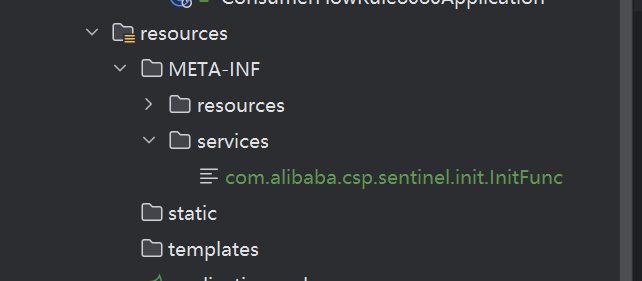
com.alibaba.csp.sentinel.init.InitFunc
com.zjw.sentinel.FileDataSourceInit
测试
启动服务后,发现创建了规则文件。

在sentinel控制台配置了规则后会自动保存在规则文件中。文件中修改了也会在sentinel控制台中修改。服务重启后配置仍然存在。
Sentinel——pull模式规则持久化的更多相关文章
- [Spring-Cloud-Alibaba] Sentinel 规则持久化
在之前的练习中,只要应用重启,就需要重新配置,这样在我们实际的项目是非常不实用的,那么有没有办法把我们配置的规则保存下来呢?答案是YES,那么接下来,给大家来介绍如何将Sentinel规则持久化. D ...
- Spring Cloud Alibaba学习笔记(7) - Sentinel规则持久化及生产环境使用
Sentinel 控制台 需要具备下面几个特性: 规则管理及推送,集中管理和推送规则.sentinel-core 提供 API 和扩展接口来接收信息.开发者需要根据自己的环境,选取一个可靠的推送规则方 ...
- Sentinel Dashboard(基于1.8.1)流控规则持久化到Nacos——涉及部分Sentinel Dashboard源码改造
前言 之前虽然也一直在使用sentinel实现限流熔断功能,但却没有好好整理之前看的源码与资料,今天有时间将之前自己整理过的资料写成一篇博文,或者是是一篇关于Sentinel(基于目前最近版本1.8, ...
- sentinel 规则持久化到nacos
问题描述 Sentinel Dashboard中添加的规则是存储在内存中的,只要项目一重启规则就丢失了 此处将规则持久化到nacos中,在nacos中添加规则,然后同步到dashboard中: 后面研 ...
- Sentinel基于Apollo的持久化改造
Sentinel基于Apollo的持久化改造 sentinel默认是将用户在dashboard中编辑过的流控信息保存在内存中,所以在重启后,所有之前配置过的流控规则也就不见了.但是sentinel给用 ...
- (六) Docker 部署 Redis 高可用集群 (sentinel 哨兵模式)
参考并感谢 官方文档 https://hub.docker.com/_/redis GitHub https://github.com/antirez/redis happyJared https:/ ...
- 什么!Sentinel流控规则可以这样玩?
项目源码地址:公众号回复 sentinel,即可免费获取源码 前言 上一篇文章中,我们讲解了关于sentinel基本介绍以及流控规则中直接和快速失败的效果,有兴趣的可以去看上一篇文章,今天,我们给大家 ...
- 微博feed系统的推(push)模式和拉(pull)模式和时间分区拉模式架构探讨
sns系统,微博系统都应用到了feed(每条微博或者sns里的新鲜事等我们称作feed)系统,不管是twitter.com或者国内的新浪微博,人人网等,在各种技术社区,技术大会上都在分享自己的feed ...
- C语言的本质(37)——makefile之隐含规则和模式规则
Makefile有很多灵活的写法,可以写得更简洁,同时减少出错的可能.本节我们来看看这样一个例子还有哪些改进的余地. 一个目标依赖的所有条件不一定非得写在一条规则中,也可以拆开写,例如: main.o ...
- Redis笔记-Sentinel哨兵模式
Redis以主从的模式搭建集群后,如果主节点Master挂掉,虽然可以实现将备用节点Slave切换成主节点,但是Redis本身并没有自动监控机制,需要借助Sentinel哨兵模式,实现监控并实现自动切 ...
随机推荐
- C#/.NET/.NET Core优秀项目和框架2025年1月简报
前言 公众号每月定期推广和分享的C#/.NET/.NET Core优秀项目和框架(每周至少会推荐两个优秀的项目和框架当然节假日除外),公众号推文中有项目和框架的详细介绍.功能特点.使用方式以及部分功能 ...
- 攻城攻心的混淆大师——深入解析第十八届CISCN x 第二届长城杯初赛Reverse赛题vt
前言 在初赛结束近两月之际,笔者在复盘过程中意外发现了这道当时无人能解的难题.经过两日深入的探索与钻研,笔者终于成功地对这道赛题进行了全面的解构.在品味破译flag所带来的喜悦之余,笔者亦深感此题蕴含 ...
- 如何在JMeter中配置断言,将非200状态码视为测试成功
如何在JMeter中配置断言,将非200状态码视为测试成功 引言 在接口测试中,HTTP响应状态码是判断请求是否成功的重要依据.通常情况下,状态码200表示请求成功,而其他状态码则可能表示各种类型的错 ...
- QT5笔记: 16. 时间和定时器的常用功能
例子 #ifndef WIDGET_H #define WIDGET_H #include <QTime> #include <QTimer> #include <QWi ...
- Typecho如何添加微博表情包
自从添加了蛆音娘表情包就想着去爬点其他地方的表情包- 使用教程跟蛆音娘一样 :点我查看 #表情包代码: "微博":{ "type": "usr&quo ...
- MySQL - [09] 正则表达式
转载:https://mp.weixin.qq.com/s/7RavuYGs9SthX2pxGJppqw select * from t1 where name rlike '^[a-zA-Z]+$' ...
- ARC132E题解
简要题意 有 \(n\) 个方块,每个方块有一个初始状态可能为左右或者空.每次操作随机选择一个空进行操作.每次操作可以向左或者向右走一直到下一个空或者走出边界,走到的每个格子会变成左或者右,这取决于移 ...
- 别再混淆了!JVM内存模型和Java内存模型的本质区别
JVM 内存模型(JVM Memory Model)和 Java 内存模型(Java Memory Model, JMM)是 Java 开发中两个非常重要的概念,但这两个概念很容易被搞混,所以本文就来 ...
- Processing (Java) 中实现2D任意图形的鼠标悬停检测 · 2D射线检测 · 模拟按钮 · 点击事件
引言 如果使用Processing开发应用,画面中需要设定一些按钮,而且这些按钮是不规则图形样式,甚至是以一张图片形式呈现,如何判定其轮廓,定义悬停事件.点击事件是非常核心的算法需求.本文浅析这一问题 ...
- nnUNet 使用方法
首先明确分割任务. 其次明确研究方法和步骤. 再做好前期准备,如数据集的采集.标注以及其中的训练集/测试集划分. 其中的参考链接: (四:2020.07.28)nnUNet最舒服的训练教程(让我的奶奶 ...