
ajax异步获取数据后动态向表格中添加数据(行)
因为某些原因,项目中突然需要做自己做个ajax异步获取数据后动态向表格中添加数据的页面,网上找了半天都没有 看到现成的,决定自己写个例子
1、HTML页面
- <!doctype html>
- <html>
- <head>
- <meta charset="utf-8">
- <title>xx信息查询</title>
- <script type="text/javascript" src="/js/jquery-1.11.3.min.js"></script>
- <script type="text/javascript" src="/js/ai/ai-lib.js"></script>
- <script src="/js/cheat-order.js"></script>
- </head>
- <body>
- <div class="main pusher">
- <form class="ui form vertical segment form-search">
- <div class="fields">
- <div class="halfsixCl wide field js_query_date">
- <label for="checkDate">预定截止日期</label>
- <input name="checkDate" type="text" id="checkDate">
- </div>
- <div class="sixCl wide field">
- <label>SEQ</label>
- <input name="hotelSeq" id="hotelSeq" placeholder="" type="text">
- </div>
- <div class="sixCl wide field js_query_seq">
- <label>订单号</label>
- <input type="text" maxlength="50" name="orderNo" id="orderNo" placeholder="">
- </div>
- <div class="sixCl wide field js_query_btype">
- <label>排序字段</label>
- <select name="sortFiled" id="sortFiled">
- <option value="hotel_seq">酒店seq</option>
- <option value="order_no">订单号</option>
- <option value="cellid">cellid</option>
- </select>
- </div>
- <div>
- <label></label>
- <input type="button" value="搜索" id="btSearch" class="ui right floated positive button btn-search"/>
- </div>
- </div>
- </form>
- <div class="table-container">
- <table class="ui nine column table celled table-result" id="table-result">
- <thead>
- <tr>
- <th>hotelSeq</th>
- <th>酒店名称</th>
- <th>订单号</th>
- <th>联系人手机号</th>
- <th>预定时间</th>
- <th>userId</th>
- <th>cellid</th>
- <th>gps定位城市</th>
- <th>wifi定位城市</th>
- <th>定位距离</th>
- </tr>
- </thead>
- <tbody id="tbody-result">
- </tbody>
- </table>
- </div>
- </div>
- </body>
- </html>
<!doctype html>
<html>
<head>
<meta charset="utf-8">
<title>xx信息查询</title>
<script type="text/javascript" src="/js/jquery-1.11.3.min.js"></script>
<script type="text/javascript" src="/js/ai/ai-lib.js"></script>
<script src="/js/cheat-order.js"></script>
</head> <body>
<div class="main pusher">
<form class="ui form vertical segment form-search">
<div class="fields">
<div class="halfsixCl wide field js_query_date">
<label for="checkDate">预定截止日期</label>
<input name="checkDate" type="text" id="checkDate">
</div><div class="sixCl wide field">
<label>SEQ</label>
<input name="hotelSeq" id="hotelSeq" placeholder="" type="text">
</div> <div class="sixCl wide field js_query_seq">
<label>订单号</label>
<input type="text" maxlength="50" name="orderNo" id="orderNo" placeholder="">
</div>
<div class="sixCl wide field js_query_btype">
<label>排序字段</label>
<select name="sortFiled" id="sortFiled">
<option value="hotel_seq">酒店seq</option>
<option value="order_no">订单号</option>
<option value="cellid">cellid</option>
</select>
</div>
<div>
<label></label>
<input type="button" value="搜索" id="btSearch" class="ui right floated positive button btn-search"/>
</div>
</div>
</form> <div class="table-container">
<table class="ui nine column table celled table-result" id="table-result">
<thead>
<tr>
<th>hotelSeq</th>
<th>酒店名称</th>
<th>订单号</th>
<th>联系人手机号</th>
<th>预定时间</th>
<th>userId</th>
<th>cellid</th>
<th>gps定位城市</th>
<th>wifi定位城市</th>
<th>定位距离</th>
</tr>
</thead>
<tbody id="tbody-result">
</tbody>
</table>
</div>
</div>
</body>
</html>
2、cheat-order.js
- $(function () {
- $('#btSearch').click(function () {
- var checkDate = $('#checkDate').val();
- var orderNo = $('#orderNo').val();
- var sortFiled = $('#sortFiled').val();
- var hotelSeq = $('#hotelSeq').val();
- var tbody=window.document.getElementById("tbody-result");
- $.ajax({
- type: "post",
- dataType: "json",
- url: "ac/order/queryCheatOrder",
- data: {
- hotelSeq: hotelSeq,
- orderNo: orderNo,
- sortFiled: sortFiled,
- checkDate: checkDate
- },
- success: function (msg) {
- if (msg.ret) {
- var str = "";
- var data = msg.data;
- for (i in data) {
- str += "<tr>" +
- "<td>" + data[i].hotel_seq + "</td>" +
- "<td>" + data[i].hotel_name + "</td>" +
- "<td>" + data[i].order_no + "</td>" +
- "<td>" + data[i].user_phone + "</td>" +
- "<td>" + data[i].create_time + "</td>" +
- "<td>" + data[i].user_id + "</td>" +
- "<td>" + data[i].cellid + "</td>" +
- "<td>" + data[i].gps_city + "</td>" +
- "<td>" + data[i].cell_city + "</td>" +
- "<td>" + data[i].distance + "</td>" +
- "</tr>";
- }
- tbody.innerHTML = str;
- }
- },
- error: function () {
- alert("查询失败")
- }
- });
- });
- });
$(function () {

    $('#btSearch').click(function () {

        var checkDate = $('#checkDate').val();

        var orderNo = $('#orderNo').val();

        var sortFiled = $('#sortFiled').val();

        var hotelSeq = $('#hotelSeq').val();

        var tbody=window.document.getElementById("tbody-result");
    $.ajax({

        type: "post",

        dataType: "json",

        url: "ac/order/queryCheatOrder",

        data: {

            hotelSeq: hotelSeq,

            orderNo: orderNo,

            sortFiled: sortFiled,

            checkDate: checkDate

        },

        success: function (msg) {

            if (msg.ret) {

                var str = "";

                var data = msg.data;

                for (i in data) {

                    str += "<tr>" +

                    "<td>" + data[i].hotel_seq + "</td>" +

                    "<td>" + data[i].hotel_name + "</td>" +

                    "<td>" + data[i].order_no + "</td>" +

                    "<td>" + data[i].user_phone + "</td>" +

                    "<td>" + data[i].create_time + "</td>" +

                    "<td>" + data[i].user_id + "</td>" +

                    "<td>" + data[i].cellid + "</td>" +

                    "<td>" + data[i].gps_city + "</td>" +

                    "<td>" + data[i].cell_city + "</td>" +

                    "<td>" + data[i].distance + "</td>" +

                    "</tr>";

                }

                tbody.innerHTML = str;

            }

        },

        error: function () {

            alert("查询失败")

        }

    });

});


});
3、示例图
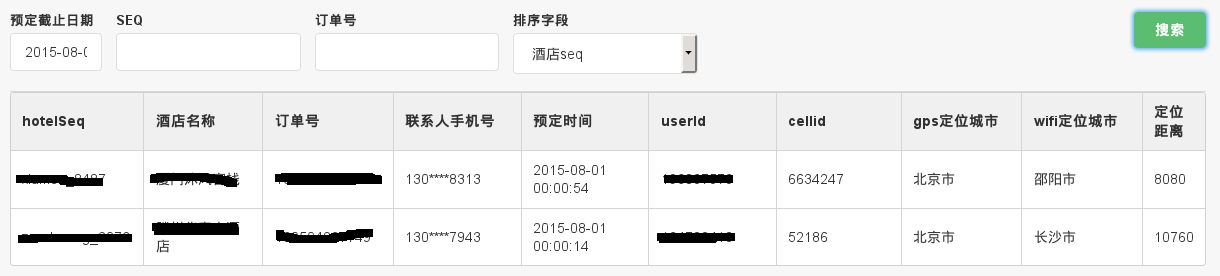
备注:css已经删除了,效果比上面示例图要差些
原创作品,允许转载,转载时请务必以超链接形式标明文章 原始出处 、作者信息和本声明
ajax异步获取数据后动态向表格中添加数据(行)的更多相关文章
- js如何实现动态在表格中添加标题和去掉标题?
js如何实现动态在表格中添加标题和去掉标题? 一.总结 1.通过table标签的createCaption(),deleteCaption()方法实现. document.getElementById ...
- Java 动态向 JTable 中添加数据
import java.awt.Toolkit; import javax.swing.SwingUtilities; import javax.swing.UIManager; import jav ...
- jQuery Ajax遍历表格,填充数据,将表格中的数据一条一条拼成Jason数组
$.ajax({ url: baseURL + "InvoiceSale/OnQuotaInvoiceSale", //点击核销单号时,点击核销时,交互的页面 ...
- 在页面上绘制一张表格,使用 DOM 节点的动态添加和删除向表格中插入数据,点击表格每行后的“删除”超链接
查看本章节 查看作业目录 需求说明: 在页面上绘制一张表格,使用 DOM 节点的动态添加和删除向表格中插入数据,点击表格每行后的"删除"超链接,使用 DOM 节点的删除操作将对应的 ...
- js如何实现动态的在表格中添加和删除行?(两种方法)
js如何实现动态的在表格中添加和删除行?(两种方法) 一.总结 1.table元素有属性和一些方法(js使用) 方法一:添加可通过在table的innerHTML属性中添加tr和td来实现 tab.i ...
- 如何使用免费控件将Word表格中的数据导入到Excel中
我通常使用MS Excel来存储和处理大量数据,但有时候经常会碰到一个问题—我需要的数据存储在word表格中,而不是在Excel中,这样处理起来非常麻烦,尤其是在数据比较庞大的时候, 这时我迫切地需要 ...
- ligerui_实际项目_003:form中添加数据,表格(grid)里面显示,最后将表格(grid)里的数据提交到servlet
实现效果: "Form"中填写数据,向本页"Grid"中添加数据,转换成Json数据提交,计算总和,Grid文本框可编辑,排序 图片效果: 总结: //disp ...
- 用JQuery中的Ajax方法获取web service等后台程序中的方法
用JQuery中的Ajax方法获取web service等后台程序中的方法 1.准备需要被前台html页面调用的web Service,这里我们就用ws来代替了,代码如下: using System; ...
- 利用java反射机制实现读取excel表格中的数据
如果直接把excel表格中的数据导入数据库,首先应该将excel中的数据读取出来. 为了实现代码重用,所以使用了Object,而最终的结果是要获取一个list如List<User>.Lis ...
随机推荐
- GUI初步和frame&panel
java的话这个GUI其实不是什么重点,但我们也要学习,重点是学习这种图形编程的思路. java里面对于图形的一些类都封装在了AWT和它的一些子包里.AWT(抽象窗口开发包) 当 ...
- VS打包后生成快捷方式:目标指向错误、Icon图标分辨率有误问题解决方案
1.目标指向错误: 在安装***.msi文件后,对快捷方式-->右键-->属性: 发现目标并非指exe文件. 于是我新建了一个快捷方式,将目标-->指向exe文件,位置Ctrl+v. ...
- Oracle分区表例子
分区表 Oracle提供的分区方法有以下几种. 1.范围分区(range) 范围分区是应用范围比较广的表分区方式,它是以列的值的范围来作为分区的划分条 件,将记录存放到列值所在的 range分区中. ...
- 工作记录:JS正则表达式 angularjs ng-if ng-show ng-switch
用了一下JS 正则表达式判断密码,很简单 学习了angularjs的ng-if ng-show ng-switch的区别并使用 https://www.cnblogs.com/54td/p/59743 ...
- swiper4实现的拥有header和footer的全屏滚动demo/swiper fullpage footer
用swiper4实现的拥有header和footer的全屏滚动demo, <!DOCTYPE html> <html lang="en"> <head ...
- 学习笔记 第十一章 CSS3布局基础
第11章 CSS3布局基础 [学习重点] 了解CSS2盒模型. 设计边框样式. 设计边界样式. 设计补白样式. 了解CSS3盒模型. 11.1 CSS盒模型基础 页面中所有元素基本显示形态为方形 ...
- Android学习笔记(六) Activity和View基础
一.Activity的启动流程 操作系统首先查看AndroidManifest.xml来决定启动哪一个Activity. 生成对应的Activity对象(系统自动完成). 调用它的onCreate() ...
- scala打印error,debug,info
1.以wordcount为例 package org.apache.spark.examples import org.apache.spark.examples.SparkPi.logger imp ...
- iTOP4418开发板7寸屏幕Android系统下横竖屏设置
Android系统屏幕旋转设置 平台: iTOP4418开发板+7寸屏幕 1. Androd4.4源码可以编译成手机模式和平板模式,讯为iTop4418 开发平台的Android系统默认编译为平板模式 ...
- jQuery 开始动画,停止动画
<!DOCTYPE html> <html lang="en"> <head> <meta charset="UTF-8&quo ...