
mha0.56版本安装使用排错
Tue Apr 30 09:26:44 2019 - [warning] Global configuration file /etc/masterha_default.cnf not found. Skipping.

Tue Apr 30 09:26:44 2019 - [info] Reading application default configuration from /etc/mha/app1.cnf..

Tue Apr 30 09:26:44 2019 - [info] Reading server configuration from /etc/mha/app1.cnf..

Tue Apr 30 09:26:44 2019 - [info] MHA::MasterMonitor version 0.56.

Tue Apr 30 09:26:45 2019 - [info] GTID failover mode = 0

Tue Apr 30 09:26:45 2019 - [info] Dead Servers:

Tue Apr 30 09:26:45 2019 - [info] Alive Servers:

Tue Apr 30 09:26:45 2019 - [info]   103.75.1.22(103.75.1.22:3306)

Tue Apr 30 09:26:45 2019 - [info]   103.75.1.23(103.75.1.23:3306)

Tue Apr 30 09:26:45 2019 - [info]   103.75.1.24(103.75.1.24:3306)

Tue Apr 30 09:26:45 2019 - [info] Alive Slaves:

Tue Apr 30 09:26:45 2019 - [info]   103.75.1.23(103.75.1.23:3306)  Version=5.7.25-log (oldest major version between slaves) log-bin:enabled

Tue Apr 30 09:26:45 2019 - [info]     Replicating from 103.75.1.22(103.75.1.22:3306)

Tue Apr 30 09:26:45 2019 - [info]     Primary candidate for the new Master (candidate_master is set)

Tue Apr 30 09:26:45 2019 - [info]   103.75.1.24(103.75.1.24:3306)  Version=5.7.25-log (oldest major version between slaves) log-bin:enabled

Tue Apr 30 09:26:45 2019 - [info]     Replicating from 103.75.1.22(103.75.1.22:3306)

Tue Apr 30 09:26:45 2019 - [info] Current Alive Master: 103.75.1.22(103.75.1.22:3306)

Tue Apr 30 09:26:45 2019 - [info] Checking slave configurations..

Tue Apr 30 09:26:45 2019 - [info]  read_only=1 is not set on slave 103.75.1.24(103.75.1.24:3306).

Tue Apr 30 09:26:45 2019 - [info] Checking replication filtering settings..

Tue Apr 30 09:26:45 2019 - [info]  binlog_do_db= , binlog_ignore_db=

Tue Apr 30 09:26:45 2019 - [info]  Replication filtering check ok.

Tue Apr 30 09:26:45 2019 - [info] GTID (with auto-pos) is not supported

Tue Apr 30 09:26:45 2019 - [info] Starting SSH connection tests..

Tue Apr 30 09:26:53 2019 - [info] All SSH connection tests passed successfully.

Tue Apr 30 09:26:53 2019 - [info] Checking MHA Node version..

Tue Apr 30 09:26:57 2019 - [info]  Version check ok.

Tue Apr 30 09:26:57 2019 - [info] Checking SSH publickey authentication settings on the current master..

Tue Apr 30 09:26:58 2019 - [info] HealthCheck: SSH to 103.75.1.22 is reachable.

Tue Apr 30 09:26:59 2019 - [info] Master MHA Node version is 0.56.

Tue Apr 30 09:26:59 2019 - [info] Checking recovery script configurations on 103.75.1.22(103.75.1.22:3306)..

Tue Apr 30 09:26:59 2019 - [info]   Executing command: save_binary_logs --command=test --start_pos=4 --binlog_dir=/data --output_file=/data/mastermha/app1//save_binary_logs_test --manager_version=0.56 --start_file=master-bin.000008

Tue Apr 30 09:26:59 2019 - [info]   Connecting to root@103.75.1.22(103.75.1.22:22)..

Failed to save binary log: Binlog not found from /data! If you got this error at MHA Manager, please set "master_binlog_dir=/path/to/binlog_directory_of_the_master" correctly in the MHA Manager's configuration file and try again.

 at /usr/bin/save_binary_logs line 123

    eval {...} called at /usr/bin/save_binary_logs line 70

    main::main() called at /usr/bin/save_binary_logs line 66

Tue Apr 30 09:27:00 2019 - [error][/usr/share/perl5/vendor_perl/MHA/MasterMonitor.pm, ln158] Binlog setting check failed!

Tue Apr 30 09:27:00 2019 - [error][/usr/share/perl5/vendor_perl/MHA/MasterMonitor.pm, ln405] Master configuration failed.

Tue Apr 30 09:27:00 2019 - [error][/usr/share/perl5/vendor_perl/MHA/MasterMonitor.pm, ln424] Error happened on checking configurations.  at /usr/bin/masterha_check_repl line 48

Tue Apr 30 09:27:00 2019 - [error][/usr/share/perl5/vendor_perl/MHA/MasterMonitor.pm, ln523] Error happened on monitoring servers.

Tue Apr 30 09:27:00 2019 - [info] Got exit code 1 (Not master dead).

MySQL Replication Health is NOT OK!
Tue Apr  ::  - [info] Checking replication health on 103.75.1.23..

Tue Apr  ::  - [info]  ok.

Tue Apr  ::  - [info] Checking replication health on 103.75.1.24..

Tue Apr  ::  - [info]  ok.

Tue Apr  ::  - [warning] master_ip_failover_script is not defined.

Tue Apr  ::  - [warning] shutdown_script is not defined.

Tue Apr  ::  - [info] Got exit code  (Not master dead).

MySQL Replication Health is OK.
103.75.1.22(103.75.1.22:) (current master)

 +--103.75.1.23(103.75.1.23:)

 +--103.75.1.24(103.75.1.24:)

Tue Apr  ::  - [info] Checking replication health on 103.75.1.23..

Tue Apr  ::  - [info]  ok.

Tue Apr  ::  - [info] Checking replication health on 103.75.1.24..

Tue Apr  ::  - [info]  ok.

Tue Apr  ::  - [info] Checking master_ip_failover_script status:

Tue Apr  ::  - [info]   /data/mastermha/app1/master_ip_failover --command=status --ssh_user=root --orig_master_host=103.75.1.22 --orig_master_ip=103.75.1.22 --orig_master_port=

Tue Apr  ::  - [error][/usr/share/perl5/vendor_perl/MHA/MasterMonitor.pm, ln424] Error happened on checking configurations. Can't exec "/data/mastermha/app1/master_ip_failover": Permission denied at /usr/share/perl5/vendor_perl/MHA/ManagerUtil.pm line 68.

Tue Apr  ::  - [error][/usr/share/perl5/vendor_perl/MHA/MasterMonitor.pm, ln523] Error happened on monitoring servers.

Tue Apr  ::  - [info] Got exit code  (Not master dead).

MySQL Replication Health is NOT OK!

Tue Apr  ::  - [error][/usr/share/perl5/vendor_perl/MHA/MasterMonitor.pm, ln226]  Failed to get master_ip_failover_script status with return code :.

Tue Apr  ::  - [error][/usr/share/perl5/vendor_perl/MHA/MasterMonitor.pm, ln424] Error happened on checking configurations.  at /usr/bin/masterha_check_repl line

Tue Apr  ::  - [error][/usr/share/perl5/vendor_perl/MHA/MasterMonitor.pm, ln523] Error happened on monitoring servers.

Tue Apr  ::  - [info] Got exit code  (Not master dead).

MySQL Replication Health is NOT OK!
/data/mastermha/app1/master_ip_failover
[root@localhost ~]# chmod +x /data/mastermha/app1/master_ip_failover

[root@localhost ~]# masterha_check_repl --conf=/etc/mha/app1.cnf

Tue Apr  ::  - [warning] Global configuration file /etc/masterha_default.cnf not found. Skipping.

Tue Apr  ::  - [info] Reading application default configuration from /etc/mha/app1.cnf..

Tue Apr  ::  - [info] Reading server configuration from /etc/mha/app1.cnf..

Tue Apr  ::  - [info] MHA::MasterMonitor version 0.56.

Tue Apr  ::  - [info] GTID failover mode =

Tue Apr  ::  - [info] Dead Servers:

Tue Apr  ::  - [info] Alive Servers:

Tue Apr  ::  - [info]   103.75.1.22(103.75.1.22:)

Tue Apr  ::  - [info]   103.75.1.23(103.75.1.23:)

Tue Apr  ::  - [info]   103.75.1.24(103.75.1.24:)

Tue Apr  ::  - [info] Alive Slaves:

Tue Apr  ::  - [info]   103.75.1.23(103.75.1.23:)  Version=5.7.-log (oldest major version between slaves) log-bin:enabled

Tue Apr  ::  - [info]     Replicating from 103.75.1.22(103.75.1.22:)

Tue Apr  ::  - [info]     Primary candidate for the new Master (candidate_master is set)

Tue Apr  ::  - [info]   103.75.1.24(103.75.1.24:)  Version=5.7.-log (oldest major version between slaves) log-bin:enabled

Tue Apr  ::  - [info]     Replicating from 103.75.1.22(103.75.1.22:)

Tue Apr  ::  - [info] Current Alive Master: 103.75.1.22(103.75.1.22:)

Tue Apr  ::  - [info] Checking slave configurations..

Tue Apr  ::  - [info]  read_only= is not set on slave 103.75.1.24(103.75.1.24:).

Tue Apr  ::  - [info] Checking replication filtering settings..

Tue Apr  ::  - [info]  binlog_do_db= , binlog_ignore_db=

Tue Apr  ::  - [info]  Replication filtering check ok.

Tue Apr  ::  - [info] GTID (with auto-pos) is not supported

Tue Apr  ::  - [info] Starting SSH connection tests..

Tue Apr  ::  - [info] All SSH connection tests passed successfully.

Tue Apr  ::  - [info] Checking MHA Node version..

Tue Apr  ::  - [info]  Version check ok.

Tue Apr  ::  - [info] Checking SSH publickey authentication settings on the current master..

Tue Apr  ::  - [info] HealthCheck: SSH to 103.75.1.22 is reachable.

Tue Apr  ::  - [info] Master MHA Node version is 0.56.

Tue Apr  ::  - [info] Checking recovery script configurations on 103.75.1.22(103.75.1.22:)..

Tue Apr  ::  - [info]   Executing command: save_binary_logs --command=test --start_pos= --binlog_dir=/var/lib/mysql,/var/log/mysql --output_file=/data/mastermha/app1//save_binary_logs_test --manager_version=0.56 --start_file=master-bin.000008

Tue Apr  ::  - [info]   Connecting to root@103.75.1.22(103.75.1.22:)..

  Creating /data/mastermha/app1 if not exists..    ok.

  Checking output directory is accessible or not..

   ok.

  Binlog found at /var/lib/mysql, up to master-bin.

Tue Apr  ::  - [info] Binlog setting check done.

Tue Apr  ::  - [info] Checking SSH publickey authentication and checking recovery script configurations on all alive slave servers..

Tue Apr  ::  - [info]   Executing command : apply_diff_relay_logs --command=test --slave_user='mhauser' --slave_host=103.75.1.23 --slave_ip=103.75.1.23 --slave_port= --workdir=/data/mastermha/app1/ --target_version=5.7.-log --manager_version=0.56 --relay_log_info=/var/lib/mysql/relay-log.info  --relay_dir=/var/lib/mysql/  --slave_pass=xxx

Tue Apr  ::  - [info]   Connecting to root@103.75.1.23(103.75.1.23:)..

  Checking slave recovery environment settings..

    Opening /var/lib/mysql/relay-log.info ... ok.

    Relay log found at /var/lib/mysql, up to relay-log.

    Temporary relay log file is /var/lib/mysql/relay-log.

    Testing mysql connection and privileges..mysql: [Warning] Using a password on the command line interface can be insecure.

 done.

    Testing mysqlbinlog output.. done.

    Cleaning up test file(s).. done.

Tue Apr  ::  - [info]   Executing command : apply_diff_relay_logs --command=test --slave_user='mhauser' --slave_host=103.75.1.24 --slave_ip=103.75.1.24 --slave_port= --workdir=/data/mastermha/app1/ --target_version=5.7.-log --manager_version=0.56 --relay_log_info=/var/lib/mysql/relay-log.info  --relay_dir=/var/lib/mysql/  --slave_pass=xxx

Tue Apr  ::  - [info]   Connecting to root@103.75.1.24(103.75.1.24:)..

  Checking slave recovery environment settings..

    Opening /var/lib/mysql/relay-log.info ... ok.

    Relay log found at /var/lib/mysql, up to relay-log.

    Temporary relay log file is /var/lib/mysql/relay-log.

    Testing mysql connection and privileges..mysql: [Warning] Using a password on the command line interface can be insecure.

 done.

    Testing mysqlbinlog output.. done.

    Cleaning up test file(s).. done.

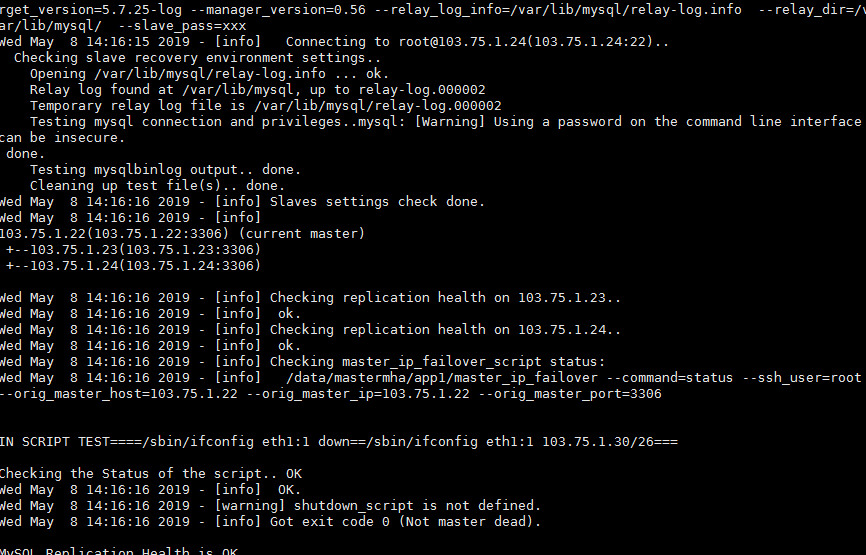
Tue Apr  ::  - [info] Slaves settings check done.

Tue Apr  ::  - [info]

103.75.1.22(103.75.1.22:) (current master)

 +--103.75.1.23(103.75.1.23:)

 +--103.75.1.24(103.75.1.24:)

Tue Apr  ::  - [info] Checking replication health on 103.75.1.23..

Tue Apr  ::  - [info]  ok.

Tue Apr  ::  - [info] Checking replication health on 103.75.1.24..

Tue Apr  ::  - [info]  ok.

Tue Apr  ::  - [info] Checking master_ip_failover_script status:

Tue Apr  ::  - [info]   /data/mastermha/app1/master_ip_failover --command=status --ssh_user=root --orig_master_host=103.75.1.22 --orig_master_ip=103.75.1.22 --orig_master_port=

IN SCRIPT TEST====/sbin/ifconfig bond1: down==/sbin/ifconfig bond1: 103.75.1.30/===

Checking the Status of the script.. OK

SIOCSIFADDR: No such device

SIOCSIFNETMASK: No such device

SIOCGIFADDR: No such device

SIOCSIFBROADCAST: No such device

bond1:: unknown interface: No such device

Tue Apr  ::  - [info]  OK.

Tue Apr  ::  - [warning] shutdown_script is not defined.

Tue Apr  ::  - [info] Got exit code  (Not master dead).

MySQL Replication Health is OK.
--conf=/etc/app1.conf
masterha_manager --conf=/etc/mha/app1.cnf >
/data/mastermha/app1/manager.log &1 &
[1] 2190
上面的就是启动命令,需要启动文件和日志
--conf=/etc/mha/app1.cnf
app1 monitoring program is now on initialization
phase(10:INITIALIZING_MONITOR). Wait for a while and try checking
again.
phase(10:INITIALIZING_MONITOR). Wait for a while and try checking
again.
[root@localhost ~]# masterha_check_status
--conf=/etc/mha/app1.cnf
app1 (pid:2190) is running(0:PING_OK), master:103.75.1.22
mha0.56版本安装使用排错的更多相关文章
- mysql 5.7以上版本安装配置方法图文教程(mysql 5.7.12\mysql 5.7.13\mysql 5.7.14)(转)
http://www.jb51.net/article/90302.htm ******************************* 这篇文章主要为大家分享了MySQL 5.7以上缩版本安装配置 ...
- Atitti.dw cc 2015 绿色版本安装总结
Atitti.dw cc 2015 绿色版本安装总结 1.1. 安装程序无法初始化.请下载adobe Support Advisor检测该问题.1 1.1.1. Adobe Application M ...
- centos7最小版本安装nginx+tomcat+java+mysql运行环境
最近项目从windows搬到linux,由于项目组成员有限并且有其它紧急的任务需要处理,因而这个任务就落到我的头上了.下面记录下centos最小版本安装nginx+tomcat+mysql+java的 ...
- Robot Framework-Windows版本安装
Robot Framework-Mac版本安装 Robot Framework-Windows版本安装 Robot Framework-工具简介及入门使用 Robot Framework-Databa ...
- Robot Framework-Mac版本安装
Robot Framework-Mac版本安装 Robot Framework-Windows版本安装 Robot Framework-工具简介及入门使用 Robot Framework-Databa ...
- centOS 6.x 版本安装 node.js 4.x 以上版本的方法
由于 node 4.x 以上版本,通过编译源代码来安装,对 GCC 的版本有要求,而 centos 的 GCC 版本不够,更新 GCC 也很麻烦,所以只能通过别的方式解决. 这里主要介绍直接下载编译后 ...
- 如何为ubuntu server 版本 安装图形界面
强烈建议使用命令行的交互方式,就算你在server上装了图形界面,但是在Linux上,大部分重要的操作还是要通过命令行的方式进行操作. 如何为ubuntu server 版本 安装图形界面 Ubunt ...
- (新)elasticsearch6.0版本安装head插件
ES6.0版本安装head插件 1.1 前言 不知道是我电脑问题还是最近的开源软件都比较**,mysql和elasticsearch新版本变动都比较大. elasticsearch6.0貌似已经不支持 ...
- Node.js 多版本安装
Node.js 多版本安装 Node.js® is a JavaScript runtime built on Chrome's V8 JavaScript engine(Node.js 是一个基于 ...
随机推荐
- How can I add files to a Jar file? (or add a file to a zip archive)
https://stackoverflow.com/questions/12239764/how-can-i-add-files-to-a-jar-file M.java class M{ publi ...
- 常用样式制作思路 自定义按钮~自适应布局~常见bug seajs简记 初学者必知的HTML规范 不容忽略的——CSS规范
常用样式制作思路 学习常用样式总结参考来自这里 带点文字链接列表利用:before实现 1 <!DOCTYPE html> 2 <html lang="en" ...
- 【Android自己定义View实战】之自己定义超简单SearchView搜索框
[Android自己定义View实战]之自己定义超简单SearchView搜索框 这篇文章是对之前文章的翻新,至于为什么我要又一次改动这篇文章?原因例如以下 1.有人举报我抄袭,原文链接:http:/ ...
- 【poj 1724】 ROADS 最短路(dijkstra+优先队列)
ROADS Time Limit: 1000MS Memory Limit: 65536K Total Submissions: 12436 Accepted: 4591 Description N ...
- 软考-系统开发与软件project
关于软件project方面的知识,相信大家都不陌生,软考中这部分知识也是重点考察范围,关于软件project的知识点很的琐碎.我把这部分的知识点分成了五部分,各自是软件project的基础知识.开发管 ...
- BNUOJ 13098 约瑟夫环问题
C. Josephus Problem 题目链接:http://www.bnuoj.com/v3/contest_show.php?cid=7095#problem/C 题目描述 The hist ...
- 51Nod 1301 集合异或和 —— 异或DP
题目:http://www.51nod.com/onlineJudge/questionCode.html#!problemId=1301 参考博客:https://blog.csdn.net/qq_ ...
- yum 安装redis
1.yum install redis 2.yum install php-redis 3service redis start chkconfig redis on
- 8.22 NOIP 模拟题
8.22 NOIP 模拟题 编译命令 g++ -o * *.cpp gcc -o * *.c fpc *.pas 编译器版本 g++/gcc fpc 评测环境 位 Linux, .3GHZ CPU ...
- 【洛谷3467/BZOJ1113】[POI2008]海报PLA-Postering(单调栈)
题目: 洛谷3467 分析: (ti jie shuo)这题是个单调栈经典题. 单调栈就是栈元素递增或递减的栈,这里只考虑递增.新元素入递增栈时,先将所有比它大的元素弹出,然后让新元素入栈,这样保证栈 ...