
IdentityServer4源码颁发token分析及性能优化
- 以下的流程用ResourceOwnerPassword类型获取token作为介绍
- 分两种获取形式说明
- token请求地址为默认TokenEndPoint的地址:"http://demo/connect/token"获取token
- 用IdentityModel的TokenClient请求获取token【 性能优化点也在这个地方】
1.默认TokenEndPoint形式



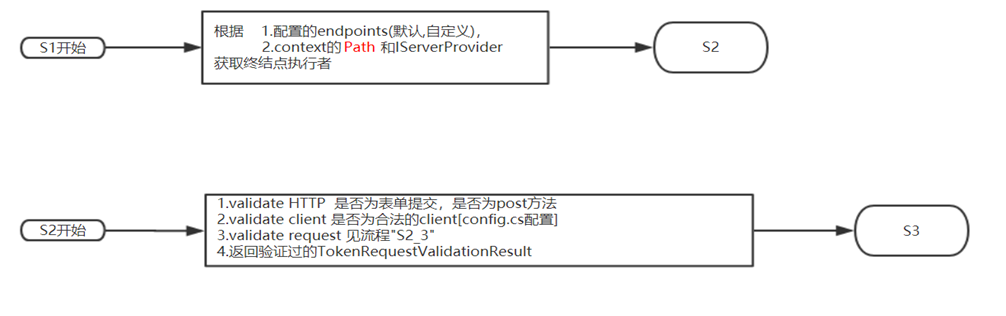
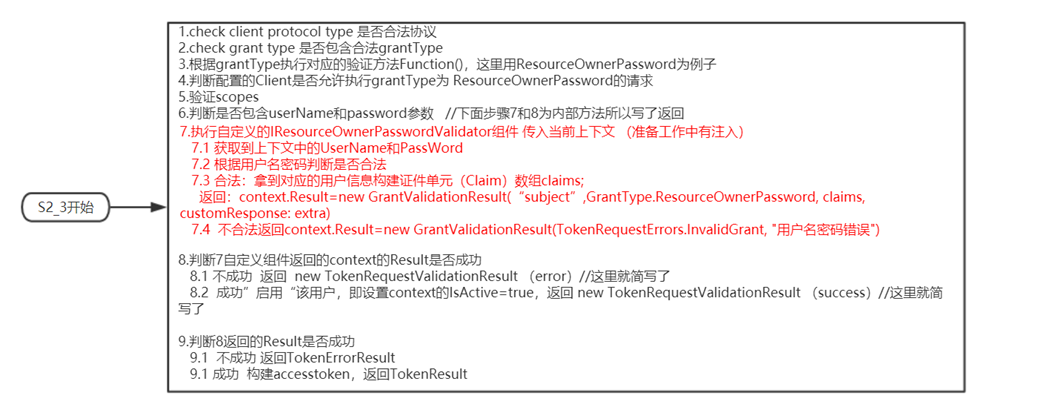

2.TokenClient形式
当请求的Token的地址没有配置默认形式的时候,那就需要利用IdentityModel下的Client来进行请求 举个例子
首先我们需要去获取当前系统的token终结点(tokenEndPoint),然后获取到TokenClient,然后调用RequestResourceOwnerPasswordAsync进行Token颁发
using (var client = new DiscoveryClient(IssuerUri) { Policy = { RequireHttps = false } })
{
res = await client.GetAsync();
}
var tokenClient = new TokenClient(res.TokenEndpoint, clientId, clientSecret);
var tokenResponse = await tokenClient.RequestResourceOwnerPasswordAsync(username, password);
然后我们来看看实际在干什么。我们去看这部分IdentiyModel的源码 (TokenClientExtensions.cs和TokenClient.cs)

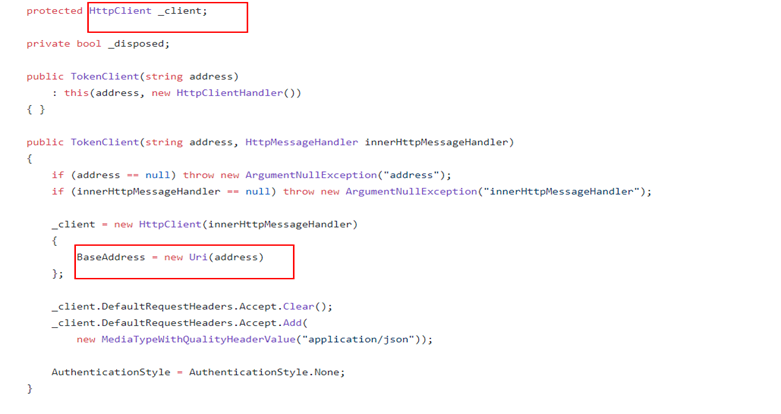

图1的方法就是我们调用时的方法,可以看到它构造了一下form表单元素就去调用RequestAsync方法。RequestAsync 是使用了HttpClient发起了请求。请求的地址是我们前面获取到的tokenEndPoint的地址,
其实就是进行了一次跳转,问题点就在于这里,绕了一个"圈圈",压测出来效果并不好,为什么不选择直接本地调用方法形式去执行呢? 只需要 仿照 重写一个TokenClient和TokenEndPoint(一直感觉这东西
既然是执handler为什么不叫TokenEndPointHandler) 去把执行方法重写掉,去掉HTTP请求方式,换成直接本地调用方式。这样就直接到类似说明S2步骤
    public class LocalTokenClient : TokenClient

    {

        private readonly ILocalTokenEndpointHandler _endpointHandler;

        public LocalTokenClient(string address, string clientId, string clientSecret, ILocalTokenEndpointHandler endpointHandler, HttpMessageHandler innerHttpMessageHandler = null, AuthenticationStyle style = AuthenticationStyle.BasicAuthentication) : base(address, clientId, clientSecret, innerHttpMessageHandler, style)

        {

            _endpointHandler = endpointHandler;

        }

        public override async Task<TokenResponse> RequestAsync(IDictionary<string, string> form, CancellationToken cancellationToken = default(CancellationToken))

        {

            form.Add("client_id", ClientId);

            form.Add("client_secret", ClientSecret);

            try

            {

                var endpointResult = await _endpointHandler.ProcessAsync(form);

                if(endpointResult is TokenResult)

                {

                    TokenResult response = (TokenResult)endpointResult;

                    if (response != null && response.Response != null)

                    {

                        Dictionary<string, object> result = new Dictionary<string, object>();

                        result.Add("id_token", response.Response.IdentityToken);

                        result.Add("access_token", response.Response.AccessToken);

                        result.Add("refresh_token", response.Response.RefreshToken);

                        result.Add("expires_in", response.Response.AccessTokenLifetime);

                        result.Add("token_type", OidcConstants.TokenResponse.BearerTokenType);

                        if (!response.Response.Custom.IsNullOrEmpty())

                        {

                            foreach (var item in response.Response.Custom)

                            {

                                result.Add(item.Key, item.Value);

                            }

                        }

                        return new TokenResponse(Newtonsoft.Json.JsonConvert.SerializeObject(result));

                    }

                }

                else

                {

                    TokenErrorResult response = (TokenErrorResult)endpointResult;

                    string error = response.Response.Error;

                    if(response.Response.ErrorDescription!=null)

                    {

                       error = response.Response.ErrorDescription;

                    }

                    return new TokenResponse(new Exception(error));

                }

            }

            catch (Exception ex)

            {

                return new TokenResponse(ex);

            }

            return new TokenResponse(new Exception("request token failed"));

        }

    }
    public interface ILocalTokenEndpointHandler

    {

        /// <summary>

        /// Processes the request.

        /// </summary>

        /// <param name="context">The HTTP context.</param>

        /// <returns></returns>

        Task<IEndpointResult> ProcessAsync(IDictionary<string, string> form);

    }

    public class LocalTokenEndpoint : ILocalTokenEndpointHandler

    {

        private readonly ICustomClientSecretValidator _clientValidator;

        private readonly ITokenRequestValidator _requestValidator;

        private readonly ITokenResponseGenerator _responseGenerator;

        private readonly IEventService _events;

        private readonly ILogger _logger;

        private readonly IClientStore _clients;

        /// <summary>

        /// Initializes a new instance of the <see cref="TokenEndpoint" /> class.

        /// </summary>

        /// <param name="clientValidator">The client validator.</param>

        /// <param name="requestValidator">The request validator.</param>

        /// <param name="responseGenerator">The response generator.</param>

        /// <param name="events">The events.</param>

        /// <param name="logger">The logger.</param>

        public LocalTokenEndpoint(

            ICustomClientSecretValidator clientValidator,

            ITokenRequestValidator requestValidator,

            ITokenResponseGenerator responseGenerator,

            IEventService events,

            ILogger<LocalTokenEndpoint> logger,

            IClientStore clients)

        {

            _clientValidator = clientValidator;

            _requestValidator = requestValidator;

            _responseGenerator = responseGenerator;

            _events = events;

            _logger = logger;

            _clients = clients;

        }

        /// <summary>

        /// Processes the request.

        /// </summary>

        /// <param name="context">The HTTP context.</param>

        /// <returns></returns>

        public async Task<IEndpointResult> ProcessAsync(IDictionary<string, string> form)

        {

            _logger.LogTrace("Processing token request.");

            return await ProcessTokenRequestAsync(form);

        }

        private Task RaiseSuccessEventAsync(string clientId, string authMethod)

        {

            return _events.RaiseAsync(new ClientAuthenticationSuccessEvent(clientId, authMethod));

        }

        private async Task<IEndpointResult> ProcessTokenRequestAsync(IDictionary<string, string> form)

        {

            _logger.LogDebug("Start token request.");

            // validate client

            var clientResult = await _clientValidator.ValidateAsync(form);

            if (clientResult.Client == null)

            {

                return Error(OidcConstants.TokenErrors.InvalidClient);

            }

            // validate request

            var form2 = form.AsNameValueCollection();

            _logger.LogTrace("Calling into token request validator: {type}", _requestValidator.GetType().FullName);

            var requestResult = await _requestValidator.ValidateRequestAsync(form2, clientResult);

            if (requestResult.IsError)

            {

                await _events.RaiseAsync(new TokenIssuedFailureEvent(requestResult));

                return Error(requestResult.Error, requestResult.ErrorDescription, requestResult.CustomResponse);

            }

            // create response

            _logger.LogTrace("Calling into token request response generator: {type}", _responseGenerator.GetType().FullName);

            var response = await _responseGenerator.ProcessAsync(requestResult);

            await _events.RaiseAsync(new TokenIssuedSuccessEvent(response, requestResult));

            LogTokens(response, requestResult);

            // return result

            _logger.LogDebug("Token request success.");

            return new TokenResult(response);

        }

        private TokenErrorResult Error(string error, string errorDescription = null, Dictionary<string, object> custom = null)

        {

            var response = new TokenErrorResponse

            {

                Error = error,

                ErrorDescription = errorDescription,

                Custom = custom

            };

            return new TokenErrorResult(response);

        }

        private void LogTokens(TokenResponse response, TokenRequestValidationResult requestResult)

        {

            var clientId = $"{requestResult.ValidatedRequest.Client.ClientId} ({requestResult.ValidatedRequest.Client?.ClientName ?? "no name set"})";

            var subjectId = requestResult.ValidatedRequest.Subject?.GetSubjectId() ?? "no subject";

            if (response.IdentityToken != null)

            {

                _logger.LogTrace("Identity token issued for {clientId} / {subjectId}: {token}", clientId, subjectId, response.IdentityToken);

            }

            if (response.RefreshToken != null)

            {

                _logger.LogTrace("Refresh token issued for {clientId} / {subjectId}: {token}", clientId, subjectId, response.RefreshToken);

            }

            if (response.AccessToken != null)

            {

                _logger.LogTrace("Access token issued for {clientId} / {subjectId}: {token}", clientId, subjectId, response.AccessToken);

            }

        }

    }
IdentityServer4源码颁发token分析及性能优化的更多相关文章
- IdentityServer4源码解析_1_项目结构
目录 IdentityServer4源码解析_1_项目结构 IdentityServer4源码解析_2_元数据接口 IdentityServer4源码解析_3_认证接口 IdentityServer4 ...
- identityserver4源码解析_2_元数据接口
目录 identityserver4源码解析_1_项目结构 identityserver4源码解析_2_元数据接口 identityserver4源码解析_3_认证接口 identityserver4 ...
- IdentityServer4源码解析_4_令牌发放接口
目录 identityserver4源码解析_1_项目结构 identityserver4源码解析_2_元数据接口 identityserver4源码解析_3_认证接口 identityserver4 ...
- HTTP请求库——axios源码阅读与分析
概述 在前端开发过程中,我们经常会遇到需要发送异步请求的情况.而使用一个功能齐全,接口完善的HTTP请求库,能够在很大程度上减少我们的开发成本,提高我们的开发效率. axios是一个在近些年来非常火的 ...
- 如何实现一个HTTP请求库——axios源码阅读与分析 JavaScript
概述 在前端开发过程中,我们经常会遇到需要发送异步请求的情况.而使用一个功能齐全,接口完善的HTTP请求库,能够在很大程度上减少我们的开发成本,提高我们的开发效率. axios是一个在近些年来非常火的 ...
- identityserver4源码解析_3_认证接口
目录 identityserver4源码解析_1_项目结构 identityserver4源码解析_2_元数据接口 identityserver4源码解析_3_认证接口 identityserver4 ...
- IdentityServer4源码解析_5_查询用户信息接口
协议简析 UserInfo接口是OAuth2.0中规定的需要认证访问的接口,可以返回认证用户的声明信息.请求UserInfo接口需要使用通行令牌.响应报文通常是json数据格式,包含了一组claim键 ...
- 从源码的角度分析ViewGruop的事件分发
从源码的角度分析ViewGruop的事件分发. 首先我们来探讨一下,什么是ViewGroup?它和普通的View有什么区别? 顾名思义,ViewGroup就是一组View的集合,它包含很多的子View ...
- 安卓图表引擎AChartEngine(二) - 示例源码概述和分析
首先看一下示例中类之间的关系: 1. ChartDemo这个类是整个应用程序的入口,运行之后的效果显示一个list. 2. IDemoChart接口,这个接口定义了三个方法, getName()返回值 ...
随机推荐
- ubuntu 18.04输入法问题
ubuntu 18.04输入法IBus出现问题.打字的弹窗只选择数字1对应的汉字,选择2,3,4,5等数字对应的汉字,就会出现问题. 例如下图只能选择1 不能选择2 3 4 5. 删除了~/.cach ...
- python3 安装 basemap 包(windows10)
下载 pyproj 和 basemap 的安装包 basemap 是具有专业标准的地图绘制工具,可以与 matplotlib 的一般绘图功能结合,在地图上绘制数据. basemap 文档:https: ...
- python 数据可视化 -- 生成可控的随机数据集合
生成可控的随机数据集合 使用 numpy.random 模块 numpy.random.random(size=None) 返回 [0.0, 1.0) 区间的随机 floats, 默认返回一个 fl ...
- Rabbit
安装配置参考:https://blog.csdn.net/qq_31634461/article/details/79377256 概念学习参考(纯洁的微笑):https://www.cnblogs. ...
- 第二阶段第四次spring会议
昨天我将对软件添加了初始页面. 今天我将对软件加上显示时间. try { SkinListBoxItem rt = new SkinListBoxItem(InputForm("请输入&qu ...
- CSS绝对定位的原点:是在border上、padding上还是在content上?
用了那么久的绝对定位,却一直没在意一个问题,就是绝对定位的原点,究竟是在盒模型的哪一处.今天想到这个问题,直接搜索没有找到标准文档,也没有搜索到相关的问题,于是决定自己动手实现一下看看,并把这个结果发 ...
- JSP·随笔
1.简介 > HTML - HTML擅长显示一个静态的网页,但是不能调用Java程序. > Servlet - Servlet擅长调用Java程序和后台进 ...
- RAM和ROM
RAM:随机存取存储器(英语:Random Access Memory,缩写:RAM),也叫主存,是与CPU直接交换数据的内部存储器.[1]它可以随时读写(刷新时除外,见下文),而且速度很快,通常作为 ...
- UTF-8的BOM含义
BOM的介绍 在github上写md文件的时候,发现生成自己blog时,报出一个错误是让使用UTF-8编码,然后在Notepad++上把文件转成UTF-8时,发现菜单中有"UTF-8无BOM ...
- DataStructs.h
#ifndef _DATASTRUCS_H__ #define _DATASTRUCS_H__ #include <systemc.h> #include "GlobalPara ...